Trunks
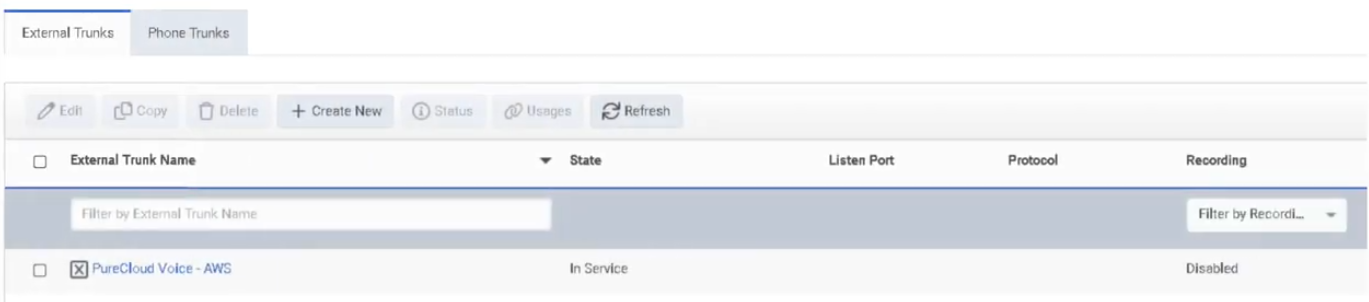
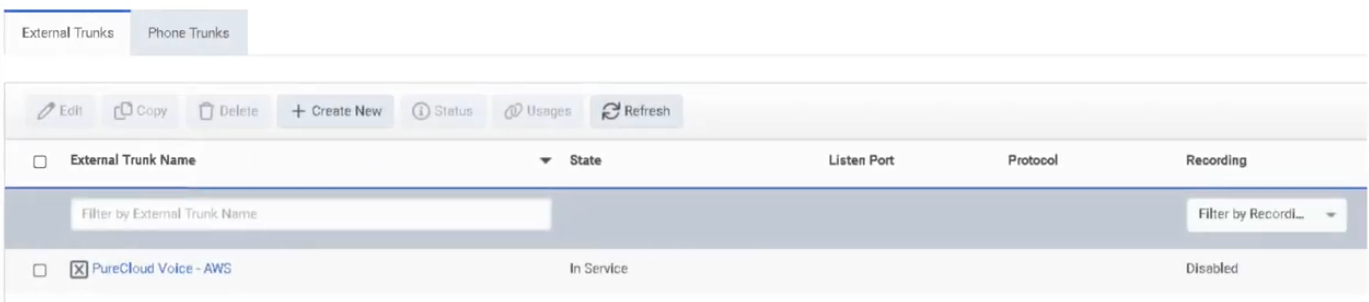
Navigation: Admin → Telephony → Trunks (or Admin → Telephony → BYOC Cloud → Trunks)
Last verified: Genesys Cloud Resource Center — March 2026
What Are Trunks?
A trunk is the SIP communications link between Genesys Cloud and an external carrier or PBX. Trunks carry inbound and outbound SIP signaling and are consumed by Sites via Outbound Routes to send calls to the PSTN or connected telephony infrastructure.
Trunk Types
| Trunk Type |
Deployment Model |
Used For |
| BYOC Carrier |
BYOC Cloud |
Third-party SIP carrier connectivity over the public internet |
| BYOC PBX |
BYOC Cloud |
SIP interconnect with an existing IP-PBX over the public internet |
| External SIP |
BYOC Premises |
On-premises SIP carrier or PBX connectivity through an Edge |
ℹ️ BYOC Carrier and BYOC PBX are for BYOC Cloud. External SIP is for BYOC Premises. Do not mix deployment models.
Navigation
| Task |
Path |
| Open trunks |
Admin → Telephony → Trunks |
| Open BYOC Cloud trunks |
Admin → Telephony → BYOC Cloud → Trunks |
| Create a trunk |
Trunks → Create Trunk |
| Edit a trunk |
Trunks → select trunk → Edit |
| Use trunk in routing |
Admin → Telephony → Sites → [Site] → Outbound Routes |
Creating a BYOC Carrier Trunk — Field Reference
| Field |
Description |
Notes |
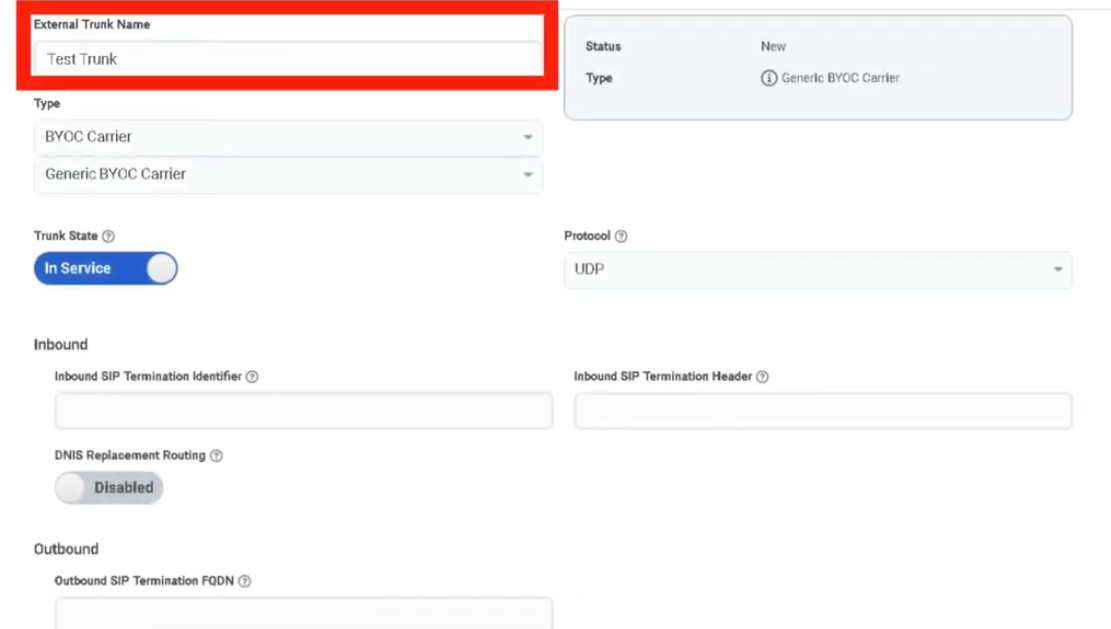
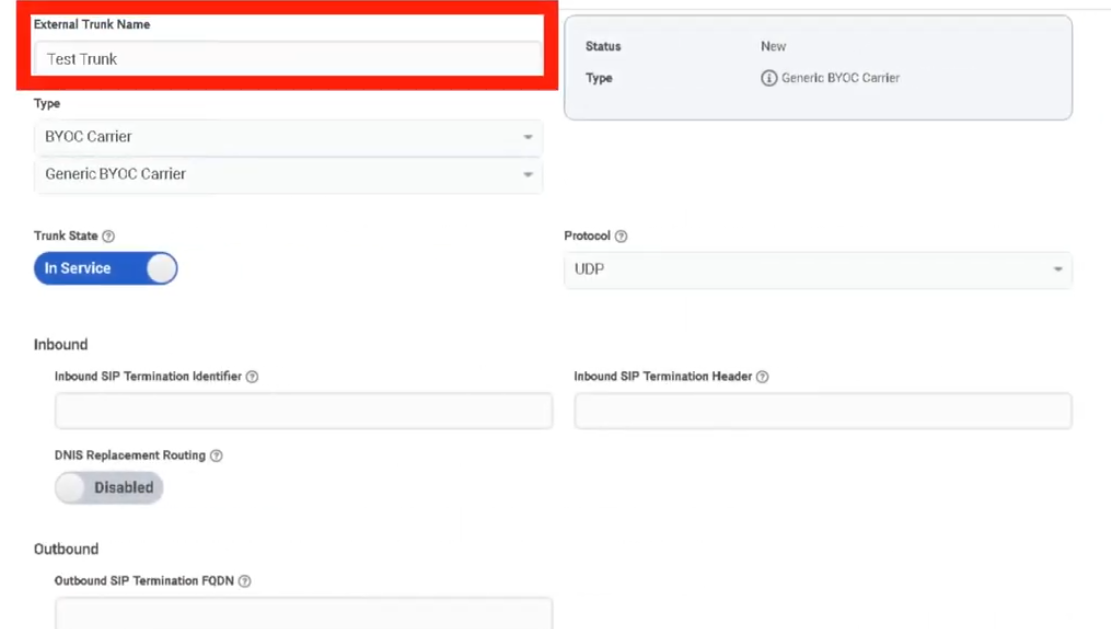
| Name |
Trunk name |
Use a descriptive, consistent naming convention |
| Type |
BYOC Carrier / BYOC PBX / External SIP |
Determined by your deployment model |
| Subtype |
Vendor/carrier profile where applicable |
Optional |
| State |
Operational state |
Set to In Service when ready for production |
| Transport Protocol |
SIP transport used to send calls |
UDP / TCP / TLS — does not control inbound protocol |
| Inbound SIP Termination Identifier |
Regionally unique ID for inbound SIP routing |
Required for BYOC Carrier; confirm with carrier |
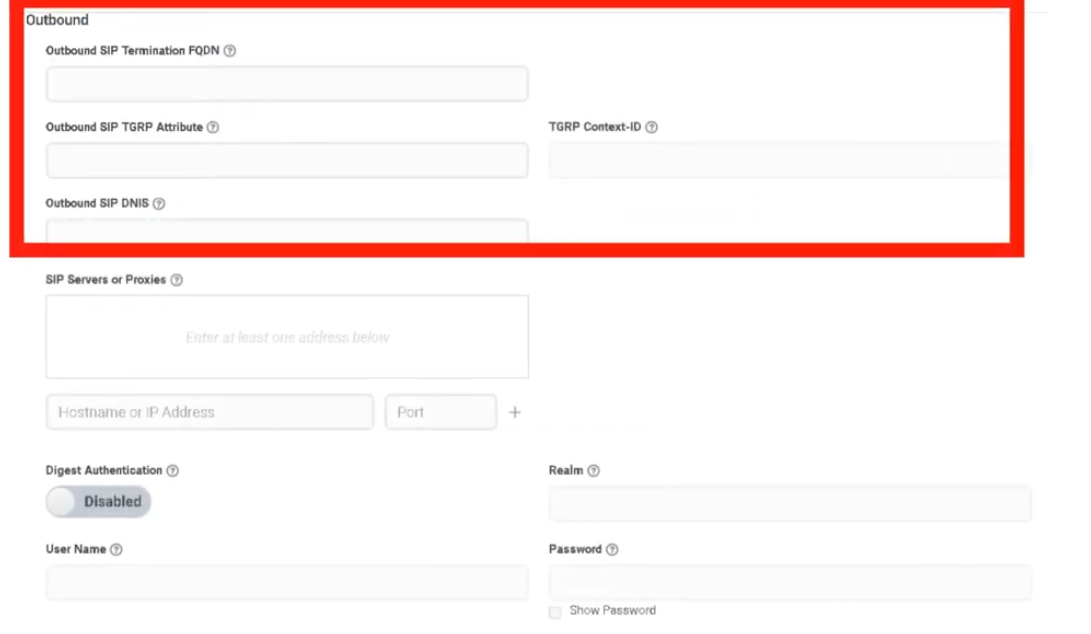
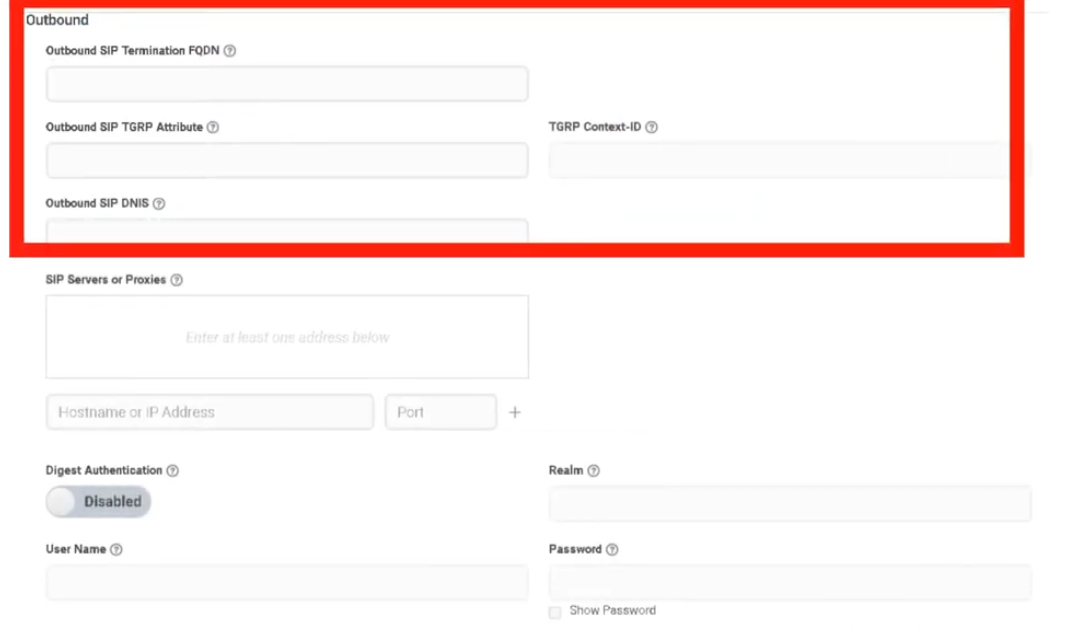
| Outbound Request URI |
Controls SIP request routing for outbound calls |
Carrier-specific |
| SIP Servers / Proxies |
Remote SIP server or proxy addresses |
Carrier-provided |
| Digest Authentication |
SIP authentication |
Enable if required by the carrier or PBX |
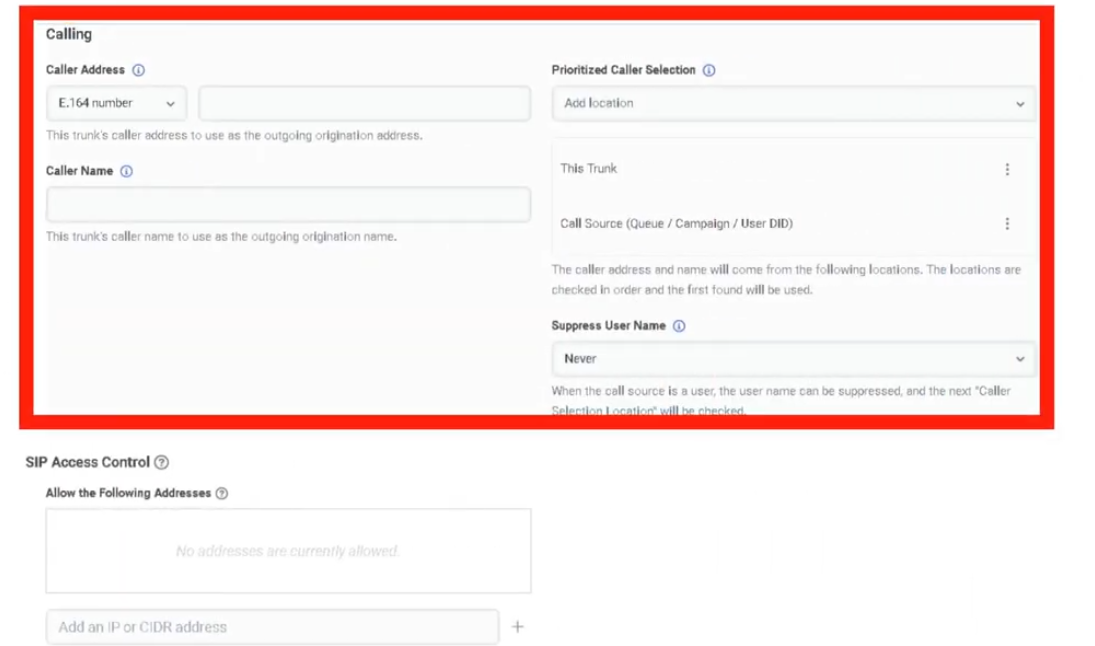
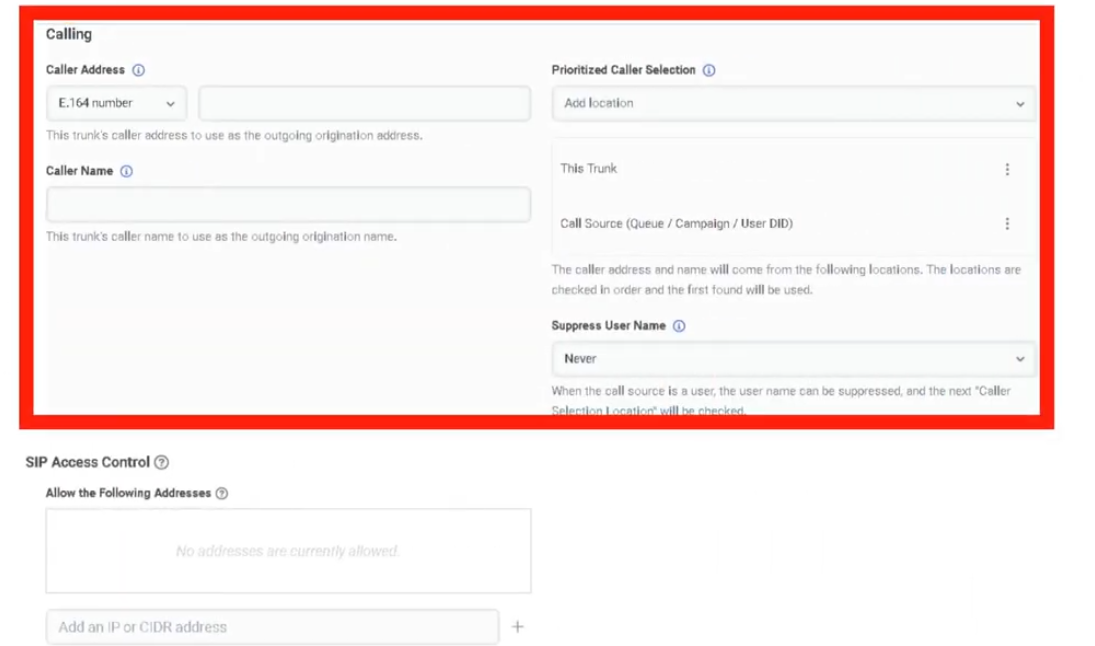
| Caller Address / Caller ID |
Outbound caller number |
E.164 format |
| Caller Name |
Outbound caller name |
Text |
| SIP Access Control |
IP allowlist for inbound SIP signaling |
Restrict to carrier signaling IPs only |
| PBX Passthrough |
Enables PBX passthrough where supported |
Optional |
| Custom SIP Headers |
Additional SIP header configuration |
Optional |
Transport Protocol Behaviour
| Protocol |
Notes |
| UDP |
Standard, connectionless — widely supported |
| TCP |
Connection-oriented, more reliable for SIP |
| TLS |
Encrypted SIP signaling; pairs with SRTP for full call security |
⚠️ For BYOC Cloud, the transport protocol setting controls how Genesys sends calls on the trunk. It is not enforced on calls received on that trunk.
Step-by-Step: Create a BYOC Carrier Trunk
| Step |
Action |
| Step 1 |
Navigate to Admin → Telephony → BYOC Cloud → Trunks |
| Step 2 |
Click Create Trunk |
| Step 3 |
Select BYOC Carrier as the trunk type |
| Step 4 |
Enter the trunk Name |
| Step 5 |
Set State to In Service |
| Step 6 |
Select Transport Protocol |
| Step 7 |
Enter the Inbound SIP Termination Identifier |
| Step 8 |
Configure Outbound Request URI |
| Step 9 |
Enter SIP Servers / Proxies |
| Step 10 |
Enable Digest Authentication if required |
| Step 11 |
Under Calling, set Caller ID and Caller Name |
| Step 12 |
Configure SIP Access Control IP rules |
| Step 13 |
Save the trunk |
| Step 14 |
Add the trunk to a Site → Outbound Route |
| Step 15 |
Validate with test calls or Simulate Call |
Dependencies
| Component |
Purpose |
| Sites |
Outbound routes on sites reference external trunks |
| Number Plans |
Classify dialed numbers before route/trunk selection |
| Outbound Routes |
Select one or more trunks with Sequential or Random distribution |
| Carrier / PBX |
Remote SIP endpoint the trunk connects to |
| Certificate Authorities |
Required when using TLS trunks (BYOC Premises) |
Troubleshooting
| Issue |
Cause |
Resolution |
| Trunk not sending calls |
Wrong transport protocol or routing config |
Recheck protocol, URI, and remote endpoint requirements |
| Inbound calls fail |
Incorrect inbound SIP identifier |
Validate inbound SIP termination identifier with carrier |
| Secure calls fail |
TLS/certificate mismatch |
Validate TLS support and certificate/trust configuration |
| Unauthorized SIP traffic |
SIP ACL not configured |
Restrict signaling IPs using SIP Access Control |
| Wrong outbound identity |
Caller ID/name misconfigured |
Recheck Calling section values |
| Route not selecting trunk |
Number plan or outbound route misconfiguration |
Validate number plans, route classification, trunk selection |
Quick Reference
| Question |
Answer |
| What trunk types exist? |
BYOC Carrier, BYOC PBX, External SIP |
| Which are for BYOC Cloud? |
BYOC Carrier and BYOC PBX |
| Which is for BYOC Premises? |
External SIP |
| What transport protocols are supported? |
UDP, TCP, TLS |
| What does SIP Access Control do? |
Permits signaling only from specific IP addresses |
| What is the Inbound SIP Termination Identifier? |
A regionally unique ID used for inbound SIP routing on BYOC Carrier |
Naming Convention
| Resource |
Example |
| Carrier trunk |
CarrierA_BYOCCarrier_Prod |
| PBX trunk |
CorpPBX_BYOCPBX_Test |
| Premises SIP trunk |
HQ_ExternalSIP_Primary |
Pattern: <Provider>_<TrunkType>_<Environment>
See Also
- Sites — outbound routes are configured here and reference trunks
- Certificate Authorities — required for TLS trunk trust (BYOC Premises)
- Edges & Edge Groups — BYOC Premises trunks attach to Edges
- Architectural Build Order — trunks are built in Phase 2
Screenshots

No Comments