Programs
Programs (Genesys Cloud Speech & Text Analytics)
| Section |
Description |
| Feature Area |
Quality Management → Speech & Text Analytics |
| Admin Location |
Admin → Quality → Programs |
| Primary Function |
Group multiple Topics into a business-level analytics package and apply them to queues or Architect flows |
| Data Source |
Interaction transcripts generated by Speech & Text Analytics |
| Typical Users |
Quality Administrators, Analytics Administrators |
| Key Dependency |
Speech & Text Analytics and Topics must be configured |
| Source |
Transcript + Genesys Documentation |
Programs act as the logical container for Topics and determine where those topics are applied in the contact center. This allows organizations to monitor specific customer intents (billing issues, cancellation requests, product complaints, etc.) for specific operational areas such as queues or routing flows.
Summary Table
| Attribute |
Details |
| Feature Type |
Speech Analytics Configuration |
| Scope |
Queue or Architect Flow |
| Function |
Topic grouping and analytics detection |
| Topic Limit |
Not explicitly documented in Genesys UI documentation |
| Dialect Requirement |
Must match speech analytics language model |
| Data Used |
Voice transcripts and digital interaction transcripts |
| Configuration Level |
Organization-wide analytics configuration |
Study Notes
| Topic |
Explanation |
| Programs |
Containers grouping multiple Topics for analytics |
| Topics |
Phrase detection logic used by programs |
| Dialect |
Determines language model used for phrase matching |
| Queue Mapping |
Applies program analytics to queue interactions |
| Flow Mapping |
Applies program analytics to interactions routed through Architect |
| Intent Detection |
Programs identify business-level conversation intents |
Programs allow the contact center to analyze conversations differently depending on the department or business goal.
Example:
| Program |
Topics |
Scope |
| Billing Insights |
Billing Dispute, Refund Request |
Billing Queue |
| Retention Insights |
Cancel Subscription, Contract Termination |
Retention Queue |
Transcript Implementation Notes
Source: Transcript
The instructor explains how Programs function and how they are configured:
| Step |
Instruction |
| Step 1 |
Navigate to Admin → Quality → Programs |
| Step 2 |
Create a program that packages related topics |
| Step 3 |
Select a dialect that matches the transcript language model |
| Step 4 |
Add existing topics or merge phrases into topics |
| Step 5 |
Map the program to specific queues or Architect flows |
| Step 6 |
Save the configuration so analytics can detect those topics |
Operational insight from transcript:
- Programs represent business-level intent detection packages
- Different departments create different programs
- Programs must be linked to queues or flows to analyze interactions
Example given in concept:
Program: Billing Analysis
Topics: Refund Request, Payment Issue
Queue: Billing Support
Navigation
| Task |
Navigation Path |
| View Programs |
Admin → Quality → Programs |
| Create Program |
Admin → Quality → Programs → Create Program |
| Edit Program |
Admin → Quality → Programs → Edit |
| Delete Program |
Admin → Quality → Programs → Delete |
| Manage Topics |
Admin → Quality → Topics |
| Discover Topics |
Admin → Quality → Topic Miner |
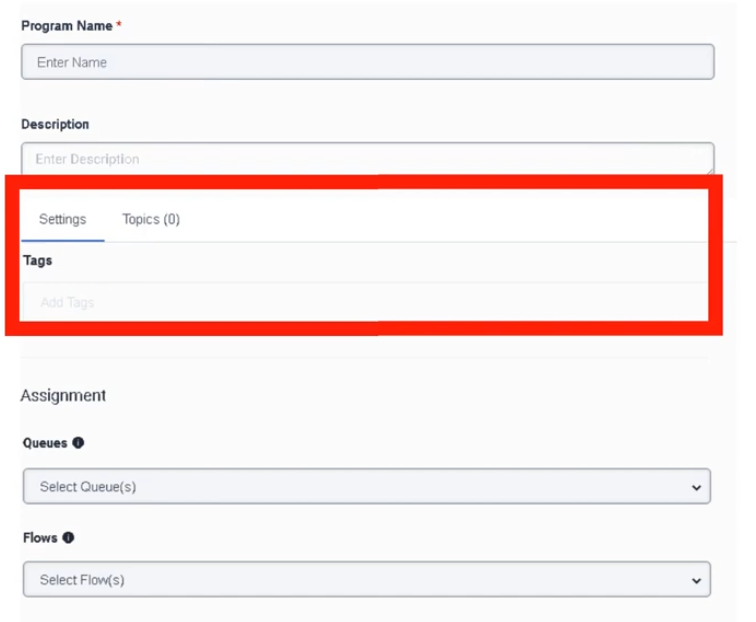
Configuration Fields (UI Form Fields)
Main Page
| UI Field |
Description |
Options |
| Program List |
Displays configured programs |
Read-only |
| Program Name |
Name of program |
Text |
| Description |
Program explanation |
Text |
| Dialect |
Language model used for phrase matching |
Example: English – United States |
| Topics |
Topics assigned to the program |
Read-only |
| Queues |
Queues mapped to the program |
Read-only |
| Flows |
Architect flows mapped to the program |
Read-only |
| Search |
Search programs |
Text |
| Create Program |
Create new program |
Button |
| Edit |
Modify program |
Button |
| Delete |
Remove program |
Button |
| Refresh |
Reload program list |
Button |
| UI Field |
Description |
Options |
| Program Name |
Unique identifier |
Text |
| Description |
Explanation of program purpose |
Text |
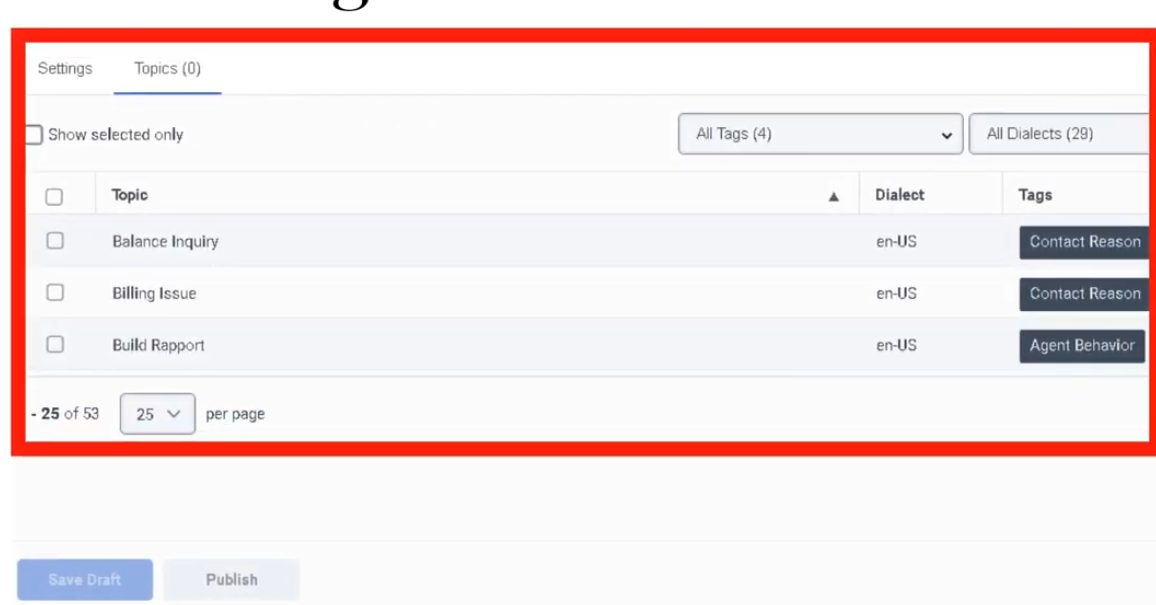
| Dialect |
Language model for topic detection |
Example: English – United States |
| Topics |
Topics included in the program |
Multi-select list |
| Queues |
Queues where analytics should apply |
Multi-select list |
| Flows |
Architect flows where analytics should apply |
Multi-select list |
| Tags |
Optional metadata classification |
Tag selector |
| Save |
Save program |
Button |
| Cancel |
Cancel configuration |
Button |
Character limit for fields: Not explicitly documented in Genesys UI documentation
Tabs, Toggles, Dropdowns, Action Buttons
| Element Type |
Items |
| Tabs |
Topics / Queues / Flows |
| Dropdowns |
Dialect |
| Multi-Select Fields |
Topics / Queues / Flows |
| Buttons |
Create Program / Save / Cancel / Edit / Delete / Refresh |
| Toggles |
Not explicitly documented in Genesys UI documentation |
Dependencies
| Component |
Purpose |
| Speech & Text Analytics |
Generates transcripts used by programs |
| Topics |
Programs rely on topics for phrase detection |
| Topic Miner |
Helps discover phrases that become topics |
| Interaction Recording |
Required for voice transcription |
| Architect |
Flows can be mapped to programs |
| Component |
Relationship |
| Speech & Text Analytics |
Core analytics engine |
| Topics |
Detection logic used by programs |
| Topic Miner |
Phrase discovery tool |
| Sentiment Feedback |
Improves sentiment classification |
| Interaction Analytics |
Displays program results |
Integration Examples
| Integration |
Description |
| Analytics API |
Retrieve topic trends and analytics data |
| Conversations API |
Access transcripts for interactions |
| Notifications API |
Subscribe to interaction lifecycle events |
Example workflow:
Customer Interaction
        ↓
Speech-to-Text Transcript
        ↓
Topic Detection
        ↓
Program Analytics
        ↓
Analytics API → External BI Dashboard
| Topic |
Description |
| Speech & Text Analytics |
Transcript analysis engine |
| Topic Miner |
Phrase discovery |
| Topics |
Phrase detection configuration |
| Sentiment Feedback |
Correct sentiment classification |
| Evaluation Forms |
Agent quality evaluation |
Implementation Checklist
| Task |
Status |
| Enable Speech & Text Analytics |
☐ |
| Create Topics |
☐ |
| Identify queues or flows |
☐ |
| Create Program |
☐ |
| Assign topics to program |
☐ |
| Map queues or flows |
☐ |
| Validate analytics results |
☐ |
Implementation Guide
| Step |
Action |
| Step 1 |
Enable Speech & Text Analytics |
| Step 2 |
Create required topics |
| Step 3 |
Navigate to Programs |
| Step 4 |
Create new program |
| Step 5 |
Assign topics |
| Step 6 |
Select dialect |
| Step 7 |
Map queues or flows |
| Step 8 |
Save configuration |
How to Implement
| Phase |
Description |
| Topic Definition |
Identify phrases representing customer intent |
| Program Creation |
Group topics logically |
| Interaction Scope |
Assign queues or flows |
| Validation |
Confirm topics appear in analytics |
Workflow
Customer Interaction
      ↓
Recording Engine
      ↓
Speech-to-Text Transcription
      ↓
Topic Detection
      ↓
Program Analytics
      ↓
CX Insights Dashboard
Architecture Diagram
Customer Interaction
       ↓
Recording Engine
       ↓
Speech-to-Text
       ↓
Transcript Storage
       ↓
Topic Detection
       ↓
Programs
       ↓
Analytics Dashboard
Real Flow Scenarios
Billing Issue Detection
Customer: "I was charged twice"
      ↓
Transcript generated
      ↓
Topic: Billing Dispute detected
      ↓
Program: Billing Insights triggered
Cancellation Request
Customer: "I want to cancel my subscription"
      ↓
Topic: Cancellation Request detected
      ↓
Program: Retention Insights
Usage Scenarios
| Scenario |
Description |
| Customer intent detection |
Identify why customers contact support |
| CX analytics |
Understand frequent issues |
| Compliance monitoring |
Detect regulatory statements |
| Product feedback monitoring |
Identify complaints |
Implementation Examples
| Example |
Configuration |
| Billing Program |
Refund Request / Billing Dispute topics |
| Support Program |
Technical Issue / Login Problem topics |
| Sales Program |
Product Inquiry / Purchase Intent topics |
Design Example
Support Queue
      ↓
Speech Analytics Transcript
      ↓
Topic Detection
      ↓
Program Groups Topics
      ↓
Analytics Dashboard Displays Trends
Best Practices
| Practice |
Reason |
| Group topics by department |
Improves analytics clarity |
| Avoid overly large programs |
Maintain accuracy |
| Use clear naming |
Improve reporting readability |
| Validate topics regularly |
Ensure phrase detection accuracy |
Source: Operational Best Practice
Naming Convention
| Resource |
Example |
| Program |
Billing_Insights |
| Program |
Customer_Retention |
| Program |
Product_Feedback |
Naming pattern:
<Department>_Insights
Security Considerations
| Control |
Description |
| Role-based access |
Restrict program creation |
| Transcript protection |
Protect sensitive interaction data |
| Encryption |
Protect stored recordings |
| Data retention policies |
Manage transcript lifecycle |
Limitations / Constraints
| Constraint |
Description |
| Requires Speech Analytics |
Programs depend on transcripts |
| Topic dependency |
Programs cannot exist without topics |
| Dialect dependency |
Phrase detection depends on language model |
| Topic accuracy |
Incorrect topics lead to false detections |
Troubleshooting
| Issue |
Cause |
Resolution |
| Topics not detected |
Topic not added to program |
Add topic |
| No analytics results |
Speech analytics disabled |
Enable transcription |
| Program not applied |
Queue or flow not mapped |
Assign queue or flow |
| Incorrect detection |
Topic phrases inaccurate |
Update topic configuration |
Interview Cheat Sheet
| Question |
Answer |
| What is a Program? |
Container grouping topics for analytics |
| What does it analyze? |
Interaction transcripts |
| What components are required? |
Topics and Speech Analytics |
| Where are programs applied? |
Queues or Architect flows |
| What is the purpose? |
Detect business intents |
Key Takeaways
| Topic |
Summary |
| Programs |
Group topics for analytics |
| Topics |
Detect phrases in conversations |
| Queue Mapping |
Determines where analytics apply |
| Speech Analytics |
Generates transcripts |
| Business Insights |
Programs enable intent detection |
Screenshots



No Comments