Sentiment Feedback
Sentiment Feedback (Genesys Cloud Quality & Performance Management)
| Section |
Description |
| Module Context |
Part of Quality Management → Speech & Text Analytics within Workforce Engagement Management (WEM) |
| Admin Location |
Admin → Quality → Sentiment Feedback |
| Purpose |
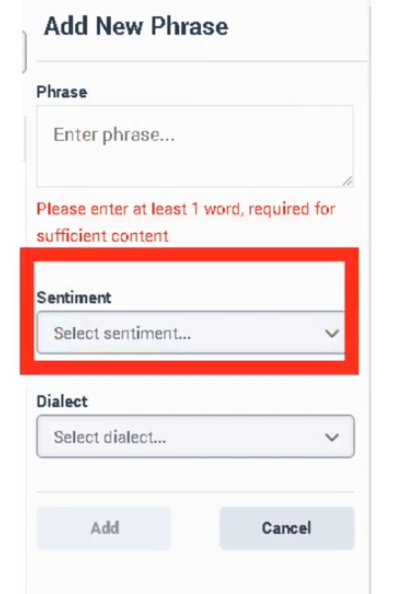
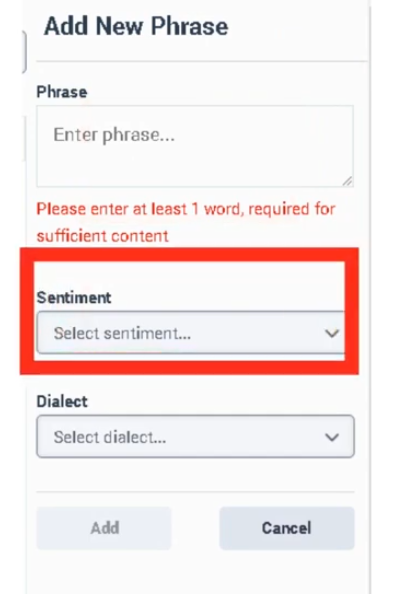
Allows administrators to correct sentiment classification errors in Speech & Text Analytics by labeling phrases as Positive, Neutral, or Negative, improving automated sentiment detection accuracy |
Sentiment Feedback is used to improve the machine learning sentiment model that evaluates transcripts produced by Speech & Text Analytics. When the system misinterprets emotional tone in a conversation, administrators can add a phrase and assign the correct sentiment classification.
These corrections influence future sentiment analysis results and help improve topic detection, interaction insights, and analytics reporting.
Summary Table
| Attribute |
Details |
| Feature Area |
Speech & Text Analytics |
| Primary Function |
Improve sentiment classification accuracy |
| Data Source |
Interaction transcripts |
| Supported Channels |
Voice (transcribed), Chat, Messaging, Email |
| Sentiment Labels |
Positive / Neutral / Negative |
| Dialect Context |
Sentiment phrases are tied to a language dialect used by speech analytics models |
| Typical Users |
Quality administrators, analytics administrators |
| Dependency |
Speech & Text Analytics must be enabled |
Study Notes
| Topic |
Explanation |
| Sentiment Analysis |
Automatic classification of emotional tone within conversations |
| Sentiment Feedback |
Manual correction of sentiment detection errors |
| Phrase-Based Overrides |
Administrators add phrases that override default sentiment classification |
| Transcript Dependency |
Sentiment feedback only applies to interactions with transcripts |
| Dialect Awareness |
Phrases must match the speech analytics dialect model used during transcription |
| Analytics Impact |
Changes influence future sentiment scoring and analytics dashboards |
Key concepts:
- Sentiment feedback improves the accuracy of automated sentiment scoring.
- Phrases are applied per dialect, ensuring correct language interpretation.
- Corrections apply to future transcript processing.
- Sentiment feedback helps refine analytics used for CX insights and coaching.
Navigation
| Task |
Navigation |
| Open Sentiment Feedback |
Admin → Quality → Sentiment Feedback |
| Add new sentiment phrase |
Admin → Quality → Sentiment Feedback → Add Phrase |
| Edit phrase |
Admin → Quality → Sentiment Feedback → Edit |
| Delete phrase |
Admin → Quality → Sentiment Feedback → Delete |
| Review transcript sentiment |
Performance → Workspace → Interactions |
Configuration Fields (UI Form Fields)
Main Page
| UI Field |
Description |
Options / Behavior |
| Phrase List |
Displays phrases configured for sentiment feedback |
Read-only |
| Sentiment Label |
Shows sentiment classification assigned to phrase |
Positive / Neutral / Negative |
| Dialect |
Dialect the phrase applies to |
Example: English – United States |
| Created By |
User who created phrase entry |
Read-only |
| Created Date |
Timestamp of phrase creation |
Read-only |
| Search |
Search for phrases in list |
Text field |
| Add Phrase |
Opens phrase creation form |
Button |
| Edit |
Edit phrase sentiment configuration |
Button |
| Delete |
Remove phrase from sentiment list |
Button |
| Refresh |
Reload phrase list |
Button |
| UI Field |
Description |
Options |
| Phrase |
Phrase appearing in transcripts |
Text input |
| Sentiment |
Sentiment assigned to phrase |
Positive / Neutral / Negative |
| Dialect |
Speech analytics dialect model used for phrase interpretation |
Example options: English – United States / English – United Kingdom / Spanish – Spain / Spanish – Mexico / Portuguese – Brazil |
| Description |
Optional note describing reason for classification |
Text input |
| Save |
Save configuration |
Button |
| Cancel |
Discard changes |
Button |
Tabs, Toggles, Dropdowns, Action Buttons
| UI Element Type |
Item |
| Tabs |
Sentiment Feedback page |
| Text Fields |
Phrase, Description |
| Dropdowns |
Sentiment classification, Dialect |
| Buttons |
Add Phrase, Save, Cancel, Edit, Delete, Refresh |
Note: No toggles are documented for Sentiment Feedback in the admin UI.
Dependencies
| Component |
Purpose |
| Speech & Text Analytics |
Generates transcripts used for sentiment analysis |
| Interaction Recording |
Required for voice transcript generation |
| Topics |
Sentiment can be correlated with topics |
| Programs |
Topics grouped for analytics programs |
| Topic Miner |
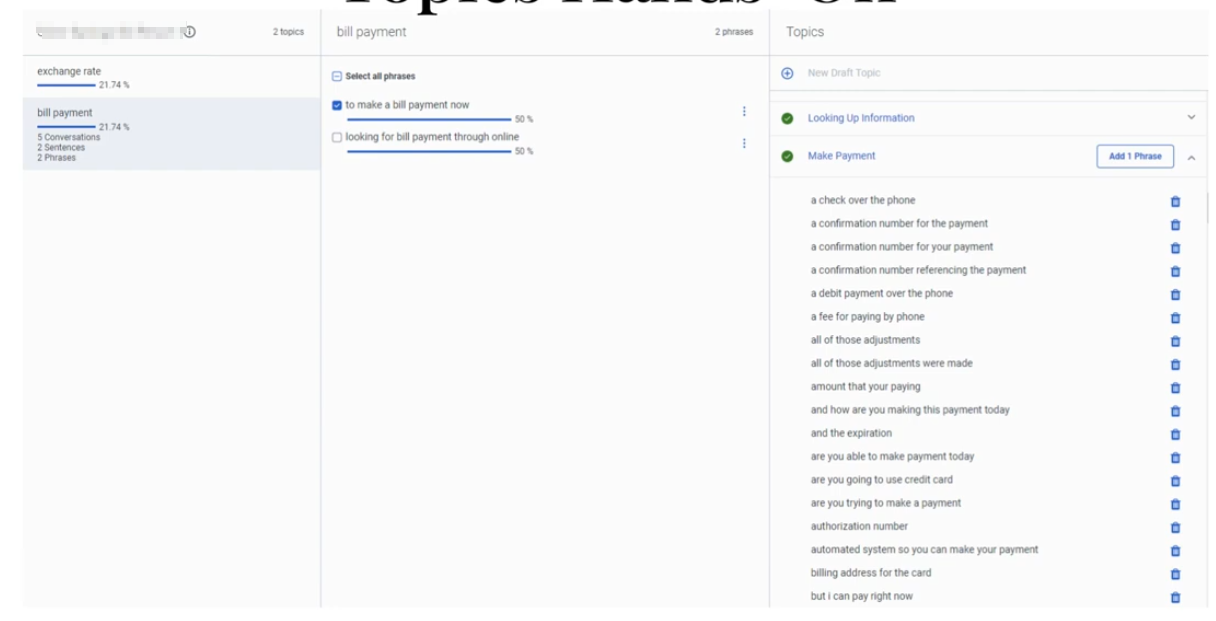
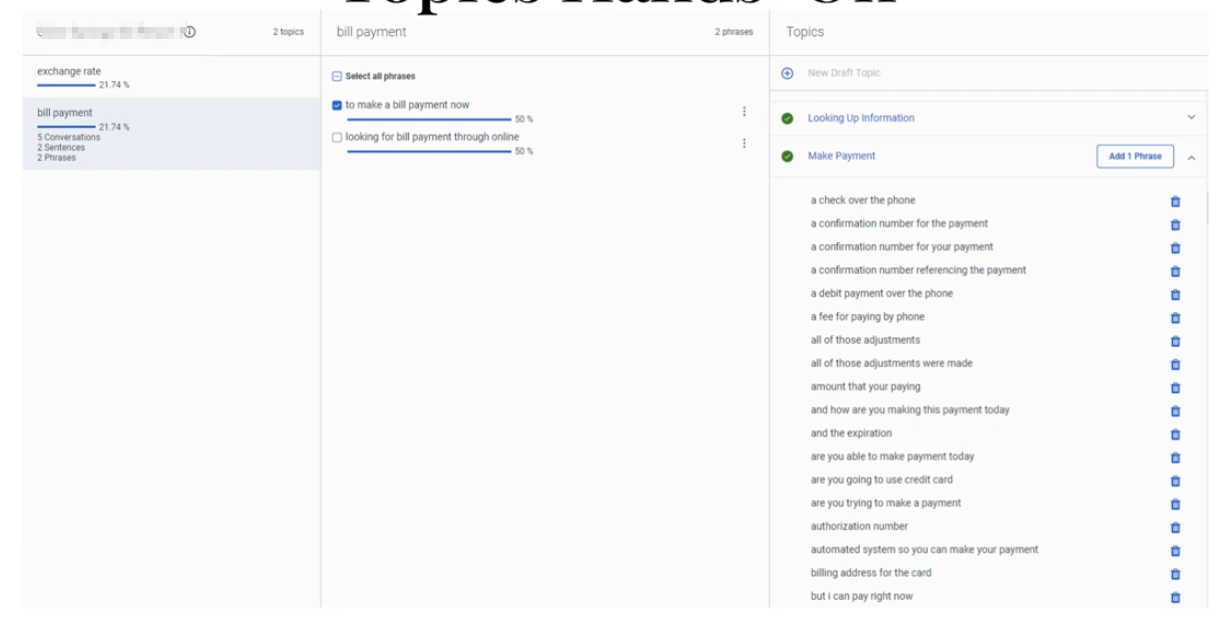
Detects candidate phrases for sentiment feedback |
| Language Models |
Dialect-specific transcription models |
| Component |
Relationship |
| Speech & Text Analytics |
Provides transcript and sentiment analysis engine |
| Topics |
Sentiment often analyzed alongside topics |
| Programs |
Topic groups used in analytics dashboards |
| Topic Miner |
Identifies phrases administrators may classify |
| Interaction Analytics |
Displays sentiment metrics |
Integration Examples
| Integration |
Description |
| Analytics API |
Retrieve sentiment metrics for dashboards |
| Notifications API |
Subscribe to interaction lifecycle events to trigger external analytics processing |
| Conversations API |
Retrieve transcript data programmatically |
Example integration workflow:
Customer Interaction
↓
Speech Analytics Transcript
↓
Sentiment Analysis
↓
Sentiment Feedback Overrides
↓
Analytics API retrieves results
↓
External dashboard updated
| Topic |
Description |
| Speech & Text Analytics |
Core analytics engine |
| Topic Miner |
Discover phrases in transcripts |
| Topics |
Phrase detection logic |
| Programs |
Topic grouping for analytics |
| Evaluation Forms |
Agent performance scoring |
Implementation Checklist
| Task |
Status |
| Enable Speech & Text Analytics |
☐ |
| Confirm transcript generation |
☐ |
| Verify correct dialect configuration |
☐ |
| Review sentiment accuracy |
☐ |
| Identify misclassified phrases |
☐ |
| Add sentiment feedback entries |
☐ |
| Validate improved sentiment detection |
☐ |
Implementation Guide
| Step |
Action |
| Step 1 |
Enable Speech & Text Analytics |
| Step 2 |
Confirm transcripts are generated |
| Step 3 |
Review interactions for sentiment misclassification |
| Step 4 |
Navigate to Sentiment Feedback |
| Step 5 |
Click Add Phrase |
| Step 6 |
Enter phrase and select correct dialect |
| Step 7 |
Assign sentiment classification |
| Step 8 |
Save configuration |
How to Implement
| Phase |
Description |
| Analytics Monitoring |
Monitor sentiment results in transcripts |
| Error Identification |
Detect incorrect sentiment classification |
| Phrase Feedback |
Add phrase classification using correct dialect |
| Validation |
Monitor analytics improvements |
Workflow
Customer Interaction
↓
Interaction Recording
↓
Speech-to-Text Transcription
↓
Speech Analytics Sentiment Engine
↓
Admin Detects Incorrect Sentiment
↓
Sentiment Feedback Phrase Added (Dialect-specific)
↓
Future transcripts classified correctly
Architecture Diagram
Customer Interaction
↓
Recording Engine
↓
Speech-to-Text Processing
↓
Transcript Storage
↓
Speech & Text Analytics
├ Sentiment Analysis
└ Topic Detection
↓
Sentiment Feedback Phrase Overrides
↓
Analytics Dashboard
Real Flow Scenarios
Scenario 1 – Correcting Positive Sentiment
Customer says: "Thank you for resolving my issue"
↓
System labels phrase as Neutral
↓
Admin adds phrase with Positive sentiment
↓
Future interactions labeled Positive
Scenario 2 – Detecting Customer Frustration
Customer says: "This service is terrible"
↓
Transcript generated
↓
Sentiment engine detects negative tone
↓
Analytics dashboard flags interaction
Usage Scenarios
| Scenario |
Description |
| Customer satisfaction monitoring |
Improve sentiment accuracy |
| Product issue detection |
Identify negative feedback |
| Agent coaching |
Understand customer reactions |
| CX analytics |
Track sentiment trends |
Implementation Examples
| Example |
Configuration |
| Support center |
Add satisfaction phrases |
| Billing queue |
Label complaint phrases |
| Sales queue |
Label positive purchase indicators |
Design Example
Inbound Customer Call
↓
Speech Analytics Transcript
↓
Sentiment Classification
↓
Admin Reviews Transcript
↓
Sentiment Feedback Added
↓
Improved Analytics Accuracy
Best Practices
| Practice |
Reason |
| Add phrases tied to correct dialect |
Prevent incorrect language interpretation |
| Focus on high-frequency phrases |
Improve model quickly |
| Review sentiment dashboards regularly |
Detect classification issues |
| Combine sentiment with topics |
Improve context understanding |
Naming Convention
| Resource |
Example |
| Phrase Classification |
Positive_Service_Resolution |
| Phrase Classification |
Negative_Billing_Issue |
Naming pattern:
<Sentiment>_<Context>
Security Considerations
| Control |
Description |
| Role-based access |
Restrict configuration to administrators |
| Transcript privacy |
Protect sensitive conversation data |
| Data retention policies |
Control transcript storage |
| Encryption |
Protect stored transcripts |
Limitations / Constraints
| Constraint |
Description |
| Sentiment categories |
Positive / Neutral / Negative |
| Requires transcripts |
Speech analytics must be enabled |
| Context sensitivity |
Phrase sentiment may vary by context |
| Dialect dependence |
Phrase must match configured dialect |
Troubleshooting
| Issue |
Cause |
Resolution |
| Sentiment incorrect |
Phrase not defined |
Add sentiment feedback |
| Phrase not matching |
Dialect mismatch |
Select correct dialect |
| No transcripts available |
Speech analytics disabled |
Enable transcription |
| Analytics unchanged |
Phrase not used in transcripts |
Verify phrase frequency |
Interview Cheat Sheet
| Question |
Answer |
| What is Sentiment Feedback? |
Manual correction of sentiment classification |
| Where is it configured? |
Admin → Quality → Sentiment Feedback |
| What labels exist? |
Positive, Neutral, Negative |
| What additional parameter is required? |
Dialect |
| What dependency is required? |
Speech & Text Analytics |
Key Takeaways
| Topic |
Summary |
| Sentiment Feedback |
Improves automated sentiment detection |
| Phrase Overrides |
Admins classify phrases manually |
| Dialect Support |
Phrases must match speech analytics dialect |
| Speech Analytics |
Provides transcripts used for analysis |
| Continuous Improvement |
Feedback improves analytics accuracy |
Screenshots



No Comments