
Sites
What Is a Site?
A site is the home of a set of phones. It defines the telephony dialing properties, call classification rules, and outbound routing rules for the phones assigned to it. Every phone in Genesys Cloud belongs to a site, and the site determines where calls go and how numbers are interpreted.
Sites are used across all telephony deployment models: BYOC Cloud, Genesys Cloud Voice, and BYOC Premises.
⚠️ The Media Model (Cloud or Premises) cannot be changed after site creation. Choose carefully.
Site Tabs
| Tab | Purpose |
|---|---|
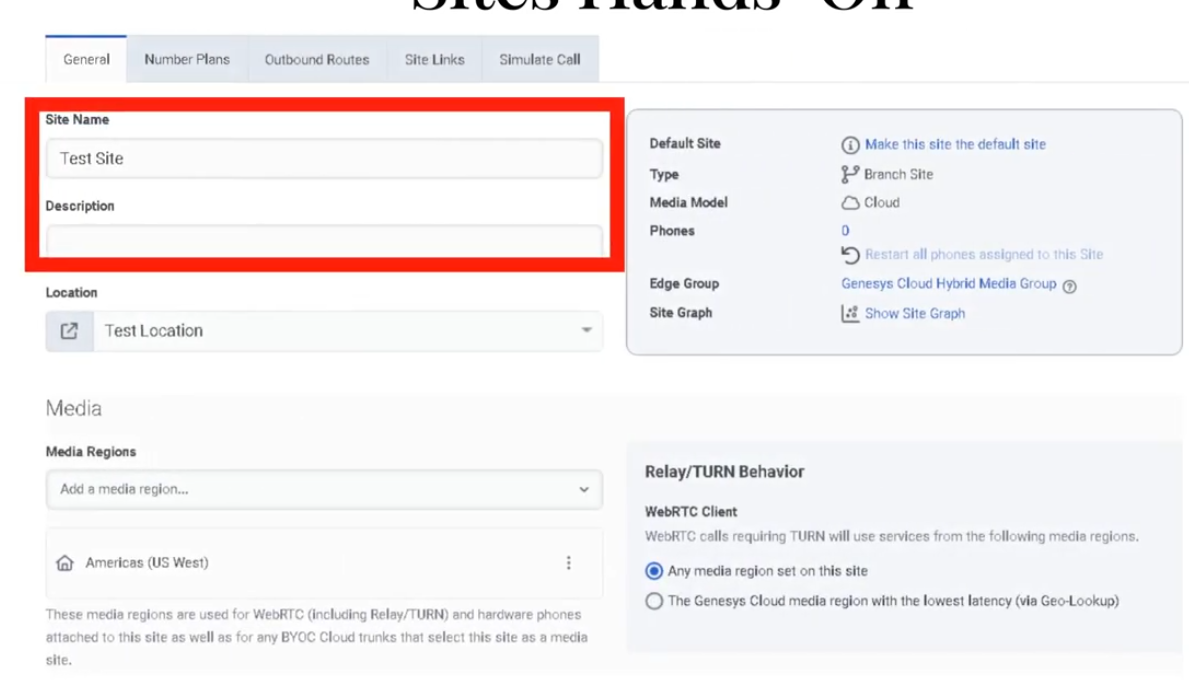
| General | Description, default site toggle, media regions, Relay/TURN behavior, outbound caller ID |
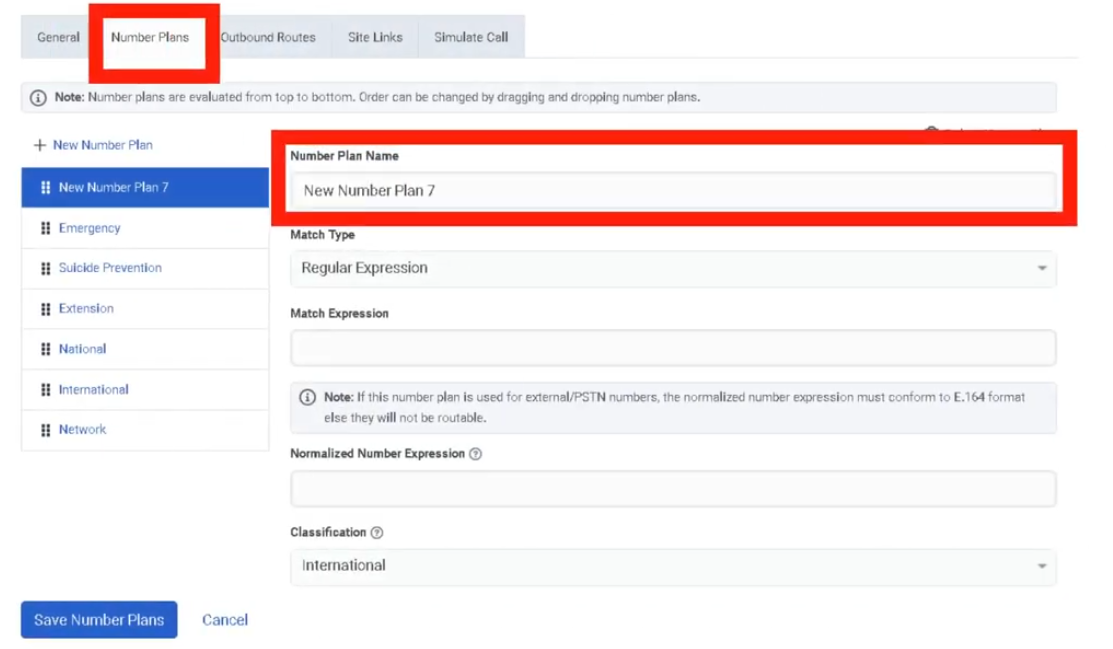
| Number Plans | Classify and normalize dialed numbers; default plans provided; max 200 per site |
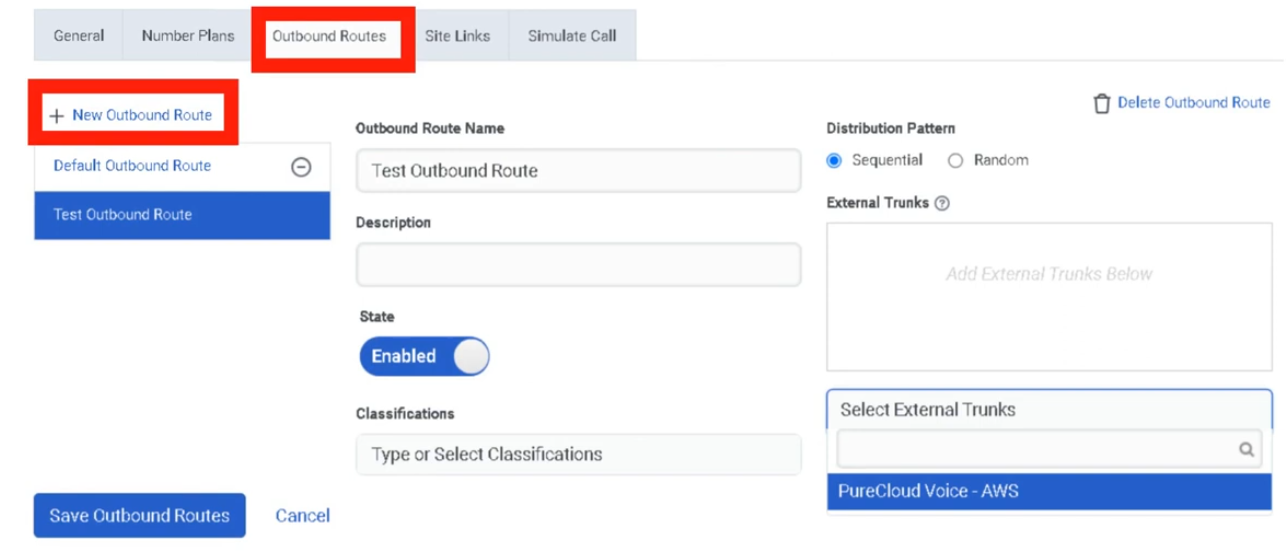
| Outbound Routes | Route calls to external trunks; Sequential or Random distribution |
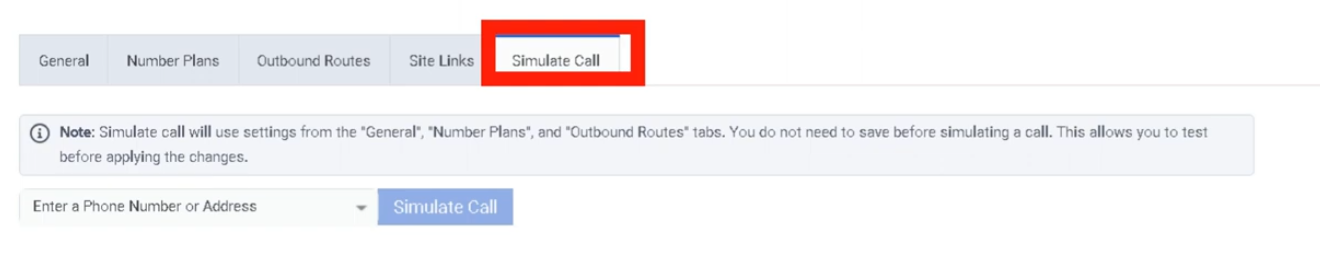
| Simulate Call | Validate routing configuration without placing an actual call |
Navigation
| Task | Path |
|---|---|
| Open sites | Admin → Telephony → Sites |
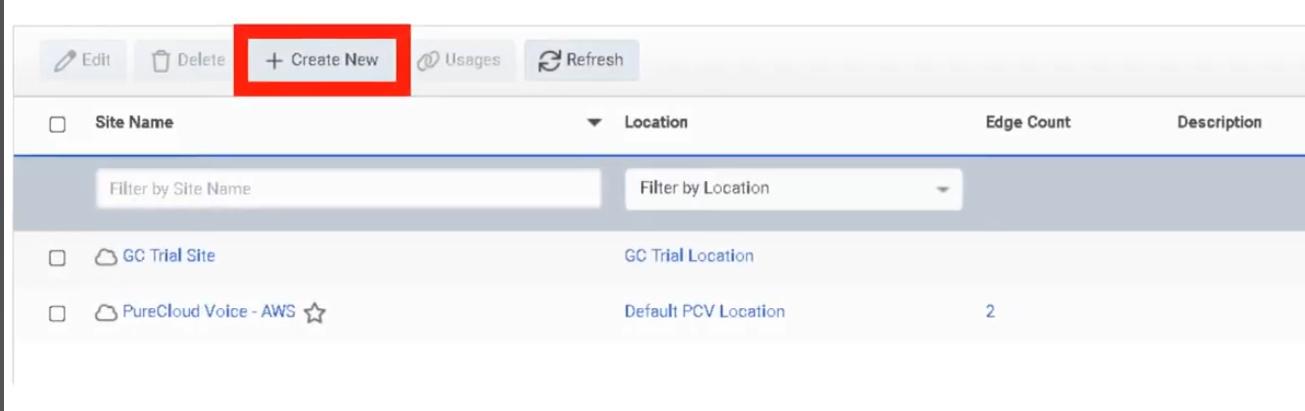
| Create site | Sites → Create New |
| Configure General settings | Sites → [Site] → General |
| Add number plans | Sites → [Site] → Number Plans |
| Create outbound route | Sites → [Site] → Outbound Routes |
| Run call simulator | Sites → [Site] → Simulate Call |
Creating a Site — Field Reference
Create Form
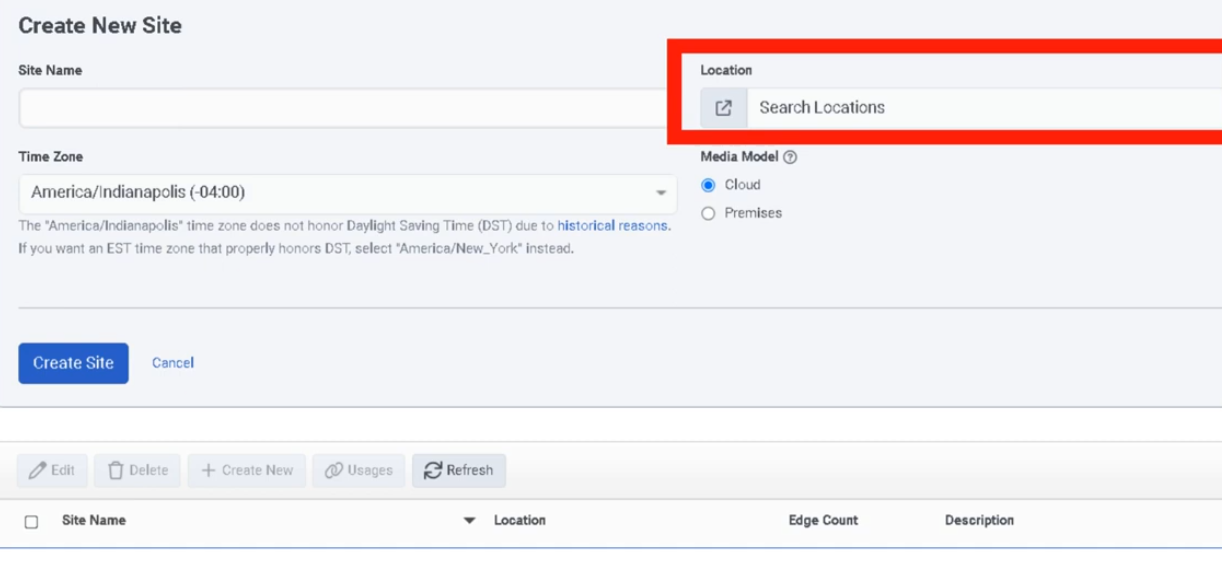
| Field | Description | Notes |
|---|---|---|
| Site Name | Unique name for the site | Required |
| Location | Location assigned to the site | Only locations marked as available for sites appear; required |
| Time Zone | Time zone for the site | Required |
| Media Model | Cloud or Premises | Cannot be changed after creation |
General Tab
| Field | Description | Notes |
|---|---|---|
| Description | Free-text description | Optional |
| Make this Site my default Site | Sets org-wide default | Only one default site allowed |
| Media Regions | Select media regions for WebRTC / Global Media Fabric | Relevant for WebRTC deployments |
| Relay/TURN Behavior | Controls TURN relay region selection for WebRTC calls | Two options: Any media region set on this site / Lowest latency via Geo-Lookup |
| Caller Address | Outbound caller number | Must be in E.164 format |
| Caller Name | Outbound caller name | Text |
Number Plans Tab
Genesys provides default number plans. Custom plans can be added to control what users can dial and how numbers are normalized before route selection. Maximum of 200 number plans per site.
Outbound Routes Tab
| Field | Description |
|---|---|
| Route Name | Name for the outbound route |
| Classification | Number plan classification this route handles |
| External Trunk(s) | One or more trunks the route uses |
| Distribution | Sequential (ordered failover) or Random (load distribution) |
| State | Enable/disable the route |
Simulate Call Tab
Enter a destination number or SIP address and click Simulate. The tool validates:
- Number normalization
- Number plan classification
- Outbound route selection
- Trunk settings
- In-service Edges (BYOC Premises)
- Destination site
ℹ️ Simulate Call validates configuration but does not place an actual call.
Media Model Selection
| Deployment | Media Model |
|---|---|
| BYOC Cloud | Cloud |
| Genesys Cloud Voice | Cloud |
| BYOC Premises | Premises |
Step-by-Step: Create a Site
| Step | Action |
|---|---|
| Step 1 | Navigate to Admin → Telephony → Sites |
| Step 2 | Click Create New |
| Step 3 | Enter Site Name, select Location, Time Zone, and Media Model |
| Step 4 | Click Create Site |
| Step 5 | On General, add description and optionally set as default site |
| Step 6 | Configure Caller Address (E.164) and Caller Name |
| Step 7 | Configure Media Regions and Relay/TURN Behavior if using WebRTC |
| Step 8 | Add number plans on Number Plans tab |
| Step 9 | Create one or more outbound routes on Outbound Routes tab |
| Step 10 | Run Simulate Call to validate routing before going live |
Key Constraints
| Constraint | Detail |
|---|---|
| Media Model | Cannot be changed after creation |
| Location availability | Only locations marked available for sites appear in the selector |
| Default site | Only one site can be the default |
| Number plans per site | Maximum 200 |
| Caller Address format | Must be E.164 (e.g. +528181234567) |
Troubleshooting
| Issue | Cause | Resolution |
|---|---|---|
| Location not visible in selector | Location not marked as available for sites | Update the location setting |
| Caller ID not displaying correctly | Caller Address not in E.164 or overridden by Prioritized Caller Selection | Recheck format and caller selection config |
| Calls not routing | Number plan or outbound route mismatch | Use Simulate Call to trace normalization, classification, and route selection |
| No route selected | Route disabled or no matching classification | Verify route state, classification, and selected trunks |
| Simulator shows failure | Site, trunk, Edge, or destination settings incomplete | Review each simulator output field in order |
Quick Reference
| Question | Answer |
|---|---|
| What is a Site? | The home of a set of phones; defines classification, routing, and dialing rules |
| What are the four tabs? | General, Number Plans, Outbound Routes, Simulate Call |
| What media models exist? | Cloud and Premises |
| Can you change the media model later? | No |
| What does Simulate Call do? | Validates routing config without placing a real call |
| What distribution patterns exist for outbound routes? | Sequential and Random |
| What format must Caller Address use? | E.164 |
Naming Convention
| Resource | Example |
|---|---|
| Cloud site | MTY_Main_Cloud |
| Premises site | MTY_Branch_Prem |
| Outbound route | PSTN_Main |
| Number plan | MX_National_Dialing |
Pattern: <Location>_<Purpose>_<MediaModel>
See Also
- Trunks — create trunks before configuring outbound routes
- Locations & Floor Plans — locations must exist before creating sites
- Edges & Edge Groups — BYOC Premises sites use Edge assignments
- WebRTC Phone Management — Media Regions and Relay/TURN Behavior are configured here
- Architectural Build Order — Sites are built in Phase 2
Screenshots
No Comments