
AZ-104 - Governance and Compliance - Tagging Resources
Control and organize Azure resources with Azure Resource Manager
Tags
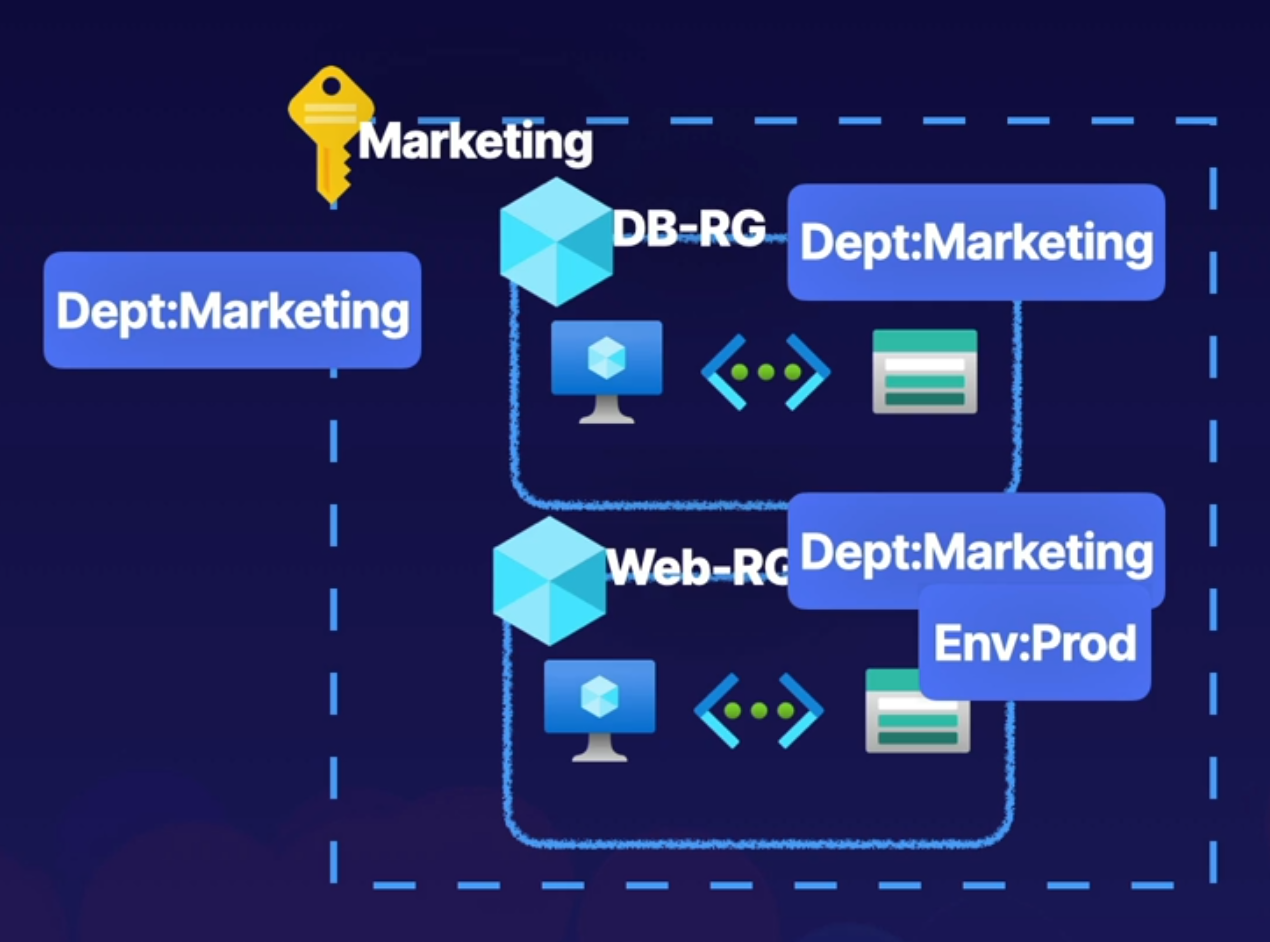
- Dept:Marketing - For example if create tag Dept:Marketing and tag all resources from Marketing this will help identify and provide billing to this resources to the Marketing department.
- Env:Prod - Identify wheather an environment is in production or dev
- Name can be 512 characters, and value can be 256 characters.
- Storage accounts can have a name with only 128 characters.
- Tags are not inherited.
- A resource can have 50 tags max.
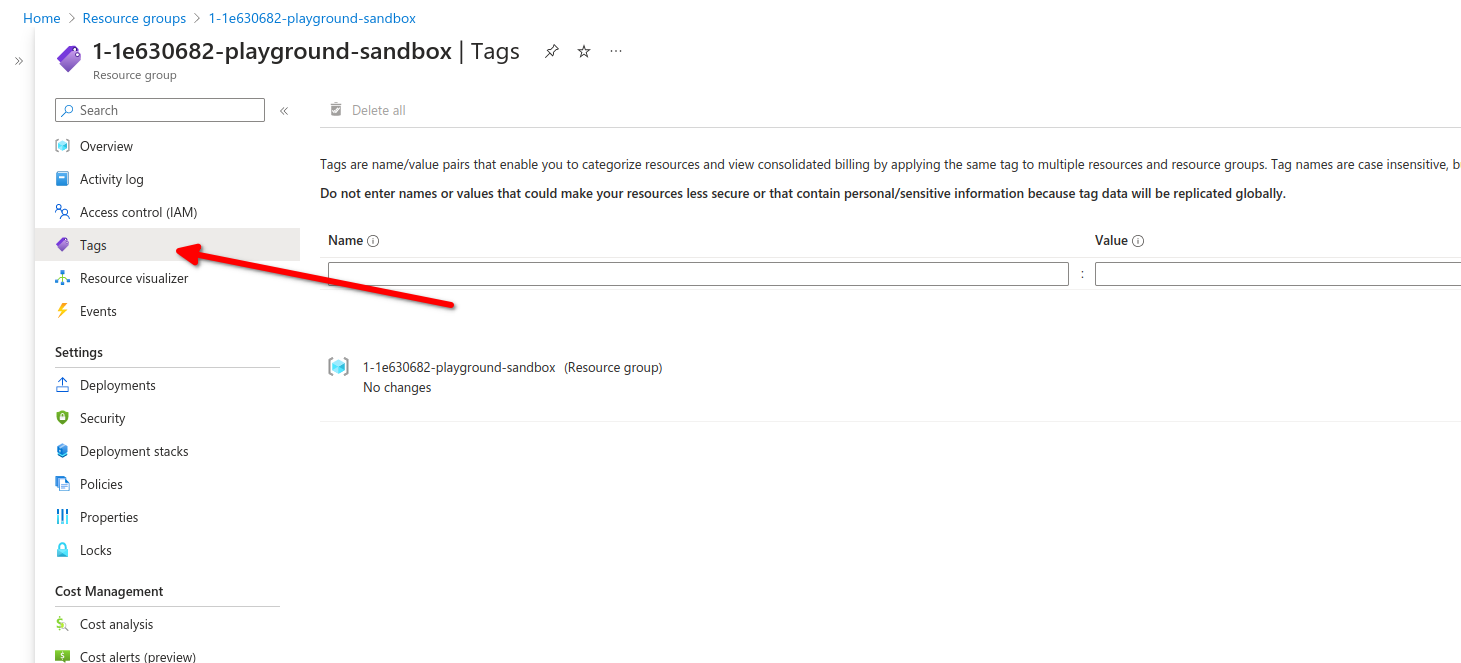
Here we can create tags, tags are not allowed to have the same name
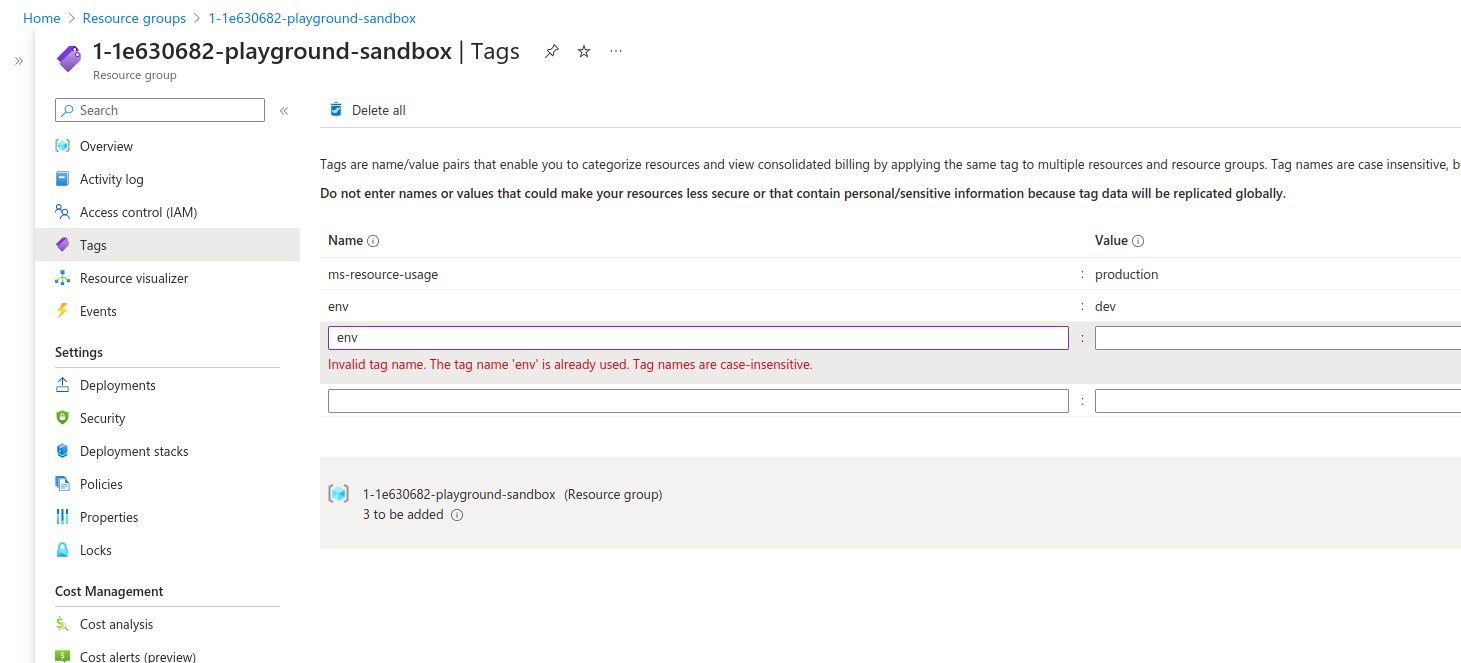
Lets test with the following ARM template.
(refer to Arm Template here to investigate how to deploy an ARM template)
Arm template for TAG test
{
  "$schema": "https://schema.management.azure.com/schemas/2019-04-01/deploymentTemplate.json#",
  "contentVersion": "1.0.0.0",
  "parameters": {
    "storageAccountName": {
      "type": "string",
      "metadata": {
        "description": "Name of storage account"
      }
    },
    "adminUsername": {
      "type": "string",
      "metadata": {
        "description": "Admin username"
      }
    },
    "adminPassword": {
      "type": "securestring",
      "metadata": {
        "description": "Admin password"
      }
    },
    "dnsNameforLBIP": {
      "type": "string",
      "metadata": {
        "description": "DNS for Load Balancer IP"
      }
    },
    "vmNamePrefix": {
      "type": "string",
      "defaultValue": "myVM",
      "metadata": {
        "description": "Prefix to use for VM names"
      }
    },
    "imagePublisher": {
      "type": "string",
      "defaultValue": "MicrosoftWindowsServer",
      "metadata": {
        "description": "Image Publisher"
      }
    },
    "imageOffer": {
      "type": "string",
      "defaultValue": "WindowsServer",
      "metadata": {
        "description": "Image Offer"
      }
    },
    "imageSKU": {
      "type": "string",
      "defaultValue": "2019-Datacenter",
      "metadata": {
        "description": "Image SKU"
      }
    },
    "lbName": {
      "type": "string",
      "defaultValue": "myLB",
      "metadata": {
        "description": "Load Balancer name"
      }
    },
    "nicNamePrefix": {
      "type": "string",
      "defaultValue": "nic",
      "metadata": {
        "description": "Network Interface name prefix"
      }
    },
    "publicIPAddressName": {
      "type": "string",
      "defaultValue": "myPublicIP",
      "metadata": {
        "description": "Public IP Name"
      }
    },
    "vnetName": {
      "type": "string",
      "defaultValue": "myVNET",
      "metadata": {
        "description": "VNET name"
      }
    },
    "vmSize": {
      "type": "string",
      "defaultValue": "Standard_D2s_v3",
      "metadata": {
        "description": "Size of the VM"
      }
    },
    "location": {
      "type": "string",
      "defaultValue": "[resourceGroup().location]",
      "metadata": {
        "description": "Location for all resources"
      }
    }
  },
  "variables": {
    "storageAccountType": "Standard_LRS",
    "availabilitySetName": "myAvSet",
    "addressPrefix": "10.0.0.0/16",
    "subnetName": "Subnet-1",
    "subnetPrefix": "10.0.0.0/24",
    "publicIPAddressType": "Dynamic",
    "subnetRef": "[resourceId('Microsoft.Network/virtualNetworks/subnets', parameters('vnetName'), variables ('subnetName'))]",
    "publicIPAddressID": "[resourceId('Microsoft.Network/publicIPAddresses',parameters('publicIPAddressName'))]",
    "numberOfInstances": 2
  },
  "resources": [
    {
      "type": "Microsoft.Storage/storageAccounts",
      "name": "[parameters('storageAccountName')]",
      "apiVersion": "2019-06-01",
      "location": "[parameters('location')]",
      "sku": {
        "name": "[variables('storageAccountType')]"
      },
      "kind": "StorageV2"
    },
    {
      "type": "Microsoft.Compute/availabilitySets",
      "name": "[variables('availabilitySetName')]",
      "apiVersion": "2019-12-01",
      "location": "[parameters('location')]",
      "properties": {
        "platformFaultDomainCount": 2,
        "platformUpdateDomainCount": 5
      },
      "sku": {
        "name": "Aligned"
      }
    },
    {
      "apiVersion": "2020-05-01",
      "type": "Microsoft.Network/publicIPAddresses",
      "name": "[parameters('publicIPAddressName')]",
      "location": "[parameters('location')]",
      "properties": {
        "publicIPAllocationMethod": "[variables('publicIPAddressType')]",
        "dnsSettings": {
          "domainNameLabel": "[parameters('dnsNameforLBIP')]"
        }
      }
    },
    {
      "apiVersion": "2020-05-01",
      "type": "Microsoft.Network/virtualNetworks",
      "name": "[parameters('vnetName')]",
      "location": "[parameters('location')]",
      "properties": {
        "addressSpace": {
          "addressPrefixes": [
            "[variables('addressPrefix')]"
          ]
        },
        "subnets": [
          {
            "name": "[variables('subnetName')]",
            "properties": {
              "addressPrefix": "[variables('subnetPrefix')]"
            }
          }
        ]
      }
    },
    {
      "apiVersion": "2020-05-01",
      "type": "Microsoft.Network/networkInterfaces",
      "name": "[concat(parameters('nicNamePrefix'), copyindex())]",
      "location": "[parameters('location')]",
      "copy": {
        "name": "nicLoop",
        "count": "[variables('numberOfInstances')]"
      },
      "dependsOn": [
        "[resourceId('Microsoft.Network/virtualNetworks/', parameters('vnetName'))]",
        "[resourceId('Microsoft.Network/loadBalancers/', parameters('lbName'))]"
      ],
      "properties": {
        "ipConfigurations": [
          {
            "name": "ipconfig1",
            "properties": {
              "privateIPAllocationMethod": "Dynamic",
              "subnet": {
                "id": "[variables('subnetRef')]"
              },
              "loadBalancerBackendAddressPools": [
                {
                  "id": "[resourceId('Microsoft.Network/loadBalancers/backendAddressPools', parameters('lbName'), 'BackendPool1')]"
                }
              ],
              "loadBalancerInboundNatRules": [
                {
                  "id": "[resourceId('Microsoft.Network/loadBalancers/inboundNatRules', parameters('lbName'), concat('RDP-VM', copyindex()))]"
                }
              ]
            }
          }
        ]
      }
    },
    {
      "apiVersion": "2020-05-01",
      "name": "[parameters('lbName')]",
      "type": "Microsoft.Network/loadBalancers",
      "location": "[parameters('location')]",
      "dependsOn": [
        "[resourceId('Microsoft.Network/publicIPAddresses/', parameters('publicIPAddressName'))]"
      ],
      "properties": {
        "frontendIPConfigurations": [
          {
            "name": "LoadBalancerFrontEnd",
            "properties": {
              "publicIPAddress": {
                "id": "[variables('publicIPAddressID')]"
              }
            }
          }
        ],
        "backendAddressPools": [
          {
            "name": "BackendPool1"
          }
        ],
        "inboundNatRules": [
          {
            "name": "RDP-VM0",
            "properties": {
              "frontendIPConfiguration": {
                "id": "[resourceId('Microsoft.Network/loadBalancers/frontendIPConfigurations', parameters('lbName'), 'LoadBalancerFrontEnd')]"
              },
              "protocol": "Tcp",
              "frontendPort": 50001,
              "backendPort": 3389,
              "enableFloatingIP": false
            }
          },
          {
            "name": "RDP-VM1",
            "properties": {
              "frontendIPConfiguration": {
                "id": "[resourceId('Microsoft.Network/loadBalancers/frontendIPConfigurations', parameters('lbName'), 'LoadBalancerFrontEnd')]"
              },
              "protocol": "Tcp",
              "frontendPort": 50002,
              "backendPort": 3389,
              "enableFloatingIP": false
            }
          }
        ],
        "loadBalancingRules": [
          {
            "name": "LBRule",
            "properties": {
              "frontendIPConfiguration": {
                "id": "[resourceId('Microsoft.Network/loadBalancers/frontendIPConfigurations', parameters('lbName'), 'LoadBalancerFrontEnd')]"
              },
              "backendAddressPool": {
                "id": "[resourceId('Microsoft.Network/loadBalancers/backendAddressPools', parameters('lbName'), 'BackendPool1')]"

              },
              "protocol": "Tcp",
              "frontendPort": 80,
              "backendPort": 80,
              "enableFloatingIP": false,
              "idleTimeoutInMinutes": 5,
              "probe": {
                "id": "[resourceId('Microsoft.Network/loadBalancers/probes', parameters('lbName'), 'tcpProbe')]"
              }
            }
          }
        ],
        "probes": [
          {
            "name": "tcpProbe",
            "properties": {
              "protocol": "Tcp",
              "port": 80,
              "intervalInSeconds": 5,
              "numberOfProbes": 2
            }
          }
        ]
      }
    },
    {
      "apiVersion": "2019-12-01",
      "type": "Microsoft.Compute/virtualMachines",
      "name": "[concat(parameters('vmNamePrefix'), copyindex())]",
      "copy": {
        "name": "virtualMachineLoop",
        "count": "[variables('numberOfInstances')]"
      },
      "location": "[parameters('location')]",
      "dependsOn": [
        "[resourceId('Microsoft.Storage/storageAccounts/', parameters('storageAccountName'))]",
        "[resourceId('Microsoft.Network/networkInterfaces/', concat(parameters('nicNamePrefix'), copyindex()))]",
        "[resourceId('Microsoft.Compute/availabilitySets/', variables('availabilitySetName'))]"
      ],
      "properties": {
        "availabilitySet": {
          "id": "[resourceId('Microsoft.Compute/availabilitySets',variables('availabilitySetName'))]"
        },
        "hardwareProfile": {
          "vmSize": "[parameters('vmSize')]"
        },
        "osProfile": {
          "computerName": "[concat(parameters('vmNamePrefix'), copyIndex())]",
          "adminUsername": "[parameters('adminUsername')]",
          "adminPassword": "[parameters('adminPassword')]"
        },
        "storageProfile": {
          "imageReference": {
            "publisher": "[parameters('imagePublisher')]",
            "offer": "[parameters('imageOffer')]",
            "sku": "[parameters('imageSKU')]",
            "version": "latest"
          },
          "osDisk": {
            "createOption": "FromImage"
          }
        },
        "networkProfile": {
          "networkInterfaces": [
            {
              "id": "[resourceId('Microsoft.Network/networkInterfaces',concat(parameters('nicNamePrefix'),copyindex()))]"
            }
          ]
        },
        "diagnosticsProfile": {
          "bootDiagnostics": {
            "enabled": true,
            "storageUri": "[reference(parameters('storageAccountName'), '2019-06-01').primaryEndpoints.blob]"
          }
        }
      }
    }
  ]
}
After deploying our VMs using the ARM template, we can see that the resource group show the tags we previously assign.
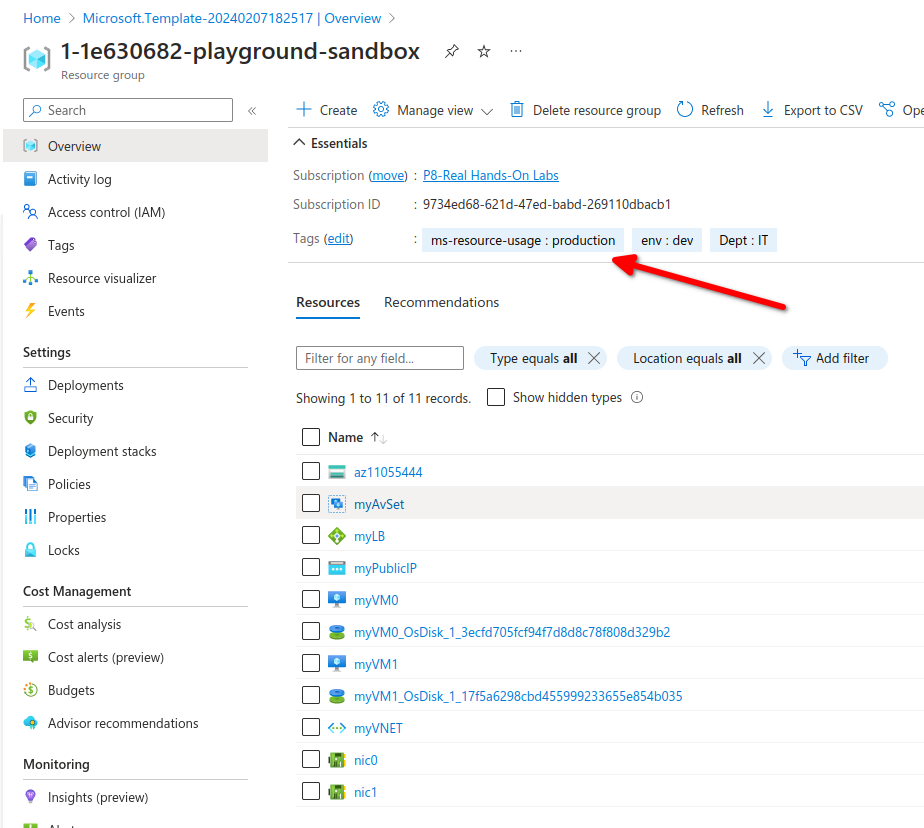
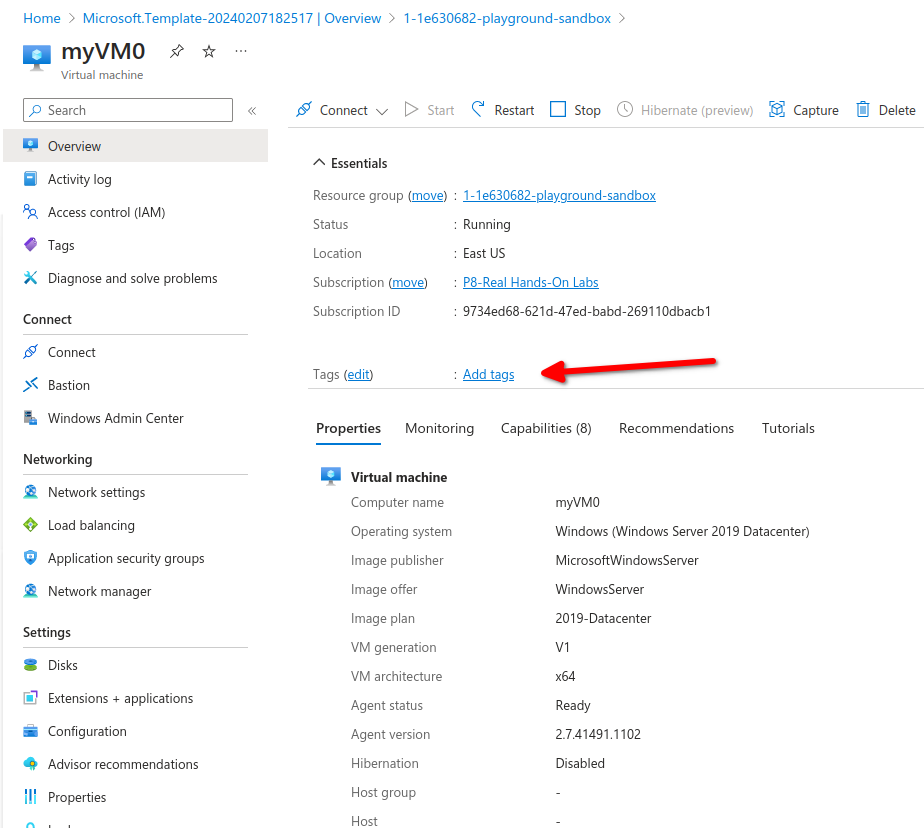
If we go to our virtual machine we notice tags are not inherited from the resource group
Manage resources via tags, For example shutting down all VM's with a specific tag or developers can only update VMs with a specific tag.
No Comments