
13. - SIP Proxies, Gateways and SIP Routing
Proxies and SIP routing
Stateless proxy: forgets about the SIP request once it has been forwarded. As the transaction is quick and simple, these scale very well to cope with a lot of requests and can also be very fast. They are very well suited to the core of a SIP network but they cannot provide services such as call forking.
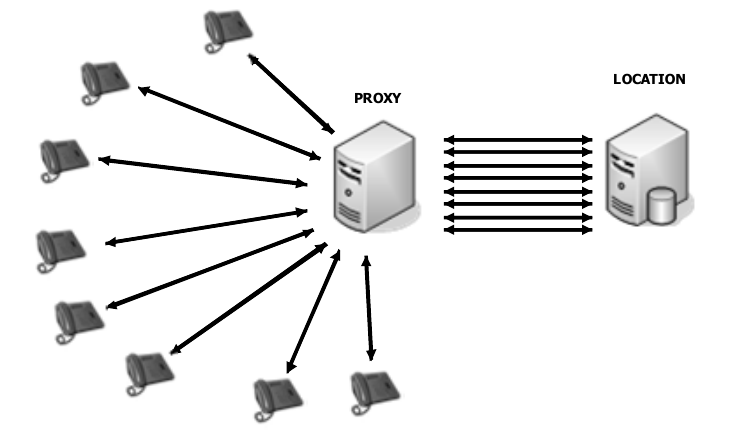
Stateful proxy: By knowing the state of a transaction a stateful proxy can provide many more services such as call forking as the example shows below.
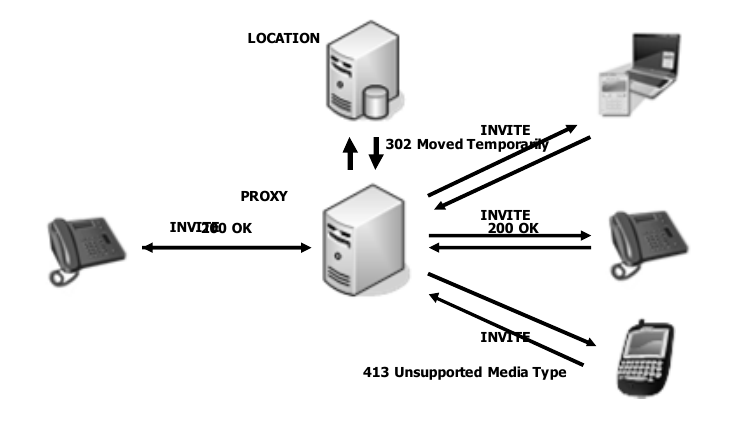
- Transactional Proxy: keeps all state information on all transactions that are pending. Once a session is established, the proxy forgets the state information.
- Super Stateful Proxy: Can use the Record-Route header in SIP messages in order to be kept on the signaling path of all subsequent exchanges. This allows a Stateful proxy to maintain call state in addition to transaction state. Maintaining Call state information is really useful for supplying billing information.
- It is also possible to setup the Proxy server to act as a Stateless proxy for some calls, Stateful for others, and even as a redirect server all based on criteria set by the administrator.
Via and Record-Route
Some of the most important elements of a SIP message are VIA and Record-Route they help prevent loops and can govern the path the SIP message takes, it is worth nothing that no all SIP providers take full advantage of these records and any wireshark/ethereal traces you may take can differ depending on the SIP provider and SIP phones or PBX you are using at the time.
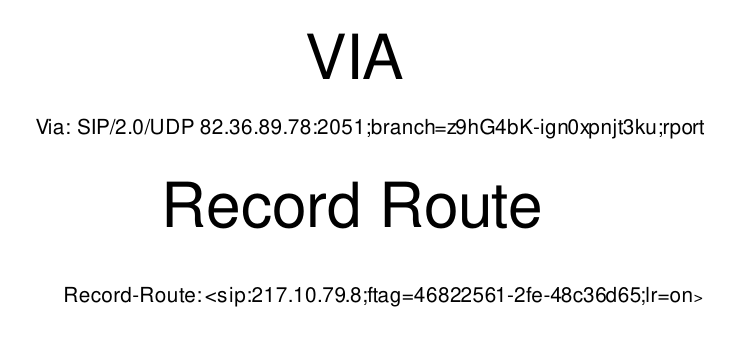
VIA details
Via records are added to a SIP message as follow
- Each element in the call path adds its own details in form of another VIA record
- These elements are removed at each hope on the way back in the response
- VIA elements can be hidden (encrypted) - Record-Route elements cannot
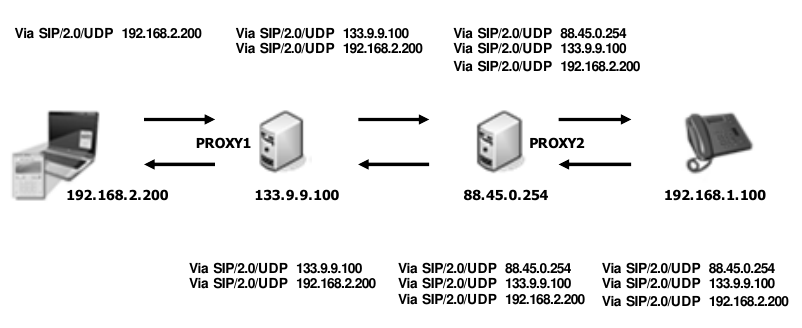
If Proxy - Redirect Servers are used, once the INVITE transaction is accomplished, User Agents will know each others direct IP addresses (from the contact field) and carry out the subsequent transactions bypassing the intermediary proxies. This will mean less number of VIA entries than if the Proxy maintains the Call State, also VIA headersa re useed by Proxies to see if any 'Looping' of the message has occurred. if they received a message that includes their own IP address in a VIA record a 482 (loop detected) response is returned to the sender.
Routing Examples 1
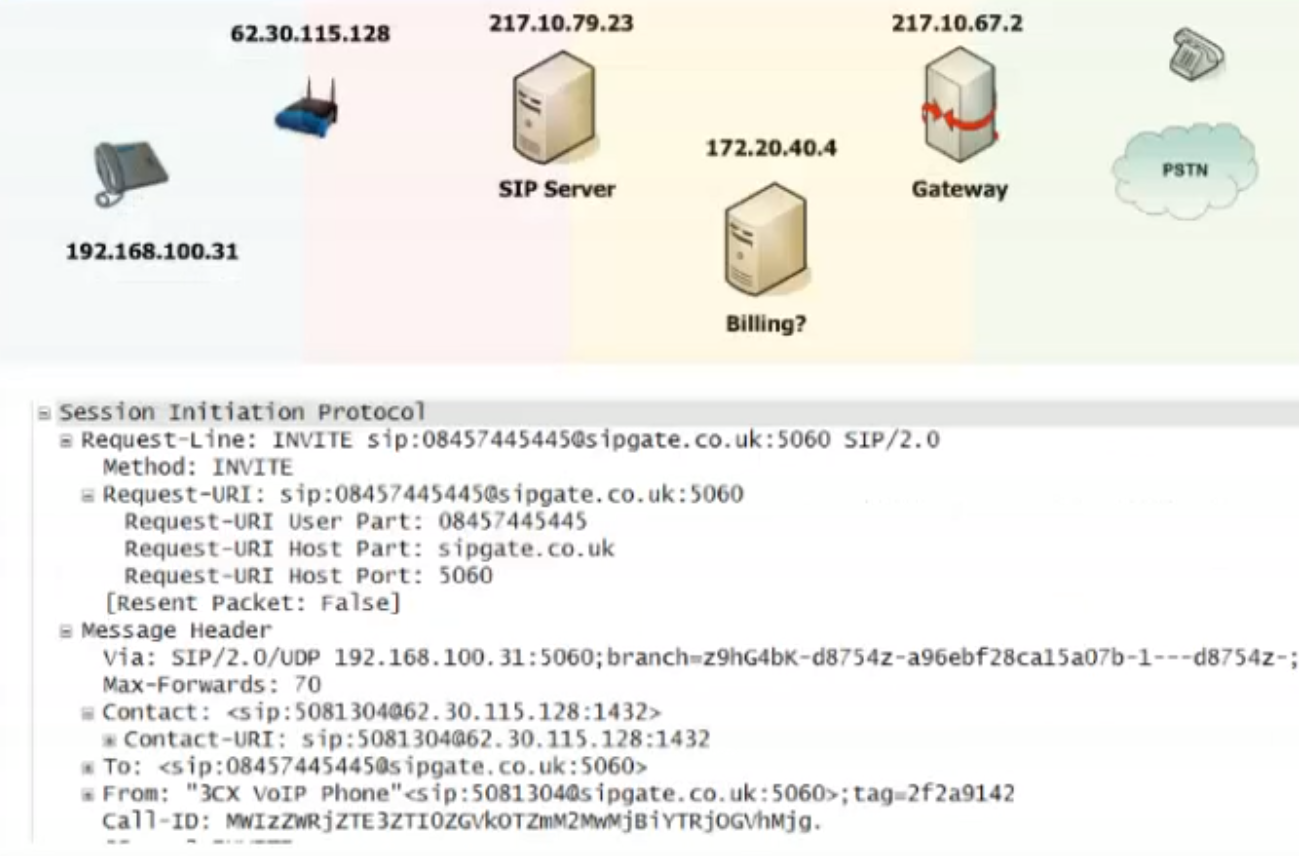
- Phone calls number 08457445445 which Generates a SIP INVITE, as we're using service provider sipgate, their domain name is append to the request URI
INVITE sip:[email protected]:5060 SIP/2.0 - The VIA header is added along along with its local lan contact detail
Via: SIP/2.0/UDP 192.168.100.31L5060;branch=z9hG4bK-d8754z-a96ebf28ca1507b-1---d8754z-; - The Contact field details are populated with the live contact details i. e. my phone number plus the IP address port combination of the edge side ip of my network this is determined by a service called STUN.
Contact: <sip:[email protected]:1432> - To is who I'm calling
<sip:[email protected]:5060> - From: are my phone details
From: "3cx VoIP Phone" <sip:[email protected]:5060>;tag=2f2a9142
Now this Invite will travel to the PSTN
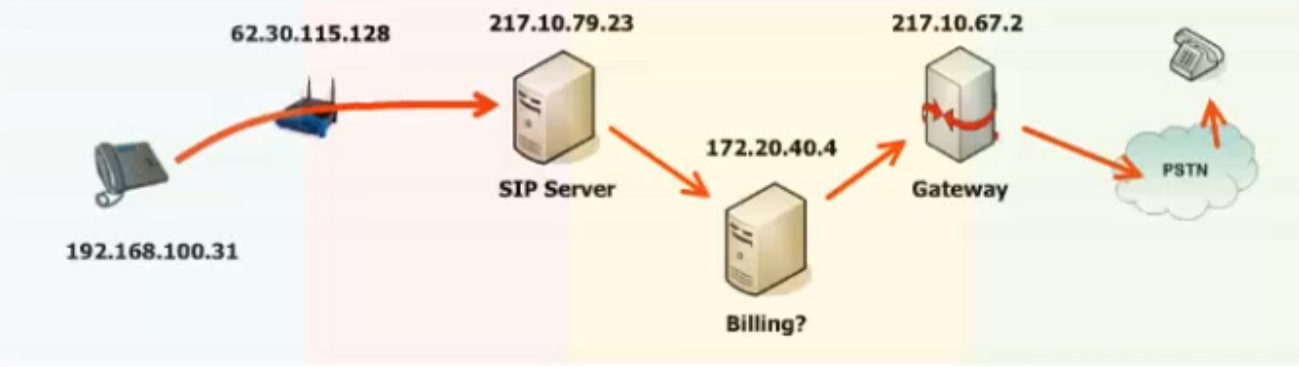
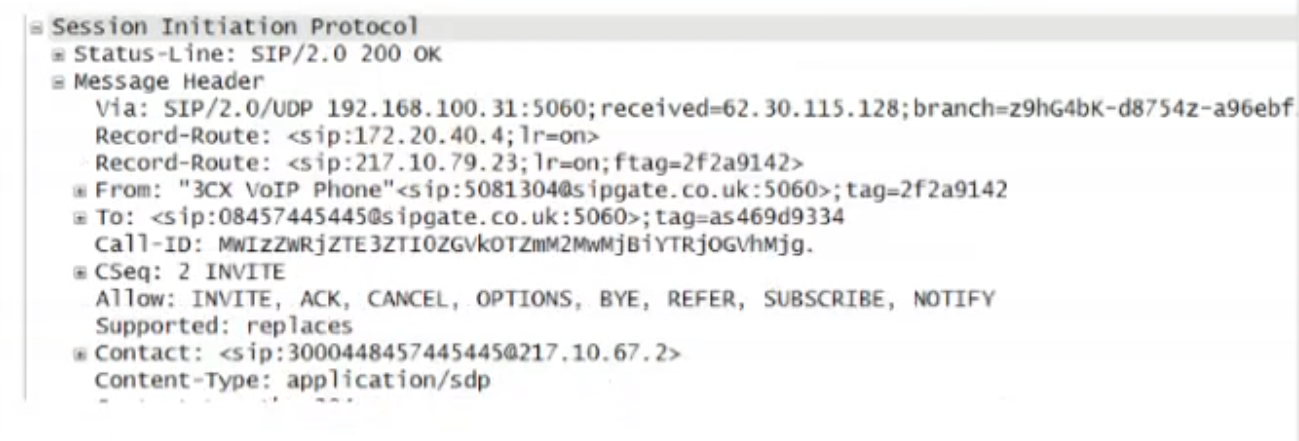
Next is the 200 OK received from the PSTN phone
- 200 message OK received by the remote user
Status-line: SIP/2.0 200 OK - VIA: this record changed based on the senders IP 62.30.115.128 is the remote destination and new branch for called party
- There is also 2 Record-route records that had been added to the invite message, as record-route records are never deleted we can see them here
Record-Route: <sip:172.20.40.4;lr=on>This is the Billing server andRecord-Route: <sip:217.10.79.23;lr=on;ftag=2f2a9142>This is the SIP server , both of these are going to be useful as the phone is going to use this when sending the message to ACK the setup - The From and To elements also stays the same.
- Contact: this has been updated to now use the gateway
Contact: <sip:[email protected]>
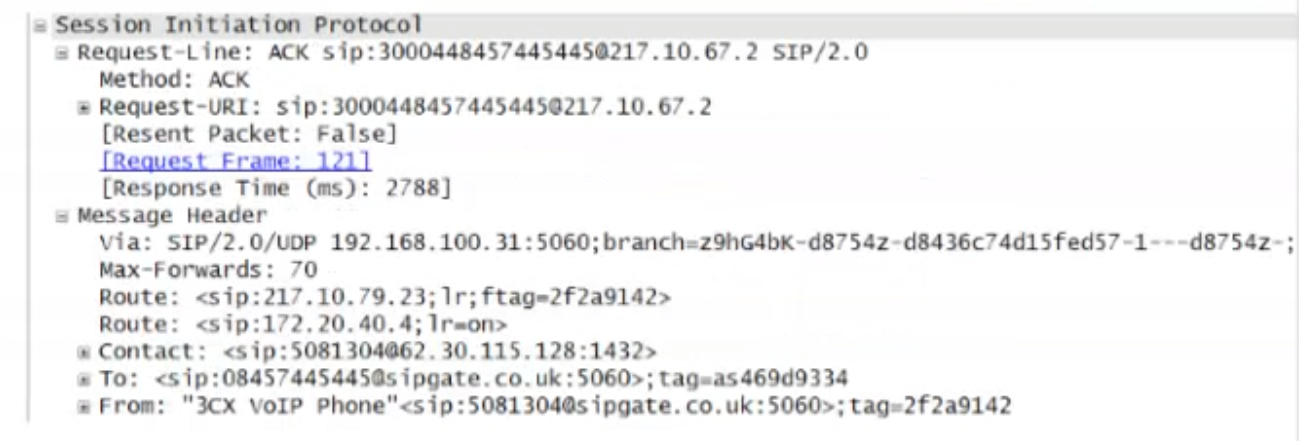
Now our Phone will send an ACK, the message needs to end up at the gatway so we can see the following
Reuest-URI: sip:[email protected]is the SIP URI of the core number plus the IP address of our gateway.- Next the Record-Route will send the message based on the Route Path received on the 200 OK this makes a route list and determine the path the message takes.
- Based on the ACK below it will first go to the SIP Server to validate, SIP server will check the Request-URI to see if its responsible for or owns if not it compares its IP address with the first route record, since there is a match it rewrites the message removing the first route-record
- Next it will go to the IP address of the billing server, this will perform the same checks as the SIP server did then it will remove the route record and as there are no more route records left fwd the ack based on the information on the Request URI field, that will be the gateway.
This process is known as Loose Routing <sip:172.20.40.4;lr=on we can see lr is displayed on the Route record, sometimes we see lr=on but this is not required as part of the RFC326 so simply lr is use.
Record-Route defined
There are so many records when sending a 'Request' message, which is used?
First it will use Route, then Contact (if there is no Route), From (if there is no Contact,
The Record-Route header is added into requests from UA clients by proxy servers that want to be in the path of follow on request or the same call-id value. The UA client will then use the entries to route subsequent requests and the details from Record-Route are copied into the responses under the Route header. Note: not all proxies will add their details into the header
Contact Headers determine the destination placed in the Request-URI for the following requests and can be used to bypass proxies that do not have an entry in the Record-Route header.
From Headers are used for following requests from the UAS to the UAC if there is no Contact of Record-Route header.
Session Policies
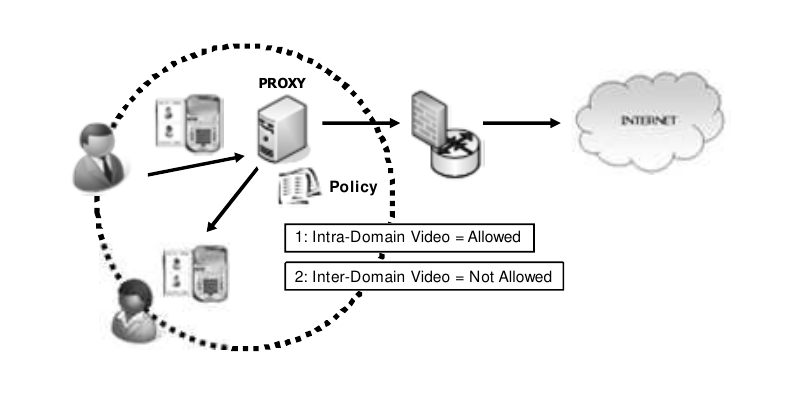
In SIP, session policies are used to control and enforce rules and restrictions on sessions between SIP user agents. Session policies can be applied to various aspects of a session, such as call routing, media handling, security, and resource allocation.
For example, a session policy can specify that calls from a certain group of users should always be routed through a specific SIP proxy, or that media streams must be encrypted using a certain algorithm. Session policies can also be used to enforce restrictions on bandwidth usage or to limit the duration of a session.
SIP session policies are typically implemented using a combination of configuration settings and network devices such as firewalls, routers, and session border controllers (SBCs). These devices can be configured to inspect SIP messages and apply policy rules based on the contents of those messages.
Session policies can be useful in a variety of SIP deployment scenarios, such as in enterprise networks where security and compliance are important, or in service provider networks where quality of service (QoS) and resource allocation are critical. By enforcing policy rules, session policies help to ensure that sessions are conducted in a secure and reliable manner, while also optimizing the use of network resources.
SIP Gateways
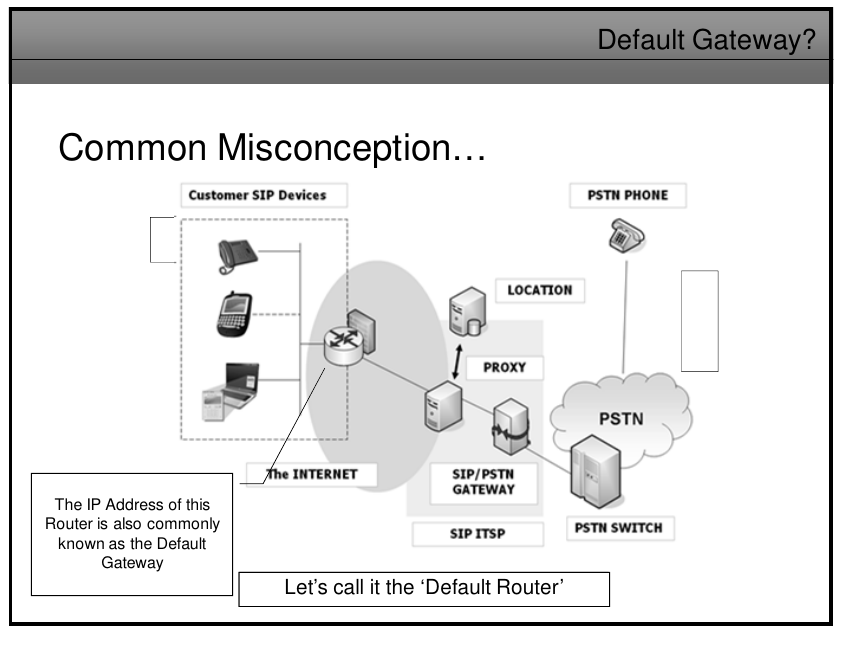
There is a common misconception of what a gateway does, have a look at the slide below, the IP address of this router is also common known as default gateway, is not a gateway its the default router.
The SIP/PSTN gateway actually converts SIP signalling and VoIP traffic to a different format ready for the PSTN - It is actually carrying out 'Real' Gateway functions.
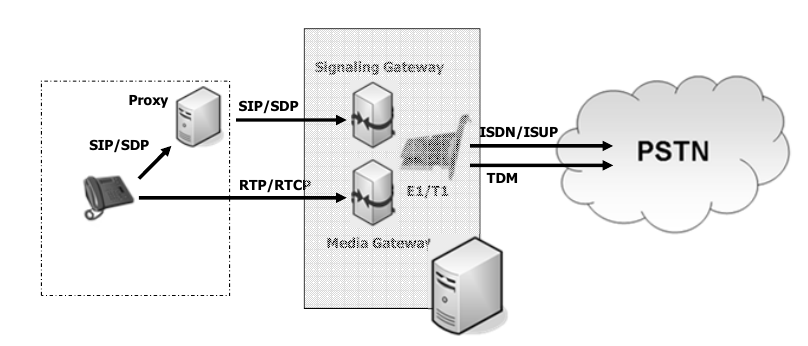
The main purpuse of the SIP/PSTN gateway to the PSSTN is to provide Signalling and Media conversion between the SIP and PSTN networks, here you can see the SIP/SDP messages hit the signaling gateway and convert the signaling to ISDN and RTP packets hit the media gateway for voice.
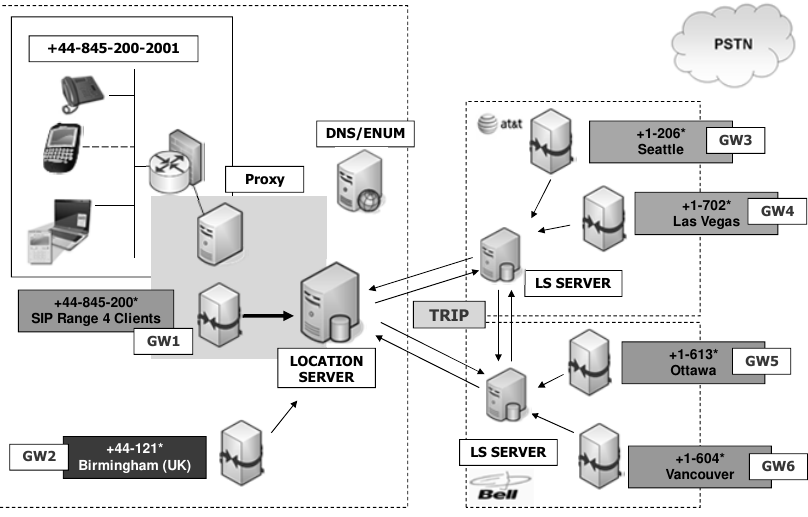
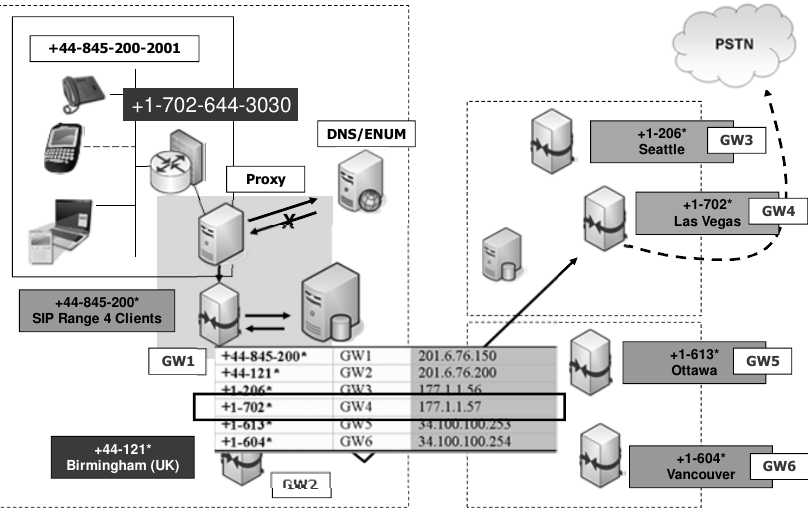
Gateway Location and routing with TRIP
No Comments