
11. - SIP SDP - Changing Session Parameters
In SIP SDP, the session parameters can be changed during the lifetime of a session by sending a re-INVITE message. A re-INVITE is an INVITE message sent within an established session that is used to modify session attributes.
When a re-INVITE message is sent, it includes a new SDP offer that specifies the updated session parameters. The remote party can then respond with a new SDP answer that acknowledges the changes or rejects them. The re-INVITE can be used to update media session attributes such as codecs, media formats, bandwidth, and transport protocols, as well as session-level attributes such as session name, session description, and session timing.
Re-INVITEs are commonly used in scenarios where a user wants to add or remove media streams from an established session, change the codec or format of an existing media stream, or modify other session parameters. The use of re-INVITEs provides a flexible mechanism for session negotiation and management in SIP-based communication systems.
Other methods that will change or update SDP parameters
-
INVITE with new SDP: When a new INVITE is sent with a new SDP, it indicates that the session parameters are being updated.
-
UPDATE: The UPDATE method can be used to modify the session parameters without terminating the session. It carries a new SDP message that describes the updated parameters.
-
Re-INVITE: A Re-INVITE can be sent by either the caller or the callee to modify the session parameters. It is similar to the INVITE method, but it is sent while the call is in progress.
-
INFO: The INFO method can be used to send non-INVITE related information during a call. It can also be used to modify the session parameters by carrying a new SDP message.
These methods can be used to update session parameters such as codec types, media ports, IP addresses, bandwidth, and other attributes defined in the SDP.
Putting a call on Hold example
Here a call is placed on hold and re-invite messages are sent
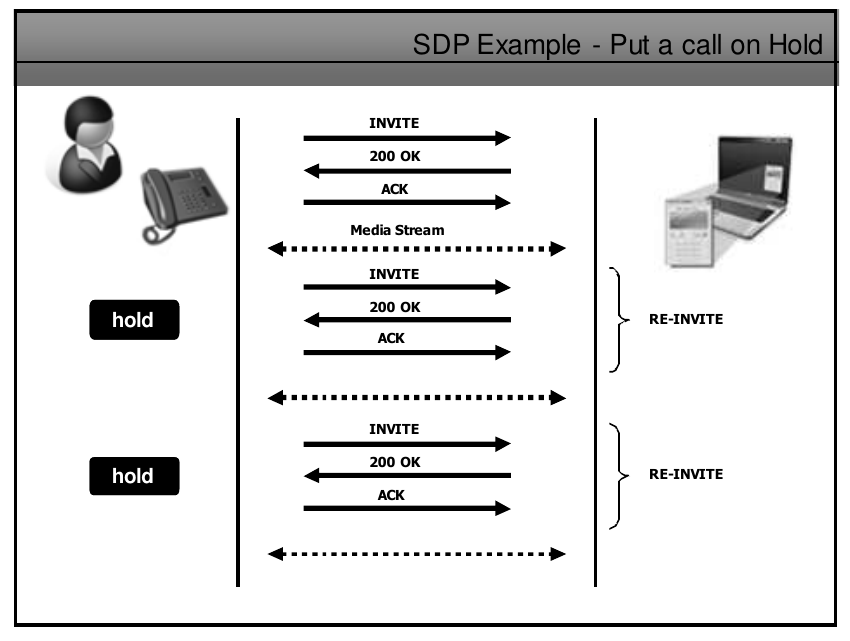
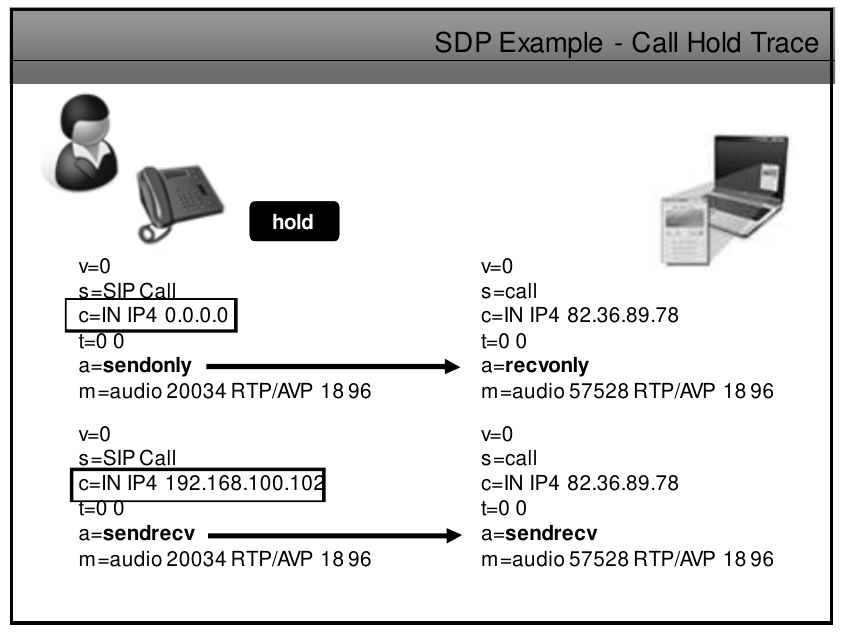
the SDP message is updated with a=sendonly and the IP is changed to 0.0.0.0, remote user updates his sdp with 200 ok and puts himself on a=recvonly, here user in left will send (send only) music on hold and remote (in receive only mode) will hear music)
when unhold user on left will send new invite with his IP 192.168.100.102 and rtpmap a=sendrecv, remote user will respond with 200 ok and change mode to a=sendrecv, this will reestablish audio both ways.
there are multiple ways of messages when placing a call on hold example below
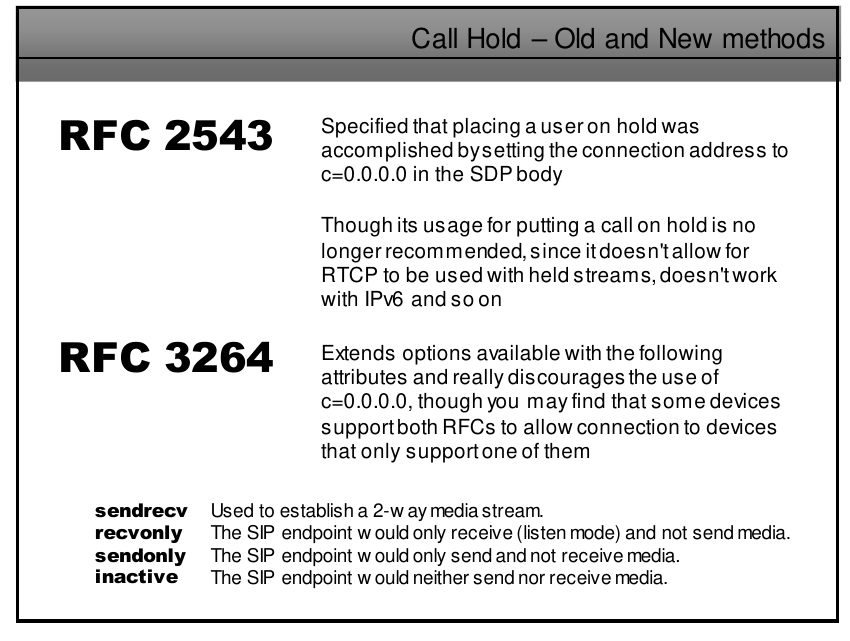
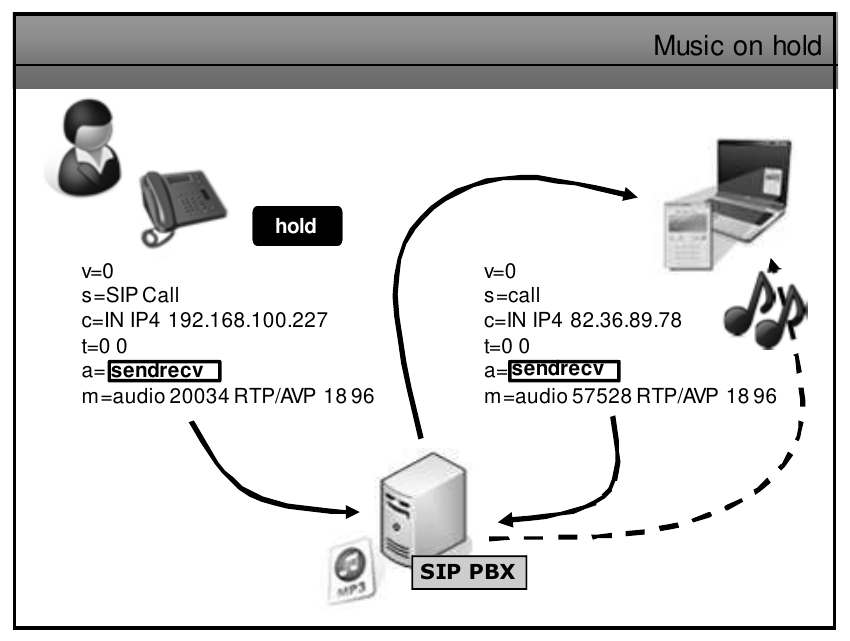
In SIP and SDP, putting a call on hold is achieved by the initiator of the hold sending a re-INVITE message to the other party with an SDP offer that indicates the call is being put on hold. The SDP offer typically sets the media streams to inactive state by setting the port to 0 and the IP address to 0.0.0.0.
For example, suppose Alice wants to put Bob on hold during a call. Alice would send a re-INVITE message to Bob with an SDP offer indicating that the audio and/or video streams are inactive, like so:
INVITE sip:[email protected] SIP/2.0
Via: SIP/2.0/UDP pc33.atlanta.com;branch=z9hG4bK776asdhds
Max-Forwards: 70
To: Bob <sip:[email protected]>
From: Alice <sip:[email protected]>;tag=1928301774
Call-ID: a84b4c76e66710
CSeq: 314160 INVITE
Contact: <sip:[email protected]>
User-Agent: BriaX 3.5.5 build 81887
Allow: INVITE, ACK, CANCEL, OPTIONS, BYE, REFER, NOTIFY, MESSAGE, SUBSCRIBE, INFO
Allow-Events: presence, message-summary, refer, dialog
Session-Expires: 3600;refresher=uas
Content-Type: application/sdp
Content-Length: 218

v=0
o=- 123456 789012 IN IP4 pc33.atlanta.com
s=SIP Call
c=IN IP4 0.0.0.0
a=sendonly
t=0 0
m=audio 0 RTP/AVP 0
m=video 0 RTP/AVP 31
When Bob receives this message, he can either accept the hold request by sending a 200 OK response, or reject it by sending a 486 Busy Here response. If he accepts it, he will send a 200 OK response with his own SDP answer indicating that the media streams have been set to inactive state, like so:
SIP/2.0 200 OK
Via: SIP/2.0/UDP pc33.atlanta.com;branch=z9hG4bK776asdhds
To: Bob <sip:[email protected]>;tag=2482893830n
From: Alice <sip:[email protected]>;tag=1928301774
Call-ID: a84b4c76e66710
CSeq: 314160 INVITE
Contact: <sip:[email protected]:5060>
Content-Type: application/sdp
Content-Length: 102

v=0
o=- 123456 789012 IN IP4 192.0.2.4
s=SIP Call
c=IN IP4 0.0.0.0
t=0 0
a=recvonly
m=audio 0 RTP/AVP 0
m=video 0 RTP/AVP 31
Once the hold has been established, Alice and Bob can either resume the call by sending another re-INVITE message with an SDP offer indicating that the media streams are active, or terminate the call by sending a BYE message.
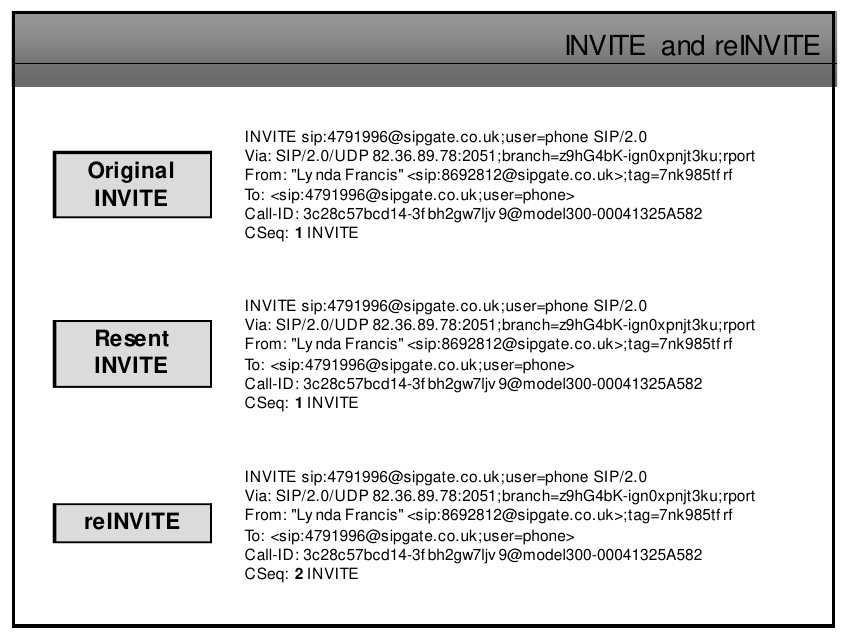
INVITE and reINVITE
In a SIP message, the type of message (e.g. INVITE, BYE, REGISTER, etc.) is specified in the first line, which is called the request line or status line. For example, in an INVITE message, the request line would start with "INVITE".
In the case of a re-INVITE message, it will also have the same request line format starting with "INVITE", but it will typically include additional headers such as "Call-ID", "From", "To", "CSeq" and "Max-Forwards". These headers provide information about the ongoing call session, allowing the recipient to identify it as a re-INVITE message and determine how to handle it appropriately.
It's also important to note that a re-INVITE message is always sent within an established SIP session and it typically contains a new SDP offer, which updates the media parameters of the session.
on the example below we can see the first 2 options are an Invite, to distinguish them we can look at the CSeq: number, they both are 1
the third attempt its a reINVITE as is using a different CSeq number.
In the next example, Alice sends two INVITEs with different branch IDs but the same CSeq number of 1 and 2 respectively. Bob can respond to each of these INVITEs with a different branch ID but the same CSeq number of 1 and 2 respectively.
After the call has been established, Alice sends a re-INVITE with a new branch ID and a CSeq number of 3 to
INVITE sip:[email protected] SIP/2.0
Via: SIP/2.0/UDP 192.0.2.2:5060;branch=z9hG4bK-1234-5678
Max-Forwards: 70
To: Bob <sip:[email protected]>
From: Alice <sip:[email protected]>;tag=8765
Call-ID: [email protected]
CSeq: 1 INVITE
Contact: <sip:[email protected]>
Content-Type: application/sdp
Content-Length: 123

v=0
o=- 123456 789012 IN IP4 192.0.2.2
s=SIP Call
c=IN IP4 192.0.2.2
t=0 0
m=audio 3456 RTP/AVP 0 8

INVITE sip:[email protected] SIP/2.0
Via: SIP/2.0/UDP 192.0.2.2:5060;branch=z9hG4bK-1234-5678
Max-Forwards: 70
To: Bob <sip:[email protected]>
From: Alice <sip:[email protected]>;tag=8765
Call-ID: [email protected]
CSeq: 1 INVITE
Contact: <sip:[email protected]>
Content-Type: application/sdp
Content-Length: 123

v=0
o=- 123456 789012 IN IP4 192.0.2.2
s=SIP Call
c=IN IP4 192.0.2.2
t=0 0
m=audio 3456 RTP/AVP 0 8

RE-INVITE sip:[email protected] SIP/2.0
Via: SIP/2.0/UDP 192.0.2.2:5060;branch=z9hG4bK-3456-7890
Max-Forwards: 70
To: Bob <sip:[email protected]>
From: Alice <sip:[email protected]>;tag=8765
Call-ID: [email protected]
CSeq: 3 RE-INVITE
Contact: <sip:[email protected]>
Content-Type: application/sdp
Content-Length: 123

v=0
o=- 123456 789012 IN IP4 192.0.2.2
s=SIP Call
c=IN IP4 192.0.2.2
t=0 0
m=audio 3456 RTP/AVP 0 8
No Comments