
RHCSA EX200 - VIM Survival kit LAB
- Creating, opening, and exiting a file
- Making simple change to a file
- Changing a system file
- Simple navigation
- Inserting, Copying and Deleting
- Undoing and redoing
- Saving and or exiting
- Resources for getting help
1. - Creating opening and exiting a file.
Open a new file typing vim on shell
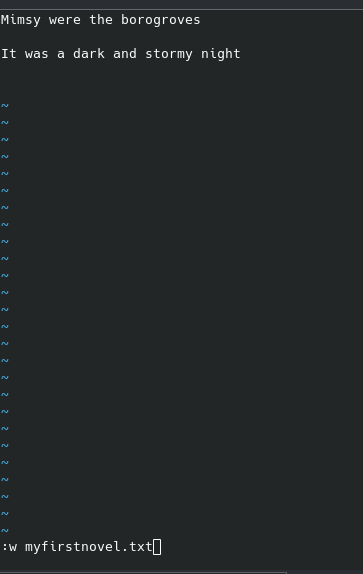
enter I to insert text, escape to go back to navigation mode then :w name to save the file name
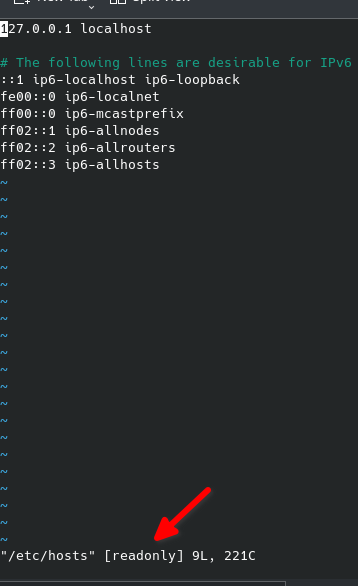
now if we try to edit a system file for example vim /etc/hosts we can look at the bottom this file is readonly
to exit a file without making changes you need to exit by hitting escape key then type q! this will exit and ignore any changes
2- Making simple changes to a file
Copy a random file to make changes, we choose help.txt from vim
cloud_user@ip-10-0-1-10:~$ cp /usr/share/vim/vim80/doc/help.txt ~/vimhelp.txt
cloud_user@ip-10-0-1-10:~$ ls
myfirstnovel.txt  vimhelp.txt
cloud_user@ip-10-0-1-10:~$
vim vimhelp.txt
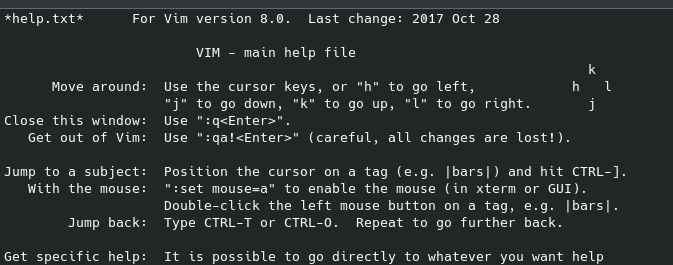
let s modify the VIM main help file
3.- Changing a system file
sudo -i vim /etc/hosts (will allow us to run the command as root.
add snowblower to the localhost
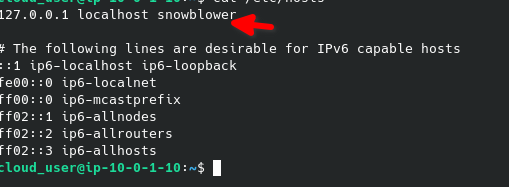
cloud_user@ip-10-0-1-10:~$ sudo -i vim /etc/hosts
cloud_user@ip-10-0-1-10:~$ grep snowblower /etc/hosts
127.0.0.1 localhost snowblower
cloud_user@ip-10-0-1-10:~$ ping -c 4 snowblower
PING localhost (127.0.0.1) 56(84) bytes of data.
64 bytes from localhost (127.0.0.1): icmp_seq=1 ttl=64 time=0.017 ms
64 bytes from localhost (127.0.0.1): icmp_seq=2 ttl=64 time=0.035 ms
64 bytes from localhost (127.0.0.1): icmp_seq=3 ttl=64 time=0.029 ms
64 bytes from localhost (127.0.0.1): icmp_seq=4 ttl=64 time=0.029 ms

--- localhost ping statistics ---
4 packets transmitted, 4 received, 0% packet loss, time 3055ms
rtt min/avg/max/mdev = 0.017/0.027/0.035/0.008 ms
4.- Simple Navigation
press w will take you forward one word, press b will take you backwards one word
now type / to search mode, search for Vim and hit enter it will take you to the first word that matches (capital wise) press n to go to the next one or shift n to go backwards.
5. - Inserting copying and deleting
o = insert a line below the cursor
dd = deletes a line
VA]1%Ex^
No Comments