# RHCSA EX200 - VIM Survival kit LAB

- Creating, opening, and exiting a file
- Making simple change to a file
- Changing a system file
- Simple navigation
- Inserting, Copying and Deleting
- Undoing and redoing
- Saving and or exiting
- Resources for getting help

##### 1. - Creating opening and exiting a file.

Open a new file typing vim on shell

enter I to insert text, escape to go back to navigation mode then :w name to save the file name
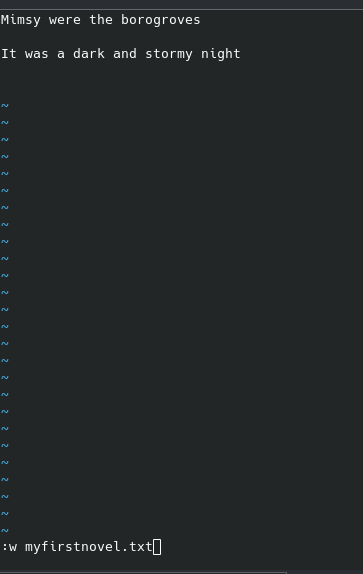
![image.png](https://wiki.tinod.net/uploads/images/gallery/2024-04/scaled-1680-/WkGOjCHasp63D1v6-image.png)

now if we try to edit a system file for example vim /etc/hosts we can look at the bottom this file is readonly
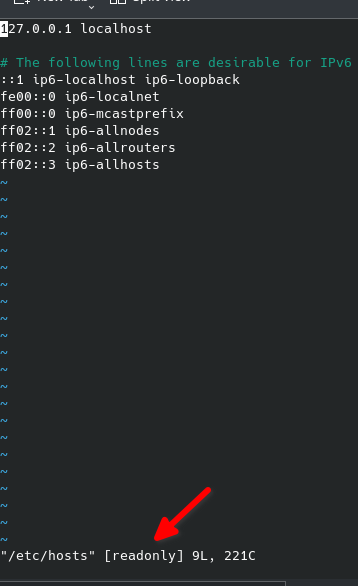
![image.png](https://wiki.tinod.net/uploads/images/gallery/2024-04/scaled-1680-/xCiVHZnpCuetPVzF-image.png)

to exit a file without making changes you need to exit by hitting escape key then type q! this will exit and ignore any changes

##### 2- Making simple changes to a file

Copy a random file to make changes, we choose help.txt from vim

```bash
cloud_user@ip-10-0-1-10:~$ cp /usr/share/vim/vim80/doc/help.txt ~/vimhelp.txt
cloud_user@ip-10-0-1-10:~$ ls
myfirstnovel.txt  vimhelp.txt
cloud_user@ip-10-0-1-10:~$ 

```

vim vimhelp.txt

[![image.png](https://wiki.tinod.net/uploads/images/gallery/2024-04/scaled-1680-/NXMsI4MQOAgfU48t-image.png)](https://wiki.tinod.net/uploads/images/gallery/2024-04/NXMsI4MQOAgfU48t-image.png)
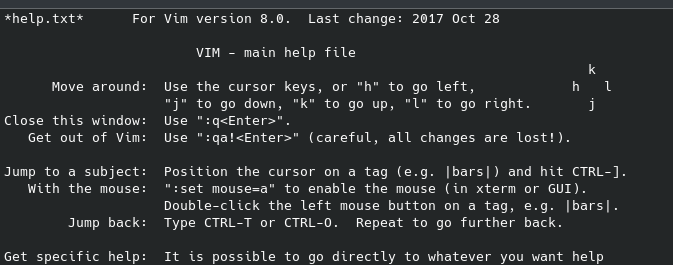
let s modify the VIM main help file

[![image.png](https://wiki.tinod.net/uploads/images/gallery/2024-04/scaled-1680-/PJuSWb4KW1X2jfY4-image.png)](https://wiki.tinod.net/uploads/images/gallery/2024-04/PJuSWb4KW1X2jfY4-image.png)
##### 3.- Changing a system file

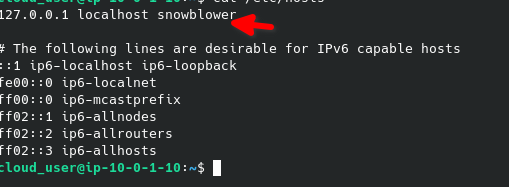
sudo -i vim /etc/hosts (will allow us to run the command as root.

add snowblower to the localhost

[![image.png](https://wiki.tinod.net/uploads/images/gallery/2024-04/scaled-1680-/aoX52uGFfjTlvpy7-image.png)](https://wiki.tinod.net/uploads/images/gallery/2024-04/aoX52uGFfjTlvpy7-image.png)
```bash
cloud_user@ip-10-0-1-10:~$ sudo -i vim /etc/hosts
cloud_user@ip-10-0-1-10:~$ grep snowblower /etc/hosts
127.0.0.1 localhost snowblower
cloud_user@ip-10-0-1-10:~$ ping -c 4 snowblower
PING localhost (127.0.0.1) 56(84) bytes of data.
64 bytes from localhost (127.0.0.1): icmp_seq=1 ttl=64 time=0.017 ms
64 bytes from localhost (127.0.0.1): icmp_seq=2 ttl=64 time=0.035 ms
64 bytes from localhost (127.0.0.1): icmp_seq=3 ttl=64 time=0.029 ms
64 bytes from localhost (127.0.0.1): icmp_seq=4 ttl=64 time=0.029 ms

--- localhost ping statistics ---
4 packets transmitted, 4 received, 0% packet loss, time 3055ms
rtt min/avg/max/mdev = 0.017/0.027/0.035/0.008 ms

```

##### <span style="font-family: monospace;">  
</span>

##### <span style="font-family: monospace;">4.- Simple Navigation</span>

<span style="font-family: monospace;">on navigation mode "gg" will take you to the top of the file, shift g will take you to the bottom of the file, for example if you wan to go to line 25 you type "25 gg" you can also go to the 50% of the line by typing "50 %"</span>

<span style="font-family: monospace;">press w will take you forward one word, press b will take you backwards one word</span>

<span style="font-family: monospace;">now type / to search mode, search for Vim and hit enter it will take you to the first word that matches (capital wise) press n to go to the next one or shift n to go backwards.</span>

##### <span style="font-family: monospace;">5. - Inserting copying and deleting</span>

<span style="font-family: monospace;">o = insert a line below the cursor</span>

<span style="font-family: monospace;">dd = deletes a line</span>

<span style="border-block: unset; border-inline: unset; border-start-start-radius: unset; border-start-end-radius: unset; border-end-start-radius: unset; border-end-end-radius: unset; overflow-inline: unset; overflow-block: unset; overscroll-behavior-inline: unset; overscroll-behavior-block: unset; margin-block: unset; margin-inline: unset; scroll-margin-block: unset; scroll-margin-inline: unset; padding-block: unset; padding-inline: unset; scroll-padding-block: unset; scroll-padding-inline: unset; inset-block: unset; inset-inline: unset; block-size: unset; min-block-size: unset; max-block-size: unset; inline-size: unset; min-inline-size: unset; max-inline-size: unset; contain-intrinsic-block-size: unset; contain-intrinsic-inline-size: unset; background: unset; background-blend-mode: unset; border: unset; border-radius: unset; box-decoration-break: unset; -moz-float-edge: unset; display: unset; position: fixed; float: unset; clear: unset; vertical-align: unset; baseline-source: unset; overflow: unset; overflow-anchor: unset; transform: unset; rotate: unset; scale: unset; translate: unset; offset: unset; scroll-behavior: unset; scroll-snap-align: unset; scroll-snap-type: unset; scroll-snap-stop: unset; overscroll-behavior: unset; isolation: unset; break-after: unset; break-before: unset; break-inside: unset; resize: unset; perspective: unset; perspective-origin: unset; backface-visibility: unset; transform-box: unset; transform-style: unset; transform-origin: unset; contain: unset; container: unset; appearance: unset; -moz-orient: unset; will-change: unset; shape-image-threshold: unset; shape-margin: unset; shape-outside: unset; touch-action: unset; -webkit-line-clamp: unset; scrollbar-gutter: unset; columns: unset; column-fill: unset; column-rule: unset; column-span: unset; content: unset; counter-increment: unset; counter-reset: unset; counter-set: unset; opacity: unset; box-shadow: unset; clip: rect(0px, 0px, 0px, 0px); filter: unset; backdrop-filter: unset; mix-blend-mode: unset; font: unset; font-synthesis: unset; font-palette: unset; visibility: unset; writing-mode: unset; text-orientation: unset; print-color-adjust: unset; image-rendering: unset; image-orientation: unset; dominant-baseline: unset; text-anchor: unset; color-interpolation: unset; color-interpolation-filters: unset; fill: unset; fill-opacity: unset; fill-rule: unset; shape-rendering: unset; stroke: unset; stroke-width: unset; stroke-linecap: unset; stroke-linejoin: unset; stroke-miterlimit: unset; stroke-opacity: unset; stroke-dasharray: unset; stroke-dashoffset: unset; clip-rule: unset; marker: unset; paint-order: unset; border-collapse: unset; empty-cells: unset; caption-side: unset; border-spacing: unset; color: unset; text-transform: unset; hyphens: unset; -moz-text-size-adjust: unset; text-indent: unset; overflow-wrap: unset; word-break: unset; text-justify: unset; text-align-last: unset; text-align: unset; letter-spacing: unset; word-spacing: unset; white-space: pre; text-shadow: unset; text-emphasis: unset; text-emphasis-position: unset; tab-size: unset; line-break: unset; -webkit-text-fill-color: unset; -webkit-text-stroke: unset; ruby-align: unset; ruby-position: unset; text-combine-upright: unset; text-rendering: unset; text-underline-offset: unset; text-underline-position: unset; text-decoration-skip-ink: unset; hyphenate-character: unset; forced-color-adjust: unset; -webkit-text-security: unset; cursor: unset; pointer-events: unset; -moz-user-input: unset; -moz-user-modify: unset; -moz-user-focus: unset; caret-color: unset; accent-color: unset; color-scheme: unset; scrollbar-color: unset; list-style: unset; quotes: unset; margin: unset; overflow-clip-margin: unset; scroll-margin: unset; outline: unset; outline-offset: unset; page: unset; padding: unset; scroll-padding: unset; top: 0px; right: unset; bottom: unset; left: unset; z-index: unset; flex-flow: unset; place-content: unset; place-items: unset; flex: unset; place-self: unset; order: unset; width: unset; min-width: unset; max-width: unset; height: unset; min-height: unset; max-height: unset; box-sizing: unset; object-fit: unset; object-position: unset; grid-area: unset; grid: unset; gap: unset; aspect-ratio: unset; contain-intrinsic-size: unset; vector-effect: unset; stop-color: unset; stop-opacity: unset; flood-color: unset; flood-opacity: unset; lighting-color: unset; mask-type: unset; clip-path: unset; mask: unset; x: unset; y: unset; cx: unset; cy: unset; rx: unset; ry: unset; r: unset; d: unset; table-layout: unset; text-overflow: unset; text-decoration: unset; ime-mode: unset; scrollbar-width: unset; user-select: text; -moz-window-dragging: unset; -moz-force-broken-image-icon: unset; transition: unset; animation: unset; animation-composition: unset; -moz-box-align: unset; -moz-box-direction: unset; -moz-box-flex: unset; -moz-box-orient: unset; -moz-box-pack: unset; -moz-box-ordinal-group: unset;">VA\]1%Ex^</span>