Create a skill expression group
Step-by-Step:
Lab: CreatingCreate a Skill Expression Group
NavigateBook: toGenesys Groups:Cloud GoHow-To to→ Groups, Users & Roles
Reference page: Groups (People & Permissions) — Chapter 2: People & Access
Navigation: Admin >→ Directory >→ Groups.Groups Access Skill Expressions:
Click on the→ Skill Expression tab
Before You Start
Requirement
Why
ACD Skills must already exist in the org
You can only build expressions against skills that have been created
Skills must be assigned to at least some users
Otherwise the group will populate empty
Division decided
You cannot change a group's division after creation
Step 1: Navigate to Groups
- Click Admin
- Under Directory, click Groups
Step 2: Access Skill Expressions
- Click the Skill Expression tab (
located next to the General tab).tab at the top of the Groups page)
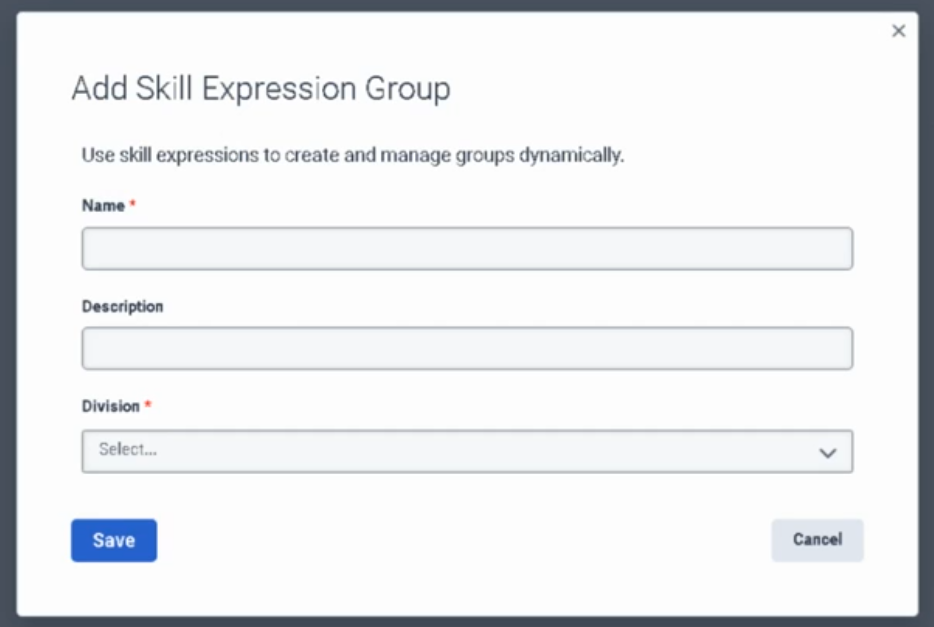
- Click Add Skill Expression
Group.Group
Step 3: Basic Configuration:Configuration
Name:
Type
a
clearField
Notes
Name
Clear, descriptive name (e.g., "Level 3 VoIP Engineers).Engineers", Description:"Spanish (Optional)Bilingual ExplainAgents")
Description
Optional — explain the purpose.purpose Division:or the skill logic being used
Division
Select the division this group belongs to.to
Click Save.Save.
Step 4: Build the Skill Expression Logic
(
- You are now on the group's Membership
Tab):tab
- On the right
side of the Membership tab,side, click Build Skill Expression.Expression
- Click Add to create your first
condition.condition
Step 5: Define the Criteria:First SelectCondition
Skill:For each condition, configure three fields:
Field
Options
Skill
Type the name of the ACD skill name (e.g., SIP"SIP", or"Spanish", Troubleshooting)."Troubleshooting")
Operator:
Choose
aOperator
relational operator:
== (Equal to)to / > (Greater than)than / >= (Greater than or equal to)to
Skill Level:Level
Select the proficiencyProficiency level (1–5).5
Optional:
Example: Spanish >= 3 → includes all agents with Spanish skill at level 3, 4, or 5
Step 6: Add Complexity:
Click Add again to include a sub-conditionSub-Conditions (usingOptional)
AND/OR logic) if you want toTo filter by multiple skills.skills:
Finalize:
- Click
Save.Add again to add another condition
- Choose the logical connector:
- AND — agent must meet all conditions
- OR — agent must meet at least one condition
- Define the additional skill, operator, and level
Example multi-condition expression:
Spanish >= 3
AND
SIP >= 2
→ Only agents who have Spanish level 3+ AND SIP level 2+ are included
Example OR expression:
French >= 2
OR
Spanish >= 2
→ Agents who speak either French or Spanish at level 2+ are included
Step 7: Save
Click Save.
The group will now automatically populate with anyall agents whowhose haveACD thoseskill assignments match the expression. No manual member management required.
What Happens After Saving
- Membership updates approximately 1 minute after any agent's skills change
- New agents assigned the matching skills are automatically added
- Agents whose skills drop below the threshold are automatically removed
- Membership is read-only — you cannot manually add or remove members from a Skill Expression Group
Key Limits (Reference)
Limit
Value
Max Skill Expression Groups per org
300
Max primary conditions per group
10
Max sub-conditions per primary condition
10
Troubleshooting
Issue
Check
Group shows no members
Verify the ACD skill name is spelled exactly as configured; verify agents have the skill assigned at the correct level
Group not updating after skill change
Wait ~1 minute; skill expression groups do not update instantly
Cannot find skill in expression builder
The skill may not exist yet — create it first under Admin → Contact Center → ACD Skills
Cannot manually add a member
Expected behaviour — Skill Expression Groups are fully automatic; use a General Group if you need manual control
See Also
- Groups (People & Permissions) — full reference including group types, limits, and general group creation
- Lab: Create a Queue — assigning skill expression groups to queues as members
- User Profile Management — where ACD Skills are assigned to
theirindividual profile.agents