Sentiment Feedback
Sentiment Feedback (Genesys Cloud Quality & Performance Management)
| Section |
Description |
| Module Context |
Part of Quality Management /→ Speech & Text Analytics /within Workforce Engagement Management (WEM) |
| Admin Location |
Admin → Quality → Sentiment Feedback |
| Purpose |
Allows administrators to correct or improve sentiment classification errors used byin Speech & Text Analytics by labeling phrases as Positive, Negative,Neutral, or NeutralNegative, improving automated sentiment detection accuracy |
Sentiment Feedback improvesis used to improve the accuracymachine of automatedlearning sentiment analysismodel withinthat Genesysevaluates Cloud.transcripts Whenproduced by Speech & Text AnalyticsAnalytics. misclassifiesWhen phrasesthe orsystem context,misinterprets emotional tone in a conversation, administrators can manually add phrasesa phrase and assign the correct sentiment label.classification.
These corrections helpinfluence train the system to produce more accuratefuture sentiment analysis results inand futurehelp conversation analysis.
Sentiment Feedback affectsimprove transcripttopic sentimentdetection, scoring, topicinteraction insights, and analytics dashboardsreporting.
Summary Table
| Attribute |
Details |
| Feature Area |
Speech & Text Analytics |
| Primary Function |
Improve sentiment classification accuracy |
| Data Source |
Interaction transcripts |
| Supported Channels |
Voice (transcribed), Chat, Messaging, Email |
| Sentiment Labels |
Positive / Neutral / Negative |
| Dialect Context |
Sentiment phrases are tied to a language dialect used by speech analytics models |
| Typical Users |
Quality administrators, analytics administrators |
| Dependency |
Speech & Text Analytics must be enabled |
Study Notes
| Topic |
Explanation |
| Sentiment Analysis |
AutomatedAutomatic evaluationclassification of emotional tone inwithin interactionsconversations |
| Sentiment Feedback |
Manual correction of sentiment interpretationdetection errors |
PhrasePhrase-Based LabelingOverrides |
AssigningAdministrators add phrases that override default sentiment classification to specific phrases |
Sentiment Model Tuning |
Improving analytics accuracy by providing feedback |
Transcript ContextDependency |
Sentiment feedback only applies to phrasesinteractions appearing inwith transcripts |
| Dialect Awareness |
Phrases must match the speech analytics dialect model used during transcription |
| Analytics Impact |
Changes influence future sentiment scoring and analytics dashboards |
Key behavior:concepts:
- Sentiment feedback improves the accuracy of automated sentiment
detectionscoring.
AdministratorsPhrases canare label phrases asapplied Positive,per Neutral,dialect, orensuring Negative.correct language interpretation.- Corrections
influenceapply to future analytics and transcript evaluation.
Feedback applies to Speech & Text Analytics pipelinesprocessing.- Sentiment feedback
supportshelps continuous improvement ofrefine analytics accuracyused for CX insights and coaching.
Navigation
| Task |
Navigation |
| Open Sentiment Feedback |
Admin → Quality → Sentiment Feedback |
| Add new sentiment phrase |
Admin → Quality → Sentiment Feedback → Add Phrase |
Edit phrase sentiment |
Admin → Quality → Sentiment Feedback → Edit |
RemoveDelete phrase feedback |
Admin → Quality → Sentiment Feedback → Delete |
ViewReview transcript sentiment |
Performance → Workspace → Interactions |
Configuration Fields (UI Form Fields)
Sentiment Feedback Main Page
| UI Field |
Description |
RealOptions Options/ Behavior |
Search Phrase |
Search existing phrases |
Text field |
| Phrase List |
Displays phrases configured for sentiment feedback |
Read-only |
| Sentiment Label |
DisplaysShows sentiment classification assigned sentimentto categoryphrase |
Positive / Neutral / Negative |
| Dialect |
Dialect the phrase applies to |
Example: English – United States |
| Created By |
Displays userUser who created thephrase phraseentry |
Read-only |
| Created Date |
DateTimestamp feedbackof wasphrase createdcreation |
Read-only |
| Search |
Search for phrases in list |
Text field |
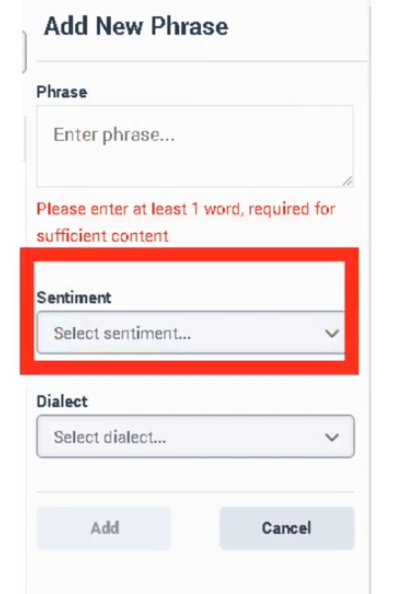
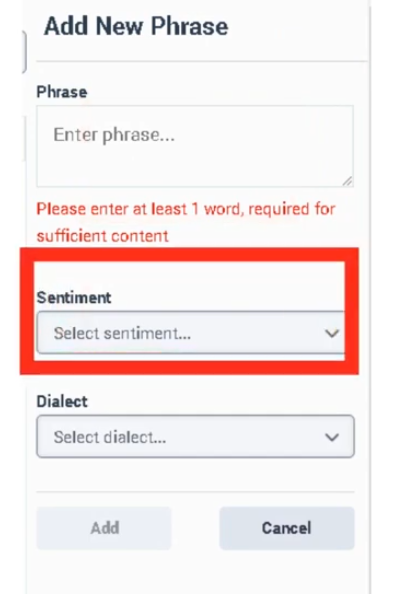
| Add Phrase |
Opens form to add phrase sentimentcreation feedbackform |
Button |
| Edit |
ModifyEdit phrase sentiment labelconfiguration |
Button |
| Delete |
Remove phrase from feedbacksentiment list |
Button |
| Refresh |
RefreshReload phrase list |
Button |
| UI Field |
Description |
Real Options |
| Phrase |
Phrase usedappearing in transcripts |
Text fieldinput |
| Sentiment |
Sentiment classificationassigned to phrase |
Positive / Neutral / Negative |
LanguageDialect |
LanguageSpeech contextanalytics dialect model used for phrase interpretation |
Example options: English – United States / English – United Kingdom / Spanish /– FrenchSpain / GermanSpanish – Mexico / Portuguese – Brazil |
| Description |
Optional notesnote explainingdescribing feedbackreason for classification |
Text fieldinput |
| Save |
Save phrase feedbackconfiguration |
Button |
| Cancel |
CancelDiscard creationchanges |
Button |
Tabs, Toggles, Dropdowns, andAction Actions
Buttons
| UI Element Type |
Item |
Tabs / Pages |
Sentiment Feedback page |
| Text Fields |
Phrase, Description |
| Dropdowns |
Sentiment classification | classification,
Text Fields |
Phrase / DescriptionDialect |
| Buttons |
Add PhrasePhrase, /Save, SaveCancel, /Edit, Cancel / Edit / Delete /Delete, Refresh |
Note: No toggles are documented for Sentiment Feedback in the admin UI.
Dependencies
| Component |
Purpose |
| Speech & Text Analytics |
Generates transcripts used for sentiment evaluationanalysis |
| Interaction Recording |
Required for voice interactiontranscript transcriptiongeneration |
| Topics |
Sentiment maycan be usedcorrelated inwith topic-level analyticstopics |
| Programs |
UseTopics topics and sentiment insightsgrouped for reportinganalytics programs |
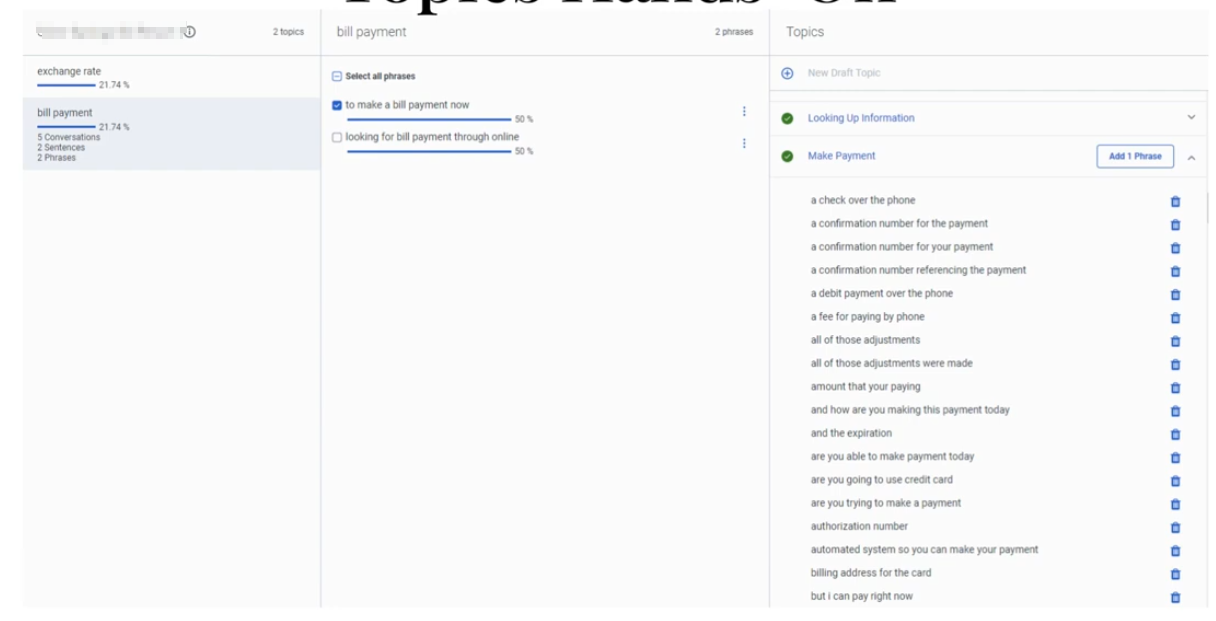
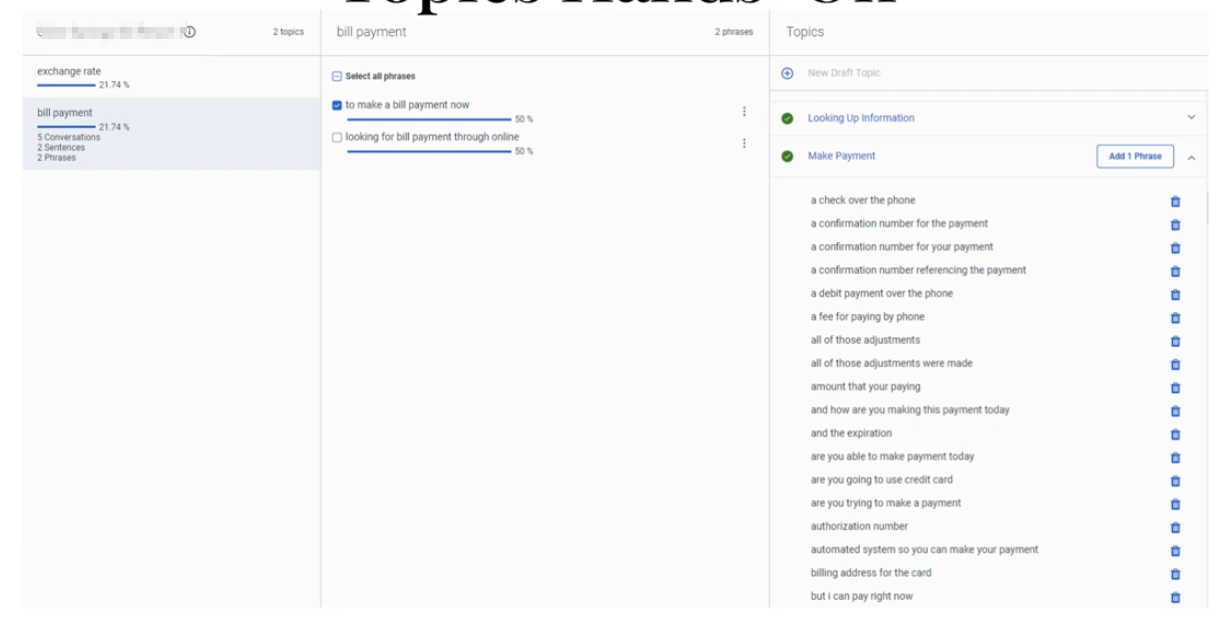
| Topic Miner |
DiscoversDetects candidate phrases usedfor insentiment conversationsfeedback |
| Language Models |
Dialect-specific transcription models |
| Component |
Relationship |
| Speech & Text Analytics |
PrimaryProvides systemtranscript performingand sentiment analysis engine |
| Topics |
Sentiment trends can beoften analyzed alongside topics |
| Programs |
Topic-basedTopic groups used in analytics reportingdashboards |
| Topic Miner |
Identifies phrases toadministrators potentiallymay classify |
| Interaction Analytics |
Displays sentiment scoringmetrics |
API
Integration
Examples
APIIntegration |
Use CaseDescription |
Notifications API |
Trigger workflows when conversation analytics updates occur |
| Analytics API |
Retrieve sentiment metrics programmaticallyfor dashboards |
| Notifications API |
Subscribe to interaction lifecycle events to trigger external analytics processing |
| Conversations API |
AccessRetrieve transcript data programmatically |
Example integration workflow:
Customer Interaction
↓
Speech Analytics Transcript
↓
Sentiment Analysis
↓
Sentiment Feedback Overrides
↓
Analytics API retrieves results
↓
External dashboard updated
| Topic |
Description |
| Speech & Text Analytics |
Core analytics engine |
| Topic Miner |
Discover phrases in transcripts |
| Topics |
Phrase detection logic |
| Programs |
Topic grouping for analytics |
| Evaluation Forms |
Agent performance scoring |
Implementation Checklist
| Task |
Status |
| Enable Speech & Text Analytics |
☐ |
| Confirm transcript generation |
☐ |
| Verify correct dialect configuration |
☐ |
| Review sentiment accuracy |
☐ |
| Identify misclassified phrases |
☐ |
| Add sentiment feedback entries |
☐ |
| Validate improved sentiment detection |
☐ |
Implementation Guide
| Step |
Action |
| Step 1 |
Enable Speech & Text Analytics |
| Step 2 |
Confirm transcripts are generated |
| Step 3 |
Review interactions for sentiment misclassification |
| Step 4 |
Navigate to Sentiment Feedback |
| Step 5 |
Click Add Phrase |
| Step 6 |
Enter phrase and select correct dialect |
| Step 7 |
Assign sentiment classification |
| Step 8 |
Save configuration |
How to Implement
| Phase |
Description |
| Analytics Monitoring |
Monitor sentiment results in transcripts |
| Error Identification |
Detect incorrect sentiment classification |
| Phrase Feedback |
Add phrase classification using correct dialect |
| Validation |
Monitor analytics improvements |
Workflow
Customer Interaction
↓
Interaction Recording
↓
Speech-to-Text Transcription
↓
Speech Analytics Sentiment Engine
↓
Admin Detects Incorrect Sentiment
↓
Sentiment Feedback Phrase Added (Dialect-specific)
↓
Future transcripts classified correctly
Architecture Diagram
Customer Interaction
↓
Recording Engine
↓
Speech-to-Text Processing
↓
Transcript Storage
↓
Speech & Text Analytics
├ Sentiment Analysis
└ Topic Detection
↓
Sentiment Feedback Phrase Overrides
↓
Analytics Dashboard
Real Flow Scenarios
Scenario 1 – Correcting Positive Sentiment
Customer says: "Thank you for resolving my issue"
↓
System labels phrase as Neutral
↓
Admin adds phrase with Positive sentiment
↓
Future interactions labeled Positive
Scenario 2 – Detecting Customer Frustration
Customer says: "This service is terrible"
↓
Transcript generated
↓
Sentiment engine detects negative tone
↓
Analytics dashboard flags interaction
Usage Scenarios
| Scenario |
Description |
| Customer satisfaction monitoring |
Improve sentiment accuracy |
| Product issue detection |
Identify negative feedback |
| Agent coaching |
Understand customer reactions |
| CX analytics |
Track sentiment trends |
Implementation Examples
| Example |
Configuration |
| Support center |
Add satisfaction phrases |
| Billing queue |
Label complaint phrases |
| Sales queue |
Label positive purchase indicators |
Design Example
Inbound Customer Call
↓
Speech Analytics Transcript
↓
Sentiment Classification
↓
Admin Reviews Transcript
↓
Sentiment Feedback Added
↓
Improved Analytics Accuracy
Best Practices
| Practice |
Reason |
| Add phrases tied to correct dialect |
Prevent incorrect language interpretation |
| Focus on high-frequency phrases |
Improve model quickly |
| Review sentiment dashboards regularly |
Detect classification issues |
| Combine sentiment with topics |
Improve context understanding |
Naming Convention
| Resource |
Example |
| Phrase Classification |
Positive_Service_Resolution |
| Phrase Classification |
Negative_Billing_Issue |
Naming pattern:
<Sentiment>_<Context>
Security Considerations
| Control |
Description |
| Role-based access |
Restrict configuration to administrators |
| Transcript privacy |
Protect sensitive conversation data |
| Data retention policies |
Control transcript storage |
| Encryption |
Protect stored transcripts |
Notifications
APILimitations Example/ UseConstraints
Case
A
developer
canConstraint |
subscribeDescription |
to
conversation
events
to
triggerSentiment categories |
Positive / Neutral / Negative |
| Requires transcripts |
Speech analytics workflows.must Examplebe pattern:
enabled |
| Context sensitivity |
Phrase sentiment may vary by context |
| Dialect dependence |
Phrase must match configured dialect |
Troubleshooting
| Issue |
Cause |
Resolution |
| Sentiment incorrect |
Phrase not defined |
Add sentiment feedback |
| Phrase not matching |
Dialect mismatch |
Select correct dialect |
| No transcripts available |
Speech analytics disabled |
Enable transcription |
| Analytics unchanged |
Phrase not used in transcripts |
Verify phrase frequency |
Interview Cheat Sheet
| Question |
Answer |
| What is Sentiment Feedback? |
Manual correction of sentiment classification |
| Where is it configured? |
Admin → Quality → Sentiment Feedback |
| What labels exist? |
Positive, Neutral, Negative |
| What additional parameter is required? |
Dialect |
| What dependency is required? |
Speech & Text Analytics |
Key Takeaways
| Topic |
Summary |
| Sentiment Feedback |
Improves automated sentiment detection |
| Phrase Overrides |
Admins classify phrases manually |
| Dialect Support |
Phrases must match speech analytics dialect |
| Speech Analytics |
Provides transcripts used for analysis |
| Continuous Improvement |
Feedback improves analytics accuracy |
Screenshots