
Scheduling & Schedule Groups
What Is Scheduling?
A Schedule defines a window of time — a date, time range, or recurring event — that Architect and Call Routing use to decide which flow runs. A Schedule Group bundles multiple schedules into a single routing definition with Open, Closed, and Holiday categories.
Together they answer the question: "Is it business hours right now?"
Schedules vs. Schedule Groups
| Object | What It Does |
|---|---|
| Schedule | Defines a single time window (e.g., Mon–Fri 8am–6pm, or Dec 25 all day) |
| Schedule Group | Bundles schedules into Open / Closed / Holiday categories — used by Call Routes and Architect flows |
✅ Always build individual Schedules first, then assemble them into a Schedule Group.
Schedule Components
| Field | Description |
|---|---|
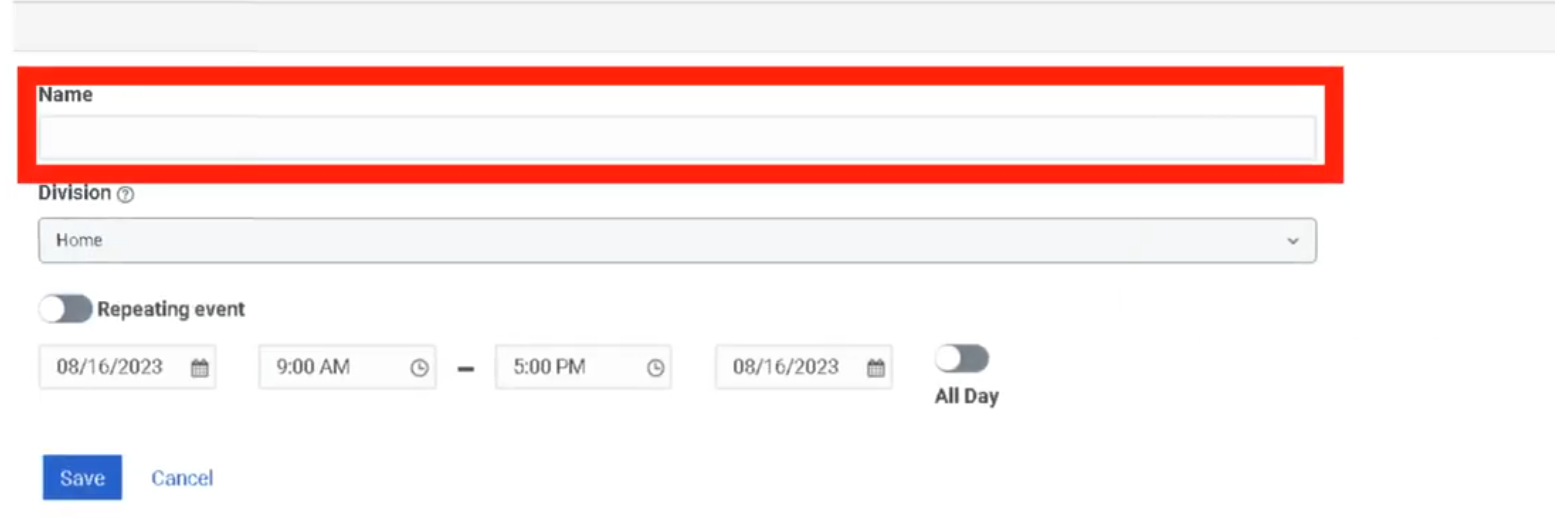
| Name | Unique identifier — no spaces recommended for flow references |
| Division | Administrative ownership |
| Repeating Event | Off = one-time only; On = recurring |
| Start / End Date | Date bounds for the schedule |
| Start / End Time | Time window; or use All Day |
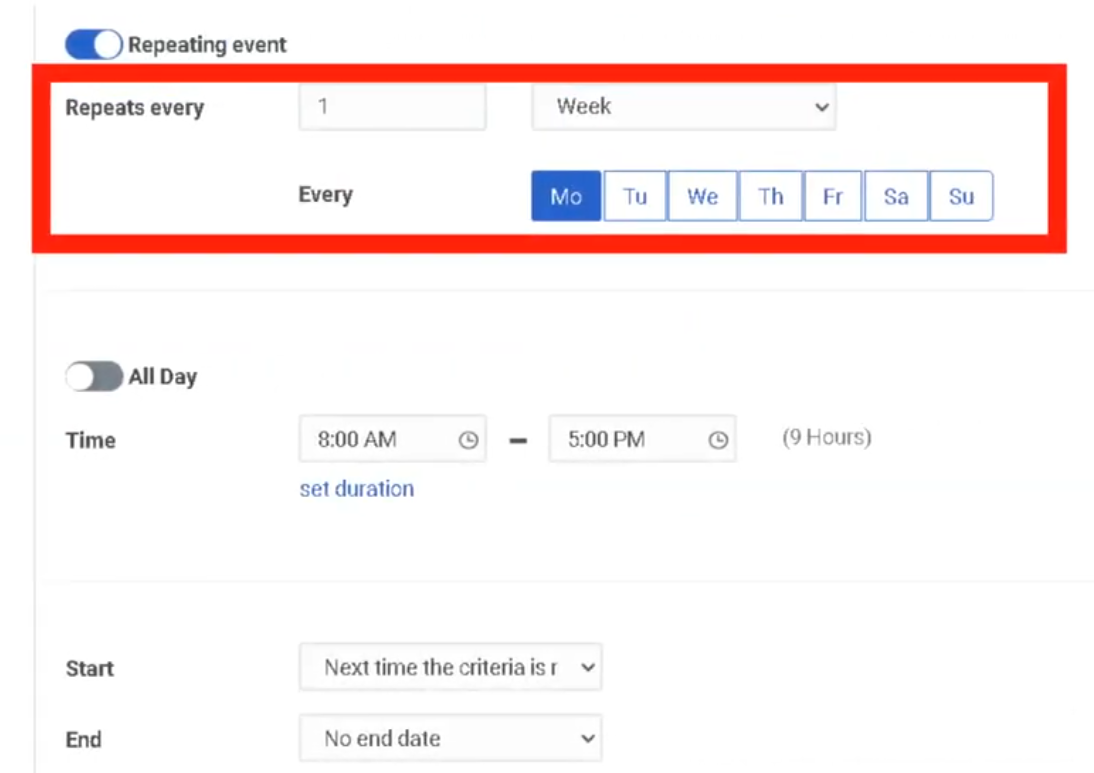
| Recurrence Rule | How often it repeats (Daily, Weekly, Monthly, Yearly, Custom iCal) |
| Start Condition | On Date, or Next Time Criteria Met |
| End Condition | No End Date, After N Occurrences, or On Date |
Recurrence Types
| Type | Use Case |
|---|---|
| One-Time | Single maintenance window, one-off closure |
| Daily | Every day, or every N days |
| Weekly | Selected weekdays (e.g., Mon–Fri) |
| Monthly | Specific day of month or weekday pattern |
| Yearly | Annual holidays (e.g., Dec 25 every year) |
| Custom iCal Rule | Advanced recurrence syntax |
iCal example — Monday through Friday:
FREQ=WEEKLY;BYDAY=MO,TU,WE,TH,FR
Creating a Schedule
- Admin → Routing → Scheduling
- Click Add Schedule
- Enter a unique Schedule Name and select Division
- Toggle Repeating Event On or Off
- Set Start Date and Start / End Time (or check All Day)
- If repeating: configure recurrence type, start condition, and end condition
- Click Save

Schedule Groups
Components
| Field | Description |
|---|---|
| Name | Unique identifier |
| Division | Administrative ownership |
| Time Zone | All schedule evaluations use this time zone — critical for accuracy |
| Open Hours | Schedules representing business hours |
| Closed Hours | Schedules representing after-hours |
| Holiday | Holiday / special closure schedules |
⚠️ Time zone is the most common misconfiguration. A schedule group set to the wrong time zone will route calls incorrectly — especially after Daylight Saving Time transitions. Always align the time zone to the business location the group serves.
Creating a Schedule Group
- Admin → Routing → Scheduling → click Schedule Groups tab
- Click Add Schedule Group
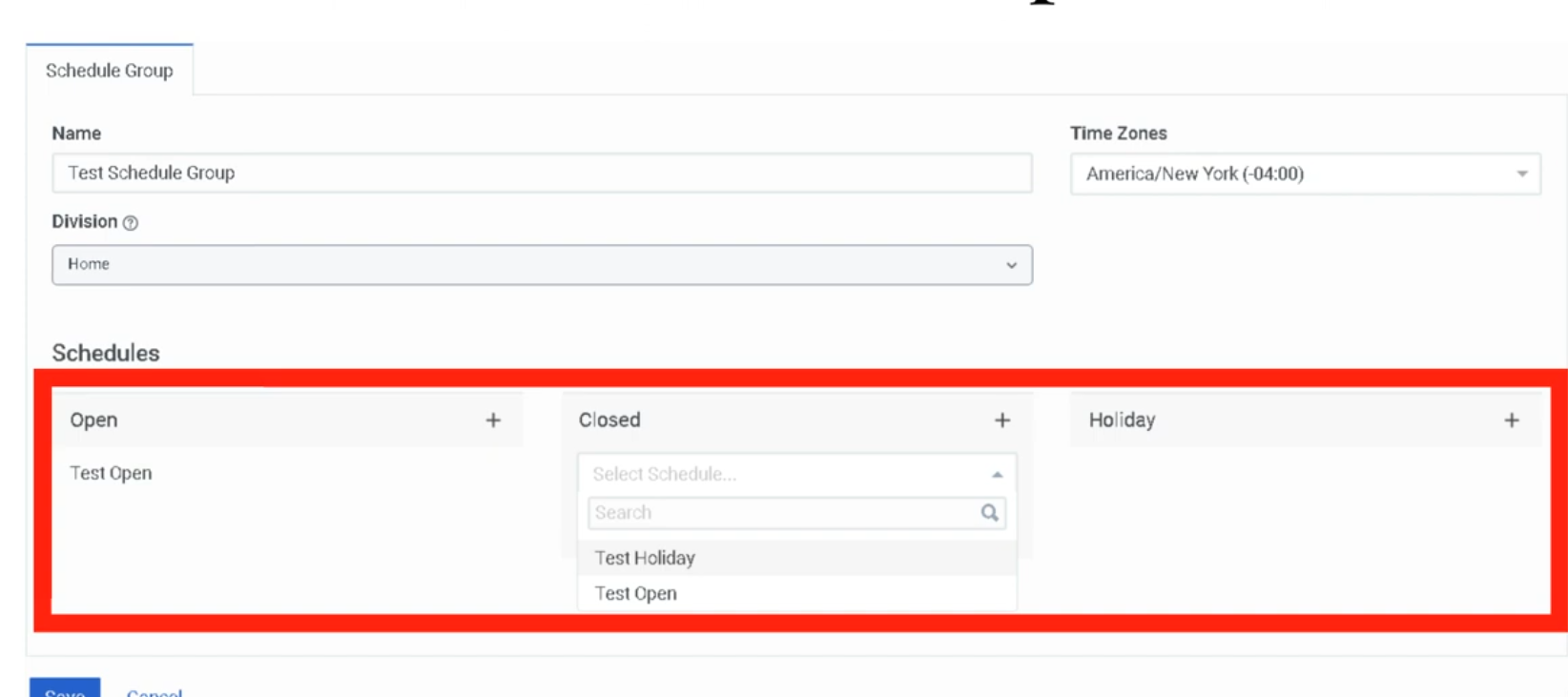
- Enter name, select division, and select time zone
- Assign schedules to each category:
- Click + beside Open Hours → search and select schedule → click Add
- Repeat for Closed Hours and Holiday as needed
- Click Save
How Schedule Groups Work in Routing
In Call Routing (Admin → Routing → Call Routing)
The Call Route references a Schedule Group directly:
- Open Flow — executes when schedule group evaluates to Open
- Closed Flow — executes when schedule group evaluates to Closed
- Holiday Flow — executes when a Holiday schedule is active (optional — can fall back to Closed Flow)
In Architect Flows
Use the Evaluate Schedule Group action inside a flow to branch on Open / Closed / Holiday logic — useful when routing decisions need to happen mid-flow rather than at the entry point.
Routing Decision Logic
Incoming Call
      ↓
Call Route checks Emergency Group
      ↓
No emergency active →
      ↓
Schedule Group evaluated
      ↓
┌─────────────┬───────────────┬──────────────┐
│   Open      │   Closed      │   Holiday    │
│   Flow      │   Flow        │   Flow       │
└─────────────┴───────────────┴──────────────┘
Common Schedule Patterns
| Pattern | Schedule Setup |
|---|---|
| Mon–Fri 8am–6pm business hours | Weekly recurrence, Mon–Fri, 08:00–18:00 → assign to Open Hours |
| After-hours (everything outside Open) | No explicit closed schedule needed — anything not matching Open = Closed |
| All US federal holidays | Create one yearly schedule per holiday → assign all to Holiday |
| Holiday with custom message | Assign holiday schedules to Holiday category; build a dedicated Holiday Flow in Architect |
| Maintenance window (one-time) | One-Time schedule, specific date/time → assign to Closed Hours |
Naming Conventions
| Format | Example |
|---|---|
<Region>_<Dept>_BusinessHours |
US_Support_BusinessHours |
<Region>_<Dept>_Holiday_<Name> |
US_Support_Holiday_Christmas |
<Region>_<Dept>_Maintenance |
EU_Support_Maintenance |
<Region>_<Dept>_ScheduleGroup |
US_Support_ScheduleGroup |
Troubleshooting
| Issue | Likely Cause | Fix |
|---|---|---|
| Calls routing to wrong flow | Time zone mismatch on schedule group | Verify schedule group time zone matches business location |
| Schedule not triggering | Recurrence rule misconfigured | Review start/end conditions and recurrence settings |
| Calls always treated as closed | Schedule group not assigned to call route | Edit call route and assign the schedule group |
| Holiday routing not working | Holiday schedules not assigned to Holiday category | Move holiday schedules to the Holiday slot in the group |
| DST-related routing errors | Time zone does not observe DST automatically | Use a named time zone (e.g., America/Chicago) not a UTC offset |
Key Facts for Exam / Interview
| Topic | Answer |
|---|---|
| Where are schedules configured? | Admin → Routing → Scheduling |
| What is a schedule group? | A container combining Open, Closed, and Holiday schedules into a routing definition |
| What evaluates the schedule group in a flow? | The Evaluate Schedule Group action in Architect |
| Can you have multiple open schedules in one group? | Yes — multiple schedules can be assigned to Open Hours |
| What handles routing outside Open Hours? | The Closed Flow — no explicit closed schedule is required |
| What overrides schedule-based routing entirely? | An active Emergency Group |
See Also
- Emergency Groups — overrides all schedule-based routing when activated
- Call Routing — where schedule groups are assigned to inbound numbers
- Architect Overview — the Evaluate Schedule Group action in flow logic