Certificate Authorities
Navigation: Admin → Telephony → Certificate Authorities
Last verified: Genesys Cloud Resource Center — March 2026
What Are Certificate Authorities?
Certificate Authorities (CAs) in Genesys Cloud are used to manage trusted digital certificates for secure TLS connections in telephony. Genesys supports two certificate types: Managed and Remote.
⚠️ This page applies primarily to BYOC Premises deployments. For BYOC Cloud TLS trunk configuration, refer to the BYOC Cloud TLS trunk transport documentation instead.
Certificate Types
| Type |
Who Manages It |
Purpose |
Editable? |
| Managed |
Genesys |
Creates trusted TLS connections for the Edge and managed phones; allows remote SIP devices to trust secure connections to external trunks connected to the Edge |
No — cannot be added, edited, or deleted |
| Remote |
Customer (you) |
Imported CA that allows the Edge to trust a remote TLS endpoint such as an SBC or PBX |
Yes — can be added, edited, and deleted |
ℹ️ There is only one managed certificate per organization. Genesys maintains it automatically.
Navigation
| Task |
Path |
| Open Certificate Authorities |
Admin → Telephony → Certificate Authorities |
| Add remote certificate authority |
Certificate Authorities → Add |
| Edit remote certificate authority |
Certificate Authorities → select entry → Edit |
| Delete remote certificate authority |
Certificate Authorities → select entry → Delete |
Required permission: Telephony > Plugin > All
Adding a Remote Certificate Authority
| Step |
Action |
| Step 1 |
Navigate to Admin → Telephony → Certificate Authorities |
| Step 2 |
Click Add |
| Step 3 |
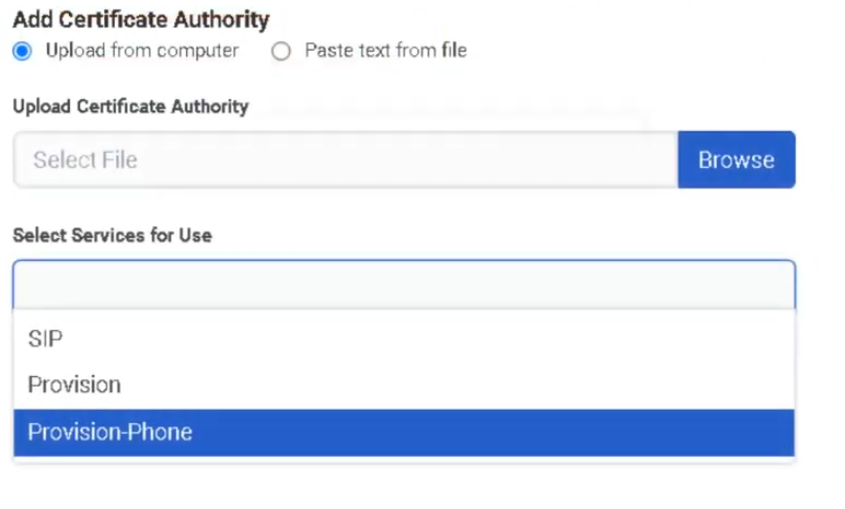
Choose import method: Upload from computer or Paste text from a file |
| Step 4 |
Upload the .crt file or paste the certificate text |
| Step 5 |
In Select Service for Use, choose the appropriate telephony service(s) |
| Step 6 |
Click Save Certificate Authority |
| Step 7 |
Test the secure TLS connection to the remote endpoint |
UI Fields
| Field |
Description |
| Type column |
Identifies whether the CA is Managed or Remote |
| Common Name |
Certificate authority common name |
| Add Certificate Authority |
Import method selector — Upload from computer or Paste text from a file |
| Browse |
Opens file browser to locate the .crt file |
| Enter Your Certificate Authority |
Text box for pasted certificate contents |
| Select Service for Use |
Associates the CA with one or more telephony services |
| Save Certificate Authority |
Saves the new or edited remote CA |
Key Rules
| Rule |
Detail |
| Managed CAs are read-only |
Cannot be added, edited, or deleted |
| Remote CAs are fully manageable |
Add, edit service associations, or delete as needed |
| Supported import formats |
.crt file upload or pasted certificate text |
| BYOC Premises scope |
This feature area is for BYOC Premises; BYOC Cloud has its own TLS trunk documentation |
When to Use a Remote Certificate Authority
| Situation |
Action |
| BYOC Premises Edge must trust a remote SBC or PBX TLS endpoint |
Import remote CA |
| Remote carrier presents a certificate signed by an internal/private CA |
Import remote CA |
| Managed phones require trusted TLS |
Use the Genesys-managed CA — no action needed |
| BYOC Cloud TLS trunk setup |
Do NOT use this page — use BYOC Cloud TLS trunk transport documentation |
Troubleshooting
| Issue |
Cause |
Resolution |
| Remote TLS endpoint not trusted |
Required remote CA not imported |
Import the correct CA and assign service usage |
| Cannot edit certificate authority |
Selected CA is of type Managed |
Managed CAs are read-only — only Remote CAs can be edited |
| Service still fails after import |
Wrong certificate or wrong service association |
Recheck the certificate chain and selected service(s) |
| Admin cannot access CA management |
Missing permission |
Grant Telephony > Plugin > All |
| Used wrong workflow for BYOC Cloud |
This page is for BYOC Premises |
Use the BYOC Cloud TLS trunk transport documentation instead |
Quick Reference
| Question |
Answer |
| What two certificate types exist? |
Managed and Remote |
| Who manages the Managed CA? |
Genesys |
| What is a Remote CA used for? |
Allows the Edge to trust a remote TLS endpoint |
| How can a remote CA be imported? |
Upload from computer or paste text from a file |
| Can Managed CAs be edited? |
No |
| Does this apply to BYOC Cloud? |
No — BYOC Cloud has its own TLS trunk documentation |
See Also
Screenshots

Create New