
2. - SBC physical and network interfaces
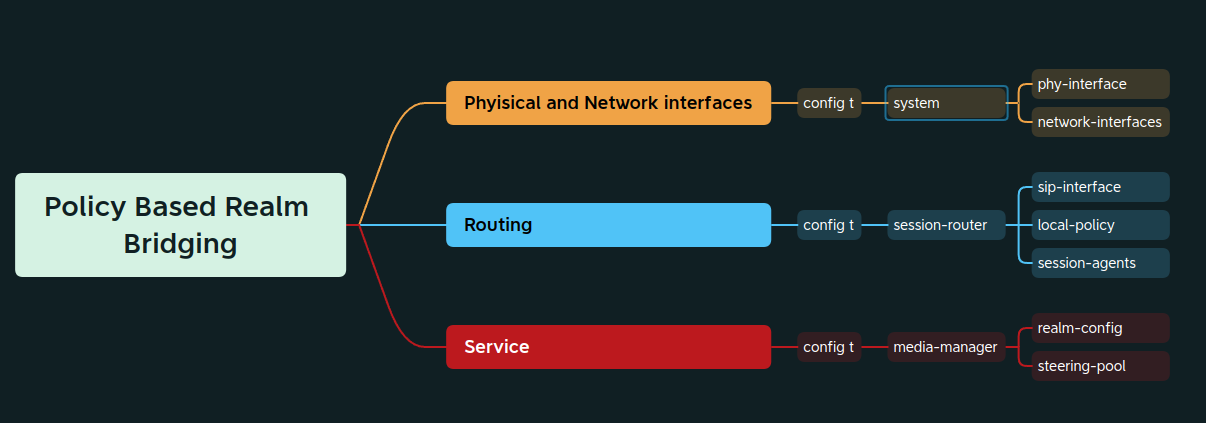
Oracle SBCs have dedicated interfaces to be used for signaling and media, those interfaces are defined as sXpX when listing the interfaces. As defined in the first entry two interfaces will be created and configured dedicating one for internal (s0p0) communication and the other for external (s1p1) communication.
The first step is set up a physical interface: s1p1 (slot 1 port 1)
PCOSBC# config t
PCOSBC(configure)# system phy-interface
PCOSBC(phy-interface)# name Internal
PCOSBC(phy-interface)# operation-type Media
PCOSBC(phy-interface)# port 1
PCOSBC(phy-interface)# slot 1
PCOSBC(phy-interface)#
PCOSBC(phy-interface)# done
phy-interface
        name                                    Internal
        operation-type                          Media
        port                                    1
        slot                                    1
        virtual-mac
        admin-state                             enabled
        auto-negotiation                        enabled
        duplex-mode                             FULL
        speed                                   100
        wancom-health-score                     50
        overload-protection                     disabled
With the physical interface created an IP address can be assigned to the physical interface, the link between the physical and the network interface is using the same name, in this case Internal.
PCOSBC(system)#
PCOSBC(system)# network-interface
PCOSBC(network-interface)#
PCOSBC(network-interface)# name Internal
PCOSBC(network-interface)# ip-address 192.168.10.101
PCOSBC(network-interface)# netmask 255.255.255.0
PCOSBC(network-interface)# gateway 192.168.10.1
PCOSBC(network-interface)# add-hip-ip 192.168.10.101
PCOSBC(network-interface)# add-icmp-ip 192.168.10.101
PCOSBC(network-interface)#
PCOSBC(network-interface)# done
network-interface
        name                                    Internal
        sub-port-id                             0
        description
        hostname
        ip-address                              192.168.10.101
        pri-utility-addr
        sec-utility-addr
        netmask                                 255.255.255.0
        gateway                                 192.168.10.1
        sec-gateway
        gw-heartbeat
                state                                   disabled
                heartbeat                               0
                retry-count                             0
                retry-timeout                           1
                health-score                            0
        bfd-config
                state                                   disabled
                health-score                            0
                options
        dns-ip-primary
        dns-ip-backup1
        dns-ip-backup2
        dns-domain
        dns-timeout                             11
        dns-max-ttl                             86400
        signaling-mtu                           0
        hip-ip-list                             192.168.10.101
        icmp-address                            192.168.10.101
        snmp-address
        ssh-address
Now lets set up the physical interface s0p0, it will be named as External.
PCOSBC(network-interface)#
PCOSBC(network-interface)# exit
PCOSBC(system)# phy-interface
PCOSBC(phy-interface)# name External
PCOSBC(phy-interface)# operation-type Media
PCOSBC(phy-interface)# port 0
PCOSBC(phy-interface)# slot 0
PCOSBC(phy-interface)#
PCOSBC(phy-interface)# done
phy-interface
        name                                    External
        operation-type                          Media
        port                                    0
        slot                                    0
        virtual-mac
        admin-state                             enabled
        auto-negotiation                        enabled
        duplex-mode                             FULL
        speed                                   100
        wancom-health-score                     50
        overload-protection                     disabled
and now the network-interface for external
PCOSBC(phy-interface)# exit
PCOSBC(system)# network-interface
PCOSBC(network-interface)# name External
PCOSBC(network-interface)# ip-address 192.168.10.201
PCOSBC(network-interface)# netmask 255.255.255.0
PCOSBC(network-interface)# gateway 192.168.10.1
PCOSBC(network-interface)# add-hip-ip 192.168.10.1
PCOSBC(network-interface)# add-icmp-ip 192.168.10.1
PCOSBC(network-interface)#
PCOSBC(network-interface)# done
network-interface
        name                                    External
        sub-port-id                             0
        description
        hostname
        ip-address                              192.168.10.201
        pri-utility-addr
        sec-utility-addr
        netmask                                 255.255.255.0
        gateway                                 192.168.10.1
        sec-gateway
        gw-heartbeat
                state                                   disabled
                heartbeat                               0
                retry-count                             0
                retry-timeout                           1
                health-score                            0
        bfd-config
                state                                   disabled
                health-score                            0
                options
        dns-ip-primary
        dns-ip-backup1
        dns-ip-backup2
        dns-domain
        dns-timeout                             11
        dns-max-ttl                             86400
        signaling-mtu                           0
        hip-ip-list                             192.168.10.1
        icmp-address                            192.168.10.1
        snmp-address
        ssh-address
With all IP addresses assigned, connectivity can be verified with show arp (this command lets you know the status connectivity to the default gateways)
In this configuration we're using 1 gateway only.
PCOSBC# show arp
IP address       HW type     Flags       HW address            Mask     Device
192.168.10.1     0x1         0x2         7c:2b:e1:13:be:3d     *        wancom0
192.168.10.10    0x1         0x2         f0:2f:74:20:1a:17     *        wancom0

                Total L2 Entries = 0
                -----------------------
No Gateway Entries (0)
No Comments