
Genesys Cloud - Routing and Queue - How to place a call on behalf of a queue
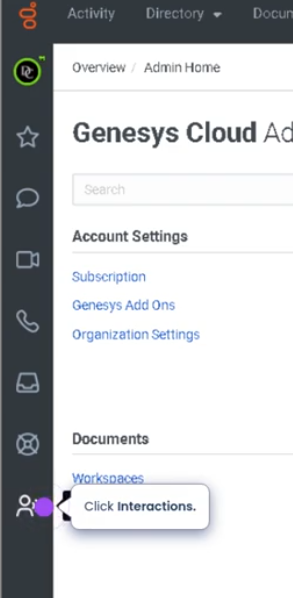
Navigate to interactions
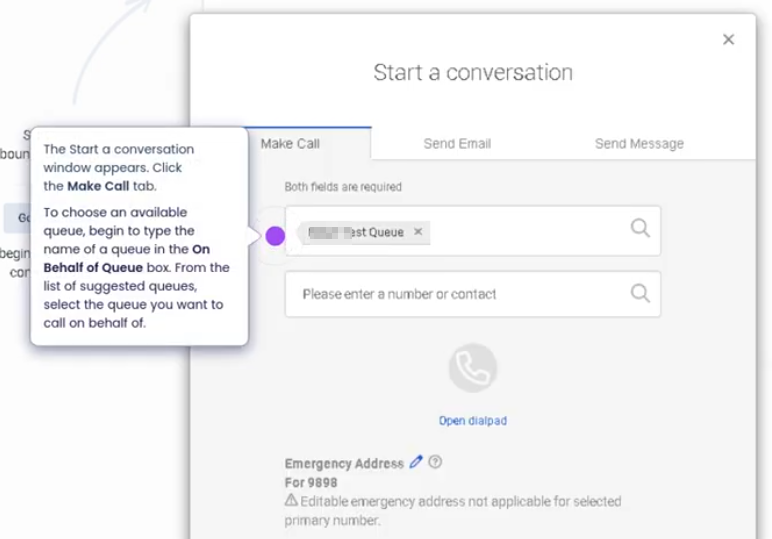
Click to start a conversation

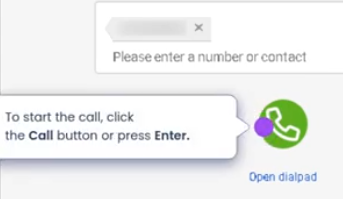
Enter number and start the call
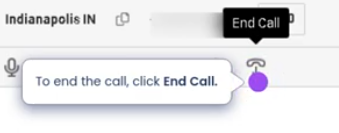
To end a call
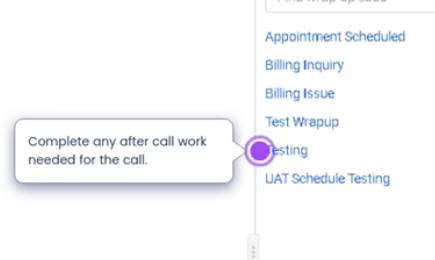
Disposition the call
Placing a Call on Behalf of a Queue
Summary
Placing a call on behalf of a queue in Genesys Cloud allows an agent to make an outbound call that is associated with a specific queue for reporting and operational tracking, even if the agent is not actively receiving ACD interactions from that queue at the moment.
This feature is commonly used for follow-ups, callbacks, or outbound communication related to interactions that originated from a queue. When the call is placed using the On Behalf of Queue field, the interaction is recorded in reporting as part of that queue’s activity, ensuring accurate metrics and historical tracking.
Utilization
| Use Case | Description |
|---|---|
| Customer Follow-ups | Agents call customers back after resolving an issue or completing research related to a queue interaction |
| Scheduled Callbacks | Agents return calls that were previously scheduled or requested through queue workflows |
| Queue-Based Ownership | Calls remain associated with the responsible queue for accurate reporting |
| Case or Ticket Follow-up | Agents contact customers related to support tickets originating from queue interactions |
| Supervisor Escalations | Supervisors can call customers directly while still associating the call with the appropriate queue |
Best Practices
| Practice | Reason |
|---|---|
| Always select the correct queue | Ensures accurate reporting and queue-level analytics |
| Use for follow-ups tied to a queue interaction | Maintains operational visibility for support teams |
| Avoid using it for personal outbound calls | Queue metrics may become inaccurate |
| Document the purpose of the call in notes | Helps maintain interaction history context |
| Train agents on when to use this feature | Prevents misuse and preserves reporting integrity |
| Use consistent queue naming conventions | Makes it easier for agents to select the correct queue quickly |
Example Scenarios
Scenario 1 – Customer Support Follow-up
Customer calls support queue
        ↓
Issue requires investigation
        ↓
Agent researches solution
        ↓
Agent places outbound call on behalf of the Support Queue
        ↓
Call is recorded as part of queue activity
Scenario 2 – Callback After Missed Call
Customer abandons call in Billing Queue
        ↓
Agent reviews queue activity
        ↓
Agent places call on behalf of Billing Queue
        ↓
Customer receives callback
        ↓
Interaction is tracked under Billing Queue
Scenario 3 – Ticket-Based Customer Communication
Customer creates support ticket
        ↓
Ticket assigned to Technical Support Queue
        ↓
Agent calls customer on behalf of Technical Support Queue
        ↓
Call activity remains linked to queue metrics
Key Benefits
| Benefit | Explanation |
|---|---|
| Accurate Queue Reporting | Outbound calls are attributed to the correct queue |
| Improved Operational Visibility | Supervisors can track follow-up activity per queue |
| Better Customer Experience | Agents can easily perform callbacks tied to the original queue interaction |
| Workflow Consistency | Maintains alignment between inbound queue interactions and outbound follow-up calls |