
Genesys Cloud - CCaaS - Change Presence and Status
Change Presence and Status (Genesys Cloud)
Summary
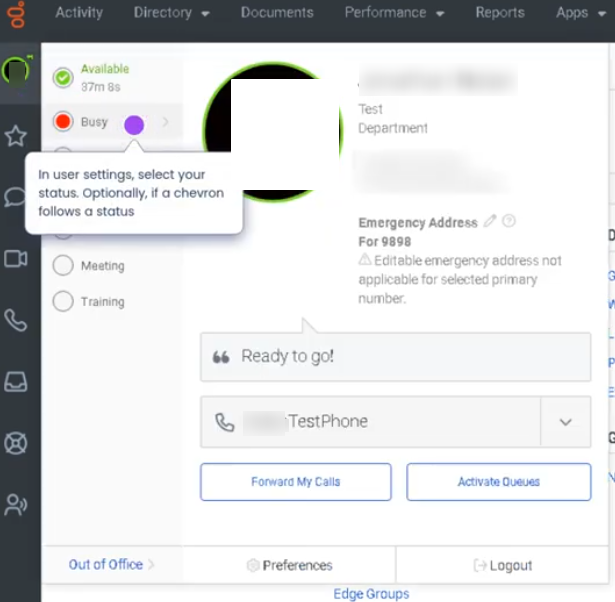
The Change Presence and Status feature in Genesys Cloud allows users to control their availability and activity state within the platform. Presence indicates a user’s general availability across collaboration tools (such as Available, Busy, Away, or Offline), while Status reflects the user’s routing availability for interactions (such as Available, Break, Meal, Meeting, or Training).
Together, these settings help the platform determine whether an agent can receive interactions and allow supervisors and coworkers to understand the agent’s current availability.
Utilization
| Use Case | Description |
|---|---|
| Starting a work shift | Agent sets presence to Available and status to Available to begin receiving interactions |
| Temporary break | Agent updates status to Break or Meal to prevent new interactions |
| Meetings or training | Agent changes status to Meeting or Training during scheduled activities |
| Remote collaboration visibility | Presence allows coworkers to see if the user is available to communicate |
| Workforce management adherence | Status changes align with scheduled WFM activities |
Changing presence and status helps maintain accurate routing, operational visibility, and workforce adherence.
Best Practices
| Practice | Reason |
|---|---|
| Set presence and status correctly before leaving workstation | Prevents missed interactions |
| Change status before taking breaks or meetings | Ensures calls are not routed unexpectedly |
| Follow workforce schedule activities | Helps maintain adherence metrics |
| Return to Available promptly when ready | Maintains queue coverage and service levels |
| Avoid incorrect manual status changes | Prevents inaccurate reporting |
| Communicate status changes when necessary | Helps supervisors manage staffing levels |
Example Scenarios
Scenario 1 – Agent Beginning Shift
Agent logs into Genesys Cloud
        ↓
Agent selects presence as Available
        ↓
Agent sets routing status to Available
        ↓
Routing engine begins sending interactions
Scenario 2 – Agent Taking Break
Agent completes current interaction
        ↓
Agent changes status to Break
        ↓
Routing engine stops sending interactions
        ↓
Agent returns and sets status to Available
Scenario 3 – Scheduled Meeting
Agent receives meeting notification
        ↓
Agent updates status to Meeting
        ↓
Supervisor sees updated agent availability
        ↓
Agent returns and switches back to Available
Key Benefits
| Benefit | Explanation |
|---|---|
| Accurate interaction routing | Ensures only available agents receive interactions |
| Workforce adherence visibility | Supervisors track schedule compliance |
| Improved operational transparency | Teams can see agent availability |
| Better staffing management | Status updates help supervisors manage workloads |
| Collaboration awareness | Presence helps coworkers know when someone is available |