
New Page
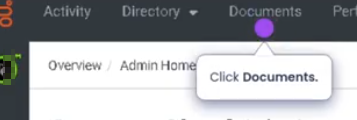
Go to Documents
Find the workspace
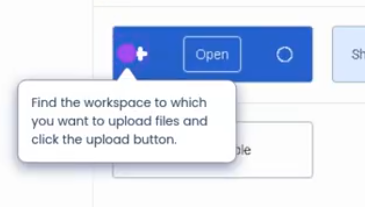
Click upload

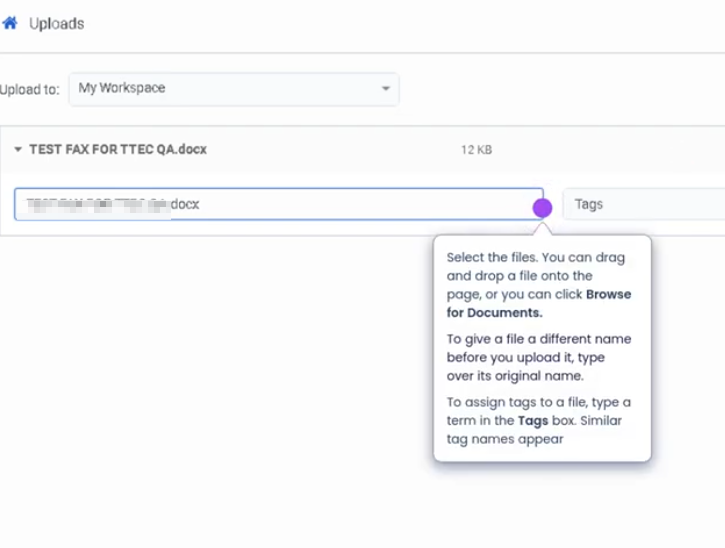
Select files
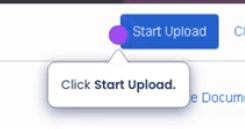
Start upload
Add Files to a Workspace (Genesys Cloud)
Summary
Adding files to a Workspace in Genesys Cloud allows teams to store, share, and collaborate on documents within the platform. Workspaces provide a centralized location where users can upload files such as guides, scripts, reports, or operational documents that are relevant to a team or project.
Files stored in a workspace can be accessed by members of that workspace, helping teams maintain consistent information, collaboration, and document availability without relying on external storage systems.
Utilization
| Use Case | Description |
|---|---|
| Team documentation | Store operational procedures, guides, or internal documentation |
| Training materials | Provide agents access to onboarding documents and reference guides |
| Collaboration | Share files among team members working on the same project |
| Knowledge sharing | Distribute job aids, scripts, or troubleshooting documentation |
| Internal communication | Share presentations, announcements, or operational updates |
Workspaces allow teams to maintain a centralized repository of shared files that can be accessed directly within Genesys Cloud.
Best Practices
| Practice | Reason |
|---|---|
| Organize files using clear naming conventions | Makes documents easier to locate and manage |
| Upload only relevant documents | Prevents clutter and improves workspace usability |
| Maintain version control | Ensures team members use the most current document |
| Restrict access to appropriate members | Protects sensitive or operational information |
| Periodically review workspace files | Removes outdated or unnecessary documents |
| Use descriptive file names | Helps users quickly identify the document’s purpose |
Example Scenarios
Scenario 1 – Sharing Agent Training Material
Training team creates onboarding documentation
        ↓
Files uploaded to a shared workspace
        ↓
New agents access the workspace
        ↓
Agents review training materials during onboarding