
Genesys Cloud - Admin - My queues and activity view
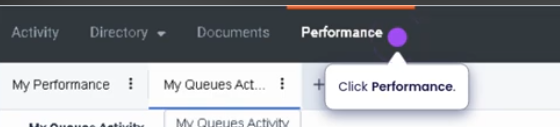
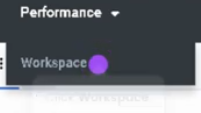
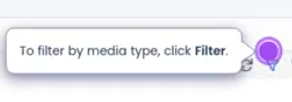
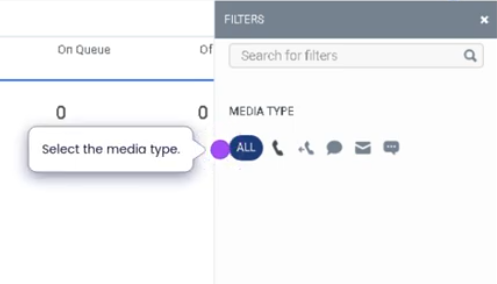
My Queue and Activity View (Genesys Cloud)
Summary
The My Queue and Activity view in Genesys Cloud provides agents with real-time visibility into the queues they are assigned to and the current activity levels within those queues. This view allows agents to monitor queue workload, understand interaction demand, and track their personal participation in queue activity.
Agents can see information such as active interactions, waiting interactions, queue membership, and their participation status. This visibility helps agents stay aware of operational demand and respond appropriately when handling interactions.
Utilization
| Use Case | Description |
|---|---|
| Queue workload awareness | Agents can monitor the number of interactions waiting in queues |
| Queue membership visibility | Shows the queues the agent is assigned to |
| Interaction demand monitoring | Helps agents understand current queue activity |
| Operational transparency | Provides insight into contact center workload in real time |
| Performance awareness | Agents can track their participation in queue activity |
Using the My Queue and Activity view helps agents maintain awareness of current service demand and operational priorities.
Best Practices
| Practice | Reason |
|---|---|
| Monitor queue activity regularly | Helps agents anticipate incoming interactions |
| Stay in Available status when workload is high | Supports queue performance and service levels |
| Understand assigned queues | Ensures agents are aware of which queues they support |
| Coordinate with supervisors during high volumes | Helps maintain operational balance |
| Use the view to understand workload trends | Improves situational awareness during shifts |
Example Scenarios
Scenario 1 – Monitoring Queue Demand
Agent opens My Queue and Activity view
        ↓
Agent sees increased number of waiting interactions
        ↓
Agent prepares to receive additional interactions
        ↓
Agent remains available to support queue demand
Scenario 2 – Agent Assigned to Multiple Queues
Agent checks My Queue and Activity view
        ↓
Agent sees activity levels across assigned queues
        ↓
Agent understands where interactions are coming from
        ↓
Agent manages interactions accordingly
Scenario 3 – High Interaction Volume
Contact center experiences high call volume
        ↓
Agents monitor queue activity levels
        ↓
Agents remain available to handle interactions
        ↓
Supervisors adjust staffing if necessary
Key Benefits
| Benefit | Explanation |
|---|---|
| Real-time queue visibility | Agents can see current interaction demand |
| Improved situational awareness | Helps agents understand operational workload |
| Supports service levels | Encourages agents to remain available during high demand |
| Queue transparency | Shows which queues agents are supporting |
| Operational efficiency | Helps teams respond quickly to changing workloads |