
Wrap-Up Codes
| Topic | Detail |
|---|---|
| Navigation | Admin → Contact Center → Wrap-Up Codes |
| Purpose | Allow agents to categorize the outcome of each interaction for reporting, analytics, and quality |
| Scope | Created globally at org level — must also be assigned to each queue individually |
Overview
Wrap-up codes are disposition tags agents apply at the end of each interaction to classify what happened (e.g., Resolved, Escalated, Follow-up Required, Technical Issue). They feed directly into:
- Historical analytics and reports
- Quality evaluations
- Workforce management data
- Contact reason tracking
Creating Wrap-Up Codes
Assigning Wrap-Up Codes to a Queue
Codes must be added to each queue individually — creating them globally is not enough.
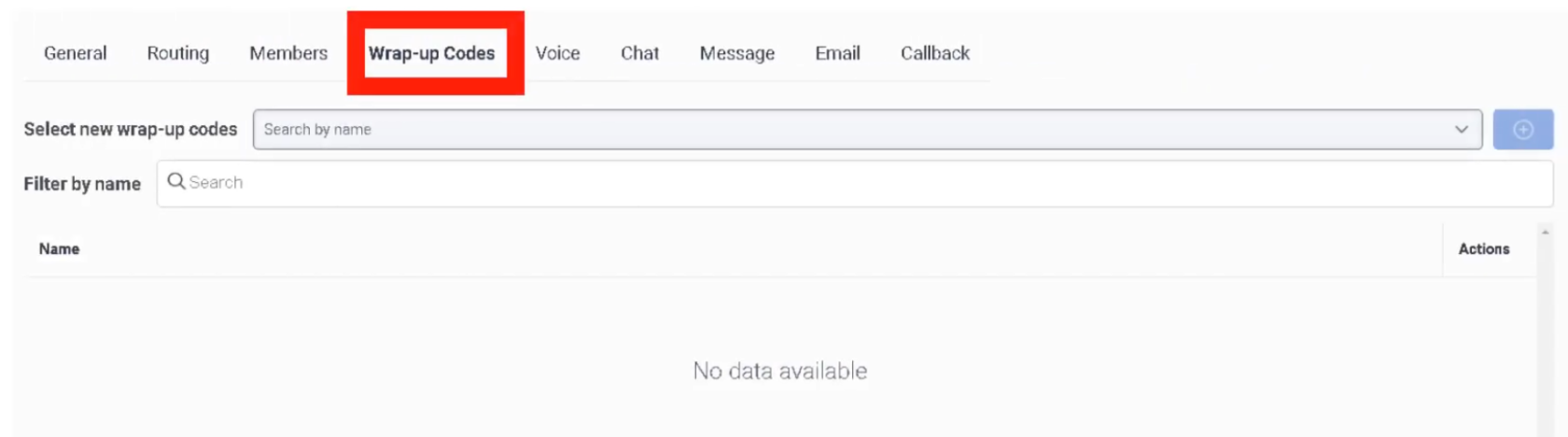
⚠️ Critical: If wrap-up codes are not assigned to the queue, agents cannot tag their interactions — even if the codes exist in the system globally.
Best Practices
| Practice | Reason |
|---|---|
| Keep code names clear and consistent | Improves reporting accuracy and agent usability |
| Limit the number of codes per queue | Too many choices slow agents during ACW |
| Use division assignment | Restricts management to appropriate admin teams |
| Review codes periodically | Remove outdated codes to keep reporting clean |
| Align codes with business reporting needs | Ensures data collected matches what leadership tracks |
Interview Cheat Sheet
| Question | Answer |
|---|---|
| Where are wrap-up codes created? | Admin → Contact Center → Wrap-Up Codes |
| Where are they assigned for use? | In each queue's Wrap-Up Codes tab |
| What happens if codes aren't assigned to the queue? | Agents cannot tag interactions, even if codes exist globally |
| What do wrap-up codes feed into? | Analytics, historical reports, quality evaluations, WFM data |