Utilization
| Topic |
Detail |
| Navigation |
Admin → Contact Center → Utilization |
| Purpose |
Controls how many simultaneous interactions an agent can handle and which channels can interrupt others |
| Levels |
Organization-wide default + per-user override |
Overview
Utilization defines agent capacity — how many interaction "slots" an agent has per media type and what priority rules govern interruptions between channels. It prevents agents from being overwhelmed while ensuring high-priority interactions (like voice calls) are never missed.
Organization-Wide Configuration
- Navigate to
Admin → Contact Center → Utilization
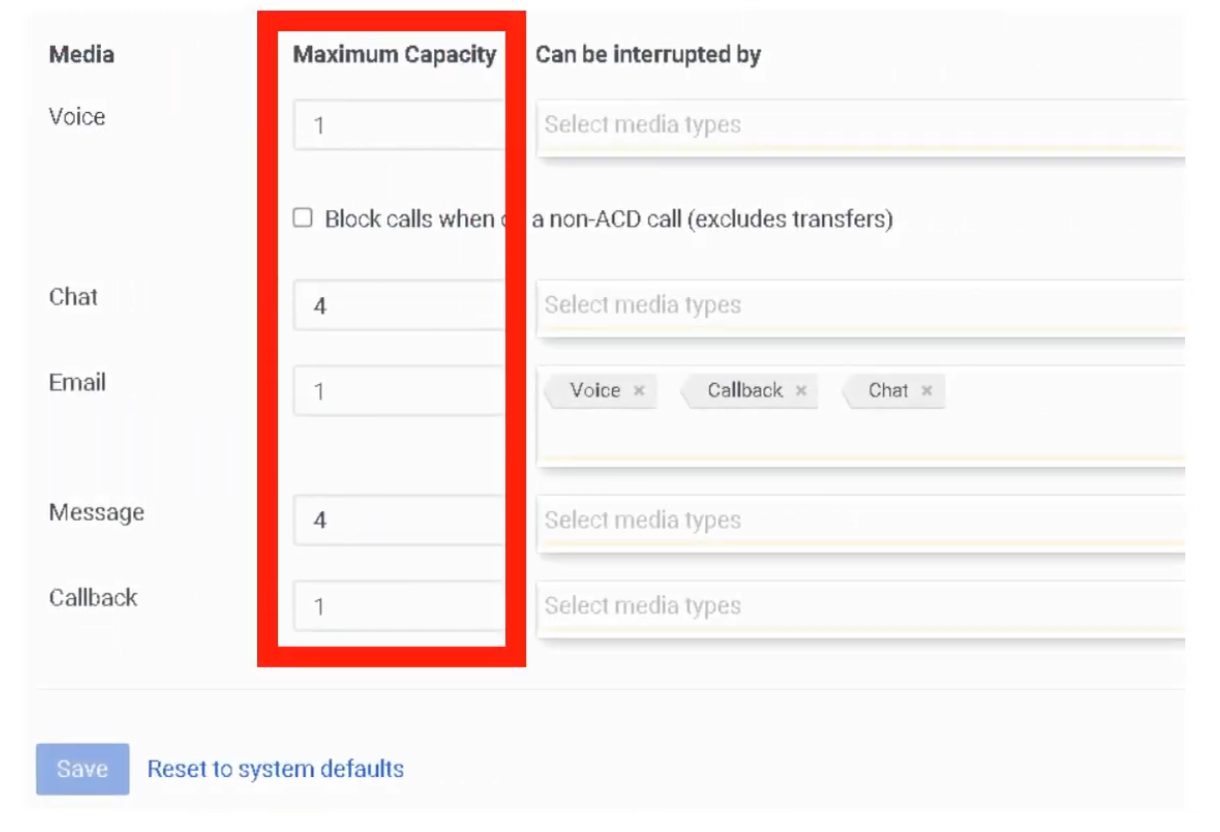
- Set Maximum Capacity per media type:
- Configure Can be interrupted by checkboxes — defines which channels can interrupt an active interaction
- Example: If an agent is working on an Email, can a Voice call interrupt? If checked, the agent sees the incoming call alert while the email draft stays open
- Block calls when on a non-ACD call — prevents ACD queue calls from reaching an agent who is already on an internal/personal call (Busy-on-Busy logic)
- Click Save
User-Level Override
To set different utilization for a specific agent (e.g., a Lead Engineer or Super Agent):
- Navigate to
Admin → People & Permissions → People
- Select the user
- Click the ACD Utilization tab
- Toggle Inherit from Organization to Off
- Manually adjust capacity and interruption rules for this person
- Click Save
Key Technical Rules
| Rule |
Detail |
| Capacity |
Number of simultaneous interaction slots per media type |
| Interruption |
Priority override — defines if a new channel can interrupt an active one |
| Non-ACD Blocking |
Busy-on-Busy for internal/direct calls vs. ACD queue calls |
| Alerting counts |
An interaction counts toward utilization when it starts Alerting (ringing), not when the agent answers |
| Voice interrupt |
Voice is always a "hard" interrupt — takes precedence over all digital channels |
| Transfers |
Non-ACD calls (transfers or direct dials) are excluded from utilization count unless "Block calls" is checked |
Summary
| Term |
Meaning |
| Capacity |
How many slots/sessions the agent has per channel |
| Interruption |
Priority override logic between channels |
| Non-ACD Blocking |
Busy-on-Busy for internal extensions vs. ACD lines |
Interview Cheat Sheet
| Question |
Answer |
| Where is utilization configured? |
Admin → Contact Center → Utilization |
| What are the two configuration levels? |
Organization-wide default and per-user override |
| When does an interaction count toward utilization? |
When it starts Alerting (ringing), not when answered |
| What does "Block calls when on a non-ACD call" do? |
Prevents queue calls from reaching agents already on internal/personal calls |
| What is the typical voice capacity? |
1 — voice is almost always a single-slot media type |
