Speech & Text Analytics
Speech & Text Analytics (Genesys Cloud Quality & Performance Management)
| Section |
Description |
| Module Context |
Part of Quality Management / Speech & Text Analytics / Workforce Engagement Management (WEM) |
| Admin Location |
Admin → Quality → Speech & Text Analytics |
| Purpose |
Enable transcription, conversation analytics, topic detection, sentiment analysis, and content search across voice and digital interactions |
Speech & Text Analytics (STA) converts interactions into searchable transcripts and analyzes conversations to detect topics, sentiment, silence, and conversational patterns. These insights allow contact centers to improve customer experience, compliance monitoring, agent coaching, and operational intelligence.
Speech & Text Analytics supports both voice and digital channels including calls, chat, email, and messaging.
Study Notes
| Topic |
Explanation |
| Speech Transcription |
Converts recorded voice conversations into text |
| Text Analytics |
Analyzes transcripts to extract insights |
| Topic Detection |
Identifies recurring conversation topics |
| Sentiment Analysis |
Determines emotional tone of conversation |
| Phrase Detection |
Detects specific words or phrases |
| Content Search |
Allows searching transcripts for keywords |
| Confidence Score |
Confidence level of transcription accuracy |
| Low-Latency Transcription |
Provides near real-time transcript generation |
Key behavior:
- Speech transcription must be enabled before analytics features work.
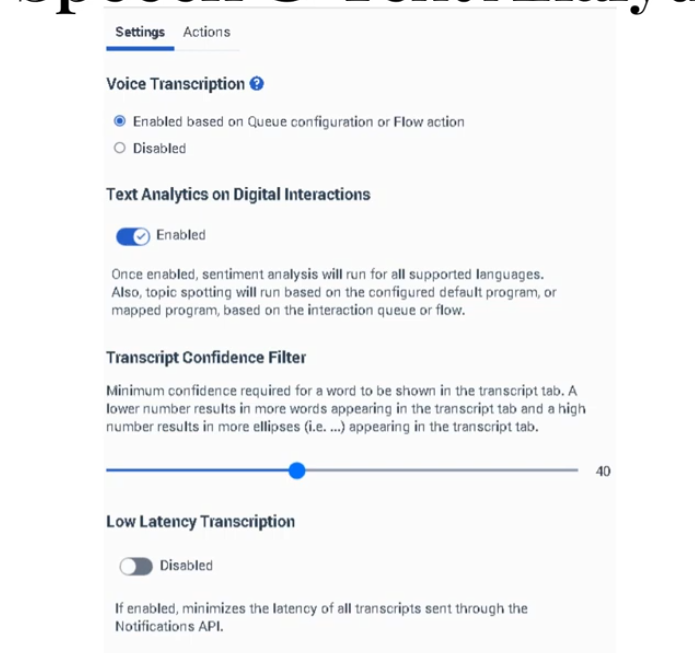
- Transcript confidence threshold default = 40%.
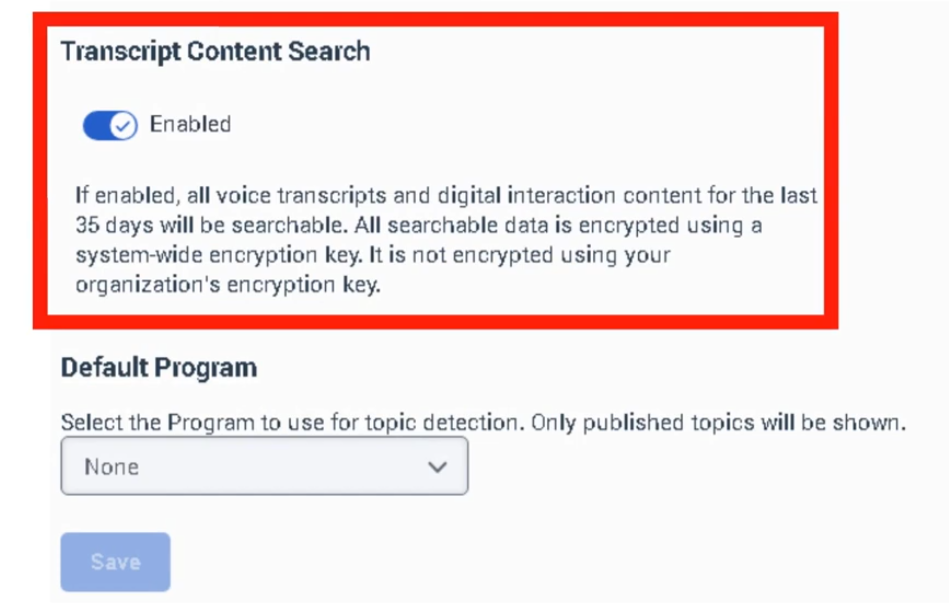
- Content search supports up to 35 days of transcript data.
- Analytics results feed into Topics, Programs, and Topic Miner.
Navigation
| Task |
Navigation |
| Configure speech analytics |
Admin → Quality → Speech & Text Analytics → Settings |
| Enable transcription |
Admin → Quality → Speech & Text Analytics → Settings → Voice Transcription |
| Manage topics |
Admin → Quality → Topics |
| Configure programs |
Admin → Quality → Programs |
| Run topic discovery |
Admin → Quality → Topic Miner |
| Review transcripts |
Performance → Workspace → Interactions → Conversation Details |
Configuration Fields (UI Form Fields)
Speech & Text Analytics Settings
| UI Field |
Description |
Real Options |
| Enable Voice Transcription |
Enables automatic transcription of voice interactions |
Toggle On / Off |
| Transcript Confidence Threshold |
Minimum confidence score for transcript inclusion |
Percentage slider (Default 40%) |
| Enable Low Latency Transcription |
Generates transcripts faster for near real-time analytics |
Toggle On / Off |
| Enable Content Search |
Allows searching transcript content |
Toggle On / Off |
| Transcript Retention |
Determines how long transcripts remain searchable |
Up to 35 days |
| Language Detection |
Detects language automatically |
Toggle On / Off |
| Supported Languages |
Languages available for transcription |
English / Spanish / French / German / Portuguese |
| Enable Keyword Search |
Allows keyword-based transcript queries |
Toggle |
| Save |
Apply settings |
Button |
| Cancel |
Cancel configuration changes |
Button |
Transcript View UI Fields (Interaction Details)
| UI Field |
Description |
Options |
| Transcript Panel |
Displays conversation transcript |
Read-only |
| Speaker Identification |
Labels speakers in transcript |
Agent / Customer |
| Sentiment Indicator |
Displays sentiment level |
Positive / Neutral / Negative |
| Confidence Indicator |
Displays transcription confidence |
Percentage |
| Keyword Highlight |
Highlights searched phrases |
Enabled |
| Search Transcript |
Search within transcript |
Text field |
| Jump to Timestamp |
Navigate to transcript timestamp |
Button |
Dependencies
| Component |
Purpose |
| Interaction Recording |
Required to capture voice conversations |
| Speech-to-Text Engine |
Converts voice recordings into transcripts |
| Topics |
Defines patterns detected in transcripts |
| Programs |
Packages topics for business analytics |
| Topic Miner |
Discovers phrases automatically |
| Component |
Relationship |
| Topics |
Define phrases and patterns detected in transcripts |
| Programs |
Organize topics for business-level analysis |
| Topic Miner |
Automatically identifies phrases |
| Sentiment Feedback |
Improves sentiment detection |
| Interaction Analytics |
Displays analytics insights |
| Topic |
Description |
| Topic Miner |
Discover phrases in transcripts |
| Topics |
Define analytics phrase patterns |
| Programs |
Group topics into analytics programs |
| Evaluation Forms |
Evaluate agent interactions |
| Quality Policies |
Manage recording lifecycle |
Implementation Checklist
| Task |
Status |
| Enable speech transcription |
☐ |
| Configure transcript confidence threshold |
☐ |
| Enable low-latency transcription |
☐ |
| Enable transcript search |
☐ |
| Configure topics |
☐ |
| Configure analytics programs |
☐ |
| Validate transcripts appear in interactions |
☐ |
Implementation Guide
| Step |
Action |
| Step 1 |
Navigate to Admin → Quality → Speech & Text Analytics → Settings |
| Step 2 |
Enable Voice Transcription |
| Step 3 |
Configure transcript confidence threshold |
| Step 4 |
Enable Low Latency Transcription |
| Step 5 |
Enable Content Search |
| Step 6 |
Save configuration |
| Step 7 |
Verify transcripts appear in interaction details |
How to Implement
| Phase |
Description |
| Transcription Setup |
Enable speech transcription |
| Analytics Configuration |
Configure transcript settings |
| Topic Creation |
Define topics for analytics |
| Program Mapping |
Map topics to queues or flows |
Workflow
Screenshots