
Single Sign-On (SSO)
| Section | Detail |
|---|---|
| Navigation | Admin → Integrations → Single Sign-On |
| Alt Navigation | Menu → IT and Integrations → Single Sign-On |
| Required Permission | Single Sign-On > Provider > Add, Delete, Edit, View |
| Also Requires | Admin role in your organization's identity provider account |
| Protocol | SAML 2.0 |
| Max SSO Integrations | Up to 30 per organization (same or mixed IdPs) |
| Module Context | Part of Integration Management / Platform Access Control |
✅ Verified against Genesys Cloud Resource Center — March 2026
Overview
Genesys Cloud SSO allows users to authenticate using existing corporate identity provider (IdP) credentials instead of separate Genesys usernames and passwords. Genesys Cloud acts as the Service Provider (SP) and delegates authentication to a trusted external Identity Provider (IdP) via the SAML 2.0 protocol.
Genesys Cloud uses a client integration strategy — rather than supporting fully open-ended custom SAML integrations, it provides pre-built integrations for common providers and a Generic SSO Provider option for any IdP that supports SAML 2.0.
💡 SSO vs. OAuth: SSO authenticates users into the platform. OAuth authenticates applications and integrations to access the Platform API. They serve different purposes and work alongside each other.
Key Concepts
| Topic | Explanation |
|---|---|
| Identity Provider (IdP) | External authentication service (e.g., Microsoft Entra ID / Azure AD, Okta, Google Workspace, OneLogin) |
| Service Provider (SP) | Genesys Cloud — receives and validates SAML assertions from the IdP |
| SAML 2.0 | Open standard protocol for exchanging authentication information between IdP and SP |
| SAML Assertion | Cryptographically signed XML message the IdP sends to Genesys Cloud confirming user identity |
| Metadata File | XML file provided by the IdP containing Issuer URI, SSO URL, SLO URL, and certificate info — importing it auto-populates Genesys Cloud config fields |
| SP-Initiated SSO | User starts at Genesys Cloud login page → redirected to IdP → authenticated → returned to Genesys Cloud |
| IdP-Initiated SSO | User logs into IdP portal → selects Genesys Cloud → lands directly in the platform |
| Clock Skew Limit | The time difference between Genesys Cloud and the IdP cannot exceed 10 seconds — larger skew causes authentication failures |
Supported Identity Providers
Genesys Cloud provides pre-built integrations for the most common SAML 2.0 providers including Microsoft Entra ID (Azure AD), Okta, Google Workspace, OneLogin, and others. A Generic SSO Provider option is also available for any IdP that supports SAML 2.0.
💡 If your IdP is not listed, use the Generic SSO Provider tab. You can also submit a request to Genesys to have your provider added.
Prerequisites
| Requirement | Detail |
|---|---|
| Genesys Cloud permission | Single Sign-On > Provider > Add, Delete, Edit, View |
| Identity provider admin access | Admin role in your organization's IdP account |
| Matching email address | User email must be the same in both the IdP account and Genesys Cloud |
| IdP metadata file | XML file from your IdP containing issuer URI, SSO URL, SLO URL, and certificate |
| Encoded public certificate | X.509 certificate from your IdP for SAML signature validation |
| Users pre-provisioned | Users must already exist in Genesys Cloud before authenticating via SSO |
SSO Page Overview
The Single Sign-On page lists all configured SSO integrations with the following details per integration:
| Column | Description |
|---|---|
| Name | Login display name for the SSO integration |
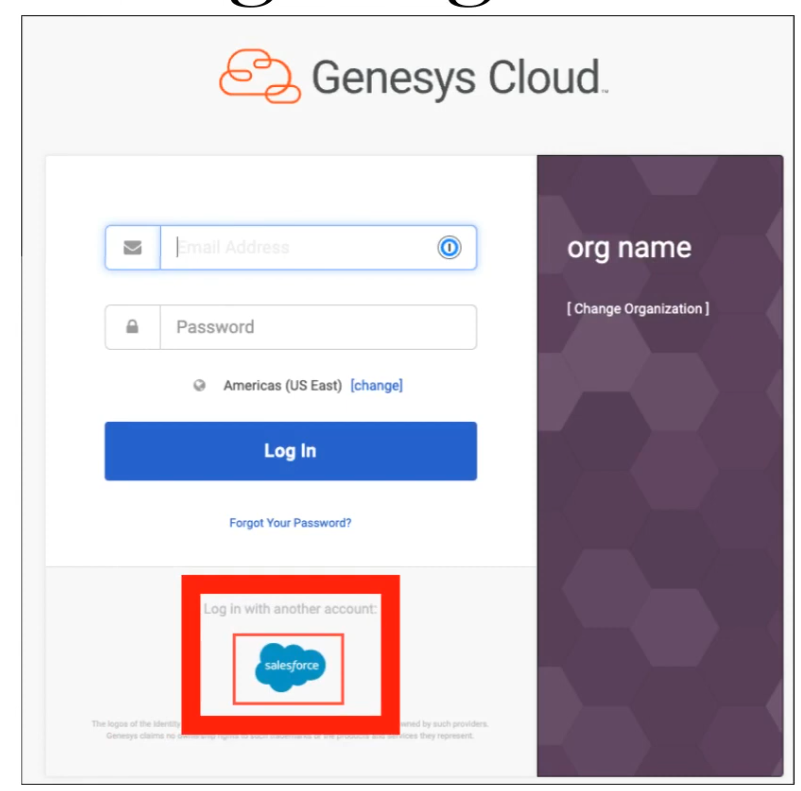
| Logo | Provider logo displayed on the login page |
| Identity Provider | Name of the IdP type configured |
| Certificate Expiration | Expiry date of the X.509 certificate — monitor to prevent auth failures |
| Actions | Click More (⋮) to edit or delete the integration |
Columns can be sorted by Name, Identity Provider, and Certificate Expiration. The page also provides buttons to Add an Identity Provider and Download Genesys Certificate.
⚠️ Only 6 SSO integrations display directly on the Genesys Cloud login page. If more than 6 are configured, the additional providers appear in a dropdown list on the login page.
Creating an SSO Integration
Step-by-Step
- Click Admin → Integrations → Single Sign-On
- Click Add an Identity Provider
- Enter a name for the integration
- Select Display Name On Login Page if you want the name visible on the login screen (not available if you have more than 6 providers)
- Select or type your Identity Provider Name from the list
- Upload a logo (SVG format only, max 25 KB) — or drag and drop the file
- In the Identity Provider Data section, click Select SAML metadata to import (or drag and drop the file) — this auto-populates all required fields
- Review and confirm the populated fields
- Click Save
After saving, Genesys Cloud generates its own SAML metadata for you to provide back to your IdP.
Identity Provider Configuration Fields
| Field | Description |
|---|---|
| Issuer URI | The IdP's unique Issuer ID (entityID) |
| Single Sign-On URI | The IdP's SSO URL where authentication requests are sent |
| Single Sign-On Binding | Sign-in binding specified by the IdP |
| Sign Authentication Requests | Optional — digitally signs outbound SAML requests for added security |
| Single Logout URI | The IdP's logout URL |
| Single Logout Binding | Logout binding specified by the IdP (default: HTTP Redirect) |
| Name Identifier Format | Format specified by the IdP (use Unspecified if unknown) |
| Certificate | X.509 certificate for SAML signature validation — supports up to 5 certificates per SSO config for continuity during rotation |
💡 Importing the IdP metadata file automatically populates all of the above fields.
Certificate Management
Each SSO integration supports up to 5 X.509 certificates. This allows certificate rotation without breaking authentication — if one certificate expires or becomes invalid, Genesys Cloud uses the next valid certificate automatically.
To download the Genesys Cloud certificate to send to your IdP, click Download Genesys Certificate on the SSO page.
SAML Assertion Decryption (November 2025)
Genesys Cloud supports SAML assertion decryption, adding an additional security layer for SSO. IdPs can encrypt SAML assertions using the Genesys Cloud public encryption certificate — Genesys Cloud then decrypts the assertion securely during authentication.
- No configuration required in Genesys Cloud to enable this
- Download the Genesys Encryption Certificate from either the main SSO page or the individual provider config page and send it to your IdP to configure encrypted assertions on their end
SAML Attributes
If the following attributes are present in the SAML assertion, Genesys Cloud acts on them. All attributes are case-sensitive.
| Attribute | Behaviour |
|---|---|
| AuthorizedClientIDs | Enumerates which OAuth client IDs the authenticated user is authorized to access. If the user attempts to access an unlisted client, they are redirected back to the IdP for re-verification. Useful for controlling access to specific apps (e.g., WebRTC Media Helper, Genesys Tempo) without using the more restrictive IP Allowlist feature. |
| OrganizationName | For IdP-initiated SSO: use the org short name. For SP-initiated SSO: must match the org name selected at login. Required when one IdP manages multiple Genesys Cloud orgs. |
| ServiceName | Optional. A valid URL to redirect to after successful authentication, or one of these keywords: directory (redirects to Genesys Cloud Collaborate) or directory-admin (redirects to the Admin UI). |
SSO Authentication Workflow
User Opens Genesys Cloud Login
           ↓
Selects SSO Provider (SP-Initiated)
  — OR —
Logs into IdP Portal (IdP-Initiated)
           ↓
Redirected to Identity Provider
           ↓
User Authenticates with Corporate Credentials
           ↓
IdP Sends Signed SAML Assertion to Genesys Cloud
           ↓
Genesys Cloud Validates Assertion (certificate + clock skew check)
           ↓
User Session Created — Access Granted per Genesys Roles
Genesys Cloud Metadata Exchange
Pairing requires configuration on both sides:
| Direction | What to Exchange |
|---|---|
| IdP → Genesys Cloud | IdP provides SAML metadata XML (Issuer URI, SSO URL, SLO URL, certificate) |
| Genesys Cloud → IdP | After saving, download Genesys Cloud SAML metadata and send to your IdP for their configuration |
Limitations & Constraints
| Constraint | Detail |
|---|---|
| Protocol | Only SAML 2.0 supported for SSO |
| User pre-provisioning required | Users must exist in Genesys Cloud before SSO authentication |
| Clock skew | Max 10 seconds allowed between Genesys Cloud and IdP system clocks |
| Max integrations | Up to 30 SSO configurations per org |
| Login page display limit | Only 6 SSO providers shown directly on login page; additional providers appear in dropdown |
| Logo format | SVG only, max 25 KB |
| Certificates per config | Maximum of 5 X.509 certificates per SSO integration |
| Assertion encryption | Genesys Cloud does not support assertion encryption for outbound requests — channel is TLS-encrypted instead |
| Desktop app limitation | The Genesys Cloud desktop app does not support browser extensions. Azure Conditional Access policies requiring a browser extension will not work with the desktop app — use a supported browser instead |
| Dual-side configuration | SSO requires configuration both in Genesys Cloud and in the identity provider |
Best Practices
| Practice | Reason |
|---|---|
| Use a trusted, enterprise-grade IdP | Ensures reliable and secure authentication |
| Enforce MFA at the IdP level | Adds a second factor before SAML assertion is issued |
| Upload multiple certificates proactively | Prevents auth failures during certificate rotation |
| Monitor certificate expiration dates | Expired certificates silently break SSO logins |
| Test SSO in a non-production org first | Avoid login disruptions when rolling out |
| Keep IdP and SP clock times in sync | Clock skew > 10 seconds causes authentication failures |
| Document all SSO integrations | Maintain governance, especially when managing up to 30 configs |
Troubleshooting
| Issue | Cause | Resolution |
|---|---|---|
| SSO login failure | Incorrect SAML configuration | Re-import metadata file and verify all fields |
| Invalid assertion error | Certificate mismatch | Update or upload the correct certificate |
| User cannot authenticate | User not provisioned in Genesys Cloud | Create the user account before they attempt SSO login |
| Login redirect loop | Incorrect IdP SSO URL or binding | Verify SSO URI and binding type in config |
| Clock skew error | System time difference > 10 seconds | Sync clocks between Genesys Cloud and IdP |
| SSO not working in desktop app | Browser extension required by Azure policy | Use a supported browser with the extension installed |
| More than 6 providers not visible on login | Login page limit reached | Providers 7+ appear in a dropdown — expected behaviour |
Exam Cheat Sheet
| Question | Answer |
|---|---|
| What protocol does Genesys Cloud SSO use? | SAML 2.0 |
| What permission is required to configure SSO? | Single Sign-On > Provider > Add, Delete, Edit, View |
| Where is SSO configured? | Admin → Integrations → Single Sign-On |
| How many SSO integrations can one org have? | Up to 30 |
| How many providers appear directly on the login page? | 6 — additional providers appear in a dropdown |
| What does importing a SAML metadata file do? | Auto-populates all IdP config fields |
| What is the max number of certificates per SSO config? | 5 — allows rotation without breaking authentication |
| What is the clock skew limit? | 10 seconds between IdP and Genesys Cloud |
| What are the two authentication flows? | SP-Initiated (starts at Genesys login) and IdP-Initiated (starts at IdP portal) |
| Do users need to exist in Genesys Cloud for SSO? | Yes — users must be pre-provisioned before they can SSO in |
| What is SAML assertion decryption? | A feature (added Nov 2025) where IdPs encrypt assertions using Genesys's public encryption cert — no Genesys config required |
| What does the AuthorizedClientIDs SAML attribute do? | Controls which OAuth clients an SSO-authenticated user can access |
| What logo format is required for SSO providers? | SVG only, max 25 KB |
| Does the Genesys desktop app support SSO with browser extensions? | No — Azure Conditional Access policies requiring browser extensions won't work with the desktop app |
Chapter Placement
✅ SSO belongs in the same chapter as OAuth Clients, Authorized Applications, and Authorized Organizations — all fall under Integration Management / Platform Access Control within the Platform Operations chapter. They form a cohesive set of topics covering how users and applications authenticate and gain access to Genesys Cloud.
See Also
- OAuth Clients (
Admin → Integrations → OAuth) — application-level authentication, counterpart to user-level SSO - Authorized Applications — manage OAuth application scopes and revocation
- Authorized Organizations — grant user access across Genesys Cloud orgs (pairing)
- Generic SSO Provider — configure SSO for any SAML 2.0-compatible IdP not in the pre-built list
- Configure Genesys Cloud to Authenticate with SSO Only — optionally disable native Genesys login entirely