Quality Management
Genesys Cloud Quality Management
| Section |
Description |
| Module Context |
Part of Quality, Performance, and Engagement Management within Genesys Cloud Workforce Engagement Management (WEM). |
| Purpose |
Enables supervisors to record interactions, evaluate agents, analyze conversations, gather customer feedback, and coach agents to improve service quality and compliance. |
| Admin Location |
Admin → Quality |
| Alt Navigation (most sub-sections) |
Menu → Conversation Intelligence → ... (see Navigation table below) |
| Core Capabilities |
Recording encryption, evaluations, surveys, policies, speech & text analytics, topic mining, sentiment analysis, and coaching tools. |
Quality management helps organizations monitor interactions, enforce compliance, evaluate agent performance, and gain insights into customer conversations using analytics and feedback tools.
Study Notes
| Topic |
Explanation |
| Quality Management |
Framework for evaluating and improving agent interactions and service quality. |
| Interaction Recording |
Captures voice and digital interactions for compliance and review. |
| Evaluation Forms |
Scorecards used to evaluate recorded interactions and measure agent performance. |
| Surveys |
Customer feedback collected after interactions (e.g., CSAT or NPS). |
| Policies |
Automation rules for evaluation assignment, recording retention, calibration, and surveys. |
| Topic Miner |
Identifies frequently occurring phrases or topics in conversation transcripts. |
| Speech & Text Analytics |
AI-powered analysis of transcripts to identify trendstrends, topics, and sentiment. |
| Topics & Programs |
Structured definitions used to track business-level intents within interactions. |
| Sentiment Feedback |
Allows administrators to correct incorrectly classified phrases.phrases in sentiment analysis. |
| Recording Management |
Controls recording storage,infrastructure: screen recording bandwidth,concurrency, URL expiration, storage region, and regions.orphaned recordings. |
Navigation
TaskFeature |
Admin Navigation |
Alt Navigation |
| Encryption Keys |
Admin → Quality → Encryption Keys |
— |
| Evaluation Forms |
Admin → Quality → Evaluation Forms |
Menu → Conversation Intelligence → Quality Management → Evaluation Forms |
| Survey Forms |
Admin → Quality → Survey Forms |
— |
| Policies |
Admin → Quality → Policies |
Menu → Conversation Intelligence → Recording and Policies → Policies |
| Evaluators (Dashboard) |
AdminPerformance → Overview → Quality Evaluator |
Menu → Conversation Intelligence → Quality Management → Evaluators |
| Recording Management |
Admin → Quality → Recording Management |
Menu → Conversation Intelligence → Recording and Policies → Recording Management |
| Topic Miner |
Admin → Quality → Topic Miner |
— |
| Speech & Text Analytics |
Admin → Conversation IntelligenceQuality → Speech & Text Analytics |
— |
| Sentiment Feedback |
Admin → Quality → Sentiment Feedback |
— |
| Topics |
Admin → Quality → Topics |
— |
| Programs |
Admin → Quality → Programs |
— |
Configuration Fields (UI Form Fields)
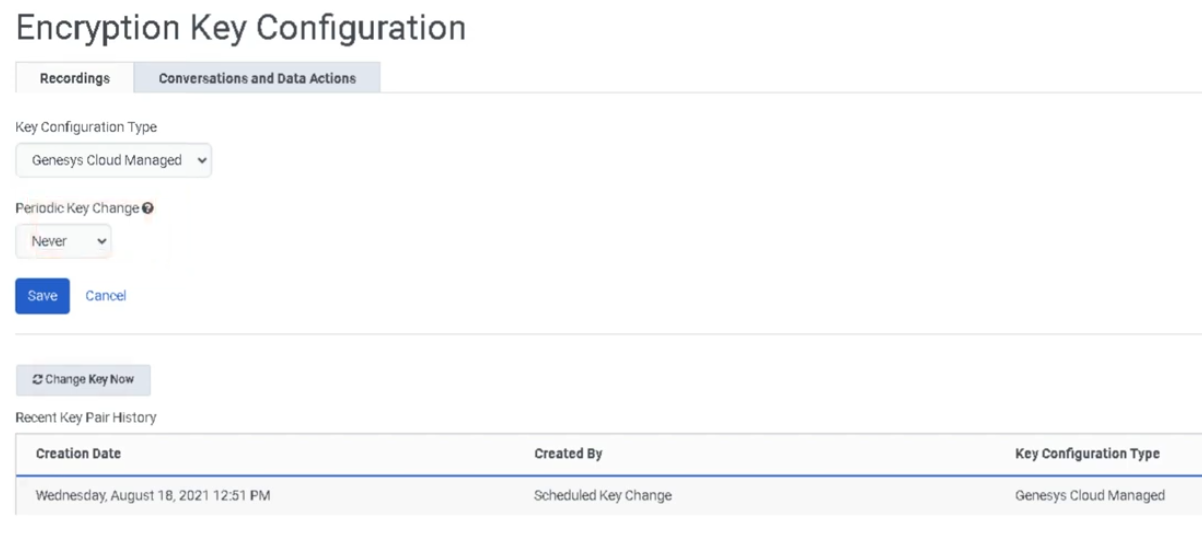
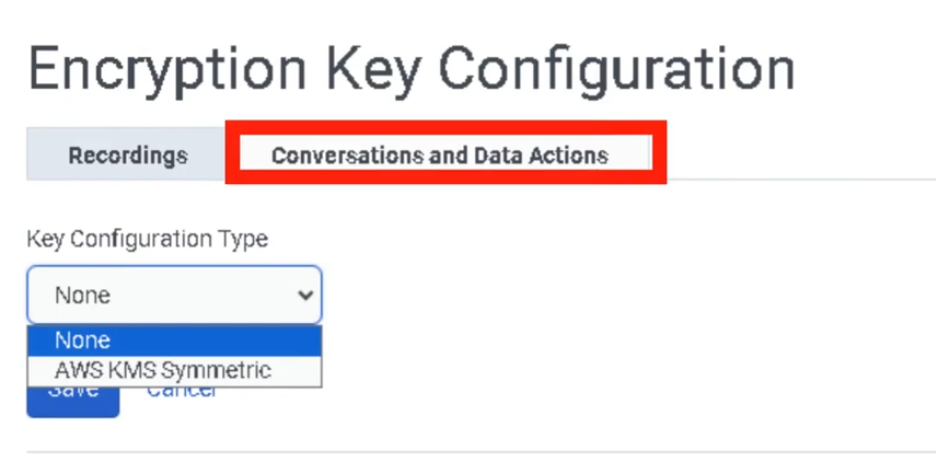
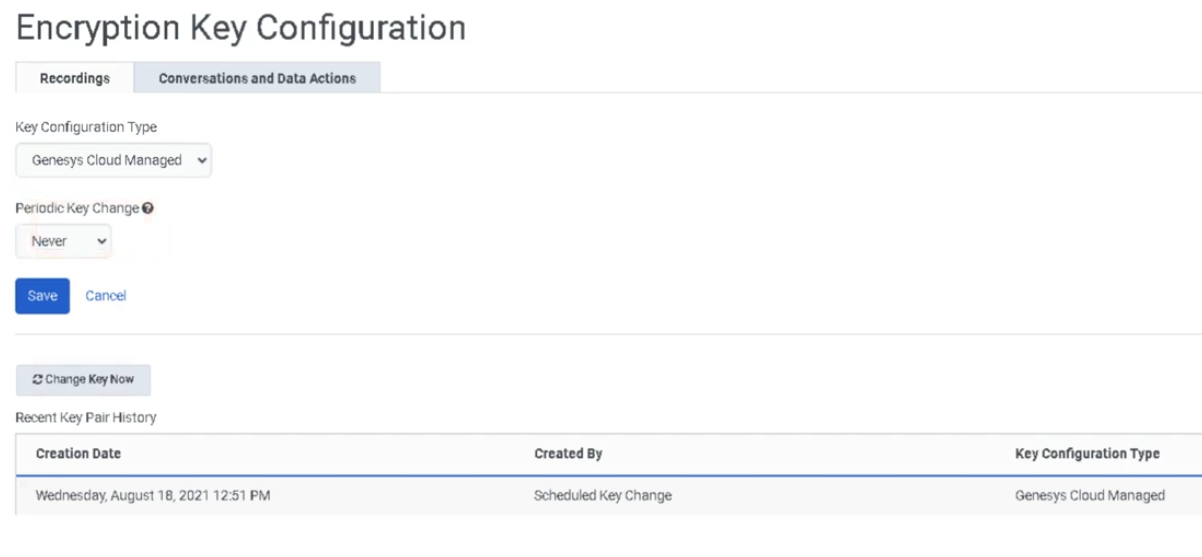
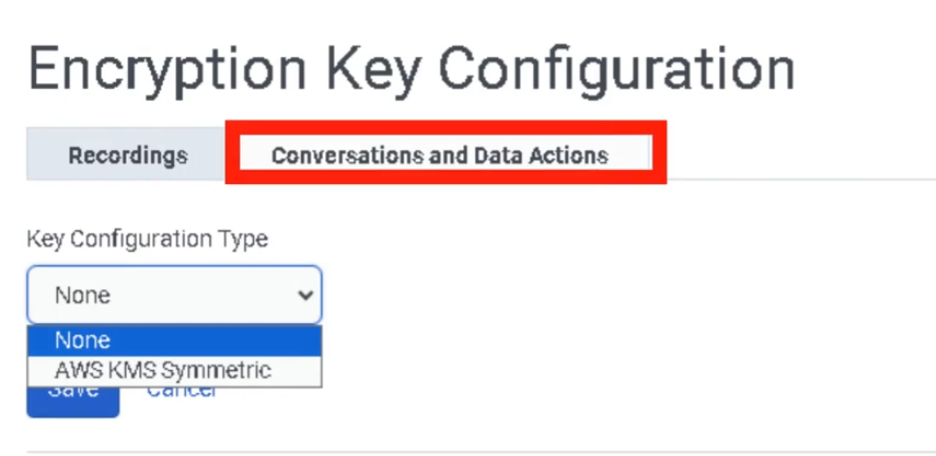
Encryption Keys
| Field |
Description |
Options |
Tab |
Default tab for encryption configuration |
Recordings |
| Key Configuration Type |
Encryption key management model |
Genesys Cloud Managed Keys / Local Key Manager / AWS KMS Symmetric |
| Periodic Key Change |
Frequency for generating new encryption keys |
Daily / Weekly / Monthly / Yearly / Never |
| Save |
SavesSave encryption configuration |
Button |
| Field |
Description |
Options |
| Create |
Creates a new evaluation form |
Button |
| Form Name |
Name of the evaluation form |
Text |
| Last Modified |
Timestamp of last modification — also serves as version ID |
Read-only |
| Question Group |
Category grouping related questions |
ProductExample: KnowledgeCompliance / Compliance | Customer
Scoring Tab |
Enables scaled scoring |
ToggleExperience |
| Add Question |
Adds new evaluation question |
Button |
| Question Type |
Type of evaluation question |
Multiple Choice / Yes-No / Range |
| Question Name |
Question text shown to evaluator |
Text |
| Help Text |
Tooltip guidance for evaluator |
Text |
| Points |
Score value assigned to answers |
Numeric |
| Require Additional Comments |
Forces evaluator to add a comment |
Toggle |
| Conditional Question |
Displays question based on previous answer |
Toggle |
| Fatal Question |
Incorrect answer fails entire evaluation automatically |
Toggle |
| Critical Question |
High-impact question — affects score but does not auto-fail |
Toggle |
| Save |
Save draft evaluation form |
Button |
| Publish |
Publish evaluationMake form available for evaluators and policies |
Button |
| Field |
Description |
Options |
| Create |
Create new survey form |
Button |
| Survey Language |
Language used for survey |
Dropdown |
| Survey Form Name |
Internal survey identifier |
Text |
| Header |
Instructions or images displayed to customer |
Text / Image |
| Add Question |
Add survey question |
Button |
| Question Type |
Survey question format |
Multiple Choice / Yes-No / Range / Free Text / NPS |
| NPS Question |
Net Promoter Score question |
Only one NPS question allowed per survey |
| Save |
Save survey form |
Button |
| Publish |
Publish survey form |
Button |
| Preview Form |
Preview survey before publishing |
Button |
Policies
| Field |
Description |
Options |
| Create New Policy |
Creates new quality policy |
Button |
| Policy Name |
Name of policy |
Text |
| Description |
Policy purpose |
Text |
| Media Type |
Interaction type tabs |
Call / Chat / Email / Message (each configured separately) |
| Conversation Direction |
Interaction direction filter |
Inbound / Outbound |
| Specific Users / Work Teams |
Restrict policy to specific users or teams |
Dropdown |
| Specific Queues |
Apply policy to queues |
Dropdown — max 250 recommended |
| Specific Wrap-Up Codes |
Filter interactions by wrap-up result |
Dropdown |
| Time Sets |
Apply policy during specific time ranges |
Dropdown |
| Date Range |
Policy date criteria |
Calendar |
| Conversation Duration |
Match interactions by duration |
Numeric — includes queue time and ACW |
| Customer Participation |
Match email/message by customer participation |
Participated / Did not participate |
| Recording Retention |
Required field — Define recording retention period |
DurationRetain / Do Not Save |
| Export Recordings |
Export recordings to AWS S3 |
Toggle |
| Screen Recording |
Enable screen recording (ACD only) |
Toggle — max 365 days retention |
| Create Evaluations by Evaluators |
Assign fixed evals per evaluator per period |
Toggle |
Screen Recording Duration |
Maximum retention |
Up to 365 days |
AssignCreate Evaluations by EvaluatorsAgents |
AutomaticallyAssign assignfixed evaluationsevals per agent per period |
Toggle |
AssignCreate Evaluations by AgentsInteraction |
CreateAssign evaluationeval quotafor perevery agentmatching interaction |
Toggle |
AssignCreate Calibration Evaluations |
Generate calibration sessions |
Toggle |
| Send Web Survey |
Automatically send surveys |
Toggle — requires Architect Survey Invite Flow |
Evaluation limits: Max 50/day, 175/week, 700/month per agent.
No-match behavior: Recordings without a matching policy are retained indefinitely (or up to org maximum if configured).
Recording Management
| Field |
Description |
Options |
Maximum Simultaneous Screen Recording BandwidthRecordings |
Limits simultaneousconcurrent screen recordings |
Numeric0–2000 |
| Recording Playback URL Time-to-live |
How long playback links remain valid |
2–60 minutes (default 60) |
| Recording Batch Download URL Time-to-live |
How long download links remain valid |
2–60 minutes (default 60) |
Storage Settingsof Call Recordings |
Defines mediaRecording storage architectureregion |
Home Region / Global Media Fabric trunk region |
| Orphaned Recordings |
Recordings stored on Edge device that failed to upload |
Clickable link to manage |
Topic Miner
| Field |
Description |
Options |
| New Miner |
Create mining job |
Button |
| Language |
Transcript language model |
Dropdown |
| Data Source |
Interaction data source |
Genesys Cloud |
| Date Range |
Time window to analyze |
Calendar |
| Media Type |
Interaction channel |
CallVoice / Chat / Message / Email |
| Queue Selection |
Select queues to mine |
Up to five5 queues |
Speech & Text Analytics Settings
| Field |
Description |
Options |
| Voice Transcription |
Enables transcription |
Toggle |
Transcript Confidence FilterThreshold |
Minimum confidence levelfor inclusion |
Default 4040% |
| Low-Latency Transcription |
Enables nearNear real-time transcriptiontranscript generation |
Toggle |
| Content Search |
Enables transcript keyword search |
Last 35 days |
Sentiment Feedback
| Field |
Description |
Options |
| Add Phrase |
Add phrase tofor sentiment dictionarycorrection |
Button |
| Phrase Text |
Phrase toas classifyit appears in transcripts |
Text |
| Sentiment Label |
SentimentCorrect sentiment classification |
Positive / NegativeNeutral / NeutralNegative |
| Dialect |
Speech analytics dialect model for phrase |
Dropdown |
Topics
| Field |
Description |
Options |
| Topic Name |
Unique topic identifier |
Text |
| Description |
Topic explanation |
Text |
| Tags |
Classification tags |
Text |
| Strictness |
Matching sensitivity |
Low / Medium / High |
| Participants |
Conversation participants analyzed |
External / Internal / Both |
Programs
| Field |
Description |
Options |
| Program Name |
Program identifier |
Text |
| Dialect |
Language dialect |
Dropdown |
| Add Topics |
Add topics to program |
Button |
| Merge Phrases |
Combine detected phrases |
Toggle |
| Queue Mapping |
Assign program to queues |
Dropdown |
| Flow Mapping |
Assign program to Architect flows |
Dropdown |
QM Roles and Permissions
| Role |
Key Permissions |
| Quality Administrator |
Manage encryption keys, policies, evaluation forms, calibrations, recordings, annotations |
| Quality Evaluator |
Edit evaluations and annotations; view chats, recordings, encryption keys — requires Quality > Evaluation > Edit Score |
Both roles are customizable. Quality Administrator recording access can be restricted to specific queues using conditions.
Dependencies
| Component |
Purpose |
| Interaction Recording |
Required for evaluations |
| SIP Trunk (Line Recording enabled) |
Required for call recording to function |
| Speech & Text Analytics |
Enables transcript-based analysis |
| Architect |
Required for survey invitation flows |
| Workforce Engagement Management |
Integrates coaching and quality monitoring |
AWS StorageS3 |
Optional long-term or external recording storage |
| Component |
Relationship |
| Architect |
Sends surveys and triggers workflows |
| Analytics Workspace |
Provides reporting dashboards |
| Workforce Engagement Management |
Supports agent coaching and training |
| Interaction Recording |
Captures interactions for evaluation |
| Gamification |
Uses evaluation data for performance metrics |
Related Topics / Further Reading
Topic |
Purpose |
|---|
Speech & Text Analytics |
Analyze interaction transcripts |
Gamification |
Encourage agent engagement |
Performance Management |
Track agent productivity |
Queue Analytics |
Monitor operational performance |
Workforce Management |
Schedule and forecast agent activity |
Implementation Checklist
| Step |
Status |
| Configure recording encryption keys |
☐ |
| Enable Line Recording on SIP trunks |
☐ |
| Enable interaction recording |
☐ |
| Create evaluation forms |
☐ |
| Publish evaluation forms |
☐ |
| Create survey forms |
☐ |
| Configure Architect survey invite flow |
☐ |
| Create quality policies |
☐ |
| Configure recording storage and URL TTL |
☐ |
| Enable speech transcription |
☐ |
| Configure topics and programs |
☐ |
Implementation Guide
| Step |
Action |
| Step 1 |
Configure recording encryption keys |
| Step 2 |
Enable interactionLine recordingRecording on SIP trunks |
| Step 3 |
CreateEnable evaluationinteraction formsrecording |
| Step 4 |
PublishCreate and publish evaluation forms |
| Step 5 |
Create and publish survey forms |
| Step 6 |
ConfigureCreate Architect survey invite flow |
| Step 7 |
Create quality policies |
Step 78 |
Configure Recording Management (concurrency, TTL, storage region) |
| Step 9 |
Enable speech transcription |
Step 810 |
Configure analytics topics and programs |
How to Implement
Phase |
Description |
|---|
Infrastructure Setup |
Configure encryption and recording settings |
Evaluation Setup |
Create evaluation forms and scoring rules |
Automation Setup |
Create policies for evaluations and surveys |
Analytics Setup |
Enable speech analytics and topic mining |
Continuous Improvement |
Use evaluation data for coaching |
Workflow
Customer Interaction
        ↓
Interaction Recording
        ↓
Speech/Text Transcription
        ↓
EvaluationQuality AssignmentPolicy Evaluates Interaction
        ↓
AgentEvaluation EvaluationAssigned to Evaluator
        ↓
Evaluator Reviews and Scores Interaction
        ↓
Customer Survey Sent (optional)if policy configured)
        ↓
Analytics & Coaching
Architecture Diagrams
Quality Monitoring Architecture
Customer Interaction
      ↓
Recording System
      ↓
Quality Evaluation
      ↓
Speech Analytics
      ↓
Supervisor Dashboard
      ↓
Agent Coaching
Real Flow Scenarios
Agent Evaluation Workflow
Customer Call Recorded
      ↓
Interaction Selected
      ↓
Evaluation Form Applied
      ↓
Evaluator Scores Interaction
      ↓
Supervisor Coaching
Usage Scenarios
Scenario |
Description |
|---|
Compliance Monitoring |
Ensure agents follow regulatory scripts |
Customer Satisfaction Monitoring |
Identify negative customer sentiment |
Agent Coaching |
Improve agent performance using evaluations |
Quality Auditing |
Verify service quality standards |
Customer Feedback |
Collect feedback through surveys |
Implementation Examples
Resource |
Example |
|---|
Evaluation Form |
Customer_Service_Evaluation |
Survey |
Post_Call_CSAT |
Policy |
Inbound_Call_Evaluation_Policy |
Topic |
Billing_Dispute |
Design Example
Customer Interaction
      ↓
Recording
      ↓
Evaluation
      ↓
Speech Analytics
      ↓
Performance Dashboard
      ↓
Supervisor Coaching Plan
Best Practices
| Practice |
Reason |
| Standardize evaluation forms |
Maintain consistent scoring |
| Use speech analytics |
Detect customer sentiment trends |
| Regularly review evaluations |
Identify coaching opportunities |
| Combine surveys and evaluations |
Gain full customer experience insight |
| Define clear policies |
Automate quality monitoring processes |
Naming Convention
Resource |
Example |
|---|
EvaluationSeparate Formretention and evaluation policies |
Support_Evaluation_FormKeeps policies focused and manageable |
SurveyCalibrate evaluators regularly |
Post_Interaction_CSAT | Ensures
consistent scoring Policy |
Inbound_Call_QA_Policy |
Topic |
Cancellation_Request |
Naming Pattern:
<Department>_<Purpose>_<ResourceType>
Security Considerations
Control |
Description |
|---|
Recording Encryption |
Protect interaction recordings |
Access Permissions |
Restrict evaluation access |
Recording Retention |
Define retention period |
Data Privacy |
Ensure sensitive data protectionstandards |
Limitations / Constraints
| Constraint |
Description |
NPS Limitper survey |
Only one NPS question per survey form |
Policy Scopescope |
Applies only to interactions after activation |
Screen Recording Durationrecording |
Maximum 365 days retention; ACD interactions only |
Topic Miner Limits |
Limited to selected5 queues andper datemining ranges |
Troubleshooting
Issue |
Cause |
Resolution |
|---|
Evaluation not generated |
Policy misconfiguration |
Verify policy criteria |
Surveys not sent |
Missing survey flow |
Configure Architect survey flow |
Transcripts missing |
Transcription disabled |
Enable voice transcriptionjob |
Evaluation form unavailablelimits |
FormMax not50/day, published175/week, 700/month per agent |
| Content search |
PublishUp formto 35 days of transcript data |
| Screen recording concurrency |
Max 2000 simultaneous screen recordings |
| Playback/download URL TTL |
2–60 minutes (default 60) |
Interview Cheat Sheet
| Question |
Answer |
| What is Genesys Cloud Quality Management? |
A system for evaluating interactions and improving service quality.quality using recordings, evaluations, surveys, policies, and analytics. |
What tools are used?included? |
Evaluations, surveys, policies, recordings, andspeech analytics.analytics, topic miner, sentiment feedback, programs, topics. |
| What is a fatal question? |
A question that automatically fails an evaluation if answered incorrectly. |
| What is Topic Miner? |
Tool used to discover frequently occurring phrases in interaction transcripts. |
| What is sentiment feedback? |
Allows manualadministrators correctionto ofmanually correct sentiment classification.classification errors. |
| What are evaluation assignment limits? |
50/day, 175/week, 700/month per agent. |
| What happens to recordings with no matching policy? |
Retained indefinitely (or up to org maximum). |
| What is the version ID for an evaluation form? |
The last-modified date/time timestamp. |
| Where do evaluators access their dashboard? |
Performance → Overview → Quality Evaluator |
Key Takeaways
| Topic |
Summary |
| Quality Management |
Ensures high service standards through evaluation, recording, and analytics |
| Evaluation Forms |
Structured scoring for— interactionsfatal questions auto-fail; critical questions heavily impact score |
| Surveys |
Capture customer feedback — one NPS per survey; require Architect invite flow |
| Speech Analytics |
Automated conversationtranscript insightsanalysis — confidence threshold default 40%; search up to 35 days |
| Policies |
Automate evaluationsevaluations, surveys, and surveysrecording retention — 3 evaluation assignment methods |
| Evaluation Limits |
50/day / 175/week / 700/month per agent |
| Coaching |
HelpsEvaluations improveand agentanalytics drive performance improvement |
| Recording Management |
Screen recording max 2000 concurrent; URL TTL 2–60 min; storage home region or GMF |
Screenshots
Encryption Keys