Quality Management
Quality Management (Genesys Cloud CX)Quality Management
| Section |
Description |
| Module Context |
Part of Quality, Performance, and Engagement Management management inwithin Genesys Cloud.Cloud Workforce Engagement Management (WEM). |
| Purpose |
Enables supervisors and administrators to monitorrecord interaction quality,interactions, evaluate agentagents, performance,analyze conversations, gather customer feedback, and coach agents usingto recordings,improve evaluationservice forms, surveys,quality and analytics tools.compliance. |
| Admin Location |
Admin → Quality |
PrimaryCore ObjectiveCapabilities |
ImproveRecording customer experience and agent performance through recordings,encryption, evaluations, surveys, policies, speech & text analytics, topic mining, sentiment analysis, and coaching workflowstools. |
Quality management allowshelps supervisorsorganizations to recordmonitor interactions, enforce compliance, evaluate agents,agent provide coaching,performance, and monitorgain serviceinsights qualityinto acrosscustomer allconversations channels.using :contentReference[oaicite:0]{index=0}analytics and feedback tools.
Study Notes
| Topic |
Explanation |
| Quality Management |
Framework usedfor toevaluating evaluateand improving agent interactions and improve service quality. |
| Interaction Recording |
RecordsCaptures voice and digital interactions for reviewcompliance and compliance.review. |
| Evaluation Forms |
Scorecards used to evaluate recorded interactions and measure agent performance on recorded interactions.performance. |
| Surveys |
Customer feedback collected after interactions.interactions (e.g., CSAT or NPS). |
| Policies |
AutomatedAutomation rules for evaluation assignment, recording retention, evaluation creation, and surveysurveys. |
distribution.
| Topic Miner |
Identifies frequently occurring phrases or topics in conversation transcripts. |
| Speech & Text Analytics |
AI-drivenpowered analysis of conversation transcripts to detectidentify topicstrends and sentiment. |
TopicTopics Miner& Programs |
ToolStructured thatdefinitions analyzes transcriptsused to identifytrack commonlybusiness-level usedintents phraseswithin or themes.interactions. |
Sentiment AnalysisFeedback |
AutomaticallyAllows determinesadministrators whetherto customercorrect interactionsincorrectly areclassified positive, negative, or neutral.phrases. |
CoachingRecording Management |
ManagersControls canrecording usestorage, evaluationscreen resultsrecording to coach agentsbandwidth, and improve performance.regions. |
Genesys Cloud integrates recording, evaluation, surveys, and analytics tools to improve compliance, agent performance, and customer satisfaction. :contentReference[oaicite:1]{index=1}
Navigation
| Task |
Navigation |
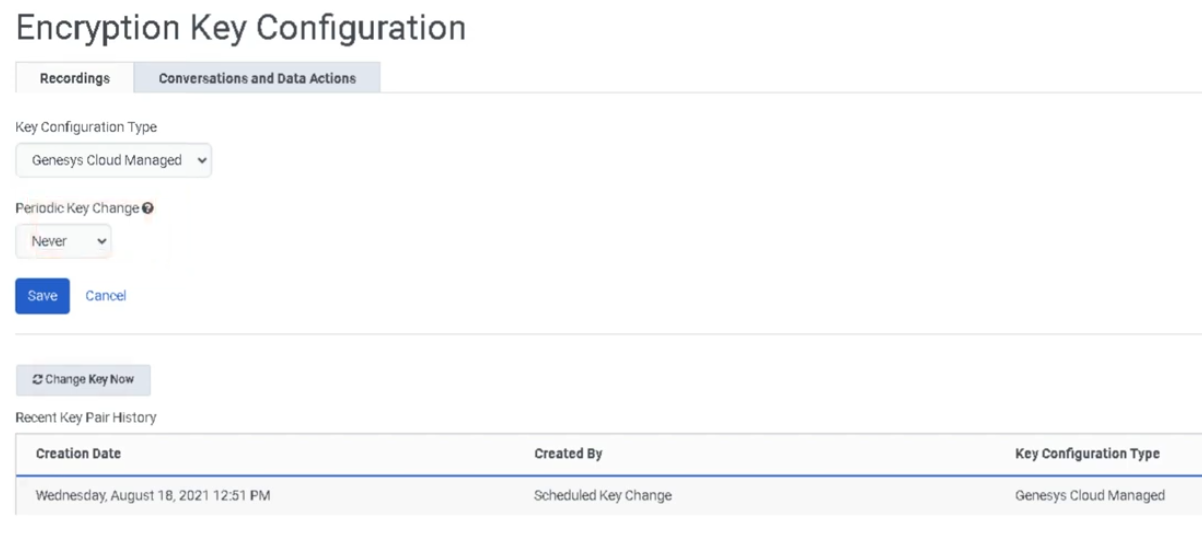
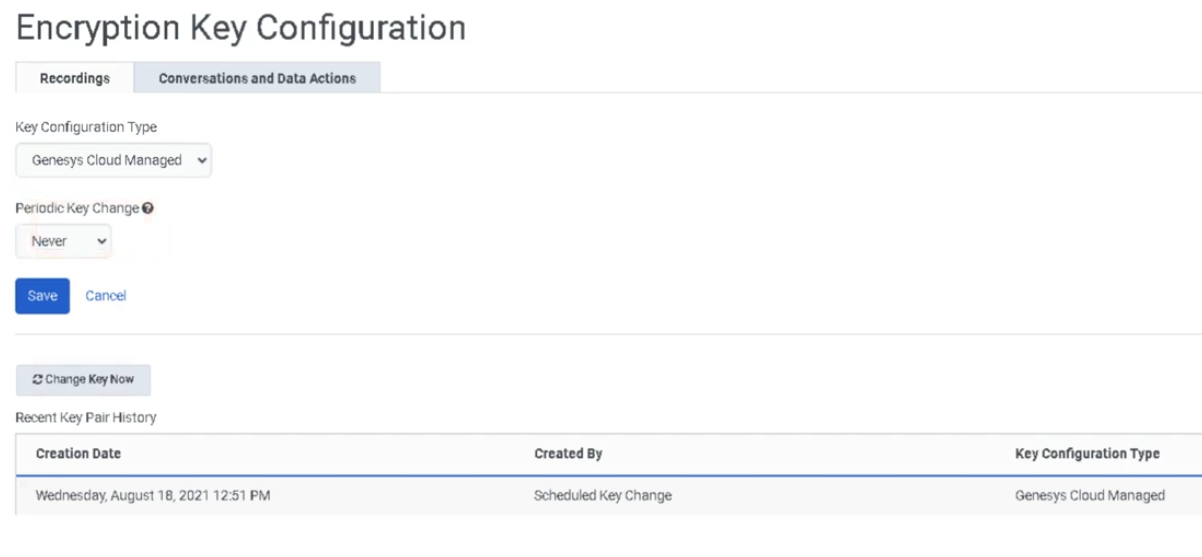
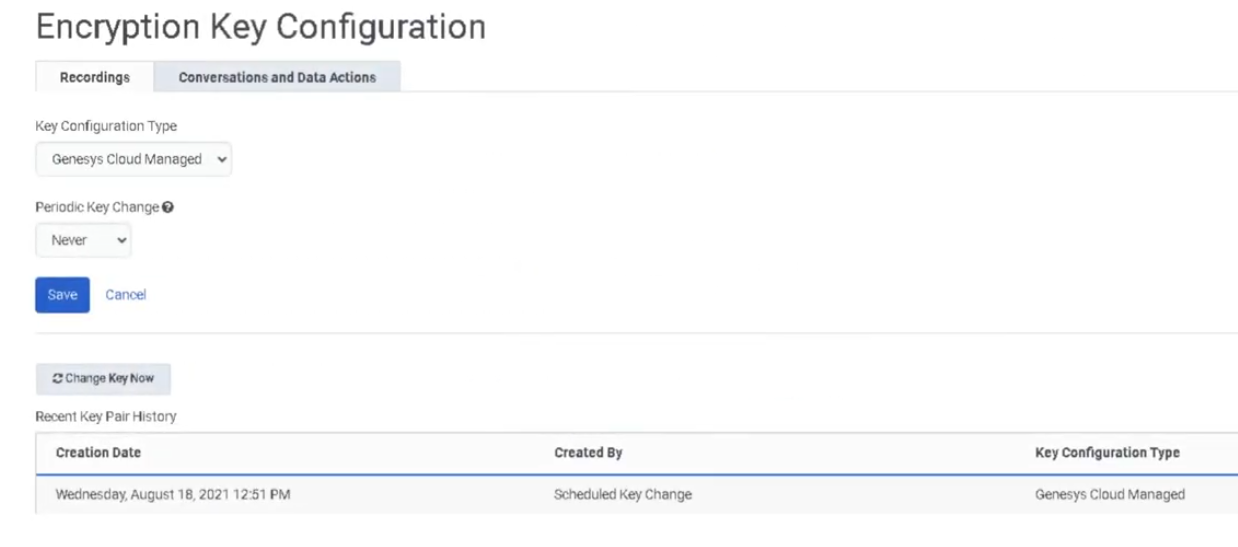
ConfigureEncryption encryption keysKeys |
Admin → Quality → Encryption Keys |
CreateEvaluation evaluation formsForms |
Admin → Quality → Evaluation Forms |
CreateSurvey survey formsForms |
Admin → Quality → Survey Forms |
Configure policiesPolicies |
Admin → Quality → Policies |
View evaluatorsEvaluators |
Admin → Quality → Evaluators |
Recording managementManagement |
Admin → Quality → Recording Management |
| Topic Miner |
Admin → Quality → Topic Miner |
| Speech & Text Analytics |
Admin → Conversation Intelligence → Speech & Text Analytics |
| Sentiment Feedback |
Admin → Quality → Sentiment Feedback |
| Topics |
Admin → Quality → Topics |
| Programs |
Admin → Quality → Programs |
Configuration Fields (UI Form Fields)
Encryption Keys
| Field |
Description |
ExampleOptions |
| Tab |
Default tab for encryption configuration |
Recordings |
| Key Configuration Type |
Defines encryptionEncryption key providermanagement model |
Genesys Cloud Managed Keys / Local Key Manager / AWS KMS Symmetric |
Periodic Key RotationChange |
Frequency offor keygenerating generationnew encryption keys |
Daily / Weekly / Monthly / Yearly / Never |
Key ManagerSave |
ExternalSaves encryption managerconfiguration |
AWS KMSButton |
| Field |
Description |
Options |
| Create |
Creates a new evaluation form |
Button |
| Form Name |
Name of the evaluation scorecardform |
Text |
Question GroupsGroup |
CategoriesCategory forgrouping related questions |
Product Knowledge / Compliance |
| Scoring Tab |
Enables scaled scoring |
Toggle |
| Add Question |
Adds new evaluation questionsquestion |
Button |
| Question Type |
Type of evaluation question |
Multiple Choice / Yes-No / Range |
| Question Name |
Question text shown to evaluator |
Text |
| Help Text |
Tooltip guidance for evaluator |
Text |
| Points |
Score value assigned to answers |
Numeric |
| Require Additional Comments |
Forces evaluator comment |
Toggle |
| Conditional Question |
Displays question based on previous answer |
Toggle |
| Fatal Question |
AutomaticallyIncorrect answer fails entire evaluation |
if answered incorrectlyToggle |
Conditional QuestionsSave |
DisplaySave questionsdraft onlyevaluation underform |
certainButton |
conditions
| Publish |
Publish evaluation form for evaluators |
Button |
Evaluation forms allow evaluators to score customer interactions based on compliance, script adherence, or satisfaction benchmarks. :contentReference[oaicite:2]{index=2}
| Field |
Description |
Options |
| Create |
Create new survey form |
Button |
| Survey Language |
Language used for survey |
Dropdown |
| Survey Form Name |
Internal survey identifier |
Text |
LanguageHeader |
LanguageInstructions usedor forimages thedisplayed to customer |
Text / Image |
| Add Question |
Add survey question |
Button |
| Question Type |
MultipleSurvey choice,question NPS, Yes/No, free text |
Header Contentformat |
InstructionsMultiple orChoice images/ forYes-No survey/ Range / Free Text / NPS |
| NPS Question |
MeasuresNet customerPromoter loyaltyScore question |
Only one per survey |
| Save |
Save survey form |
Button |
| Publish |
Publish survey form |
Button |
Policy FieldsPolicies
| Field |
Description |
Options |
| Create New Policy |
Creates new quality policy |
Button |
| Policy Name |
Name of policy |
Text |
| Media Type |
Call,Interaction Chat,type |
Email,Call / Chat / Email / Message |
MatchingConversation CriteriaDirection |
Queue, user, wrap-up code,Interaction direction filter |
Inbound / Outbound |
RetentionUsers Period/ Work Teams |
RecordingRestrict retentionpolicy durationto specific users |
Dropdown |
EvaluationQueues |
AssignmentApply policy to queues |
Dropdown |
| Wrap-Up Codes |
Filter interactions by wrap-up result |
Dropdown |
| Time Sets |
Apply policy during specific time ranges |
Dropdown |
| Date Range |
Policy date criteria |
Calendar |
| Recording Retention |
Define recording retention period |
Duration |
| Export Recordings |
Export recordings to AWS S3 |
Toggle |
| Screen Recording |
Enable screen recording |
Toggle |
| Screen Recording Duration |
Maximum retention |
Up to 365 days |
| Assign Evaluations by Evaluators |
Automatically assign evaluations |
Toggle |
SurveyAssign TriggerEvaluations by Agents |
Create evaluation quota per agent |
Toggle |
| Assign Calibration Evaluations |
Generate calibration sessions |
Toggle |
Send surveyWeb afterSurvey |
interactionAutomatically send surveys |
Toggle |
Recording Management
| Field |
Description |
Options |
| Screen Recording Bandwidth |
Limits simultaneous screen recordings |
Numeric |
| Storage Settings |
Defines media storage architecture |
Home Region / Global Media Fabric |
Topic Miner
| Field |
Description |
Options |
| New Miner |
Create mining job |
Button |
| Language |
Transcript language |
Dropdown |
| Data Source |
Interaction data source |
Genesys Cloud |
| Date Range |
Time window to analyze |
Calendar |
| Media Type |
Interaction channel |
Call / Message |
| Queue Selection |
Select queues to mine |
Up to five |
Speech & Text Analytics Settings
| Field |
Description |
Options |
| Voice Transcription |
Enables transcription |
Toggle |
| Transcript Confidence Filter |
Minimum confidence level |
Default 40 |
| Low-Latency Transcription |
Enables near real-time transcription |
Toggle |
| Content Search |
Enables transcript search |
Last 35 days |
Sentiment Feedback
| Field |
Description |
Options |
| Add Phrase |
Add phrase to sentiment dictionary |
Button |
| Phrase Text |
Phrase to classify |
Text |
| Sentiment Label |
Sentiment classification |
Positive / Negative / Neutral |
Topics
| Field |
Description |
Options |
| Topic Name |
Unique topic identifier |
Text |
| Description |
Topic explanation |
Text |
| Tags |
Classification tags |
Text |
| Strictness |
Matching sensitivity |
Low / Medium / High |
| Participants |
Conversation participants analyzed |
External / Internal / Both |
Programs
| Field |
Description |
Options |
| Program Name |
Program identifier |
Text |
| Dialect |
Language dialect |
Dropdown |
| Add Topics |
Add topics to program |
Button |
| Merge Phrases |
Combine detected phrases |
Toggle |
| Queue Mapping |
Assign program to queues |
Dropdown |
| Flow Mapping |
Assign program to flows |
Dropdown |
Dependencies
| Component |
Purpose |
| Interaction Recording |
Required for evaluating calls |
User Roles |
Quality Administrator / Evaluator permissionsevaluations |
| Speech & Text Analytics |
Enables transcript and sentimenttranscript-based analysis |
Architect Survey Flow |
Required to sendfor survey invitationsinvitation flows |
DataWorkforce Engagement Management |
Integrates coaching and quality monitoring |
| AWS Storage |
RecordingOptional long-term recording storage region configuration |
| Component |
Relationship |
| Architect |
Sends surveysurveys invitationsand viatriggers flowsworkflows |
| Analytics Workspace |
Provides reporting dashboards |
| Workforce Engagement Management |
Supports agent coaching and training |
| Interaction Recording |
Captures voiceinteractions andfor digital conversationsevaluation |
Speech & Text AnalyticsGamification |
ProvidesUses automatedevaluation insightsdata into interactions |
Workforce Engagement Management |
Integrates coaching andfor performance tracking |
Analytics Workspace |
Provides performance reporting dashboardsmetrics |
| Topic |
Why It MattersPurpose |
Performance Management |
Uses evaluation scores to monitor agent KPIs |
| Speech & Text Analytics |
AutomatesAnalyze conversationinteraction insightstranscripts |
| Gamification |
EncouragesEncourage performanceagent improvementengagement |
| Performance Management |
Track agent productivity |
Queue Performance MonitoringAnalytics |
MeasuresMonitor operational efficiencyperformance |
Workforce Engagement Management |
Integrates training, coaching,Schedule and qualityforecast evaluationagent activity |
Implementation Checklist
| Step |
Status |
| Configure recording encryption keys |
☐ |
| Enable interaction recording |
☐ |
| Create evaluation forms |
☐ |
| Publish evaluation forms |
☐ |
| Create survey forms |
☐ |
| Configure survey invite flow |
☐ |
| Create quality policies |
☐ |
Configure recording managementstorage |
☐ |
| Enable speech transcription |
☐ |
Configure analytics programstopics and topicsprograms |
☐ |
Implementation Guide
| Step |
Action |
| Step 1 |
Configure recording encryption keys for recordings |
| Step 2 |
CreateEnable evaluationinteraction forms and question groupsrecording |
| Step 3 |
Create evaluation forms |
| Step 4 |
Publish evaluation forms |
Step 45 |
ConfigureCreate survey forms |
Step 5 |
Create policies to automate evaluations and surveys |
Step 6 |
EnableConfigure speechquality and text analyticspolicies |
| Step 7 |
ConfigureEnable topicsspeech and sentiment analysistranscription |
| Step 8 |
MonitorConfigure evaluationsanalytics topics and agent performanceprograms |
How to Implement
| Phase |
Description |
| Infrastructure Setup |
Configure recording encryption and recording settings |
| Evaluation Setup |
Create evaluation forms and scoring criteriarules |
PolicyAutomation ConfigurationSetup |
AutomateCreate policies for evaluations and survey triggerssurveys |
| Analytics Setup |
Enable transcriptionspeech analytics and topic mining |
PerformanceContinuous MonitoringImprovement |
ReviewUse evaluationsevaluation anddata for coaching opportunities |
Workflow
Customer Interaction
        ↓
Interaction Recording
        ↓
Speech / Speech/Text Transcription
        ↓
Evaluation Assignment
        ↓
Agent Evaluation
        ↓
Coaching and Feedback
        ↓
Customer Survey (optional)
        ↓
Analytics & Coaching
Architecture Diagrams
Quality Monitoring Architecture
Customer Interaction
      ↓
GenesysRecording Cloud RecordingSystem
      ↓
Quality Evaluation
      ↓
Speech & Text Analytics
        ↓
Performance Insights
      ↓
Supervisor Coaching
Evaluation Process Architecture
Recorded Interaction
       ↓
Evaluation Form
       ↓
Evaluator Review
       ↓
Score CalculationDashboard
      ↓
Agent Coaching
Real Flow Scenarios
Scenario 1 – Agent Evaluation Workflow
Customer Call Recorded
      ↓
Interaction Selected
      ↓
Evaluation Form Applied
      ↓
AgentEvaluator ScoreScores GeneratedInteraction
      ↓
Supervisor Coaching
Scenario 2 – Post Interaction Survey
Customer Interaction Ends
      ↓
Survey Policy Triggered
      ↓
Survey Invitation Sent
      ↓
Customer Completes Survey
      ↓
Feedback Recorded
Scenario 3 – Conversation Analytics
Recorded Call
      ↓
Speech Transcription
      ↓
Topic Detection
      ↓
Sentiment Analysis
      ↓
Supervisor Insight
Speech and text analytics automatically analyze interactions to detect topics and customer sentiment. :contentReference[oaicite:3]{index=3}
Usage Scenarios
| Scenario |
Description |
| Compliance Monitoring |
Ensure agents follow regulatory scripts |
Customer ExperienceSatisfaction Monitoring |
Identify negative customer dissatisfactionsentiment |
| Agent Coaching |
UseImprove agent performance using evaluations to train agents |
ServiceQuality ImprovementAuditing |
DetectVerify trendsservice fromquality speech analyticsstandards |
VoiceCustomer of the CustomerFeedback |
Analyze customerCollect feedback fromthrough surveys |
Implementation Examples
ConfigurationResource |
Example |
| Evaluation Form |
Customer Service Evaluation |
Question GroupSurvey |
Product KnowledgePost_Call_CSAT |
Range QuestionPolicy |
Rate agent professionalism (1-5)Inbound_Call_Evaluation_Policy |
Fatal QuestionTopic |
Compliance disclaimer spokenBilling_Dispute |
Design Example
Customer Interaction
      ↓
Recording
      ↓
Quality
Evaluation
      ↓
Speech Analytics
      ↓
Performance Dashboard
      ↓
Supervisor Coaching Plan
Best PracticesGenerate a Genesys Cloud wiki section including: Study notes, Navigation, Configuration fields (UI form fields), Dependencies, Platform integration / related components, Related topics / further reading, Implementation checklist, Implementation guide, How to implement, Workflow, Architecture diagrams, Real flow scenarios, Usage scenarios, Implementation examples, Design example, Best practices, Naming convention, Security considerations, Limitations / constraints, Troubleshooting, Interview cheat sheet, and Key takeaways based on the transcript provided to cover everything and search on genesys documentation for anything its missing for Quality ManagementPractices
| Practice |
Reason |
Use standardizedStandardize evaluation forms |
Maintain consistent scoring |
EnableUse speech transcriptionanalytics |
ImproveDetect interactioncustomer insightssentiment trends |
ReviewRegularly review evaluations regularly |
Identify coaching opportunities |
Combine analyticssurveys withand surveysevaluations |
UnderstandGain full customer sentimentexperience insight |
UseDefine fatalclear questions carefullypolicies |
AvoidAutomate excessivequality evaluationmonitoring failuresprocesses |
Naming Convention
| Resource |
Example |
| Evaluation Form |
Customer_Service_Evaluation |
Survey Form |
Post_Call_CSAT |
| Policy |
Inbound_Call_Evaluation_Policy |
| Topic |
Cancellation_Request |
Naming Pattern:
<Department>_<Purpose>_<ResourceType>
Security Considerations
| Control |
Description |
Recording Encryption Keys |
Protect interaction recordings |
| Access Permissions |
Restrict evaluation access |
| Recording Retention |
Define retention policiesperiod |
| Data Privacy |
ProtectEnsure sensitive interactiondata dataprotection |
Limitations / Constraints
| Constraint |
Description |
Survey NPS Limit |
Only one NPS question per survey |
| Policy Scope |
PoliciesApplies only apply to interactions after activation |
| Screen Recording Duration |
Maximum 365 days |
| Topic Miner Limits |
Limited to selected queues and date ranges |
Troubleshooting
| Issue |
Cause |
Resolution |
EvaluationsEvaluation not createdgenerated |
Policy misconfiguration |
Verify policy criteria |
| Surveys not sent |
SurveyMissing survey flow missing |
Configure Architect survey flow |
MissingTranscripts transcriptsmissing |
Transcription disabled |
Enable voice transcription |
| Evaluation form unavailable |
Form not published |
Publish evaluation form |
Analytics missing topics |
Topic Miner not configured |
Run topic mining analysis |
Interview Cheat Sheet
| Question |
Answer |
| What is Genesys Cloud Quality Management? |
A system tofor evaluateevaluating interactions and improveimproving agentservice performance.quality. |
What tools are used for quality monitoring?used? |
Evaluation forms,Evaluations, surveys, policies, recordings, and analytics. |
| What is a fatal question? |
A question that automatically fails the entirean evaluation if answered incorrectly. |
| What is Topic Miner? |
A tool that identifies commonlyTool used to discover phrases in transcripts. |
What is sentiment analysis?feedback? |
AIAllows thatmanual detectscorrection customerof emotionalsentiment tone in conversations.classification. |
Key Takeaways
| Topic |
Summary |
| Quality Management |
EnablesEnsures supervisorshigh toservice evaluate and improve agent interactionsstandards |
| Evaluation Forms |
Provide structuredStructured scoring for agent performanceinteractions |
| Surveys |
Capture customer feedback |
Speech & Text Analytics |
ProvideAutomated automatedconversation insights into conversations |
| Policies |
Automate qualityevaluations monitoringand workflowssurveys |
| Coaching |
Helps improve serviceagent quality and customer satisfactionperformance |
Screenshots
Encryption Keys