Quality Management
Quality Management (Genesys Cloud CX)
| Section |
Description |
| Module Context |
Part of Quality, Performance, and Engagement management in Genesys Cloud. |
| Purpose |
Enables supervisors and administrators to monitor interaction quality, evaluate agent performance, and coach agents using recordings, evaluation forms, surveys, and analytics tools. |
| Admin Location |
Admin → Quality |
| Primary Objective |
Improve customer experience and agent performance through recordings, evaluations, surveys, analytics, and coaching workflows |
Quality management allows supervisors to record interactions, evaluate agents, provide coaching, and monitor service quality across all channels. :contentReference[oaicite:0]{index=0}
Study Notes
| Topic |
Explanation |
| Quality Management |
Framework used to evaluate agent interactions and improve service quality. |
| Interaction Recording |
Records voice and digital interactions for review and compliance. |
| Evaluation Forms |
Scorecards used to evaluate agent performance on recorded interactions. |
| Surveys |
Customer feedback collected after interactions. |
| Policies |
Automated rules for recording retention, evaluation creation, and survey distribution. |
| Speech & Text Analytics |
AI-driven analysis of conversation transcripts to detect topics and sentiment. |
| Topic Miner |
Tool that analyzes transcripts to identify commonly used phrases or themes. |
| Sentiment Analysis |
Automatically determines whether customer interactions are positive, negative, or neutral. |
| Coaching |
Managers can use evaluation results to coach agents and improve performance. |
Genesys Cloud integrates recording, evaluation, surveys, and analytics tools to improve compliance, agent performance, and customer satisfaction. :contentReference[oaicite:1]{index=1}
Navigation
| Task |
Navigation |
| Configure encryption keys |
Admin → Quality → Encryption Keys |
| Create evaluation forms |
Admin → Quality → Evaluation Forms |
| Create survey forms |
Admin → Quality → Survey Forms |
| Configure policies |
Admin → Quality → Policies |
| View evaluators |
Admin → Quality → Evaluators |
| Recording management |
Admin → Quality → Recording Management |
| Topic Miner |
Admin → Quality → Topic Miner |
| Speech & Text Analytics |
Admin → Conversation Intelligence → Speech & Text Analytics |
| Sentiment Feedback |
Admin → Quality → Sentiment Feedback |
Configuration Fields (UI Form Fields)
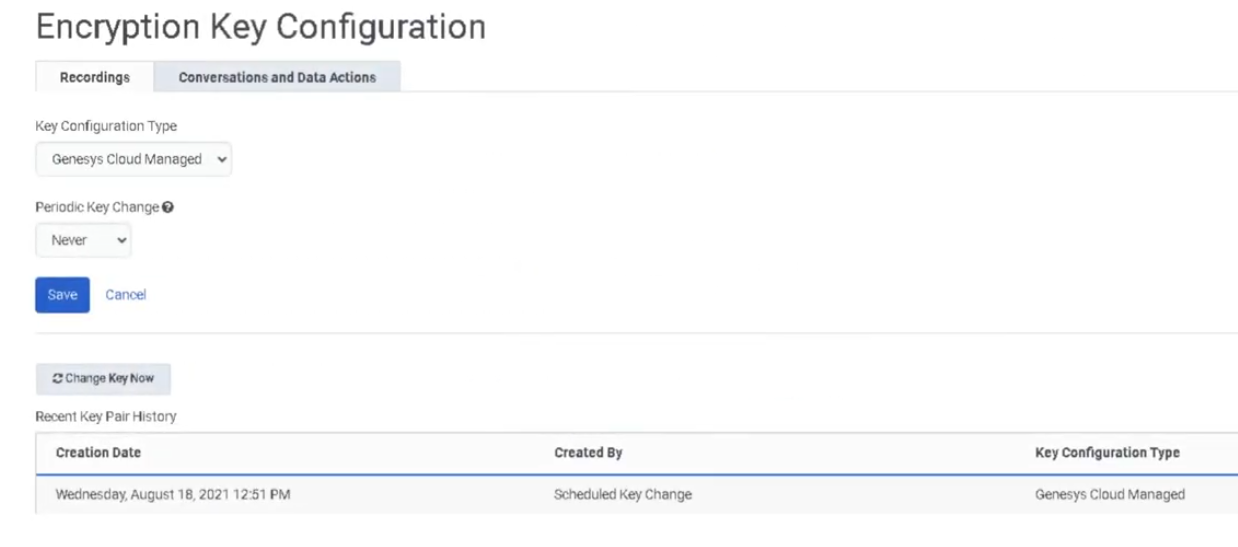
Encryption Keys
| Field |
Description |
Example |
| Key Configuration Type |
Defines encryption key provider |
Genesys Cloud Managed Keys |
| Key Rotation |
Frequency of key generation |
Monthly |
| Key Manager |
External encryption manager |
AWS KMS |
| Field |
Description |
| Form Name |
Name of evaluation scorecard |
| Question Groups |
Categories for evaluation questions |
| Question Type |
Multiple Choice / Yes-No / Range |
| Points |
Score value assigned to answers |
| Fatal Question |
Automatically fails evaluation if answered incorrectly |
| Conditional Questions |
Display questions only under certain conditions |
Evaluation forms allow evaluators to score customer interactions based on compliance, script adherence, or satisfaction benchmarks. :contentReference[oaicite:2]{index=2}
| Field |
Description |
| Survey Name |
Internal survey identifier |
| Language |
Language used for the survey |
| Question Type |
Multiple choice, NPS, Yes/No, free text |
| Header Content |
Instructions or images for survey |
| NPS Question |
Measures customer loyalty |
Policy Fields
| Field |
Description |
| Media Type |
Call, Chat, Email, Message |
| Matching Criteria |
Queue, user, wrap-up code, direction |
| Retention Period |
Recording retention duration |
| Evaluation Assignment |
Automatically assign evaluations |
| Survey Trigger |
Send survey after interaction |
Dependencies
| Component |
Purpose |
| Interaction Recording |
Required for evaluating calls |
| User Roles |
Quality Administrator / Evaluator permissions |
| Speech Analytics |
Enables transcript and sentiment analysis |
| Architect Survey Flow |
Required to send survey invitations |
| Data Storage |
Recording storage region configuration |
| Component |
Relationship |
| Architect |
Sends survey invitations via flows |
| Interaction Recording |
Captures voice and digital conversations |
| Speech & Text Analytics |
Provides automated insights into interactions |
| Workforce Engagement Management |
Integrates coaching and performance tracking |
| Analytics Workspace |
Provides performance reporting dashboards |
| Topic |
Why It Matters |
| Performance Management |
Uses evaluation scores to monitor agent KPIs |
| Speech & Text Analytics |
Automates conversation insights |
| Gamification |
Encourages performance improvement |
| Queue Performance Monitoring |
Measures operational efficiency |
| Workforce Engagement Management |
Integrates training, coaching, and quality evaluation |
Implementation Checklist
| Step |
Status |
| Configure recording encryption keys |
☐ |
| Create evaluation forms |
☐ |
| Publish evaluation forms |
☐ |
| Create survey forms |
☐ |
| Configure survey invite flow |
☐ |
| Create quality policies |
☐ |
| Configure recording management |
☐ |
| Enable speech transcription |
☐ |
| Configure analytics programs and topics |
☐ |
Implementation Guide
| Step |
Action |
| Step 1 |
Configure encryption keys for recordings |
| Step 2 |
Create evaluation forms and question groups |
| Step 3 |
Publish evaluation forms |
| Step 4 |
Configure survey forms |
| Step 5 |
Create policies to automate evaluations and surveys |
| Step 6 |
Enable speech and text analytics |
| Step 7 |
Configure topics and sentiment analysis |
| Step 8 |
Monitor evaluations and agent performance |
How to Implement
| Phase |
Description |
| Setup |
Configure recording encryption and recording settings |
| Evaluation Setup |
Create evaluation forms and scoring criteria |
| Policy Configuration |
Automate evaluations and survey triggers |
| Analytics Setup |
Enable transcription and topic mining |
| Performance Monitoring |
Review evaluations and coaching opportunities |
Workflow
Customer Interaction
        ↓
Interaction Recording
        ↓
Speech / Text Transcription
        ↓
Evaluation Assignment
        ↓
Agent Evaluation
        ↓
Coaching and Feedback
        ↓
Customer Survey (optional)
Architecture Diagrams
Quality Monitoring Architecture
Customer Interaction
        ↓
Genesys Cloud Recording
        ↓
Quality Evaluation
        ↓
Speech & Text Analytics
        ↓
Performance Insights
        ↓
Supervisor Coaching
Evaluation Process Architecture
Recorded Interaction
       ↓
Evaluation Form
       ↓
Evaluator Review
       ↓
Score Calculation
       ↓
Agent Coaching
Real Flow Scenarios
Scenario 1 – Agent Evaluation
Customer Call Recorded
      ↓
Interaction Selected
      ↓
Evaluation Form Applied
      ↓
Agent Score Generated
      ↓
Supervisor Coaching
Scenario 2 – Post Interaction Survey
Customer Interaction Ends
      ↓
Survey Policy Triggered
      ↓
Survey Invitation Sent
      ↓
Customer Completes Survey
      ↓
Feedback Recorded
Scenario 3 – Conversation Analytics
Recorded Call
      ↓
Speech Transcription
      ↓
Topic Detection
      ↓
Sentiment Analysis
      ↓
Supervisor Insight
Speech and text analytics automatically analyze interactions to detect topics and customer sentiment. :contentReference[oaicite:3]{index=3}
Usage Scenarios
| Scenario |
Description |
| Compliance Monitoring |
Ensure agents follow regulatory scripts |
| Customer Experience Monitoring |
Identify customer dissatisfaction |
| Agent Coaching |
Use evaluations to train agents |
| Service Improvement |
Detect trends from speech analytics |
| Voice of the Customer |
Analyze customer feedback from surveys |
Implementation Examples
| Configuration |
Example |
| Evaluation Form |
Customer Service Evaluation |
| Question Group |
Product Knowledge |
| Range Question |
Rate agent professionalism (1-5) |
| Fatal Question |
Compliance disclaimer spoken |
Design Example
Customer Interaction
        ↓
Recording
        ↓
Quality Evaluation
        ↓
Speech Analytics
        ↓
Performance Dashboard
        ↓
Supervisor Coaching Plan
Best PracticesGenerate a Genesys Cloud wiki section including: Study notes, Navigation, Configuration fields (UI form fields), Dependencies, Platform integration / related components, Related topics / further reading, Implementation checklist, Implementation guide, How to implement, Workflow, Architecture diagrams, Real flow scenarios, Usage scenarios, Implementation examples, Design example, Best practices, Naming convention, Security considerations, Limitations / constraints, Troubleshooting, Interview cheat sheet, and Key takeaways based on the transcript provided to cover everything and search on genesys documentation for anything its missing for Quality Management
| Practice |
Reason |
| Use standardized evaluation forms |
Maintain consistent scoring |
| Enable speech transcription |
Improve interaction insights |
| Review evaluations regularly |
Identify coaching opportunities |
| Combine analytics with surveys |
Understand customer sentiment |
| Use fatal questions carefully |
Avoid excessive evaluation failures |
Naming Convention
| Resource |
Example |
| Evaluation Form |
Customer_Service_Evaluation |
| Survey Form |
Post_Call_CSAT |
| Policy |
Inbound_Call_Evaluation_Policy |
| Topic |
Cancellation_Request |
Naming Pattern:
<Department>_<Purpose>_<ResourceType>
Security Considerations
| Control |
Description |
| Encryption Keys |
Protect interaction recordings |
| Access Permissions |
Restrict evaluation access |
| Recording Retention |
Define retention policies |
| Data Privacy |
Protect sensitive interaction data |
Limitations / Constraints
| Constraint |
Description |
| Survey NPS Limit |
Only one NPS question per survey |
| Policy Scope |
Policies only apply to interactions after activation |
| Screen Recording Duration |
Maximum 365 days |
| Topic Miner |
Limited to selected queues and date ranges |
Troubleshooting
| Issue |
Cause |
Resolution |
| Evaluations not created |
Policy misconfiguration |
Verify policy criteria |
| Surveys not sent |
Survey flow missing |
Configure Architect survey flow |
| Missing transcripts |
Transcription disabled |
Enable voice transcription |
| Evaluation form unavailable |
Form not published |
Publish evaluation form |
| Analytics missing topics |
Topic Miner not configured |
Run topic mining analysis |
Interview Cheat Sheet
| Question |
Answer |
| What is Genesys Cloud Quality Management? |
A system to evaluate interactions and improve agent performance. |
| What tools are used for quality monitoring? |
Evaluation forms, surveys, policies, recordings, and analytics. |
| What is a fatal question? |
A question that fails the entire evaluation if answered incorrectly. |
| What is Topic Miner? |
A tool that identifies commonly used phrases in transcripts. |
| What is sentiment analysis? |
AI that detects customer emotional tone in conversations. |
Key Takeaways
| Topic |
Summary |
| Quality Management |
Enables supervisors to evaluate and improve agent interactions |
| Evaluation Forms |
Provide structured scoring for agent performance |
| Surveys |
Capture customer feedback |
| Speech & Text Analytics |
Provide automated insights into conversations |
| Policies |
Automate quality monitoring workflows |
| Coaching |
Helps improve service quality and customer satisfaction |