Policies
Policies (Genesys Cloud Quality & Performance Management)
| Section |
Description |
| Module Context |
Part of Quality Management within Genesys Cloud Workforce Engagement Management (WEM). |
| Purpose |
Policies automate recording retention, evaluation assignment, survey delivery, calibration, and screen recording based on interaction criteria. |
| Admin Location |
Admin → Quality → Policies |
| Alt Navigation |
Menu → Conversation Intelligence → Recording and Policies → Policies |
| Core Objective |
Ensure consistent quality monitoring, compliance retention, and automated quality workflows. |
Policies are rules that match specific interaction criteria and automatically perform actions such as retaining recordings, assigning evaluations, creating calibration evaluations, and sending surveys.
Important behavior: Policies only apply to interactions occurring after the policy is enabled — they do not apply retroactively. Interaction recordings that do not match any policy are retained indefinitely (or until the maximum interaction data retention time is reached, if configured).
Study Notes
| Topic |
Explanation |
| Quality Policies |
Automation rules used to manage recordings, evaluations, calibrations, and surveys. |
| Matching Criteria |
Defines which interactions the policy applies to. |
| Recording Retention |
Determines how long recordings are stored. |
| Evaluation Assignment |
Automatically assigns interactions for evaluation.evaluation (3 methods — see below). |
| Calibration Evaluations |
Allows multiple evaluators to review the same interaction. |
| Survey Triggering |
Sends surveys to customers after interactions. |
| Screen Recording |
Enables recording of the agent desktop during interactions.ACD interactions only. |
| Overlapping Policies |
When policies overlap, Genesys Cloud applies the longest retention period unless explicitly overridden. |
Important behavior from the transcript:
Policies only apply to interactions occurring after the policy is enabled.
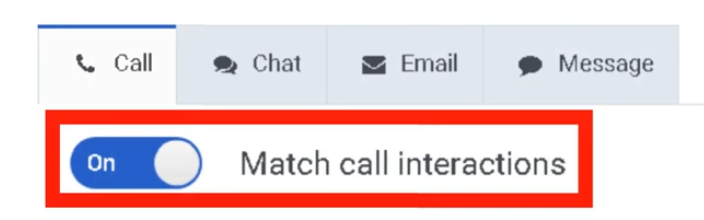
Policies can apply to calls, chats, emails, and messaging interactions.
Navigation
| Task |
Navigation |
| View policies |
Admin → Quality → Policies |
| Alt navigation |
Menu → Conversation Intelligence → Recording and Policies → Policies |
| Create policy |
Admin → Quality → Policies → Create New Policy |
| Edit policy |
Admin → Quality → Policies → Select Policy |
| Delete policy |
Admin → Quality → Policies → Delete |
| Filter policies |
Select Enabled or Disabled state, or enter policy name → click Apply |
Configuration Fields (UI Form Fields)
Policy Creation
| Field |
Description |
Options |
| Create New Policy |
Creates a new quality policy |
Button |
| Policy Name |
Unique name for the policy |
Text |
| Description |
Optional explanationExplanation of policy purposepurpose. Tip: describe its function (e.g., "evaluate inbound support calls") |
Text |
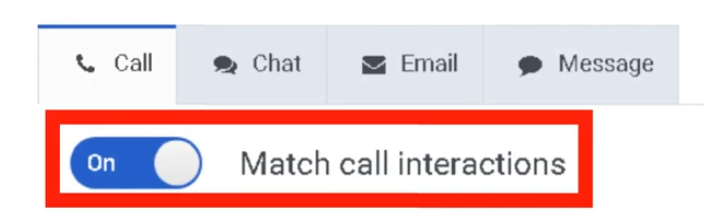
| Media Type Tabs |
Enable/disable policy per interaction type |
Toggle per tab |
Each media type is configured separately — matching criteria and actions are defined per media type tab.
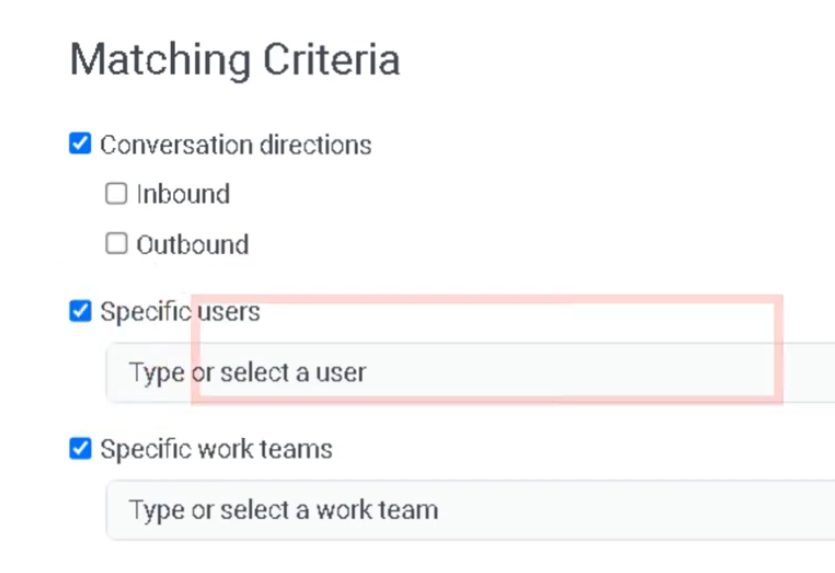
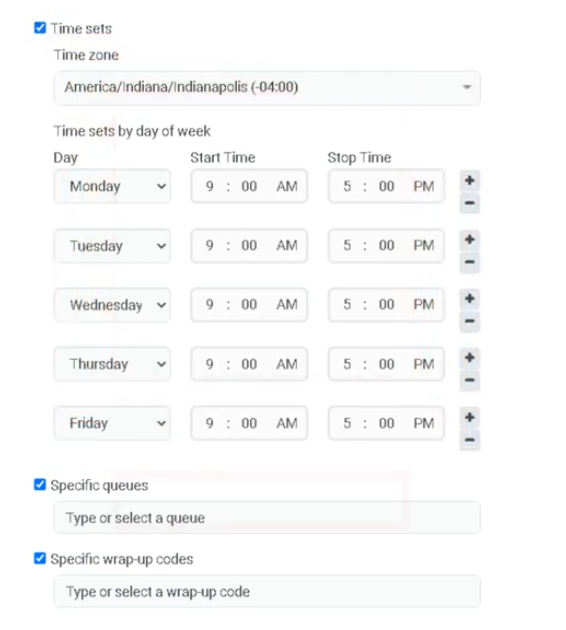
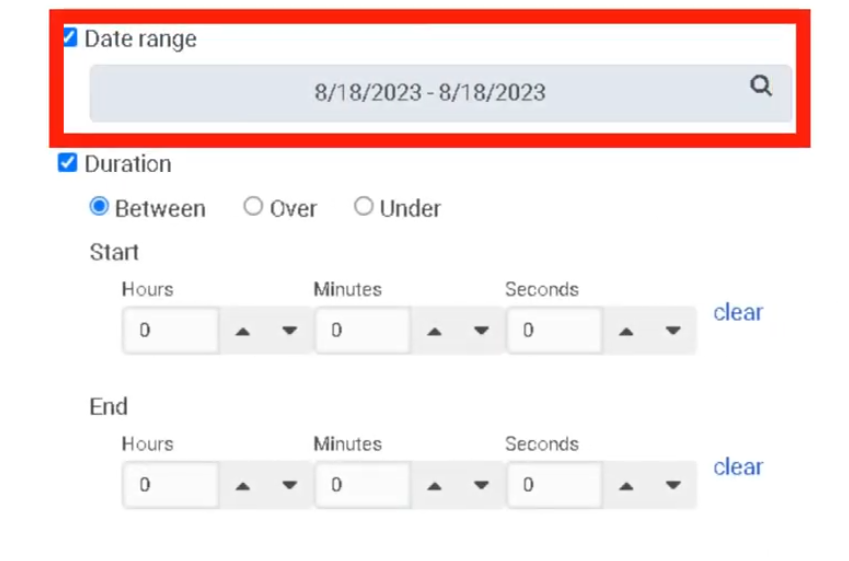
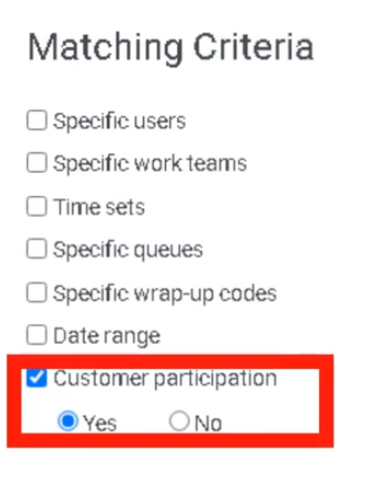
Matching Criteria
| Field |
Description |
Options / Notes |
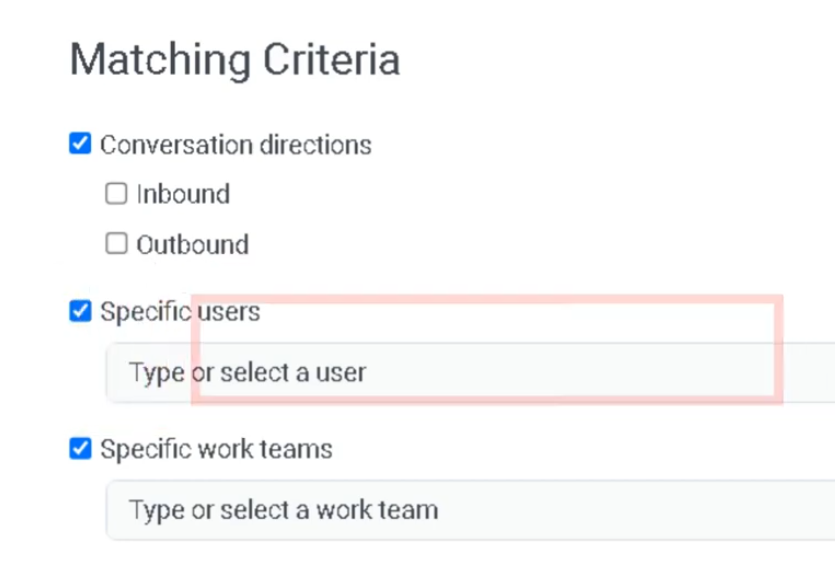
| Conversation Direction |
Interaction direction |
Inbound / Outbound |
| Specific Users |
Apply policy to specific agents |
Dropdown (up to recommended limit) |
| Specific Work Teams |
Apply policy to teams |
Dropdown |
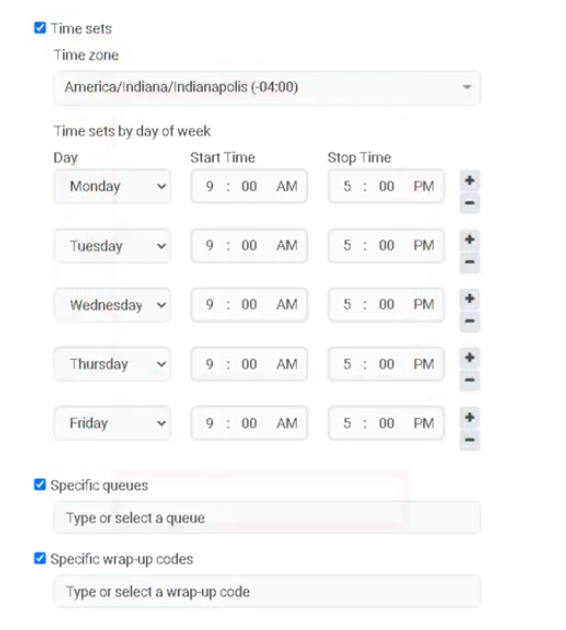
| Specific Queues |
Apply policy to specific queues |
Dropdown — Genesys recommends no more than 250 queues per policy |
| Specific Wrap-Up Codes |
Apply policy based on wrap-up results |
Dropdown |
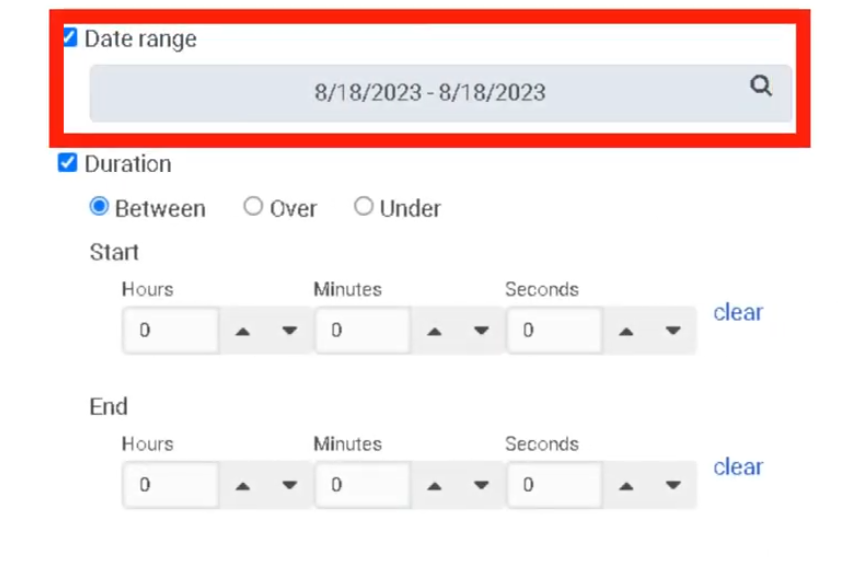
| Date Range |
Apply policy during specific dates |
Calendar |
| Time Sets |
Apply policy during specific time windows |
Dropdown |
| Conversation Duration |
Match interactions based on duration |
Numeric — includes queue time and after-call work |
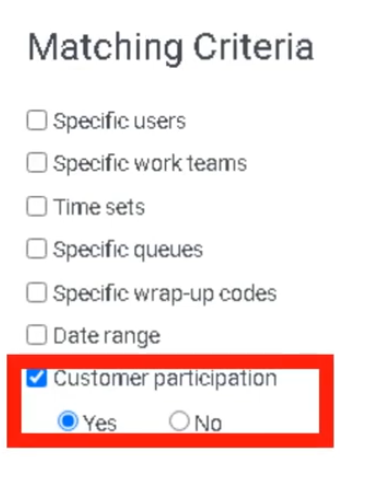
| Customer Participation |
Match email/message interactions based on whether customer participated |
Participated / Did not participate |
Note: Policies are not automatically modified when an agent, queue, or wrap-up code is deleted. These should be reviewed manually after deletions.
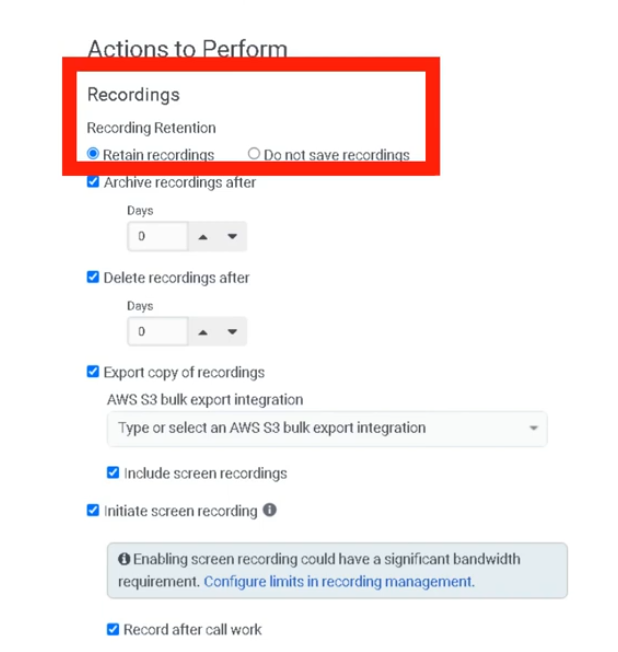
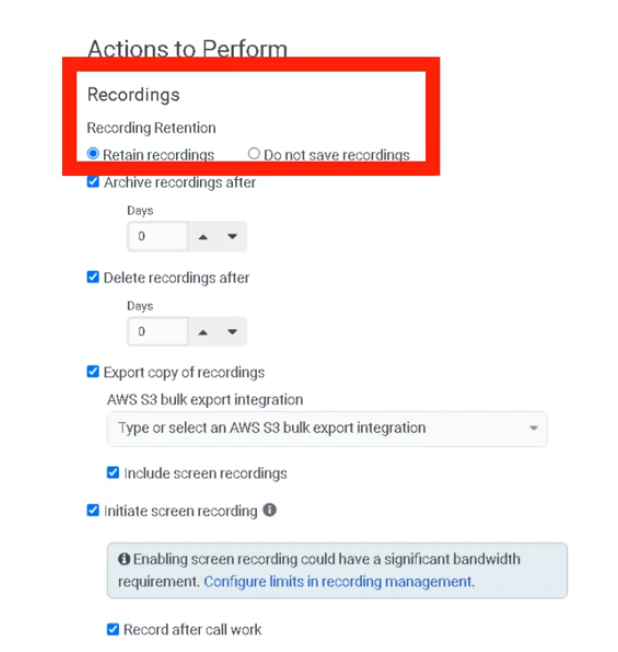
Recording Retention (Required)
| Field |
Description |
Options |
| Retain Recordings |
Retain recordings for evaluationevaluation/calibration/surveys |
Toggle — required if evaluations or surveys are used |
RetentionDo Duration | Not Recording retention time |
Days / Months |
ArchiveSave Recordings |
SendInteractions recordingsare tonot retained for long-term storage |
Toggle |
ExportDelete Even if Another Policy Retains |
Override overlap behavior to force delete |
Toggle — only shown when "Do not save" is selected |
| Archive Recording After |
Time before recording moves to long-term storage |
Days / Months |
| Delete Recordings After |
Days before recording is permanently deleted |
Numeric |
Export Copy of Recordings (AWS S3S3) |
Export recordings automatically to externalan AWS S3 bucket |
Toggle |
Overlap behavior: When two policies match the same interaction, Genesys Cloud applies the policy that retains the recording longest, as long as a delete date is explicitly defined on both. To override this and force deletion, use "Delete even if another policy retains."
Screen Recording
| Field |
Description |
Options |
EnableInitiate Screen Recording |
Record agent desktop during interaction |
Toggle |
| Record After Call Work |
Include ACW in screen recording |
Toggle |
| Screen Recording Retention |
DurationMaximum recordings are storedretention |
Up to 365 days |
Note: Screen recording only applies to ACD interactions. Policies that initiate screen recording only perform screen recording actions — they do not also apply to non-initiating policies.
Evaluation Automation — Three Methods
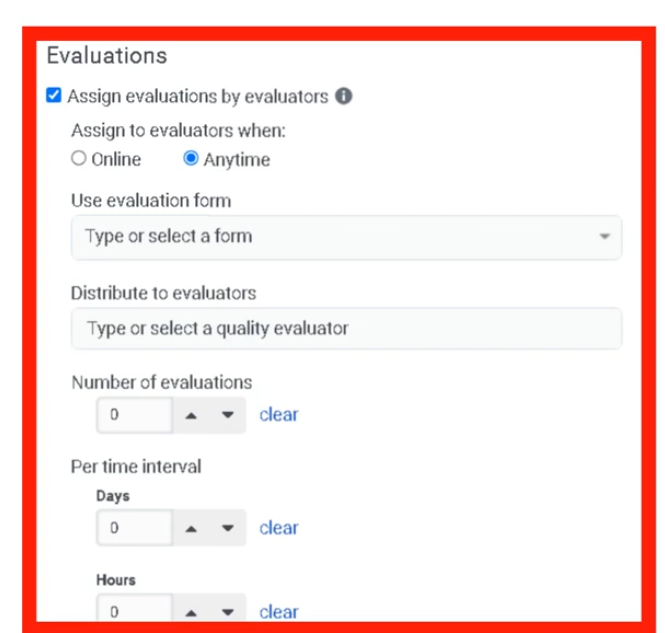
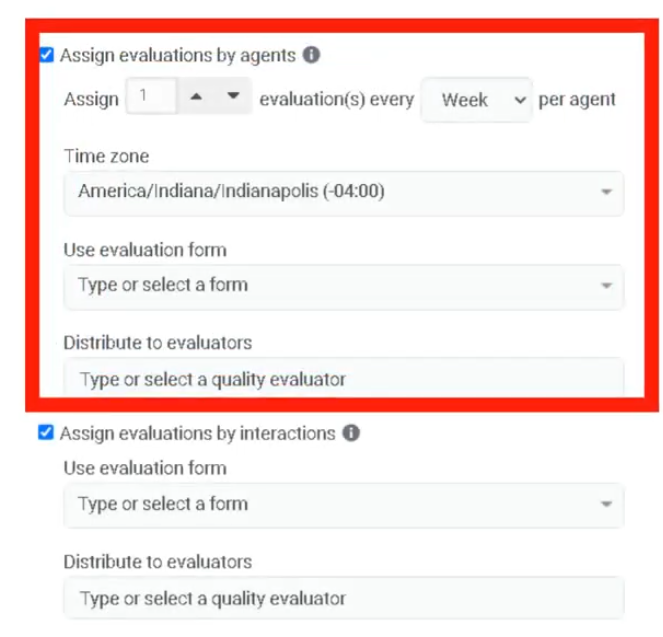
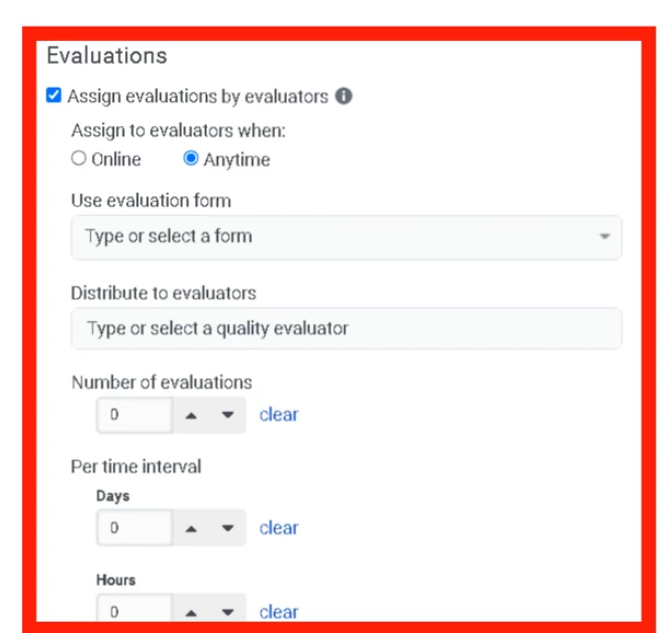
Method 1: Create Evaluations by Evaluators
| Field |
Description |
Options |
| Assign Evaluations by Evaluators |
AutomaticallyCreates assigna interactionsset tonumber evaluatorsof evaluations per time period per evaluator |
Toggle |
NumberEvaluation of EvaluationsForm |
Number of evaluationsForm to createuse |
NumericDropdown |
| Evaluators |
Users assigned to evaluate interactions |
Dropdown |
| Number of Evaluations |
Per evaluator per time interval |
Numeric |
| Time Interval |
When evaluations are assigned |
Daily / Weekly / Monthly |
Agent Evaluationselected: Assignmentfirst agent connected to the interaction.
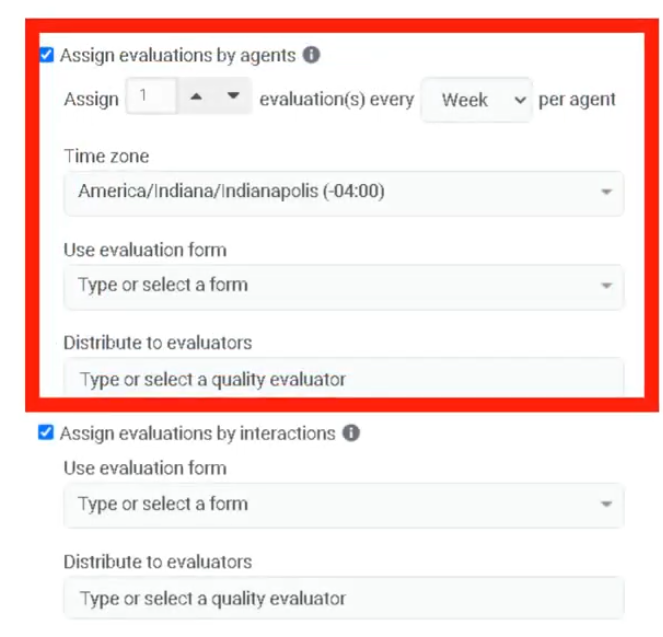
Method 2: Create Evaluations by Agents
| Field |
Description |
Options |
| Assign Evaluations by Agents |
Automatically createCreates evaluations for eachper agent listed in matching criteria |
Toggle |
Evaluation CountForm |
Form to use |
Dropdown |
| Evaluators |
Evaluations distributed evenly among these users |
Dropdown |
| Evaluations per Agent per Period |
Number of evaluationsQuota per agent |
Numeric |
| Agent Connected Duration |
Duration from agent joining to disconnect (excludes ACW and dialing, includes hold) |
Numeric |
| Time Zone |
Determines when evaluation period resets |
Dropdown |
Agent selected: last agent that participated in the interaction meeting the criteria. Monitors and coaches are excluded. Requires users, teams, or queues in matching criteria.
Method 3: Create Evaluations by Interaction
| Field |
Description |
Options |
| Assign Evaluations by Interaction |
Creates an evaluation for every matching interaction |
Toggle |
| Evaluation Form |
Form to use |
Dropdown |
| Evaluators |
If multiple specified, each gets the same set of interactions |
Dropdown |
Agent selected: first agent connected to the interaction. Useful for new hires or compliance scenarios requiring 100% evaluation coverage.
Evaluation Limits (Exam Critical)
| Time Period |
Maximum Evaluations per Agent |
| Per Day |
50 |
| Per Week |
175 |
| Per Month |
700 |
These limits prevent policies from accidentally assigning more evaluations than an evaluator can complete. Limits apply even if more interactions match the policy.
Note: A policy does not create an evaluation for an interaction that has no recording on the agent side (e.g., agent dismisses an email without replying).
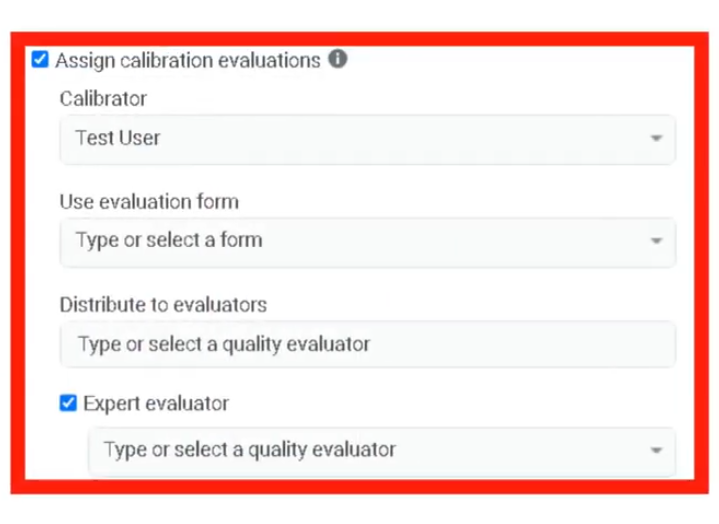
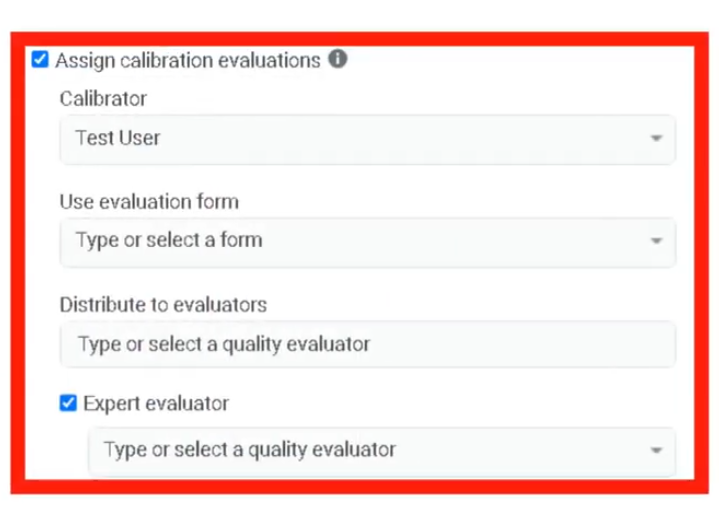
Calibration Evaluations
| Field |
Description |
Options |
| Assign Calibration Evaluations |
Create calibration sessions for evaluators |
Toggle |
| Calibration Form |
Evaluation form for calibration |
Dropdown |
| Evaluators |
UsersTwo participatingor inmore calibrationevaluators required |
Dropdown |
| Expert Evaluator |
Benchmark scorer |
Dropdown |
| Calibrator |
Person who created the policy is default calibrator |
Dropdown |
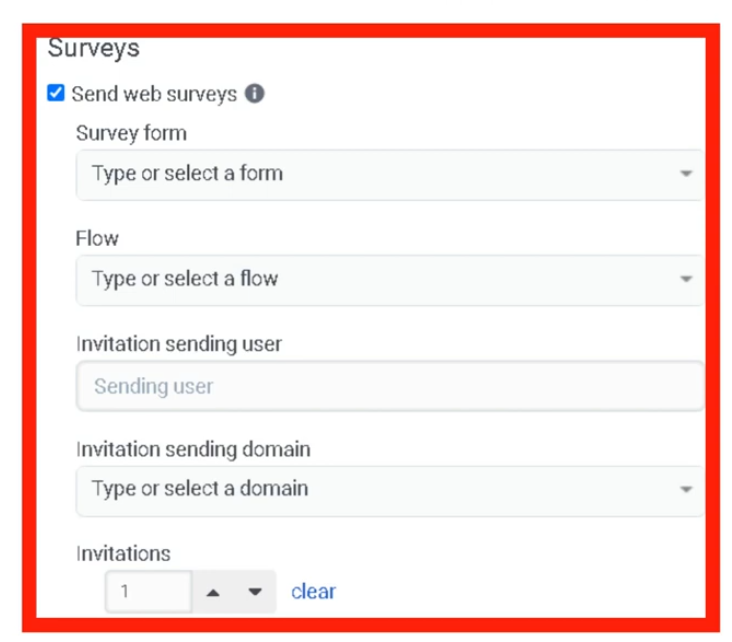
Survey Trigger
| Field |
Description |
Options |
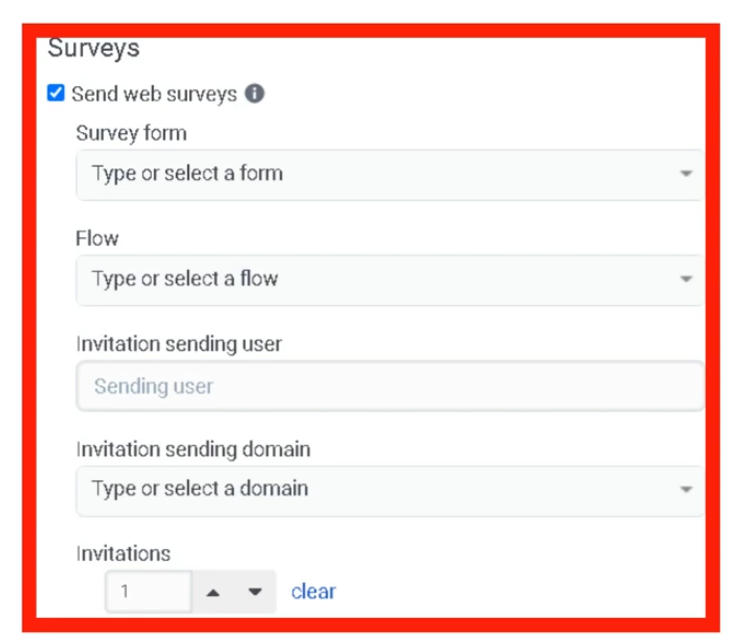
| Send Web Survey |
SendsAutomatically sends a survey invitation to customeremail |
Toggle |
| Survey Form |
Survey form usedto use |
Dropdown |
| Survey Invite Flow |
Architect flow that delivers the invitation |
Dropdown |
| Email Domain |
Domain used for invitation email |
Dropdown |
| Number of Invitations |
How many invitations to send |
Numeric |
Survey delivery requires a configured Architect Survey Invite Flow.
Dependencies
| Component |
Purpose |
| Interaction Recording |
Required for evaluationevaluation, calibration, and retention policies |
| Evaluation Forms |
Used when policies assign evaluations |
| Survey Forms |
Used when policies send surveys |
| Architect Survey Invite Flow |
Required to deliver survey invitations |
| AWS S3 |
Optional external storage for recordings |
| SIP Trunk (Line Recording enabled) |
Required for call recording to function |
| Component |
Relationship |
| Architect |
Executes survey invite flows |
| Evaluation Forms |
Used for scoring interactions |
| Survey Forms |
Collect customer feedback |
| Interaction Recording |
Captures interactions for evaluation |
| Speech & Text Analytics |
Analyzes recorded conversations |
| Topic |
Purpose |
| Evaluation Forms |
Score agent interactions |
| Survey Forms |
Collect customer feedback |
| Speech & Text Analytics |
Analyze interaction transcripts |
| Recording Management |
Configure recording storage |
| Workforce Engagement Management |
Manage agent coaching and development |
Implementation Checklist
| Step |
Status |
| Enable interaction recording (Line Recording on SIP trunk) |
☐ |
| Create evaluation forms |
☐ |
| Create survey forms |
☐ |
| Create quality policy |
☐ |
| Configure matching criteria |
☐ |
| Configure retention rules |
☐ |
EnableSelect evaluation assignment method |
☐ |
| Enable survey automation |
☐ |
| Test policy behavior |
☐ |
Implementation Guide
| Step |
Action |
| Step 1 |
Navigate to Admin → Quality → Policies |
| Step 2 |
Click Create New Policy |
| Step 3 |
SelectEnter name and description |
| Step 4 |
Click media type tab and enable/disable per type |
Step 45 |
Configure matching criteria |
Step 56 |
Configure recording retention settings |
Step 6 |
Enable evaluation assignment if needed |
| Step 7 |
Select evaluation method (by Evaluators / by Agents / by Interaction) |
| Step 8 |
Enable calibration if required |
| Step 9 |
Enable survey automation if required |
Step 810 |
Save policy | and
Step 9 |
Testtest policy behavior |
How to Implement
Phase |
Description |
|---|
Policy Design |
Define which interactions require monitoring |
Automation Setup |
Configure evaluation and survey automation |
Retention Configuration |
Define recording storage rules |
Monitoring |
Review evaluations and feedback |
Workflow
Customer Interaction
        ↓
Interaction Recording
        ↓
Quality Policy Evaluates Interaction
        ↓
Policy Criteria Match
        ↓
Action Triggered
      ├─ Retain Recording
      ├─ Assign Evaluation (by Evaluator / Agent / Interaction)
      ├─ Assign Calibration
      └─ Send Survey
Architecture Diagrams
Policy Automation Architecture
Customer Interaction
       ↓
Recording System
       ↓
Quality Policy Engine
       ↓
Automated Actions
   ├─ Evaluation AssignmentMethod ├─Decision Survey Delivery
   └─ Recording Retention
Real Flow Scenarios
Automated Evaluation Assignment
Customer Call Ends
      ↓
Policy Matches Queue Criteria
      ↓
Evaluation Automatically Assigned
      ↓
Evaluator Reviews Interaction
Customer Survey Trigger
Customer Chat Interaction Ends
      ↓
Policy Detects Interaction
      ↓
Survey Invite Flow Triggered
      ↓
Customer Receives Survey
Usage ScenariosGuide
ScenarioUse Case |
DescriptionRecommended Method |
ComplianceFixed Monitoringnumber of evals per evaluator per period |
RetainCreate recordingsEvaluations forby regulatory complianceEvaluators |
AgentFixed Coachingquota of evals per agent per period |
AutomaticallyCreate assignEvaluations evaluationsby Agents |
CustomerEvaluate Feedbackevery matching interaction (e.g., new hires, compliance) |
TriggerCreate surveysEvaluations afterby interactionsInteraction |
PerformanceConsistent Monitoringscoring across evaluators |
IdentifyCalibration interactions needing review |
Training Calibration |
Ensure evaluator scoring consistencyEvaluations |
Implementation Examples
Policy Type |
Example |
|---|
Evaluation Policy |
Evaluate 10% of inbound support calls |
Compliance Policy |
Retain recordings for 12 months |
Survey Policy |
Send CSAT survey after resolved interactions |
Calibration Policy |
Assign same call to multiple evaluators |
Design Example
Inbound Support Call
        ↓
Quality Policy Match
        ↓
Actions Triggered
   ├─ Recording Retained
   ├─ Evaluation Assigned
   └─ Survey Sent
Best Practices
| Practice |
Reason |
| Use clear policy names and descriptions |
Improves administrative clarity |
| Apply policies to specific queues |
Avoid unnecessary evaluations |
| Separate retention and evaluation policies |
Keeps policies focused and manageable |
| Divide large queue sets into multiple policies |
Genesys recommends no more than 250 queues per policy; consider 100 for best practice |
| Use evaluation quotas |
Prevent evaluator overload |
Review policies regularlyafter agent/queue/wrap-up deletions |
MaintainPolicies complianceare requirementsnot auto-updated |
| Combine surveys and evaluations in separate policies |
Gain full quality insight without conflicting retention rules |
Naming Convention
| Resource |
Example |
| Policy |
Inbound_Call_Evaluation_Policy |
| Compliance Policy |
Call_Recording_Compliance |
| Survey Policy |
Post_Call_CSAT_Policy |
| Calibration Policy |
Monthly_Calibration_Policy |
Naming Pattern:
<InteractionType>_<Purpose>_Policy
Security Considerations
| Control |
Description |
| Recording Encryption |
Protect interaction recordings |
| Access Permissions |
Restrict policy configuration to admins |
| Retention Compliance |
Ensure regulatory complianceretention requirements are met |
| Data Privacy |
Protect customer interaction data |
Limitations / Constraints
| Constraint |
Description |
| Policy Scope |
Only affects interactions after activation |
Screen Recording Retention |
MaximumACD interactions only — max 365 days retention |
| Survey Delivery |
Requires Architect survey invite flow |
RecordingEvaluation StorageLimits |
LimitedMax by50/day, storage175/week, configuration700/month per agent |
| Queue Recommendation |
No more than 250 queues per policy |
| Overlapping Policies |
Longest retention wins unless explicitly overridden |
| Recordings with no policy |
Retained indefinitely (up to org maximum if set) |
Troubleshooting
| Issue |
Cause |
Resolution |
| Evaluations not assigned |
Matching criteria incorrect |
Verify queue/useruser/team filters |
| Surveys not triggered |
Survey policyinvite flow missing or not selected |
EnableConfigure and assign Architect survey triggerinvite flow |
| Recordings not retained |
Retention settingssetting incorrectnot configured |
Update retention configuration |
| Screen recording missing |
Feature disablednot initiated by policy |
Enable screen recording in the initiating policy |
| Evaluation missing for email interaction |
Agent never replied — no agent-side recording |
Manually assign evaluation if needed |
| Too many evaluations assigned |
Policy quota too high or method too broad |
Use "by Agents" method with explicit quotas |
Interview Cheat Sheet
| Question |
Answer |
| What is a quality policy in Genesys Cloud? |
AutomationAn automation rule that manages recordings, evaluations, calibrations, and surveys. |
What actionsare canthe policiesthree perform?evaluation assignment methods? |
RetainBy recordings,Evaluators, assignBy evaluations,Agents, assignBy calibrations,Interaction |
send
surveys.
| What are the evaluation assignment limits? |
50/day, 175/week, 700/month per agent |
| What media types are supported? |
Call, chat,Chat, email,Email, and message.Message |
| Do policies apply to existing interactions? |
No,No — only to interactions occurring after the policy is enabled.enabled |
| What happens when no policy matches a recording? |
It is retained indefinitely (or up to org maximum) |
| What happens when overlapping policies have different retention? |
Genesys applies the longest retention period |
| What is required for screen recording? |
ACD interactions only; initiated by the policy |
| What is required for surveys? |
An Architect Survey Invite Flow must be configured |
Key Takeaways
| Topic |
Summary |
| Policies |
Automate quality monitoring tasks |
| Matching Criteria |
Determines which interactions trigger policies — includes Duration and Customer Participation |
| Three Evaluation Methods |
By Evaluators / By Agents / By Interaction — each serves a different use case |
Evaluation AssignmentLimits |
Automatically50/day, assign175/week, interactions700/month forper reviewagent |
| Overlapping Policies |
Longest retention wins by default |
| No-Match Behavior |
Recordings without a matching policy are retained indefinitely |
| Survey Automation |
CollectRequires customerArchitect feedbackSurvey automaticallyInvite Flow |
| Recording Retention |
EnsuresRequired compliancefield andfor qualityall monitoringpolicies — retention rules cannot be skipped |
Screenshots


Assign evaluators
Calibratiopn evaluations
This uses the survey form used previosly Survey