Policies
Policies (Genesys Cloud Quality & Performance Management)
| Section |
Description |
| Module Context |
Part of Quality Management within Genesys Cloud Workforce Engagement Management (WEM). |
| Purpose |
Policies automate recording retention, evaluation assignment, survey delivery, and screen recording based on interaction criteria. |
| Admin Location |
Admin → Quality → Policies |
| Core Objective |
Ensure consistent quality monitoring, compliance retention, and automated quality workflows. |
Policies are rules that match specific interaction criteria and automatically perform actions such as retaining recordings, assigning evaluations, creating calibration evaluations, and sending surveys.
Study Notes
| Topic |
Explanation |
| Quality Policies |
Automation rules used to manage recordings, evaluations, and surveys. |
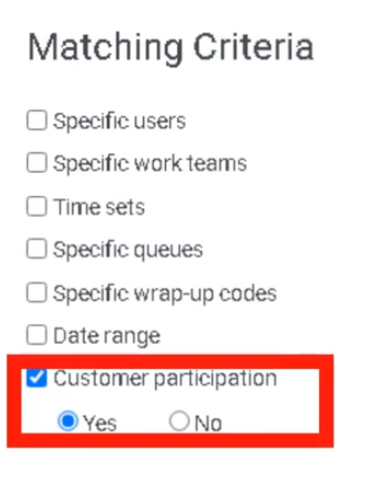
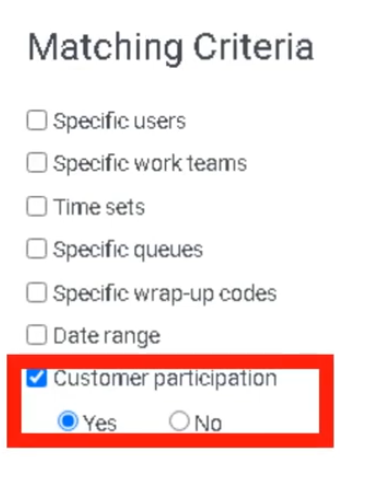
| Matching Criteria |
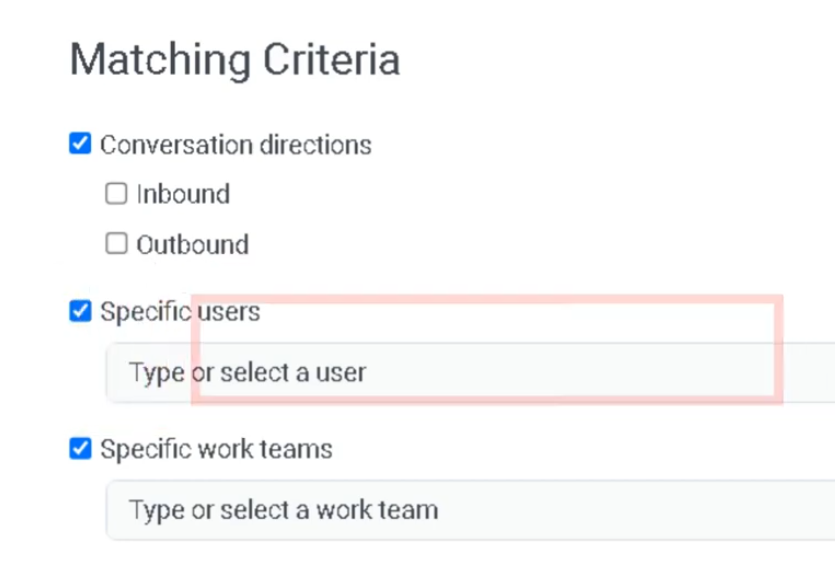
Defines which interactions the policy applies to. |
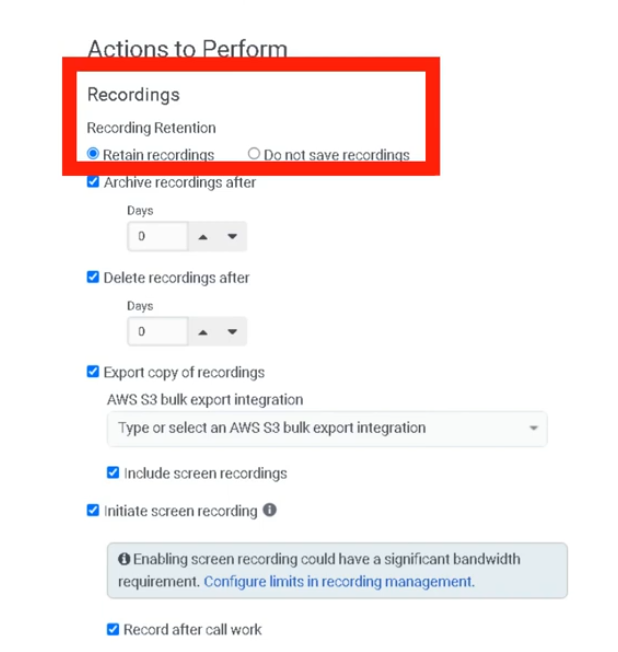
| Recording Retention |
Determines how long recordings are stored. |
| Evaluation Assignment |
Automatically assigns interactions for evaluation. |
| Calibration Evaluations |
Allows multiple evaluators to review the same interaction. |
| Survey Triggering |
Sends surveys to customers after interactions. |
| Screen Recording |
Enables recording of the agent desktop during interactions. |
Important behavior from the transcript:
- Policies only apply to interactions occurring after the policy is enabled.
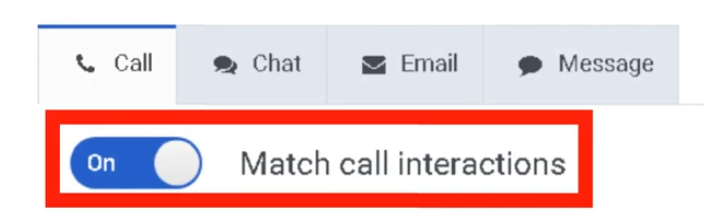
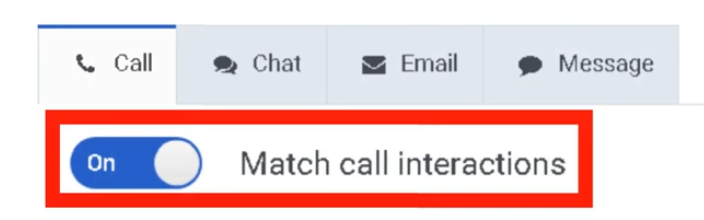
- Policies can apply to calls, chats, emails, and messaging interactions.
Navigation
| Task |
Navigation |
| View policies |
Admin → Quality → Policies |
| Create policy |
Admin → Quality → Policies → Create New Policy |
| Edit policy |
Admin → Quality → Policies → Select Policy |
| Delete policy |
Admin → Quality → Policies → Delete |
Configuration Fields (UI Form Fields)
Policy Creation
| Field |
Description |
Options |
| Create New Policy |
Creates a new quality policy |
Button |
| Policy Name |
Unique name for the policy |
Text |
| Description |
Optional explanation of policy purpose |
Text |
| Field |
Description |
Options |
| Media Type |
Interaction type the policy applies to |
Call / Chat / Email / Message |
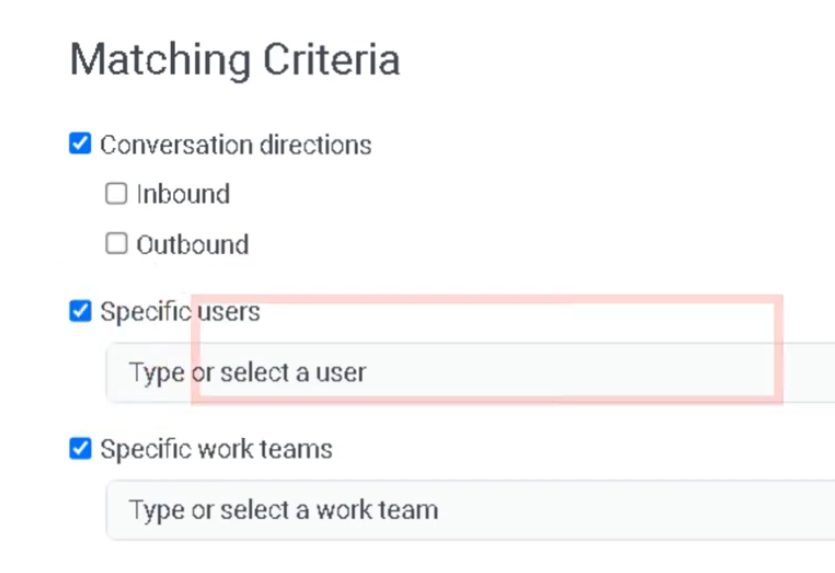
Matching Criteria
| Field |
Description |
Options |
| Conversation Direction |
Interaction direction |
Inbound / Outbound |
| Users |
Apply policy to specific agents |
Dropdown |
| Work Teams |
Apply policy to teams |
Dropdown |
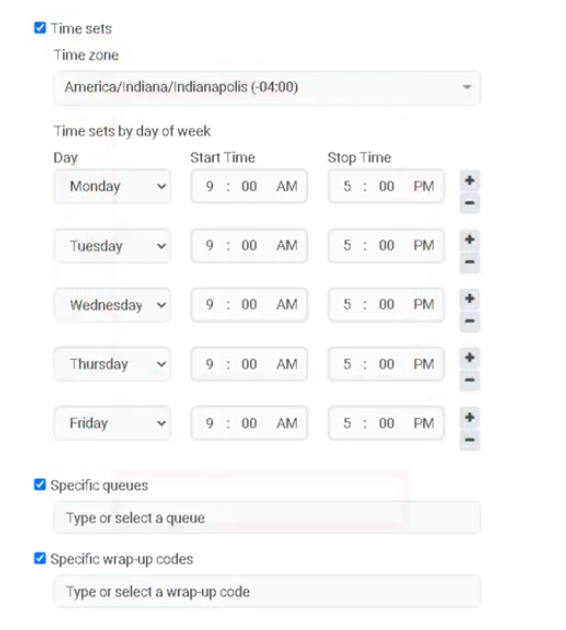
| Queues |
Apply policy to specific queues |
Dropdown |
| Wrap-Up Codes |
Apply policy based on wrap-up results |
Dropdown |
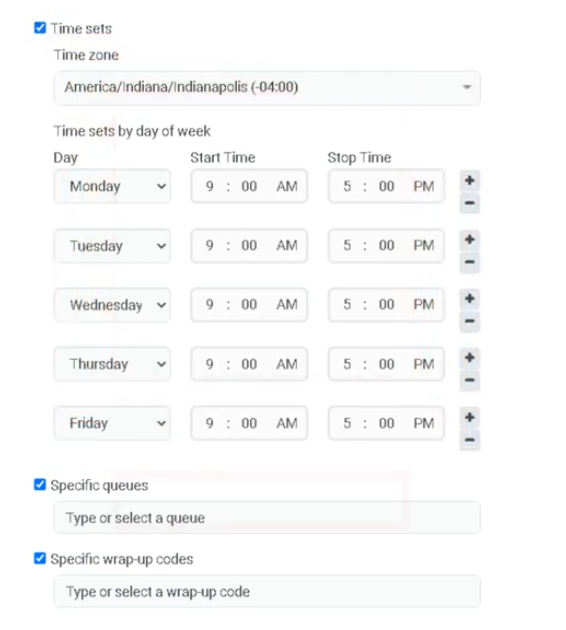
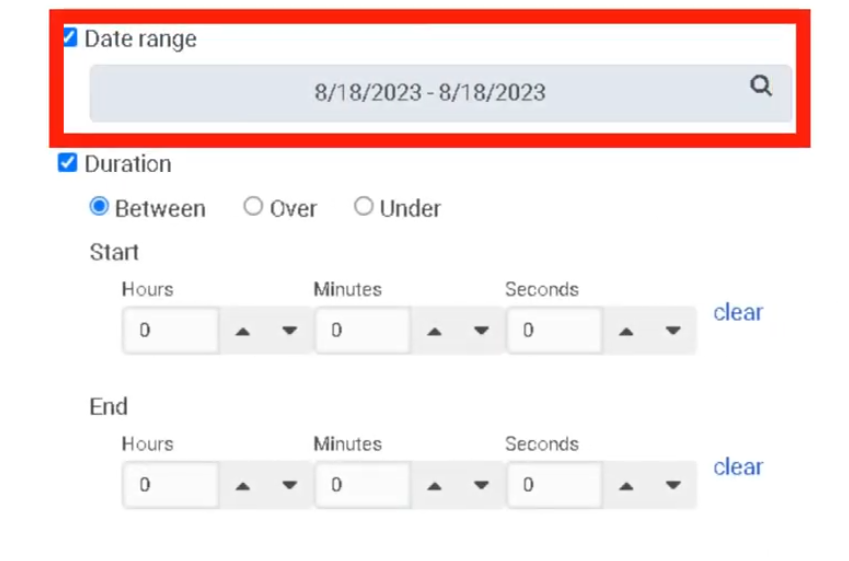
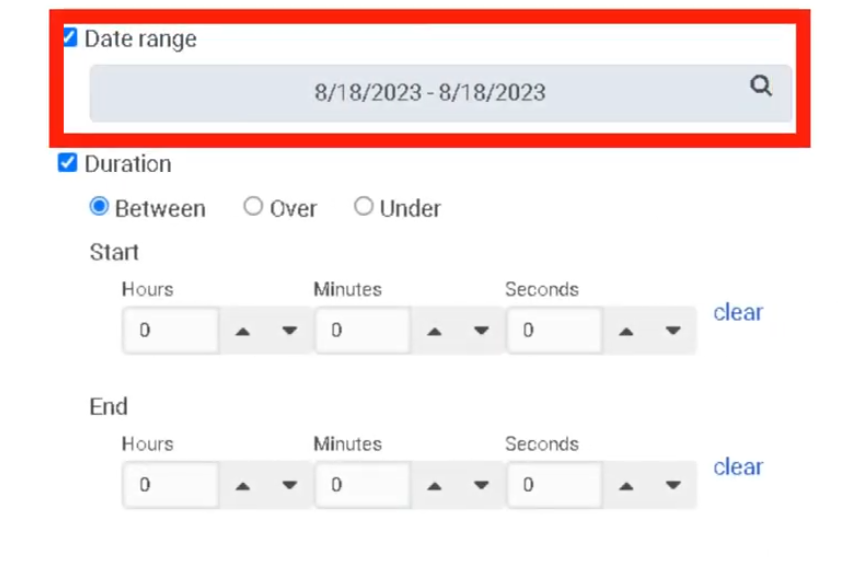
| Date Range |
Apply policy during specific dates |
Calendar |
| Time Sets |
Apply policy during specific time windows |
Dropdown |
Recording Retention
| Field |
Description |
Options |
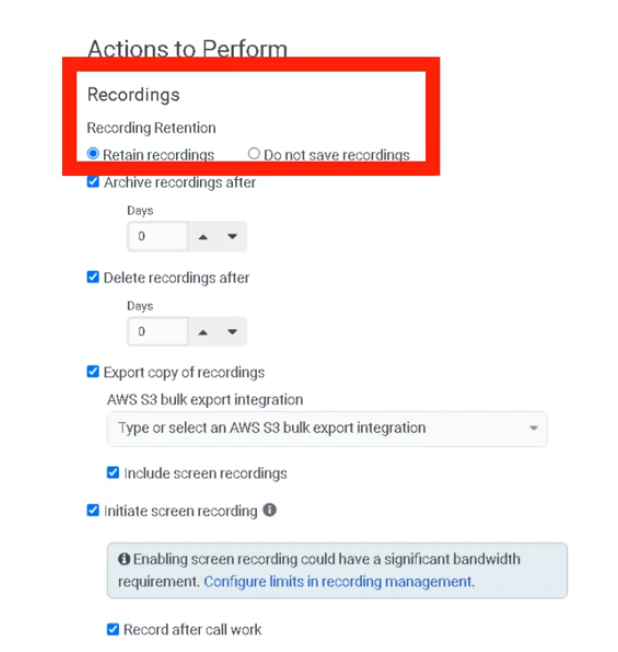
| Retain Recordings |
Retain recordings for evaluation |
Toggle |
| Retention Duration |
Recording retention time |
Days / Months |
| Archive Recordings |
Send recordings to long-term storage |
Toggle |
| Export to AWS S3 |
Export recordings to external S3 bucket |
Toggle |
Screen Recording
| Field |
Description |
Options |
| Enable Screen Recording |
Record agent desktop |
Toggle |
| Screen Recording Retention |
Duration recordings are stored |
Up to 365 days |
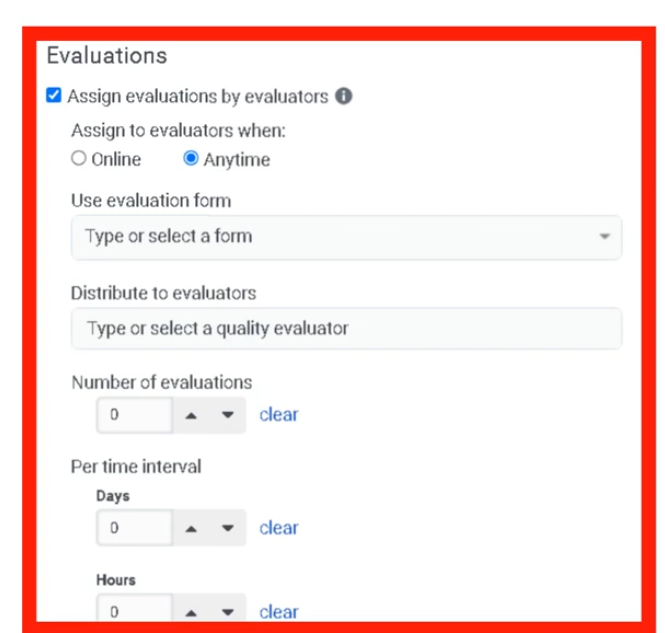
Evaluation Automation
| Field |
Description |
Options |
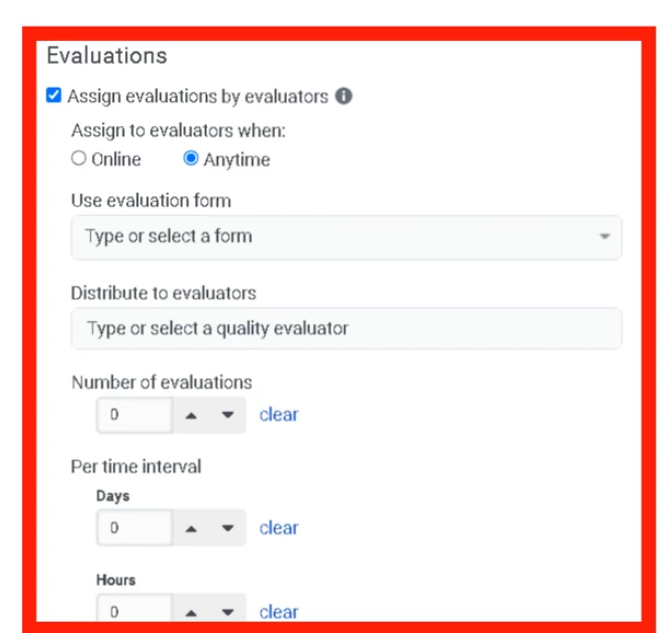
| Assign Evaluations by Evaluators |
Automatically assign interactions to evaluators |
Toggle |
| Number of Evaluations |
Number of evaluations to create |
Numeric |
| Evaluators |
Users assigned to evaluate interactions |
Dropdown |
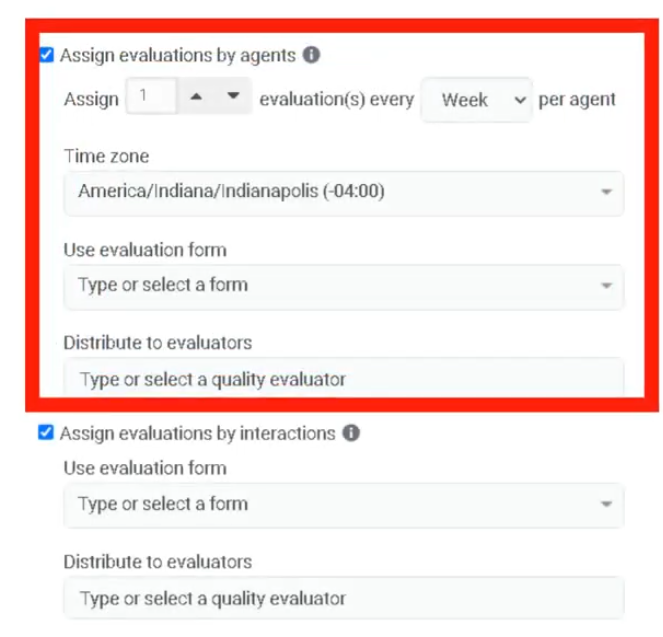
Agent Evaluation Assignment
| Field |
Description |
Options |
| Assign Evaluations by Agents |
Automatically create evaluations for each agent |
Toggle |
| Evaluation Count per Agent |
Number of evaluations per agent |
Numeric |
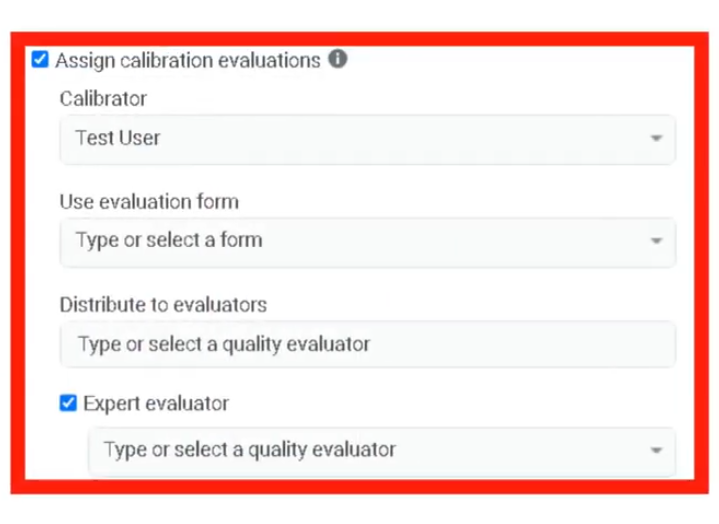
Calibration Evaluations
| Field |
Description |
Options |
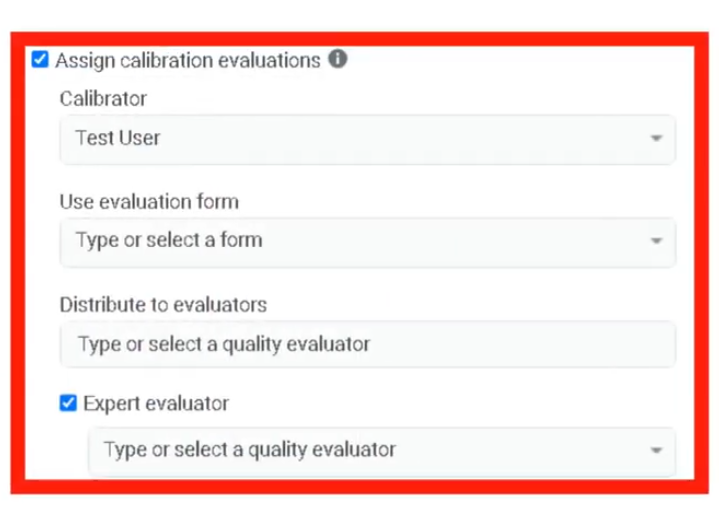
| Assign Calibration Evaluations |
Create calibration sessions for evaluators |
Toggle |
| Calibration Evaluators |
Users participating in calibration |
Dropdown |
Survey Trigger
| Field |
Description |
Options |
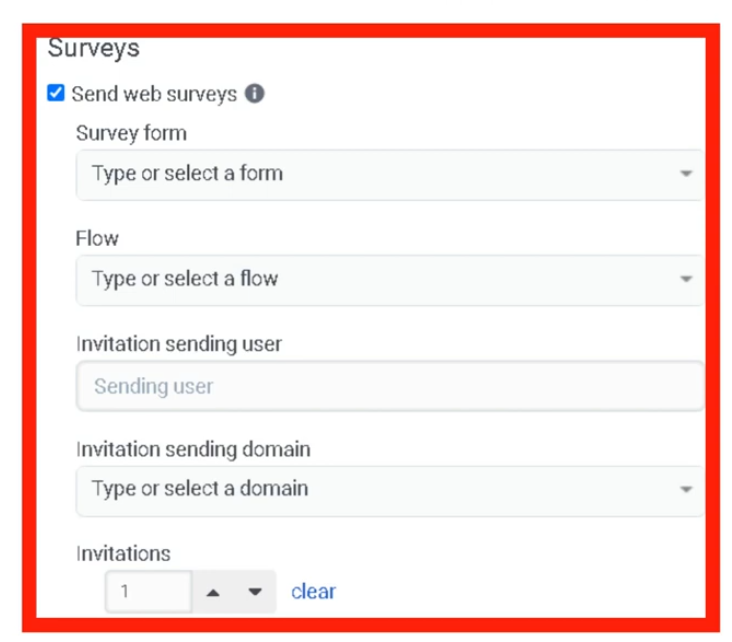
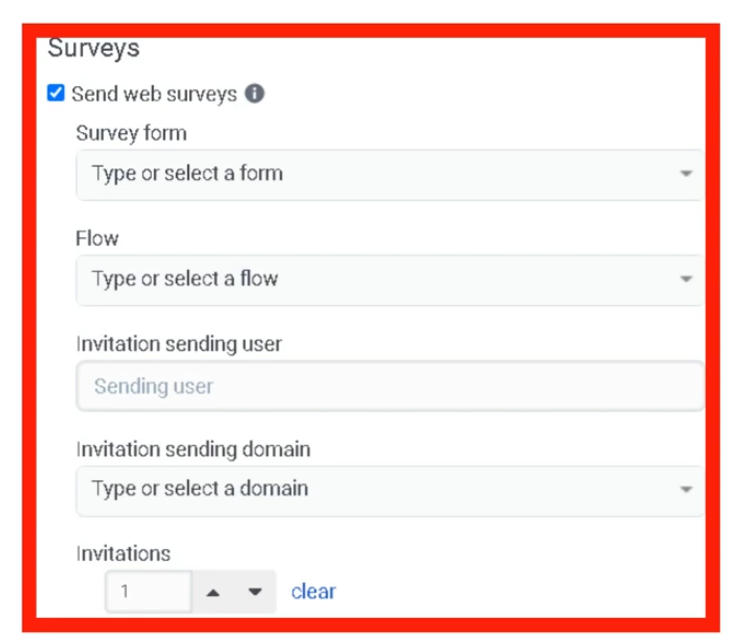
| Send Web Survey |
Sends survey invitation to customer |
Toggle |
| Survey Form |
Survey form used |
Dropdown |
Dependencies
| Component |
Purpose |
| Interaction Recording |
Required for evaluation and retention policies |
| Evaluation Forms |
Used when policies assign evaluations |
| Survey Forms |
Used when policies send surveys |
| Architect Survey Invite Flow |
Required to deliver survey invitations |
| AWS S3 |
Optional external storage for recordings |
| Component |
Relationship |
| Architect |
Executes survey invite flows |
| Evaluation Forms |
Used for scoring interactions |
| Survey Forms |
Collect customer feedback |
| Interaction Recording |
Captures interactions for evaluation |
| Speech & Text Analytics |
Analyzes recorded conversations |
| Topic |
Purpose |
| Evaluation Forms |
Score agent interactions |
| Survey Forms |
Collect customer feedback |
| Speech & Text Analytics |
Analyze interaction transcripts |
| Recording Management |
Configure recording storage |
| Workforce Engagement Management |
Manage agent coaching and development |
Implementation Checklist
| Step |
Status |
| Enable interaction recording |
☐ |
| Create evaluation forms |
☐ |
| Create survey forms |
☐ |
| Create quality policy |
☐ |
| Configure matching criteria |
☐ |
| Configure retention rules |
☐ |
| Enable evaluation assignment |
☐ |
| Enable survey automation |
☐ |
| Test policy behavior |
☐ |
Implementation Guide
| Step |
Action |
| Step 1 |
Navigate to Admin → Quality → Policies |
| Step 2 |
Click Create New Policy |
| Step 3 |
Select media type |
| Step 4 |
Configure matching criteria |
| Step 5 |
Configure retention settings |
| Step 6 |
Enable evaluation assignment if needed |
| Step 7 |
Enable survey automation if required |
| Step 8 |
Save policy |
| Step 9 |
Test policy behavior |
How to Implement
| Phase |
Description |
| Policy Design |
Define which interactions require monitoring |
| Automation Setup |
Configure evaluation and survey automation |
| Retention Configuration |
Define recording storage rules |
| Monitoring |
Review evaluations and feedback |
Workflow
Customer Interaction
        ↓
Interaction Recording
        ↓
Quality Policy Evaluates Interaction
        ↓
Policy Criteria Match
        ↓
Action Triggered
      ├─ Retain Recording
      ├─ Assign Evaluation
      ├─ Assign Calibration
      └─ Send Survey
Architecture Diagrams
Policy Automation Architecture
Customer Interaction
       ↓
Recording System
       ↓
Quality Policy Engine
       ↓
Automated Actions
   ├─ Evaluation Assignment
   ├─ Survey Delivery
   └─ Recording Retention
Real Flow Scenarios
Automated Evaluation Assignment
Customer Call Ends
      ↓
Policy Matches Queue Criteria
      ↓
Evaluation Automatically Assigned
      ↓
Evaluator Reviews Interaction
Customer Survey Trigger
Customer Chat Interaction Ends
      ↓
Policy Detects Interaction
      ↓
Survey Invite Flow Triggered
      ↓
Customer Receives Survey
Usage Scenarios
| Scenario |
Description |
| Compliance Monitoring |
Retain recordings for regulatory compliance |
| Agent Coaching |
Automatically assign evaluations |
| Customer Feedback |
Trigger surveys after interactions |
| Performance Monitoring |
Identify interactions needing review |
| Training Calibration |
Ensure evaluator scoring consistency |
Implementation Examples
| Policy Type |
Example |
| Evaluation Policy |
Evaluate 10% of inbound support calls |
| Compliance Policy |
Retain recordings for 12 months |
| Survey Policy |
Send CSAT survey after resolved interactions |
| Calibration Policy |
Assign same call to multiple evaluators |
Design Example
Inbound Support Call
        ↓
Quality Policy Match
        ↓
Actions Triggered
   ├─ Recording Retained
   ├─ Evaluation Assigned
   └─ Survey Sent
Best Practices
| Practice |
Reason |
| Use clear policy names |
Improves administrative clarity |
| Apply policies to specific queues |
Avoid unnecessary evaluations |
| Use evaluation quotas |
Prevent evaluator overload |
| Review policies regularly |
Maintain compliance requirements |
| Combine surveys and evaluations |
Gain full quality insight |
Naming Convention
| Resource |
Example |
| Policy |
Inbound_Call_Evaluation_Policy |
| Compliance Policy |
Call_Recording_Compliance |
| Survey Policy |
Post_Call_CSAT_Policy |
Naming Pattern:
<InteractionType>_<Purpose>_Policy
Security Considerations
| Control |
Description |
| Recording Encryption |
Protect interaction recordings |
| Access Permissions |
Restrict policy configuration to admins |
| Retention Compliance |
Ensure regulatory compliance |
| Data Privacy |
Protect customer interaction data |
Limitations / Constraints
| Constraint |
Description |
| Policy Scope |
Only affects interactions after activation |
| Screen Recording Retention |
Maximum 365 days |
| Survey Delivery |
Requires Architect survey invite flow |
| Recording Storage |
Limited by storage configuration |
Troubleshooting
| Issue |
Cause |
Resolution |
| Evaluations not assigned |
Matching criteria incorrect |
Verify queue/user filters |
| Surveys not triggered |
Survey policy missing |
Enable survey trigger |
| Recordings not retained |
Retention settings incorrect |
Update retention configuration |
| Screen recording missing |
Feature disabled |
Enable screen recording |
Interview Cheat Sheet
| Question |
Answer |
| What is a quality policy in Genesys Cloud? |
Automation rule that manages recordings, evaluations, and surveys. |
| What actions can policies perform? |
Retain recordings, assign evaluations, assign calibrations, send surveys. |
| What media types are supported? |
Call, chat, email, and message. |
| Do policies apply to existing interactions? |
No, only to interactions occurring after the policy is enabled. |
Key Takeaways
| Topic |
Summary |
| Policies |
Automate quality monitoring tasks |
| Matching Criteria |
Determines which interactions trigger policies |
| Evaluation Assignment |
Automatically assign interactions for review |
| Survey Automation |
Collect customer feedback automatically |
| Recording Retention |
Ensures compliance and quality monitoring |
Screenshots


Assign evaluators
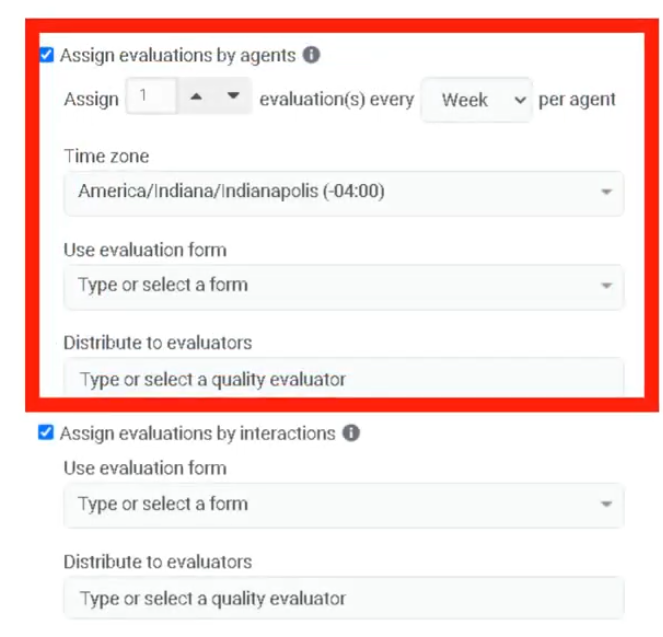 Calibratiopn evaluations
This uses the survey form used previosly Survey



 Calibratiopn evaluations