
Emergency Groups
What Are Emergency Groups?
An Emergency Group is a switch that overrides all normal schedule-based call routing when activated. When an emergency group is active, inbound calls bypass the schedule group entirely and route directly to a designated emergency call flow.
Use cases: office closures, power outages, network failures, natural disasters, building evacuations, planned maintenance requiring full call redirection.
⚠️ Emergency Groups have the highest routing priority. They override Open / Closed / Holiday schedule logic. An active emergency group = all calls go to the emergency flow, regardless of time of day.
Emergency Group Components
| Component | Description |
|---|---|
| Name | Unique identifier for the group |
| Division | Administrative ownership and access scoping |
| Activation Status | On = emergency routing active; Off = normal routing |
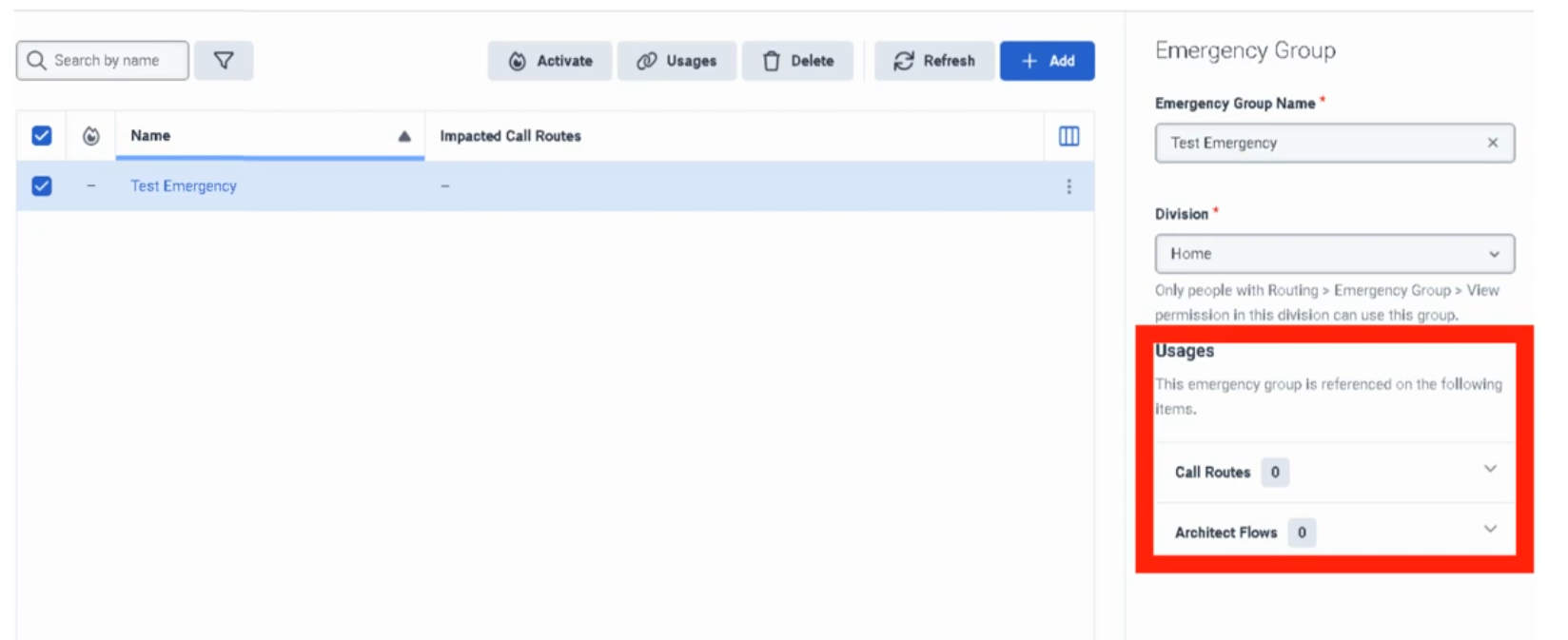
| Usages | Shows which call routes and flows reference this group — critical for impact assessment |
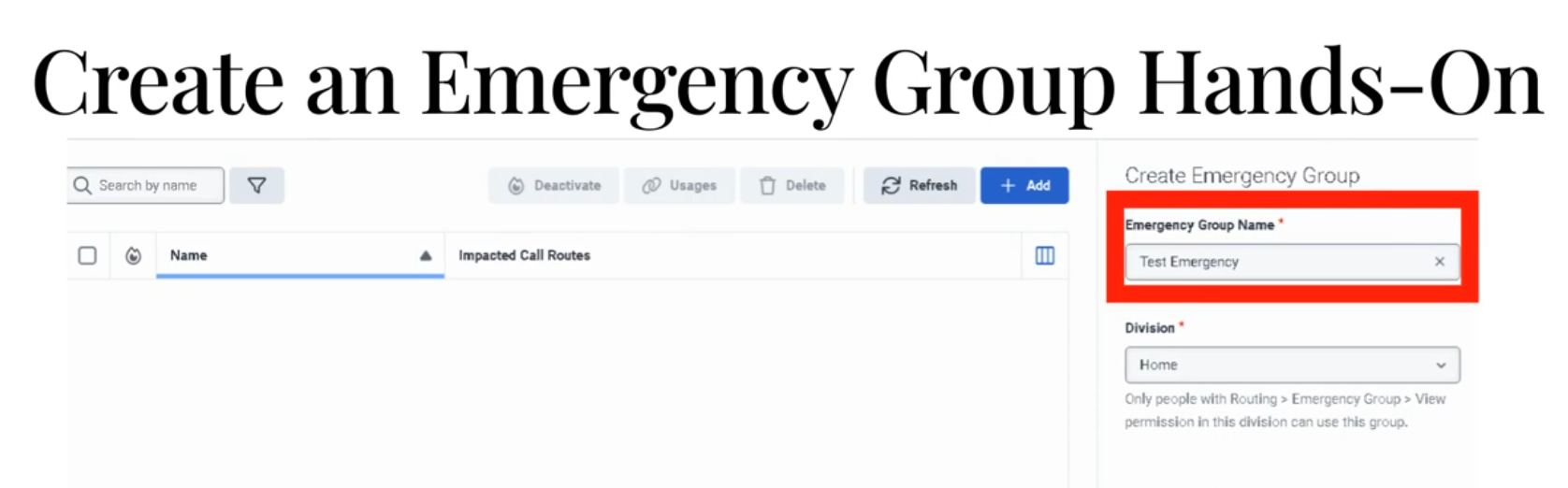
Creating an Emergency Group
- Admin → Routing → Emergency Groups
- Click Add
- Enter a unique Emergency Group Name
- Select Division
- Click Save
The group is created in a deactivated state — it has no routing impact until activated.
Connecting an Emergency Group to a Call Route
Creating the group alone does nothing. It must be assigned to a Call Route:
- Admin → Routing → Call Routing → open the target route
- Enable Emergency toggle
- In the Emergency Group field, select the group you created
- In the Emergency Flow field, select the published Architect flow to use during emergencies
- Click Save
Activating an Emergency Group
When an incident occurs:
- Admin → Routing → Emergency Groups
- Find the group
- Toggle Activation to On
- Calls immediately begin routing to the emergency flow
To restore normal routing:
- Return to Emergency Groups
- Toggle Activation to Off
✅ Best practice: Test activation/deactivation during a low-traffic window before a real incident occurs. Know exactly where to find this toggle under pressure.
Routing Priority Diagram
Incoming Call
      ↓
Call Route
      ↓
Emergency Group active?
      ↓
┌──── YES ─────────────────────┐
│  Emergency Flow executes     │
│  (schedule ignored entirely) │
└──────────────────────────────┘
      ↓ NO
Schedule Group evaluated
      ↓
Open / Closed / Holiday → respective flow
Common Emergency Flow Designs
Simple Closure Announcement
Start
  ↓
Play Emergency Announcement
  ↓
Disconnect
Redirect to Backup Location
Start
  ↓
Play Brief Message ("We are experiencing an outage...")
  ↓
Transfer to backup contact center DID
Alternate Contact Information
Start
  ↓
Play Emergency Message
  ↓
Provide website / email / alternate number
  ↓
Disconnect
✅ Keep emergency flows simple. Complex logic is a liability during an outage. The goal is: play a clear message, offer an alternative, end the call.
The Usages Field
The Usages field on an emergency group shows every call route and Architect flow that references it. Always check this before making changes — it tells you the blast radius of any modification or activation.
Naming Convention
| Format | Example |
|---|---|
<Region>_<Dept>_Emergency |
US_Support_Emergency |
<Site>_<Function>_Emergency |
Monterrey_IVR_Emergency |
Troubleshooting
| Issue | Cause | Fix |
|---|---|---|
| Emergency routing not activating | Group not assigned to the call route | Edit call route → assign emergency group |
| Group is active but calls still follow normal schedule | Emergency flow not assigned to the route | Assign the emergency flow on the call route |
| Emergency flow errors out | Flow has unpublished changes or broken logic | Open Architect, validate, publish latest version |
| Wrong routes affected | Unexpected routes also reference the group | Check Usages field; scope the group correctly |
| Normal routing not restoring after deactivation | Underlying schedule or call route was already misconfigured | Test non-emergency routing path separately |
| Admin cannot modify group | Division permission issue | Verify division assignment and admin role permissions |
Troubleshooting Checklist
| Check | ✓ |
|---|---|
| Emergency group created | ☐ |
| Correct division selected | ☐ |
| Emergency group assigned to all relevant call routes | ☐ |
| Emergency flow is published in Architect | ☐ |
| Emergency flow assigned to call route | ☐ |
| Tested activation in non-production or low-traffic window | ☐ |
| Verified Usages field — no unexpected routes affected | ☐ |
| Confirmed normal routing works when group is deactivated | ☐ |
Key Facts for Exam / Interview
| Question | Answer |
|---|---|
| Where are emergency groups configured? | Admin → Routing → Emergency Groups |
| What does activating an emergency group do? | Overrides all schedule-based routing — all calls go to the emergency flow |
| What must be done after creating an emergency group? | Assign it to a call route AND assign an emergency flow on that route |
| How do you check what a group affects? | The Usages field on the group |
| What is the routing priority order? | Emergency Group → Schedule Group → Open/Closed/Holiday flows |
| What is the most common implementation mistake? | Creating the group but forgetting to assign it to the call route, or not assigning an emergency flow |
See Also
- Scheduling & Schedule Groups — the routing layer that emergency groups override
- Call Routing — where emergency groups are assigned to inbound numbers
- Architect Overview — building the emergency call flow that gets executed