Development and Feedback
Development and Feedback (Genesys Cloud Performance and Engagement)
| Section |
Description |
| Feature Area |
Performance and Engagement |
| Admin Location |
Admin → Performance and Engagement → Development and Feedback |
| Primary Function |
Create, assign, and manage training and assessment modules for agents and employees |
| Training Sources |
Genesys Beyond content or custom organization-created modules |
| Module Types |
Learning, Learning with Assessment, Assessment |
| Typical Users |
Supervisors, Quality Administrators, Performance Managers, WEM Administrators |
| Key Dependency |
Performance Management / WEM capabilities must be enabled for the organization :contentReference[oaicite:0]{index=0} |
Development and Feedback provides the training layer of Genesys Cloud performance management. It allows administrators and supervisors to assign prepackaged or custom learning content to help bridge knowledge gaps, reinforce coaching plans, and support continuous agent improvement. The module supports both educational content and scored knowledge checks, and it can automatically assign modules based on organizational criteria such as ACD skills, divisions, or groups. :contentReference[oaicite:1]{index=1}
Summary Table
| Attribute |
Details |
| Feature Type |
Performance Management / Learning Management |
| Core Purpose |
Deliver development modules and assessments to employees |
| Assignment Model |
Manual assignment and auto assignment |
| Content Types |
Files, documents, learning content, assessments |
| Scoring Support |
Available when module includes assessment/question groups |
| Automation Inputs |
ACD skills, divisions, groups |
| Transcript Source Coverage |
Module types, assignment model, basic create flow |
| Documentation Coverage |
Performance management and WEM positioning of development modules :contentReference[oaicite:2]{index=2} |
Study Notes
| Topic |
Explanation |
| Development Modules |
Structured learning content assigned to users |
| Feedback |
Used to guide improvement and address knowledge gaps |
| Genesys Beyond |
Genesys-provided training content that can be assigned |
| Custom Modules |
Organization-built learning modules |
| Module Type |
Determines whether the module is educational only or includes an assessment |
| Auto Assign |
Automatically assigns modules to users based on matching criteria |
| Assessment Content |
Question groups and questions similar to evaluation forms |
| Recommended Completion Date |
Target completion date set by the administrator |
Development and Feedback is part of Genesys Cloud performance management and is intended to improve agent performance through guided learning, evaluation follow-up, and targeted knowledge reinforcement. Agents can access assigned training modules as part of their performance experience. :contentReference[oaicite:3]{index=3}
Transcript Implementation Notes
Source: Transcript
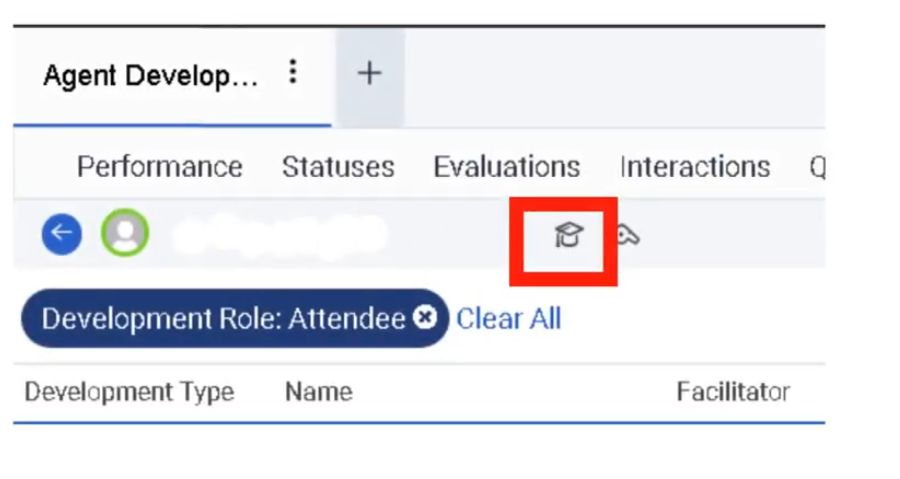
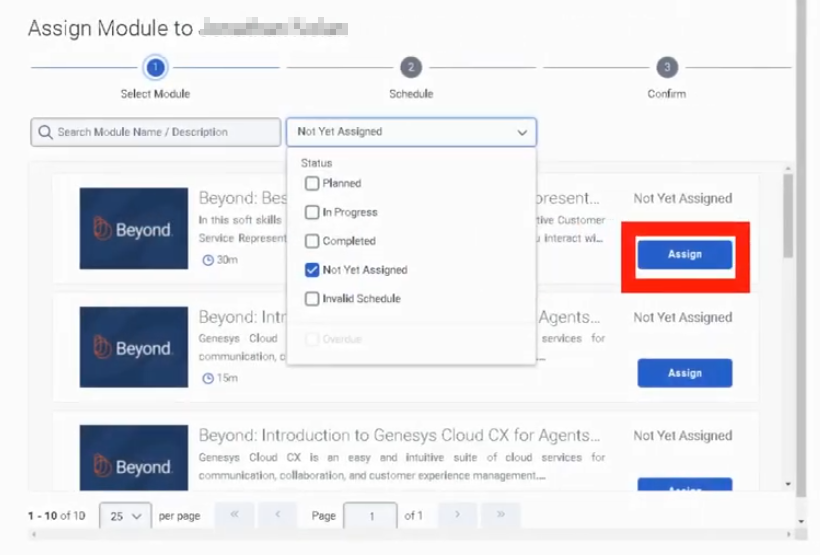
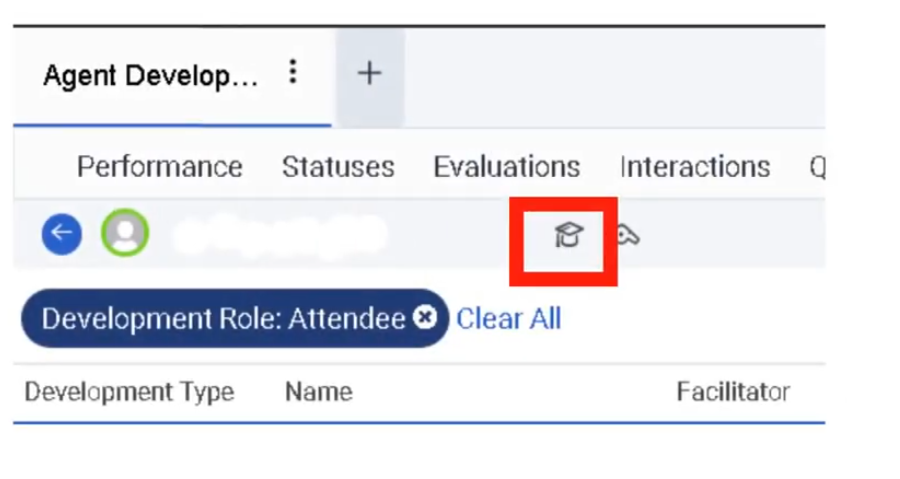
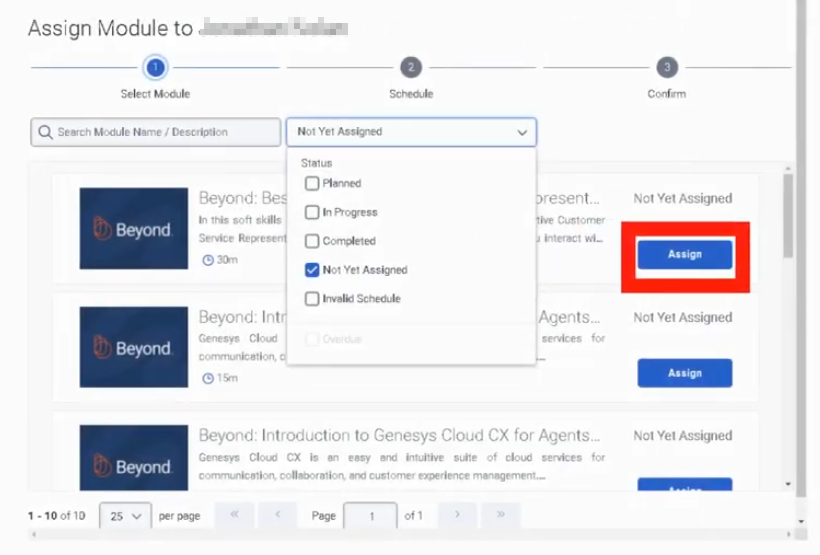
The instructor describes Development and Feedback as part of Performance and Engagement and explains that administrators can assign Genesys Beyond training or create their own modules.
| Step |
Instruction |
| Step 1 |
Go to Performance and Engagement → Development and Feedback |
| Step 2 |
Choose to assign Genesys Beyond training or create a custom module |
| Step 3 |
Select the module type: Learning, Learning with Assessment, or Assessment |
| Step 4 |
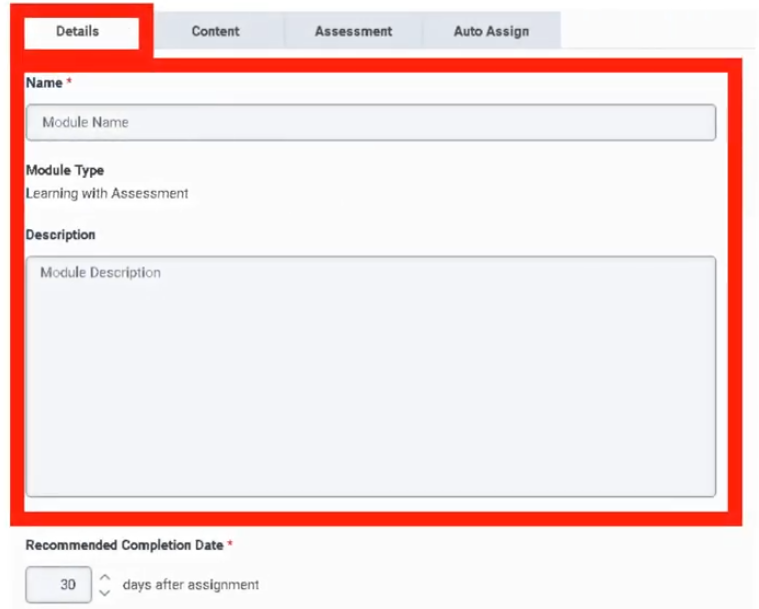
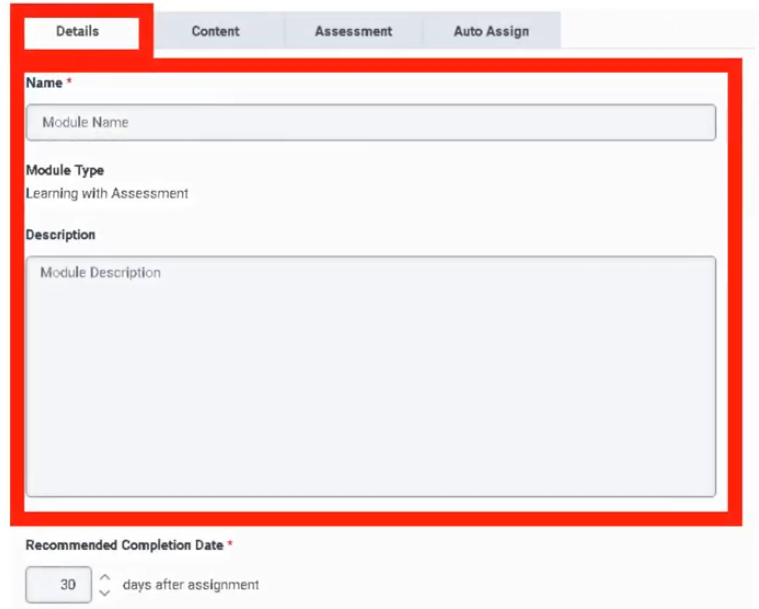
Enter a name and description |
| Step 5 |
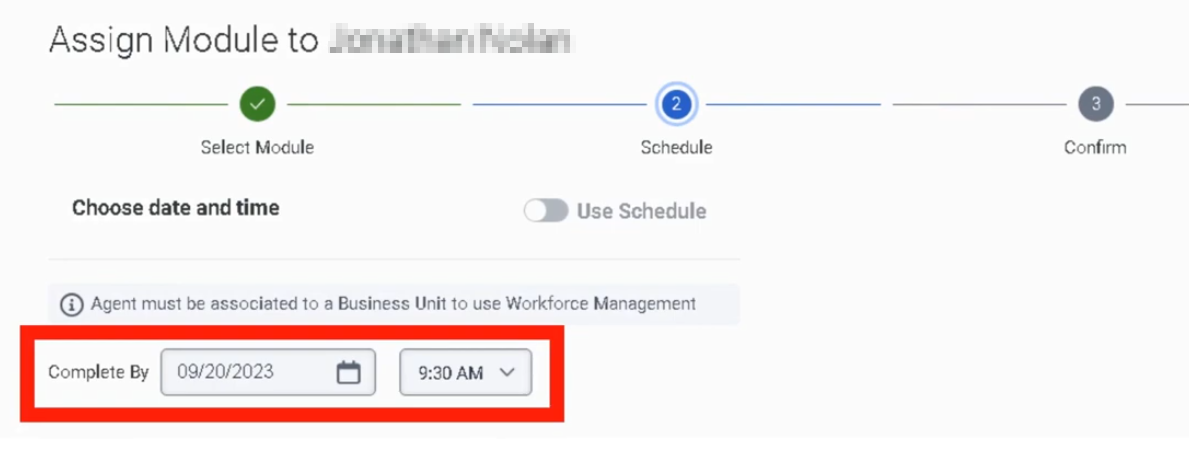
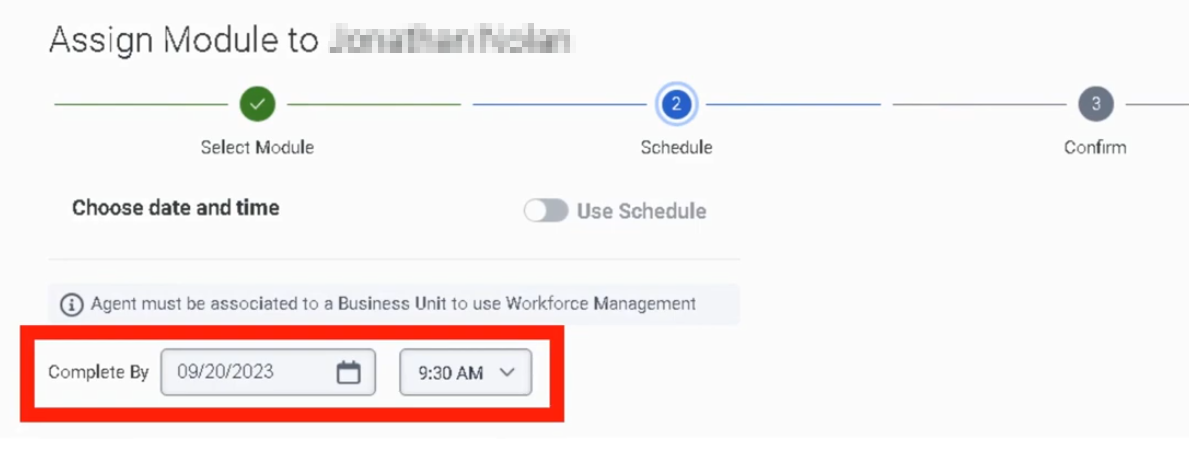
Set a recommended completion date |
| Step 6 |
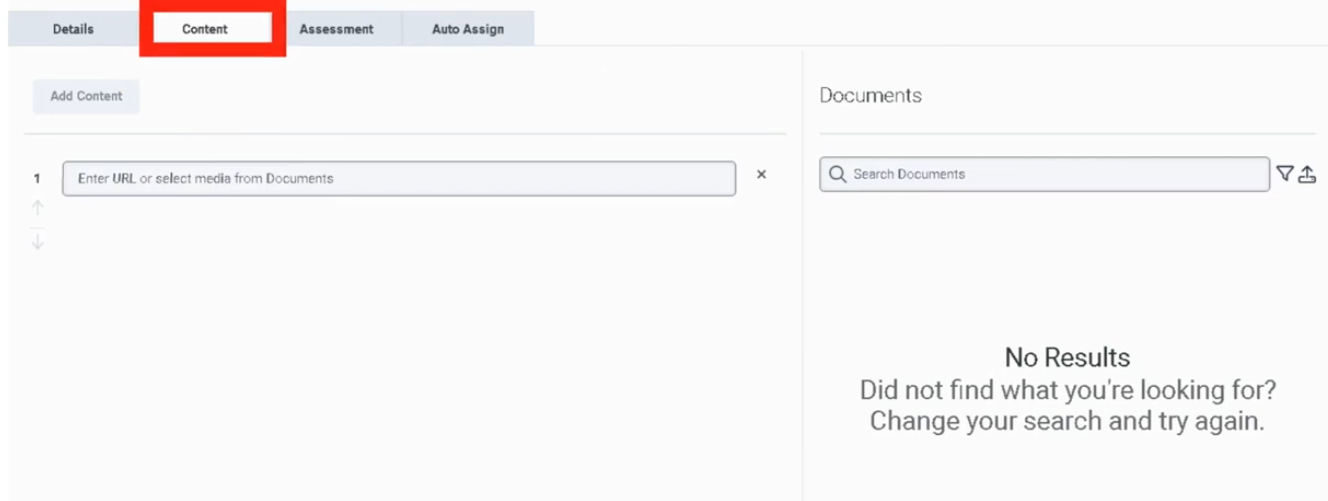
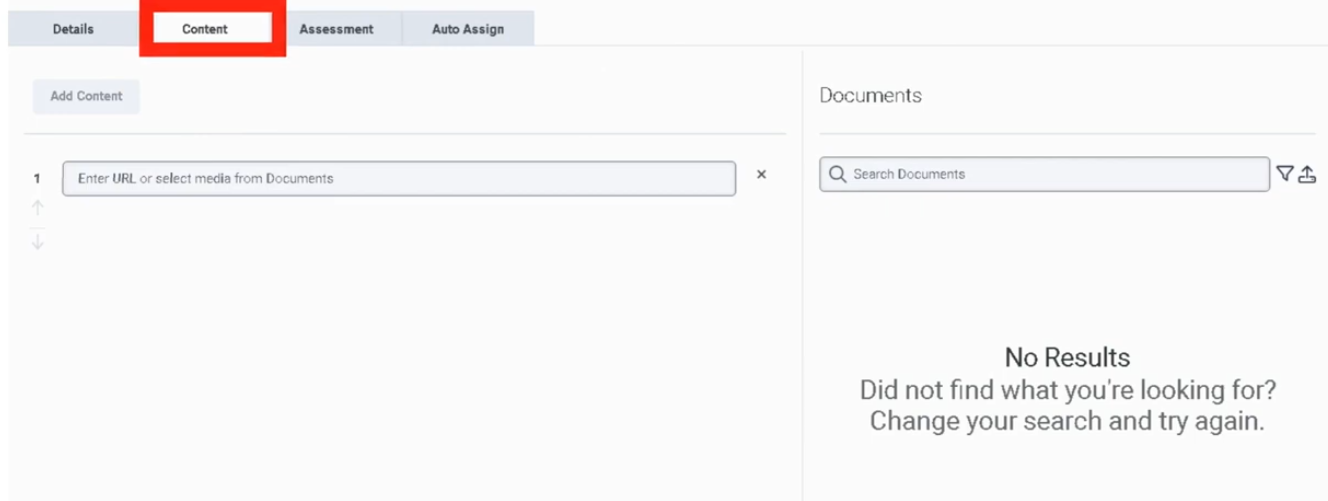
Add content such as files or documents |
| Step 7 |
Add question groups and questions if assessment content is required |
| Step 8 |
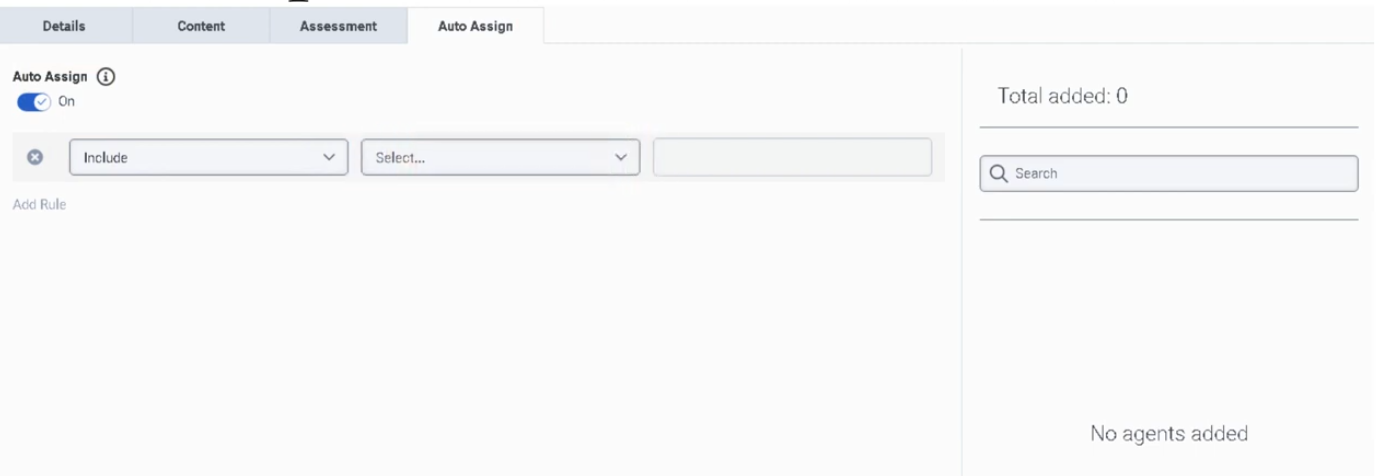
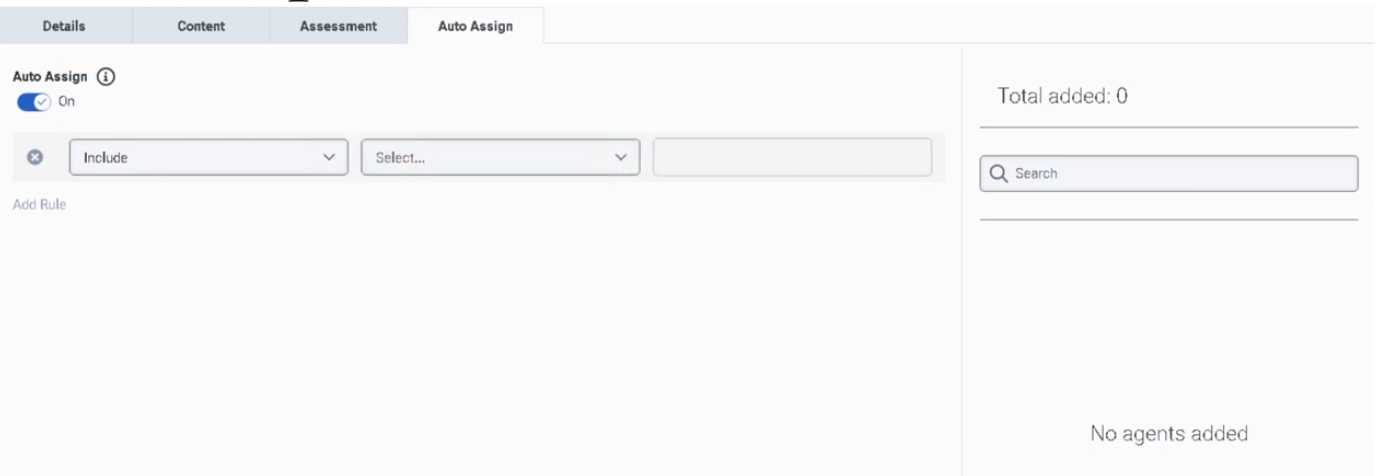
Configure Auto Assign rules based on ACD skills, divisions, or groups |
| Step 9 |
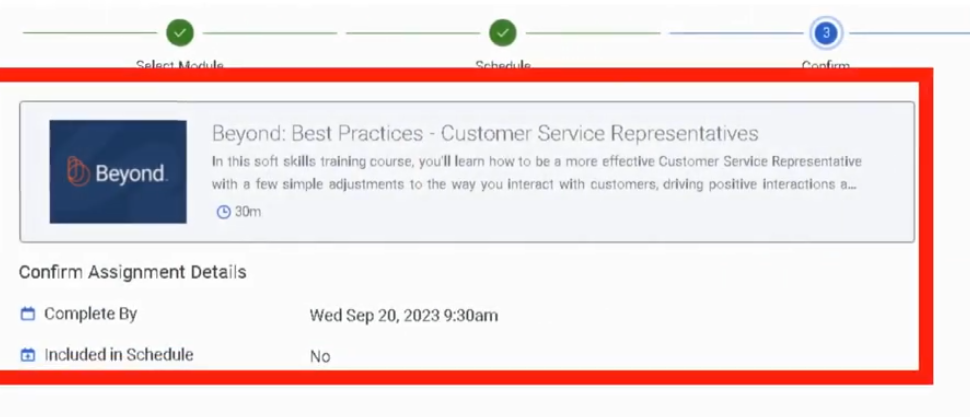
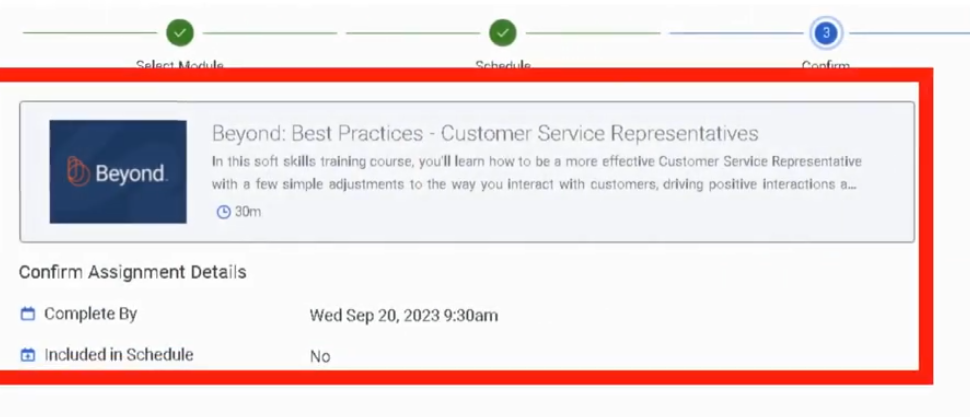
Save and assign the module |
Transcript-derived implementation guidance:
| Item |
Guidance |
| Module Type Selection |
Choose Learning when no assessment is needed, Learning with Assessment when content and scoring are both needed, and Assessment when the goal is testing only |
| Content Strategy |
Attach documents or files that directly support the coaching objective |
| Assessment Design |
Build question groups similar to evaluation forms for consistency |
| Targeting Strategy |
Use Auto Assign to align modules with teams, skills, or organizational segmentation |
| Character Limits |
Not explicitly documented in the transcript |
| Required Fields |
Name and module type are clearly implied by the create flow; other required-field behavior is not explicitly documented in Genesys UI documentation |
Navigation
| Task |
Navigation Path |
| Open Development and Feedback |
Admin → Performance and Engagement → Development and Feedback |
| View modules |
Admin → Performance and Engagement → Development and Feedback |
| Create module |
Admin → Performance and Engagement → Development and Feedback → Create |
| Edit module |
Admin → Performance and Engagement → Development and Feedback → Edit |
| Assign module |
Admin → Performance and Engagement → Development and Feedback → Assign |
| Configure auto assignment |
Admin → Performance and Engagement → Development and Feedback → Auto Assign |
| Review assigned training as agent |
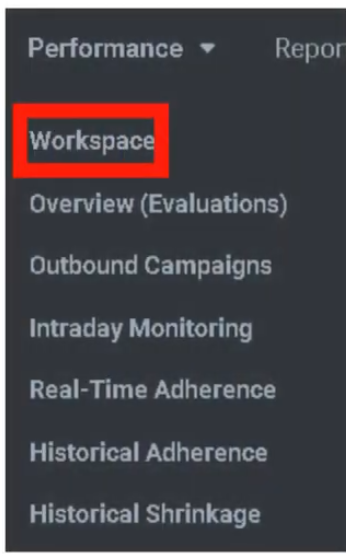
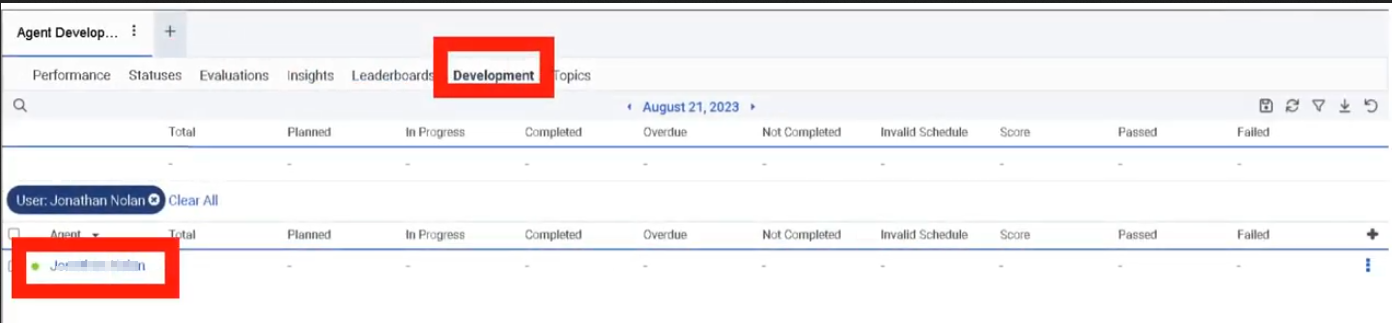
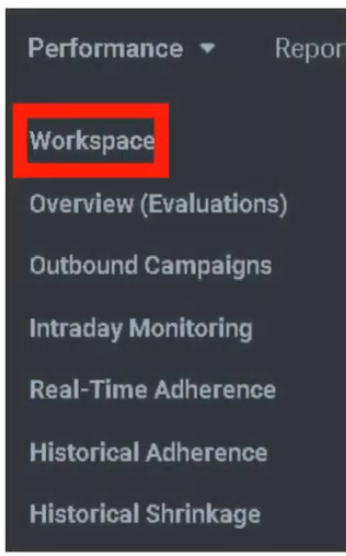
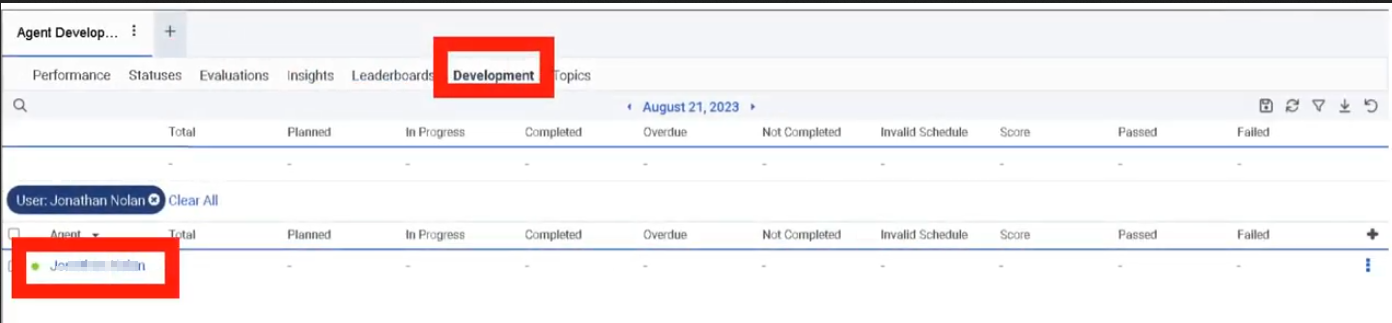
Agent performance area / assigned modules view (exact UI path not explicitly documented in Genesys UI documentation) |
Configuration Fields (UI Form Fields)
Main Page
| UI Field |
Description |
Options |
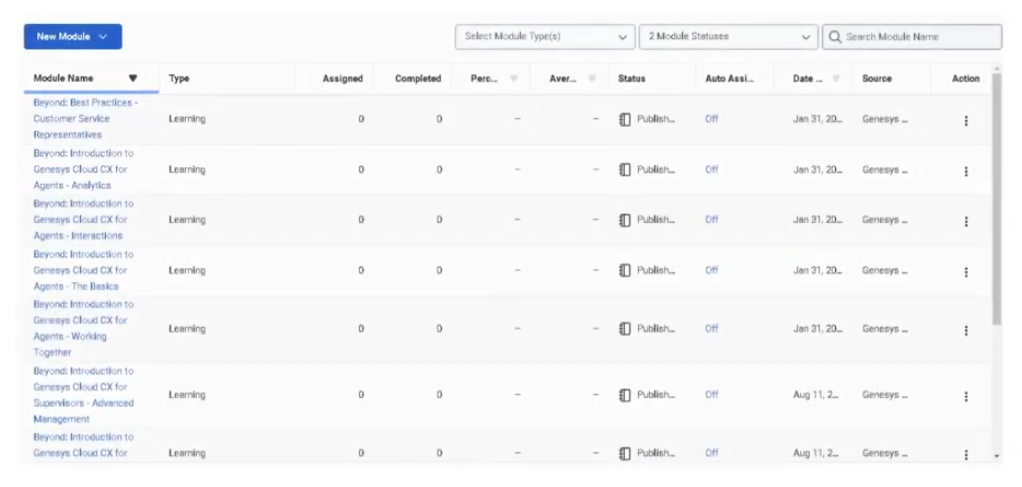
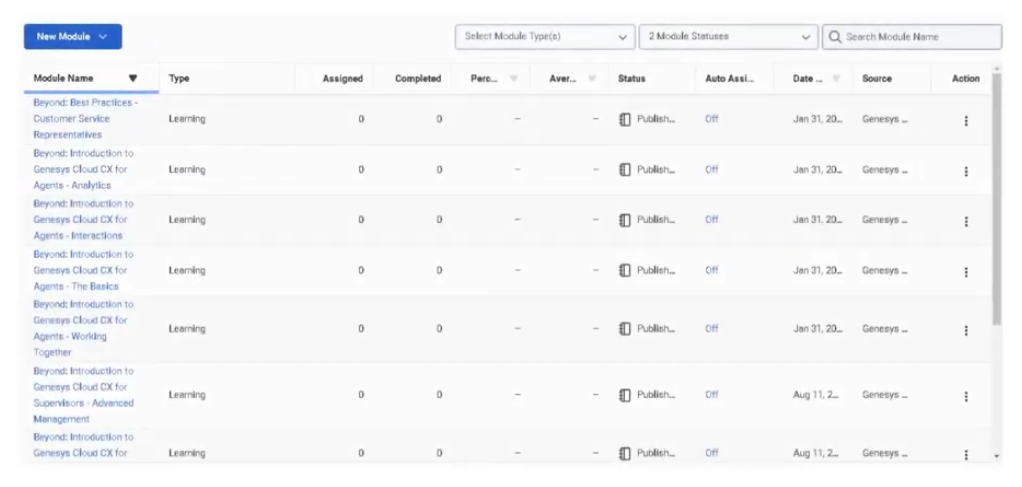
| Module List |
Displays existing development and feedback modules |
Read-only |
| Module Name |
Name of the module |
Read-only in list |
| Module Type |
Indicates module category |
Learning / Learning with Assessment / Assessment |
| Description |
Short explanation of module purpose |
Read-only in list |
| Recommended Completion Date |
Target completion date for assignees |
Date |
| Assignment Status |
Shows whether module is assigned/published/active |
Not explicitly documented in Genesys UI documentation |
| Search |
Search for modules |
Text field |
| Filter |
Filter modules list |
Not explicitly documented in Genesys UI documentation |
| Create |
Start a new module |
Button |
| Edit |
Modify selected module |
Button |
| Delete |
Remove selected module |
Button |
| Assign |
Assign module manually |
Button |
| Refresh |
Reload module list |
Button |
| UI Field |
Description |
Options |
| Module Name |
Unique module title |
Text |
| Description |
Explains the objective of the module |
Text area |
| Module Type |
Defines whether content includes assessment |
Learning / Learning with Assessment / Assessment |
| Recommended Completion Date |
Suggested completion target |
Date picker |
| Content |
Add learning content |
Files / Documents |
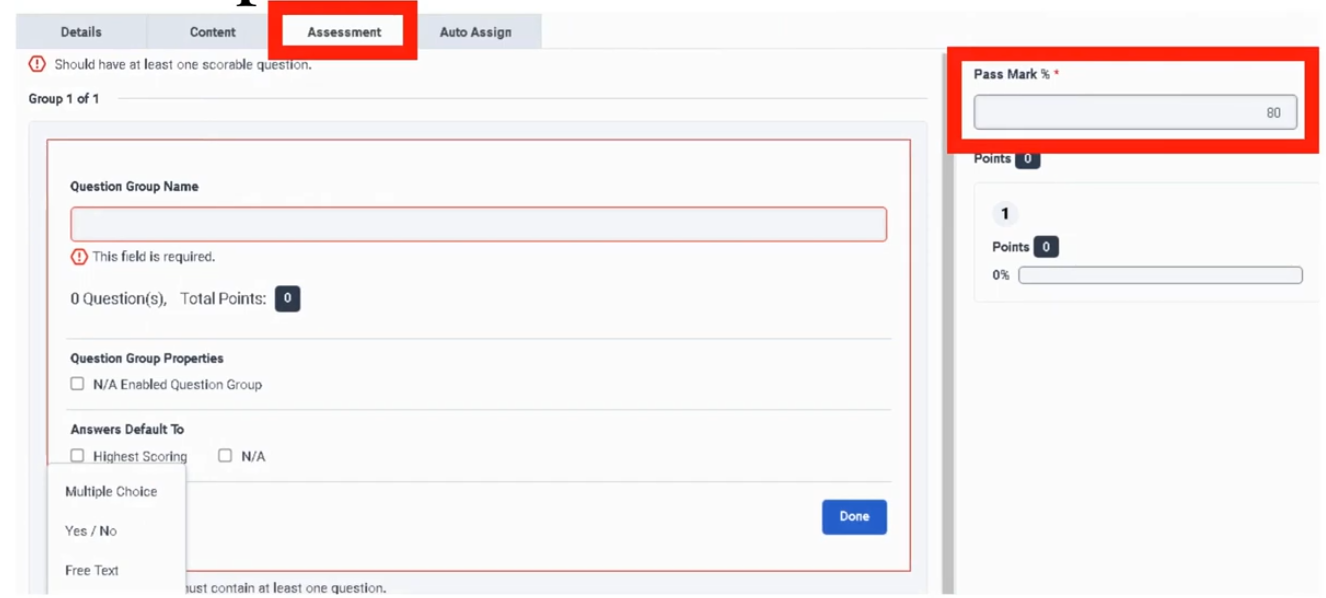
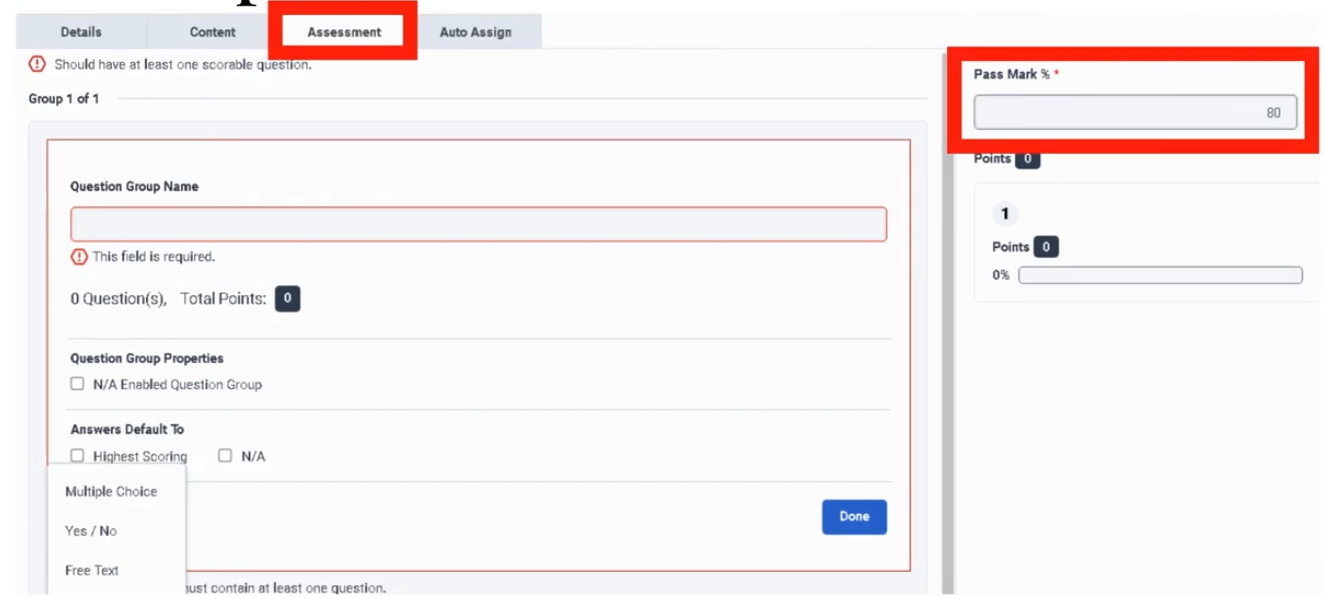
| Question Group Name |
Groups assessment questions |
Text |
| Add Question |
Create assessment item |
Button |
| Question Type |
Assessment question type |
Multiple Choice / Yes-No / Range (transcript aligns these with evaluation-style questions) |
| Question Name |
Name/title of question |
Text |
| Help Text |
Guidance shown with the question |
Text |
| Points |
Score value |
Numeric |
| Require Comments |
Require additional comments |
Toggle or option; not explicitly documented in this specific UI, but transcript states similar question behavior |
| Conditional Display |
Show question conditionally |
Not explicitly documented in Genesys UI documentation for this page; transcript says questions can be conditional in similar form behavior |
| Auto Assign |
Opens or enables assignment rules |
Button / section |
| Save |
Save module |
Button |
| Publish |
Make module available |
Not explicitly documented in Genesys UI documentation for this page; transcript does not explicitly confirm publish behavior for modules |
| Cancel |
Cancel changes |
Button |
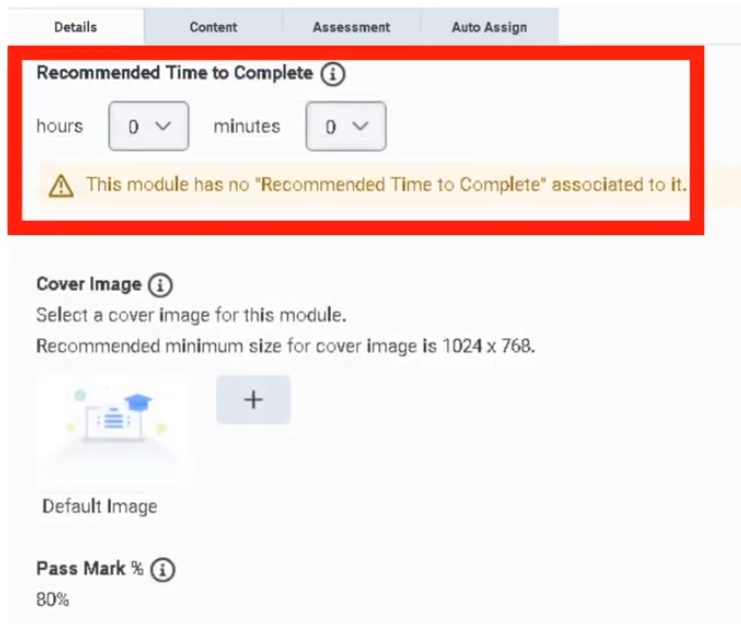
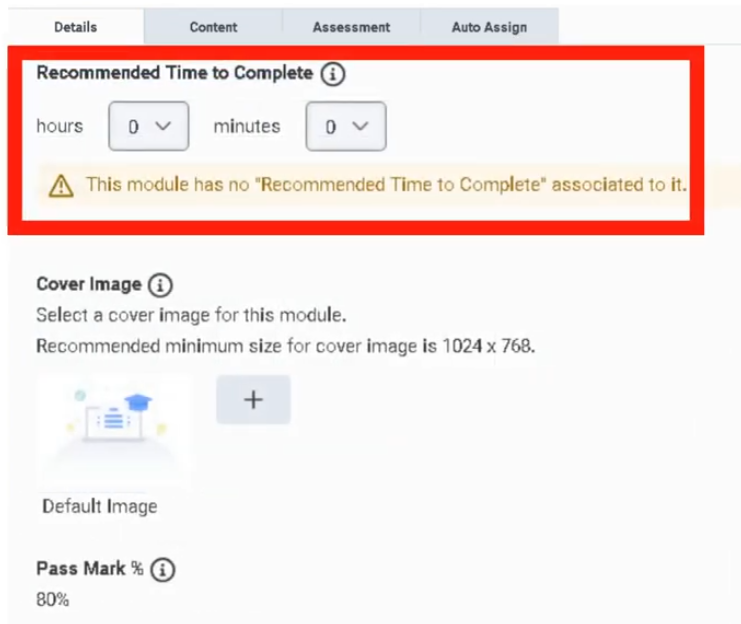
Character limits for Module Name, Description, and Question Group Name are not explicitly documented in Genesys UI documentation.
Tabs, Toggles, Dropdowns, Action Buttons
| Element Type |
Items |
| Tabs |
Content / Assessment / Auto Assign (exact tab names not explicitly documented in Genesys UI documentation; these are logical create areas derived from transcript workflow) |
| Dropdowns |
Module Type / Question Type |
| Toggles |
Auto Assign enabled state, Require Comments (specific toggle labels not explicitly documented in Genesys UI documentation) |
| Date Controls |
Recommended Completion Date |
| Upload Controls |
Add files / documents |
| Action Buttons |
Create / Save / Cancel / Edit / Delete / Assign / Add Question / Auto Assign |
| Text Inputs |
Module Name / Description / Question Group Name / Question Name / Help Text |
Dependencies
| Component |
Purpose |
| Performance Management |
Base feature area for Development and Feedback :contentReference[oaicite:4]{index=4} |
| Workforce Engagement Management (WEM) |
Broader feature family that includes development modules :contentReference[oaicite:5]{index=5} |
| Users and Permissions |
Needed to assign modules and manage access |
| ACD Skills |
Can be used for Auto Assign rules |
| Divisions |
Can be used for Auto Assign rules |
| Groups |
Can be used for Auto Assign rules |
| Documents / Files |
Used as attached module content |
| Evaluation-style Question Logic |
Assessment section follows question-group/question patterns similar to evaluation forms |
| Component |
Relationship |
| Genesys Beyond |
Prepackaged training content source mentioned in transcript |
| Evaluations |
Evaluation outcomes often drive coaching and targeted module assignment |
| Coaching |
Modules can reinforce coaching plans and identified performance gaps |
| Scorecards |
Training completion and performance improvement are related in agent performance management :contentReference[oaicite:6]{index=6} |
| Gamification |
Another Performance and Engagement feature used alongside learning modules |
| Groups / Divisions / Skills |
Organizational targeting dimensions for Auto Assign |
| Documents |
Storage or selection of training materials |
| Reports, Views, and Dashboards |
Used to monitor broader performance outcomes related to training effectiveness :contentReference[oaicite:7]{index=7} |
Integration Examples
| Integration |
Description |
| HR/LMS Export |
Track completion outside Genesys Cloud using exported reports or manual reconciliation |
| Analytics / Performance Reporting |
Correlate training assignments with performance results in reporting views |
| Notifications API |
Can support downstream workflow when assignment/completion events are exposed through organizational integrations; not a UI field |
| API Usage / External BI |
External dashboards can consume performance data for learning impact analysis, where available through supported reporting pipelines |
Example integration workflow:
Evaluation Released
        ↓
Supervisor Identifies Knowledge Gap
        ↓
Development Module Assigned
        ↓
Agent Completes Module
        ↓
Performance Metrics Reviewed in Dashboard
        ↓
Optional External BI / Coaching Follow-up
| Topic |
Description |
| Performance Management |
Parent feature area for modules and scorecards ([Genesys Cloud Resource Center][1]) |
| Workforce Engagement Management |
Suite that includes development modules, gamification, and quality tools ([Genesys Cloud Resource Center][1]) |
| Evaluation Forms |
Similar question-group and scoring model for assessments |
| Gamification |
Performance engagement mechanism complementary to training |
| External Metrics Definitions |
Scorecard enrichment with third-party metrics |
| Reports, Views, and Dashboards |
Monitor performance changes after training assignments ([Genesys Cloud Resource Center][1]) |
Implementation Checklist
| Task |
Status |
| Confirm Performance Management / WEM licensing and access |
☐ |
| Review target audience for training |
☐ |
| Decide whether to use Genesys Beyond or custom content |
☐ |
| Choose module type |
☐ |
| Prepare files/documents |
☐ |
| Build assessment question groups if needed |
☐ |
| Define recommended completion date |
☐ |
| Configure Auto Assign rules |
☐ |
| Validate assignment scope (skills/divisions/groups) |
☐ |
| Test with pilot users |
☐ |
Implementation Guide
| Step |
Action |
| Step 1 |
Navigate to Admin → Performance and Engagement → Development and Feedback |
| Step 2 |
Click Create |
| Step 3 |
Enter Module Name and Description |
| Step 4 |
Select Module Type: Learning, Learning with Assessment, or Assessment |
| Step 5 |
Set Recommended Completion Date |
| Step 6 |
Add files or documents as content if applicable |
| Step 7 |
Add question groups and questions if assessment is required |
| Step 8 |
Configure Auto Assign rules using ACD skills, divisions, or groups |
| Step 9 |
Save the module |
| Step 10 |
Validate that the correct users receive the assignment |
How to Implement
| Phase |
Description |
| Planning |
Identify business gap, coaching objective, and target audience |
| Content Build |
Prepare learning materials and assessment questions |
| Module Design |
Choose the right module type and structure |
| Assignment Design |
Decide manual assignment vs Auto Assign |
| Validation |
Test with a pilot group |
| Rollout |
Deploy to production user groups |
| Measurement |
Review completion and post-training performance |
Recommended selection model:
| Need |
Recommended Module Type |
| Knowledge transfer only |
Learning |
| Knowledge transfer plus validation |
Learning with Assessment |
| Knowledge check only |
Assessment |
Workflow
Performance Gap Identified
        ↓
Supervisor Creates Module
        ↓
Content Added
        ↓
Assessment Added (Optional)
        ↓
Manual or Auto Assign
        ↓
Agent Completes Module
        ↓
Supervisor Reviews Progress and Performance
Architecture Diagram
Supervisor / Admin
       ↓
Development and Feedback Module
       ├─ Learning Content
       ├─ Assessment Questions
       └─ Auto Assign Rules
       ↓
Target Users (by Skills / Divisions / Groups)
       ↓
Agent Completion Experience
       ↓
Performance Management / Coaching / Scorecard Review
Real Flow Scenarios
Scenario 1 – Evaluation-Driven Remediation
Agent receives low evaluation score on compliance
        ↓
Supervisor creates "Compliance Refresher" module
        ↓
Module type = Learning with Assessment
        ↓
Assigned to impacted agents
        ↓
Agents complete module and assessment
        ↓
Future evaluations improve
Scenario 2 – Onboarding by Skill Group
New ACD skill introduced
        ↓
Admin creates product knowledge module
        ↓
Auto Assign rule targets users with that ACD skill
        ↓
Users receive module automatically
        ↓
Completion tracked as part of onboarding
Usage Scenarios
| Scenario |
Description |
| New hire onboarding |
Deliver standard learning content to new agents |
| Post-evaluation coaching |
Assign targeted remediation after poor evaluations |
| Product launch training |
Deliver new knowledge to selected teams |
| Compliance refreshers |
Reinforce required policies and scripts |
| Skill-based enablement |
Auto assign modules by ACD skill |
| Division-specific training |
Assign modules based on business unit or division |
Implementation Examples
| Example |
Configuration |
| Compliance Refresher |
Learning with Assessment / assigned to regulated queue teams |
| Product Launch Training |
Learning / assigned to sales division |
| Knowledge Validation Quiz |
Assessment / assigned to support group |
| New Hire Fundamentals |
Learning with Assessment / auto assigned to onboarding group |
Design Example
Module Name: Billing Policy Refresher
Type: Learning with Assessment
Content: PDF policy guide + quick reference sheet
Question Groups: Policy Rules / Escalation Handling
Auto Assign: Billing division + selected support groups
Completion Target: 7 days
Best Practices
| Practice |
Reason |
| Match module type to objective |
Prevent unnecessary complexity |
| Keep modules focused on one coaching goal |
Improves completion and retention |
| Use clear, action-oriented titles |
Makes assignment purpose obvious |
| Attach concise supporting documents |
Reduces learner fatigue |
| Reuse evaluation-style scoring patterns |
Creates consistency across quality and training |
| Pilot Auto Assign rules first |
Avoids incorrect broad assignment |
| Align modules with coaching plans |
Improves measurable performance outcomes |
| Review completion and performance together |
Training value is proven by behavior change |
Source: Operational Best Practice
Naming Convention
| Resource |
Example |
| Learning Module |
Billing_Policy_Refresher |
| Assessment Module |
Security_Awareness_Assessment |
| Combined Module |
New_Hire_Onboarding_Learning_Assessment |
| Question Group |
Product_Knowledge |
| Auto Assign Rule |
AutoAssign_Billing_Division_Compliance |
Naming pattern:
<BusinessArea>_<Topic>_<ModuleType>
Examples:
Support_LoginTroubleshooting_Learning
Compliance_CallHandling_Assessment
Sales_NewOffer_LearningWithAssessment
Security Considerations
| Control |
Description |
| Role-Based Access |
Limit who can create, edit, assign, and delete modules |
| Content Governance |
Ensure attached files/documents are approved and current |
| Division-Aware Assignment |
Prevent users from receiving irrelevant or restricted training |
| Auditability |
Maintain records of who created and assigned training |
| Privacy |
Do not attach sensitive data unless properly governed |
| Least Privilege |
Grant only required permissions for content management and assignment |
Limitations / Constraints
| Constraint |
Description |
| Character Limits |
Not explicitly documented in Genesys UI documentation |
| Publish Behavior |
Not explicitly documented in Genesys UI documentation for this specific feature page |
| Exact Filter Set on Main Page |
Not explicitly documented in Genesys UI documentation |
| Auto Assign Logic Dimensions |
Transcript explicitly mentions ACD skills, divisions, groups |
| Module Types |
Limited in transcript to Learning, Learning with Assessment, Assessment |
| Assessment Question Model |
Transcript states assessment questions are similar to evaluations |
| Dependency on Feature Availability |
Performance Management / WEM access is required ([Genesys Cloud Resource Center][1]) |
Troubleshooting
| Issue |
Cause |
Resolution |
| Users did not receive module |
Auto Assign criteria did not match |
Verify ACD skills, divisions, or groups |
| Wrong users received module |
Assignment criteria too broad |
Refine Auto Assign scope and pilot first |
| Assessment incomplete |
Required content or question groups missing |
Review module structure |
| Low completion rate |
Module too long or unclear |
Simplify content and clarify objective |
| No measurable performance change |
Module not aligned to root cause |
Rework training to address actual gap |
| Attached document unavailable |
File/content issue |
Re-upload approved content and retest |
Interview Cheat Sheet
| Question |
Answer |
| What is Development and Feedback? |
Genesys Cloud feature for assigning training and assessment modules |
| What module types are available? |
Learning, Learning with Assessment, Assessment |
| What can be used as content? |
Files or documents; Genesys Beyond can also be assigned |
| How can modules be assigned automatically? |
By ACD skills, divisions, or groups |
| How is it related to performance management? |
It supports coaching, development, and continuous improvement ([Genesys Cloud Resource Center][1]) |
| Are APIs UI fields? |
No; APIs belong under integration, not UI configuration |
Key Takeaways
| Topic |
Summary |
| Development and Feedback |
Training and assessment capability within Performance and Engagement |
| Module Types |
Learning, Learning with Assessment, and Assessment |
| Content Model |
Files/documents plus optional question groups |
| Auto Assign |
Targets users by ACD skills, divisions, or groups |
| Business Value |
Reinforces coaching and closes performance gaps |
| Documentation Gaps |
Some exact UI labels and field limits are not explicitly documented in Genesys UI documentation |
Screenshots