Authorized Applications
| Section |
Detail |
| Navigation |
Admin → Integrations → Authorized Applications |
| Alt Navigation |
Menu → IT and Integrations → Authorized Applications |
| Required Permission |
OAuth > Client > Authorize |
| Purpose |
View, modify, and revoke OAuth application access to your Genesys Cloud organization |
| Module Context |
Part of Integration Management in Genesys Cloud |
✅ Verified against Genesys Cloud Resource Center — March 2026
Overview
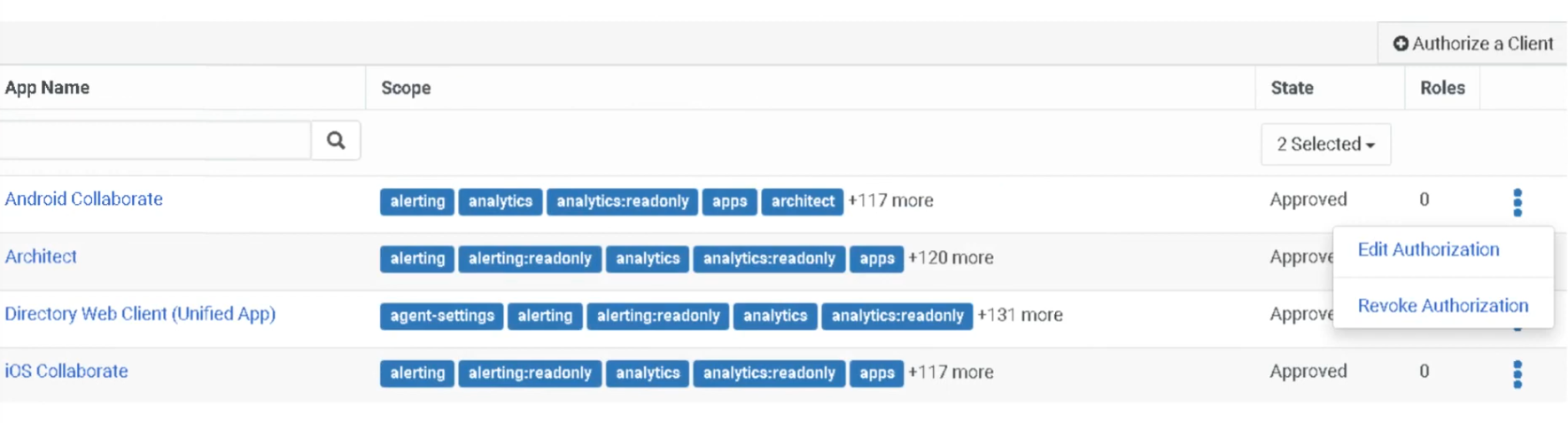
The Authorized Applications view lists all client applications that have been granted permission to operate in your organization, along with the OAuth scopes assigned to them. From this view, administrators can modify what an app is allowed to do (its scopes) or revoke an app so it can no longer run in the org.
💡 Authorized Applications vs. Authorized Organizations: These are two different features. Authorized Organizations grants user access across orgs (pairing). Authorized Applications grants application access via OAuth scopes — used for integrations, AppFoundry apps, and third-party tools.
Authorized Applications View — Columns
| Column |
Description |
| App Name |
Name of the authorized OAuth client application. Click the name to edit its scope or revoke its authorization. |
| Scope |
The OAuth scopes granted to the application. Scopes define exactly what the app is allowed to do within your org. |
| State |
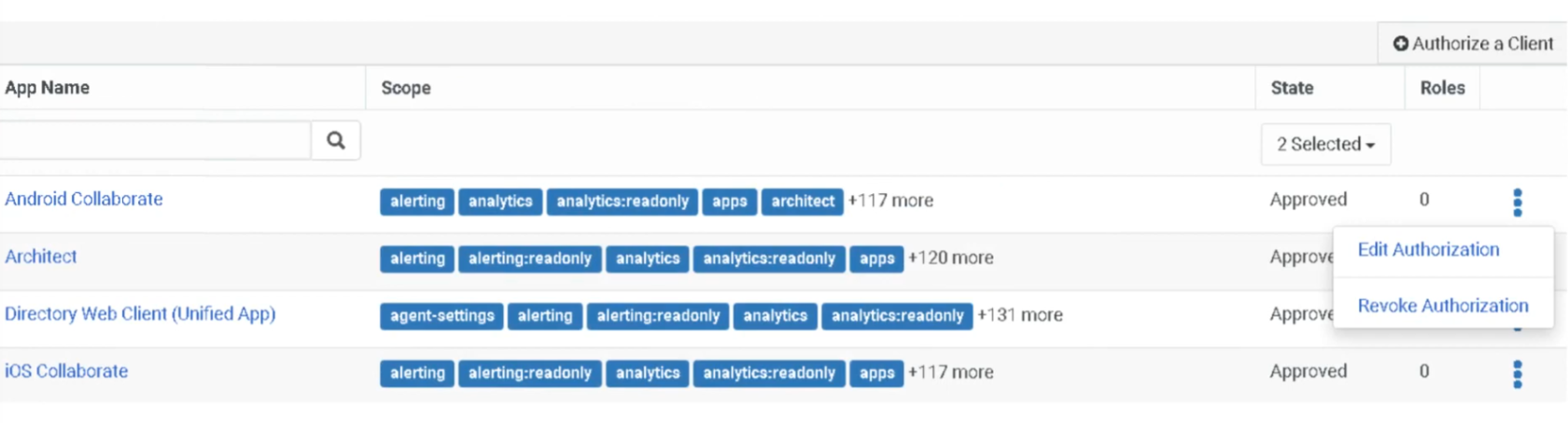
Current authorization status of the application — Approved, Pending, or Revoked. Use the State dropdown to filter by status. |
| Role |
Displays the number of roles available to the application (not the role names). |
| Actions |
Click More (⋮) to open the action menu — options are Edit Authorization or Revoke Authorization. |
Application States
| State |
Meaning |
| Approved |
Application is authorized and can obtain access tokens |
| Pending |
Authorization request has been submitted but not yet approved |
| Revoked |
Authorization has been removed — app cannot obtain access tokens |
⚠️ Revocation is permanent and cannot be undone. A revoked application cannot get a new access token. To restore access, you must fully reauthorize the application from scratch.
Key Concepts
| Topic |
Explanation |
| Authorized Application |
An application that has been granted permission to access Genesys Cloud via OAuth |
| OAuth Client |
The credential set (Client ID / Secret) that an application uses to authenticate and request tokens |
| Scopes |
Define the specific API permissions granted to an application — limit what the app can access or do on behalf of a user or org |
| Roles |
Determine the level of access the application has within Genesys Cloud (assigned per application, visible as a count in the view) |
| Revocation |
Immediately and permanently blocks the application from obtaining access tokens — reauthorization required to restore |
Navigation
| Task |
Steps |
| View Authorized Applications |
Admin → Integrations → Authorized Applications |
| Edit Application Scopes |
Click More (⋮) beside the application → Edit Authorization → select/deselect scopes → Save |
| Revoke Application Access |
Click More (⋮) beside the application → Revoke Authorization → confirm Revoke |
| Filter by Application State |
Use the State dropdown to filter by Approved, Pending, or Revoked |
| Open App Details |
Click the application name directly |
Editing Application Authorization
To modify the scopes assigned to an application:
- Locate the application in the list
- In the Actions column, click More (⋮)
- Select Edit Authorization (or click the app name directly)
- Select or deselect scopes as required
- Click Save
💡 Only modify scopes to what the application actually needs. If unsure whether a scope is required, check with the application developer before approving.
Revoking Application Authorization
Revoke authorization if a security issue is discovered, or if an app should no longer operate in your org.
- Locate the application in the list
- In the Actions column, click More (⋮)
- Select Revoke Authorization
- Confirm by clicking Revoke
⚠️ Revocation is immediate and irreversible. The app loses the ability to obtain access tokens instantly. To restore access, the application must be fully reauthorized.
Authorization Workflow
External Application
        ↓
OAuth Client Authentication (Client ID + Secret)
        ↓
Application Requests Authorization
        ↓
Admin Reviews & Approves in Authorized Applications
        ↓
Scopes Assigned
        ↓
Access Token Issued
        ↓
Application Accesses Genesys Cloud APIs
Dependencies
| Component |
Purpose |
| OAuth Clients |
Authorized applications rely on OAuth client credentials for authentication |
| Scopes |
Define granular API permissions — limit app access beyond just role-based permissions |
| Roles & Permissions |
Determine what actions an application can perform inside Genesys Cloud |
| Genesys Cloud Platform API |
The API endpoints that authorized applications access via OAuth tokens |
| Data Actions |
Architect flows may call data actions that rely on authorized OAuth apps |
| Platform Usage (API Usage) |
API activity from authorized apps appears in the API Usage report and view |
Usage Scenarios
| Scenario |
Description |
| CRM Integration |
Authorize a CRM system to sync customer data with Genesys Cloud |
| Analytics Platforms |
Grant read access to retrieve interaction and performance data |
| Automation Systems |
Authorize tools that execute automated workflows via the Platform API |
| Custom Applications |
Internal or partner-built apps requiring scoped API access |
| AppFoundry Apps |
Marketplace applications authorized through this view |
Best Practices
| Practice |
Reason |
| Regularly review authorized apps |
Ensure only trusted, active applications have access |
| Apply least-privilege scopes |
Limit application permissions to only what is required |
| Revoke unused or retired applications |
Reduce attack surface and security risk |
| Monitor API activity |
Detect unusual usage from authorized apps via the API Usage report |
| Confirm scopes with app developers |
Avoid granting unnecessary permissions during authorization |
| Document all authorized integrations |
Maintain governance and auditability over external access |
Security Considerations
| Security Control |
Description |
| Scope Control |
Applications can only access permitted API scopes — not the full platform |
| Role Assignment |
Assign minimal required roles to limit application reach |
| Revocation Capability |
Ability to revoke application access instantly if a threat is detected |
| API Monitoring |
Monitor API calls from authorized apps via Platform Usage |
| Credential Protection |
OAuth Client ID and Secret must be protected by the application owner |
Limitations & Constraints
| Constraint |
Description |
| OAuth Dependency |
Applications must use OAuth to appear in Authorized Applications |
| Revocation is irreversible |
Once revoked, the app cannot get a token — must be reauthorized from scratch |
| Scope-only editing |
Edit Authorization modifies scopes only, not other application settings |
| Role count, not names |
The Role column shows the number of roles, not which roles are assigned |
Troubleshooting
| Issue |
Cause |
Resolution |
| Application cannot access API |
Missing or incorrect scope |
Edit Authorization and add the required scope |
| Authorization fails at login |
OAuth client misconfigured |
Verify Client ID and Secret in Admin → Integrations → OAuth |
| Access denied on API call |
Role permissions insufficient |
Review and assign appropriate roles to the OAuth client |
| App shows as Revoked unexpectedly |
Access was revoked by an admin |
Reauthorize the application from scratch |
| Integration failure after change |
Authorization revoked or scope removed |
Reauthorize or restore the required scope via Edit Authorization |
Exam Cheat Sheet
| Question |
Answer |
| What are Authorized Applications? |
Applications granted OAuth permission to access Genesys Cloud APIs |
| What permission is required to manage them? |
OAuth > Client > Authorize |
| Where are they managed? |
Admin → Integrations → Authorized Applications |
| What are the three application states? |
Approved, Pending, Revoked |
| What does Edit Authorization change? |
Only the OAuth scopes assigned to the application |
| What does the Role column show? |
The number of roles available — not the role names |
| What happens when you revoke an app? |
It immediately loses the ability to get access tokens — cannot be undone |
| How do you restore a revoked app? |
Fully reauthorize it from scratch |
| How is this different from Authorized Organizations? |
Authorized Organizations grants user access across orgs; Authorized Applications grants application-level API access via scopes |
| What do scopes control? |
The specific API permissions an app has — an additional layer beyond role-based permissions |
See Also
- OAuth Clients (
Admin → Integrations → OAuth) — where OAuth client credentials are created and managed
- Authorize an OAuth Client — process for approving a new application
- About OAuth Scopes for Applications — full scope reference on the Genesys Developer Center
- Authorized Organizations — separate feature for granting user (not application) access across orgs
- Platform Usage → API Usage — monitor API activity from authorized applications