
AZ-104 Azure - Configuring blob object replication
Object replication asynchronously copies blocks of blobs between storage accounts
-
- Requires source and destination storage accounts
- Requires versioning and change feed
- Support cross-tenant replication
- Requires source and destination storage accounts
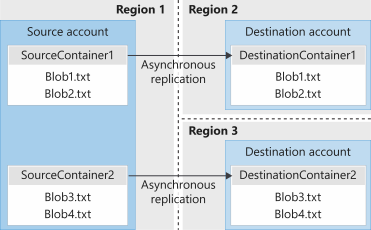
- Minimize latency - reduce latency for read requests.
- Increased efficiency - Processing block blob in different regions.
- Data distribution - Processing and analyzing data in one location that replicate to other regions.
- Cost Optimization -moving replicate data to the archive tier can reduce cost.
- Versioning: Versioning must be enabled on both the source and desalination accounts to perform replication
- Change feed: Change feed must be enabled on the source account. Azure storage monitors the $blobchangefeed to advise replication.
- Cross subscription and azure AD: Object replication is supported across subscriptions and azure AD tenants
- Replication Policy: A Storage account can be a source for up to two destination accounts. Each policy supports only a single pairing using a policy ID.
Create a destination storage account and make sure versioning for blobs its enabled

For source storage account we will enable versioning and change feed.

now we need to add our containers one on source and one on destination storage account.


Next step is to create an object replication rule on our source data storage

for our replication rule we need to select the destination storage account in this case dststorageaccountcloud1 specify the source container and destination container we can also apply filters to replicate only data on specific folder structure ,we can also specify which data to copy over here we select only new objects.


Now we are uploading a new blob on our src storage account and src container

now we can see file blob1.txt on our source account but not on our destination as there is a rule

we are adding our same blob but this time we will specify the folder /prefix to match our object rule.

blob.txt is now also on destination container due to our object replication
