
Avaya Upgrade 8 to 10 plan
Upgrading Avaya Services from Version 8 to Version 10
Objective: The objective of this business proposal is to outline the strategic upgrade of our organization's Avaya services from version 8.0 to version 10. This upgrade is intended to modernize and enhance our communication infrastructure, ensuring that we remain competitive and efficient in an ever-evolving business landscape.
Significance: Avaya is a critical component of our communication and collaboration infrastructure. Upgrading to version 10 will offer several significant advantages, including improved performance, enhanced security, access to new features, and long-term support. This will enable us to better serve our customers, enhance employee productivity, and prepare for future growth.
Key Benefits:
-
Enhanced Performance: Avaya version 10 introduces optimizations that will result in a more robust and responsive communication system, reducing downtime and improving call quality.
-
Advanced Features: Version 10 provides access to new features and functionalities, such as improved video conferencing capabilities, advanced analytics, and enhanced mobile integration, empowering our organization to stay ahead of industry trends.
-
Security Enhancement: The upgrade will address known vulnerabilities in version 8.0 and provide robust security features to protect our sensitive communications and data.
-
Compliance and Long-Term Support: Staying up to date with Avaya versions ensures compliance with industry standards and regulations. Moreover, Avaya will continue to offer support and maintenance for version 10, protecting our investment in the long term.
Key Considerations:
-
Budget and Resources: The upgrade will require a budget allocation for software licensing, hardware improvements, and labor costs. A detailed breakdown is available in the full business plan.
-
Project Timeline: The upgrade project is expected to take several weeks, with specific milestones outlined in the comprehensive plan.
-
Risk Mitigation: A proactive approach to addressing potential risks and challenges, including downtime during the transition, is built into the upgrade plan.
Conclusion: The upgrade from Avaya version 8.0 to version 10 represents a strategic investment in our organization's communication infrastructure. It is a forward-thinking move that not only addresses immediate needs but also positions us for future growth and technological advancements. This executive summary serves as an introduction to the comprehensive business plan, which provides detailed insights into the upgrade project.
Upgrade Plan: Selected Avaya Component Upgrades (In Order)
-
Hard Endpoints (H.323 and SIP):
- Upgrade hard endpoints to the latest compatible firmware version.
-
Standalone Avaya WebLM:
- Upgrade WebLM to Release 10.1.2.
-
SAL Gateway:
- Upgrade SAL Gateway to the latest compatible version.
-
Avaya Aura® System Manager:
- Update System Manager based on your setup:
- In Non-Geography Redundancy setup, update standalone System Manager.
- In Geography Redundancy setup, update the primary System Manager.
- Ensure that System Manager is on the same or a higher release than the applications you're upgrading.
- Update System Manager based on your setup:
-
Avaya Experience Portal:
- Upgrade Experience Portal to the latest compatible version.
-
G4XX Media gateways or Avaya Aura® Media Server:
- Ensure that gateways are on load 38.21.2 or newer for successful upgrade to 42.x.
- Upgrade gateways as needed to meet the load requirements.
-
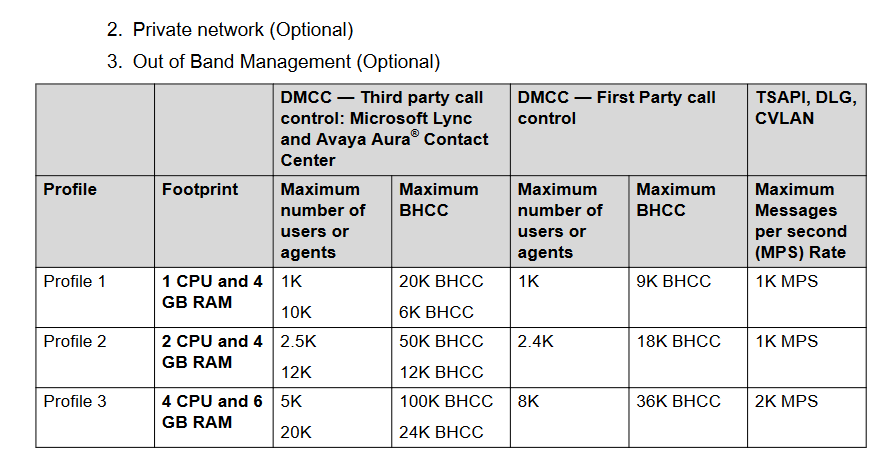
Avaya Aura® Application Enablement Services (AES):
- Upgrade AES to the latest compatible version.
-
Avaya Session Border Controller:
- Upgrade the Session Border Controller to the latest compatible version.
This plan outlines the sequence for upgrading the selected Avaya components. It's important to conduct thorough testing and follow any application-specific upgrade guides provided by Avaya to ensure a smooth transition for each component.
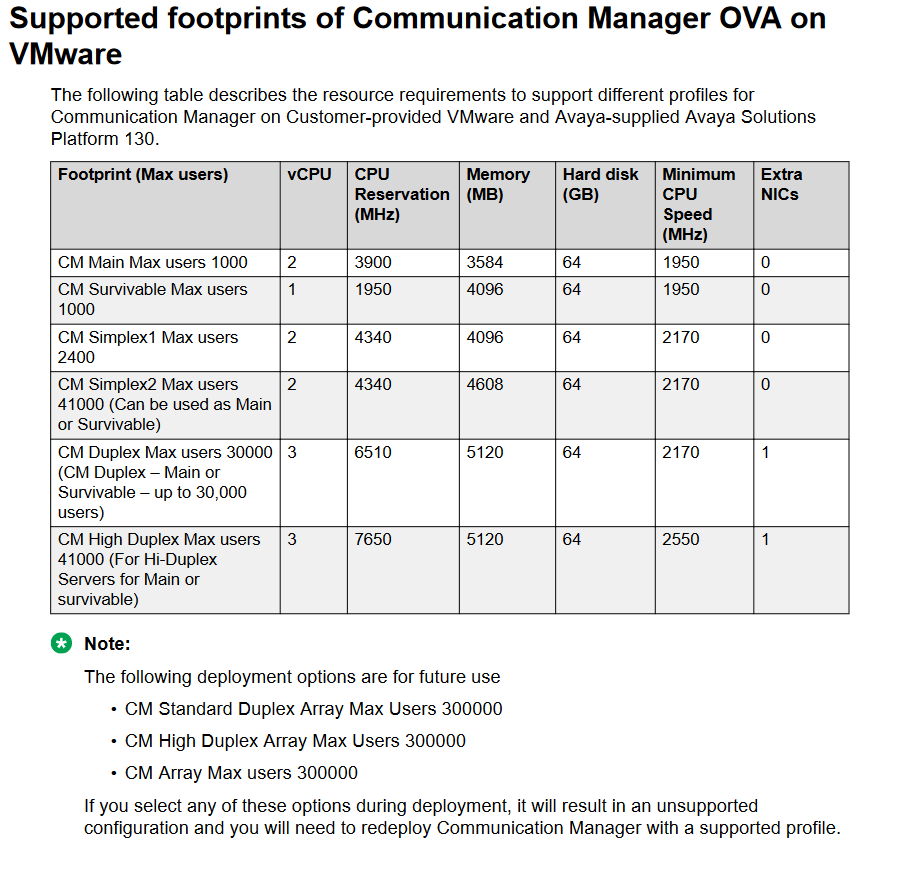
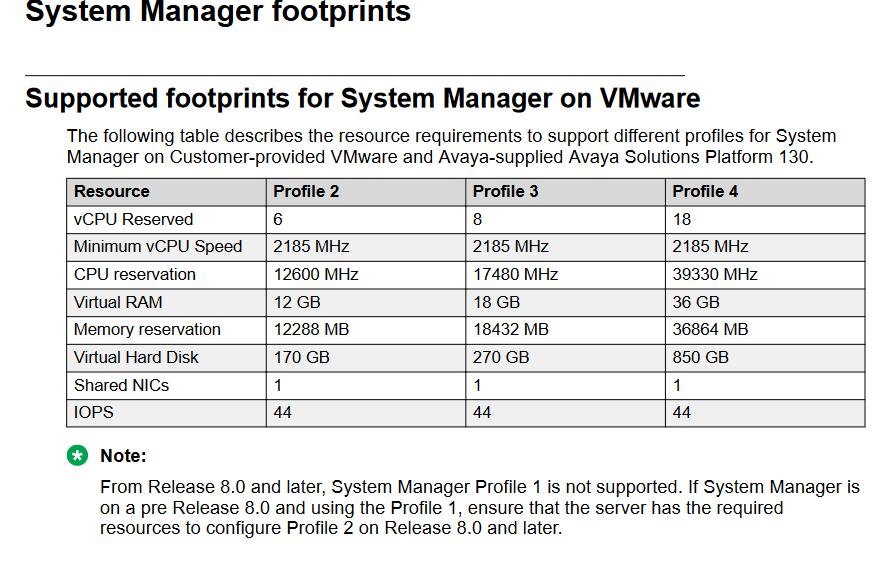
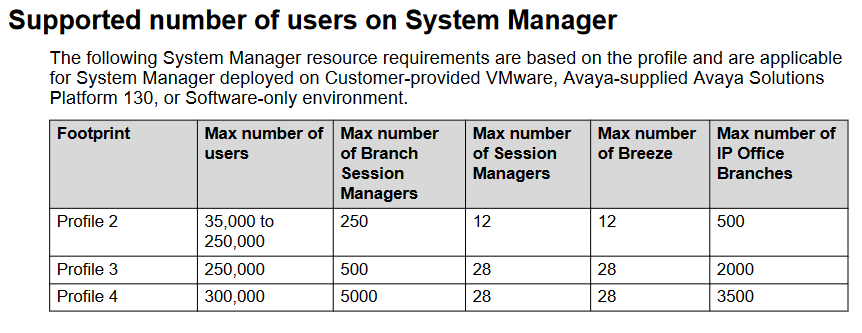
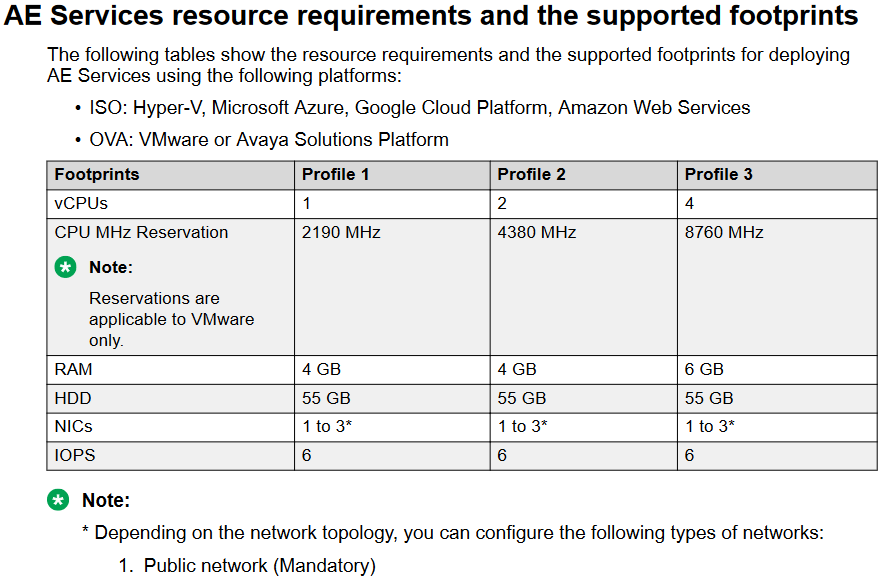
VM Requirements for Major components
Avaya CM - https://download.avaya.com/css/public/documents/101079070
System Manager - https://download.avaya.com/css/public/documents/101079166
AES - https://download.avaya.com/css/public/documents/101079166
No Comments