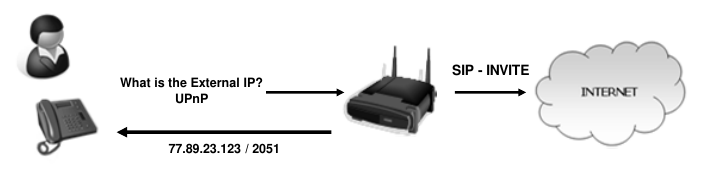
# SIP Core

Information about SIP, Servers and operations and client config

# 1. - What is SIP

SIP

- SIP - Session Initiation Protocol
- Signaling Protocol
- Controls Multi-media sessions
- Establish user presence
- Locate users - SIP Mobility
- Setup, Modify and tear down sessions

<details id="bkmrk-sip-rfc-3261-sip-is-"><summary>SIP RFC 3261</summary>

```
SIP is an application-layer control protocol that can establish,
   modify, and terminate multimedia sessions (conferences) such as
   Internet telephony calls.  SIP can also invite participants to
   already existing sessions, such as multicast conferences.  Media can
   be added to (and removed from) an existing session.  SIP
   transparently supports name mapping and redirection services, which
   supports personal mobility [27] - users can maintain a single
   externally visible identifier regardless of their network location.

   SIP supports five facets of establishing and terminating multimedia
   communications:

      User location: determination of the end system to be used for
           communication;

      User availability: determination of the willingness of the called
           party to engage in communications;

      User capabilities: determination of the media and media parameters
           to be used;

      Session setup: "ringing", establishment of session parameters at
           both called and calling party;

      Session management: including transfer and termination of
           sessions, modifying session parameters, and invoking
           services.

   SIP is not a vertically integrated communications system.  SIP is
   rather a component that can be used with other IETF protocols to
   build a complete multimedia architecture.  Typically, these
   architectures will include protocols such as the Real-time Transport
   Protocol (RTP) (RFC 1889 [28]) for transporting real-time data and
   providing QoS feedback, the Real-Time streaming protocol (RTSP) (RFC
   2326 [29]) for controlling delivery of streaming media, the Media
   Gateway Control Protocol (MEGACO) (RFC 3015 [30]) for controlling
   gateways to the Public Switched Telephone Network (PSTN), and the
   Session Description Protocol (SDP) (RFC 2327 [1]) for describing
   multimedia sessions.  Therefore, SIP should be used in conjunction
   with other protocols in order to provide complete services to the
   users.  However, the basic functionality and operation of SIP does
   not depend on any of these protocols.

   SIP does not provide services.  Rather, SIP provides primitives that
   can be used to implement different services.  For example, SIP can
   locate a user and deliver an opaque object to his current location.
   If this primitive is used to deliver a session description written in
   SDP, for instance, the endpoints can agree on the parameters of a
   session.  If the same primitive is used to deliver a photo of the
   caller as well as the session description, a "caller ID" service can
   be easily implemented.  As this example shows, a single primitive is
   typically used to provide several different services.

   SIP does not offer conference control services such as floor control
   or voting and does not prescribe how a conference is to be managed.
   SIP can be used to initiate a session that uses some other conference
   control protocol.  Since SIP messages and the sessions they establish
   can pass through entirely different networks, SIP cannot, and does
   not, provide any kind of network resource reservation capabilities.

   The nature of the services provided make security particularly
   important.  To that end, SIP provides a suite of security services,
   which include denial-of-service prevention, authentication (both user
   to user and proxy to user), integrity protection, and encryption and
   privacy services.

   SIP works with both IPv4 and IPv6.
```

</details>More on RFC 3261 SIP

[https://datatracker.ietf.org/doc/html/rfc3261](https://datatracker.ietf.org/doc/html/rfc3261)

[![image.png](https://wiki.tinod.net/uploads/images/gallery/2023-05/scaled-1680-/mMvt2e9vwDftcJxY-image.png)](https://wiki.tinod.net/uploads/images/gallery/2023-05/mMvt2e9vwDftcJxY-image.png)

# 2.- SIP User Agents

#### User Agents

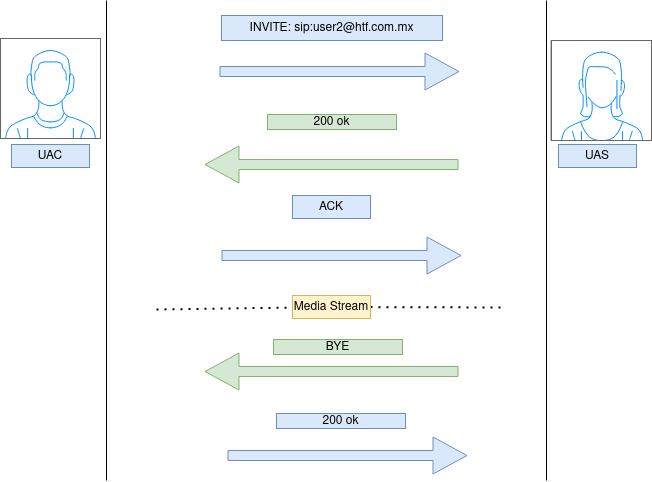
A SIP (Session Initiation Protocol) user agent is a software application that runs on a device and communicates with other devices using the SIP protocol. A user agent can act as a client, a server, or both.

There are two types of SIP user agents: User Agent Client (UAC) and User Agent Server (UAS).

A User Agent Client (UAC) is a SIP endpoint that initiates a SIP session. The UAC sends SIP requests to other SIP user agents, such as a User Agent Server (UAS), to establish a session. The UAC is responsible for generating the SIP requests, processing responses, and terminating the session.

A User Agent Server (UAS) is a SIP endpoint that responds to SIP requests. When a UAS receives a SIP request, it generates a SIP response that is sent back to the requesting user agent. The UAS is responsible for processing the SIP requests, generating the SIP responses, and maintaining the session.

Both UAC and UAS can be implemented as separate software applications or combined into a single application. For example, a softphone application can act as both a UAC and a UAS, allowing users to initiate and receive calls using SIP.

In addition to UACs and UASs, there are other types of SIP user agents, such as a Proxy Server, which forwards SIP messages between user agents, and a Redirect Server, which redirects SIP messages to other servers or user agents.

<div drawio-diagram="158"><img src="https://wiki.tinod.net/uploads/images/drawio/2023-05/upKIlDYPN0McZEQr-drawing-1-1683333387.png" alt=""/></div>

# 3.- SIP Addressing and URI

#### SIP Addressing

In SIP (Session Initiation Protocol), addressing is used to identify the endpoints of a SIP session. SIP addressing is based on the use of SIP Uniform Resource Identifiers (URIs), which are used to identify the SIP endpoints.

#### URI

A SIP URI (Uniform Resource Identifier) is a string of characters that identifies a SIP (Session Initiation Protocol) endpoint or user on the Internet or another IP network. It is similar to a URL (Uniform Resource Locator) that identifies a web page or resource, but instead of identifying a web page, a SIP URI identifies a user or device that can participate in a SIP session.

<div class="bg-black rounded-md mb-4" id="bkmrk-sip%3Auser%40domain.com"><div class="p-4 overflow-y-auto">`sip:<span class="hljs-keyword">user</span><span class="hljs-variable">@domain</span>.com`</div></div>The `sip:` prefix indicates that this is a SIP URI. The `user` part of the URI identifies the user or device within the domain, and the `domain.com` part of the URI identifies the domain name of the endpoint.

In addition to the user and domain parts of the URI, SIP URIs can also contain other parameters, such as port numbers and transport protocols. For example, a SIP URI for an endpoint using the secure transport protocol over port 5061 would look like this:

<div class="bg-black rounded-md mb-4" id="bkmrk-sips%3Auser%40domain.com"><div class="p-4 overflow-y-auto">`sips:<span class="hljs-keyword">user</span><span class="hljs-variable">@domain</span>.com:<span class="hljs-number">5061</span>;transport<span class="hljs-operator">=</span>TLS`</div></div>SIP addressing can also include other elements such as the SIP message header fields, which provide additional information about the session, including the address of the sender and receiver, the type of session being initiated, and other session-specific information.

The SIP addressing scheme is flexible, allowing for the identification of a wide variety of SIP endpoints, including phones, softphones, SIP servers, and other SIP-capable devices.

Here are more examples of URI

`sip:alice@domain.com` - This SIP URI identifies a SIP endpoint with the username "alice" located at the domain "domain.com". This endpoint could be a softphone application running on Alice's computer or a physical SIP phone connected to the network.

`sip:bob@192.168.1.100:5060` - This SIP URI identifies a SIP endpoint with the username "bob" located at the IP address "192.168.1.100" and using port 5060. This endpoint could be a physical SIP phone or a SIP server running on a computer.

`sip:conference@domain.com;transport=tcp` - This SIP URI identifies a SIP conference server located at the domain "domain.com" that uses the TCP transport protocol. Users could dial into this conference by sending SIP INVITE messages to this URI.

In all of these examples, the "sip:" prefix indicates that this is a SIP URI. The username (e.g. "alice", "bob", "conference") identifies the endpoint or resource being addressed, and the domain (e.g. "domain.com", "192.168.1.100") identifies the network location of the endpoint. In example 2, a port number is also specified. Additionally, example 3 demonstrates how SIP URIs can contain other parameters, in this case specifying the use of the TCP transport protocol.

The goal of SIP addressing is to identify SIP endpoints and resources on the network for routing SIP messages.

```pl/sql
+-------------+                       +-------------+
| User A      |                       | User B      |
| SIP Address |                       | SIP Address |
| 192.0.2.1   |                       | 192.0.2.2   |
| SIP URI     |                       | SIP URI     |
| sip:userA@192.0.2.1:5060;transport=UDP | sip:userB@192.0.2.2:5060;transport=UDP |
+-------------+                       +-------------+
        |                                          |
        |  INVITE                                  |
        |  sip:userB@192.0.2.2:5060 SIP/2.0        |
        |  Via: SIP/2.0/UDP 192.0.2.1:5060         |
        |  From: sip:userA@192.0.2.1:5060;tag=1234 |
        |  To: sip:userB@192.0.2.2:5060            |
        |  Call-ID: 5678                           |
        |  CSeq: 1 INVITE                          |
        |  Contact: sip:userA@192.0.2.1:5060       |
        |  Content-Type: application/sdp           |
        |  Content-Length: 150                     |
        |                                          |
        |---------------------------------------->|
        |                                          |
        |  100 Trying                              |
        |  SIP/2.0 100 Trying                      |
        |  Via: SIP/2.0/UDP 192.0.2.2:5060         |
        |  From: sip:userA@192.0.2.1:5060;tag=1234 |
        |  To: sip:userB@192.0.2.2:5060;tag=5678   |
        |  Call-ID: 5678                           |
        |  CSeq: 1 INVITE                          |
        |  Content-Length: 0                       |
        |                                          |
        |<-----------------------------------------|
        |                                          |
        |  200 OK                                  |
        |  SIP/2.0 200 OK                          |
        |  Via: SIP/2.0/UDP 192.0.2.2:5060         |
        |  From: sip:userA@192.0.2.1:5060;tag=1234 |
        |  To: sip:userB@192.0.2.2:5060;tag=5678   |
        |  Call-ID: 5678                           |
        |  CSeq: 1 INVITE                          |
        |  Contact: sip:userB@192.0.2.2:5060       |
        |  Content-Type: application/sdp           |
        |  Content-Length: 150                     |
        |                                          |
        |<-----------------------------------------|
        |                                          |
        |  ACK                                     |
        |  sip:userB@192.0.2.2:5060 SIP/2.0        |
        |  Via: SIP/2.0/UDP 192.0.2.1:5060         |
        |  From: sip:userA@192.0.2.1:5060;tag=1234 |
        |  To: sip:userB@192.0.2.2:5060;tag=5678   |
        |  Call-ID: 5678                           |
        |  CSeq: 1 ACK

```

# 4. - SIP Servers

## SIP Servers

- Registration
- Re-Registration
- SIP Proxy Servers
- SIP Server - Proxy mode
- SIP Server -Re-Direct mode
- Proxy Server 'State' types
- Location Services

### SIP Registration server

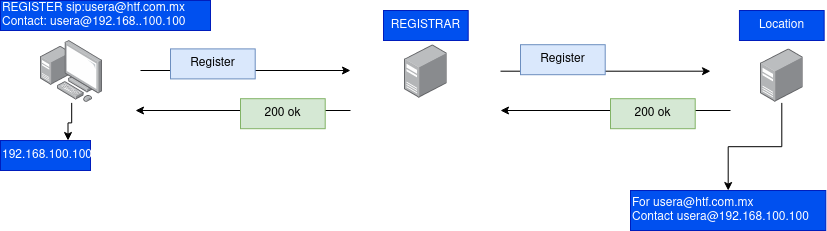
A SIP registration server is responsible for authenticating and registering SIP users or endpoints with a SIP server. It acts as a central database for storing user information, including their SIP addresses, phone numbers, IP addresses, and other relevant information. When a SIP user wants to make a call, they first register with the SIP registration server, which sends a notification to the SIP server that the user is available. The SIP server then routes the call to the appropriate user based on their SIP address. The SIP registration server is crucial for enabling SIP-based communications, as it allows SIP users to locate and communicate with one another over the internet.

<div drawio-diagram="159"><img src="https://wiki.tinod.net/uploads/images/drawio/2023-05/2fmDep8SqocwCVjx-drawing-1-1683335535.png" alt=""/></div>

When SIP UA Registers with a registrar it tells the registrar about its feature capabilities. This is really useful information for SIP devices to make contact with the UA.

### SIP RE-Registration Server

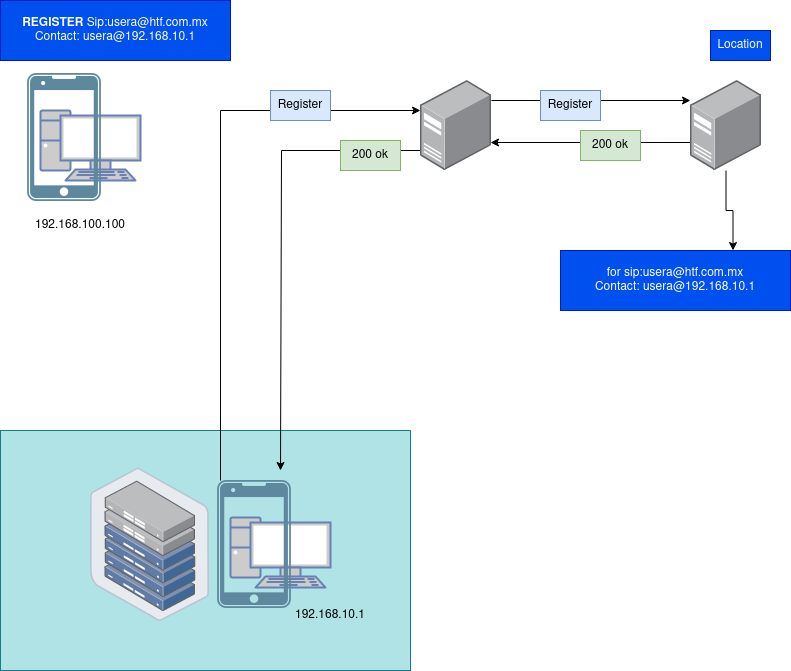
A SIP re-registration server is a server that allows SIP devices to re-register their contact information periodically. SIP devices usually send registration requests to a SIP registration server to inform it of their current IP address and availability to receive calls. However, if the IP address of the SIP device changes or it becomes unavailable for some reason, the registration information needs to be updated. A re-registration server helps to automate this process by periodically sending a SIP re-registration request to the SIP devices. If the device responds with a new contact address, the registration server updates its records accordingly. This ensures that the SIP devices can always be reached by other users and devices in the network, even if their IP address changes or they go offline temporarily.

<div drawio-diagram="160"><img src="https://wiki.tinod.net/uploads/images/drawio/2023-05/ESebCWhnLhMu0Nid-drawing-1-1683336056.png" alt=""/></div>

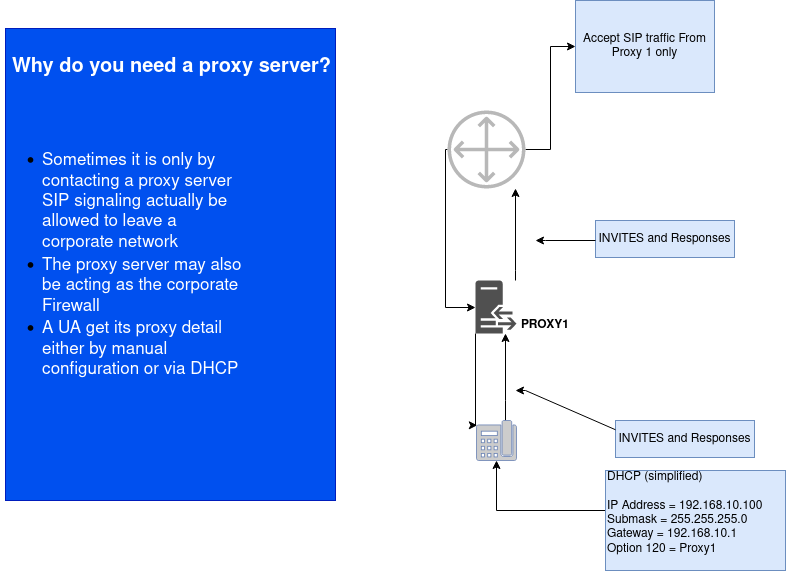
### SIP Proxy Server

A SIP proxy server is an intermediary device that sits between SIP user agents (UAs) to facilitate communication between them. It receives SIP requests from one UA, inspects them, and forwards them to the appropriate destination UA. It can modify the request headers or body as necessary and may also provide services like call routing, load balancing, and security. A proxy server can be located within a private network or in the public domain.

- A proxy server forward request to the next server after working out which is the next server to talk to.
- It interpret a request message and if necessary rewrite the message before forwarding it.
- It can issue both request and responses so it is in effect a SIP client and a Server
- A proxy server can fork the incoming request to multiple locations if someone has multiple registrations i.e Office and Mobile phones

<div drawio-diagram="161"><img src="https://wiki.tinod.net/uploads/images/drawio/2023-05/LPn2WrFKvEmq5BR0-drawing-1-1683336961.png" alt=""/></div>

<details id="bkmrk-other-examples-of-si"><summary>Other examples of SIP Proxy</summary>

#####  Trapezoid Model  


The SIP Proxy Trapezoid model is a reference model for SIP networks that defines the different types of SIP proxy servers and their relationships. The model consists of four layers: User Agents (UA), Proxy Servers, Redirect Servers, and Location Servers.

The UA layer contains user agents, which initiate SIP requests and responses. The Proxy Server layer includes stateful and stateless proxies, which act as intermediaries between UAs and other SIP entities. The Redirect Server layer includes servers that redirect SIP requests to other destinations based on specific rules.

The Location Server layer includes SIP location servers, which maintain information about the current location of UAs within the network. The trapezoid shape of the model represents the different levels of trust in the network, with the UA layer being the most trusted and the Location Server layer being the least trusted.

The SIP Proxy Trapezoid model is useful for understanding the different types of SIP proxy servers and their roles in the network. It can also help network administrators design and implement SIP networks that are secure and efficient.

![image.png](https://wiki.tinod.net/uploads/images/gallery/2023-05/scaled-1680-/NbKzAL2Byt3gFZ8L-image.png)

##### Proxy mode

SIP server acts as an intermediary between clients in a SIP network. It receives SIP requests from one client and then forwards them to the appropriate destination client. The proxy server can manipulate the message headers and routing information to control the flow of the SIP messages. It can also provide services such as call routing, policy enforcement, security, and protocol translation. The proxy server can be stateful or stateless, depending on whether it maintains the state of the SIP transactions it handles. A stateful proxy server provides more advanced features and services but requires more resources to maintain the state information.

![image.png](https://wiki.tinod.net/uploads/images/gallery/2023-05/scaled-1680-/5r1tM4J8xS38fSCf-image.png)

##### Proxy Redirect Mode

A server in proxy redirect mode acts as a middleman that receives a SIP request from a client and sends a redirect response to the client, which contains the address of the next hop server that the client should contact to complete the request. The proxy redirect server does not actively participate in the transaction beyond sending the redirect response. Instead, it relies on the client to initiate a new transaction with the next hop server specified in the redirect response. The proxy redirect server can be used to offload traffic from one server to another or to provide load balancing across multiple servers.

![image.png](https://wiki.tinod.net/uploads/images/gallery/2023-05/scaled-1680-/VnhHWr9gGGMsVLp7-image.png)

</details>#### Types of Proxy Server

1. Stateful proxy server: A stateful proxy server maintains the transaction state and message history for all transactions that pass through it. This allows it to make more informed routing decisions, but also requires more processing power and memory.
2. Stateless proxy server: A stateless proxy server does not maintain any transaction state or message history. It simply forwards messages based on routing rules. This makes it faster and less resource-intensive, but also less flexible.
3. Transaction Stateful: They store information about the SIP messages exchanged between the clients and servers and maintain the session state until the transaction is complete.
4. B2BUA (Back-to-Back User Agent): A B2BUA is a type of SIP proxy server that acts as both a client and a server, allowing it to manipulate the SIP messages as they pass through it. This makes it useful for applications such as call forwarding, where the B2BUA can modify the destination of the call based on user preferences or availability.

### SIP Location Server

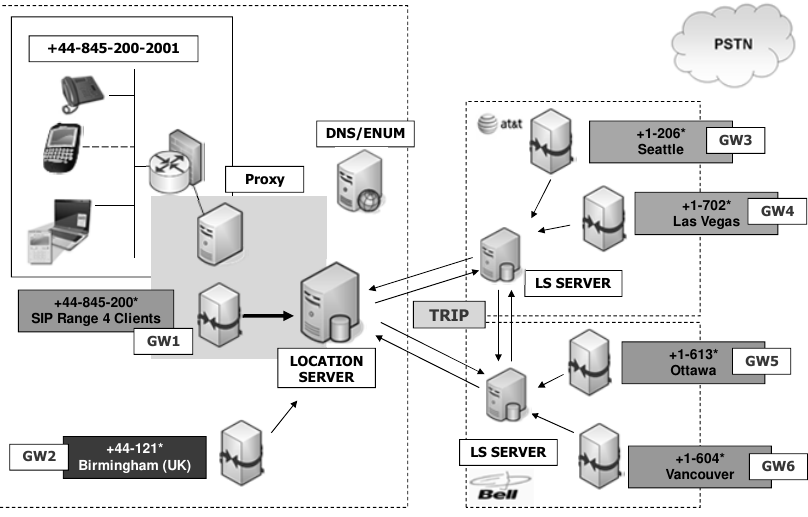
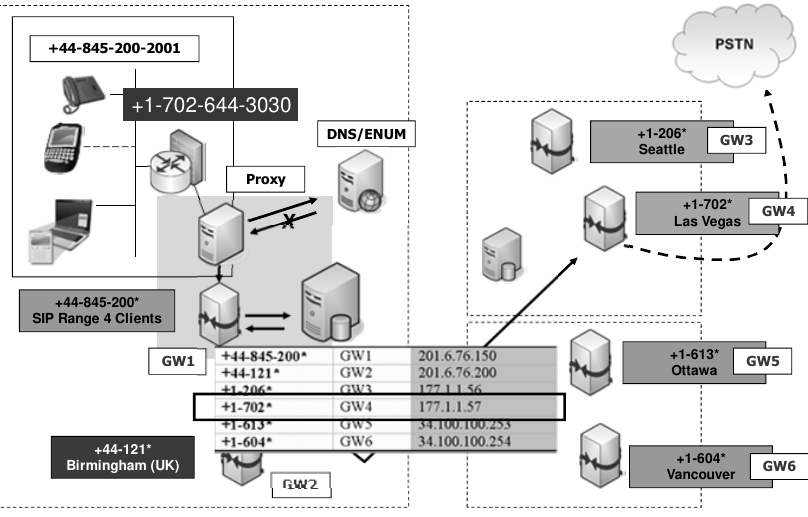
Is a type of server in a SIP network that keeps track of the current location or address of SIP user agents (UAs) in the network. It is responsible for maintaining a database of user agent location information, which can be used by other SIP servers to locate and communicate with those user agents. The location server uses the SIP REGISTER method to receive location updates from the user agents and stores the information in a location database. When another SIP server needs to communicate with a user agent, it can query the location server for the user agent's current address and then forward messages to that address.

![image.png](https://wiki.tinod.net/uploads/images/gallery/2023-05/scaled-1680-/Je7isVQH9oJNZkhP-image.png)

![image.png](https://wiki.tinod.net/uploads/images/gallery/2023-05/scaled-1680-/TkdCv13rbnGfXTT4-image.png)

![image.png](https://wiki.tinod.net/uploads/images/gallery/2023-05/scaled-1680-/U3jdG0xnYoaI5elA-image.png)

# 5. - SIP Clients

#### SIP Clients

SIP clients are software applications that run on devices such as computers, smartphones, or tablets and allow users to make and receive SIP-based voice, video, and messaging communications over the internet. They use SIP protocol to establish, maintain and terminate multimedia sessions between two or more parties. SIP clients can be standalone applications, web-based or integrated into other software such as email clients or instant messaging applications. Examples of SIP clients include softphones, web-based clients, and mobile apps.

They all need to be configured with parameters in order to register.

- TFTP: Phone download configuration from a tftp server during boot process containing parameters for registration
- CS: Configuration server (option 141) provide process more on [RFC 6011](https://datatracker.ietf.org/doc/html/rfc6011)
- Manual: Manually enter configuration parameters for registration
- Group Policy: push configuration via config files using group policy

- ![image.png](https://wiki.tinod.net/uploads/images/gallery/2023-05/scaled-1680-/iFYwOZzIcaljYepe-image.png)

# 6. - SIP Messages

SIP messages are the communication units used by SIP endpoints to establish, modify, and terminate multimedia sessions. SIP messages are exchanged between SIP user agents, proxy servers, and redirect servers, and are used to initiate and control communication sessions between two or more parties. The messages consist of a request or response line, message headers, and a message body, and are used to exchange information about the session, including media types, codecs, addresses, and authentication credentials. SIP messages can be sent over UDP, TCP, or TLS transport protocols.

Here are some examples of a SIP message

SIP Invite Message

```
INVITE sip:user@example.com SIP/2.0
Via: SIP/2.0/UDP 192.168.1.100:5060;branch=z9hG4bK123456789
From: Alice <sip:alice@example.com>;tag=987654321
To: Bob <sip:bob@example.com>
Call-ID: 123456789@192.168.1.100
CSeq: 1 INVITE
Contact: <sip:alice@192.168.1.100>
Max-Forwards: 70
Content-Type: application/sdp
Content-Length: 100

v=0
o=- 123456789 123456789 IN IP4 192.168.1.100
s=Session
c=IN IP4 192.168.1.100
t=0 0
m=audio 5004 RTP/AVP 0
a=rtpmap:0 PCMU/8000

```

SIP OK Message

```
SIP/2.0 200 OK
Via: SIP/2.0/UDP 192.168.1.100:5060;branch=z9hG4bK123456789;received=192.168.1.100
From: Alice <sip:alice@example.com>;tag=987654321
To: Bob <sip:bob@example.com>;tag=123456789
Call-ID: 123456789@192.168.1.100
CSeq: 1 INVITE
Contact: <sip:bob@192.168.1.101>
Content-Type: application/sdp
Content-Length: 100

v=0
o=- 123456789 123456789 IN IP4 192.168.1.101
s=Session
c=IN IP4 192.168.1.101
t=0 0
m=audio 5004 RTP/AVP 0
a=rtpmap:0 PCMU/8000

```

SIP Notify Message

```
NOTIFY sip:alice@example.com SIP/2.0
Via: SIP/2.0/UDP 192.168.1.101:5060;branch=z9hG4bK987654321
From: Bob <sip:bob@example.com>;tag=123456789
To: Alice <sip:alice@example.com>;tag=987654321
Call-ID: 987654321@192.168.1.101
CSeq: 1 NOTIFY
Event: message-summary
Subscription-State: terminated;reason=noresource
Content-Length: 0

```

SIP Prack Message

```
PRACK sip:bob@example.com SIP/2.0
Via: SIP/2.0/UDP 192.168.1.100:5060;branch=z9hG4bK123456789
From: Alice <sip:alice@example.com>;tag=987654321
To: Bob <sip:bob@example.com>;tag=123456789
Call-ID: 123456789@192.168.1.100
CSeq: 1 PRACK
Max-Forwards: 70
Content-Length: 0

```

# 7. - SIP Messages - Requests Methods

SIP request methods are used to initiate a request from a client to a server or from one server to another server in a distributed network. The SIP request methods are similar to HTTP methods and are used to perform different functions such as establishing, modifying, and terminating a session. Some of the common SIP request methods include:

<table border="1" id="bkmrk-invite-used-to-initi" style="border-collapse: collapse; width: 100%; height: 1122.6px;"><colgroup><col style="width: 11.8665%;"></col><col style="width: 88.1335%;"></col></colgroup><tbody><tr style="height: 29.8px;"><td style="height: 29.8px;">INVITE  
</td><td style="height: 29.8px;">Used to initiate a session or invite another user to participate in a session or session modification</td></tr><tr style="height: 46.6px;"><td style="height: 46.6px;">ACK  
</td><td style="height: 46.6px;">Sent by the client to confirm that it has received a final response to its INVITE request, ACK is only used with Invite requests including re-invites.  
</td></tr><tr style="height: 29.8px;"><td style="height: 29.8px;">BYE  
</td><td style="height: 29.8px;">Used to terminate an existing session.</td></tr><tr style="height: 29.8px;"><td style="height: 29.8px;">CANCEL  
</td><td style="height: 29.8px;">Used to cancel an outstanding request or pending request.  
</td></tr><tr style="height: 46.6px;"><td style="height: 46.6px;">REGISTER  
</td><td style="height: 46.6px;">Used by a client to register its contact address with a registrar server bby binding the Agent URI to an AOR (address of record) so the sip seerver knows the location of the user agent.  
</td></tr><tr style="height: 29.8px;"><td style="height: 29.8px;">OPTIONS  
</td><td style="height: 29.8px;">Used by SIP User Agents (UAs) to query a server or another UA for its capabilities and determine what SIP methods and extensions it supports. It is a way for SIP UAs to discover what services are available from the server or UA and what methods can be used to access them. The OPTIONS method is usually sent without a request body, and the response from the server or UA will include information about its supported methods, extensions, and capabilities. The OPTIONS method is often used to determine if a server or UA is available and responsive, and to verify that it supports certain features before attempting to use them.  
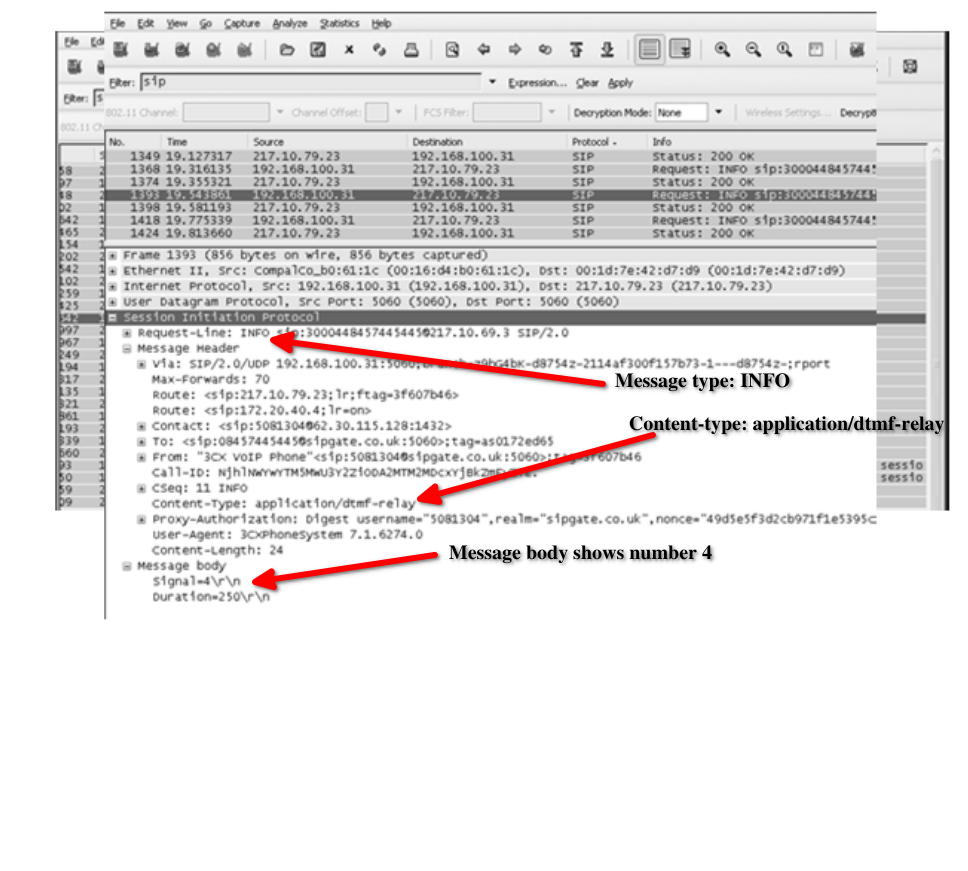
</td></tr><tr style="height: 113.8px;"><td style="height: 113.8px;">INFO  
</td><td style="height: 113.8px;">The SIP INFO method is used to carry session-related control information that cannot be carried by other SIP methods. This method is used to send mid-session signaling information within an existing SIP session, such as DTMF (Dual Tone Multi-Frequency) digits or an update to session parameters. The INFO method does not modify the session state or the dialog state. It is a simple request/response method, where the recipient of the INFO message responds with a 200 OK message to acknowledge receipt of the message. The INFO message is commonly used in Voice over IP (VoIP) applications, particularly in interactive voice response (IVR) systems.  
</td></tr><tr style="height: 147.4px;"><td style="height: 147.4px;">SUBSCRIBE  
</td><td style="height: 147.4px;">Used to request notification of an event or set of events at a later time. An example can be requesting a notification when another person IM Presence details change. The server sends a SIP 200 OK response message to confirm the subscription, along with the current state of the event. The server then sends a NOTIFY message to the client whenever the event state changes. The NOTIFY message contains the updated state of the event and other relevant information.The client can unsubscribe from the event notifications by sending a SIP UNSUBSCRIBE request message to the server. The server sends a SIP 200 OK response message to confirm the unsubscription. The client can also renew the subscription by sending a new SUBSCRIBE request message before the subscription expires.  
</td></tr><tr style="height: 113.8px;"><td style="height: 113.8px;">NOTIFY  
</td><td style="height: 113.8px;">Used to notify that an event which was requested by an earlier SUBSCRIBE method has actually ocurred. It can also be used by a SIP server to NOTIFY a client of an event. The NOTIFY message contains a payload that describes the event, and it is sent in response to a subscription request made by the client using the SIP SUBSCRIBE method. The NOTIFY message is also used in the context of the SIP event notification framework, which allows for the subscription and notification of events using specific event packages. When a client receives a NOTIFY message, it can take appropriate action based on the information contained in the message.</td></tr><tr style="height: 113.8px;"><td style="height: 113.8px;">REFER   
</td><td style="height: 113.8px;">Used to Transfer calls and also to contact external resources, the REFER message contains a URI identifying the new target for the call transfer. The server receiving the REFER message will create a new INVITE request to the new target and then try to establish a new call between the transferee and the new target. Once the new call is established, the server will send a SIP NOTIFY message to the transferor indicating the status of the call transfer. If the transfer is successful, the NOTIFY message will contain a 200 OK response. If the transfer is not successful, the NOTIFY message will contain a different response code indicating the reason for the failure.  
</td></tr><tr style="height: 169.8px;"><td style="height: 169.8px;">PRACK  
</td><td style="height: 169.8px;">Used to acknowledge the receipt of a provisional response (1xx) to a SIP INVITE request. PRACK is used to confirm that the user agent has received a provisional response and is ready to receive the final response for the request. Each provisional response (from a UAS - e.g. a 183 session in progress) is given a sequence number, carried in the RSeq header field in the response. THE PRACK messages (from the UAC) contain a RAck heeader field, which indicates the sequencee number of the provisional response that is beingg acknowledged. PRACK messages can be used in scenarios where reliability is important, such as when using SIP over unreliable transport protocols like UDP. PRACK messages can also include a body that contains an offer or an answer to a session description protocol (SDP) negotiation. The PRACK message is part of the SIP protocol and is defined in [RFC 3262](https://www.ietf.org/rfc/rfc3262.txt)</td></tr><tr style="height: 113.8px;"><td style="height: 113.8px;">UPDATE  
</td><td style="height: 113.8px;">Used to modify the state of a session without creating a new one. It is typically used to update the session parameters such as media characteristics or session description. An UPDATE request is sent to the UAS that is involved in the session, and it includes the new session description with the updated parameters. The UAS responds with a 200 OK message, indicating that the session has been updated successfully. The UPDATE method is a reliable method and requires a reliable transport such as TCP. It can also be used to update the session timers or to cancel a pending offer.</td></tr><tr style="height: 46.6px;"><td style="height: 46.6px;">SERVICE  
</td><td style="height: 46.6px;">Can carry a Simple object access protocol (SOAP) message as it's payload. SOAP is a lightweight protocol that defines a framework for encoding request and response messages in XML.  
</td></tr><tr style="height: 91.2px;"><td style="height: 91.2px;">BENOTIFY  
</td><td style="height: 91.2px;">also known as Best Effort NOTIFY is used by Microsoft Lync, LCS and OCS communication products, unlike the notify method, BENOTIFY doesnt require a response as applications may no need a notify reesponse to a certain requeest thus reducing SIP signaling traffic. This is important for deployments with large numbers of clients per Lync, LCS, or OCS Server.  
</td></tr><tr><td>COMET  
</td><td>Used to confirm that conditions to make the connection have been met, such as QoS requirements.  
</td></tr></tbody></table>

# 8. - SIP Messages - Response Codes

SIP response codes are made up of 3 digits, first digit in the code indicates the class of the response and the other two digits are used to represent a reason or 'reason phrase'.

<table border="1" id="bkmrk-1xx-this-is-an-infor" style="border-collapse: collapse; width: 100%; height: 178.8px;"><colgroup><col style="width: 5.4939%;"></col><col style="width: 94.6297%;"></col></colgroup><tbody><tr style="height: 29.8px;"><td style="height: 29.8px;">1XX  
</td><td style="height: 29.8px;">This is an informational response. The request was received and is still being processed  
</td></tr><tr style="height: 29.8px;"><td style="height: 29.8px;">2XX  
</td><td style="height: 29.8px;">A 2XX response is a success response, the action was received understood and accepted.  
</td></tr><tr style="height: 29.8px;"><td style="height: 29.8px;">3XX  
</td><td style="height: 29.8px;">A 3XX response is a redirection response, further action needs to be taken in order to complete the request.  
</td></tr><tr style="height: 29.8px;"><td style="height: 29.8px;">4XX  
</td><td style="height: 29.8px;">A 4XX response is a client error response, for some reason (such as bad syntax) the request cannot be fulfilled at this server.  
</td></tr><tr style="height: 29.8px;"><td style="height: 29.8px;">5XX  
</td><td style="height: 29.8px;">A 5XX response is a server error response, for some reason the server cannot fulfill a valid request.  
</td></tr><tr style="height: 29.8px;"><td style="height: 29.8px;">6XX  
</td><td style="height: 29.8px;">A 6XX response is a global error, the request being made is invalid at any server.</td></tr></tbody></table>

## 1xx = Informational SIP responses

<div class="fusion-text fusion-text-2" id="bkmrk-100-trying---extende">- **100 Trying** - Extended search is being performed so a forking proxy must send a 100 Trying response.
- **180 Ringing** - The Destination User Agent has received the INVITE message and is alerting the user of call.
- **181 Call Is Being Forwarded** - Optional, send by Server to indicate a call is being forwarded.
- **182 Queued** - Destination was temporarily unavailable, the server has queued the call until the destination is available.
- **183 Session Progress** - This response may be used to send extra information for a call which is still being set up.
- **199 Early Dialog Terminated** - Send by the User Agent Server to indicate that an early dialogue has been terminated.

</div>## 2xx = Success responses

<div class="fusion-text fusion-text-3" id="bkmrk-200-ok---shows-that-">- **200 OK** - Shows that the request was successful.
- **202 Accepted** - Indicates that the request has been accepted for processing, mainly used for referrals.
- **204 No Notification** - Indicates that the request was successful but no response will be received.

</div>## 3xx = Redirection responses

<div class="fusion-text fusion-text-4" id="bkmrk-300-multiple-choices">- **300 Multiple Choices** - The address resolved to one of several options for the user or client to choose between.
- **301 Moved Permanently** - The original Request URI is no longer valid, the new address is given in the Contact header.
- **302 Moved Temporarily** - The client should try at the address in the Contact field.
- **305 Use Proxy** - The Contact field details a proxy that must be used to access the requested destination.
- **380 Alternative Service** - The call failed, but alternatives are detailed in the message body.

</div>## 4xx = Request failures

<div class="fusion-text fusion-text-5" id="bkmrk-400-bad-request--%C2%A0th">- **400 Bad Request** - The request could not be understood due to malformed syntax.
- **401 Unauthorized** - The request requires user authentication. This response is issued by UASs and registrars.
- **402 Payment Required** - (Reserved for future use).
- **403 Forbidden** - The server understood the request, but is refusing to fulfil it.
- **404 Not Found** - The server has definitive information that the user does not exist at the (User not found).
- **405 Method Not Allowed** - The method specified in the Request-Line is understood, but not allowed.
- **406 Not Acceptable** - The resource is only capable of generating responses with unacceptable content.
- **407 Proxy Authentication Required** - The request requires user authentication.
- **408 Request Timeout** - Couldn't find the user in time.
- **409 Conflict** - User already registered (deprecated).
- **410 Gone** - The user existed once but is not available here any more.
- **411 Length Required** - The server will not accept the request without a valid content length (deprecated).
- **412 Conditional Request Failed** - The given precondition has not been met.
- **413 Request Entity Too Large** - Request body too large.
- **414 Request URI Too Long** - Server refuses to service the request, the Req-URI is longer than the server can interpret.
- **415 Unsupported Media Type** - Request body is in a non-supported format.
- **416 Unsupported URI Scheme** - Request-URI is unknown to the server.
- **417 Uknown Resource-Priority** - There was a resource-priority option tag, but no Resource-Priority header.
- **420 Bad Extension** - Bad SIP Protocol Extension used, not understood by the server.
- **421 Extension Required** - The server needs a specific extension not listed in the Supported header.
- **422 Session Interval Too Small** - The request contains a Session-Expires header field with a duration below the minimum.
- **423 Interval Too Brief** - Expiration time of the resource is too short.
- **424 Bad Location Information** - The request's location content was malformed or otherwise unsatisfactory.
- **428 Use Identity Header** - The server policy requires an Identity header, and one has not been provided.
- **429 Provide Referrer Identity** - The server did not receive a valid Referred-By token on the request.
- **430 Flow Failed** - A specific flow to a user agent has failed, although other flows may succeed.
- **433 Anonymity Disallowed** - The request has been rejected because it was anonymous.
- **436 Bad Identity Info** - The request has an Identity-Info header and the URI scheme contained cannot be de-referenced.
- **437 Unsupported Certificate** - The server was unable to validate a certificate for the domain that signed the request.
- **438 Invalid Identity Header** - Server obtained a valid certificate used to sign a request, was unable to verify the signature.
- **439 First Hop Lacks Outbound Support** - The first outbound proxy doesn't support the "outbound" feature.
- **440 Max-Breadth Exceeded** - If a SIP proxy determined a response context had insufficient Incoming Max-Breadth to carry out a desired parallel fork, and the proxy is unwilling/unable to compensate by forking serially or sending a redirect, that proxy MUST return a 440 response. A client receiving a 440 response can infer that its request did not reach all possible destinations.
- **469 Bad Info Package** - If a SIP UA receives an INFO request associated with an Info Package that the UA has not indicated willingness to receive, the UA MUST send a 469 response, which contains a Recv-Info header field with Info Packages for which UA is willing to receive INFO requests.
- **470 Consent Needed** - The source of the request did not have the permission of the recipient to make such a request.
- **480 Temporarily Unavailable** - Callee currently unavailable.
- **481 Call/Transaction Does Not Exist** - Server received a request that does not match any dialogue or transaction.
- **482 Loop Detected** - Server has detected a loop.
- **483 Too Many Hops** - Max-Forwards header has reached the value '0'.
- **484 Address Incomplete** - Request-URI incomplete.
- **485 Ambiguous** - Request-URI is ambiguous.
- **486 Busy Here** - Callee is busy.
- **487 Request Terminated** - Request has terminated by bye or cancel.
- **488 Not Acceptable Here** - Some aspects of the session description of the Request-URI are not acceptable.
- **489 Bad Event** - The server did not understand an event package specified in an Event header field.
- **491 Request Pending** - Server has some pending request from the same dialogue.
- **493 Undecipherable** - UndecipherableRequest contains an encrypted MIME body, which recipient can not decrypt.
- **494 Security Agreement Required** - The server has received a request that requires a negotiated security mechanism.

</div>## 5xx = Server errors

<div class="fusion-text fusion-text-6" id="bkmrk-500-server-internal-">- **500 Server Internal Error** - The server could not fulfill the request due to some unexpected condition.
- **501 Not Implemented** - The SIP request method is not implemented here.
- **502 Bad Gateway** - The server, received an invalid response from a downstream server while trying to fulfill a request.
- **503 Service Unavailable** - The server is in maintenance or is temporarily overloaded and cannot process the request.
- **504 Server Time-out** - The server tried to access another server while trying to process a request, no timely response.
- **505 Version Not Supported** - The SIP protocol version in the request is not supported by the server.
- **513 Message Too Large** - The request message length is longer than the server can process.
- **555 Push Notification Service Not Supported** - The server does not support the push notification serviced specified in the pn-provider SIP URI parameter.
- **580 Precondition Failure** - The server is unable or unwilling to meet some constraints specified in the offer.

</div>## 6xx = Global failures

<div class="fusion-text fusion-text-7" id="bkmrk-600-busy-everywhere-">- **600 Busy Everywhere** - All possible destinations are busy.
- **603 Decline** - Destination cannot/doen't wish to participate in the call, no alternative destinations.
- **604 Does Not Exist Anywhere** - The server has authoritative information that the requested user does not exist anywhere.
- **606 Not Acceptable** - The user's agent was contacted successfully but some aspects of the session description were not acceptable.
- **607 Unwanted** - The called party did not want his call from the calling party. Future attempts from the calling party are likely to be similarly rejected.

</div>

# 9. - SIP Header

A sip message looks like an HTTP message

here is an example of a SIP header.

```
INVITE sip:user@example.com SIP/2.0
Via: SIP/2.0/UDP 192.168.0.10:5060;branch=z9hG4bK776asdhds
Max-Forwards: 70
To: <sip:user@example.com>
From: "John" <sip:john@example.com>;tag=4234235
Call-ID: 985673242@192.168.0.10
CSeq: 1 INVITE
Contact: <sip:john@192.168.0.10:5060>
Content-Type: application/sdp
Content-Length: 142

v=0
o=- 2304919776 2304919776 IN IP4 192.168.0.10
s=SDP Seminar
c=IN IP4 192.168.0.10
t=0 0
m=audio 49170 RTP/AVP 0
a=rtpmap:0 PCMU/8000

```

This is an example of a SIP INVITE message, which is used to initiate a session between two SIP endpoints. The header contains various fields that provide information about the message, including the sender and recipient addresses, a unique call ID, the type of message, and any session description information in the SDP (Session Description Protocol) body.

Here is another example with more details

```
INVITE sip:bob@biloxi.com SIP/2.0
Via: SIP/2.0/UDP pc33.atlanta.com;branch=z9hG4bK776asdhds
Max-Forwards: 70
To: Bob <sip:bob@biloxi.com>
From: Alice <sip:alice@atlanta.com>;tag=1928301774
Call-ID: a84b4c76e66710
CSeq: 314159 INVITE
Contact: <sip:alice@pc33.atlanta.com>
User-Agent: model300/7.6.9
Allow: INVITE,ACK,CANCEL,BYE,OPTIONS,NOTIFY,SUBSCRIBE
Allow-Events: talk,hold,refer
Session-Expires: 3600;refresher=uas
Content-Type: application/sdp
Content-Length: 142

```

- `Request Line`: The first line of a SIP header is called the request line, and it contains the method (INVITE), the SIP URI of the destination (sip:<bob@biloxi.com>), and the SIP protocol version (SIP/2.0).
- `Via`: The Via header indicates the path of the message through any intermediaries (such as proxies) that it passes through on the way to its destination. In this example, the Via header indicates that the message was sent using the SIP/2.0/UDP protocol from the host pc33.atlanta.com, with a branch identifier of z9hG4bK776asdhds.
- `Max-Forwards`: This header specifies the maximum number of hops (intermediaries) that the message is allowed to pass through before it is discarded. In this example, the maximum number of hops is 70.
- `To`: The To header specifies the user or service that the message is intended for. It includes the display name (Bob) and the SIP URI (sip:<bob@biloxi.com>) of the destination.
- `From`: The From header specifies the user or service that sent the message. It includes the display name (Alice), the SIP URI (sip:<alice@atlanta.com>), and a tag (1928301774) that uniquely identifies this request.
- `Call-ID`: This header specifies a unique identifier for the call, which is used to group related messages together. In this example, the call ID is a84b4c76e66710.
- `CSeq`: This header specifies the sequence number of the request within the call. In this example, the sequence number is 314159, and the method is INVITE.
- `Contact`: This header specifies the SIP URI that the recipient should use to contact the sender. In this example, the sender's URI is [sip:alice@pc33.atlanta.com](mailto:sip:alice@pc33.atlanta.com).
- `User-Agent` - In this examplee indicate a model300 telephone firmware rev 7.6.9, with some voip phone syou will see the model and MAC
- `Allow`: list the set of methods supported by the UA generating the message.
- `Allow-Events`: details some basic events that the UA supports, here we can talk, put on hold, refer (or transfer) a call session
- `Session-Expires`: conveys the session interval for a SIP call. it is placed in an invite request and is allowed in any 2XX class response to an INVITE, here it is 3600 seconds or 60 minutes, it can be updated with the UPDATE requests, if there is no Session Expires header then its implied that the session never expires.
- `Content-Type`: This header specifies the type of message body that is included in the message. In this example, the message body is of type application/sdp.
- `Content-Length`: This header specifies the length of the message body, in bytes. In this example, the message body is 142 bytes long.

##### Here is the 200 Response

```
SIP/2.0 200 OK
Via: SIP/2.0/UDP pc33.atlanta.com;branch=z9hG4bK776asdhds;received=192.0.2.1;rport=5060
To: Bob <sip:bob@biloxi.com>;tag=9fxced76sl
From: Alice <sip:alice@atlanta.com>;tag=1928301774
Call-ID: a84b4c76e66710
CSeq: 314159 INVITE
Contact: <sip:bob@192.0.2.4:5060>
User-Agent: server500/2.0.3
Allow: INVITE,ACK,CANCEL,BYE,OPTIONS,NOTIFY,SUBSCRIBE
Allow-Events: talk,hold,refer
Session-Expires: 1800;refresher=uac
Record-Route: <sip:192.0.2.100;lr=on>
Content-Type: application/sdp
Content-Length: 238

v=0
o=bob 2890844526 2890844526 IN IP4 192.0.2.4
s=-
c=IN IP4 192.0.2.4
t=0 0
m=audio 49170 RTP/AVP 0
a=rtpmap:0 PCMU/8000

```

- `Via`: Indicates the transport protocol, IP address, and port used to send the message. It also includes the branch parameter that helps identify the transaction, they are inserted by servers into requests to detect loops and to allow responses to find their way back to the client 'VIA' the aforementioned servers.
- `To`: Identifies the recipient of the message. In this case, it is Bob at the domain biloxi.com, and it includes a tag parameter to uniquely identify this dialog.
- `From`: Identifies the sender of the message. In this case, it is Alice at the domain atlanta.com, and it includes a tag parameter to uniquely identify this dialog.
- `Call-ID`: Uniquely identifies the call and allows responses to be associated with the correct call.
- `CSeq`: Indicates the sequence number of the message within the call, and the method used for the message. In this case, it is INVITE.
- `Contact`: Specifies the address where the sender can be reached for subsequent requests. In this case, it is Bob's address at IP 192.0.2.4 and port 5060.
- `User-Agent`: Identifies the software or device that generated the message.
- `Allow`: Lists the SIP methods that are allowed in subsequent messages.
- `Allow-Events`: Lists the event packages that the User Agent is willing to receive.
- `Session-Expires`: Specifies the duration of the session and the mechanism to maintain it.
- `Record-Route`: details are inserted by the proxy to force future reuests in this dialog to be routed through the proxy, here it is 192.0.2.100
- `Content-Type`: Indicates the format of the message body.
- `Content-Length`: Indicates the length of the message body.

<p class="callout info">Remember that in the header the Via, From, To, Call-ID, CSeq are copied exactly from request.  
TO and FROM are NOT swapped around in Request and Response headers!  
</p>

```
Alice -> Bob:  INVITE sip:bob@biloxi.com SIP/2.0
Via: SIP/2.0/UDP pc33.atlanta.com;branch=z9hG4bK776asdhds
Max-Forwards: 70
To: Bob <sip:bob@biloxi.com>
From: Alice <sip:alice@atlanta.com>;tag=1928301774
Call-ID: a84b4c76e66710
CSeq: 314159 INVITE
Contact: <sip:alice@pc33.atlanta.com>

```

# 10. - SIP SDP - Session Descripton Protocol

#### SIP SDP

SIP SDP stands for Session Description Protocol and is a protocol used to describe multimedia sessions for the purposes of session initiation, control, and management. In the context of SIP, SDP is typically used in the body of SIP messages to describe the characteristics of media streams being offered or negotiated in a SIP session. This includes information such as the type of media, codec, bandwidth, and IP addresses and ports for the media streams. SDP is an important part of the SIP protocol because it allows endpoints to negotiate and establish media sessions for audio, video, and other types of multimedia content.

There are a lot of fieldes availabble in SDP and some are mandatory (shown here in blue). New fields can be added as needed. if an agent doesn't understand a field it simply ignores it.

![image.png](https://wiki.tinod.net/uploads/images/gallery/2023-05/scaled-1680-/t081mIiEHRqe95rB-image.png)

#### MIME

MIME stands for Multipurpose Internet Mail Extensions, which is a standard that extends the format of email messages to support text in character sets other than ASCII, as well as attachments of audio, video, images, and application programs. In the context of SIP SDP (Session Description Protocol), MIME is used to specify the media type and format of the SDP body in the SIP message. The MIME type for SDP is "application/sdp". The SDP body contains information about the media streams to be used for the session, such as the codecs, transport protocols, and media formats to be used. The MIME type allows the receiving endpoint to determine how to handle the SDP body in the SIP message.

```
INVITE sip:bob@biloxi.com SIP/2.0
Via: SIP/2.0/UDP pc33.atlanta.com;branch=z9hG4bK776asdhds
Max-Forwards: 70
To: Bob <sip:bob@biloxi.com>
From: Alice <sip:alice@atlanta.com>;tag=1928301774
Call-ID: a84b4c76e66710
CSeq: 314159 INVITE
Contact: <sip:alice@pc33.atlanta.com>
User-Agent: BriaX 3.5.5 build 81887
Allow: INVITE, ACK, CANCEL, OPTIONS, BYE, REFER, NOTIFY, MESSAGE, SUBSCRIBE, INFO
Allow-Events: presence, message-summary, refer, dialog
Session-Expires: 3600;refresher=uas
Content-Type: application/sdp
Content-Length: 283

v=0
o=- 123456 789012 IN IP4 pc33.atlanta.com
s=SIP Call
c=IN IP4 192.0.2.1
t=0 0
m=audio 49170 RTP/AVP 0 8 18 3 101
a=rtpmap:0 PCMU/8000
a=rtpmap:8 PCMA/8000
a=rtpmap:18 G729/8000
a=fmtp:18 annexb=no
a=rtpmap:3 GSM/8000
a=rtpmap:101 telephone-event/8000
a=fmtp:101 0-16
m=video 49172 RTP/AVP 31 34
a=rtpmap:31 H261/90000
a=rtpmap:34 H263/90000

```

In this example, the header includes the following fields:

<details id="bkmrk-expand-to-view-heade"><summary>Expand to view Header description</summary>

- Via: Indicates the transport protocol, IP address, and port number used for the request. In this case, it is a UDP transport protocol and the IP address is pc33.atlanta.com.
- Max-Forwards: Indicates the maximum number of times the request can be forwarded before it is discarded.
- To: Contains the display name and SIP URI of the destination user.
- From: Contains the display name and SIP URI of the source user, along with a unique identifier (tag) for the request.
- Call-ID: Unique identifier for the call.
- CSeq: Sequence number for the request.
- Contact: Indicates the SIP URI that can be used to reach the sender of the request.
- User-Agent: Indicates the user agent that generated the request.
- Allow: Lists the SIP methods that the user agent is able to handle.
- Allow-Events: Lists the types of events that the user agent can generate.
- Session-Expires: Indicates the duration of the session in seconds and the refresher type (in this case, uas).

</details>The SDP message in the body of the request describes the media capabilities of the sender and includes the following information:

- `v` (Protocol version): Indicates the protocol version of the session description. In this case, it is 0.
- `o` (Origin): Specifies the originator of the session and a unique identifier for the session. The fields include username, session identifier, session version number, and network type (IN for Internet) and address type (IP4 for IPv6). O=&lt;username&gt; &lt;sess-id&gt; &lt;sess-version&gt; &lt;nettype&gt; &lt;addrtype&gt; &lt;unicast-address&gt;
    
    The nettype and addrtype fields can take various values depending on the network protocol being used. Some of the options for the nettype field include:
    
    
    - IN: Internet
    - AT: Atmosphere
    - FI: FIP Snooping
    - Token-Ring: IBM Token Ring Network
    
    Some of the options for the addrtype field include:
    
    
    - IP4: IPv4 address
    - IP6: IPv6 address
    - MAC: MAC address
    - NSAP: Network Service Access Point
    - E.164: E.164 telephone number
- `s` (Session name): Specifies a human-readable session name.
- `c` (Connection information): Specifies the connection information for the session. In this case, it is the IP address 192.0.2.1 - This field specifies the network address type IP4 or IP6 and the connection address IP Address or hostname of the media stream RTP, there are different types of connection information fields: 
    - c=IN IP4 192.0.2.1: This specifies that the media stream will use IPv4 and the IP address is 192.0.2.1
    - c=IN IP6 ::1: This specifies that the media stream will use IPv6 and the IP address is ::1 (loopback address).
    - c=IN IP4 192.168.1.100/255: This specifies that the media stream will use IPv4 and the IP address is 192.168.1.100, with a subnet mask of 255.255.255.0.
- `t` (Timing): Specifies the start and stop times of the session. In this case, it is set to 0, which means the session is not limited by time.
- `m` (Media): Specifies the media type (audio), the port number (1234), and the transport protocol (RTP/AVP). There can be multiple media fields in an SDP message. 
    - m=audio 49170 RTP/AVP 0 8: This specifies an audio stream on port 49170 using RTP/AVP protocol, with two codecs: PCMU (payload type 0) and PCMA (payload type 8).
    - m=video 51372 RTP/AVP 31 34: This specifies a video stream on port 51372 using RTP/AVP protocol, with two codecs: H.263 (payload type 31) and H.264 (payload type 34).
- `a` (Attribute): Specifies additional attributes for the session. In this case, it specifies the RTP payload type for each codec (0 for PCMU, 8 for PCMA, and 101 for telephone-event), the codec names (PCMU, PCMA, and telephone-event), and the sampling rate (8000). The last line specifies the allowable range of event codes for the telephone-event codec. there can be multiple attribute fields in an SDP message
- a=rtpmap:0 PCMU/8000: This specifies the codec for payload type 0 as PCMU with a sampling rate of 8000 Hz.
- a=rtpmap:31 H263/90000: This specifies the codec for payload type 31 as H.263 with a clock rate of 90000 Hz.
- a=sendrecv: This specifies that the media stream is bi-directional (send and receive).
- a=rtcp-mux: This specifies that the RTP and RTCP packets are multiplexed on the same port.

##### RTPMAP

In the context of SDP, RTPMAP (RTP Mapping) is an attribute used to map a particular codec to an RTP payload type number. RTP is the Real-time Transport Protocol, which is used to transmit audio and video over IP networks. RTP uses payload types to identify the format of the data being transmitted.

The RTPMAP attribute provides a way for the sender to signal the receiver about the payload type numbers and the corresponding codecs being used. The attribute specifies the encoding name, the clock rate of the codec, and the number of audio channels being transmitted.

The syntax for the RTPMAP attribute is as follows:

<div class="bg-black rounded-md mb-4" id="bkmrk--2"></div>```
a=rtpmap:<payload type> <encoding name>/<clock rate>[/<encoding parameters>]
```

where:

- `<payload type>` is an integer value representing the payload type number.
- `<encoding name>` is a string that identifies the codec being used, such as "PCMU" for G.711 mu-law audio or "H264" for H.264 video.
- `<clock rate>` is an integer value indicating the clock rate of the codec, in Hz.
- `<encoding parameters>` is an optional string that specifies additional parameters for the codec, such as packetization mode or frame size.

Here is an example of an RTPMAP attribute for G.711 mu-law audio:

```
a=rtpmap:0 PCMU/8000
```

This specifies that payload type 0 is used for G.711 mu-law audio, with a clock rate of 8000 Hz.

<div class="bg-black rounded-md mb-4" id="bkmrk--3"></div>Overall, RTPMAP is an important attribute in SDP as it allows the sender and receiver to negotiate and agree upon the codec to be used for transmitting the media.

<details id="bkmrk-all-rtpmap-codecs-pa"><summary>All RTPMAP codecs</summary>

<table class="wikitable sortable jquery-tablesorter" style="height: 6642px; width: 100%;"><thead><tr><th class="headerSort" role="columnheader button" style="width: 11.0962%;" tabindex="0" title="Sort ascending">Payload type (PT)</th><th class="headerSort" role="columnheader button" style="width: 11.0962%;" tabindex="0" title="Sort ascending">Name</th><th class="headerSort" role="columnheader button" style="width: 11.0962%;" tabindex="0" title="Sort ascending">Type</th><th class="headerSort" role="columnheader button" style="width: 11.0962%;" tabindex="0" title="Sort ascending">No. of channels</th><th class="headerSort" role="columnheader button" style="width: 11.0962%;" tabindex="0" title="Sort ascending">Clock rate (Hz)<sup class="reference" id="bkmrk-%5Bnote-1%5D">[\[note 1\]](https://en.wikipedia.org/wiki/RTP_payload_formats#cite_note-1)</sup></th><th class="headerSort" role="columnheader button" style="width: 11.0962%;" tabindex="0" title="Sort ascending">Frame size (byte)</th><th class="headerSort" role="columnheader button" style="width: 11.0962%;" tabindex="0" title="Sort ascending">Default packet interval (ms)</th><th class="headerSort" role="columnheader button" style="width: 11.0962%;" tabindex="0" title="Sort ascending">Description</th><th class="headerSort" role="columnheader button" style="width: 11.0962%;" tabindex="0" title="Sort ascending">References</th></tr></thead><tbody><tr><td style="width: 11.0962%;">0</td><td style="width: 11.0962%;">PCMU</td><td style="width: 11.0962%;">audio</td><td style="width: 11.0962%;">1</td><td style="width: 11.0962%;">8000</td><td style="width: 11.0962%;">any</td><td style="width: 11.0962%;">20</td><td style="width: 11.0962%;">ITU-T [G.711](https://en.wikipedia.org/wiki/G.711 "G.711") PCM [μ-Law](https://en.wikipedia.org/wiki/%CE%9C-Law "Μ-Law") audio 64 kbit/s</td><td style="width: 11.0962%;">RFC 3551</td></tr><tr><td style="width: 11.0962%;">1</td><td style="width: 11.0962%;">reserved (previously [FS-1016](https://en.wikipedia.org/wiki/FS-1016 "FS-1016") [CELP](https://en.wikipedia.org/wiki/CELP "CELP"))</td><td style="width: 11.0962%;">audio</td><td style="width: 11.0962%;">1</td><td style="width: 11.0962%;">8000</td><td style="width: 11.0962%;"> </td><td style="width: 11.0962%;"> </td><td style="width: 11.0962%;">reserved, previously [FS-1016](https://en.wikipedia.org/wiki/FS-1016 "FS-1016") [CELP](https://en.wikipedia.org/wiki/CELP "CELP") audio 4.8 kbit/s</td><td style="width: 11.0962%;">RFC 3551, previously RFC 1890</td></tr><tr><td style="width: 11.0962%;">2</td><td style="width: 11.0962%;">reserved (previously G721 or G726-32)</td><td style="width: 11.0962%;">audio</td><td style="width: 11.0962%;">1</td><td style="width: 11.0962%;">8000</td><td style="width: 11.0962%;"> </td><td style="width: 11.0962%;"> </td><td style="width: 11.0962%;">reserved, previously ITU-T [G.721](https://en.wikipedia.org/wiki/G.721 "G.721") [ADPCM](https://en.wikipedia.org/wiki/ADPCM "ADPCM") audio 32 kbit/s or ITU-T [G.726](https://en.wikipedia.org/wiki/G.726 "G.726") audio 32 kbit/s</td><td style="width: 11.0962%;">RFC 3551, previously RFC 1890</td></tr><tr><td style="width: 11.0962%;">3</td><td style="width: 11.0962%;">GSM</td><td style="width: 11.0962%;">audio</td><td style="width: 11.0962%;">1</td><td style="width: 11.0962%;">8000</td><td style="width: 11.0962%;">20</td><td style="width: 11.0962%;">20</td><td style="width: 11.0962%;">European [GSM Full Rate](https://en.wikipedia.org/wiki/GSM-FR "GSM-FR") audio 13 kbit/s (GSM 06.10)</td><td style="width: 11.0962%;">RFC 3551</td></tr><tr><td style="width: 11.0962%;">4</td><td style="width: 11.0962%;">G723</td><td style="width: 11.0962%;">audio</td><td style="width: 11.0962%;">1</td><td style="width: 11.0962%;">8000</td><td style="width: 11.0962%;">30</td><td style="width: 11.0962%;">30</td><td style="width: 11.0962%;">ITU-T [G.723.1](https://en.wikipedia.org/wiki/G.723.1 "G.723.1") audio</td><td style="width: 11.0962%;">RFC 3551</td></tr><tr><td style="width: 11.0962%;">5</td><td style="width: 11.0962%;">DVI4</td><td style="width: 11.0962%;">audio</td><td style="width: 11.0962%;">1</td><td style="width: 11.0962%;">8000</td><td style="width: 11.0962%;">any</td><td style="width: 11.0962%;">20</td><td style="width: 11.0962%;">[IMA](https://en.wikipedia.org/wiki/Interactive_Multimedia_Association "Interactive Multimedia Association") [ADPCM](https://en.wikipedia.org/wiki/ADPCM "ADPCM") audio 32 kbit/s</td><td style="width: 11.0962%;">RFC 3551</td></tr><tr><td style="width: 11.0962%;">6</td><td style="width: 11.0962%;">DVI4</td><td style="width: 11.0962%;">audio</td><td style="width: 11.0962%;">1</td><td style="width: 11.0962%;">16000</td><td style="width: 11.0962%;">any</td><td style="width: 11.0962%;">20</td><td style="width: 11.0962%;">[IMA](https://en.wikipedia.org/wiki/Interactive_Multimedia_Association "Interactive Multimedia Association") [ADPCM](https://en.wikipedia.org/wiki/ADPCM "ADPCM") audio 64 kbit/s</td><td style="width: 11.0962%;">RFC 3551</td></tr><tr><td style="width: 11.0962%;">7</td><td style="width: 11.0962%;">LPC</td><td style="width: 11.0962%;">audio</td><td style="width: 11.0962%;">1</td><td style="width: 11.0962%;">8000</td><td style="width: 11.0962%;">any</td><td style="width: 11.0962%;">20</td><td style="width: 11.0962%;">Experimental [Linear Predictive Coding](https://en.wikipedia.org/wiki/Linear_predictive_coding "Linear predictive coding") audio 5.6 kbit/s</td><td style="width: 11.0962%;">RFC 3551</td></tr><tr><td style="width: 11.0962%;">8</td><td style="width: 11.0962%;">PCMA</td><td style="width: 11.0962%;">audio</td><td style="width: 11.0962%;">1</td><td style="width: 11.0962%;">8000</td><td style="width: 11.0962%;">any</td><td style="width: 11.0962%;">20</td><td style="width: 11.0962%;">ITU-T G.711 PCM [A-Law](https://en.wikipedia.org/wiki/A-Law "A-Law") audio 64 kbit/s</td><td style="width: 11.0962%;">RFC 3551</td></tr><tr><td style="width: 11.0962%;">9</td><td style="width: 11.0962%;">G722</td><td style="width: 11.0962%;">audio</td><td style="width: 11.0962%;">1</td><td style="width: 11.0962%;">8000<sup class="reference" id="bkmrk-%5Bnote-2%5D">[\[note 2\]](https://en.wikipedia.org/wiki/RTP_payload_formats#cite_note-3)</sup></td><td style="width: 11.0962%;">any</td><td style="width: 11.0962%;">20</td><td style="width: 11.0962%;">ITU-T [G.722](https://en.wikipedia.org/wiki/G.722 "G.722") audio 64 kbit/s</td><td style="width: 11.0962%;">[RFC 3551 - Page 14](https://tools.ietf.org/html/rfc3551#page-14)</td></tr><tr><td style="width: 11.0962%;">10</td><td style="width: 11.0962%;">L16</td><td style="width: 11.0962%;">audio</td><td style="width: 11.0962%;">2</td><td style="width: 11.0962%;">44100</td><td style="width: 11.0962%;">any</td><td style="width: 11.0962%;">20</td><td style="width: 11.0962%;">[Linear PCM](https://en.wikipedia.org/wiki/Linear_PCM "Linear PCM") 16-bit Stereo audio 1411.2 kbit/s,<sup class="reference" id="bkmrk-%5B2%5D">[\[2\]](https://en.wikipedia.org/wiki/RTP_payload_formats#cite_note-4)</sup><sup class="reference" id="bkmrk-%5B3%5D">[\[3\]](https://en.wikipedia.org/wiki/RTP_payload_formats#cite_note-5)</sup><sup class="reference" id="bkmrk-%5B4%5D">[\[4\]](https://en.wikipedia.org/wiki/RTP_payload_formats#cite_note-6)</sup> uncompressed</td><td style="width: 11.0962%;">[RFC 3551, Page 27](https://tools.ietf.org/html/rfc3551#page-27)</td></tr><tr><td style="width: 11.0962%;">11</td><td style="width: 11.0962%;">L16</td><td style="width: 11.0962%;">audio</td><td style="width: 11.0962%;">1</td><td style="width: 11.0962%;">44100</td><td style="width: 11.0962%;">any</td><td style="width: 11.0962%;">20</td><td style="width: 11.0962%;">[Linear PCM](https://en.wikipedia.org/wiki/Linear_PCM "Linear PCM") 16-bit audio 705.6 kbit/s, uncompressed</td><td style="width: 11.0962%;">[RFC 3551, Page 27](https://tools.ietf.org/html/rfc3551#page-27)</td></tr><tr><td style="width: 11.0962%;">12</td><td style="width: 11.0962%;">QCELP</td><td style="width: 11.0962%;">audio</td><td style="width: 11.0962%;">1</td><td style="width: 11.0962%;">8000</td><td style="width: 11.0962%;">20</td><td style="width: 11.0962%;">20</td><td style="width: 11.0962%;">[Qualcomm Code Excited Linear Prediction](https://en.wikipedia.org/wiki/QCELP "QCELP")</td><td style="width: 11.0962%;">RFC 2658, [RFC 3551](https://tools.ietf.org/html/rfc3551#page-28)</td></tr><tr><td style="width: 11.0962%;">13</td><td style="width: 11.0962%;">CN</td><td style="width: 11.0962%;">audio</td><td style="width: 11.0962%;">1</td><td style="width: 11.0962%;">8000</td><td style="width: 11.0962%;"> </td><td style="width: 11.0962%;"> </td><td style="width: 11.0962%;">[Comfort noise](https://en.wikipedia.org/wiki/Comfort_noise "Comfort noise"). Payload type used with audio codecs that do not support comfort noise as part of the codec itself such as [G.711](https://en.wikipedia.org/wiki/G.711 "G.711"), [G.722.1](https://en.wikipedia.org/wiki/G.722.1 "G.722.1"), [G.722](https://en.wikipedia.org/wiki/G.722 "G.722"), [G.726](https://en.wikipedia.org/wiki/G.726 "G.726"), [G.727](https://en.wikipedia.org/wiki/G.727 "G.727"), [G.728](https://en.wikipedia.org/wiki/G.728 "G.728"), [GSM 06.10](https://en.wikipedia.org/wiki/GSM_06.10 "GSM 06.10"), [Siren](https://en.wikipedia.org/wiki/Siren_(codec) "Siren (codec)"), and [RTAudio](https://en.wikipedia.org/wiki/RTAudio "RTAudio").</td><td style="width: 11.0962%;">RFC 3389</td></tr><tr><td style="width: 11.0962%;">14</td><td style="width: 11.0962%;">MPA</td><td style="width: 11.0962%;">audio</td><td style="width: 11.0962%;">1, 2</td><td style="width: 11.0962%;">90000</td><td style="width: 11.0962%;">8–72</td><td style="width: 11.0962%;"> </td><td style="width: 11.0962%;">[MPEG-1](https://en.wikipedia.org/wiki/MPEG-1 "MPEG-1") or [MPEG-2](https://en.wikipedia.org/wiki/MPEG-2 "MPEG-2") audio only</td><td style="width: 11.0962%;">RFC 3551, RFC 2250</td></tr><tr><td style="width: 11.0962%;">15</td><td style="width: 11.0962%;">G728</td><td style="width: 11.0962%;">audio</td><td style="width: 11.0962%;">1</td><td style="width: 11.0962%;">8000</td><td style="width: 11.0962%;">2.5</td><td style="width: 11.0962%;">20</td><td style="width: 11.0962%;">ITU-T [G.728](https://en.wikipedia.org/wiki/G.728 "G.728") audio 16 kbit/s</td><td style="width: 11.0962%;">RFC 3551</td></tr><tr><td style="width: 11.0962%;">16</td><td style="width: 11.0962%;">DVI4</td><td style="width: 11.0962%;">audio</td><td style="width: 11.0962%;">1</td><td style="width: 11.0962%;">11025</td><td style="width: 11.0962%;">any</td><td style="width: 11.0962%;">20</td><td style="width: 11.0962%;">[IMA](https://en.wikipedia.org/wiki/Interactive_Multimedia_Association "Interactive Multimedia Association") [ADPCM](https://en.wikipedia.org/wiki/ADPCM "ADPCM") audio 44.1 kbit/s</td><td style="width: 11.0962%;">RFC 3551</td></tr><tr><td style="width: 11.0962%;">17</td><td style="width: 11.0962%;">DVI4</td><td style="width: 11.0962%;">audio</td><td style="width: 11.0962%;">1</td><td style="width: 11.0962%;">22050</td><td style="width: 11.0962%;">any</td><td style="width: 11.0962%;">20</td><td style="width: 11.0962%;">IMA ADPCM audio 88.2 kbit/s</td><td style="width: 11.0962%;">RFC 3551</td></tr><tr><td style="width: 11.0962%;">18</td><td style="width: 11.0962%;">G729</td><td style="width: 11.0962%;">audio</td><td style="width: 11.0962%;">1</td><td style="width: 11.0962%;">8000</td><td style="width: 11.0962%;">10</td><td style="width: 11.0962%;">20</td><td style="width: 11.0962%;">ITU-T [G.729](https://en.wikipedia.org/wiki/G.729 "G.729") and G.729a audio 8 kbit/s; Annex B is implied unless the `annexb=no` parameter is used</td><td style="width: 11.0962%;">[RFC 3551, Page 20](https://tools.ietf.org/html/rfc3551#page-20), [RFC 3555, Page 15](https://tools.ietf.org/html/rfc3555#page-15)</td></tr><tr><td style="width: 11.0962%;">19</td><td style="width: 11.0962%;">reserved (previously CN)</td><td style="width: 11.0962%;">audio</td><td style="width: 11.0962%;"> </td><td style="width: 11.0962%;"> </td><td style="width: 11.0962%;"> </td><td style="width: 11.0962%;"> </td><td style="width: 11.0962%;">reserved, previously [comfort noise](https://en.wikipedia.org/wiki/Comfort_noise "Comfort noise")</td><td style="width: 11.0962%;">RFC 3551</td></tr><tr><td style="width: 11.0962%;">25</td><td style="width: 11.0962%;">CELLB</td><td style="width: 11.0962%;">video</td><td style="width: 11.0962%;"> </td><td style="width: 11.0962%;">90000</td><td style="width: 11.0962%;"> </td><td style="width: 11.0962%;"> </td><td style="width: 11.0962%;">[Sun](https://en.wikipedia.org/wiki/Sun_Microsystems "Sun Microsystems") CellB video<sup class="reference" id="bkmrk-%5B5%5D">[\[5\]](https://en.wikipedia.org/wiki/RTP_payload_formats#cite_note-7)</sup></td><td style="width: 11.0962%;">RFC 2029</td></tr><tr><td style="width: 11.0962%;">26</td><td style="width: 11.0962%;">JPEG</td><td style="width: 11.0962%;">video</td><td style="width: 11.0962%;"> </td><td style="width: 11.0962%;">90000</td><td style="width: 11.0962%;"> </td><td style="width: 11.0962%;"> </td><td style="width: 11.0962%;">[JPEG](https://en.wikipedia.org/wiki/JPEG "JPEG") video</td><td style="width: 11.0962%;">RFC 2435</td></tr><tr><td style="width: 11.0962%;">28</td><td style="width: 11.0962%;">nv</td><td style="width: 11.0962%;">video</td><td style="width: 11.0962%;"> </td><td style="width: 11.0962%;">90000</td><td style="width: 11.0962%;"> </td><td style="width: 11.0962%;"> </td><td style="width: 11.0962%;">[Xerox PARC](https://en.wikipedia.org/wiki/Xerox_PARC "Xerox PARC")'s Network Video (nv)<sup class="reference" id="bkmrk-%5B6%5D">[\[6\]](https://en.wikipedia.org/wiki/RTP_payload_formats#cite_note-8)</sup><sup class="reference" id="bkmrk-%5B7%5D">[\[7\]](https://en.wikipedia.org/wiki/RTP_payload_formats#cite_note-9)</sup></td><td style="width: 11.0962%;">[RFC 3551, Page 32](https://tools.ietf.org/html/rfc3551#page-32)</td></tr><tr><td style="width: 11.0962%;">31</td><td style="width: 11.0962%;">H261</td><td style="width: 11.0962%;">video</td><td style="width: 11.0962%;"> </td><td style="width: 11.0962%;">90000</td><td style="width: 11.0962%;"> </td><td style="width: 11.0962%;"> </td><td style="width: 11.0962%;">ITU-T [H.261](https://en.wikipedia.org/wiki/H.261 "H.261") video</td><td style="width: 11.0962%;">RFC 4587</td></tr><tr><td style="width: 11.0962%;">32</td><td style="width: 11.0962%;">MPV</td><td style="width: 11.0962%;">video</td><td style="width: 11.0962%;"> </td><td style="width: 11.0962%;">90000</td><td style="width: 11.0962%;"> </td><td style="width: 11.0962%;"> </td><td style="width: 11.0962%;">MPEG-1 and MPEG-2 video</td><td style="width: 11.0962%;">RFC 2250</td></tr><tr><td style="width: 11.0962%;">33</td><td style="width: 11.0962%;">MP2T</td><td style="width: 11.0962%;">audio/video</td><td style="width: 11.0962%;"> </td><td style="width: 11.0962%;">90000</td><td style="width: 11.0962%;"> </td><td style="width: 11.0962%;"> </td><td style="width: 11.0962%;">MPEG-2 [transport stream](https://en.wikipedia.org/wiki/MPEG_transport_stream "MPEG transport stream")</td><td style="width: 11.0962%;">RFC 2250</td></tr><tr><td style="width: 11.0962%;">34</td><td style="width: 11.0962%;">H263</td><td style="width: 11.0962%;">video</td><td style="width: 11.0962%;"> </td><td style="width: 11.0962%;">90000</td><td style="width: 11.0962%;"> </td><td style="width: 11.0962%;"> </td><td style="width: 11.0962%;">[H.263](https://en.wikipedia.org/wiki/H.263 "H.263") video, first version (1996)</td><td style="width: 11.0962%;">RFC 3551, RFC 2190</td></tr><tr><td style="width: 11.0962%;">72–76</td><td style="width: 11.0962%;">reserved</td><td style="width: 11.0962%;"> </td><td style="width: 11.0962%;"> </td><td style="width: 11.0962%;"> </td><td style="width: 11.0962%;"> </td><td style="width: 11.0962%;"> </td><td style="width: 11.0962%;">reserved because RTCP packet types 200–204 would otherwise be indistinguishable from RTP payload types 72–76 with the marker bit set</td><td style="width: 11.0962%;">RFC 3550, RFC 3551</td></tr><tr><td style="width: 11.0962%;">77–95</td><td style="width: 11.0962%;">unassigned</td><td style="width: 11.0962%;"> </td><td style="width: 11.0962%;"> </td><td style="width: 11.0962%;"> </td><td style="width: 11.0962%;"> </td><td style="width: 11.0962%;"> </td><td style="width: 11.0962%;">note that RTCP packet type 207 (XR, Extended Reports) would be indistinguishable from RTP payload types 79 with the marker bit set</td><td style="width: 11.0962%;">RFC 3551, RFC 3611</td></tr><tr><td style="width: 11.0962%;">dynamic</td><td style="width: 11.0962%;">H263-1998</td><td style="width: 11.0962%;">video</td><td style="width: 11.0962%;"> </td><td style="width: 11.0962%;">90000</td><td style="width: 11.0962%;"> </td><td style="width: 11.0962%;"> </td><td style="width: 11.0962%;">[H.263](https://en.wikipedia.org/wiki/H.263 "H.263") video, second version (1998)</td><td style="width: 11.0962%;">RFC 3551, RFC 4629, RFC 2190</td></tr><tr><td style="width: 11.0962%;">dynamic</td><td style="width: 11.0962%;">H263-2000</td><td style="width: 11.0962%;">video</td><td style="width: 11.0962%;"> </td><td style="width: 11.0962%;">90000</td><td style="width: 11.0962%;"> </td><td style="width: 11.0962%;"> </td><td style="width: 11.0962%;">[H.263](https://en.wikipedia.org/wiki/H.263 "H.263") video, third version (2000)</td><td style="width: 11.0962%;">RFC 4629</td></tr><tr><td style="width: 11.0962%;">dynamic (or profile)</td><td style="width: 11.0962%;">H264 AVC</td><td style="width: 11.0962%;">video</td><td style="width: 11.0962%;"> </td><td style="width: 11.0962%;">90000</td><td style="width: 11.0962%;"> </td><td style="width: 11.0962%;"> </td><td style="width: 11.0962%;">[H.264](https://en.wikipedia.org/wiki/H.264 "H.264") video (MPEG-4 Part 10)</td><td style="width: 11.0962%;">RFC 6184, previously RFC 3984</td></tr><tr><td style="width: 11.0962%;">dynamic (or profile)</td><td style="width: 11.0962%;">H264 SVC</td><td style="width: 11.0962%;">video</td><td style="width: 11.0962%;"> </td><td style="width: 11.0962%;">90000</td><td style="width: 11.0962%;"> </td><td style="width: 11.0962%;"> </td><td style="width: 11.0962%;">[H.264](https://en.wikipedia.org/wiki/H.264 "H.264") video</td><td style="width: 11.0962%;">RFC 6190</td></tr><tr><td style="width: 11.0962%;">dynamic (or profile)</td><td style="width: 11.0962%;">H265</td><td style="width: 11.0962%;">video</td><td style="width: 11.0962%;"> </td><td style="width: 11.0962%;">90000</td><td style="width: 11.0962%;"> </td><td style="width: 11.0962%;"> </td><td style="width: 11.0962%;">[H.265](https://en.wikipedia.org/wiki/H.265 "H.265") video (HEVC)</td><td style="width: 11.0962%;">RFC 7798</td></tr><tr><td style="width: 11.0962%;">dynamic (or profile)</td><td style="width: 11.0962%;">theora</td><td style="width: 11.0962%;">video</td><td style="width: 11.0962%;"> </td><td style="width: 11.0962%;">90000</td><td style="width: 11.0962%;"> </td><td style="width: 11.0962%;"> </td><td style="width: 11.0962%;">[Theora](https://en.wikipedia.org/wiki/Theora "Theora") video</td><td style="width: 11.0962%;">[draft-barbato-avt-rtp-theora](https://tools.ietf.org/html/draft-barbato-avt-rtp-theora)</td></tr><tr><td style="width: 11.0962%;">dynamic</td><td style="width: 11.0962%;">iLBC</td><td style="width: 11.0962%;">audio</td><td style="width: 11.0962%;">1</td><td style="width: 11.0962%;">8000</td><td style="width: 11.0962%;">20, 30</td><td style="width: 11.0962%;">20, 30</td><td style="width: 11.0962%;">[Internet low Bitrate Codec](https://en.wikipedia.org/wiki/ILBC "ILBC") 13.33 or 15.2 kbit/s</td><td style="width: 11.0962%;">RFC 3952</td></tr><tr><td style="width: 11.0962%;">dynamic</td><td style="width: 11.0962%;">PCMA-WB</td><td style="width: 11.0962%;">audio</td><td style="width: 11.0962%;">1</td><td style="width: 11.0962%;">16000</td><td style="width: 11.0962%;">5</td><td style="width: 11.0962%;"> </td><td style="width: 11.0962%;">ITU-T [G.711.1](https://en.wikipedia.org/wiki/G.711 "G.711") A-law</td><td style="width: 11.0962%;">RFC 5391</td></tr><tr><td style="width: 11.0962%;">dynamic</td><td style="width: 11.0962%;">PCMU-WB</td><td style="width: 11.0962%;">audio</td><td style="width: 11.0962%;">1</td><td style="width: 11.0962%;">16000</td><td style="width: 11.0962%;">5</td><td style="width: 11.0962%;"> </td><td style="width: 11.0962%;">ITU-T [G.711.1](https://en.wikipedia.org/wiki/G.711 "G.711") μ-law</td><td style="width: 11.0962%;">RFC 5391</td></tr><tr><td style="width: 11.0962%;">dynamic</td><td style="width: 11.0962%;">G718</td><td style="width: 11.0962%;">audio</td><td style="width: 11.0962%;"> </td><td style="width: 11.0962%;">32000 (placeholder)</td><td style="width: 11.0962%;">20</td><td style="width: 11.0962%;"> </td><td style="width: 11.0962%;">ITU-T [G.718](https://en.wikipedia.org/wiki/G.718 "G.718")</td><td style="width: 11.0962%;">[draft-ietf-payload-rtp-g718](https://tools.ietf.org/html/draft-ietf-payload-rtp-g718)</td></tr><tr><td style="width: 11.0962%;">dynamic</td><td style="width: 11.0962%;">G719</td><td style="width: 11.0962%;">audio</td><td style="width: 11.0962%;">(various)</td><td style="width: 11.0962%;">48000</td><td style="width: 11.0962%;">20</td><td style="width: 11.0962%;"> </td><td style="width: 11.0962%;">ITU-T [G.719](https://en.wikipedia.org/wiki/G.719 "G.719")</td><td style="width: 11.0962%;">RFC 5404</td></tr><tr><td style="width: 11.0962%;">dynamic</td><td style="width: 11.0962%;">G7221</td><td style="width: 11.0962%;">audio</td><td style="width: 11.0962%;"> </td><td style="width: 11.0962%;">16000, 32000</td><td style="width: 11.0962%;">20</td><td style="width: 11.0962%;"> </td><td style="width: 11.0962%;">ITU-T [G.722.1](https://en.wikipedia.org/wiki/G.722.1 "G.722.1") and G.722.1 Annex C</td><td style="width: 11.0962%;">RFC 5577</td></tr><tr><td style="width: 11.0962%;">dynamic</td><td style="width: 11.0962%;">G726-16</td><td style="width: 11.0962%;">audio</td><td style="width: 11.0962%;">1</td><td style="width: 11.0962%;">8000</td><td style="width: 11.0962%;">any</td><td style="width: 11.0962%;">20</td><td style="width: 11.0962%;">ITU-T [G.726](https://en.wikipedia.org/wiki/G.726 "G.726") audio 16 kbit/s</td><td style="width: 11.0962%;">RFC 3551</td></tr><tr><td style="width: 11.0962%;">dynamic</td><td style="width: 11.0962%;">G726-24</td><td style="width: 11.0962%;">audio</td><td style="width: 11.0962%;">1</td><td style="width: 11.0962%;">8000</td><td style="width: 11.0962%;">any</td><td style="width: 11.0962%;">20</td><td style="width: 11.0962%;">ITU-T G.726 audio 24 kbit/s</td><td style="width: 11.0962%;">RFC 3551</td></tr><tr><td style="width: 11.0962%;">dynamic</td><td style="width: 11.0962%;">G726-32</td><td style="width: 11.0962%;">audio</td><td style="width: 11.0962%;">1</td><td style="width: 11.0962%;">8000</td><td style="width: 11.0962%;">any</td><td style="width: 11.0962%;">20</td><td style="width: 11.0962%;">ITU-T G.726 audio 32 kbit/s</td><td style="width: 11.0962%;">RFC 3551</td></tr><tr><td style="width: 11.0962%;">dynamic</td><td style="width: 11.0962%;">G726-40</td><td style="width: 11.0962%;">audio</td><td style="width: 11.0962%;">1</td><td style="width: 11.0962%;">8000</td><td style="width: 11.0962%;">any</td><td style="width: 11.0962%;">20</td><td style="width: 11.0962%;">ITU-T G.726 audio 40 kbit/s</td><td style="width: 11.0962%;">RFC 3551</td></tr><tr><td style="width: 11.0962%;">dynamic</td><td style="width: 11.0962%;">G729D</td><td style="width: 11.0962%;">audio</td><td style="width: 11.0962%;">1</td><td style="width: 11.0962%;">8000</td><td style="width: 11.0962%;">10</td><td style="width: 11.0962%;">20</td><td style="width: 11.0962%;">ITU-T [G.729](https://en.wikipedia.org/wiki/G.729 "G.729") Annex D</td><td style="width: 11.0962%;">RFC 3551</td></tr><tr><td style="width: 11.0962%;">dynamic</td><td style="width: 11.0962%;">G729E</td><td style="width: 11.0962%;">audio</td><td style="width: 11.0962%;">1</td><td style="width: 11.0962%;">8000</td><td style="width: 11.0962%;">10</td><td style="width: 11.0962%;">20</td><td style="width: 11.0962%;">ITU-T [G.729](https://en.wikipedia.org/wiki/G.729 "G.729") Annex E</td><td style="width: 11.0962%;">RFC 3551</td></tr><tr><td style="width: 11.0962%;">dynamic</td><td style="width: 11.0962%;">G7291</td><td style="width: 11.0962%;">audio</td><td style="width: 11.0962%;"> </td><td style="width: 11.0962%;">16000</td><td style="width: 11.0962%;">20</td><td style="width: 11.0962%;"> </td><td style="width: 11.0962%;">ITU-T [G.729.1](https://en.wikipedia.org/wiki/G.729.1 "G.729.1")</td><td style="width: 11.0962%;">RFC 4749</td></tr><tr><td style="width: 11.0962%;">dynamic</td><td style="width: 11.0962%;">GSM-EFR</td><td style="width: 11.0962%;">audio</td><td style="width: 11.0962%;">1</td><td style="width: 11.0962%;">8000</td><td style="width: 11.0962%;">20</td><td style="width: 11.0962%;">20</td><td style="width: 11.0962%;">ITU-T [GSM-EFR](https://en.wikipedia.org/wiki/GSM-EFR "GSM-EFR") (GSM 06.60)</td><td style="width: 11.0962%;">RFC 3551</td></tr><tr><td style="width: 11.0962%;">dynamic</td><td style="width: 11.0962%;">GSM-HR-08</td><td style="width: 11.0962%;">audio</td><td style="width: 11.0962%;">1</td><td style="width: 11.0962%;">8000</td><td style="width: 11.0962%;">20</td><td style="width: 11.0962%;"> </td><td style="width: 11.0962%;">ITU-T [GSM-HR](https://en.wikipedia.org/wiki/Half_Rate "Half Rate") (GSM 06.20)</td><td style="width: 11.0962%;">RFC 5993</td></tr><tr><td style="width: 11.0962%;">dynamic (or profile)</td><td style="width: 11.0962%;">AMR</td><td style="width: 11.0962%;">audio</td><td style="width: 11.0962%;">(various)</td><td style="width: 11.0962%;">8000</td><td style="width: 11.0962%;">20</td><td style="width: 11.0962%;"> </td><td style="width: 11.0962%;">[Adaptive Multi-Rate](https://en.wikipedia.org/wiki/Adaptive_Multi-Rate "Adaptive Multi-Rate") audio</td><td style="width: 11.0962%;">RFC 4867</td></tr><tr><td style="width: 11.0962%;">dynamic (or profile)</td><td style="width: 11.0962%;">AMR-WB</td><td style="width: 11.0962%;">audio</td><td style="width: 11.0962%;">(various)</td><td style="width: 11.0962%;">16000</td><td style="width: 11.0962%;">20</td><td style="width: 11.0962%;"> </td><td style="width: 11.0962%;">[Adaptive Multi-Rate Wideband](https://en.wikipedia.org/wiki/AMR-WB "AMR-WB") audio (ITU-T G.722.2)</td><td style="width: 11.0962%;">RFC 4867</td></tr><tr><td style="width: 11.0962%;">dynamic (or profile)</td><td style="width: 11.0962%;">AMR-WB+</td><td style="width: 11.0962%;">audio</td><td style="width: 11.0962%;">1, 2 or omit</td><td style="width: 11.0962%;">72000</td><td style="width: 11.0962%;">13.3–40</td><td style="width: 11.0962%;"> </td><td style="width: 11.0962%;">[Extended Adaptive Multi Rate – WideBand](https://en.wikipedia.org/wiki/AMR-WB%2B "AMR-WB+") audio</td><td style="width: 11.0962%;">RFC 4352</td></tr><tr><td style="width: 11.0962%;">dynamic (or profile)</td><td style="width: 11.0962%;">vorbis</td><td style="width: 11.0962%;">audio</td><td style="width: 11.0962%;">(various)</td><td style="width: 11.0962%;">(various)</td><td style="width: 11.0962%;"> </td><td style="width: 11.0962%;"> </td><td style="width: 11.0962%;">[Vorbis](https://en.wikipedia.org/wiki/Vorbis "Vorbis") audio</td><td style="width: 11.0962%;">RFC 5215</td></tr><tr><td style="width: 11.0962%;">dynamic (or profile)</td><td style="width: 11.0962%;">opus</td><td style="width: 11.0962%;">audio</td><td style="width: 11.0962%;">1, 2</td><td style="width: 11.0962%;">48000<sup class="reference" id="bkmrk-%5Bnote-3%5D">[\[note 3\]](https://en.wikipedia.org/wiki/RTP_payload_formats#cite_note-10)</sup></td><td style="width: 11.0962%;">2.5–60</td><td style="width: 11.0962%;">20</td><td style="width: 11.0962%;">[Opus](https://en.wikipedia.org/wiki/Opus_(audio_format) "Opus (audio format)") audio</td><td style="width: 11.0962%;">RFC 7587</td></tr><tr><td style="width: 11.0962%;">dynamic (or profile)</td><td style="width: 11.0962%;">speex</td><td style="width: 11.0962%;">audio</td><td style="width: 11.0962%;">1</td><td style="width: 11.0962%;">8000, 16000, 32000</td><td style="width: 11.0962%;">20</td><td style="width: 11.0962%;"> </td><td style="width: 11.0962%;">[Speex](https://en.wikipedia.org/wiki/Speex "Speex") audio</td><td style="width: 11.0962%;">RFC 5574</td></tr><tr><td style="width: 11.0962%;">dynamic</td><td style="width: 11.0962%;">mpa-robust</td><td style="width: 11.0962%;">audio</td><td style="width: 11.0962%;">1, 2</td><td style="width: 11.0962%;">90000</td><td style="width: 11.0962%;">24–72</td><td style="width: 11.0962%;"> </td><td style="width: 11.0962%;">Loss-Tolerant [MP3](https://en.wikipedia.org/wiki/MP3 "MP3") audio</td><td style="width: 11.0962%;">RFC 5219 (previously RFC 3119)</td></tr><tr><td style="width: 11.0962%;">dynamic (or profile)</td><td style="width: 11.0962%;">MP4A-LATM</td><td style="width: 11.0962%;">audio</td><td style="width: 11.0962%;"> </td><td style="width: 11.0962%;">90000 or others</td><td style="width: 11.0962%;"> </td><td style="width: 11.0962%;"> </td><td style="width: 11.0962%;">[MPEG-4 Audio](https://en.wikipedia.org/wiki/MPEG-4_Audio "MPEG-4 Audio") (includes [AAC](https://en.wikipedia.org/wiki/Advanced_Audio_Coding "Advanced Audio Coding"))</td><td style="width: 11.0962%;">RFC 6416 (previously RFC 3016)</td></tr><tr><td style="width: 11.0962%;">dynamic (or profile)</td><td style="width: 11.0962%;">MP4V-ES</td><td style="width: 11.0962%;">video</td><td style="width: 11.0962%;"> </td><td style="width: 11.0962%;">90000 or others</td><td style="width: 11.0962%;"> </td><td style="width: 11.0962%;"> </td><td style="width: 11.0962%;">[MPEG-4 Visual](https://en.wikipedia.org/wiki/MPEG-4_Visual "MPEG-4 Visual")</td><td style="width: 11.0962%;">RFC 6416 (previously RFC 3016)</td></tr><tr><td style="width: 11.0962%;">dynamic (or profile)</td><td style="width: 11.0962%;">mpeg4-generic</td><td style="width: 11.0962%;">audio/video</td><td style="width: 11.0962%;"> </td><td style="width: 11.0962%;">90000 or other</td><td style="width: 11.0962%;"> </td><td style="width: 11.0962%;"> </td><td style="width: 11.0962%;">[MPEG-4](https://en.wikipedia.org/wiki/MPEG-4 "MPEG-4") Elementary Streams</td><td style="width: 11.0962%;">RFC 3640</td></tr><tr><td style="width: 11.0962%;">dynamic</td><td style="width: 11.0962%;">VP8</td><td style="width: 11.0962%;">video</td><td style="width: 11.0962%;"> </td><td style="width: 11.0962%;">90000</td><td style="width: 11.0962%;"> </td><td style="width: 11.0962%;"> </td><td style="width: 11.0962%;">[VP8](https://en.wikipedia.org/wiki/VP8 "VP8") video</td><td style="width: 11.0962%;">RFC 7741</td></tr><tr><td style="width: 11.0962%;">dynamic</td><td style="width: 11.0962%;">VP9</td><td style="width: 11.0962%;">video</td><td style="width: 11.0962%;"> </td><td style="width: 11.0962%;">90000</td><td style="width: 11.0962%;"> </td><td style="width: 11.0962%;"> </td><td style="width: 11.0962%;">[VP9](https://en.wikipedia.org/wiki/VP9 "VP9") video</td><td style="width: 11.0962%;">[draft-ietf-payload-vp9](https://tools.ietf.org/html/draft-ietf-payload-vp9)</td></tr><tr><td style="width: 11.0962%;">dynamic</td><td style="width: 11.0962%;">L8</td><td style="width: 11.0962%;">audio</td><td style="width: 11.0962%;">(various)</td><td style="width: 11.0962%;">(various)</td><td style="width: 11.0962%;">any</td><td style="width: 11.0962%;">20</td><td style="width: 11.0962%;">[Linear PCM](https://en.wikipedia.org/wiki/Linear_PCM "Linear PCM") 8-bit audio with 128 offset</td><td style="width: 11.0962%;">RFC 3551 Section 4.5.10 and Table 5</td></tr><tr><td style="width: 11.0962%;">dynamic</td><td style="width: 11.0962%;">DAT12</td><td style="width: 11.0962%;">audio</td><td style="width: 11.0962%;">(various)</td><td style="width: 11.0962%;">(various)</td><td style="width: 11.0962%;">any</td><td style="width: 11.0962%;">20 (by analogy with L16)</td><td style="width: 11.0962%;">IEC 61119 12-bit nonlinear audio</td><td style="width: 11.0962%;">RFC 3190 Section 3</td></tr><tr><td style="width: 11.0962%;">dynamic</td><td style="width: 11.0962%;">L16</td><td style="width: 11.0962%;">audio</td><td style="width: 11.0962%;">(various)</td><td style="width: 11.0962%;">(various)</td><td style="width: 11.0962%;">any</td><td style="width: 11.0962%;">20</td><td style="width: 11.0962%;">[Linear PCM](https://en.wikipedia.org/wiki/Linear_PCM "Linear PCM") 16-bit audio</td><td style="width: 11.0962%;">RFC 3551 Section 4.5.11, RFC 2586</td></tr><tr><td style="width: 11.0962%;">dynamic</td><td style="width: 11.0962%;">L20</td><td style="width: 11.0962%;">audio</td><td style="width: 11.0962%;">(various)</td><td style="width: 11.0962%;">(various)</td><td style="width: 11.0962%;">any</td><td style="width: 11.0962%;">20 (by analogy with L16)</td><td style="width: 11.0962%;">[Linear PCM](https://en.wikipedia.org/wiki/Linear_PCM "Linear PCM") 20-bit audio</td><td style="width: 11.0962%;">RFC 3190 Section 4</td></tr><tr><td style="width: 11.0962%;">dynamic</td><td style="width: 11.0962%;">L24</td><td style="width: 11.0962%;">audio</td><td style="width: 11.0962%;">(various)</td><td style="width: 11.0962%;">(various)</td><td style="width: 11.0962%;">any</td><td style="width: 11.0962%;">20 (by analogy with L16)</td><td style="width: 11.0962%;">[Linear PCM](https://en.wikipedia.org/wiki/Linear_PCM "Linear PCM") 24-bit audio</td><td style="width: 11.0962%;">RFC 3190 Section 4</td></tr><tr><td style="width: 11.0962%;">dynamic</td><td style="width: 11.0962%;">raw</td><td style="width: 11.0962%;">video</td><td style="width: 11.0962%;"> </td><td style="width: 11.0962%;">90000</td><td style="width: 11.0962%;"> </td><td style="width: 11.0962%;"> </td><td style="width: 11.0962%;">Uncompressed Video</td><td style="width: 11.0962%;">RFC 4175</td></tr><tr><td style="width: 11.0962%;">dynamic</td><td style="width: 11.0962%;">ac3</td><td style="width: 11.0962%;">audio</td><td style="width: 11.0962%;">(various)</td><td style="width: 11.0962%;">32000, 44100, 48000</td><td style="width: 11.0962%;"> </td><td style="width: 11.0962%;"> </td><td style="width: 11.0962%;">[Dolby AC-3](https://en.wikipedia.org/wiki/Dolby_AC-3 "Dolby AC-3") audio</td><td style="width: 11.0962%;">RFC 4184</td></tr><tr><td style="width: 11.0962%;">dynamic</td><td style="width: 11.0962%;">eac3</td><td style="width: 11.0962%;">audio</td><td style="width: 11.0962%;">(various)</td><td style="width: 11.0962%;">32000, 44100, 48000</td><td style="width: 11.0962%;"> </td><td style="width: 11.0962%;"> </td><td style="width: 11.0962%;">[Enhanced AC-3](https://en.wikipedia.org/wiki/Dolby_Digital_Plus "Dolby Digital Plus") audio</td><td style="width: 11.0962%;">RFC 4598</td></tr><tr><td style="width: 11.0962%;">dynamic</td><td style="width: 11.0962%;">t140</td><td style="width: 11.0962%;">text</td><td style="width: 11.0962%;"> </td><td style="width: 11.0962%;">1000</td><td style="width: 11.0962%;"> </td><td style="width: 11.0962%;"> </td><td style="width: 11.0962%;">[Text over IP](https://en.wikipedia.org/wiki/Text_over_IP "Text over IP")</td><td style="width: 11.0962%;">RFC 4103</td></tr><tr><td style="width: 11.0962%;">dynamic</td><td style="width: 11.0962%;">EVRC  
EVRC0  
EVRC1</td><td style="width: 11.0962%;">audio</td><td style="width: 11.0962%;"> </td><td style="width: 11.0962%;">8000</td><td style="width: 11.0962%;"> </td><td style="width: 11.0962%;"> </td><td style="width: 11.0962%;">[EVRC](https://en.wikipedia.org/wiki/Enhanced_Variable_Rate_Codec "Enhanced Variable Rate Codec") audio</td><td style="width: 11.0962%;">RFC 4788</td></tr><tr><td style="width: 11.0962%;">dynamic</td><td style="width: 11.0962%;">EVRCB  
EVRCB0  
EVRCB1</td><td style="width: 11.0962%;">audio</td><td style="width: 11.0962%;"> </td><td style="width: 11.0962%;">8000</td><td style="width: 11.0962%;"> </td><td style="width: 11.0962%;"> </td><td style="width: 11.0962%;">[EVRC-B](https://en.wikipedia.org/wiki/Enhanced_Variable_Rate_Codec_B "Enhanced Variable Rate Codec B") audio</td><td style="width: 11.0962%;">RFC 4788</td></tr><tr><td style="width: 11.0962%;">dynamic</td><td style="width: 11.0962%;">EVRCWB  
EVRCWB0  
EVRCWB1</td><td style="width: 11.0962%;">audio</td><td style="width: 11.0962%;"> </td><td style="width: 11.0962%;">16000</td><td style="width: 11.0962%;"> </td><td style="width: 11.0962%;"> </td><td style="width: 11.0962%;">[EVRC-WB](https://en.wikipedia.org/wiki/Enhanced_Variable_Rate_Codec_B "Enhanced Variable Rate Codec B") audio</td><td style="width: 11.0962%;">RFC 5188</td></tr><tr><td style="width: 11.0962%;">dynamic</td><td style="width: 11.0962%;">jpeg2000</td><td style="width: 11.0962%;">video</td><td style="width: 11.0962%;"> </td><td style="width: 11.0962%;">90000</td><td style="width: 11.0962%;"> </td><td style="width: 11.0962%;"> </td><td style="width: 11.0962%;">[JPEG 2000](https://en.wikipedia.org/wiki/JPEG_2000 "JPEG 2000") video</td><td style="width: 11.0962%;">RFC 5371</td></tr><tr><td style="width: 11.0962%;">dynamic</td><td style="width: 11.0962%;">UEMCLIP</td><td style="width: 11.0962%;">audio</td><td style="width: 11.0962%;"> </td><td style="width: 11.0962%;">8000, 16000</td><td style="width: 11.0962%;"> </td><td style="width: 11.0962%;"> </td><td style="width: 11.0962%;">[UEMCLIP](https://en.wikipedia.org/w/index.php?title=UEMCLIP&action=edit&redlink=1 "UEMCLIP (page does not exist)") audio</td><td style="width: 11.0962%;">RFC 5686</td></tr><tr><td style="width: 11.0962%;">dynamic</td><td style="width: 11.0962%;">ATRAC3</td><td style="width: 11.0962%;">audio</td><td style="width: 11.0962%;"> </td><td style="width: 11.0962%;">44100</td><td style="width: 11.0962%;"> </td><td style="width: 11.0962%;"> </td><td style="width: 11.0962%;">[ATRAC](https://en.wikipedia.org/wiki/Adaptive_Transform_Acoustic_Coding "Adaptive Transform Acoustic Coding")3 audio</td><td style="width: 11.0962%;">RFC 5584</td></tr><tr><td style="width: 11.0962%;">dynamic</td><td style="width: 11.0962%;">ATRAC-X</td><td style="width: 11.0962%;">audio</td><td style="width: 11.0962%;"> </td><td style="width: 11.0962%;">44100, 48000</td><td style="width: 11.0962%;"> </td><td style="width: 11.0962%;"> </td><td style="width: 11.0962%;">[ATRAC](https://en.wikipedia.org/wiki/Adaptive_Transform_Acoustic_Coding "Adaptive Transform Acoustic Coding")3+ audio</td><td style="width: 11.0962%;">RFC 5584</td></tr><tr><td style="width: 11.0962%;">dynamic</td><td style="width: 11.0962%;">ATRAC-ADVANCED-LOSSLESS</td><td style="width: 11.0962%;">audio</td><td style="width: 11.0962%;"> </td><td style="width: 11.0962%;">(various)</td><td style="width: 11.0962%;"> </td><td style="width: 11.0962%;"> </td><td style="width: 11.0962%;">[ATRAC](https://en.wikipedia.org/wiki/Adaptive_Transform_Acoustic_Coding "Adaptive Transform Acoustic Coding") Advanced Lossless audio</td><td style="width: 11.0962%;">RFC 5584</td></tr><tr><td style="width: 11.0962%;">dynamic</td><td style="width: 11.0962%;">DV</td><td style="width: 11.0962%;">video</td><td style="width: 11.0962%;"> </td><td style="width: 11.0962%;">90000</td><td style="width: 11.0962%;"> </td><td style="width: 11.0962%;"> </td><td style="width: 11.0962%;">[DV](https://en.wikipedia.org/wiki/DV "DV") video</td><td style="width: 11.0962%;">RFC 6469 (previously RFC 3189)</td></tr><tr><td style="width: 11.0962%;">dynamic</td><td style="width: 11.0962%;">BT656</td><td style="width: 11.0962%;">video</td><td style="width: 11.0962%;"> </td><td style="width: 11.0962%;"> </td><td style="width: 11.0962%;"> </td><td style="width: 11.0962%;"> </td><td style="width: 11.0962%;">[ITU-R BT.656](https://en.wikipedia.org/wiki/ITU-R_BT.656 "ITU-R BT.656") video</td><td style="width: 11.0962%;">RFC 3555</td></tr><tr><td style="width: 11.0962%;">dynamic</td><td style="width: 11.0962%;">BMPEG</td><td style="width: 11.0962%;">video</td><td style="width: 11.0962%;"> </td><td style="width: 11.0962%;"> </td><td style="width: 11.0962%;"> </td><td style="width: 11.0962%;"> </td><td style="width: 11.0962%;">Bundled MPEG-2 video</td><td style="width: 11.0962%;">RFC 2343</td></tr><tr><td style="width: 11.0962%;">dynamic</td><td style="width: 11.0962%;">SMPTE292M</td><td style="width: 11.0962%;">video</td><td style="width: 11.0962%;"> </td><td style="width: 11.0962%;"> </td><td style="width: 11.0962%;"> </td><td style="width: 11.0962%;"> </td><td style="width: 11.0962%;">[SMPTE 292M](https://en.wikipedia.org/wiki/SMPTE_292M "SMPTE 292M") video</td><td style="width: 11.0962%;">RFC 3497</td></tr><tr><td style="width: 11.0962%;">dynamic</td><td style="width: 11.0962%;">RED</td><td style="width: 11.0962%;">audio</td><td style="width: 11.0962%;"> </td><td style="width: 11.0962%;"> </td><td style="width: 11.0962%;"> </td><td style="width: 11.0962%;"> </td><td style="width: 11.0962%;">Redundant Audio Data</td><td style="width: 11.0962%;">RFC 2198</td></tr><tr><td style="width: 11.0962%;">dynamic</td><td style="width: 11.0962%;">VDVI</td><td style="width: 11.0962%;">audio</td><td style="width: 11.0962%;"> </td><td style="width: 11.0962%;"> </td><td style="width: 11.0962%;"> </td><td style="width: 11.0962%;"> </td><td style="width: 11.0962%;">Variable-rate DVI4 audio</td><td style="width: 11.0962%;">RFC 3551</td></tr><tr><td style="width: 11.0962%;">dynamic</td><td style="width: 11.0962%;">MP1S</td><td style="width: 11.0962%;">video</td><td style="width: 11.0962%;"> </td><td style="width: 11.0962%;"> </td><td style="width: 11.0962%;"> </td><td style="width: 11.0962%;"> </td><td style="width: 11.0962%;">MPEG-1 Systems Streams video</td><td style="width: 11.0962%;">RFC 2250</td></tr><tr><td style="width: 11.0962%;">dynamic</td><td style="width: 11.0962%;">MP2P</td><td style="width: 11.0962%;">video</td><td style="width: 11.0962%;"> </td><td style="width: 11.0962%;"> </td><td style="width: 11.0962%;"> </td><td style="width: 11.0962%;"> </td><td style="width: 11.0962%;">MPEG-2 Program Streams video</td><td style="width: 11.0962%;">RFC 2250</td></tr><tr><td style="width: 11.0962%;">dynamic</td><td style="width: 11.0962%;">tone</td><td style="width: 11.0962%;">audio</td><td style="width: 11.0962%;"> </td><td style="width: 11.0962%;">8000 (default)</td><td style="width: 11.0962%;"> </td><td style="width: 11.0962%;"> </td><td style="width: 11.0962%;">tone</td><td style="width: 11.0962%;">RFC 4733</td></tr><tr><td style="width: 11.0962%;">dynamic</td><td style="width: 11.0962%;">telephone-event</td><td style="width: 11.0962%;">audio</td><td style="width: 11.0962%;"> </td><td style="width: 11.0962%;">8000 (default)</td><td style="width: 11.0962%;"> </td><td style="width: 11.0962%;"> </td><td style="width: 11.0962%;">[DTMF](https://en.wikipedia.org/wiki/Dual-tone_multi-frequency_signaling "Dual-tone multi-frequency signaling") tone</td><td style="width: 11.0962%;">RFC 4733</td></tr><tr><td style="width: 11.0962%;">dynamic</td><td style="width: 11.0962%;">aptx</td><td style="width: 11.0962%;">audio</td><td style="width: 11.0962%;">2 – 6</td><td style="width: 11.0962%;">(equal to sampling rate)</td><td style="width: 11.0962%;">4000 ÷ sample rate</td><td style="width: 11.0962%;">4<sup class="reference" id="bkmrk-%5Bnote-4%5D">[\[note 4\]](https://en.wikipedia.org/wiki/RTP_payload_formats#cite_note-11)</sup></td><td style="width: 11.0962%;">[aptX](https://en.wikipedia.org/wiki/AptX "AptX") audio</td><td style="width: 11.0962%;">RFC 7310</td></tr><tr><td style="width: 11.0962%;">dynamic</td><td style="width: 11.0962%;">jxsv</td><td style="width: 11.0962%;">video</td><td style="width: 11.0962%;"> </td><td style="width: 11.0962%;">90000</td><td style="width: 11.0962%;"> </td><td style="width: 11.0962%;"> </td><td style="width: 11.0962%;">[JPEG XS](https://en.wikipedia.org/wiki/JPEG_XS "JPEG XS") video</td><td style="width: 11.0962%;">RFC 9134</td></tr></tbody></table>

</details>##### FMTP

The "fmtp" (format parameters) attribute in SDP (Session Description Protocol) is used to describe the format parameters of a media stream, specifically for codecs that support dynamic negotiation of parameters. It specifies the media format parameters as a set of parameter name-value pairs, separated by semicolons.

The format of the "fmtp" attribute is as follows:

```
a=fmtp:<format> <parameter_name>=<value>;<parameter_name>=<value>;...
```

<div class="bg-black rounded-md mb-4" id="bkmrk--4"></div>- `<format>`: specifies the media format to which the parameters apply.
- `<parameter_name>`: specifies the name of the parameter.
- `<value>`: specifies the value of the parameter.

For example, the "fmtp" attribute for the H.264 video codec may look like:

<div class="bg-black rounded-md mb-4" id="bkmrk--5"></div>```
a=fmtp:120 profile-level-id=42801E; packetization-mode=1; sprop-parameter-sets=Z0IACpZTBYmI,aMljiA==
```

In this example, the `<format>` value is 120 (which is the format number for H.264). The `<parameter_name>` values include "profile-level-id", "packetization-mode", and "sprop-parameter-sets", and their corresponding `<value>`s are "42801E", "1", and "Z0IACpZTBYmI,aMljiA==", respectively. These parameters provide information such as the profile and level of the codec, the packetization mode, and the parameter sets required for decoding the video stream.

The "fmtp" attribute is typically used in conjunction with the "rtpmap" attribute to describe media formats that use RTP (Real-time Transport Protocol) for transmission.

This is a SIP response to an INVITE request shown above. It has a status code of 200 OK, indicating that the request was successful. The Via header indicates the path that the request followed. The To header contains the tag that identifies the current dialog. The From header contains the tag that identifies the previous dialog. The Call-ID header is used to identify the call. The CSeq header contains the sequence number and method of the request. The Contact header specifies the address where the response should be sent. The Content-Type header indicates that the body of the message is in SDP format. The SDP message body includes connection information, timing information, and media information for both audio and video. In this response, some codecs have been removed from both audio and video streams.

```
SIP/2.0 200 OK
Via: SIP/2.0/UDP pc33.atlanta.com;branch=z9hG4bK776asdhds
To: Bob <sip:bob@biloxi.com>;tag=2482893830n
From: Alice <sip:alice@atlanta.com>;tag=1928301774
Call-ID: a84b4c76e66710
CSeq: 314159 INVITE
Contact: <sip:bob@192.0.2.4:5060>
Content-Type: application/sdp
Content-Length: 204

v=0
o=- 123456 789012 IN IP4 192.0.2.4
s=SIP Call
c=IN IP4 192.0.2.1
t=0 0
m=audio 49170 RTP/AVP 0 18
a=rtpmap:0 PCMU/8000
a=rtpmap:18 G729/8000
a=fmtp:18 annexb=no
m=video 49172 RTP/AVP 31
a=rtpmap:31 H261/90000

```

- `v=0`: The protocol version being used is 0.
- `o=- 123456 789012 IN IP4 pc33.atlanta.com`: This is the origin field. The `-` indicates that the session is not valid for further communication. `123456` is the session ID, which is chosen arbitrarily. `789012` is the session version number. `IN` stands for "Internet", and `IP4 pc33.atlanta.com` (192.0.2.4) is the address of the host that originated the session.
- `s=SIP Call`: The session name, which is an optional field. In this case, it is "SIP Call".
- `c=IN IP4 192.0.2.1`: The connection information for the session. This field specifies the network type, address type, and address information. In this case, it indicates that the session is using the Internet network, IPv4 address, and the address is `192.0.2.1`.
- `t=0 0`: The timing information for the session. The first `0` indicates the start time of the session, which is "now". The second `0` indicates the session will not terminate automatically.
- `m=audio 49170 RTP/AVP 0 18`: This is the media description for the audio stream. `audio` indicates that this is an audio stream. `49170` is the port number being used for the RTP stream. `RTP/AVP` specifies the protocol being used (RTP) and the payload format for the audio data (AVP). `0` and `18` are the RTP payload types being used for this stream.
- `a=rtpmap:0 PCMU/8000`: This attribute maps the payload type `0` to the audio codec PCMU and indicates that the audio is sampled at a rate of 8000 Hz.
- `a=rtpmap:18 G729/8000`: This attribute maps the payload type `18` to the audio codec G.729 and indicates that the audio is sampled at a rate of 8000 Hz.
- `a=fmtp:18 annexb=no`: This is an optional attribute that provides additional parameters for the G.729 codec. In this case, it specifies that the codec is not using the Annex B format.
- `m=video 49172 RTP/AVP 31`: This is the media description for the video stream. `video` indicates that this is a video stream. `49172` is the port number being used for the RTP stream. `RTP/AVP` specifies the protocol being used (RTP) and the payload format for the video data (AVP). `31` is the RTP payload type being used for this stream.
- `a=rtpmap:31 H261/90000`: This attribute maps the payload type `31` to the video codec H.261 and indicates that the video is sampled at a rate of 90000 Hz.

#### Multiple M Lines

In SIP SDP, multiple "m=" lines can be included in a single SDP message to provide information about multiple media streams within a session. Each "m=" line corresponds to a different type of media, such as audio, video, or data. The "m=" line specifies the transport protocol and port number to be used for that particular media stream, as well as the format of the media data being transmitted. Each "m=" line can also have its own set of media-level attributes, such as the RTP payload types being used for different codecs, or the clock rate of the media data. By including multiple "m=" lines in a single SDP message, a SIP session can support multiple media streams simultaneously.

![image.png](https://wiki.tinod.net/uploads/images/gallery/2023-05/scaled-1680-/heVX1864a2dDMvTd-image.png)

# 11. - SIP SDP - Changing Session Parameters

In SIP SDP, the session parameters can be changed during the lifetime of a session by sending a re-INVITE message. A re-INVITE is an INVITE message sent within an established session that is used to modify session attributes.

When a re-INVITE message is sent, it includes a new SDP offer that specifies the updated session parameters. The remote party can then respond with a new SDP answer that acknowledges the changes or rejects them. The re-INVITE can be used to update media session attributes such as codecs, media formats, bandwidth, and transport protocols, as well as session-level attributes such as session name, session description, and session timing.

Re-INVITEs are commonly used in scenarios where a user wants to add or remove media streams from an established session, change the codec or format of an existing media stream, or modify other session parameters. The use of re-INVITEs provides a flexible mechanism for session negotiation and management in SIP-based communication systems.

Other methods that will change or update SDP parameters

1. INVITE with new SDP: When a new INVITE is sent with a new SDP, it indicates that the session parameters are being updated.
2. UPDATE: The UPDATE method can be used to modify the session parameters without terminating the session. It carries a new SDP message that describes the updated parameters.
3. Re-INVITE: A Re-INVITE can be sent by either the caller or the callee to modify the session parameters. It is similar to the INVITE method, but it is sent while the call is in progress.
4. INFO: The INFO method can be used to send non-INVITE related information during a call. It can also be used to modify the session parameters by carrying a new SDP message.

These methods can be used to update session parameters such as codec types, media ports, IP addresses, bandwidth, and other attributes defined in the SDP.

#### Putting a call on Hold example

Here a call is placed on hold and re-invite messages are sent

![image.png](https://wiki.tinod.net/uploads/images/gallery/2023-05/scaled-1680-/dDfWitX2zhQg7bec-image.png)

the SDP message is updated with a=sendonly and the IP is changed to 0.0.0.0, remote user updates his sdp with 200 ok and puts himself on a=recvonly, here user in left will send (send only) music on hold and remote (in receive only mode) will hear music)

when unhold user on left will send new invite with his IP 192.168.100.102 and rtpmap a=sendrecv, remote user will respond with 200 ok and change mode to a=sendrecv, this will reestablish audio both ways.

![image.png](https://wiki.tinod.net/uploads/images/gallery/2023-05/scaled-1680-/Had2hIJVTtxvcjq5-image.png)

there are multiple ways of messages when placing a call on hold example below

![image.png](https://wiki.tinod.net/uploads/images/gallery/2023-05/scaled-1680-/ZHTvC42M6nLvRvmS-image.png)

![image.png](https://wiki.tinod.net/uploads/images/gallery/2023-05/scaled-1680-/yvJ8Hpm31OseZj2B-image.png)

In SIP and SDP, putting a call on hold is achieved by the initiator of the hold sending a re-INVITE message to the other party with an SDP offer that indicates the call is being put on hold. The SDP offer typically sets the media streams to inactive state by setting the port to 0 and the IP address to 0.0.0.0.

For example, suppose Alice wants to put Bob on hold during a call. Alice would send a re-INVITE message to Bob with an SDP offer indicating that the audio and/or video streams are inactive, like so:

```
INVITE sip:bob@biloxi.com SIP/2.0
Via: SIP/2.0/UDP pc33.atlanta.com;branch=z9hG4bK776asdhds
Max-Forwards: 70
To: Bob <sip:bob@biloxi.com>
From: Alice <sip:alice@atlanta.com>;tag=1928301774
Call-ID: a84b4c76e66710
CSeq: 314160 INVITE
Contact: <sip:alice@pc33.atlanta.com>
User-Agent: BriaX 3.5.5 build 81887
Allow: INVITE, ACK, CANCEL, OPTIONS, BYE, REFER, NOTIFY, MESSAGE, SUBSCRIBE, INFO
Allow-Events: presence, message-summary, refer, dialog
Session-Expires: 3600;refresher=uas
Content-Type: application/sdp
Content-Length: 218

v=0
o=- 123456 789012 IN IP4 pc33.atlanta.com
s=SIP Call
c=IN IP4 0.0.0.0
a=sendonly
t=0 0
m=audio 0 RTP/AVP 0
m=video 0 RTP/AVP 31

```

When Bob receives this message, he can either accept the hold request by sending a 200 OK response, or reject it by sending a 486 Busy Here response. If he accepts it, he will send a 200 OK response with his own SDP answer indicating that the media streams have been set to inactive state, like so:

```
SIP/2.0 200 OK
Via: SIP/2.0/UDP pc33.atlanta.com;branch=z9hG4bK776asdhds
To: Bob <sip:bob@biloxi.com>;tag=2482893830n
From: Alice <sip:alice@atlanta.com>;tag=1928301774
Call-ID: a84b4c76e66710
CSeq: 314160 INVITE
Contact: <sip:bob@192.0.2.4:5060>
Content-Type: application/sdp
Content-Length: 102

v=0
o=- 123456 789012 IN IP4 192.0.2.4
s=SIP Call
c=IN IP4 0.0.0.0
t=0 0
a=recvonly
m=audio 0 RTP/AVP 0
m=video 0 RTP/AVP 31

```

Once the hold has been established, Alice and Bob can either resume the call by sending another re-INVITE message with an SDP offer indicating that the media streams are active, or terminate the call by sending a BYE message.

#### INVITE and reINVITE

In a SIP message, the type of message (e.g. INVITE, BYE, REGISTER, etc.) is specified in the first line, which is called the request line or status line. For example, in an INVITE message, the request line would start with "INVITE".

In the case of a re-INVITE message, it will also have the same request line format starting with "INVITE", but it will typically include additional headers such as "Call-ID", "From", "To", "CSeq" and "Max-Forwards". These headers provide information about the ongoing call session, allowing the recipient to identify it as a re-INVITE message and determine how to handle it appropriately.

It's also important to note that a re-INVITE message is always sent within an established SIP session and it typically contains a new SDP offer, which updates the media parameters of the session.

on the example below we can see the first 2 options are an Invite, to distinguish them we can look at the CSeq: number, they both are 1

the third attempt its a reINVITE as is using a different CSeq number.

![image.png](https://wiki.tinod.net/uploads/images/gallery/2023-05/scaled-1680-/zxMvxZCIAcGIecUj-image.png)

In the next example, Alice sends two INVITEs with different branch IDs but the same CSeq number of 1 and 2 respectively. Bob can respond to each of these INVITEs with a different branch ID but the same CSeq number of 1 and 2 respectively.

After the call has been established, Alice sends a re-INVITE with a new branch ID and a CSeq number of 3 to

```
INVITE sip:bob@192.0.2.1 SIP/2.0
Via: SIP/2.0/UDP 192.0.2.2:5060;branch=z9hG4bK-1234-5678
Max-Forwards: 70
To: Bob <sip:bob@192.0.2.1>
From: Alice <sip:alice@192.0.2.3>;tag=8765
Call-ID: 1234abcd@192.0.2.2
CSeq: 1 INVITE
Contact: <sip:alice@192.0.2.2>
Content-Type: application/sdp
Content-Length: 123

v=0
o=- 123456 789012 IN IP4 192.0.2.2
s=SIP Call
c=IN IP4 192.0.2.2
t=0 0
m=audio 3456 RTP/AVP 0 8

INVITE sip:bob@192.0.2.1 SIP/2.0
Via: SIP/2.0/UDP 192.0.2.2:5060;branch=z9hG4bK-1234-5678
Max-Forwards: 70
To: Bob <sip:bob@192.0.2.1>
From: Alice <sip:alice@192.0.2.3>;tag=8765
Call-ID: 1234abcd@192.0.2.2
CSeq: 1 INVITE
Contact: <sip:alice@192.0.2.2>
Content-Type: application/sdp
Content-Length: 123

v=0
o=- 123456 789012 IN IP4 192.0.2.2
s=SIP Call
c=IN IP4 192.0.2.2
t=0 0
m=audio 3456 RTP/AVP 0 8

RE-INVITE sip:bob@192.0.2.1 SIP/2.0
Via: SIP/2.0/UDP 192.0.2.2:5060;branch=z9hG4bK-3456-7890
Max-Forwards: 70
To: Bob <sip:bob@192.0.2.1>
From: Alice <sip:alice@192.0.2.3>;tag=8765
Call-ID: 1234abcd@192.0.2.2
CSeq: 3 RE-INVITE
Contact: <sip:alice@192.0.2.2>
Content-Type: application/sdp
Content-Length: 123

v=0
o=- 123456 789012 IN IP4 192.0.2.2
s=SIP Call
c=IN IP4 192.0.2.2
t=0 0
m=audio 3456 RTP/AVP 0 8

```

# 12. - SIP Mobility

- SIP Mobility
- SIP Call Forking - Parallel
- SIP Call Forking - Sequential
- Call Forward - No Answer
- Call Forward to Voicemail
- More Proxy Server Details

#### SIP Mobility

- Sip support users mobility by proxying and redirecting request to a user's current location.
- The user can be using a PC at work, PC at home, wireless phone, IP Phone or regular phone.
- The user must register their current location.
- The proxy server will forward calls to the user's current location.

#### SIP Call Forking 

SIP call forking is a mechanism used to distribute incoming calls to multiple endpoints simultaneously. SIP call forking can be done in two modes: sequential and parallel.

##### SIP Call Forking - Parallel

In parallel call forking, the incoming call is sent to all specified endpoints at the same time, and the first endpoint that answers the call receives it. This is useful when you want to make sure that the call is answered as quickly as possible, or if you want to distribute the call load across multiple endpoints.

![image.png](https://wiki.tinod.net/uploads/images/gallery/2023-05/scaled-1680-/WKldsfEVt7et6TDE-image.png)

##### SIP Call Forking - Sequential

SIP call forking sequential is a call distribution method in which a SIP request is forwarded to multiple destinations sequentially. The request is first sent to the first destination in the list and if it fails to respond or rejects the request, the request is forwarded to the next destination in the list until a successful response is received. This is typically used for applications such as call hunting or sequential ring groups, where a call is routed to a group of users in a pre-defined order.

![image.png](https://wiki.tinod.net/uploads/images/gallery/2023-05/scaled-1680-/ZvpQcqNPuIdU0KVR-image.png)

In this example a user Graham makes a call to Linda at <vocale@voipuser.org>, and the user answer on both devices we will have one conversation and 2 call legs (RFC 2543) or dialogs will (RFC 3261)

![image.png](https://wiki.tinod.net/uploads/images/gallery/2023-05/scaled-1680-/uexg2QeGsLBQO51D-image.png)

##### Dialog trace example

The dialog below is based in previous figure, a dialog is identified by a call identifier, local tag and remote tag

When Graham calls Linda in the dialog below we can see the following:

- Request-Line: INVITE - this is the first invite sent
- Call-ID
- CSeq: 1 Invite - first sequence for the invite
- From: "Graham" we can see there is a tag=86aee210, this was added by Graham client
- To: Linda SIP URI &lt;sip:vocale@voipuser.org&gt; There is no tag here yet

![image.png](https://wiki.tinod.net/uploads/images/gallery/2023-05/scaled-1680-/wTtDMII86igwoJKy-image.png)

- Request-line: INVITE - this is a Re-INVITE as Cseq is 2, proxy rejected first INVITE as it needed authentication
- Call-ID: remains the same
- CSeq: Change to 2 as this is a Re-INVITE, everything else remains the same

![image.png](https://wiki.tinod.net/uploads/images/gallery/2023-05/scaled-1680-/K41HZACc6u1Gl4fu-image.png)

- Status-Line: 200 OK from Linda phone
- To: Here at the end we can see the tag on Lindas number tag=ba694f6a
- From: Here we can see the unique tag on Grahams number which remain the same tag=86aee210
- Call-ID: The unique call ID remains the same
- CSeq: 2 Invite - the 200 ok is a response for the Re-INVITE per the Cseq number

<p class="callout info">If we were to trace the mobile phone, Linda phone tag will be the same the mobile number will have the same SIP URI but it will have its own unique tag, this help to separate the dialogs from each other.</p>

![image.png](https://wiki.tinod.net/uploads/images/gallery/2023-05/scaled-1680-/dC7cOnNFPXlj3wkA-image.png)

##### Dialogs and 'transactions'

Now that the dialog is established, tags are in place, we are talking, from here we can hold, unhold and do any other transactions we've like but all transactions made will be part of the established dialog (or call leg)
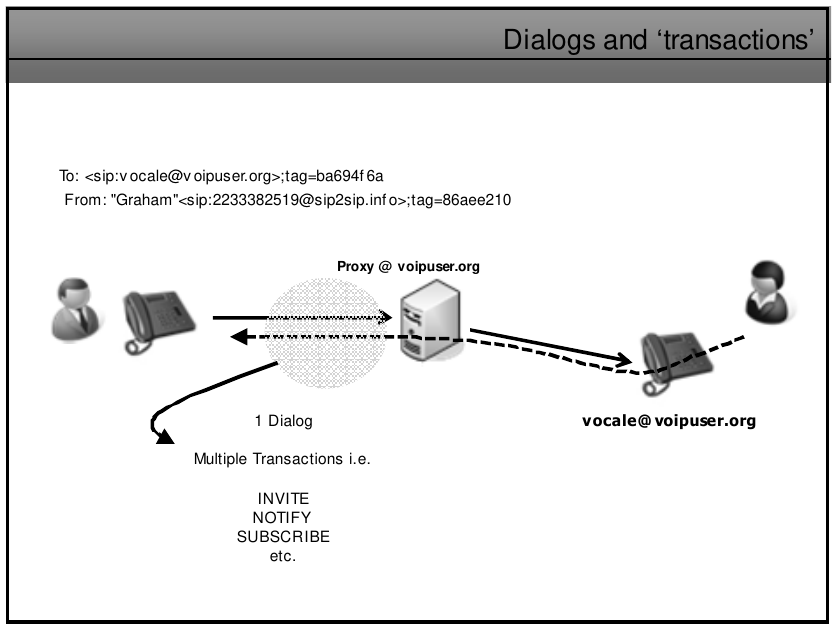
![image.png](https://wiki.tinod.net/uploads/images/gallery/2023-05/scaled-1680-/n1UWOS0qorabJMZO-image.png)

#### Branch ID

A "branch ID" is a unique identifier that is used to identify a particular SIP transaction within a call. Each SIP message in a transaction has a unique branch ID that is generated by the user agent sending the message. This branch ID is included in the Via header of the SIP message, and is used to match the response message with the original request message. The branch ID allows SIP to be stateful, meaning that it can keep track of the progress of a call and route subsequent messages to the correct destination. When a SIP message is sent, the branch ID is generated by the sender, and it is typically a random string of characters that is unique for each message. The branch ID is included in the Via header of the message, along with other information such as the transport protocol and the IP address of the sender.
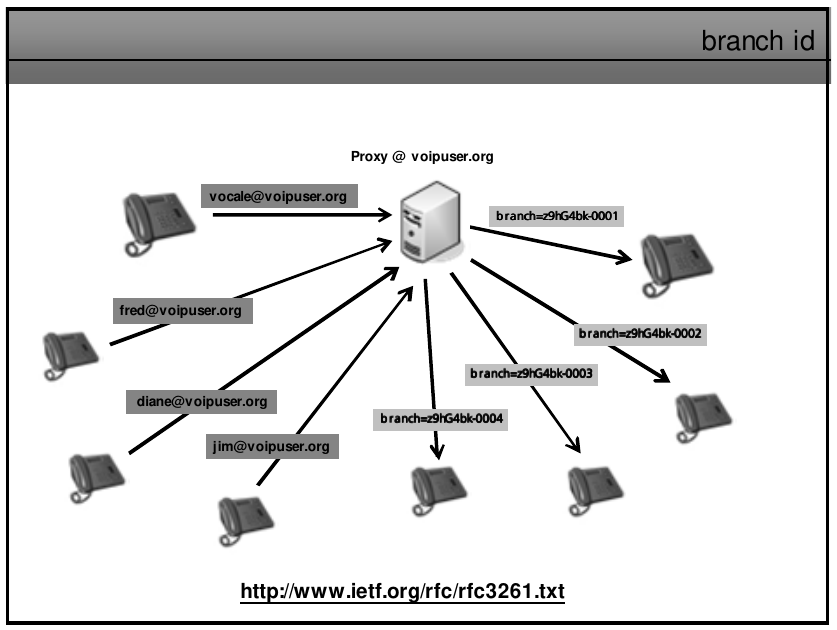
![image.png](https://wiki.tinod.net/uploads/images/gallery/2023-05/scaled-1680-/tM5aTBSZKqJc9WyY-image.png)

RFC 3261 specifies that the branch ID parameter for SIP requests should begin with the string "z9hG4bK" (note that the "K" is uppercase). This is a recommended convention to ensure that the branch ID is globally unique. The "z9hG4bK" string is a fixed prefix that serves as a unique identifier for SIP requests, while the remainder of the branch ID is typically generated randomly or by hashing the request contents. Using a fixed prefix allows SIP elements to quickly identify and process SIP requests that belong to the same transaction.

#### SIP Call Forward - No Answer

SIP call forwarding no answer is a feature that allows incoming calls to be forwarded to another number if the call is not answered after a set number of rings or a certain period of time. This feature is useful when the recipient is unavailable or unable to answer the call.

When an incoming call arrives at a SIP user agent, the user agent will first attempt to answer the call. If the call is not answered after a predetermined number of rings or a specific period of time, the user agent can forward the call to another SIP user agent or phone number.

To implement SIP call forwarding no answer, a user agent must support the SIP call forwarding feature and be configured with the appropriate settings. The user agent must also have access to a SIP proxy or registrar that can handle the call forwarding request.

The SIP call forwarding no answer feature can be configured in various ways. For example, the forwarding number can be specified in the user agent's configuration, or it can be dynamically entered by the user during the call forwarding process. The number of rings or time period before forwarding can also be configured to meet the user's needs.

Overall, SIP call forwarding no answer is a useful feature that helps ensure that important calls are not missed, even if the recipient is unavailable or unable to answer the call.
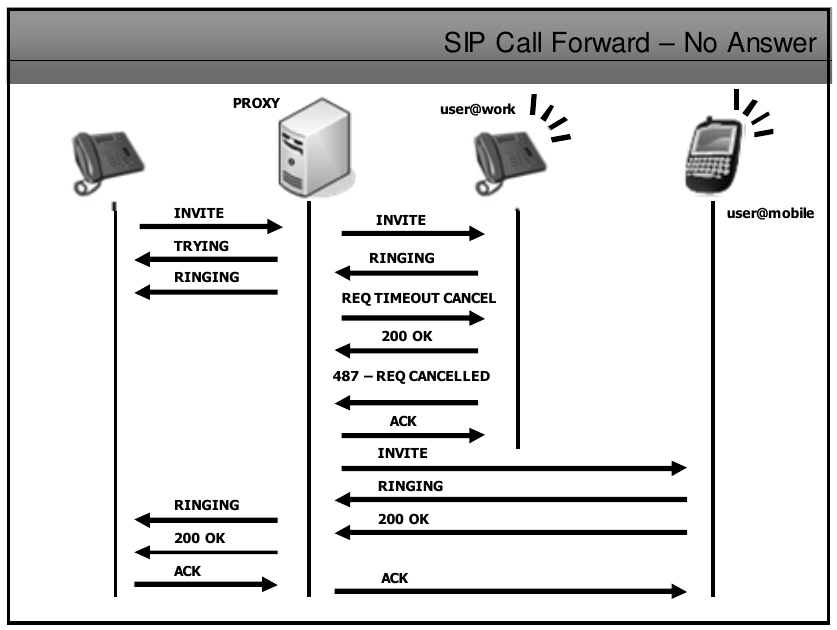
![image.png](https://wiki.tinod.net/uploads/images/gallery/2023-05/scaled-1680-/Wdvlj2Y0Vlokx6h6-image.png)

#### SIP Call Forward to Voicemail

SIP call forwarding to voicemail is a feature that allows a call to be automatically redirected to a voicemail box when the call is not answered within a certain amount of time. This is useful when a caller is unable to reach the intended recipient and wants to leave a message.

When a call is forwarded to voicemail, the call is routed to the voicemail system instead of the intended recipient's phone. The voicemail system then answers the call and prompts the caller to leave a message, which is stored in the recipient's voicemail box.

To configure SIP call forwarding to voicemail, the user can set a "no answer" or "unavailable" timer on their phone or PBX. When the timer expires, the call is automatically forwarded to the voicemail system. The user can also configure their voicemail box to send an email or text message notification when a new voicemail is received.

SIP call forwarding to voicemail can be a useful tool for businesses and individuals who want to ensure that important messages are not missed. It allows callers to leave messages even if the recipient is unavailable, and provides a convenient way for the recipient to check their messages at a later time.
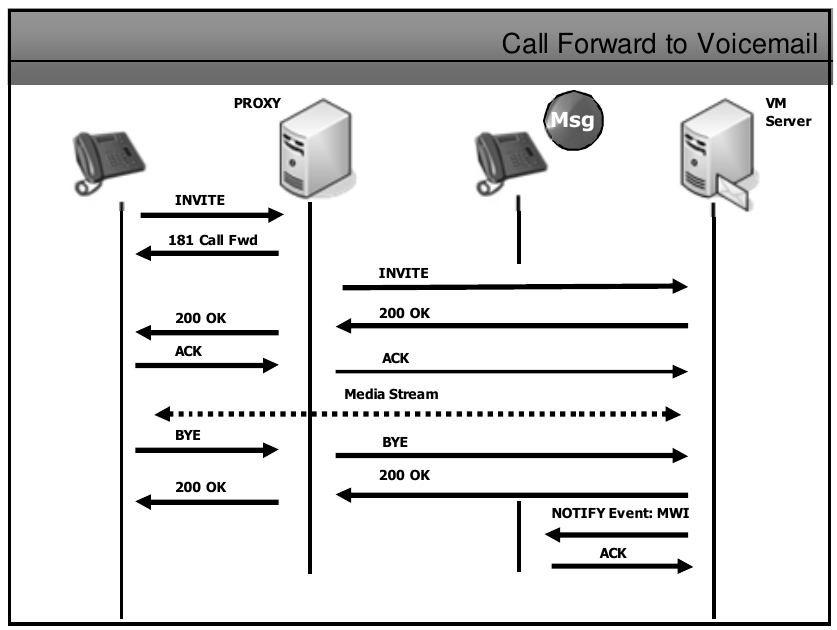
![image.png](https://wiki.tinod.net/uploads/images/gallery/2023-05/scaled-1680-/gHWAXjRcUeJhCRrz-image.png)

##### Here is an example of a call forward no answer

1\. - Initial INVITE message from Alice to Bob

```
INVITE sip:bob@example.com SIP/2.0
Via: SIP/2.0/UDP alice.example.com:5060;branch=z9hG4bKdf877ekj4
Max-Forwards: 70
From: <sip:alice@example.com>;tag=1928301774
To: <sip:bob@example.com>
Call-ID: 84@alice.example.com
CSeq: 1 INVITE
Contact: <sip:alice@example.com>
Content-Type: application/sdp
Content-Length: 142

v=0
o=alice 2890844526 2890844526 IN IP4 alice.example.com
s=-
c=IN IP4 alice.example.com
t=0 0
m=audio 49170 RTP/AVP 0

```

2\. - Bob's 100 trying response

```
SIP/2.0 100 Trying
Via: SIP/2.0/UDP alice.example.com:5060;branch=z9hG4bKdf877ekj4
From: <sip:alice@example.com>;tag=1928301774
To: <sip:bob@example.com>
Call-ID: 84@alice.example.com
CSeq: 1 INVITE
Content-Length: 0

```

3\. - Bob's ringing response

```
SIP/2.0 180 Ringing
Via: SIP/2.0/UDP alice.example.com:5060;branch=z9hG4bKdf877ekj4
From: <sip:alice@example.com>;tag=1928301774
To: <sip:bob@example.com>;tag=1234567890
Call-ID: 84@alice.example.com
CSeq: 1 INVITE
Contact: <sip:bob@example.com>
Content-Length: 0

```

4\. - Bob's call forward no answer response to Alice, Response is 302 Moved Temporarily and To and Contact are updated with new contact info.

```
SIP/2.0 302 Moved Temporarily
Via: SIP/2.0/UDP alice.example.com:5060;branch=z9hG4bKdf877ekj4
From: <sip:alice@example.com>;tag=1928301774
To: <sip:bob-new@example.com>;tag=1234567890
Call-ID: 84@alice.example.com
CSeq: 1 INVITE
Contact: <sip:bob-new@example.com>
Content-Length: 0

```

5\. - Alice sends a new INVITE message to the new address <bob-new@example.com> provided by Bob in the previous response

```
INVITE sip:bob-new@example.com SIP/2.0
Via: SIP/2.0/UDP alice.example.com:5060;branch=z9hG4bKdf877ekj5
Max-Forwards: 70
From: <sip:alice@example.com>;tag=1928301774
To: <sip:bob-new@example.com>
Call-ID: 84@alice.example.com
CSeq: 2 INVITE
Contact: <sip:alice@example.com>
Content-Type: application/sdp
Content-Length: 142

v=0
o=alice 2890844526 2890844527 IN IP4 alice.example.com
s=-
c=IN IP4 alice.example.com
t=0 0
m=audio 49170 RTP/AVP 0

```

##### Call Forward to Voicemail

1\. - Alice calls Bob's phone (sip:<bob@example.com>):

```
INVITE sip:bob@example.com SIP/2.0
Via: SIP/2.0/UDP pc33.example.com;branch=z9hG4bK776asdhds
Max-Forwards: 70
To: <sip:bob@example.com>
From: Alice <sip:alice@example.com>;tag=1928301774
Call-ID: a84b4c76e66710
CSeq: 314160 INVITE
Contact: <sip:alice@pc33.example.com>
User-Agent: BriaX 3.5.5 build 81887
Allow: INVITE, ACK, CANCEL, OPTIONS, BYE, REFER, NOTIFY, MESSAGE, SUBSCRIBE, INFO
Allow-Events: presence, message-summary, refer, dialog
Session-Expires: 3600;refresher=uas
Content-Type: application/sdp
Content-Length: 218

v=0
o=- 123456 789012 IN IP4 pc33.example.com
s=SIP Call
c=IN IP4 192.0.2.1
t=0 0
m=audio 50000 RTP/AVP 0
a=rtpmap:0 PCMU/8000
m=video 50002 RTP/AVP 31
a=rtpmap:31 H261/90000

```

2\. - Bob's phone (sip:<bob@example.com>) rings, but he doesn't answer. After a timeout period, the call is forwarded to Bob's voicemail (sip:<vm@example.com>):

```
BYE sip:bob@example.com SIP/2.0
Via: SIP/2.0/UDP pc33.example.com;branch=z9hG4bK776asdhds
Max-Forwards: 70
To: <sip:bob@example.com>;tag=2482893830n
From: Alice <sip:alice@example.com>;tag=1928301774
Call-ID: a84b4c76e66710
CSeq: 314161 BYE
Contact: <sip:alice@pc33.example.com>
User-Agent: BriaX 3.5.5 build 81887
Reason: Q.850;cause=0
Content-Length: 0

INVITE sip:vm@example.com SIP/2.0
Via: SIP/2.0/UDP pc33.example.com;branch=z9hG4bK776asdhdt
Max-Forwards: 70
To: <sip:vm@example.com>
From: Alice <sip:alice@example.com>;tag=1928301775
Call-ID: a84b4c76e66710
CSeq: 314162 INVITE
Contact: <sip:alice@pc33.example.com>
User-Agent: BriaX 3.5.5 build 81887
Allow: INVITE, ACK, CANCEL, OPTIONS, BYE, REFER, NOTIFY, MESSAGE, SUBSCRIBE, INFO
Allow-Events: presence, message-summary, refer, dialog
Session-Expires: 3600;refresher=uas
Content-Type: application/sdp
Content-Length: 164

v=0
o=- 123456 789013 IN IP4 pc33.example.com
s=SIP Call
c=IN IP4 192.0.2.1
t=0 0
m=audio 50000 RTP/AVP 0
a=rtpmap:0 PCMU/

```

# 13. - SIP Proxies, Gateways and SIP Routing

Proxies and SIP routing

**Stateless proxy:** forgets about the SIP request once it has been forwarded. As the transaction is quick and simple, these scale very well to cope with a lot of requests and can also be very fast. They are very well suited to the core of a SIP network but they cannot provide services such as call forking.

![image.png](https://wiki.tinod.net/uploads/images/gallery/2023-05/scaled-1680-/N4a2Ti2L2C1xcLXx-image.png)

**Stateful proxy**: By knowing the state of a transaction a stateful proxy can provide many more services such as call forking as the example shows below.

![image.png](https://wiki.tinod.net/uploads/images/gallery/2023-05/scaled-1680-/DN59xEP4yOa8bGXO-image.png)

- **Transactional Proxy**: keeps all state information on all transactions that are pending. Once a session is established, the proxy forgets the state information.
- **Super Stateful Proxy**: Can use the Record-Route header in SIP messages in order to be kept on the signaling path of all subsequent exchanges. This allows a Stateful proxy to maintain call state in addition to transaction state. Maintaining Call state information is really useful for supplying billing information.
- It is also possible to setup the Proxy server to act as a Stateless proxy for some calls, Stateful for others, and even as a redirect server all based on criteria set by the administrator.

##### Via and Record-Route

Some of the most important elements of a SIP message are VIA and Record-Route they help prevent loops and can govern the path the SIP message takes, it is worth nothing that no all SIP providers take full advantage of these records and any wireshark/ethereal traces you may take can differ depending on the SIP provider and SIP phones or PBX you are using at the time.

![image.png](https://wiki.tinod.net/uploads/images/gallery/2023-05/scaled-1680-/u6VYRdDQL85ru35V-image.png)

##### VIA details

Via records are added to a SIP message as follow

- Each element in the call path adds its own details in form of another VIA record
- These elements are removed at each hope on the way back in the response
- VIA elements can be hidden (encrypted) - Record-Route elements cannot

![image.png](https://wiki.tinod.net/uploads/images/gallery/2023-05/scaled-1680-/2pvgLD9oF4iQ7gOk-image.png)

If Proxy - Redirect Servers are used, once the INVITE transaction is accomplished, User Agents will know each others direct IP addresses (from the contact field) and carry out the subsequent transactions bypassing the intermediary proxies. This will mean less number of VIA entries than if the Proxy maintains the Call State, also VIA headersa re useed by Proxies to see if any 'Looping' of the message has occurred. if they received a message that includes their own IP address in a VIA record a 482 (loop detected) response is returned to the sender.

##### Routing Examples 1

- Phone calls number 08457445445 which Generates a SIP INVITE, as we're using service provider sipgate, their domain name is append to the request URI `INVITE <a href="mailto:sip:08457445445@sipgate.co.uk:5060">sip:08457445445@sipgate.co.uk:5060</a> SIP/2.0`
- The VIA header is added along along with its local lan contact detail `Via: SIP/2.0/UDP 192.168.100.31L5060;branch=z9hG4bK-d8754z-a96ebf28ca1507b-1---d8754z-;`
- The Contact field details are populated with the live contact details i. e. my phone number plus the IP address port combination of the edge side ip of my network this is determined by a service called STUN. `Contact: <sip:5081304@62.30.115.128:1432>`
- To is who I'm calling `<sip:08457445445@sipgate.co.uk:5060>`
- From: are my phone details `From: "3cx VoIP Phone" <sip:5081304@sipgate.co.uk:5060>;tag=2f2a9142`
- 

![image.png](https://wiki.tinod.net/uploads/images/gallery/2023-05/scaled-1680-/ciWbIaFt9MKpIvIw-image.png)

Now this Invite will travel to the PSTN

![image.png](https://wiki.tinod.net/uploads/images/gallery/2023-05/scaled-1680-/z2Fb5Gr6JnpX4okj-image.png)

Next is the 200 OK received from the PSTN phone

- 200 message OK received by the remote user `Status-line: SIP/2.0 200 OK`
- VIA: this record changed based on the senders IP 62.30.115.128 is the remote destination and new branch for called party
- There is also 2 Record-route records that had been added to the invite message, as record-route records are never deleted we can see them here `Record-Route: <sip:172.20.40.4;lr=on>`This is the Billing server and `Record-Route: <sip:217.10.79.23;lr=on;ftag=2f2a9142>` This is the SIP server , both of these are going to be useful as the phone is going to use this when sending the message to ACK the setup
- The From and To elements also stays the same.
- Contact: this has been updated to now use the gateway `Contact: <sip:3000448457445445@217.10.67.2>`

![image.png](https://wiki.tinod.net/uploads/images/gallery/2023-05/scaled-1680-/uAd5ZNP7EfPmiqTe-image.png)

Now our Phone will send an ACK, the message needs to end up at the gatway so we can see the following

- `Reuest-URI: <a href="mailto:sip:300044845744544@217.10.67.2">sip:300044845744544@217.10.67.2</a>` is the SIP URI of the core number plus the IP address of our gateway.
- Next the Record-Route will send the message based on the Route Path received on the 200 OK this makes a route list and determine the path the message takes.
- Based on the ACK below it will first go to the SIP Server to validate, SIP server will check the Request-URI to see if its responsible for or owns if not it compares its IP address with the first route record, since there is a match it rewrites the message removing the first route-record
- Next it will go to the IP address of the billing server, this will perform the same checks as the SIP server did then it will remove the route record and as there are no more route records left fwd the ack based on the information on the Request URI field, that will be the gateway.

<p class="callout info">This process is known as Loose Routing *&lt;sip:172.20.40.4;***lr=on** we can see lr is displayed on the Route record, sometimes we see lr=on but this is not required as part of the RFC326 so simply lr is use.</p>

![image.png](https://wiki.tinod.net/uploads/images/gallery/2023-05/scaled-1680-/mCFB8cn11nLAaaQR-image.png)

##### Record-Route defined

There are so many records when sending a 'Request' message, which is used?

First it will use Route, then Contact (if there is no Route), From (if there is no Contact,

The **Record-Route** header is added into requests from UA clients by proxy servers that want to be in the path of follow on request or the same **call-id** value. The UA client will then use the entries to route subsequent requests and the details from Record-Route are copied into the responses under the **Route** header. Note: not all proxies will add their details into the header

**Contact** Headers determine the destination placed in the Request-URI for the following requests and can be used to bypass proxies that do not have an entry in the Record-Route header.

**From** Headers are used for following requests from the UAS to the UAC if there is no Contact of Record-Route header.

##### Session Policies

In SIP, session policies are used to control and enforce rules and restrictions on sessions between SIP user agents. Session policies can be applied to various aspects of a session, such as call routing, media handling, security, and resource allocation.

For example, a session policy can specify that calls from a certain group of users should always be routed through a specific SIP proxy, or that media streams must be encrypted using a certain algorithm. Session policies can also be used to enforce restrictions on bandwidth usage or to limit the duration of a session.

SIP session policies are typically implemented using a combination of configuration settings and network devices such as firewalls, routers, and session border controllers (SBCs). These devices can be configured to inspect SIP messages and apply policy rules based on the contents of those messages.

Session policies can be useful in a variety of SIP deployment scenarios, such as in enterprise networks where security and compliance are important, or in service provider networks where quality of service (QoS) and resource allocation are critical. By enforcing policy rules, session policies help to ensure that sessions are conducted in a secure and reliable manner, while also optimizing the use of network resources.
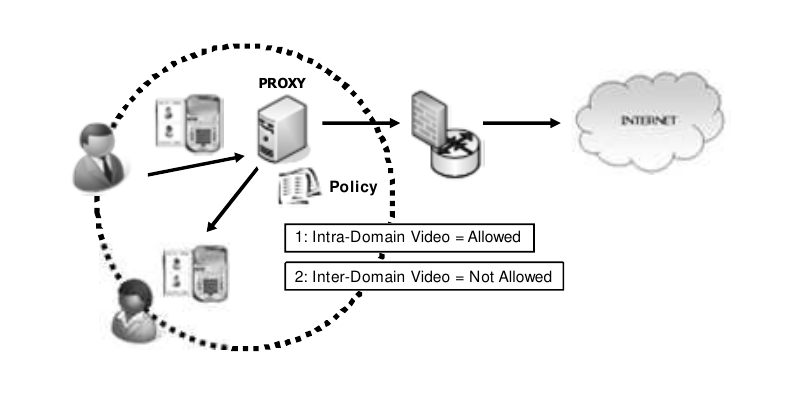
![image.png](https://wiki.tinod.net/uploads/images/gallery/2023-05/scaled-1680-/wvGW1TriVOavCJdZ-image.png)

##### SIP Gateways

There is a common misconception of what a gateway does, have a look at the slide below, the IP address of this router is also common known as default gateway, is not a gateway its the default router.

The SIP/PSTN gateway actually converts SIP signalling and VoIP traffic to a different format ready for the PSTN - It is actually carrying out 'Real' Gateway functions.
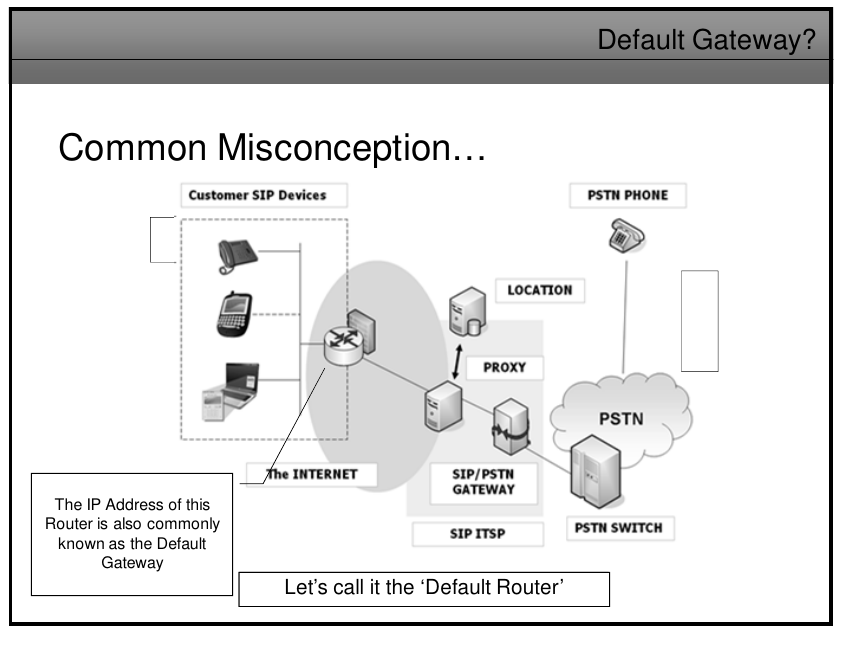
![image.png](https://wiki.tinod.net/uploads/images/gallery/2023-05/scaled-1680-/4NLcpTAXLuGwGXlt-image.png)

The main purpuse of the SIP/PSTN gateway to the PSSTN is to provide Signalling and Media conversion between the SIP and PSTN networks, here you can see the SIP/SDP messages hit the signaling gateway and convert the signaling to ISDN and RTP packets hit the media gateway for voice.
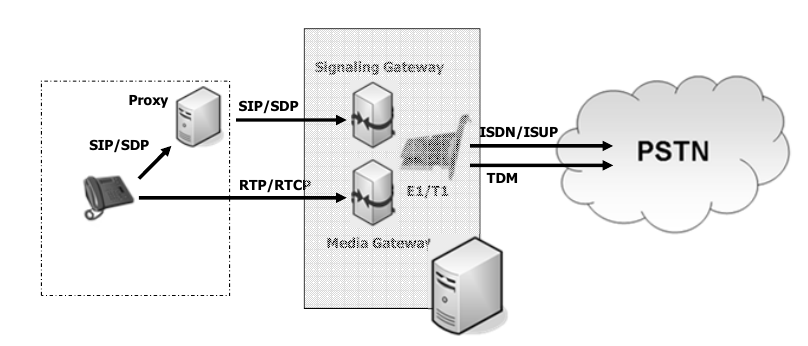
![image.png](https://wiki.tinod.net/uploads/images/gallery/2023-05/scaled-1680-/fJ78y18McEjQGXy0-image.png)

Gateway Location and routing with TRIP
![image.png](https://wiki.tinod.net/uploads/images/gallery/2023-05/scaled-1680-/DUGsjN7qpSgZ4il6-image.png)

![image.png](https://wiki.tinod.net/uploads/images/gallery/2023-05/scaled-1680-/WmFmTF8jAdDBJBnc-image.png)

[![image.png](https://wiki.tinod.net/uploads/images/gallery/2023-05/scaled-1680-/kmbG6VCuttXUouzN-image.png)](https://wiki.tinod.net/uploads/images/gallery/2023-05/kmbG6VCuttXUouzN-image.png)

# 14. - SIP SDP - MIME

Mime was defined to provide a way of attaching different document/file types to email messages, SIP takes advante of this existing standard by using it to inform a UA what content is present in a SIP message.

Content-Type: &lt;type&gt;/&lt;subtype&gt;

Content-Type: image/gif

As you have already seen Content-Type: application/SDP tell us that the MIME content of the SIP message is the application layer protocol SDP. THE UA then (if supporting SDP) can interpret the SDP information in the message to find out details such as Codecs supported in the 'Inviting Agent' and Port numbers for responses etc.
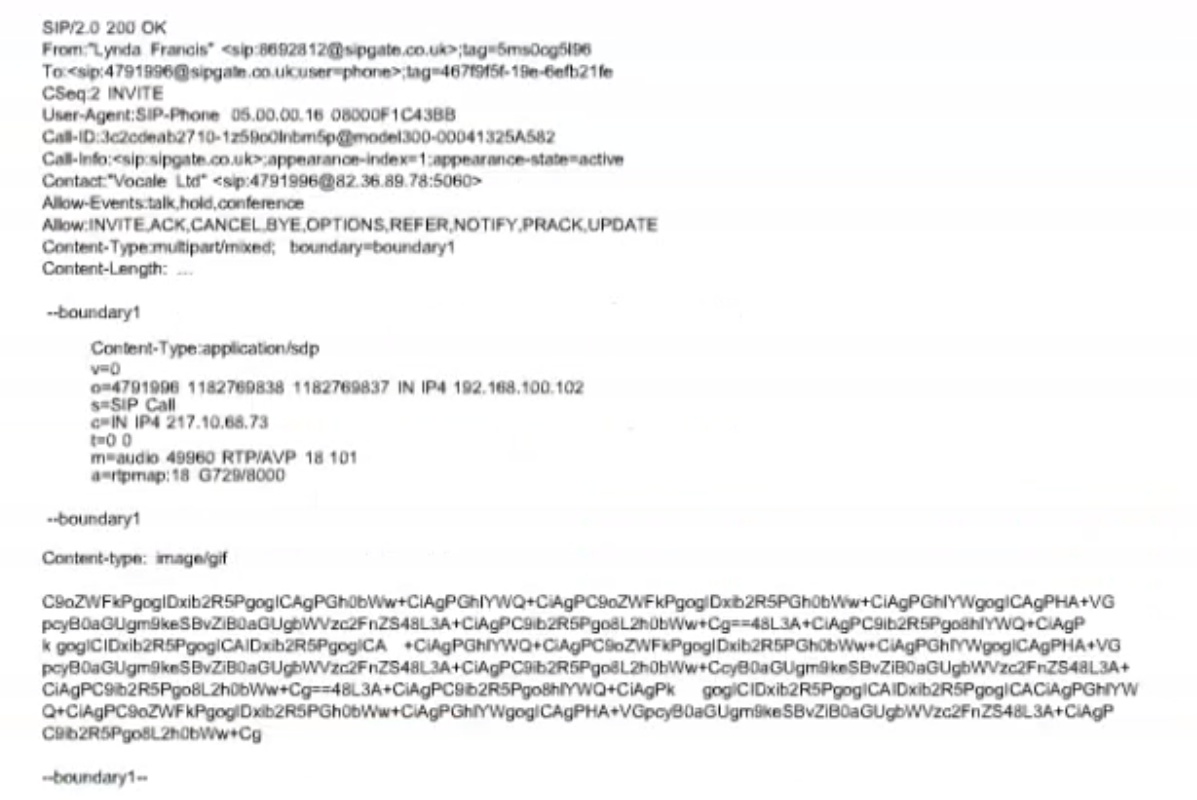
![image.png](https://wiki.tinod.net/uploads/images/gallery/2023-05/scaled-1680-/XsMP4Cq6dLOVLHJC-image.png)

A sip message can actually contain multiple mime parts, on the previous image wee can see the following

Content-Type:multipart/mixed; boundary=boundary1

the first Content-type:application/sdp belongs to an SDP MIME message, there is also a second Content-type: image/gif which could be an image of a business card, a photograph, etc.

<span style="font-size: xx-small;"><span lang="en-US">  
</span></span>

# 15. - SIP and the PSTN

- Basic SIP to PSTN example
- SIP Messages used in SIP to PSTN call
- Other SIP to PSTN Codes
- SIP and Early Media
- Early Offer / Delayed Offer
- SIP Gateways
- TRIP
- SIP-T and PSTN Bridging
- ISUP to SIP Code Message Mapping
- More on SIP addressing
- DTMF and SIP

- ![image.png](https://wiki.tinod.net/uploads/images/gallery/2023-05/scaled-1680-/MKr9wMs46oUoqwLf-image.png)
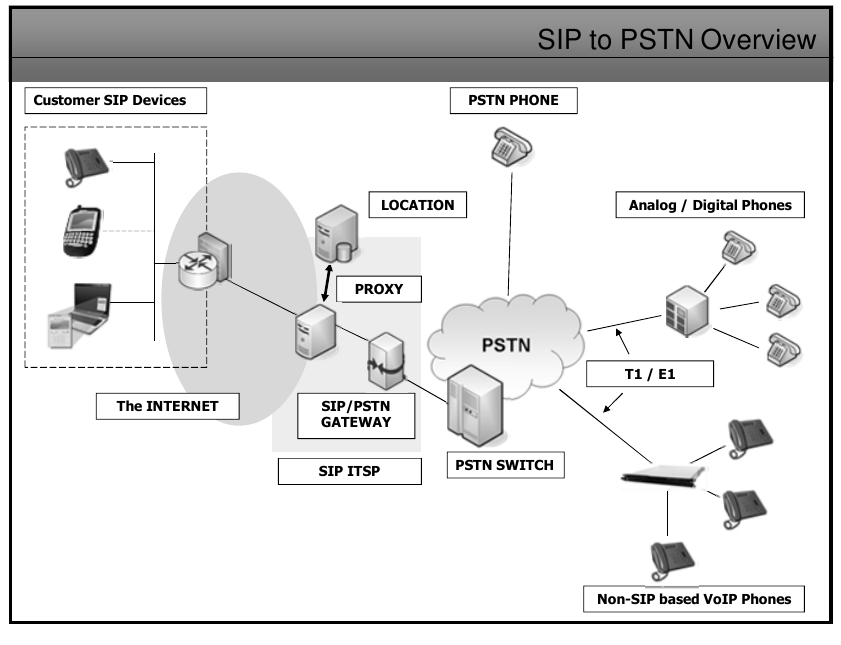
Here our SIP phone dial the number of a PSTN device, the proxy will send the invite onto the SIP/PSTN Gateway that will next sent the proper setup message to the PSTN switch then to the telephone.

A PRACK 183 inform the SIP phone of the progress of the call setup and setup an Early Media (RTP)

Once the PSTN phone start ringing the alerting 180 Ringing messages are sent back to our SIP phone along with the 200 OK

Our SIP phone will response with an ACK then the media will start to flow, it is up to the SIP/PSTN gateway to convert the media from RTP to TDM and viceversa
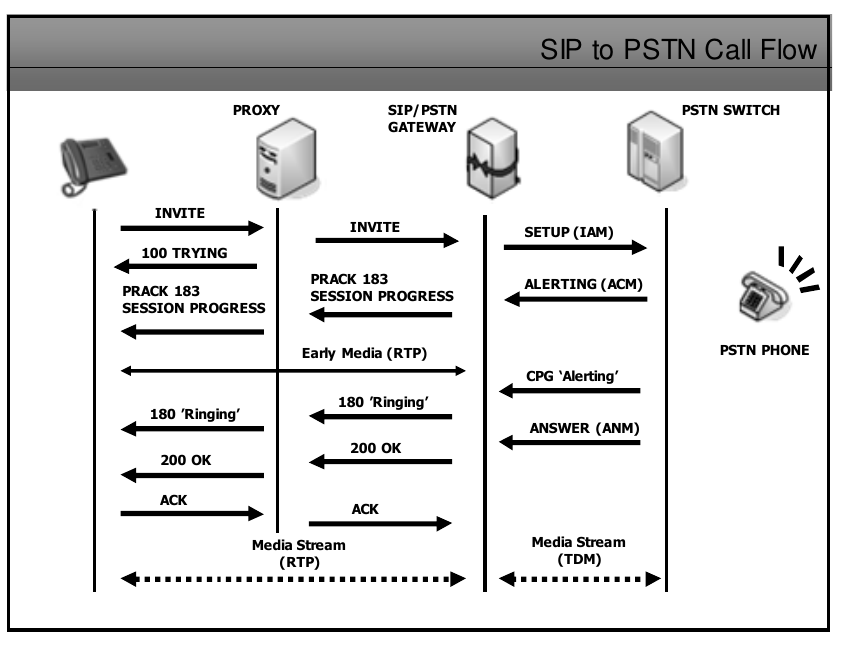
![image.png](https://wiki.tinod.net/uploads/images/gallery/2023-05/scaled-1680-/hmkMlQiAGCxdyjQ9-image.png)

In more detail 01216896815, the SIP proxy uses the location services and determines the number is on the PSTN it then passes the invite to the SIP/PSTN Gateway which thenn by the PSTN Switch goes to Grahams phone. The detail on the next image shows the INVITE along with the contact details and SDP information
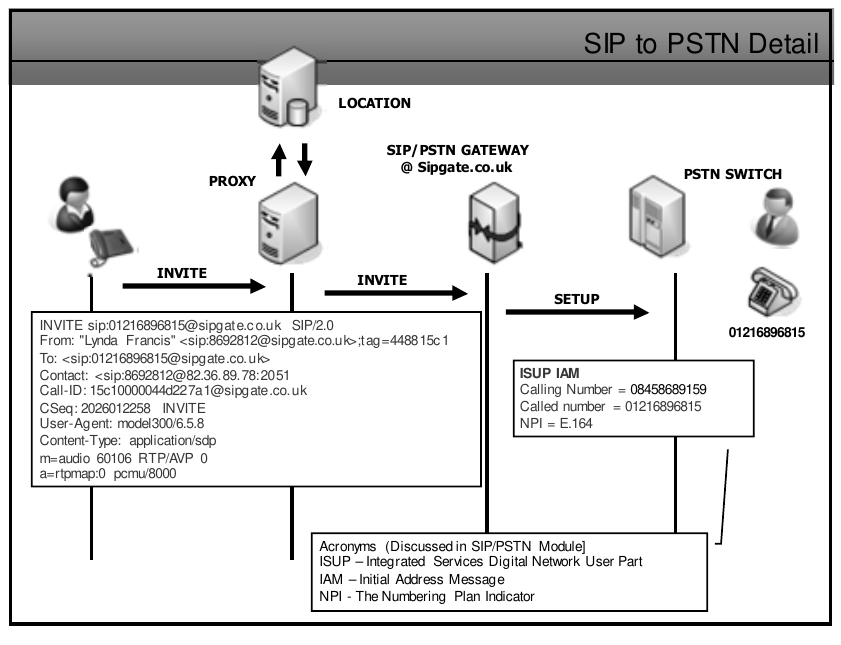
![image.png](https://wiki.tinod.net/uploads/images/gallery/2023-05/scaled-1680-/Icth8KC3lf376OJZ-image.png)

Some other sample SIP Codes re: SIP to PSTN call setup attemps are

- 404 Not Found : The number called is unallocated
- 407 Proxy authenticarion Req : Call Rejected
- 480 Temporary Unavailable : No User Response
- 486 Busy Here : Called Party is Busy
- 502 Bad Gateway : Network out of order
- 600 Busy Everywhere : Useer Busy
- 603 Decline : Call Rejected
- 604 Does not exist anywhere : Unallocated number

Here is an example of a PSTN to SIP Call Flow
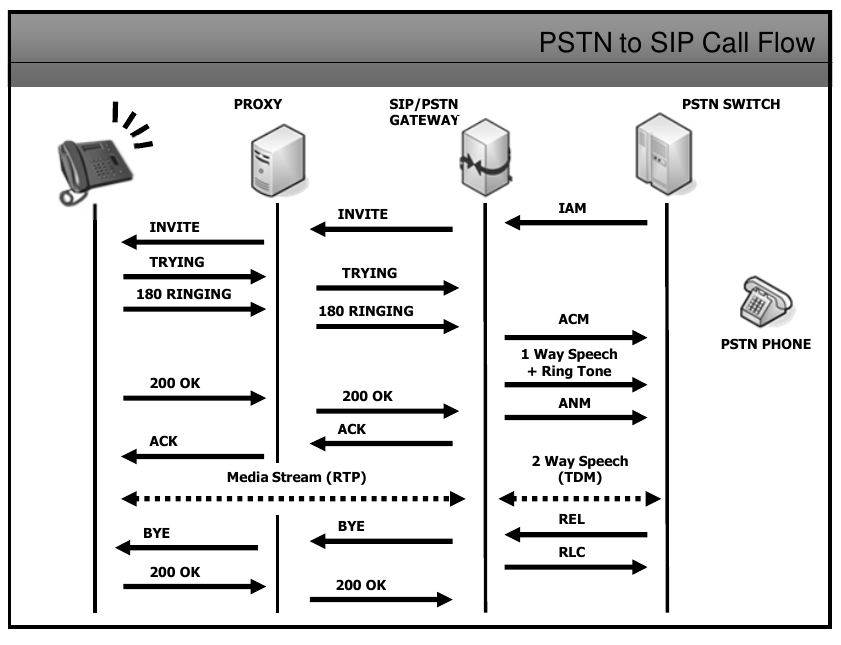
![image.png](https://wiki.tinod.net/uploads/images/gallery/2023-05/scaled-1680-/W7MtStG5vBmcdCvv-image.png)

##### Early Media

To overcome a few problems that arise due to the two different systems such as SIP and the PSTN trying to work together, a concept called 'Early Media' has been introduced

Early media is not required on standard PSTN calls as when a number is dialed a media channel is established so that the caller can hear the ringing tone of the remote device, This also gives companies the opportunity to replace ringing media with corporate messages or other instructions for the caller before they get to speak to a real person.

Clipping is a problem where if a person using a PSTN phone answer their phoene adn starts talking straight away without Early Media the SIP phone that is calling them will miss the first part of the conversation as it hasn't yet received a 200 ok message to enable it to setup the RTP media path.

Early media also allows Busy Tone and other announcements to be played to the caller even though the called phone has not been picked up.
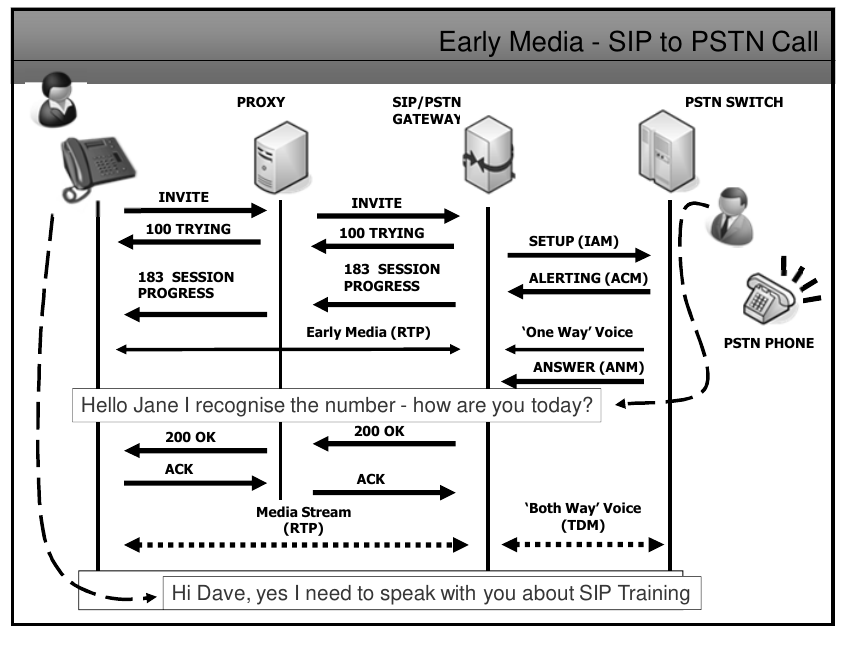
![image.png](https://wiki.tinod.net/uploads/images/gallery/2023-05/scaled-1680-/x5S4dm1Gj7Jwc1xk-image.png)


##### Early Offer / Delayed Offer

With Early offer the invite sends the SDP to being voice inmediately

[![image.png](https://wiki.tinod.net/uploads/images/gallery/2023-05/scaled-1680-/vQ3mNJKu16VJADKj-image.png)](https://wiki.tinod.net/uploads/images/gallery/2023-05/vQ3mNJKu16VJADKj-image.png)
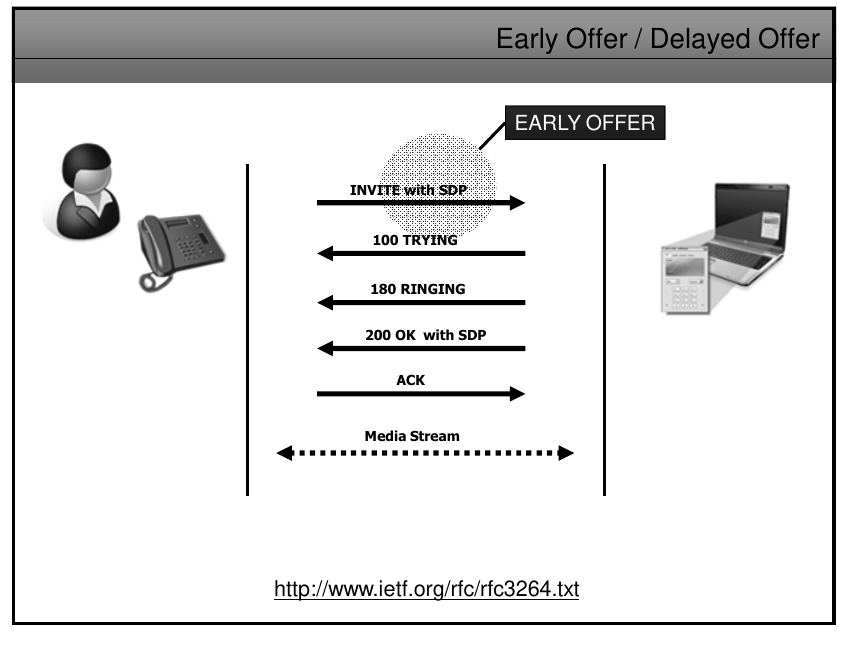
With delayed offer Invite goes without SDP allowing the other end select a codec to use, if available it will reply with an ACK SDP to begin media.

[![image.png](https://wiki.tinod.net/uploads/images/gallery/2023-05/scaled-1680-/2fRSMyiAFj2qPpMU-image.png)](https://wiki.tinod.net/uploads/images/gallery/2023-05/2fRSMyiAFj2qPpMU-image.png)
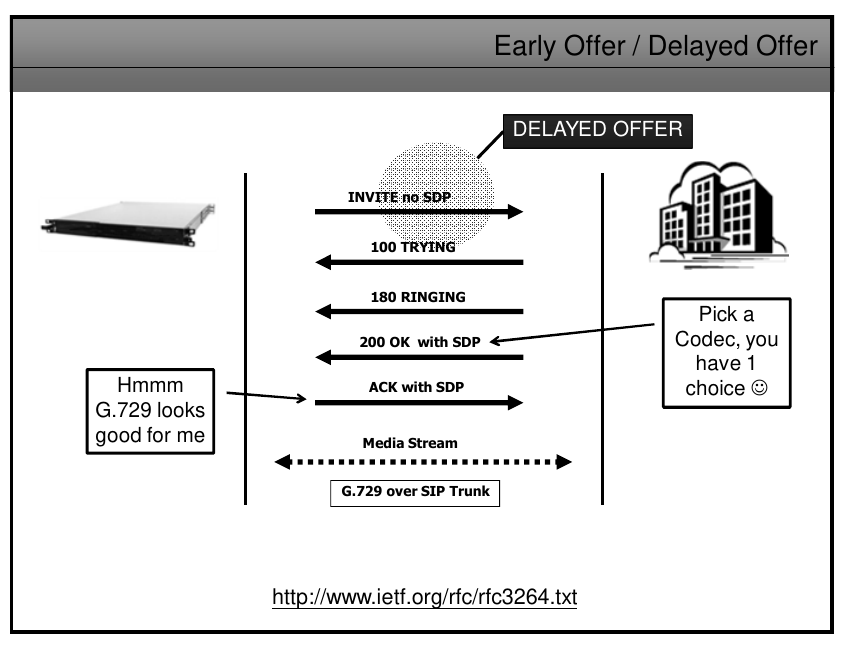
SIP Bridging or SIP-T is a framework that can enable SIP networks to carry legacy telephone signals across an IP based network to another legacy network, This would have a dramatic effect on long distance call charges which is great for end users but of course there are technical issues that need to be addressed.

The legacy SS7 ISUP messages have to be interrogated by the SIP/PSTN gateway and then the information that will help SIP proxies to route the SIP messages is built into the SIP header, while othert ISUP information added as a MIME message body, to ensure that the body is closed to 'unwanted' parties snooping on the network it can be encrypted and this is discussed in the security module course.

SIP INFO is another SIP-T approach or method that is used for in-call ISUP signaling across an IP network.

In essence SIP-T must provide translation beteen protocols and providee feature transparency across PSTN to SIP to PSTN interconnections.
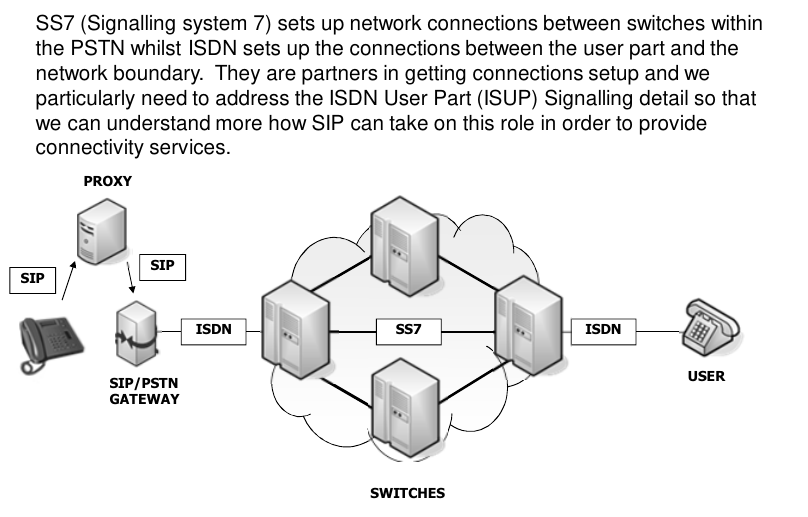
![image.png](https://wiki.tinod.net/uploads/images/gallery/2023-05/scaled-1680-/PWBbNFtmTN8riSrq-image.png)

##### ISUP and SIP messages

![image.png](https://wiki.tinod.net/uploads/images/gallery/2023-05/scaled-1680-/ScZ5PEG3hkqhxTBT-image.png)

##### ISDN User part (ISUP) to SIP codes
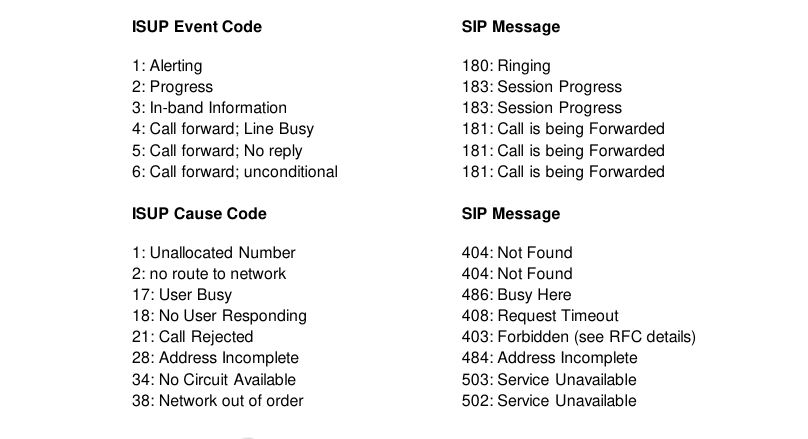
![image.png](https://wiki.tinod.net/uploads/images/gallery/2023-05/scaled-1680-/udu7S37RZAwvkoxe-image.png)

Here is an example of a PSTN to PSTN via SIP
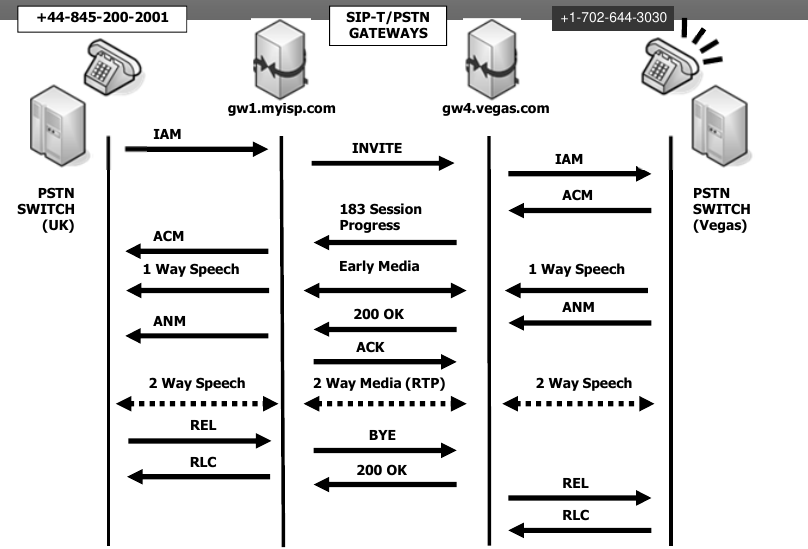
![image.png](https://wiki.tinod.net/uploads/images/gallery/2023-05/scaled-1680-/0Z380BOqAHppfX1j-image.png)

ISUP Encapsulation / SDP also known as SIP Bridging

If this is all that a client requires, then all of the ISUP information can be held in the body of the SIP message and the details such as To: From: Contact, etc. never changes as these just relates to the SIP gateway addresses, an example of the SDP portion of the SIP message (mime/isup) is below, This way any ISUP information that cannot be mapped to SIP will be retained and in this case, secured as well.
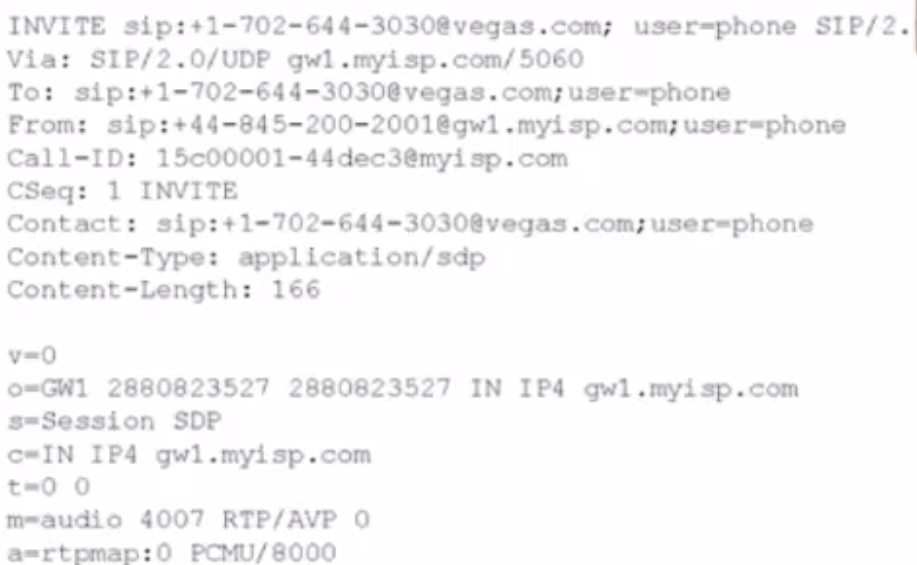
![image.png](https://wiki.tinod.net/uploads/images/gallery/2023-05/scaled-1680-/sjNrIb1PFKYMZNpX-image.png)

- The o field show which originating gateway is going to connect to the gateway in vegas and then forward the SIP message.
- The c field also shows originating gateway details
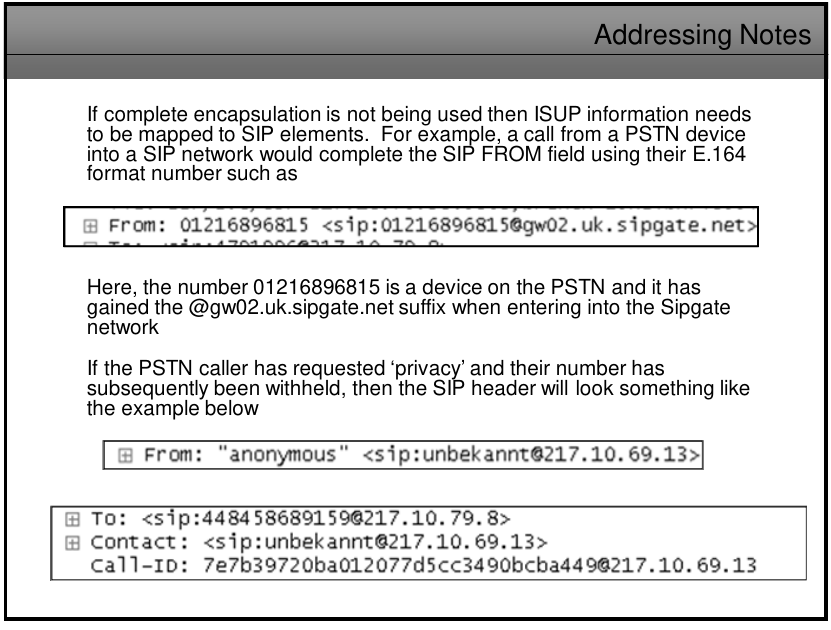
![image.png](https://wiki.tinod.net/uploads/images/gallery/2023-05/scaled-1680-/AZBe2jjo1vPWZKme-image.png)

##### SIP and DTMF

As well as DTMF Dialling tones there are a lot more tonees and events that need to be considered when carrying them across a SIP/VoIP network

DTMF Tones
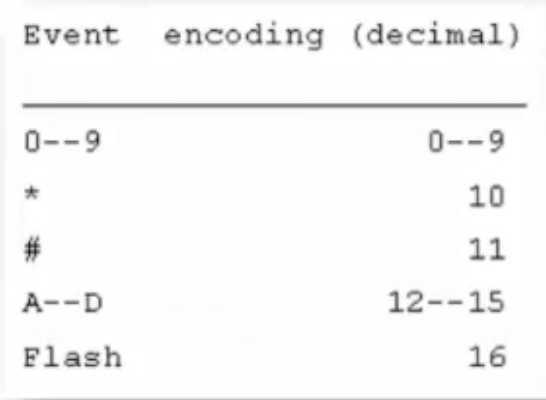
![image.png](https://wiki.tinod.net/uploads/images/gallery/2023-05/scaled-1680-/VKEo2F0HGUtdkrUj-image.png)

Fax-related tones

![image.png](https://wiki.tinod.net/uploads/images/gallery/2023-05/scaled-1680-/g7EdUHXiPdeX8KxA-image.png)

Standard subscriber line tones

![image.png](https://wiki.tinod.net/uploads/images/gallery/2023-05/scaled-1680-/gu8vDeonq1o1CHWx-image.png)

Country specific subscriber line tones
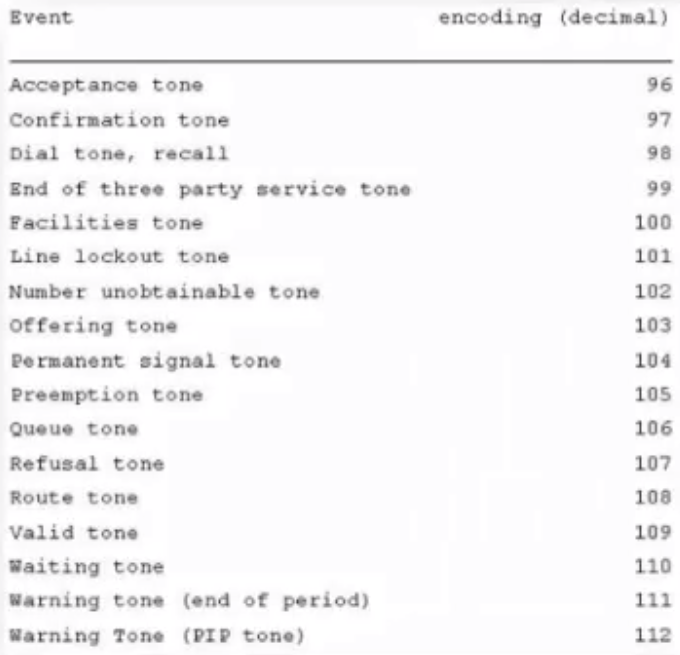
![image.png](https://wiki.tinod.net/uploads/images/gallery/2023-05/scaled-1680-/xIklmHE5gksPVzMS-image.png)

Trunk Events

![image.png](https://wiki.tinod.net/uploads/images/gallery/2023-05/scaled-1680-/rFsph076wUfb2am6-image.png)

##### Different types of DTMF

- Inband: DTMF is transmitted in the same RTP stream as the meedia is, thus some tones will be heard by parties in a conversation, it's important to understand that compression codecs such as g.729, g.723 etc, may make the tones unintelligible so this will only really work when using the G.711 codec or better.
- RFC 2833: Known also as Out of band method that takes DTMF out of the RTP stream and into it's on RTP packet, this means that the DTMF codes can survive ok even if the main stream is compressed, the Out-of-band RTP packets theen hold thee various event codes and the tone is -regenerated by an appropriate gateway or SIP UA.
- RFC 4733: Builds on and supersedes RFC 2833 though its taking a while for manufacturers to support it, it actually requires that devices don't have to support every tone and event there is, just simply advertise what they DO support when setting up a connection, example if the payload format uses the payload type number 100, and the implementation can handle the DTMF tones (events 0 through 15) and the dial and ringing tones (assuming as an example that these were defined as events with codes 66 and 70 respectively) it would include the following description in its SDP message:
- ```
    m=audio 12346 RTP/AVP 100
    a=rtpmap:100 telephone-event/8000
    a=fmtp:100 0-15,66,70
    ```
- RFC 4734: More event codes for modem, fax and text telephony signals that get carried in the RTP payload.
- SIP INFO: is used to carry session control information along the SIP signaling path 'during' an existing session, In the example of a phone call to a bank, the session is established but you may get asked to type in an account number, SIP INFO can carry the digits you type without changing the characteristics of the SIP session, Its worth noting that SIP proxies can see and act upon SIP INFO messages and not DTMF Inband or RFC 2833 packets.

DTMF RFC 2833 example
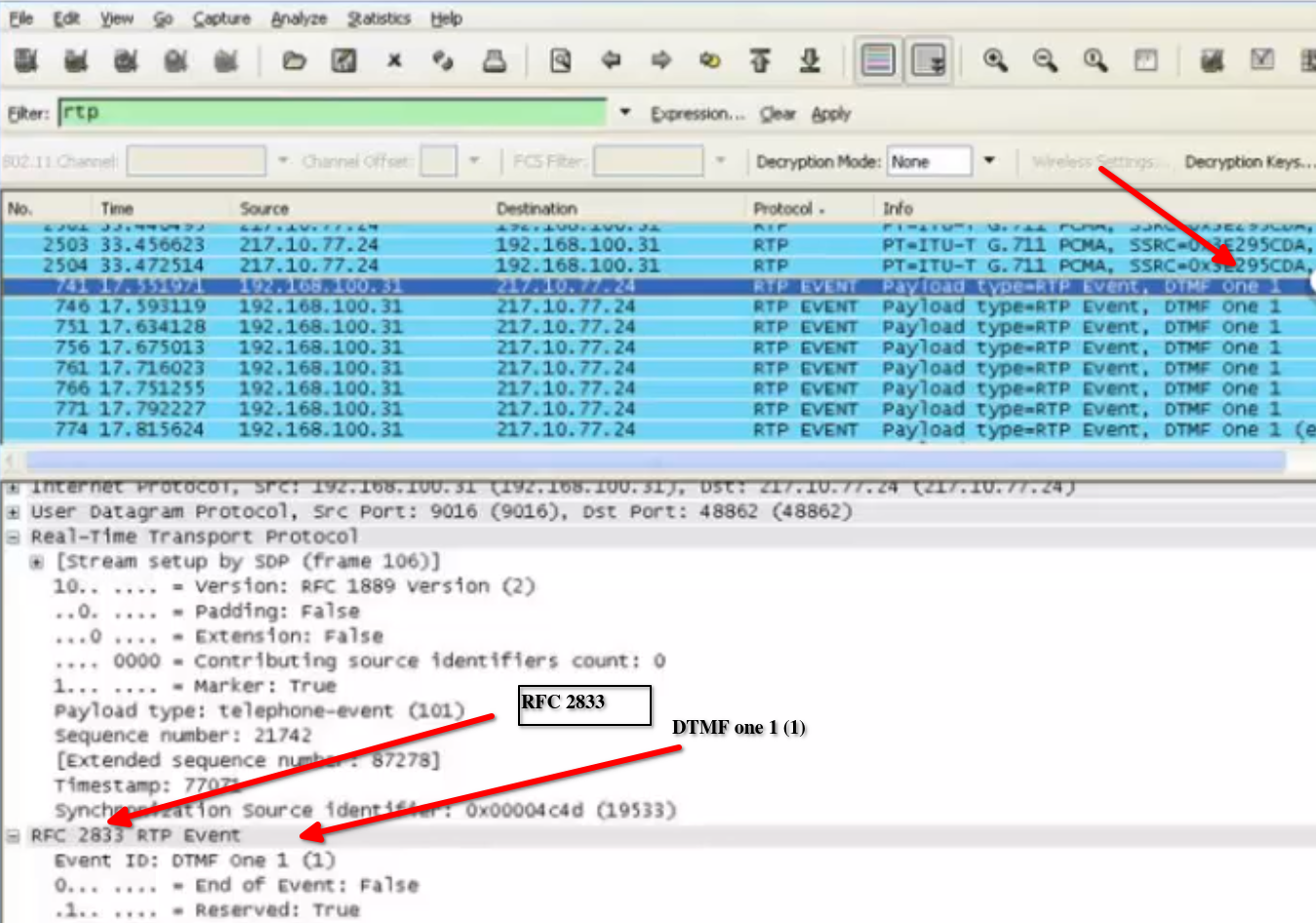
![image.png](https://wiki.tinod.net/uploads/images/gallery/2023-05/scaled-1680-/i8KLUc8wL7m0e4IM-image.png)

SIP INFO DTMF example

![image.png](https://wiki.tinod.net/uploads/images/gallery/2023-05/scaled-1680-/SF1jsdP53ViHZPnV-image.png)

#### Summary

- SIP Networks and the PSTN can work well together as long as SIP gateways perform the correct ISUP to SIP mapping in order for a call to reach its destination
- This also is true for SIP to PSTN calls and PSTN to PSTN bridging across a SIP based internetwork
- Gateways can be complex devicees and it wouln't be uncommon to find a single server running gateway, proxy, location, registration service on it
- TRIP is an emerging protocol that promises to do for SIP what BGP did for i nternet in making it easy for SIP calls to be connected to the most appropriate gateway.
- DTMF tones havee been known to be problematic so support for at least RFC 2833 is recommended for all manufacturers and ITSPs
- SIP tu ISUP commands do map fairly well though it takes time to remember what each of the command does and what the responses s hould be, this do not intend to give you all the details on USUP to SIP mapping, check [RFC 3398 ](https://datatracker.ietf.org/doc/html/rfc3398)for more details

# 16. - SIP and B2BUA Back to Back User Agent

- Back-2-Back

Thee B2BUA its a standalone proxy when it receives a request process the request just as thee intended destination UA Server would, it repackage the request and act as a UA client then generates a new request and send this to the destination, the B2BUA will maintain the complete call state and continue to send request and responses on which its involved, in essence it own the session.
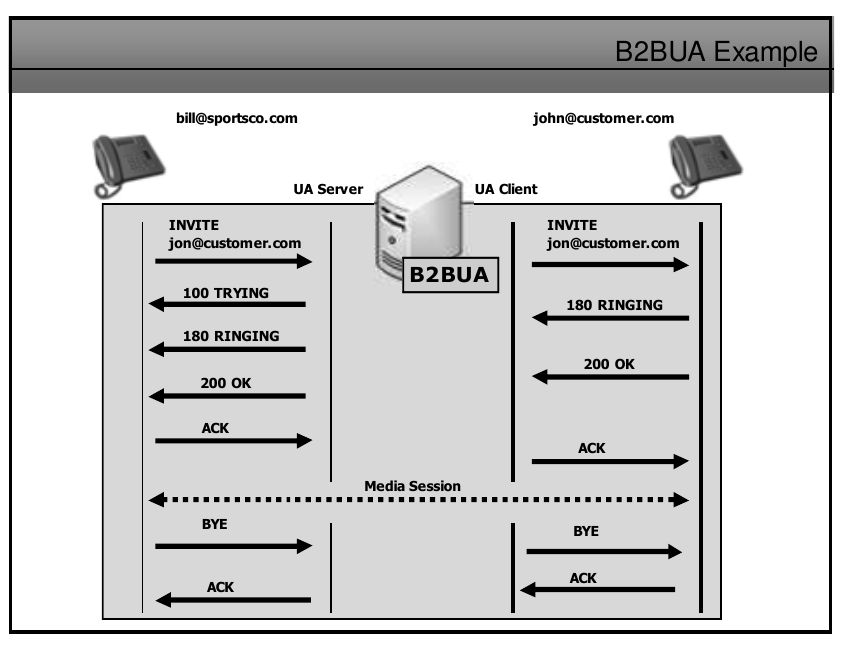
![image.png](https://wiki.tinod.net/uploads/images/gallery/2023-05/scaled-1680-/5GOwD5vCTrzbVDPC-image.png)

A B2BUA implementation would make it easier to offer the following, you just have to choose your B2BUA carefully

- Centralized management of all calls.
- PBX call management features such as call transfer, forwarding and automatic call disconnection to warm a user that credit is low.
- Billing functionality.
- Call Conferencing facilities.
- The ability to 'hide' the network such as Private IP address schemes and the underlying network topology from scanning attempts.
- The ability to connect two different types of signaling networks such as SIP and H.323 for co-existence during a migration to a fully SIP based network.
- Implement and enforce policies such as 'Class of Service and Restriction'.
- Manage Security and NAT issues.

# 17 .- SIP Security

- Authentication
- Authorization
- Encryption
- Attacks and Responses
- Ethical Hacking

##### Authentication and Authorization

Proxy Authentication – when user needs to be authenticated proxy responses with a 407, sending a string nonce, user encrypt the password using nonce and MD5, and send back the invite including the hash with the password encrypted, it’s decrypted by the server.  
401 unauthorized is a response to register messages   
Once authentication has been made, authorization will determine what an authenticated person can do.  
128 bit MD5 mechanism is proven to flawed.  
SHA-1 at 160 bits is a little more secure but has issues, hence the development of SHA-2 that can produce hash sizes of up to 512 bits.  
SHA-3 is currently in development and promises larger hash sizes and no flaws in the algorithm.d is defined in RFC 3262..
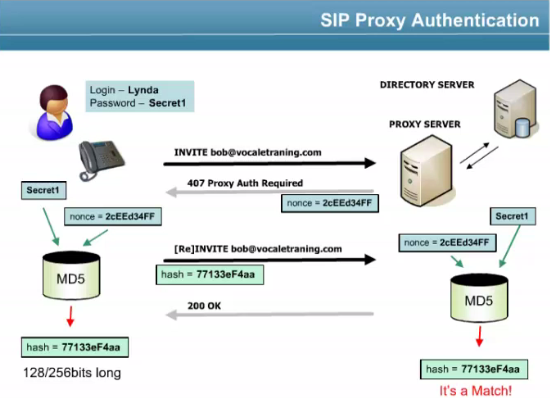
![image.png](https://wiki.tinod.net/uploads/images/gallery/2023-05/scaled-1680-/8cPBLaQrX7o4kfwE-image.png)

##### Encryption

  
 There are many types of malicious attacks:  
 • VoIP interception, modification and replay  
 • Conversation eavesdropping  
 • Dictionary attacks  
 • Telephone number harvesting  
 • DOS and DDOS attacks  
 • SPIT and SPAM  
 • Flood attacks
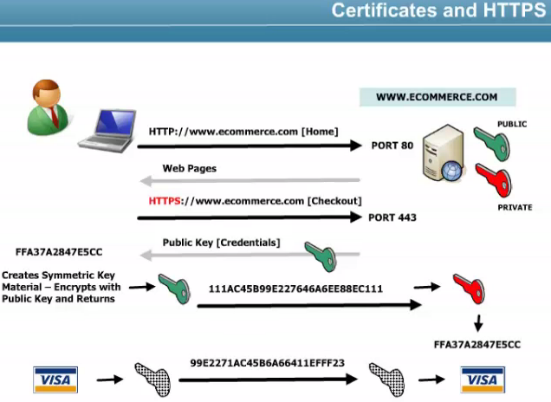
![image.png](https://wiki.tinod.net/uploads/images/gallery/2023-05/scaled-1680-/b9TCDfqKHTAbgrkO-image.png)

![image.png](https://wiki.tinod.net/uploads/images/gallery/2023-05/scaled-1680-/xY9jqQhNdH8bkXMG-image.png)

##### Certificate authorities manages the certificates for some companies.

  
SIP with TLS only secures signaling, but no audio or other media, SRTP needs to be used to encrypts audio.  
SSL (Secure Sockets Layer) first introduced via the Netscape browser, v3 introduced certificate support and SHA-1 support (http, ftp, smtp use it).  
TLS has replaced SSL, RFC 5246 TLS 1.2  
TLS is based on a shared secret known only to the server and the client, ensure that all SIP signaling messages are encrypted, work on an end to end basis where all systems between the UAs must support TLS or the call will fail. Can work on a hop by hop basis but this requires a new TLS session established between each point on the network.

If security/encryption along the whole path is needed to the end destination the use the sip address type of sips:  
Crypto - RFC 4568  
RFC 4474 – Caller ID Identity   
RFC 6347 and 5763 – DTLS/SRTP  
S/MIME (Secure Multipurpose Internet Mail Extensions) – was developed so emails can be encrypted and also digitally signed for proof of sender (only the sender needs a certificate and associated encryption keys) (for email encryption both sender and recipient require certificates), SIP has adopted S/MIME standard to enable it to encrypt SDP body parts to ensure information privacy, SIP headers are encrypted using TLS.  
sRTP can generate encryption keys between two UA without the need of a certificate authority.  
IPSec is a heavyweight solution as it requires a PKI to be in place:  
 • Adds a lot of overhead in the encapsulation process  
 • Is tended to be implemented in a lot of VPN

##### Attacks and Responses

Attacks

- DOS: Systems send vast numbers of SIP INVITE to a UA or Server, the system hangs or shuts down, denying service to the users.
- DDOS: Destributed Denial of Service occurs when there are multiple focused external attacks on a SIP gateway.
- Call Pattern Tracking: Find out who is making calls to whom, when and for how long, helps to build up a call profile for a user or even a company.
- ARP Poisoning: Fools using MAC address so host in a conversation thinks they are talking to the correct MAC.
- Intereection/Modification: Occurs when a n unknown 3rd party intercepts SIP signaling, makes changes or even adds to the SIP messages and forwards messages on
- Directory Harvest for SPIT: using whois, dns and google to 'Directory Harvest' telephony numbers that can be used to send unsolicited VoIP messages to SPIT is the IP tellephony variant of SPAM.
- Hacking: Describe attacks on a network server or end device, Hacking starts by 'footprinting' the network to check for vulnerabilities then use tools to exploit them.
- Spoofing: Modify packets so that the recipient thinks you are someone else, can modify MAC, IP, extensions, etc.
- Eaversdropping: Voice capture for playback, building directory numbers for a SPIT attack and also Call PAttern Tracking.
- Capture + Replay: capture for playback.

Response

- Firewalls: Prevent attacks, closing unneeded ports and providing a barrier to TCP/UDP ports scans, apply security policies to control incoming/outgoing traffic.
- SPIS: By using SIPs your sip UA is requesting a Secure Session, preventing capturee spoofing intersection and modification.
- Authentication: If a SIP device is not authenticated with a Proxy or other SIP server then it cannot communicate.
- Authorization: Determines what an autheenticated SIP UA can do, this also prevents rogue SIP devices from accessing services that you want to keep locked down.
- Anti-Harvesting: Ensure that your DNS has secure Zone transfers to known devices.
- VLAN Port Security: ARP poisoning and MAC spoofing is possible as any device can register its MAC address with a LAN switch, use switch port security.
- PKI: Is the foundation of securing all SIP signaling and other network traffic, try to use certificate authority such as VeriSign.
- TLS, SRTP and IPSec: TLS secure sip messages, Seecure RTP media streams, SBC can break end to end security, IPSEC Encrypts all traffic regardless of the tyepe of traffic, it needs PKI.

RFC 4475 - SIP Torture test messagees

Ethical Hacking

- Capture conversation
- SIP vicious
- Cain
- HoverIP - Port scanning
- SIPScan
- SIPtap

NIST National INstitutes of Standards and Technology

- Separate your networks public and private voice and data
- Use an ALG firewall or SBC
- STUN: doesnt work with symmetric NAT
- TURN: works but is limited to a single UA behind NAT
- ICE: is good but can take time to call setup and not all deevices are compatible with ICE yet
- UpnP : not good with multiple NAT but fine for home use

Use Strong autheentication such as SHA-1 or MD5

Use TLS end to end encryption or even an IPSec connection.

Dont use softphone in a security sensitive network as the PC runs on usually vulnerable OS attack.

# 18. - SIP - Firewall NAT and SBC

- Firewalls
- NAT &amp; Types of NAT
- Firewall / NAT solutions
- THE RTP Problem
- MG, ALG, SBC

##### Issues to Address

Protection of your network is vital if connected to the internet, Private addressing on the internal network can cause problems when using SIP through a NAT (network address translation service), NAPT also introduces another set of problems and finally SIP has a firewall to content with.

##### Firewalls

Corporate and personal firewalls are usually placed at the wedge of the network to act as a perimeter device that can permit traffic leaving and entering thenetwork, usually all traffic originating from within a network is allowed out and traffic from outside is allowed in, firewalls usually allow traffic such as HTTP and SMTP to enter the network, firewalls that are not SIP aware will probably block all SIP traffic and it may be the case that the RTP packets will be blocked as well.

#### NAT

Private addressing on the internal network can cause problems wueh using SIP through a NAT

##### Full-cone NAT

- Once an internal address (iAddr:iPort) is mapped to an external address (eAddr:ePort), any packets from iAddr:iPort will be sent through eAddr:ePort.
- Any external host can send packets to iAddr:iPort by sending packets to eAddr:ePort.
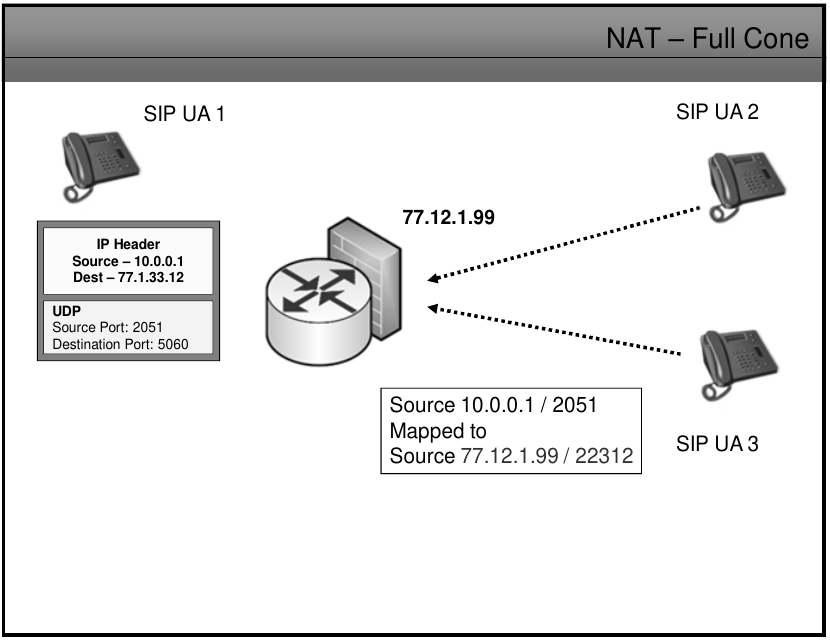
![image.png](https://wiki.tinod.net/uploads/images/gallery/2023-05/scaled-1680-/PeoCLFGY5I5QS61L-image.png)

##### Restricted Cone NAT

- Once an internal address iAddr:iPort is mapped to an external address eAddr:ePort, any packets from iAddr:iPort will be sent through eAddr:ePort
- An External host hAddr:any can send packets to iAddr:iPort by sending packets to eAddr:ePort only if iAddr:iPort has previously sent a packet to hAddr:any. "ANY" means the port number doesn't matter.
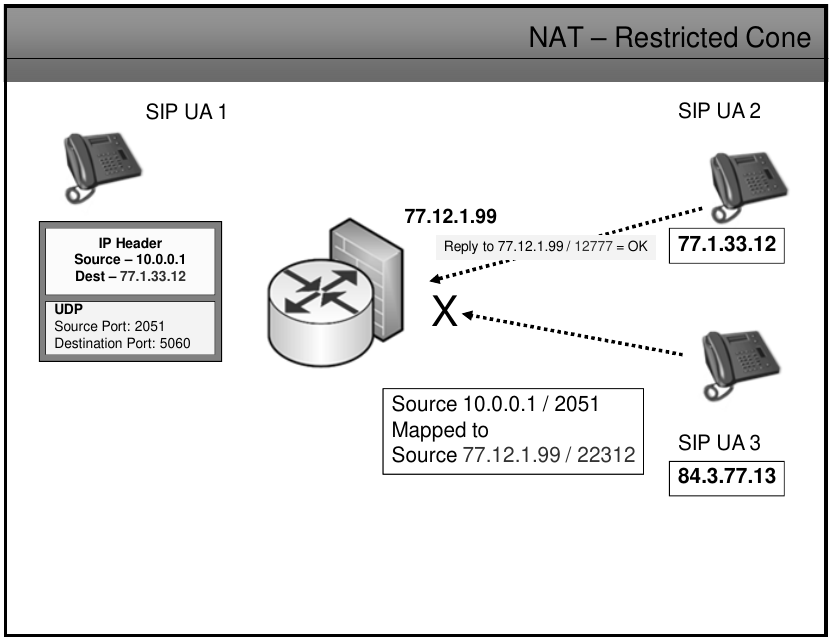
![image.png](https://wiki.tinod.net/uploads/images/gallery/2023-05/scaled-1680-/s1G2SWEQnOkF3DgK-image.png)

##### Port Restricted NAT

- Like an address restricted cone NAT, but the restriction includes port numbers.
- Once and internal address iAddr:iPort is mapped to an external address eAddr:ePort, any packets from iAddr:iPort will be sent through eAddr:ePort.
- An external host hAddr:hPort can send packets to iAddr:iPort by sending packets to eAddr:ePort only if iAddr:iPort has previously sent a packet to hAddr:hPort.
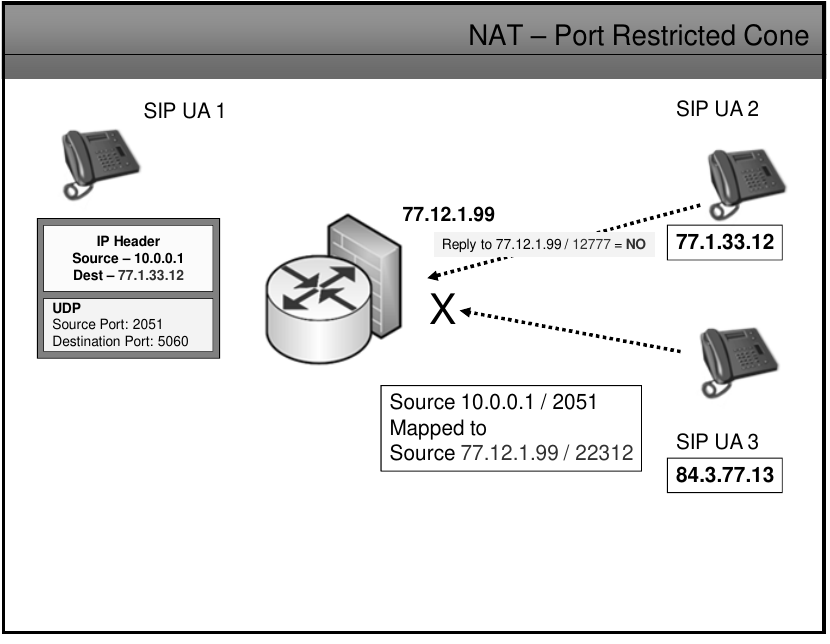
![image.png](https://wiki.tinod.net/uploads/images/gallery/2023-05/scaled-1680-/J0yrW3G0TUEu3J2c-image.png)

##### NAT Symmetric

- Each request from the same internal IP address and port to a specific destination IP address and port is mapped to a unique external source IP address and port, if the same internal host sends a packet eeven with the same source address and port but to a different destination a different mapping is used.
- Only an external host that receivs a packet from an internal host can sed a packet back.
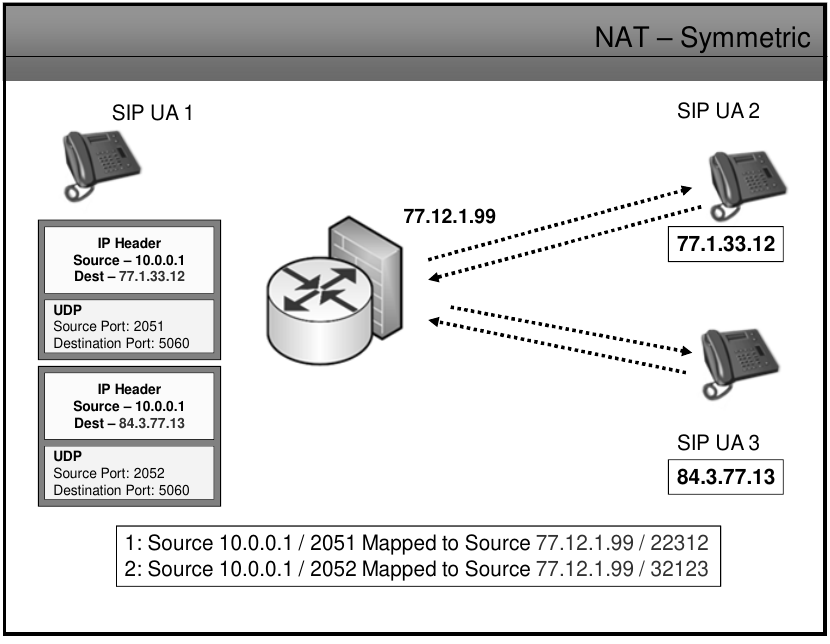
![image.png](https://wiki.tinod.net/uploads/images/gallery/2023-05/scaled-1680-/yEQkmbibcGZ6SXsw-image.png)

NAPT Introduces another set of problems![image.png](https://wiki.tinod.net/uploads/images/gallery/2023-05/scaled-1680-/j2nAD7oELvb2GTx1-image.png)
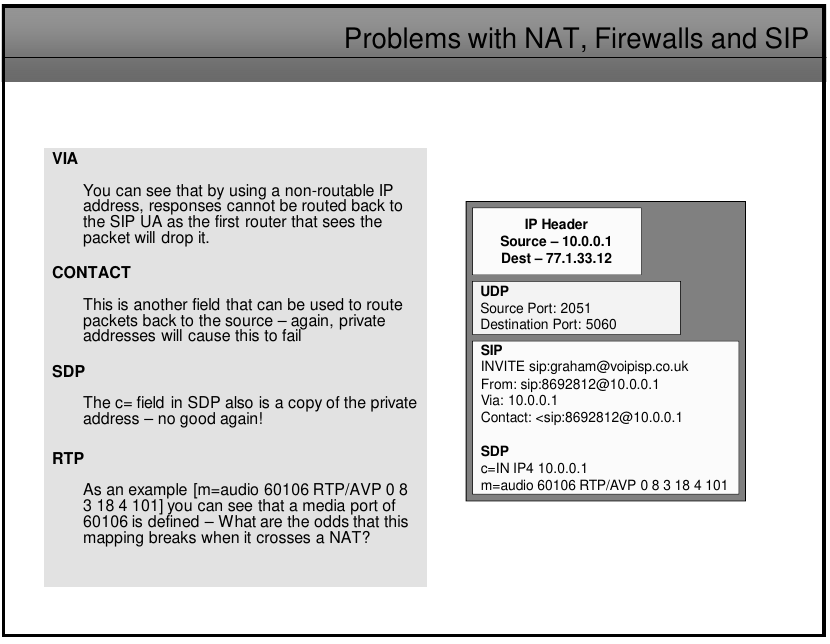
Problems with NAT are caused because of the hostile environment made for the lack of standardize behaviors and controls in NATs solutions.

##### STUN (Simple Transversal of UDP)

How it works

- Allow to communicate across NATs before making calls client contacts STUN SERVER to find out the external IP address that is using, on port 3489, that way when seeding the messages clients can get back to the originating client.
- Also use port IP/Port details in its register to the registration server to keep the appropriate firewalls port open.
- Rport entry overrides the dst port when SIP messages are returned to the client behind NAT as it is what STUN can see.
- Rport is filled in by the proxy or UAS.

Problems

- STUN doesnt work behind symmetric NAT as the new IP/Port mappings are created for each session
- if firewalls are configured to drop UDP packets it will fail
- UDP is not connection oriented so firewalls may close port pinholes causing session to fail
- Multiple NAT can have problems
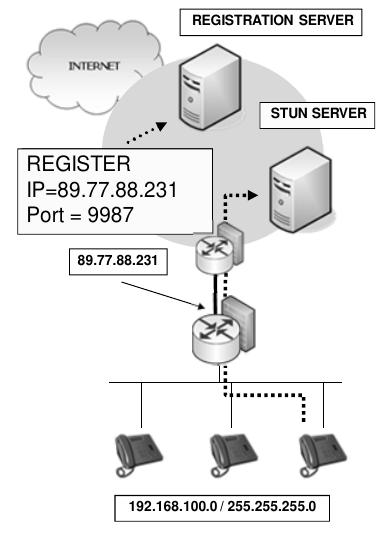
![image.png](https://wiki.tinod.net/uploads/images/gallery/2023-05/scaled-1680-/VCmfIlwDefP78oRo-image.png)

![image.png](https://wiki.tinod.net/uploads/images/gallery/2023-05/scaled-1680-/YvhcdF6OIgrfqLvQ-image.png)

![image.png](https://wiki.tinod.net/uploads/images/gallery/2023-05/scaled-1680-/bs1EG5QlWwvoZgak-image.png)

##### TURN (Traversal Using Relays around NAT)

- Operates similar to STUN but it can also relay RTP streams as well as SIP messages (both are proxied)
- Works with both UDP and TCP so TCP can be used to ensure session stay open
- TURN works with symmetric NAT
- TURN must have an internet facing address
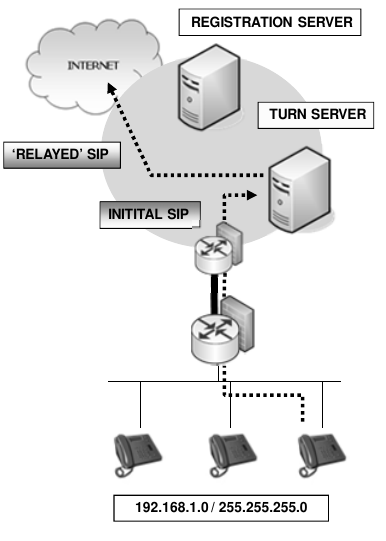
![image.png](https://wiki.tinod.net/uploads/images/gallery/2023-05/scaled-1680-/uMogeMHRkB4g16pO-image.png)

##### Interactive Connectivity Establishment (ICE)  


- ICE UA make a series of connectivity check in order to discover which is the set of IP address that will be guaranteed to work
- Loos at all of its local addresses and then queries its STUN and TURN server to collect more addresses it can be reached.
- Then it starts its own STUN service, passes a copy of the IP addresses to it and then sends all of the collected IP address to the destination device
- The destination responds by sending a STUN request to each IP address with initiates a STUn reply back to the destination client with details of each IP address that worked
- The STUN deevice then sends a final notification back to the destination device to confirm the connection details
- ICE RFC 5245
- Will take time to enable ICEE clients, good news is that actual devices may only need software upgrade or patch
- Due to chaotic implementation of NATs it could take a while to implement ICE
- AS it checks for the bes IP/Port combination to usee it delays the call setup time.
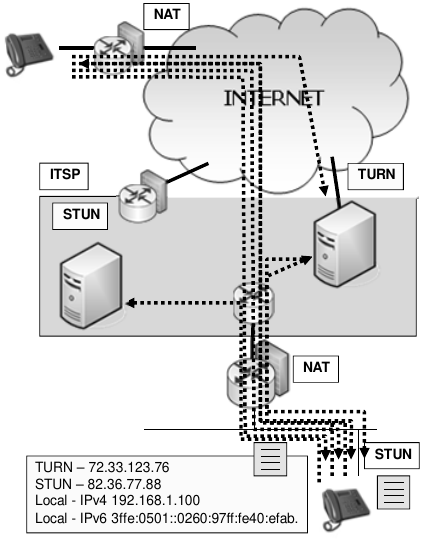
![image.png](https://wiki.tinod.net/uploads/images/gallery/2023-05/scaled-1680-/aP67jvG2ptvTdZTx-image.png)

##### UPnP

- The protocol running on the SIP devices queries the firewall/NAT directly for the external public address and port numbers
- SIP device rewrites private addresses as usual in the sip message and SDP body with the public address
- UpnP is supported by the majority of manufacturers
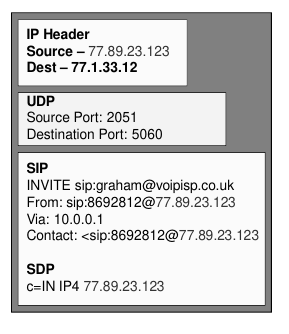
![image.png](https://wiki.tinod.net/uploads/images/gallery/2023-05/scaled-1680-/v1so2y9aM8gyd79e-image.png)

![image.png](https://wiki.tinod.net/uploads/images/gallery/2023-05/scaled-1680-/ZXjnqyzDKYIO3LJQ-image.png)

##### RTP Problem

- When caller inside send the rtp packet the firewall cannot know which port is going to bee used so the response can be blocked
- When caller outside send the rtp packet the firewall cannot know which port is being used for audio so the response can be blocked

##### Solving the RTP problem

- RTP are dynamically allocated
- Firewall don't know these details
- Opening more firewall ports is not an option
- Symmetric RTP 
    - The audio is sent to the port used for signaling as it is already opened
- Media Proxy 
    - The SIP device register in the media proxy and forward the registration to the registration server as it was the SIP device.
- ALG (Application level gateway) 
    - Is not unlike a MEdia Proxy
    - Can sit inside a DMZ controlled by the firewall
    - All sip and rtp packets are sent to the ALG
    - Works with NAT by changing the SDP body of the SIP
    - Can be software that is embedded on the firewall
- SIP Aware Firewall 
    - Rewrites the ports used to send the audio
- SBC 
    - Control billing
    - Ensure QoS
    - Apply usage policies
    - Apply security policies
    - Firewall/NAT issues
- SBC Enterprise 
    - Act as an ALG
    - Codec conversion
    - TLS, SRTP and/or IPSec
    - Reemote SIP devices
    - Benefits 
        - Hide ip addressing
        - Apply CAC
        - Apply Security policies
        - Apply QoS settings
        - Billing Services
        - Scalatee to 100,000 connections