PFSense
Security
Setting up DNS over TLS on pfSense
Source: https://medium.com/@davetempleton/setting-up-dns-over-tls-on-pfsense-bd96912c2416
DNS is a protocol woefully in need of confidentiality and integrity checks. The traditional service running over port 53 can be trivially eavesdropped upon to see what hosts you’re visiting, and it’s routinely intercepted and its responses altered for domains without DNSSEC (which is most domains). Many VPN clients do not by default route DNS queries over their tunnel, and thus so-called “DNS leaks” allow for hostname resolutions to disclose the nature of tunneled traffic.
There are two competing standards: DNS over TLS, and DNS over HTTPS. DNS over TLS is what pfSense most easily supports using its built-in resolver Unbound. Here’s what I’ve done to set up DNS over TLS on pfSense 2.4.4p3.
Choosing your DNS servers
pfSense’s implementation of DNS over TLS only allows connections to upstream resolvers on port 853. If you’d like to test if your resolver of choice allows connections on this port, you can run the following Nmap command:
nmap -Pn -sT -p 853 1.2.3.4
Where 1.2.3.4 is the server. You’re looking for a state of “open” and not “closed” or “filtered.” I use the following Google and Cloudflare servers which support DNS over TLS on port 853:
- 8.8.8.8
- 1.1.1.1
- 8.8.4.4
- 1.0.0.1
Feel free to add IPv6 addresses as well if that works on your ISP. You should edit your list of DNS servers in System > General Setup before continuing, as all listed servers must support DNS over TLS on port 853.
Setting up the DNS Resolver service
pfSense offers two competing DNS services: DNS Forwarder (dnsmasq) and DNS Resolver (Unbound). You must use the DNS Resolver, and the DNS Forwarder must be disabled. If you’re using the DNS Forwarder currently, you must transition over to the DNS Resolver service; this would include manually copying over any Host Overrides and Domain Overrides if you have any. If you’re excepting any domains from DNS rebinding protection, you’d use the following syntax in the DNS Resolver under Custom Options:
server:
private-domain: "example.com"
private-domain: "example.org"
with as many “private-domain” lines as you need. You must disable the DNS Forwarder service before you enable the DNS Resolver service, as only one service at a time can listen on port 53.
Here are some settings you should make sure you set in Services > DNS Resolver:
- For Network Interfaces, shift-click to select multiple interfaces you’d like to offer DNS services on. Do not use the default of all interfaces, as you do not want to offer DNS services to the internet.
- Outgoing Network Interfaces should be “WAN” or whatever interface(s) you use for your ISPs.
- DNSSEC, DNS Query Forwarding, and “Use SSL/TLS for outgoing DNS Queries to Forwarding Servers” should all be enabled.
- On the Advanced tab, I recommend enabling Prefetch Support, Prefetch DNS Key Support, and Harden DNSSEC Data.
Once enabled, make sure DNS services work on your LAN clients.
Blocking outbound DNS from LAN clients
It would be smart at this point to block outgoing connections on port 53, to make sure all services are using encrypted DNS. To do this, go to Firewall > Rules > Floating and click Add. Use the following settings:
- Action: Reject (or Block)
- Quick: enabled
- Interface: WAN or whatever interface(s) you use for your ISPs
- Direction: out
- Address Family: IPv4 + IPv6
- Protocol: TCP/UDP
- Source: invert match, This Firewall
(note: previous directions here said “any,” however that prevented the DNS Resolver service from restarting correctly) - Destination: any
- Destination Port: 53
If you want to disable LAN clients from using DNS over TLS directly, perhaps so you can log all resolutions, you can block them from using port 853 as well. Unfortunately, a single floating rule wouldn’t work here, as blocking port 853 in this manner would also prevent the DNS Resolver service from working. You’d have to create a rule for each LAN/VLAN interface. These rule would look similar to the floating rule above, except:
- Destination: invert match, This Firewall (or “any” if you’ll never enable the DNS over TLS serving features of the DNS Resolver, which are off by default)
- Destination Port Range: 853
You’d be wise at this point to test resolution on LAN clients to make sure things work. You can also verify that LAN clients cannot access outbound DNS services by running the following Nmap command as root:
sudo nmap -Pn -sT -sU -p 53,853 8.8.8.8
No states should say “open” (a state of “open|filtered” is okay).
Redirecting outbound port 53 traffic
At it’s set up now, any client trying to reach an outside DNS server over port 53 will fail. Some software and devices might have been hard-coded to use these services for a variety of benign, lazy, or malicious reasons; if you’d like for them not to fail, these queries can be re-directed to your DNS Resolver service. Go to Firewall > NAT > Port Forward and click Add. Use the following settings:
- Interface: LAN (you’ll need to make duplicate rules for each LAN/VLAN interface)
- Protocol: TCP/UDP
- Destination: invert match, This Firewall
- Destination port range: DNS
- Redirect target IP: 127.0.0.1
- Redirect target port: DNS
- NAT reflection: Disable
You can now test that LAN clients think this port is open on outside IPs:
sudo nmap -Pn -sT -sU -p 53 1.2.3.4
dig @1.2.3.4 example.com +short
Nmap should show a state of “open” for all non-local, non-bogon IPs, and Dig should quickly return an IP.
What protections have we gained?
What we’ve done here will greatly increase the reliability of your DNS resolutions by keeping them from being modified, and we’ve stopped the possibility of DNS leaks for any VPN clients.
What we haven’t done is stop clients from using insecure protocols like HTTP. The browser extension/addon HTTPS Everywhere with its “Encrypt All Sites Eligible” mode enabled can greatly help here; I’ve been using this for years, and there are fewer sites without HTTPS support than you might expect. For sites that don’t support HTTPS, you can individually allow them, or you can keep a Tor Browser window open and browse HTTP sites in there. In practice, the links I click that most commonly don’t support HTTPS are the “Unsubscribe” links in commercial email.
I should also note here that, even with encrypted DNS and HTTPS web traffic, eavesdroppers can typically still know what hostname you’re visiting because of Server Name Indication, which allows multiple websites to be hosted on the same web server. Even if your connection doesn’t use SNI, if the destination server serves only one website, an eavesdropper would likely know what website you’re loading (by knowing the destination IP). For privacy in all of these scenarios, you’d want to tunnel your connections past an eavesdropper using, for example, a VPN or Tor.
We also haven’t stopped LAN clients from using outside DNS services that either run over non-standard ports, use DNS over HTTPS, or use other encrypted/obfuscated protocols.
Acme Certificates with letsencrypt and cloudflare
This is to install and configure Acme certs with Letsencrypt as well as deploying HA Proxy for access to our internal services and add SSL services, we're using cloudflare for our cert verification.
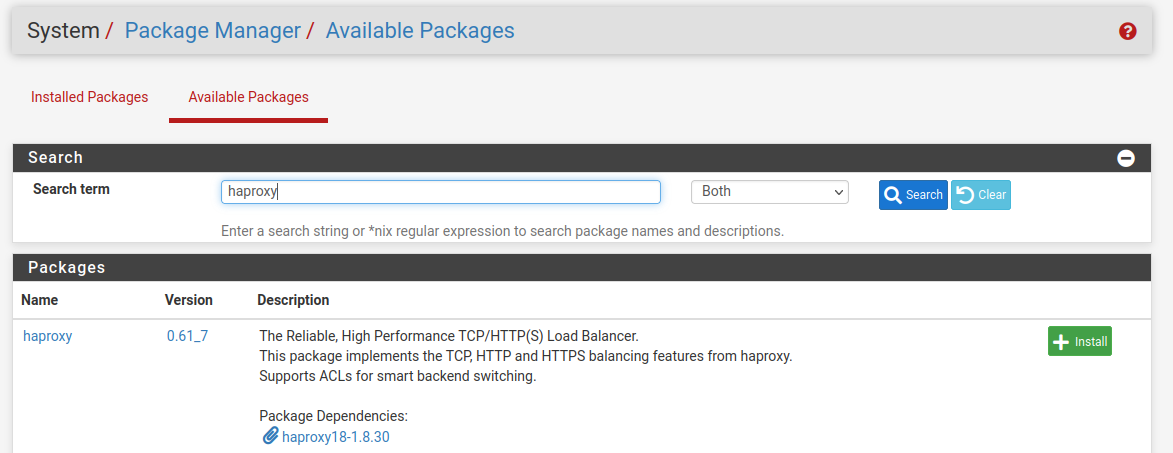
Search for acme and click install then on confirm
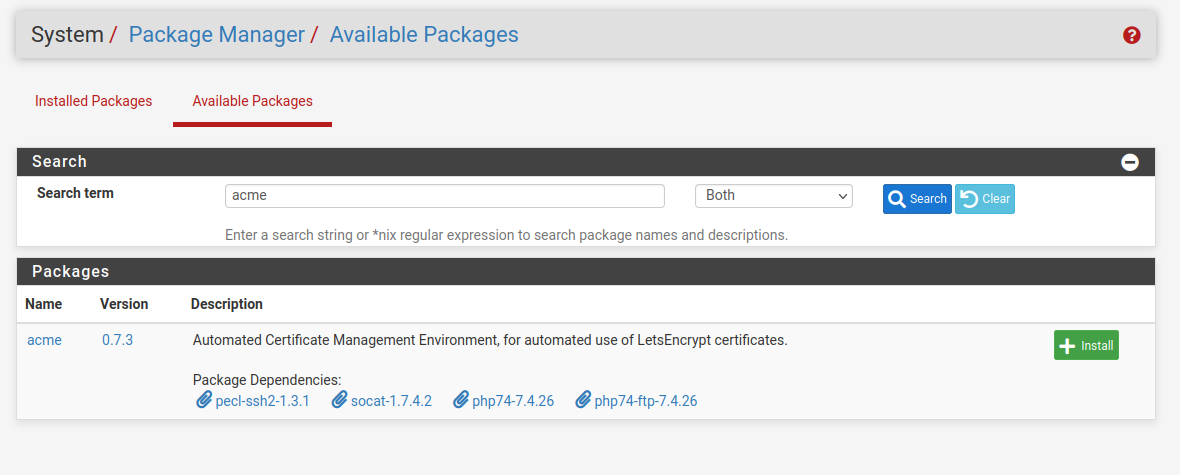
do the same for haproxy and install then click on confirm.
if you are installing this via the wan interface access, make sure you go back and disable packet filter as doing the installation will re enable, go to the shell and type pfctl -d to disable and gain access via WAN interface
go to Account keys and click add, fill out the information below, for ACME Server you can use production or test, its the same
click on create new account key then register acme account key, after you are done click save
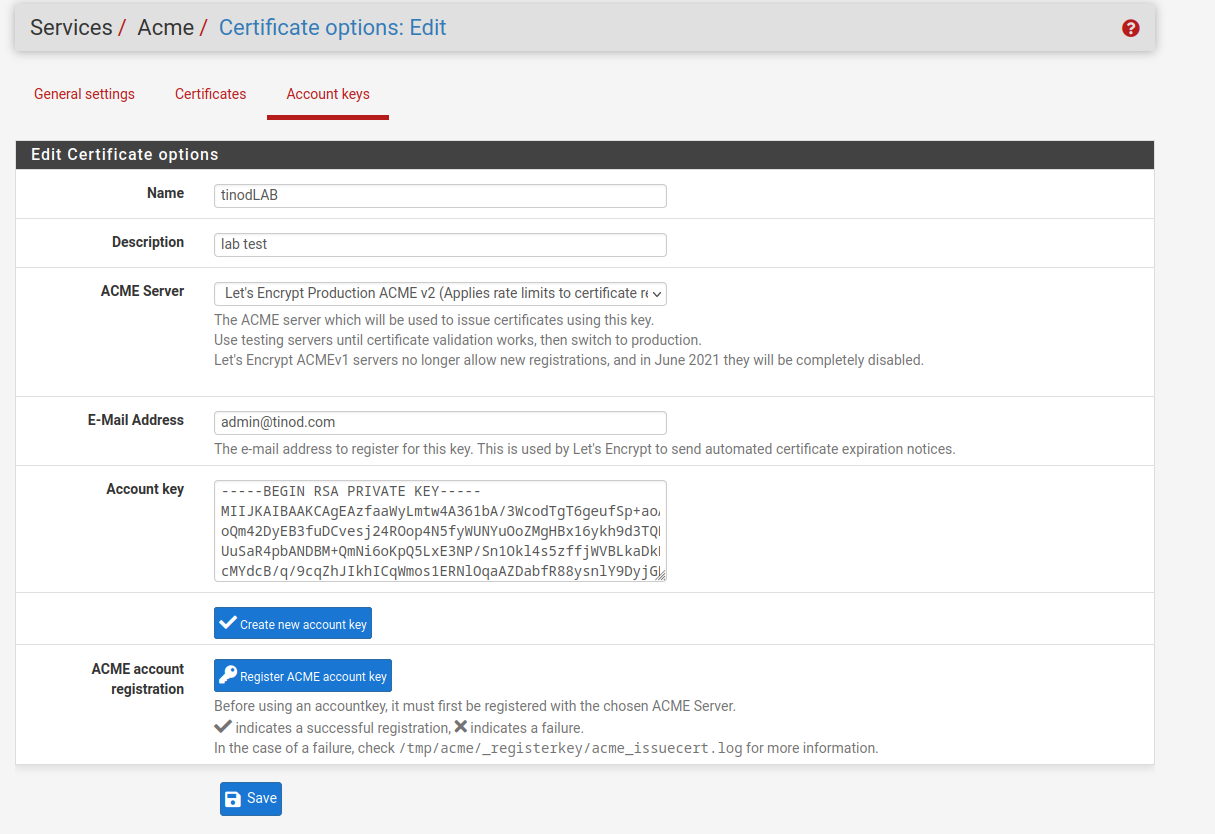
you have now your account key.

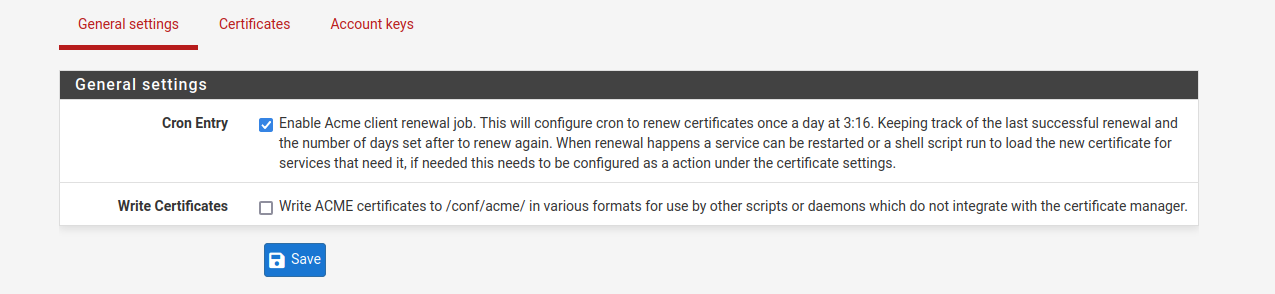
now you can create your first certificate, navigate to certificates and click add, we're using cloudflare
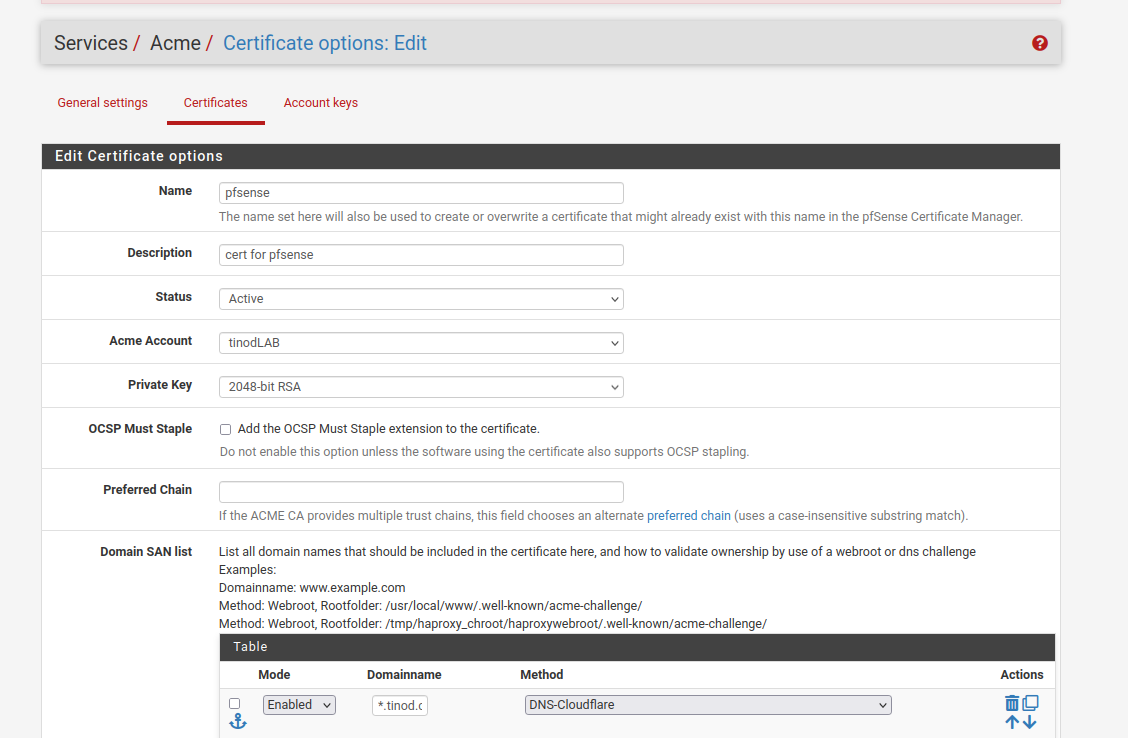
For this lab we're using a wildcard certificate, for our domain we will do *.tinod.com
you need to get your key, token, accound ID and Zone ID from cloudflare
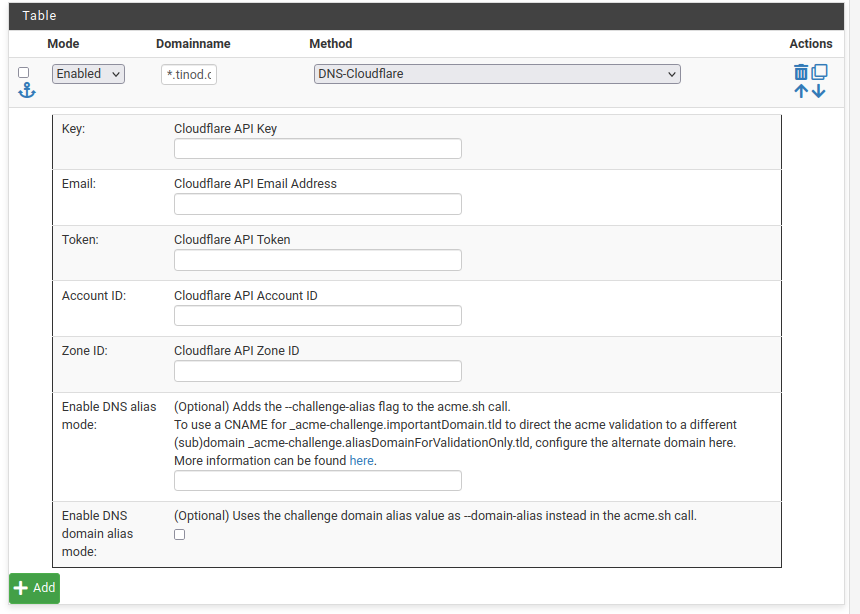
click add and your cert will be ready and it will renew automatically
Administration
Enable WAN access
To enable wan access go into ssh and run the following command
pfctl - d
to enable protection
pfctl -e
Update PFSense CLI
Run a backup
23.05-RELEASE][admin@pfsense.htf.com.mx]/root: pkg-static -d update
Troubleshooting
Disk Full
Discover PFSense disk is full, discovered snort log files not clearing up, manually run script to clear logs
Enter an option: 8
[23.05-RELEASE][admin@pfsense.htf.com.mx]/root: du -Pshx /*
4.5K /COPYRIGHT
892K /bin
365M /boot
2.4M /cf
512B /conf
9.5K /conf.default
4.0K /dev
4.5K /entropy
4.1M /etc
512B /home
10M /lib
113K /libexec
512B /media
512B /mnt
512B /net
1.0K /pfSense
512B /proc
17M /rescue
131M /root
3.0M /sbin
178K /tmp
995M /usr
15M /var
[23.05-RELEASE][admin@pfsense.htf.com.mx]/root: cd /var
[23.05-RELEASE][admin@pfsense.htf.com.mx]/var: ls
account audit backups crash db empty games lib mail preserve rwho tmp yp
at authpf cache cron dhcpd etc heimdal log msgs run spool unbound
[23.05-RELEASE][admin@pfsense.htf.com.mx]/var: du -Pshx /var/log*
47G /var/log
[23.05-RELEASE][admin@pfsense.htf.com.mx]/var: du -Pshx /var/*
512B /var/account
1.5K /var/at
1.5K /var/audit
512B /var/authpf
8.2M /var/backups
66K /var/cache
1.0K /var/crash
1.0K /var/cron
15M /var/db
3.0M /var/dhcpd
512B /var/empty
102K /var/etc
512B /var/games
512B /var/heimdal
1.0K /var/lib
47G /var/log
12K /var/mail
512B /var/msgs
512B /var/preserve
135K /var/run
512B /var/rwho
12K /var/spool
13K /var/tmp
3.4M /var/unbound
512B /var/yp
[23.05-RELEASE][admin@pfsense.htf.com.mx]/var: du -Pshx /var/log*
47G /var/log
[23.05-RELEASE][admin@pfsense.htf.com.mx]/var: cd /var/log
[23.05-RELEASE][admin@pfsense.htf.com.mx]/var/log: ls
auth.log filter.log lighttpd openvpn.log ppp.log system.log wireless.log
bsdinstall_log gateways.log mount.today pf.today resolver.log userlog
dhcpd.log haproxy.log nginx pf.yesterday routing.log utx.lastlogin
dmesg.boot ipsec.log nginx.log pfblockerng routing.log.0 utx.log
dmesg.today l2tps.log ntp poes.log setuid.today vpn.log
dmesg.yesterday lastlog ntpd.log portalauth.log snort watchdogd.log
[23.05-RELEASE][admin@pfsense.htf.com.mx]/var/log: ls -la
total 300
drwxr-xr-x 7 root wheel 39 Oct 10 20:18 .
drwxr-xr-x 27 root wheel 27 May 22 09:57 ..
-rw------- 1 root wheel 484415 Oct 10 20:15 auth.log
-rw-r--r-- 1 root wheel 56964 Jan 9 2023 bsdinstall_log
-rw------- 1 root wheel 0 Oct 10 20:18 dhcpd.log
-rw-r--r-- 1 root wheel 12145 Oct 10 17:28 dmesg.boot
-rw------- 1 root wheel 22577 Jun 14 02:01 dmesg.today
-rw------- 1 root wheel 18863 Jun 13 02:01 dmesg.yesterday
-rw------- 1 root wheel 0 Oct 10 20:18 filter.log
-rw------- 1 root wheel 0 Oct 10 20:18 gateways.log
-rw------- 1 root wheel 0 Mar 28 2023 haproxy.log
-rw------- 1 root wheel 0 Oct 10 20:18 ipsec.log
-rw------- 1 root wheel 0 Oct 10 20:18 l2tps.log
-rw-r--r-- 1 root wheel 0 Mar 19 2023 lastlog
drwx------ 2 www www 2 Feb 17 2023 lighttpd
-rw------- 1 root wheel 971 Mar 20 2023 mount.today
drwxr-xr-x 2 root wheel 3 Jan 9 2023 nginx
-rw------- 1 root wheel 0 Oct 10 20:18 nginx.log
drwxr-xr-x 2 root wheel 2 Jan 9 2023 ntp
-rw------- 1 root wheel 0 Oct 10 20:18 ntpd.log
-rw------- 1 root wheel 0 Oct 10 20:18 openvpn.log
-rw------- 1 root wheel 628 Jun 14 02:01 pf.today
-rw------- 1 root wheel 461 Jun 13 02:01 pf.yesterday
drwxr-xr-x 2 unbound unbound 13 Oct 10 19:09 pfblockerng
-rw------- 1 root wheel 0 Oct 10 20:18 poes.log
-rw------- 1 root wheel 0 Oct 10 20:18 portalauth.log
-rw------- 1 root wheel 0 Oct 10 20:18 ppp.log
-rw------- 1 root wheel 0 Oct 10 20:18 resolver.log
-rw------- 1 root wheel 70759 Oct 10 20:11 routing.log
-rw------- 1 root wheel 511905 Sep 27 18:26 routing.log.0
-rw------- 1 root wheel 2340 Mar 20 2023 setuid.today
drwxr-xr-x 4 root wheel 6 Jul 17 00:45 snort
-rw------- 1 root wheel 0 Oct 10 20:18 system.log
-rw------- 1 root wheel 25523 Oct 10 17:28 userlog
-rw-r--r-- 1 root wheel 394 Oct 10 20:15 utx.lastlogin
-rw------- 1 root wheel 4022 Oct 10 20:15 utx.log
-rw------- 1 root wheel 0 Oct 10 20:18 vpn.log
-rw------- 1 root wheel 0 Oct 10 17:28 watchdogd.log
-rw------- 1 root wheel 0 Oct 10 20:18 wireless.log
[23.05-RELEASE][admin@pfsense.htf.com.mx]/var/log: du -hi
du: invalid option -- i
usage: du [-Aclnx] [-H | -L | -P] [-g | -h | -k | -m] [-a | -s | -d depth] [-B blocksize] [-I mask] [-t threshold] [file ...]
[23.05-RELEASE][admin@pfsense.htf.com.mx]/var/log: du -h *
113K auth.log
13K bsdinstall_log
512B dhcpd.log
8.5K dmesg.boot
8.5K dmesg.today
8.5K dmesg.yesterday
512B filter.log
512B gateways.log
512B haproxy.log
512B ipsec.log
512B l2tps.log
512B lastlog
512B lighttpd
4.5K mount.today
1.0K nginx
512B nginx.log
512B ntp
512B ntpd.log
512B openvpn.log
4.5K pf.today
4.5K pf.yesterday
2.0M pfblockerng
512B poes.log
512B portalauth.log
512B ppp.log
512B resolver.log
8.5K routing.log
69K routing.log.0
4.5K setuid.today
47G snort/snort_igc317124
43M snort/snort_igc138051
47G snort
512B system.log
4.5K userlog
512B utx.lastlogin
4.5K utx.log
512B vpn.log
512B watchdogd.log
512B wireless.log
[23.05-RELEASE][admin@pfsense.htf.com.mx]/var/log: ls
auth.log filter.log lighttpd openvpn.log ppp.log system.log wireless.log
bsdinstall_log gateways.log mount.today pf.today resolver.log userlog
dhcpd.log haproxy.log nginx pf.yesterday routing.log utx.lastlogin
dmesg.boot ipsec.log nginx.log pfblockerng routing.log.0 utx.log
dmesg.today l2tps.log ntp poes.log setuid.today vpn.log
dmesg.yesterday lastlog ntpd.log portalauth.log snort watchdogd.log
[23.05-RELEASE][admin@pfsense.htf.com.mx]/var/log: cd snort/
[23.05-RELEASE][admin@pfsense.htf.com.mx]/var/log/snort: ls
HOMENETWORK_disabled_preproc_rules.log snort_igc317124
snort_igc138051 snort_rules_update.log
[23.05-RELEASE][admin@pfsense.htf.com.mx]/var/log/snort: du -h *
512B HOMENETWORK_disabled_preproc_rules.log
43M snort_igc138051
47G snort_igc317124
4.5K snort_rules_update.log
[23.05-RELEASE][admin@pfsense.htf.com.mx]/var/log/snort: du -h
47G ./snort_igc317124
43M ./snort_igc138051
47G .
[23.05-RELEASE][admin@pfsense.htf.com.mx]/var/log/snort: df -h
Filesystem Size Used Avail Capacity Mounted on
pfSense/ROOT/default 1.5G 1.5G 6.1M 100% /
devfs 1.0K 1.0K 0B 100% /dev
pfSense/tmp 6.5M 384K 6.1M 6% /tmp
pfSense/var 21M 15M 6.1M 71% /var
pfSense 6.2M 96K 6.1M 2% /pfSense
pfSense/home 6.2M 96K 6.1M 2% /home
pfSense/var/log 47G 47G 6.1M 100% /var/log
pfSense/var/db 21M 15M 6.1M 72% /var/db
pfSense/var/tmp 6.2M 104K 6.1M 2% /var/tmp
pfSense/var/cache 6.2M 104K 6.1M 2% /var/cache
pfSense/reservation 5.6G 96K 5.6G 0% /pfSense/reservation
pfSense/ROOT/default/cf 8.6M 2.5M 6.1M 29% /cf
pfSense/ROOT/default/var_cache_pkg 18M 12M 6.1M 65% /var/cache/pkg
pfSense/ROOT/default/var_db_pkg 13M 6.9M 6.1M 53% /var/db/pkg
tmpfs 4.0M 148K 3.9M 4% /var/run
/lib 1.5G 1.5G 6.1M 100% /var/unbound/lib
devfs 1.0K 1.0K 0B 100% /var/unbound/dev
/var/log/pfblockerng 47G 47G 6.1M 100% /var/unbound/var/log/pfblockerng
/usr/local/share/GeoIP 1.5G 1.5G 6.1M 100% /var/unbound/usr/local/share/GeoIP
/usr/local/bin 1.5G 1.5G 6.1M 100% /var/unbound/usr/local/bin
/usr/local/lib 1.5G 1.5G 6.1M 100% /var/unbound/usr/local/lib
devfs 1.0K 1.0K 0B 100% /var/dhcpd/dev
[23.05-RELEASE][admin@pfsense.htf.com.mx]/var/log/snort: cat /etc/cron
cron.d/ crontab
[23.05-RELEASE][admin@pfsense.htf.com.mx]/var/log/snort: cat /etc/crontab
#
# pfSense specific crontab entries
# Created: October 10, 2023, 8:11 pm
#
SHELL=/bin/sh
PATH=/sbin:/bin:/usr/sbin:/usr/bin:/usr/local/sbin:/usr/local/bin
*/1 * * * * root /usr/sbin/newsyslog
1 3 * * * root /etc/rc.periodic daily
15 4 * * 6 root /etc/rc.periodic weekly
30 5 1 * * root /etc/rc.periodic monthly
1,31 0-5 * * * root /usr/bin/nice -n20 adjkerntz -a
1 3 1 * * root /usr/bin/nice -n20 /etc/rc.update_bogons.sh
1 1 * * * root /usr/bin/nice -n20 /etc/rc.dyndns.update
*/60 * * * * root /usr/bin/nice -n20 /usr/local/sbin/expiretable -v -t 3600 virusprot
30 12 * * * root /usr/bin/nice -n20 /etc/rc.update_urltables
1 0 * * * root /usr/bin/nice -n20 /etc/rc.update_pkg_metadata
16 3 * * * root /usr/local/pkg/acme/acme_command.sh "renewall" | /usr/bin/logger -t ACME 2>&1
*/5 * * * * root /usr/bin/nice -n20 /usr/local/bin/php -f /usr/local/pkg/snort/snort_check_cron_misc.inc
52 3 */1 * * root /usr/bin/nice -n20 /usr/local/bin/php -f /usr/local/pkg/snort/snort_check_for_rule_updates.php
0 8 * * 5 root /usr/local/bin/php /usr/local/www/pfblockerng/pfblockerng.php dcc >> /var/log/pfblockerng/extras.log 2>&1
0 * * * * root /usr/local/bin/php /usr/local/www/pfblockerng/pfblockerng.php cron >> /var/log/pfblockerng/pfblockerng.log 2>&1
#
# DO NOT EDIT THIS FILE MANUALLY!
# Use the cron package or create files in /etc/cron.d/.
#
[23.05-RELEASE][admin@pfsense.htf.com.mx]/var/log/snort: cat /etc/crontab
#
# pfSense specific crontab entries
# Created: October 10, 2023, 8:11 pm
#
SHELL=/bin/sh
PATH=/sbin:/bin:/usr/sbin:/usr/bin:/usr/local/sbin:/usr/local/bin
*/1 * * * * root /usr/sbin/newsyslog
1 3 * * * root /etc/rc.periodic daily
15 4 * * 6 root /etc/rc.periodic weekly
30 5 1 * * root /etc/rc.periodic monthly
1,31 0-5 * * * root /usr/bin/nice -n20 adjkerntz -a
1 3 1 * * root /usr/bin/nice -n20 /etc/rc.update_bogons.sh
1 1 * * * root /usr/bin/nice -n20 /etc/rc.dyndns.update
*/60 * * * * root /usr/bin/nice -n20 /usr/local/sbin/expiretable -v -t 3600 virusprot
30 12 * * * root /usr/bin/nice -n20 /etc/rc.update_urltables
1 0 * * * root /usr/bin/nice -n20 /etc/rc.update_pkg_metadata
16 3 * * * root /usr/local/pkg/acme/acme_command.sh "renewall" | /usr/bin/logger -t ACME 2>&1
*/5 * * * * root /usr/bin/nice -n20 /usr/local/bin/php -f /usr/local/pkg/snort/snort_check_cron_misc.inc
52 3 */1 * * root /usr/bin/nice -n20 /usr/local/bin/php -f /usr/local/pkg/snort/snort_check_for_rule_updates.php
0 8 * * 5 root /usr/local/bin/php /usr/local/www/pfblockerng/pfblockerng.php dcc >> /var/log/pfblockerng/extras.log 2>&1
0 * * * * root /usr/local/bin/php /usr/local/www/pfblockerng/pfblockerng.php cron >> /var/log/pfblockerng/pfblockerng.log 2>&1
#
# DO NOT EDIT THIS FILE MANUALLY!
# Use the cron package or create files in /etc/cron.d/.
#
[23.05-RELEASE][admin@pfsense.htf.com.mx]/var/log/snort: php -f /usr/local/pkg/snort/snort_check_cron_misc.inc
[23.05-RELEASE][admin@pfsense.htf.com.mx]/var/log/snort: df -h
Filesystem Size Used Avail Capacity Mounted on
pfSense/ROOT/default 42G 1.5G 41G 4% /
devfs 1.0K 1.0K 0B 100% /dev
pfSense/tmp 41G 384K 41G 0% /tmp
pfSense/var 41G 15M 41G 0% /var
pfSense 41G 96K 41G 0% /pfSense
pfSense/home 41G 96K 41G 0% /home
pfSense/var/log 47G 6.5G 41G 14% /var/log
pfSense/var/db 41G 15M 41G 0% /var/db
pfSense/var/tmp 41G 104K 41G 0% /var/tmp
pfSense/var/cache 41G 104K 41G 0% /var/cache
pfSense/reservation 46G 96K 46G 0% /pfSense/reservation
pfSense/ROOT/default/cf 41G 2.5M 41G 0% /cf
pfSense/ROOT/default/var_cache_pkg 41G 12M 41G 0% /var/cache/pkg
pfSense/ROOT/default/var_db_pkg 41G 6.9M 41G 0% /var/db/pkg
tmpfs 4.0M 148K 3.9M 4% /var/run
/lib 42G 1.5G 41G 4% /var/unbound/lib
devfs 1.0K 1.0K 0B 100% /var/unbound/dev
/var/log/pfblockerng 47G 6.5G 41G 14% /var/unbound/var/log/pfblockerng
/usr/local/share/GeoIP 42G 1.5G 41G 4% /var/unbound/usr/local/share/GeoIP
/usr/local/bin 42G 1.5G 41G 4% /var/unbound/usr/local/bin
/usr/local/lib 42G 1.5G 41G 4% /var/unbound/usr/local/lib
devfs 1.0K 1.0K 0B 100% /var/dhcpd/dev
[23.05-RELEASE][admin@pfsense.htf.com.mx]/var/log/snort:
Wireshark
Wireshark is an open-source packet analyzer which is widely used for network troubleshooting and traffic analysis.
You can download it from the official website https://www.wireshark.org/#download
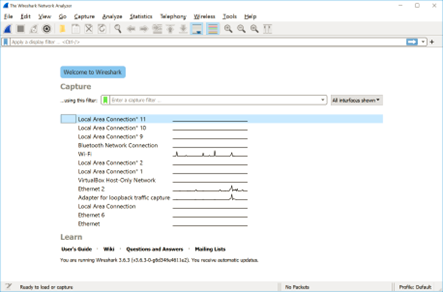
With Wireshark you can capture traffic on any of your available interfaces, you must be clear on what interface your traffic is working on.
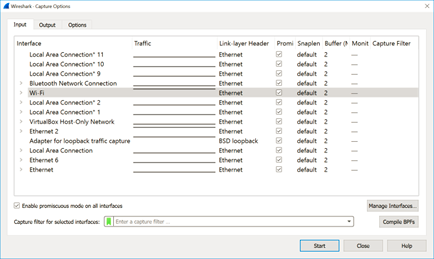
Its really recommended to apply filters to narrow down to show only the packets you are interested in.
Filters can work based on transport or application protocol, source or destination IP addresses, source or destination port, etc.
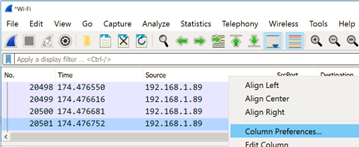
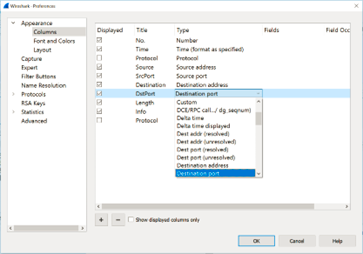
Its highly recommended that you set the view that you feel more comfortable, for example, I personally like to see the Source and Destination Port on the captures, this is easily modified right clicking on the column name and choose Column Preferences
On Title set up the name you want to use to identify the column in the top and select the type to Destination port and Source port.
Other setting is also removing the Packet bytes in the bottom.
The filter toolbar lets you quickly edit and apply filters

Filters can be combined and applied on the traffic for example:

Any error in the syntax of the filter will turn the background of the toolbar to red:

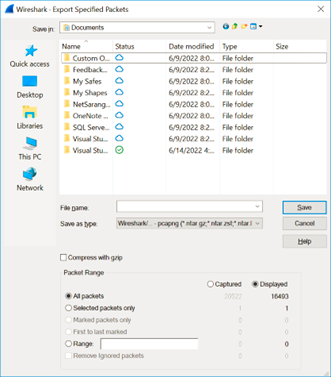
When saving your traffic you could choose to save only the traffic you filtered, you can use the option Export Specified Packets and select the Displayed option