# SBC HomeLAB
# 1. - SBC Initial configuration
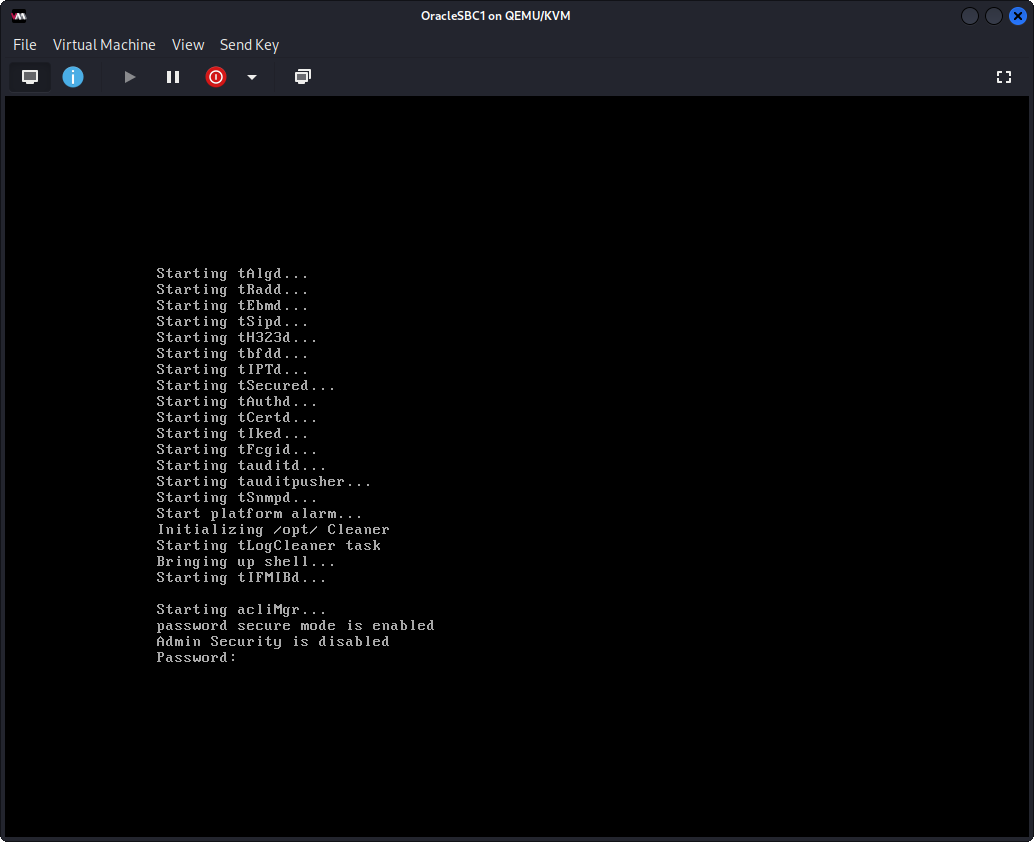
Initial password acme
you will need to setup a new password
[](https://wiki.tinod.net/uploads/images/gallery/2023-03/gsKimage.png)
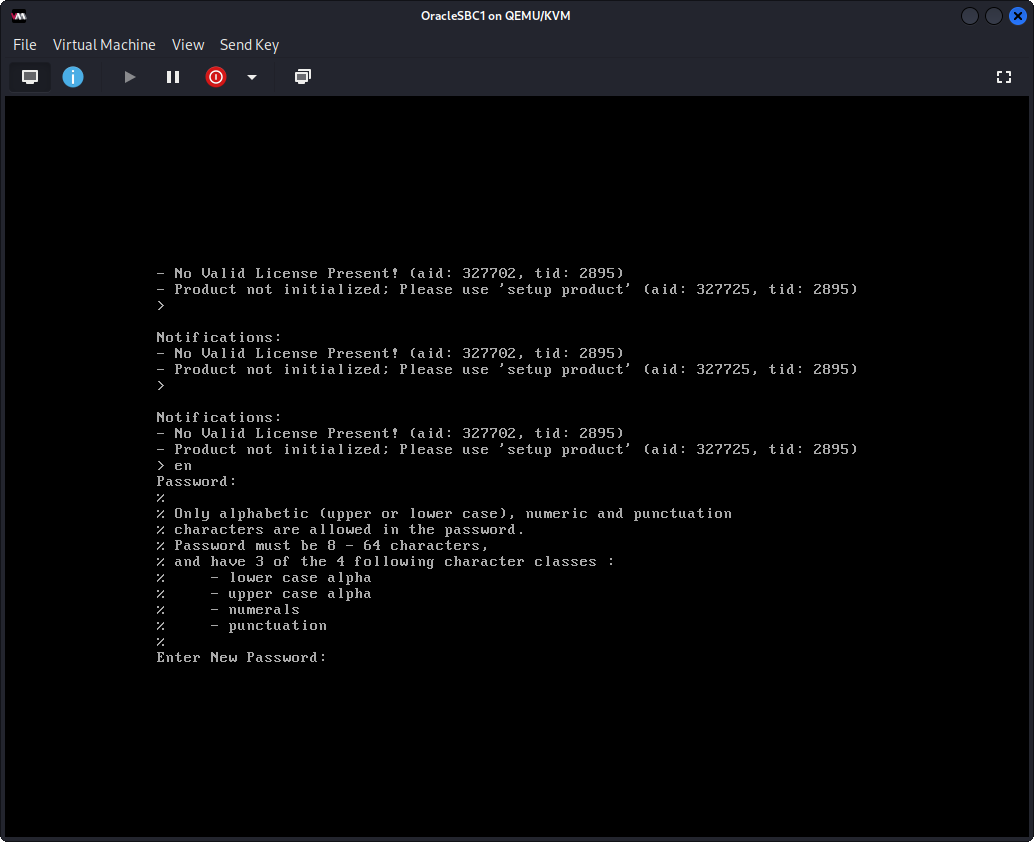
en password is packet
[](https://wiki.tinod.net/uploads/images/gallery/2023-03/rD0image.png)
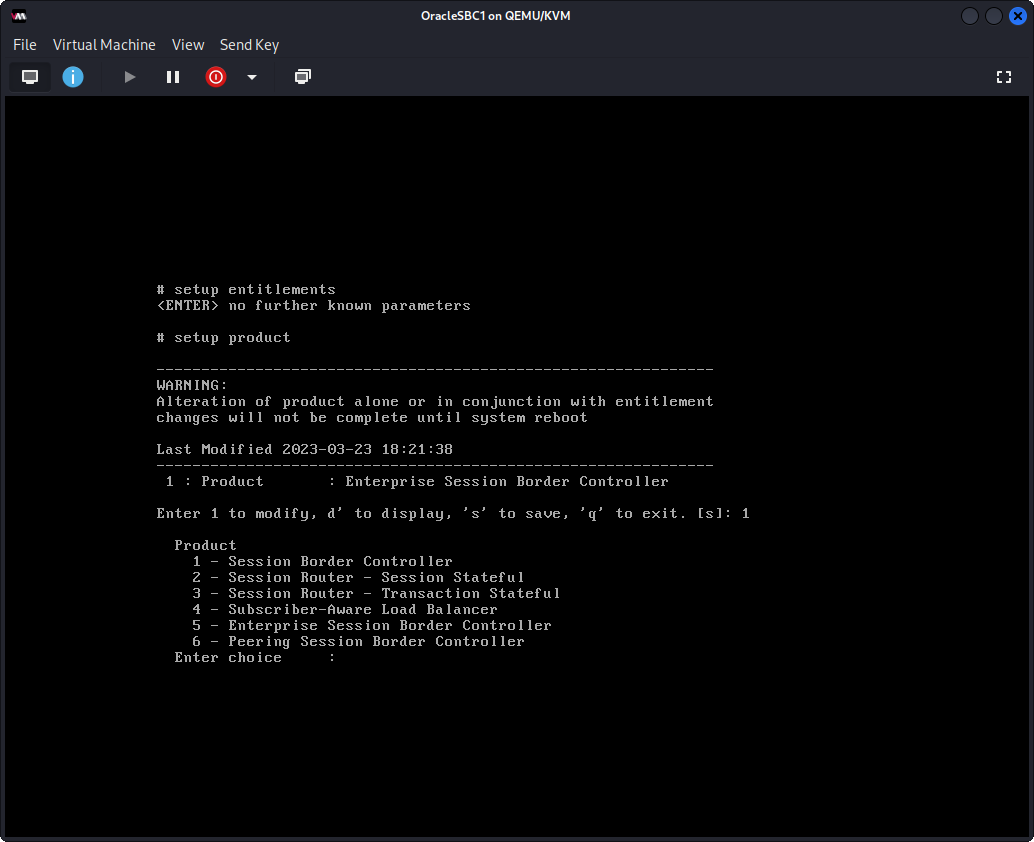
enter setup product, press 1 to modify then 5 for sbc enterprise then s to save
[](https://wiki.tinod.net/uploads/images/gallery/2023-03/xJ5image.png)
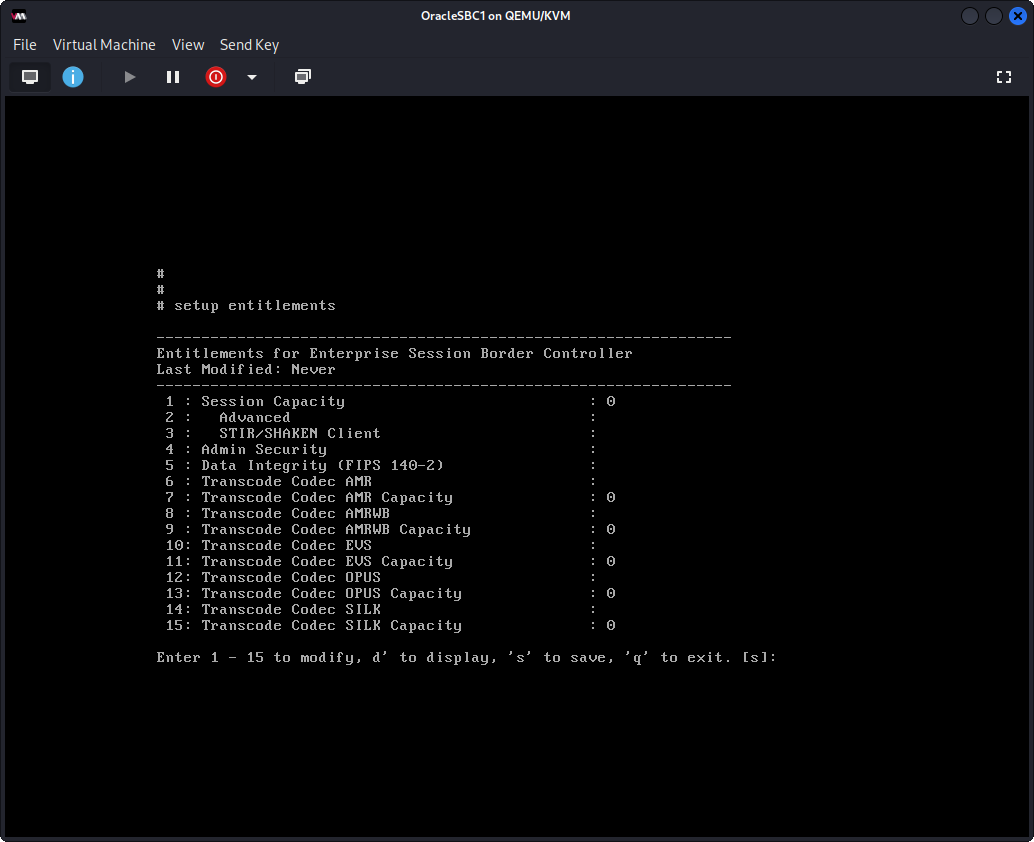
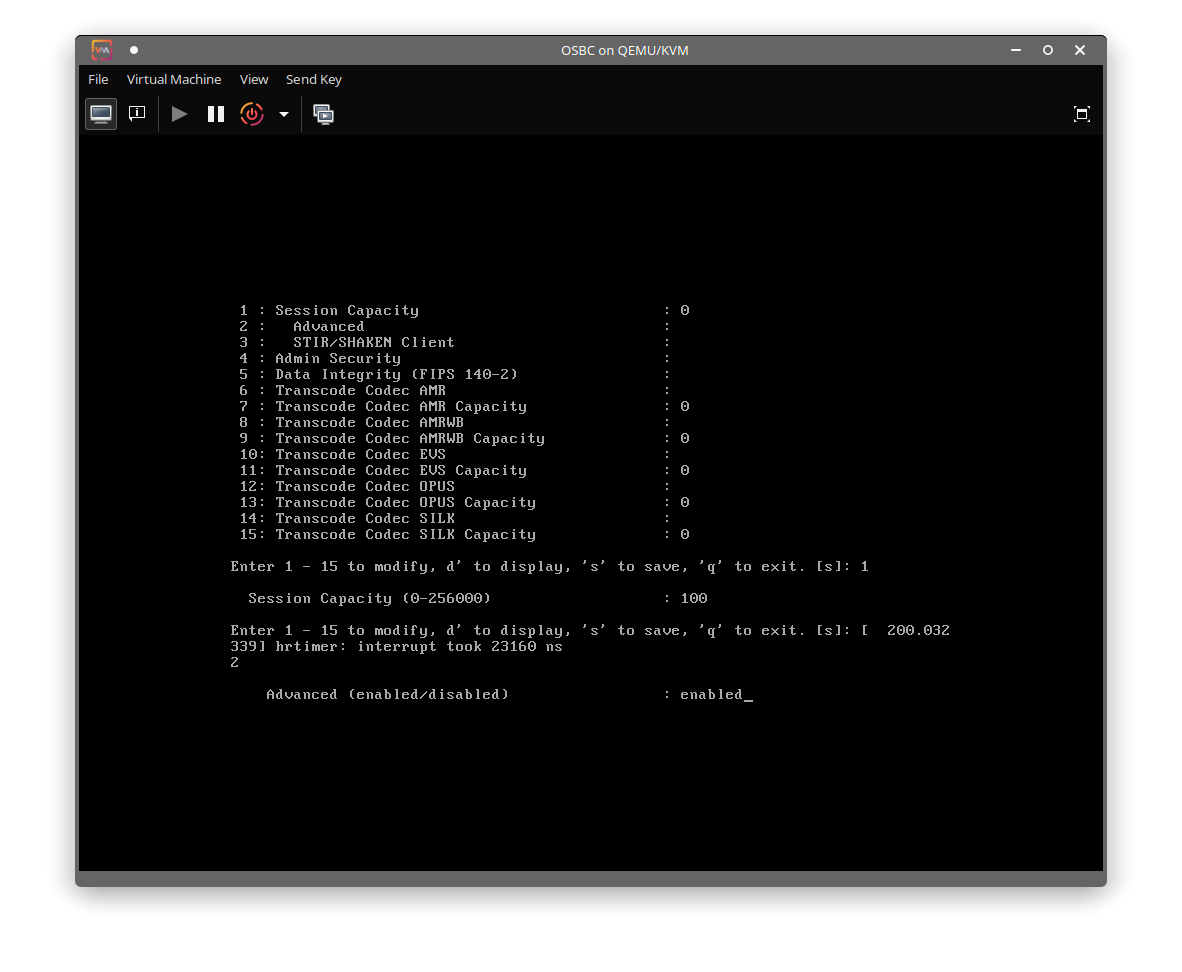
enter command setup entitlements then 1 for session capacity enter 100 then save
[](https://wiki.tinod.net/uploads/images/gallery/2023-03/8Umimage.png)
Select 2 to enable advance licenses then press s to save config
[](https://wiki.tinod.net/uploads/images/gallery/2023-04/sClGofDPb2UIKIbY-image.png)
go to config t and setup bootparam
IP address to ssh remotely for management
```bash
(configure)# bootparam
'.' = clear field; '-' = go to previous field; q = quit
Boot File : /boot/bzImage
IP Address : 192.168.10.100
VLAN :
Netmask : 255.255.255.0
Gateway : 192.168.10.1
IPv6 Address :
IPv6 Gateway :
Host IP :
FTP username :
FTP password :
Flags :
Target Name : PCOSBC
Console Device : VGA
Console Baudrate : 115200
Other :
NOTE: These changed parameters will not go into effect until reboot.
Also, be aware that some boot parameters may also be changed through
PHY and Network Interface Configurations.
```
After rebooting, SBC must show LabOSBC in the prompt name and must reply in the network.
configure options
```shell
(configure)# session-router
(session-router)# sip-config
(sip-config)# options +max
(sip-config)# options +max-udp-length=0
(sip-config)# options +reinvite-trying=yes
(sip-config)# options +sag-target-uri=ip
(sip-config)# enum-sag-match enabled
(sip-config)# extra-method-stats enable
(sip-config)#
(sip-config)# done
sip-config
```
Options explained
These are some configuration options for SIP (Session Initiation Protocol) on an Oracle SBC:
1. `options +max`: This command sets the maximum number of simultaneous sessions that the SBC can handle. The value can be any integer between 1 and 50000.
2. `options +max-udp-length=0`: This command sets the maximum UDP packet size to 0, which effectively disables UDP transport for SIP signaling. This can be useful for troubleshooting or for environments where UDP traffic is not allowed.
3. `options +reinvite-trying=yes`: This command enables the SBC to send 100 Trying responses to re-INVITE requests from the far-end UA (user agent). This is useful when the far-end UA sends re-INVITE requests without waiting for an answer to the previous request.
4. `options +sag-target-uri=ip`: This command sets the target URI for the SAG (Session Agent) to the IP address of the SBC. This is useful when the SAG and SBC are on different networks and the SAG needs to know the IP address of the SBC.
5. `enum-sag-match enabled`: This command enables the ENUM (Electronic Numbering) feature on the SBC. ENUM is a protocol that maps telephone numbers to IP addresses, allowing SIP calls to be routed more efficiently.
6. `extra-method-stats enable`: This command enables additional SIP method statistics to be collected by the SBC. This can provide more detailed information on SIP traffic patterns and help with troubleshooting.
Options
state enabled
operation-mode dialog
dialog-transparency enabled
home-realm-id
egress-realm-id
auto-realm-id
nat-mode None
registrar-domain
registrar-host
registrar-port 0
register-service-route always
init-timer 500
max-timer 4000
trans-expire 32
initial-inv-trans-expire 0
invite-expire 180
session-max-life-limit 0
inactive-dynamic-conn 32
enforcement-profile
pac-method
pac-interval 10
pac-strategy PropDist
pac-load-weight 1
pac-session-weight 1
pac-route-weight 1
pac-callid-lifetime 600
pac-user-lifetime 3600
red-sip-port 1988
red-max-trans 10000
red-sync-start-time 5000
red-sync-comp-time 1000
options max-udp-length=0
reinvite-trying=yes
sag-target-uri=ip
spl-options
add-reason-header disabled
sip-message-len 4096
enum-sag-match enabled
extra-method-stats enabled
extra-enum-stats disabled
mps-volte disabled
rph-feature disabled
nsep-user-sessions-rate 0
nsep-sa-sessions-rate 0
registration-cache-limit 0
register-use-to-for-lp disabled
refer-src-routing disabled
add-ucid-header disabled
proxy-sub-events
allow-pani-for-trusted-only inherit
atcf-stn-sr
atcf-psi-dn
atcf-route-to-sccas disabled
eatf-stn-sr
pass-gruu-contact disabled
sag-lookup-on-redirect disabled
set-disconnect-time-on-bye disabled
refer-reinvite-no-sdp disabled
msrp-delayed-bye-timer 15
transcoding-realm
transcoding-agents
create-dynamic-sa disabled
node-functionality P-CSCF
match-sip-instance disabled
sa-routes-stats disabled
sa-routes-traps disabled
rx-sip-reason-mapping disabled
add-ue-location-in-pani inherit
hold-emergency-calls-for-loc-info 0
retry-after-upon-offline 0
reg-reject-response-upon-offline 503
hold-invite-calls-for-loc-info 0
cache-loc-info-expire 32
msg-hold-for-loc-info 0
npli-upon-register inherit
start-hold-timer-event AAR
hist-to-div-for-cause-380 inherit
anonymize-history-for-untrusted disabled
asymm-preconditions-evs-swb-support disabled
sms-report-timeout 32
user-agent
Media Manager options
media-manager
state enabled
latching enabled
flow-time-limit 86400
initial-guard-timer 300
subsq-guard-timer 300
tcp-flow-time-limit 86400
tcp-initial-guard-timer 300
tcp-subsq-guard-timer 300
tcp-number-of-ports-per-flow 2
hnt-rtcp disabled
algd-log-level NOTICE
mbcd-log-level NOTICE
options active-arp
red-flow-port 1985
red-mgcp-port 1986
red-max-trans 10000
red-sync-start-time 5000
red-sync-comp-time 1000
media-policing enabled
max-arp-rate 10
max-signaling-packets 0
max-untrusted-signaling 100
min-untrusted-signaling 30
dos-guard-window 5
untrusted-minor-threshold 0
untrusted-major-threshold 0
untrusted-critical-threshold 0
trusted-minor-threshold 0
trusted-major-threshold 0
trusted-critical-threshold 0
arp-minor-threshold 0
arp-major-threshold 0
arp-critical-threshold 0
tolerance-window 30
untrusted-drop-threshold 0
trusted-drop-threshold 0
acl-monitor-window 30
trap-on-demote-to-deny disabled
trap-on-demote-to-untrusted disabled
syslog-on-demote-to-deny disabled
syslog-on-demote-to-untrusted disabled
rtcp-rate-limit 0
anonymous-sdp disabled
rfc2833-timestamp disabled
reactive-transcoding disabled
default-2833-duration 100
rfc2833-end-pkts-only-for-non-sig enabled
translate-non-rfc2833-event disabled
media-supervision-traps disabled
dnsalg-server-failover disabled
syslog-on-call-reject disabled
xcode-fax-max-rate 14400
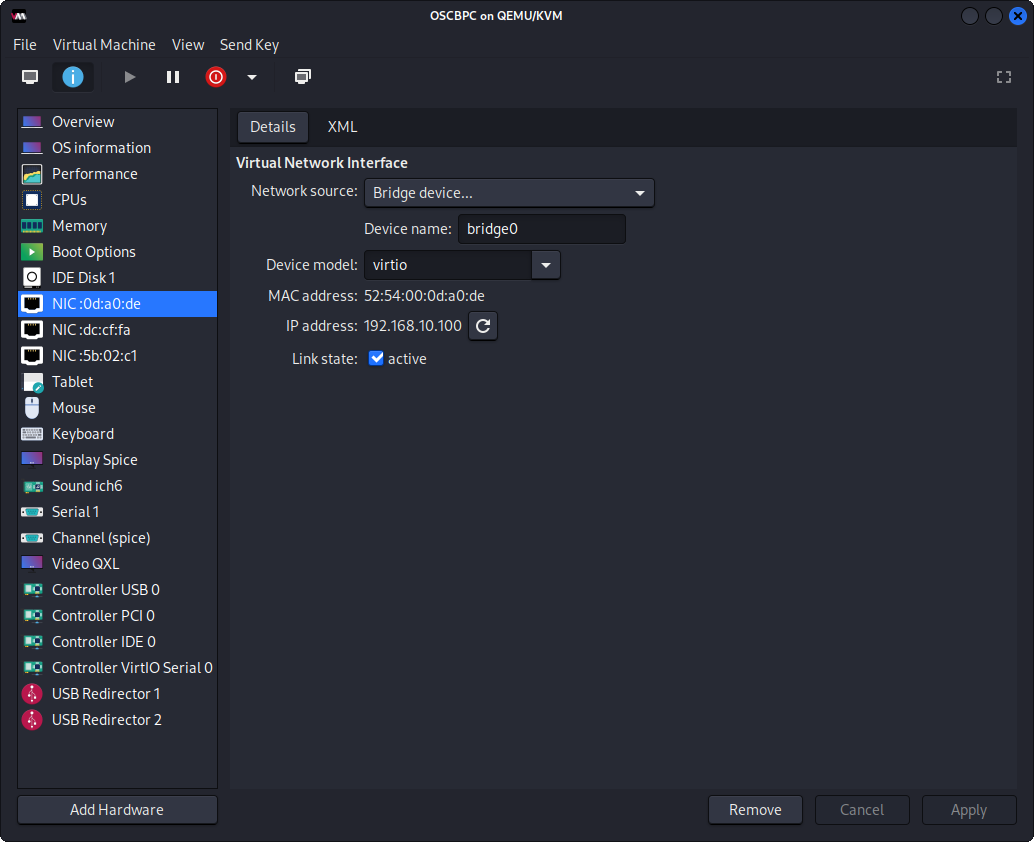
Below screenshot its using linux KVM Virtual Machine Manager
[](https://wiki.tinod.net/uploads/images/gallery/2023-03/pDar7ykuHde0uwuw-JKBimage.png)
```bash
# interface-mapping show
Interface Mapping Info
-------------------------------------------
Eth-IF MAC-Addr Label
wancom0 52:54:00:0D:A0:DE #generic
wancom1 52:54:00:DC:CF:FA #generic
s0p0 52:54:00:5B:02:C1 #generic
wancom2 FF:FF:FF:FF:FF:FF #dummy
spare FF:FF:FF:FF:FF:FF #dummy
s1p0 FF:FF:FF:FF:FF:FF #dummy
s0p1 FF:FF:FF:FF:FF:FF #dummy
s1p1 FF:FF:FF:FF:FF:FF #dummy
s0p2 FF:FF:FF:FF:FF:FF #dummy
s1p2 FF:FF:FF:FF:FF:FF #dummy
s0p3 FF:FF:FF:FF:FF:FF #dummy
s1p3 FF:FF:FF:FF:FF:FF #dummy
# interface-mapping swap
Error: Missing label text!
# interface-mapping swap wancom0 wancom1
Interface Mapping Info after swapping
-------------------------------------------
Eth-IF MAC-Addr Label
wancom0 52:54:00:DC:CF:FA #generic
wancom1 52:54:00:0D:A0:DE #generic
s0p0 52:54:00:5B:02:C1 #generic
wancom2 FF:FF:FF:FF:FF:FF #dummy
spare FF:FF:FF:FF:FF:FF #dummy
s1p0 FF:FF:FF:FF:FF:FF #dummy
s0p1 FF:FF:FF:FF:FF:FF #dummy
s1p1 FF:FF:FF:FF:FF:FF #dummy
s0p2 FF:FF:FF:FF:FF:FF #dummy
s1p2 FF:FF:FF:FF:FF:FF #dummy
s0p3 FF:FF:FF:FF:FF:FF #dummy
s1p3 FF:FF:FF:FF:FF:FF #dummy
Changes could affect service, and Requires Reboot to become effective.
Continue [y/n]?:
```
show arp and ping gateway
```bash
# show arp
IP address HW type Flags HW address Mask Device
192.168.10.1 0x1 0x2 7c:2b:e1:13:be:3d * wancom0
192.168.10.10 0x1 0x2 f0:2f:74:20:1a:17 * wancom0
Total L2 Entries = 0
-----------------------
No Gateway Entries (0)
# ping 192.168.10.1
PING 192.168.10.1 from wancom0:1
44 bytes from 192.168.10.1: icmp_seq=1 ttl=64 time=0.183 ms
44 bytes from 192.168.10.1: icmp_seq=2 ttl=64 time=0.158 ms
44 bytes from 192.168.10.1: icmp_seq=3 ttl=64 time=0.211 ms
44 bytes from 192.168.10.1: icmp_seq=4 ttl=64 time=0.209 ms
4 packets transmitted, 4 received, 0% packet loss
```
# 2. - SBC physical and network interfaces
[](https://wiki.tinod.net/uploads/images/gallery/2023-04/GWImx0pjNoEHhU7z-image.png)
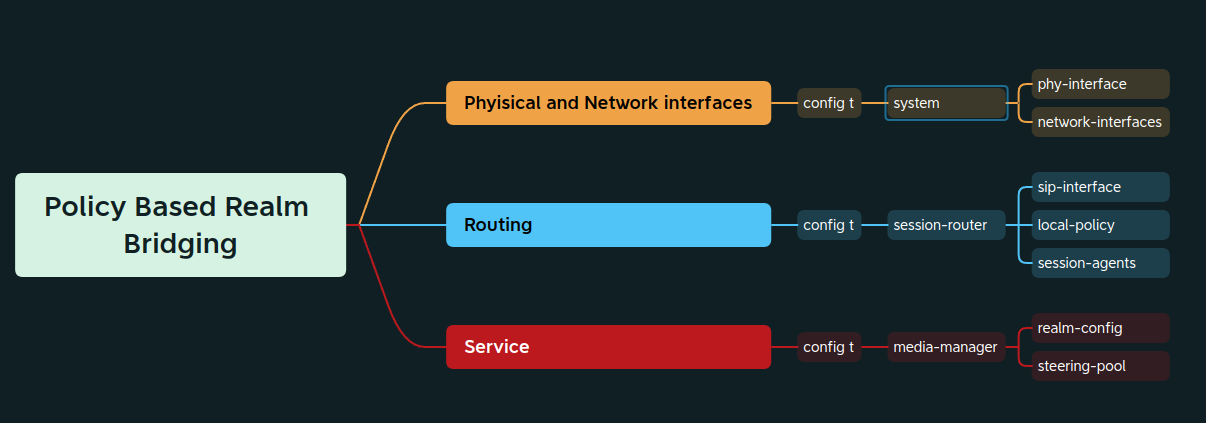
Oracle SBCs have dedicated interfaces to be used for signaling and media, those interfaces are defined as sXpX when listing the interfaces. As defined in the first entry two interfaces will be created and configured dedicating one for internal (s0p0) communication and the other for external (s1p1) communication.
The first step is set up a physical interface: s1p1 (slot 1 port 1)
```shell
PCOSBC# config t
PCOSBC(configure)# system phy-interface
PCOSBC(phy-interface)# name Internal
PCOSBC(phy-interface)# operation-type Media
PCOSBC(phy-interface)# port 1
PCOSBC(phy-interface)# slot 1
PCOSBC(phy-interface)#
PCOSBC(phy-interface)# done
phy-interface
name Internal
operation-type Media
port 1
slot 1
virtual-mac
admin-state enabled
auto-negotiation enabled
duplex-mode FULL
speed 100
wancom-health-score 50
overload-protection disabled
```
With the physical interface created an IP address can be assigned to the physical interface, the link between the physical and the network interface is using the same name, in this case Internal.
```bash
PCOSBC(system)#
PCOSBC(system)# network-interface
PCOSBC(network-interface)#
PCOSBC(network-interface)# name Internal
PCOSBC(network-interface)# ip-address 192.168.10.101
PCOSBC(network-interface)# netmask 255.255.255.0
PCOSBC(network-interface)# gateway 192.168.10.1
PCOSBC(network-interface)# add-hip-ip 192.168.10.101
PCOSBC(network-interface)# add-icmp-ip 192.168.10.101
PCOSBC(network-interface)#
PCOSBC(network-interface)# done
network-interface
name Internal
sub-port-id 0
description
hostname
ip-address 192.168.10.101
pri-utility-addr
sec-utility-addr
netmask 255.255.255.0
gateway 192.168.10.1
sec-gateway
gw-heartbeat
state disabled
heartbeat 0
retry-count 0
retry-timeout 1
health-score 0
bfd-config
state disabled
health-score 0
options
dns-ip-primary
dns-ip-backup1
dns-ip-backup2
dns-domain
dns-timeout 11
dns-max-ttl 86400
signaling-mtu 0
hip-ip-list 192.168.10.101
icmp-address 192.168.10.101
snmp-address
ssh-address
```
Now lets set up the physical interface s0p0, it will be named as External.
```bash
PCOSBC(network-interface)#
PCOSBC(network-interface)# exit
PCOSBC(system)# phy-interface
PCOSBC(phy-interface)# name External
PCOSBC(phy-interface)# operation-type Media
PCOSBC(phy-interface)# port 0
PCOSBC(phy-interface)# slot 0
PCOSBC(phy-interface)#
PCOSBC(phy-interface)# done
phy-interface
name External
operation-type Media
port 0
slot 0
virtual-mac
admin-state enabled
auto-negotiation enabled
duplex-mode FULL
speed 100
wancom-health-score 50
overload-protection disabled
```
and now the network-interface for external
```shell
PCOSBC(phy-interface)# exit
PCOSBC(system)# network-interface
PCOSBC(network-interface)# name External
PCOSBC(network-interface)# ip-address 192.168.10.201
PCOSBC(network-interface)# netmask 255.255.255.0
PCOSBC(network-interface)# gateway 192.168.10.1
PCOSBC(network-interface)# add-hip-ip 192.168.10.1
PCOSBC(network-interface)# add-icmp-ip 192.168.10.1
PCOSBC(network-interface)#
PCOSBC(network-interface)# done
network-interface
name External
sub-port-id 0
description
hostname
ip-address 192.168.10.201
pri-utility-addr
sec-utility-addr
netmask 255.255.255.0
gateway 192.168.10.1
sec-gateway
gw-heartbeat
state disabled
heartbeat 0
retry-count 0
retry-timeout 1
health-score 0
bfd-config
state disabled
health-score 0
options
dns-ip-primary
dns-ip-backup1
dns-ip-backup2
dns-domain
dns-timeout 11
dns-max-ttl 86400
signaling-mtu 0
hip-ip-list 192.168.10.1
icmp-address 192.168.10.1
snmp-address
ssh-address
```
With all IP addresses assigned, connectivity can be verified with ***show arp*** (this command lets you know the status connectivity to the default gateways)
In this configuration we're using 1 gateway only.
```bash
PCOSBC# show arp
IP address HW type Flags HW address Mask Device
192.168.10.1 0x1 0x2 7c:2b:e1:13:be:3d * wancom0
192.168.10.10 0x1 0x2 f0:2f:74:20:1a:17 * wancom0
Total L2 Entries = 0
-----------------------
No Gateway Entries (0)
```
# 3. - SBC Realms
Session Border Controllers are network devices that secures voice over IP (VoIP) infrastructure while providing interworking between incompatible signaling messages and media flows from end device or application servers.
An important element in Oracle SBCs is realm which are defined as a logical way to identify domain, network, collection of networks.
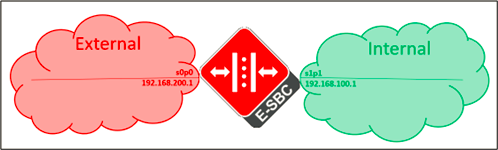
Let’s forget the management interfaces running in the lab devices for now, the concept of realm would be applied as the following image associating the SBCs interfaces to the realms and any external device sending traffic to the IPs associated.
[](https://wiki.tinod.net/uploads/images/gallery/2023-03/ztIg4tQXAUcr9pqd-jsUimage.png)
Now let’s go back to the CLI and configure the realms as shown in the image above, it’s important to mention that identifier can have any name, in my case I used the same names used in physical interfaces and network interfaces, but the key is associate the correct network interface name created in the previous entry.
```shell
PCOSBC# config t
PCOSBC(configure)# media-manager
PCOSBC(media-manager)# realm-config
PCOSBC(realm-config)# identifier External
PCOSBC(realm-config)#
PCOSBC(realm-config)# network-interfaces External
PCOSBC(realm-config)#
PCOSBC(realm-config)# done
realm-config
```
realm-config extended
realm-config
identifier External
description
addr-prefix 0.0.0.0
network-interfaces External:0
media-realm-list
mm-in-realm disabled
mm-in-network enabled
mm-same-ip enabled
mm-in-system enabled
bw-cac-non-mm disabled
msm-release disabled
qos-enable disabled
max-bandwidth 0
fallback-bandwidth 0
max-priority-bandwidth 0
max-latency 0
max-jitter 0
max-packet-loss 0
observ-window-size 0
parent-realm
dns-realm
media-policy
nsep-media-policy
rtcp-mux disabled
ice-profile
teams-fqdn
teams-fqdn-in-uri disabled
sdp-inactive-only disabled
dtls-srtp-profile
class-profile
in-translationid
out-translationid
in-manipulationid
out-manipulationid
average-rate-limit 0
access-control-trust-level none
invalid-signal-threshold 0
maximum-signal-threshold 0
untrusted-signal-threshold 0
nat-trust-threshold 0
max-endpoints-per-nat 0
nat-invalid-message-threshold 0
wait-time-for-invalid-register 0
deny-period 30
session-max-life-limit 0
cac-failure-threshold 0
untrust-cac-failure-threshold 0
ext-policy-svr
diam-e2-address-realm
subscription-id-type END\_USER\_NONE
symmetric-latching disabled
pai-strip disabled
trunk-context
device-id
early-media-allow
enforcement-profile
additional-prefixes
restricted-latching none
restriction-mask 32
user-cac-mode none
user-cac-bandwidth 0
user-cac-sessions 0
icmp-detect-multiplier 0
icmp-advertisement-interval 0
icmp-target-ip
monthly-minutes 0
options
spl-options
accounting-enable enabled
net-management-control disabled
delay-media-update disabled
refer-call-transfer disabled
hold-refer-reinvite disabled
refer-notify-provisional none
dyn-refer-term disabled
codec-policy
codec-manip-in-realm disabled
codec-manip-in-network enabled
rtcp-policy
constraint-name
session-recording-server
session-recording-required disabled
manipulation-string
manipulation-pattern
stun-enable disabled
stun-server-ip 0.0.0.0
stun-server-port 3478
stun-changed-ip 0.0.0.0
stun-changed-port 3479
sip-profile
flow-time-limit -1
initial-guard-timer -1
subsq-guard-timer -1
tcp-flow-time-limit -1
tcp-initial-guard-timer -1
tcp-subsq-guard-timer -1
sip-isup-profile
match-media-profiles
qos-constraint
block-rtcp disabled
hide-egress-media-update disabled
tcp-media-profile
monitoring-filters
node-functionality
default-location-string
alt-family-realm
pref-addr-type none
sm-icsi-match-for-invite
sm-icsi-match-for-message
merge-early-dialogs disabled
user-site
srvcc-trfo
feature-trfo
real-config extended
realm-config
identifier Internal
description
addr-prefix 0.0.0.0
network-interfaces Internal:0
media-realm-list
mm-in-realm disabled
mm-in-network enabled
mm-same-ip enabled
mm-in-system enabled
bw-cac-non-mm disabled
msm-release disabled
qos-enable disabled
max-bandwidth 0
fallback-bandwidth 0
max-priority-bandwidth 0
max-latency 0
max-jitter 0
max-packet-loss 0
observ-window-size 0
parent-realm
dns-realm
media-policy
nsep-media-policy
rtcp-mux disabled
ice-profile
teams-fqdn
teams-fqdn-in-uri disabled
sdp-inactive-only disabled
dtls-srtp-profile
class-profile
in-translationid
out-translationid
in-manipulationid
out-manipulationid
average-rate-limit 0
access-control-trust-level none
invalid-signal-threshold 0
maximum-signal-threshold 0
untrusted-signal-threshold 0
nat-trust-threshold 0
max-endpoints-per-nat 0
nat-invalid-message-threshold 0
wait-time-for-invalid-register 0
deny-period 30
session-max-life-limit 0
cac-failure-threshold 0
untrust-cac-failure-threshold 0
ext-policy-svr
diam-e2-address-realm
subscription-id-type END\_USER\_NONE
symmetric-latching disabled
pai-strip disabled
trunk-context
device-id
early-media-allow
enforcement-profile
additional-prefixes
restricted-latching none
restriction-mask 32
user-cac-mode none
user-cac-bandwidth 0
user-cac-sessions 0
icmp-detect-multiplier 0
icmp-advertisement-interval 0
icmp-target-ip
monthly-minutes 0
options
spl-options
accounting-enable enabled
net-management-control disabled
delay-media-update disabled
refer-call-transfer disabled
hold-refer-reinvite disabled
refer-notify-provisional none
dyn-refer-term disabled
codec-policy
codec-manip-in-realm disabled
codec-manip-in-network enabled
rtcp-policy
constraint-name
session-recording-server
session-recording-required disabled
manipulation-string
manipulation-pattern
stun-enable disabled
stun-server-ip 0.0.0.0
stun-server-port 3478
stun-changed-ip 0.0.0.0
stun-changed-port 3479
sip-profile
flow-time-limit -1
initial-guard-timer -1
subsq-guard-timer -1
tcp-flow-time-limit -1
tcp-initial-guard-timer -1
tcp-subsq-guard-timer -1
sip-isup-profile
match-media-profiles
qos-constraint
block-rtcp disabled
hide-egress-media-update disabled
tcp-media-profile
monitoring-filters
node-functionality
default-location-string
alt-family-realm
pref-addr-type none
sm-icsi-match-for-invite
sm-icsi-match-for-message
merge-early-dialogs disabled
user-site
srvcc-trfo
feature-trfo
Remember to issue the done command when completing the sip-port element and exit to jump to the sip-interface branch and issue the done command.
Setup SIP Interface for Internal
```bash
PCOSBC(configure)# session-router
PCOSBC(session-router)# sip-interface
PCOSBC(sip-interface)# realm-id Internal
PCOSBC(sip-interface)# sip-ports
PCOSBC(sip-port)# address 192.168.2.101
PCOSBC(sip-port)# transport-protocol UDP
PCOSBC(sip-port)#
PCOSBC(sip-port)# allow-anonymous all
PCOSBC(sip-port)# done
sip-port
address 192.168.2.101
port 5060
transport-protocol UDP
allow-anonymous all
multi-home-addrs
ims-aka-profile
PCOSBC(sip-port)# exit
PCOSBC(sip-interface)# done
sip-interface
state enabled
realm-id Internal
description
sip-port
address 192.168.2.101
port 5060
transport-protocol UDP
allow-anonymous all
multi-home-addrs
ims-aka-profile
```
An easy way to confirm the association of the IP address with the correct realm is issuing the command: show virtual need to save active config to display the information
```bash
PCOSBC# show virtual
intf phy-name vlan ip-addr realm type
0/0 External 0 192.168.10.201 External sip-port
1/1 Internal 0 192.168.10.101 Internal sip-port
```
# 5. - SBC Steering pool
With the current configuration Oracle SBC is now able to process signaling but there are two problems, first there are no resources to manage audio and there is no routing in place to process the session correctly.
Let’s fix the problem about the resources adding steering pools associated with the Internal and External realms.
Adding steering pools resources must be associated with the number of sessions to be supported and needs to be consider ports for video and RTCP. For this lab environment we will add only 101 ports.
```bash
PCOSBC# config t
PCOSBC(configure)# media-manager
PCOSBC(media-manager)# steering-pool
PCOSBC(steering-pool)# ip-address 192.168.10.201
PCOSBC(steering-pool)# start-port 20000
PCOSBC(steering-pool)# end-port 20100
PCOSBC(steering-pool)# realm-id External
PCOSBC(steering-pool)# done
steering-pool
ip-address 192.168.10.201
start-port 20000
end-port 20100
realm-id External
network-interface
last-modified-by admin@192.168.10.10
last-modified-date 2023-03-30 05:53:07
```
```bash
PCOSBC(media-manager)# steering-pool
PCOSBC(steering-pool)# ip-address 192.168.10.101
PCOSBC(steering-pool)# start-port 30000
PCOSBC(steering-pool)# end-port 30100
PCOSBC(steering-pool)# reallm
PCOSBC(steering-pool)# realm-id Internal
PCOSBC(steering-pool)# done
steering-pool
ip-address 192.168.10.101
start-port 30000
end-port 30100
realm-id Internal
network-interface
last-modified-by admin@192.168.10.10
last-modified-date 2023-03-30 05:53:47
```
an easy way to verify the number of ports assigned ot realms is issuing the command show mbcd realm
```bash
PCOSBC# show mbcd realms
05:55:51-47
--- Steering Ports --- ----------- Bandwidth Usage ----------
Realm Used Free No Ports Flows Ingrss Egress IngrssPriority EgressPriority Total Insuf BW
External 0 101 0 0 0K 0K 0K 0K 0K 0
Internal 0 101 0 0 0K 0K 0K 0K 0K 0
```
This command can be used in real time to verify if ports are enough to support current sessions.
# 6. - SBC Local Policies
The last step for this basic lab environment is to create routing to connect the External and Internal realms.
In Oracle SBCs this kind of configuration is called Policy Realm Based Realm Bridging.
To configure this routing, we need to create 2 local policies, indicating the source realm and destination realm, let’s go to the CLI: