# 0.- Oracle SBC Peer to peer lab Introduction

The objective of this first series of entries is to setup an environment to be able to perform testing on a Oracle Session Border Controller.

SIP traffic will be generated using Linphone application on 2 remote hosts using Oracle SBC.

<table border="1" id="bkmrk-name-network-managem" style="border-collapse: collapse; width: 61.1111%; height: 119px;"><colgroup><col style="width: 44.5359%;"></col><col style="width: 55.4675%;"></col></colgroup><tbody><tr style="height: 29.8px;"><td class="align-center" style="height: 29.8px; vertical-align: middle;">**Name**  
</td><td class="align-center" style="height: 29.8px; vertical-align: middle;">**Network**  
</td></tr><tr style="height: 29.8px;"><td class="align-center" style="height: 29.8px; vertical-align: middle;">Management (Home Network)  
</td><td class="align-center" style="height: 29.8px; vertical-align: middle;">192.168.10.0/24  
</td></tr><tr style="height: 29.8px;"><td class="align-center" style="height: 29.8px; vertical-align: middle;">External  
</td><td class="align-center" style="height: 29.8px; vertical-align: middle;">192.168.11.0/24</td></tr><tr><td class="align-center" style="vertical-align: middle;">Internal  
</td><td class="align-center" style="vertical-align: middle;">192.168.12.0/24  
</td></tr></tbody></table>

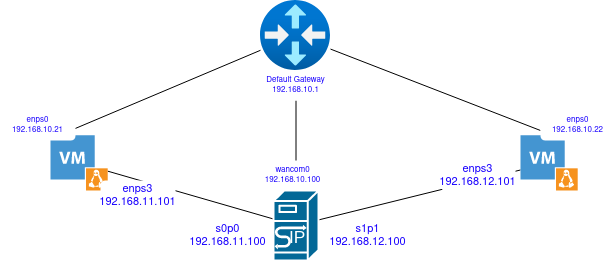
Diagram representing our LAB

<div drawio-diagram="151"><img src="https://wiki.tinod.net/uploads/images/drawio/2023-04/Ie31z1pAWQoIn1Xy-drawing-1-1682568512.png" alt=""/></div>

<table border="1" id="bkmrk-device-interface-ip-" style="border-collapse: collapse; width: 92.0988%; height: 111.4px; border-width: 1px; border-style: ridge;"><colgroup><col style="width: 20%;"></col><col style="width: 20%;"></col><col style="width: 20%;"></col><col style="width: 20%;"></col><col style="width: 20%;"></col></colgroup><tbody><tr style="height: 29.8px;"><td style="height: 29.8px; border-width: 1px;">Device</td><td style="height: 29.8px; border-width: 1px;">Interface  
</td><td style="height: 29.8px; border-width: 1px;">IP  
</td><td style="height: 29.8px; border-width: 1px;">Gateway  
</td><td style="height: 29.8px; border-width: 1px;">Description  
</td></tr><tr style="height: 29.8px;"><td style="height: 29.8px; border-width: 1px;">OracleSBC  
</td><td style="height: 29.8px; border-width: 1px;">wancom0  
</td><td style="height: 29.8px; border-width: 1px;">192.168.10.100  
</td><td style="height: 29.8px; border-width: 1px;">192.168.10.1  
</td><td style="height: 29.8px; border-width: 1px;">SBC Management</td></tr><tr><td style="border-width: 1px;">OracleSBC</td><td style="border-width: 1px;">s0p0  
</td><td style="border-width: 1px;">192.168.11.100  
</td><td style="border-width: 1px;">192.168.11.1  
</td><td style="border-width: 1px;">SBC Internal</td></tr><tr><td style="border-width: 1px;">OracleSBC</td><td style="border-width: 1px;">s1p1  
</td><td style="border-width: 1px;">192.168.12.100  
</td><td style="border-width: 1px;">192.168.12.1  
</td><td style="border-width: 1px;">SBC External</td></tr><tr><td style="border-width: 1px;">VM1  
</td><td style="border-width: 1px;">enp1s0  
</td><td style="border-width: 1px;">192.168.10.21  
</td><td style="border-width: 1px;">192.168.10.1  
</td><td style="border-width: 1px;">VM1 Management</td></tr><tr><td style="border-width: 1px;">VM1  
</td><td style="border-width: 1px;">enp3s0  
</td><td style="border-width: 1px;">192.168.11.101  
</td><td style="border-width: 1px;">192.168.11.1  
</td><td style="border-width: 1px;">VM1 Internal</td></tr><tr><td style="border-width: 1px;">VM1  
</td><td style="border-width: 1px;">enp1s0  
</td><td style="border-width: 1px;">192.168.10.22  
</td><td style="border-width: 1px;">192.168.10.1  
</td><td style="border-width: 1px;">VM1 Management  
</td></tr><tr style="height: 29.8px;"><td style="border-width: 1px;">VM1  
</td><td style="border-width: 1px;">enp3s0  
</td><td style="height: 29.8px; border-width: 1px;">192.168.12.101  
</td><td style="height: 29.8px; border-width: 1px;">192.168.12.1  
</td><td style="height: 29.8px; border-width: 1px;">VM2 External</td></tr></tbody></table>