Extensions
What Are Extensions?
Extensions are internal dialing numbers that allow users to reach each other within the organization without using a full DID number. Before an extension can be assigned to a user, it must first exist in an Extension Pool.
Two Main Areas
| Tab | Purpose |
|---|---|
| Extension Pools | Create and manage the inventory of available extension numbers |
| Assignments | Search and review how extensions are currently assigned to users |
The Pool-First Model
Create Extension Pool
        ↓
Assign Pool to a Division
        ↓
Extensions become available for assignment
        ↓
Assign extension to user via Contact Information
⚠️ You cannot assign an extension to a user until it exists in an Extension Pool.
Navigation
| Task | Path |
|---|---|
| Open Extensions | Admin → Telephony → Extensions |
| Open Extension Pools | Extensions → Extension Pools tab |
| Open Assignments | Extensions → Assignments tab |
| Add extension(s) | Extension Pools → Add |
| Assign to user | Admin → People and Permissions → People → [User] → Contact Information |
Required permissions:
Telephony > Plugin > AllTelephony > Extensions > Add, Edit, View, and Delete
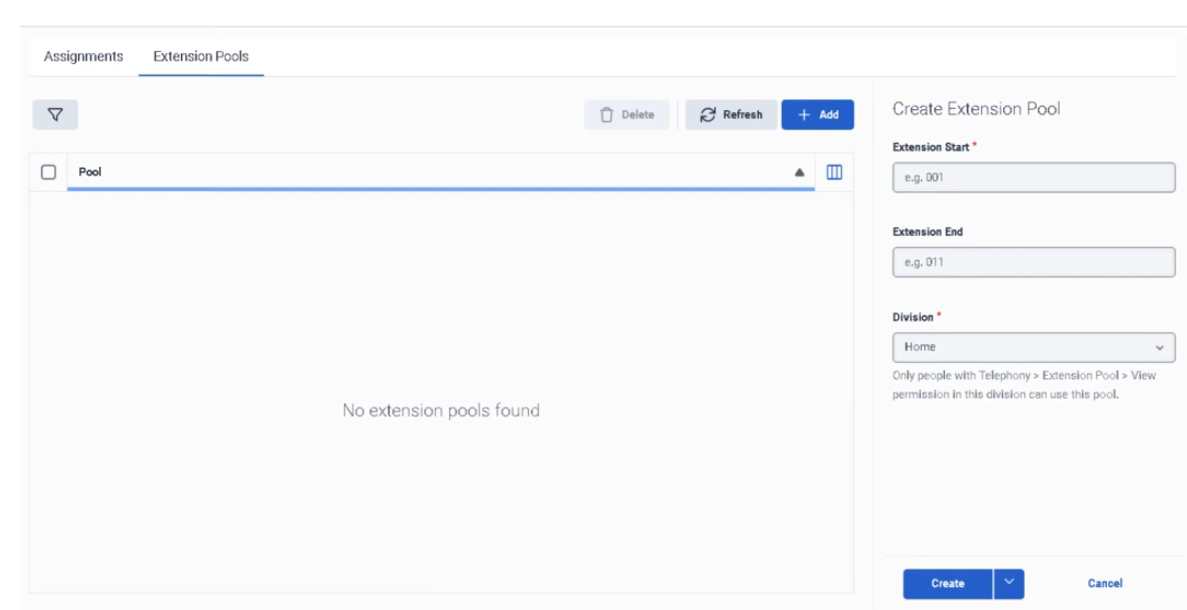
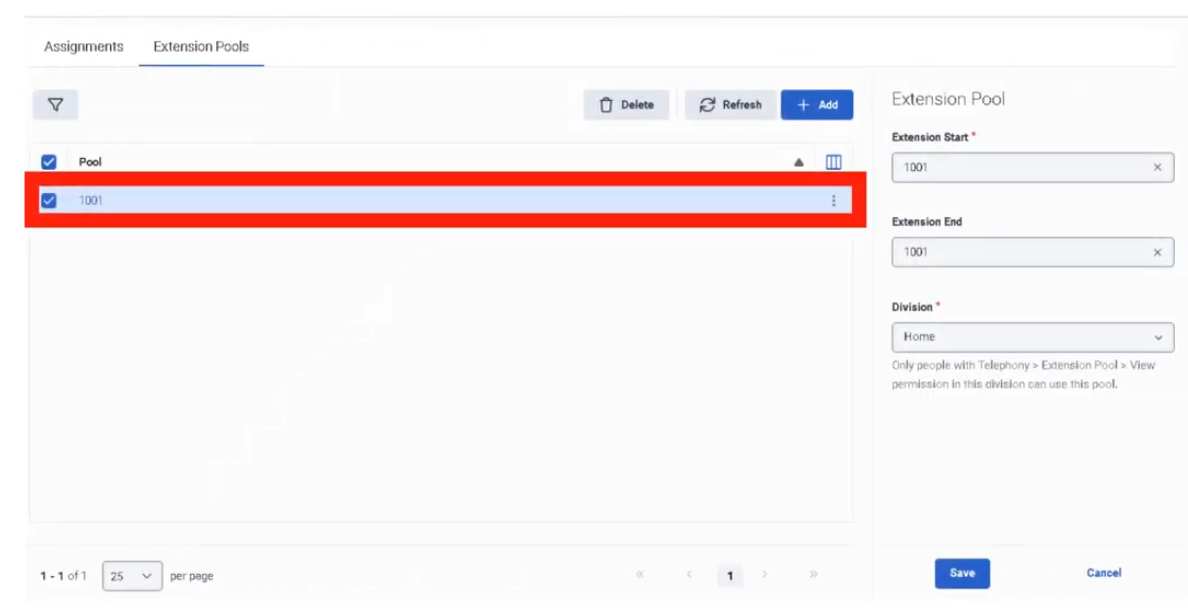
Step 1: Create an Extension Pool
| Step | Action |
|---|---|
| Step 1 | Navigate to Admin → Telephony → Extensions |
| Step 2 | Open the Extension Pools tab |
| Step 3 | Click Add |
| Step 4 | Enter Extension Start (single number, or first in a range) |
| Step 5 | Enter Extension End — leave blank for a single extension, or fill for a range |
| Step 6 | Select the Division |
| Step 7 | Click Create |
Extension Pool Fields
| Field | Description |
|---|---|
| Extension Start | Single extension number, or first number in a range |
| Extension End | Last number in a range; leave blank for a single extension |
| Division | Access-control boundary for this pool |
Step 2: Assign Extension to a User
Extensions are assigned through the user's profile, not from the Extensions page directly.
| Step | Action |
|---|---|
| Step 1 | Navigate to Admin → People and Permissions → People |
| Step 2 | Search for the user and open Edit Person |
| Step 3 | Open the Person Details tab |
| Step 4 | Click View Edit Mode |
| Step 5 | In Contact Information, click Edit |
| Step 6 | Under Phone, enter the extension in the ext. field of an empty Work Phone entry |
| Step 7 | Click Save |
| Step 8 | Return to Extensions → Assignments to confirm the extension appears |
⚠️ Critical: Enter the extension only in a Work Phone entry that does not already have a phone number. Adding an extension to an entry that already contains a number prevents Genesys Cloud from generating a dial plan for the user, and the extension will not appear in the Assignments page.
Key Rules
| Rule | Detail |
|---|---|
| Pool first | Extension must exist in a pool before it can be assigned |
| Unique extensions | Duplicate extension numbers are not allowed |
| Empty Work Phone entry | Extension must be entered in an empty Work Phone slot, not alongside an existing number |
| DID and extension are separate | If a user has both, they must be separate phone entries |
| Range deletion | If an extension was added as part of a range, the entire range may need to be deleted — you cannot delete a single number from within a range |
| Assigned range deletion | Cannot delete an extension pool while any extension in its range is assigned to a user |
| Propagation delay | After assigning an extension, it can take up to 60 minutes before it is accessible in a Dial By Extension action |
Assignments View
The Assignments tab lets you:
- Search by extension number
- View which user each extension is assigned to
- Open the user's profile directly from search results
- Customize visible columns and row density
Troubleshooting
| Issue | Cause | Resolution |
|---|---|---|
| Extension not assignable | Not added to an Extension Pool | Add it to Extension Pools first |
| Duplicate extension error | Same number already exists | Use a unique extension |
| Extension not visible in Assignments | Entered in a Work Phone entry that already had a number | Remove and re-enter in an empty Work Phone entry |
| Cannot delete extension | Belongs to a range or is currently assigned | Remove the user assignment first, or delete the entire range |
| User not receiving calls by extension | Profile or dial-plan issue | Verify pool membership, user profile entry, and permissions |
| Dial By Extension not working immediately | Propagation delay | Wait up to 60 minutes and retest |
Quick Reference
| Question | Answer |
|---|---|
| Where do you manage extensions? | Admin → Telephony → Extensions |
| What are the two main areas? | Extension Pools and Assignments |
| What must happen before assigning an extension? | It must be added to an Extension Pool |
| Can duplicate extensions exist? | No |
| Where is the extension assigned to a user? | In the user's Contact Information, in the ext. field |
| Can you delete one number from a range? | Not if it was originally entered as part of a range |
| How long can Dial By Extension take to recognize a new extension? | Up to 60 minutes |
Naming Convention
| Resource | Example |
|---|---|
| Extension Pool | Support_Ext_Pool_4100_4199 |
| Extension Pool | Sales_Ext_Pool_4200_4299 |
Pattern: <Division>_Ext_Pool_<Start>_<End>
See Also
- DID & Toll-Free Numbers — external numbers; different from internal extensions
- User Profile Management — Contact Information is where extensions are assigned to users
- Divisions & Access Control — divisions are required when creating extension pools
- Architectural Build Order — extensions are assigned during Phase 3 (People)
Screenshots