AZ-104 Azure Identity - Creating and Managing Users
- Describing Users
- Type of Users
- Creating a User
- Managing User Propertiies
- Bulk Adding Users
- Inviting Guests
Entra ID
Describing Members
- Administrative users: Global admins, Billing Administrators, User Administrators.
- Members: Employees such as a support engineer to manage virtual machines, organization data engineering team with access to specific services.
- Guest users: Users invited from a different Microsoft Entra ID Tenant, etc.
All users are part of Azure AD Tenant and are all just identity objects with certain properties, each member will have a set of default permissions and all these members are all identity objects with JSON properties we can modify these properties such as job title, given name or user's location.
- Administrators: users whit administrator role assigned
- Members: Regular user that are native to Azure AD
- Guest: External users that tare invited to the azure AD Tenant
Creating a user in Entra ID
Different methods of creating users
Exercise:
- Create/add a User - create a member account inside off Entra ID
- Update user properties - Update the properties to show this user is part of the HR department
- Bulk add users - Using a csv file, bulk add users to azure AD
- Invite a Guest account - Invite an External guest to Azure AD


After creating our user we can go back to list all user and select our new user, here we can edit properties, manage assigned roles, admin units, groups etc.

Inviting a Guest Account
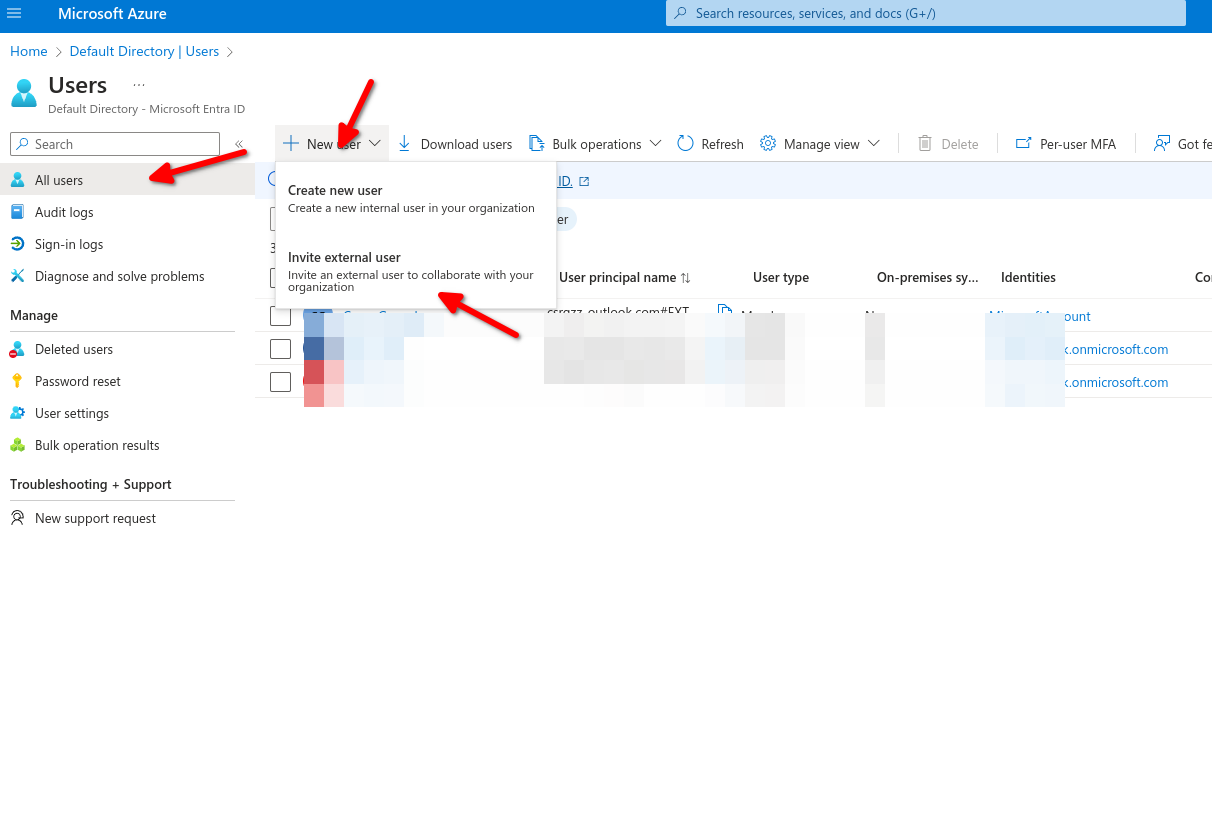

An Invitation will be sent to access your Organization
Type of users - Administrators Members and Guest Accounts.
Role Assignment - Determines permissions and access.
Object Ownership - App, Devices, groups and resources that are owned.