5.- AZ-104 Azure - Storage
- AZ-104 Azure - Storage Accounts
- AZ-104 Azure - Conceptualizing Azure Blog Storage
- AZ-104 Azure - Configuring blob object replication
- AZ-104 Azure - Configuring Blob Lifecycle Management
AZ-104 Azure - Storage Accounts
- Azure Queue: Message Based storage for microservices.
- Azure Table: Non-relational semi-structured data storage service.
- Azure Files: Cloud-based file-sharing service.
- Azure blob: object-oriented storage solutions (store jpgs, mp4s, etc).
| Type of storage account | Supported storage services | Redundancy options | Usage |
|---|---|---|---|
| Standard general-purpose v2 | Blob Storage (including Data Lake Storage1), Queue Storage, Table Storage, and Azure Files | Locally redundant storage (LRS) / geo-redundant storage (GRS) / read-access geo-redundant storage (RA-GRS) Zone-redundant storage (ZRS) / geo-zone-redundant storage (GZRS) / read-access geo-zone-redundant storage (RA-GZRS)2 |
Standard storage account type for blobs, file shares, queues, and tables. Recommended for most scenarios using Azure Storage. If you want support for network file system (NFS) in Azure Files, use the premium file shares account type. |
| Premium block blobs3 | Blob Storage (including Data Lake Storage1) | LRS ZRS2 |
Premium storage account type for block blobs and append blobs. Recommended for scenarios with high transaction rates or that use smaller objects or require consistently low storage latency. Learn more about example workloads. |
| Premium file shares3 | Azure Files | LRS ZRS2 |
Premium storage account type for file shares only. Recommended for enterprise or high-performance scale applications. Use this account type if you want a storage account that supports both Server Message Block (SMB) and NFS file shares. |
| Premium page blobs3 | Page blobs only | LRS ZRS2 |
Premium storage account type for page blobs only. Learn more about page blobs and sample use cases. |
Storage accounts
- Account type: determines feature and costs.
- Performance tier: determines performance levels.
- Replication: determines infrastructure redundancy.
- Access tier: determines access level and data costs.
Azure Storage Redundancy
Locally redundant storage

Locally redundant storage (LRS) copies your data three times across separate racks of hardware in a datacenter inside one region. Even if there's a hardware failure or if there's maintenance work in the datacenter, this replication type ensures data is available for use.
LRS doesn't protect you from a datacenter-wide outage. If the datacenter goes down, you could lose your data.
Geographically redundant storage
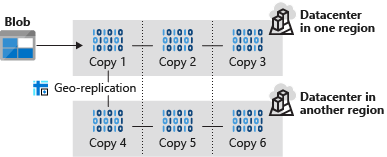
Read-access geo-redundant storage
With GRS, your secondary region isn't available for read access until the primary region fails. If you want to read from the secondary region, even if the primary region hasn't failed, use Read-access geo-redundant storage (RA-GRS) for your replication type.
Zone-redundant storage

Zone-redundant storage (ZRS) copies your data in three storage clusters in a single region. Each cluster is in a different physical location and is considered as a single availability zone. Each cluster uses its own separate utilities for things like networking and power. If one datacenter is experiencing an outage, your data remains accessible from another availability zone in the same Azure region.
Because all availability zones are in a single region, ZRS can't protect your data from a regional-level outage.
Geo-zone-redundant storage
Geo-zone-redundant storage (GZRS) combines the high availability benefits of ZRS with GRS. With this replication type, your data is copied across three availability zones in one region. Data is also replicated three times to another secondary region that's paired with it. This way, your zone-redundant data is also secure from regional-level outages.
Read-access geo-zone-redundant storage
Read-access geo-zone-redundant storage (RA-GZRS) uses the same replication method as GZRS, but lets you read from the secondary region. If you want to read the data that's replicated to the secondary region, even if your primary isn't experiencing downtime, use RA-GZRS for your replication type.
GZRS and RA-GZRS are currently available in the following regions:
- South Africa North
- Australia East
- East Asia
- Japan East
- Korea Central
- Southeast Asia
- Central India
- France Central
- Germany West Central
- North Europe
- Norway East
- Sweden Central
- Switzerland North
- UK South
- West Europe
- Canada Central
- Central US
- East US
- East US 2
- South Central US
- West US 2
- West US 3
- US Gov Virginia
- Brazil South
Paired regions
A paired region is where an Azure region is paired with another in the same geographical location to protect against regional outage. Paired regions are used with GRS and GZRS replication types.

Here's a list showing some of the regions that are paired together. You can get the full list at Azure paired regions.
| Region | Region | |
|---|---|---|
| Asia | East Asia | Southeast Asia |
| Australia | Australia East | Australia Southeast |
| Canada | Canada Central | Canada East |
| China | China North | China East |
| Europe | North Europe (Ireland) | West Europe (Netherlands) |
| Japan | Japan East | Japan West |
| North America | East US | West US |
| South Africa | South Africa North | South Africa West |
| UK | UK West | UK South |
Use cases for each replication type
The following table summarizes how many copies you get with each replication type and when you should use it.
| Replication type | Copies | Use case |
|---|---|---|
| LRS | 3 | Data remains highly available, but for compliance reasons, isn't allowed to leave the local datacenter. |
| GRS | 6 | App has access to the data, even if an entire region has an outage. |
| RA-GRS | 6 | App reads from multiple geographical locations, so you can serve users from a location that's closer to them. |
| ZRS | 3 | Need redundancy in multiple physical locations, but because of compliance, data isn't allowed to leave a region. |
| GZRS | 6 | App can access data, even if the primary region has failed, and your secondary region has a datacenter that's experiencing an outage, but you don't want to read from the secondary region unless the primary region is down. |
| RA-GZRS | 6 | Regularly read data from your secondary region, perhaps to serve users from a location closer to them, even if a datacenter is up in your primary region. |
Creating a storage account

Select type of redundancy


AZ-104 Azure - Conceptualizing Azure Blog Storage
- Describing Azure Blob Storage
- Components of Blob Architecture
- Type of Blobs
- Container Access Levels
Azure Blob Storage is Microsoft's object storage solution for the cloud. Blob Storage is optimized for storing massive amounts of unstructured data. Unstructured data is data that doesn't adhere to a particular data model or definition, such as text or binary data. Its object based and easily accessible from HTTP/REST

Blob Storage is designed for:
- Serving images or documents directly to a browser.
- Storing files for distributed access.
- Streaming video and audio.
- Writing to log files.
- Storing data for backup and restore, disaster recovery, and archiving.
- Storing data for analysis by an on-premises or Azure-hosted service.
Blob Architecture
- Blob Service: A sub service for storage accounts.
- Blob Container: The container where we store our blobs.
- Blobs: The data we store in our containers.
Types of Blobs
- Block blobs: Storing images or videos best suited for streaming.
- Append blobs: Log files
- Page Blobs: Virtual machine disks
Container Access Level
- Access control: By default, public access to blobs is granted at the storage account level
Container Access Levels:
- Private: No anonymous access.
- Blob: Anonymous access to blob
- Container: Anonymous access to container and blobs it contains.
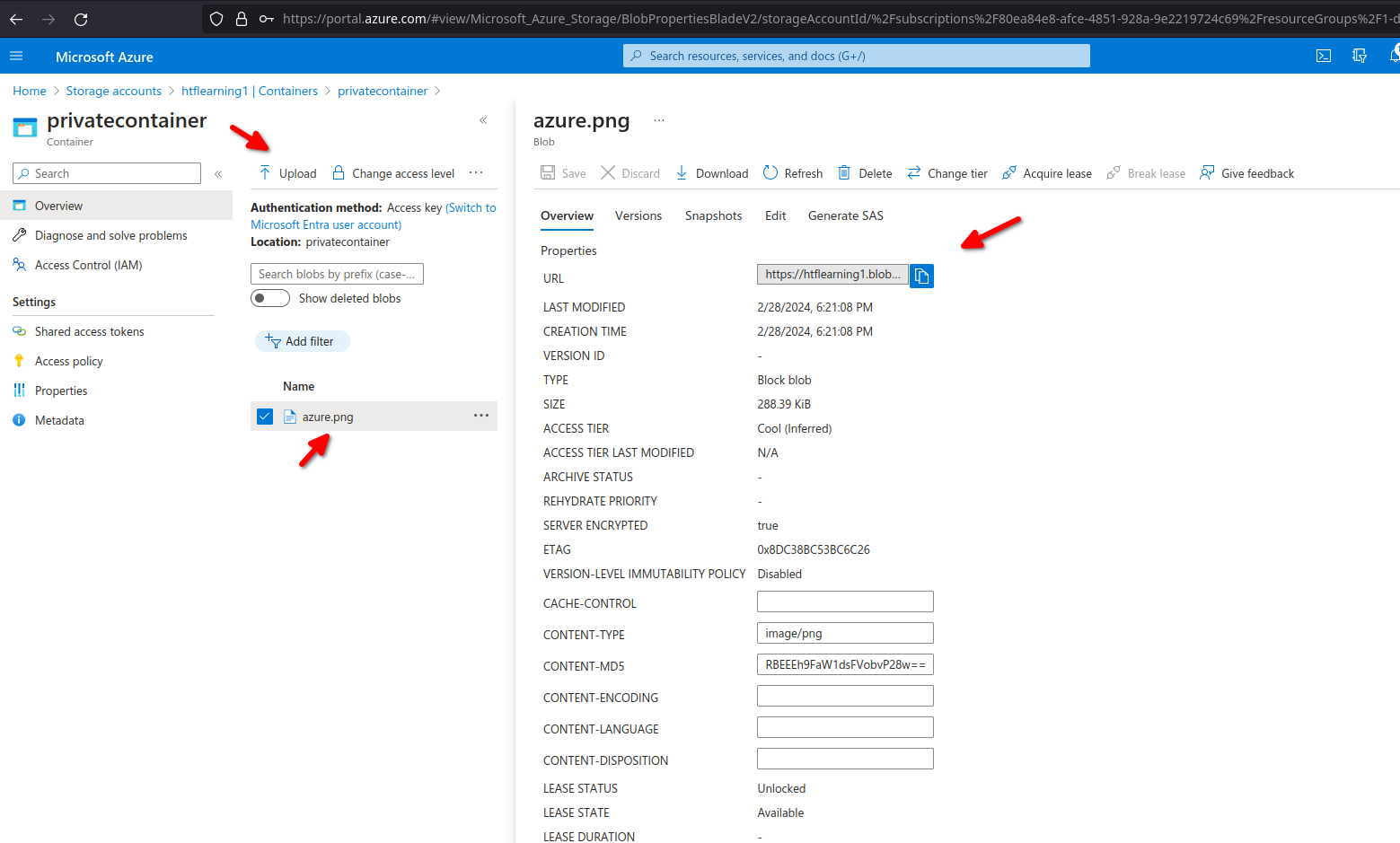
Now let's access our Storage account ,below we can see the system storage account, here we will crate a container

First check if blob anonymous access its enabled if not click on the link to enable

now create a new container, anonymous access level will only be available if blob anonymous access its enabled.

3 different levels of containers with different access.

We can see each container has its own url to access the container

now let's upload a random file to our private container, we can see it has its own url to access the file directly
AZ-104 Azure - Configuring blob object replication
Object replication asynchronously copies blocks of blobs between storage accounts
-
- Requires source and destination storage accounts
- Requires versioning and change feed
- Support cross-tenant replication
- Requires source and destination storage accounts
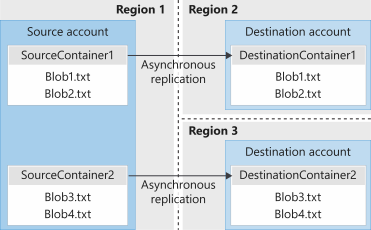
- Minimize latency - reduce latency for read requests.
- Increased efficiency - Processing block blob in different regions.
- Data distribution - Processing and analyzing data in one location that replicate to other regions.
- Cost Optimization -moving replicate data to the archive tier can reduce cost.
- Versioning: Versioning must be enabled on both the source and desalination accounts to perform replication
- Change feed: Change feed must be enabled on the source account. Azure storage monitors the $blobchangefeed to advise replication.
- Cross subscription and azure AD: Object replication is supported across subscriptions and azure AD tenants
- Replication Policy: A Storage account can be a source for up to two destination accounts. Each policy supports only a single pairing using a policy ID.
Create a destination storage account and make sure versioning for blobs its enabled

For source storage account we will enable versioning and change feed.

now we need to add our containers one on source and one on destination storage account.


Next step is to create an object replication rule on our source data storage

for our replication rule we need to select the destination storage account in this case dststorageaccountcloud1 specify the source container and destination container we can also apply filters to replicate only data on specific folder structure ,we can also specify which data to copy over here we select only new objects.


Now we are uploading a new blob on our src storage account and src container

now we can see file blob1.txt on our source account but not on our destination as there is a rule
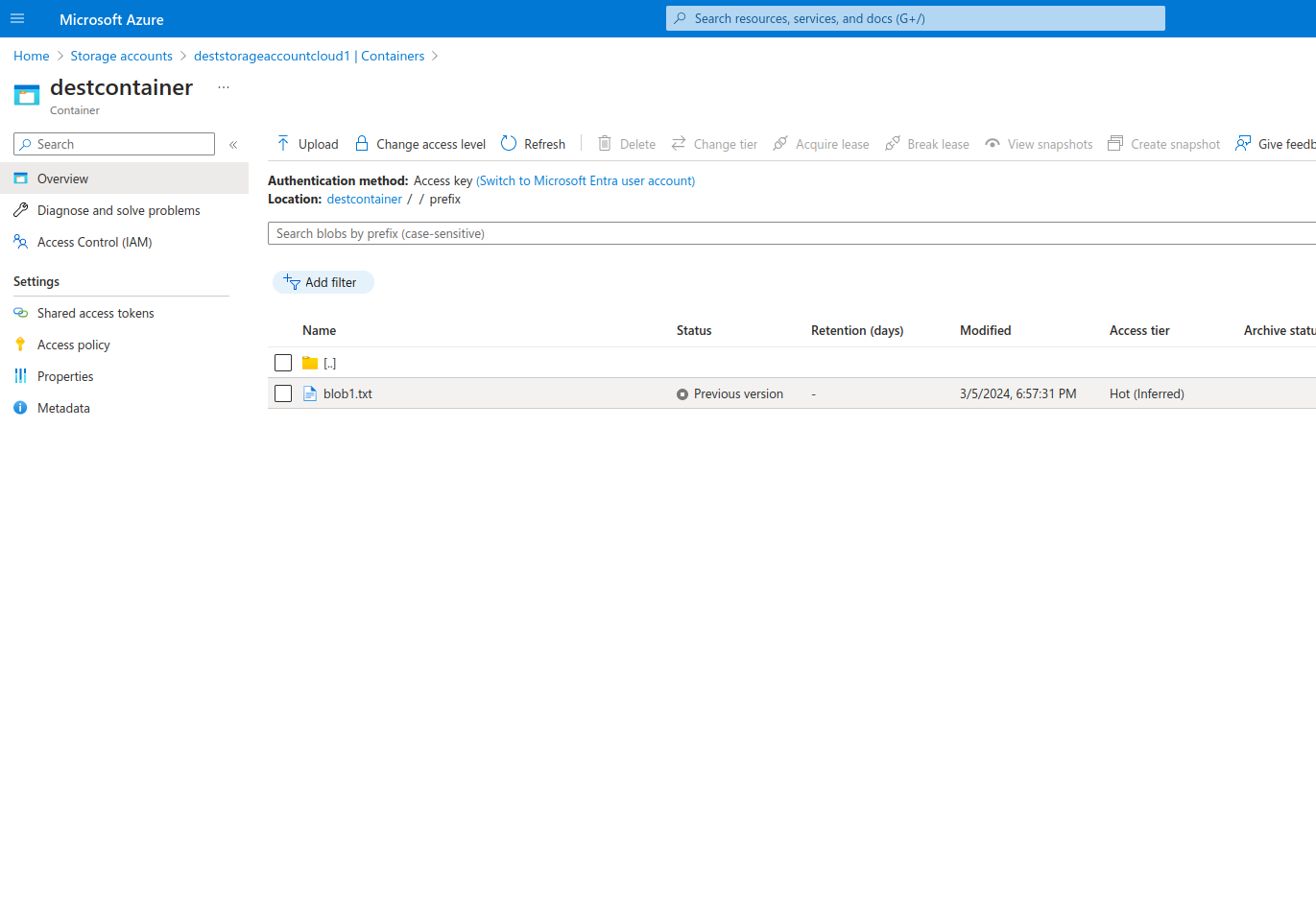
we are adding our same blob but this time we will specify the folder /prefix to match our object rule.

blob.txt is now also on destination container due to our object replication
AZ-104 Azure - Configuring Blob Lifecycle Management
Azure Blob Storage service feature that enables automation to manage lifecycle operations of blobs.
- Automate blob lifecycle: Easily manage blob life-cycles from frequent use to archive or deletion
- Move access tiers: Switch blobs between tiers to meet access or usage needs.
- Optimize cost: Save money by decreasing admin overhead and tiering blobs based on usage requirements.

Let's add random files to our container and add a lifecycle rule


we can also specify a filter to modify only those inside our testcontainer/folder

Now after 30 days all our blobs will move from hot to cold.
- Storage accounts: Support GPv2 storage accounts and blob storage accounts.
- Types and Sub-types: Support block and append blobs and support sub-types such as based blobs snapshots and versions.
- Filtering: filter blobs in the rule using prefix or blob index matches.
- Scoping: Scope at the storage account or limit blobs with filters.
- If/Then Logic: Uses logic in lifecycle rules to move blobs through access tiers based on modification and access times.