4.- AZ-104 Azure RBAC - Role-based Access Control
- AZ-104 Azure RBAC - Understanding Roles in Azure
- AZ-104 Azure RBAC - Assigning access to resources
- AZ-104 Azure RBAC - LAB Using service Principal Identity to List AD Roles
- AZ-104 Azure RBAC - Creating custom roles
AZ-104 Azure RBAC - Understanding Roles in Azure
- Describing RBAC
- Describing Azure Roles
- Describing Azure AD Roles
- Azure Roles vs Azure AD Roles
- RBAC Architecture
Describing RBAC
"Who can do what, where, who what and where"
Describing Azure Roles
- Owner: Full access to resources and delegates access to other users
- Reader: Provides the ability to view sources, cannot perform actions on resources
- contributor: Can create and manage resources
- User Access Administrator: Can delegate access to resources
Describing Azure Entra ID Roles
- Special set of roles for providing access to manage identity objects inside our azure tenant, to manage user application or devices not resources.
- Global Administrator: Provide access to manage AD Resources
- Billing Administrator: Perform billing tasks
- User Administrator: Can manage users and groups inside Azure Entra ID Tenant
- Helpdesk Administrator: perform password resets if SSPR is not enabled.
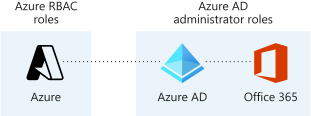
Microsoft Entra and Azure roles
Microsoft Entra roles and Azure roles are often confused when you first work with Azure. Microsoft Entra roles provide the mechanism for managing permissions to Microsoft Entra resources, like user accounts and passwords. Azure roles provide a wealth of capabilities for managing Azure resources like virtual machines (VMs) at a granular level.
| Azure Roles |
Microsoft Entra ID Roles |
| Manage access to Azure resources like VMs, storage, networks, and more | Manage access to Microsoft Entra resources like user accounts and passwords |
| Multiple scope levels (management group, subscription, resource group, resource) | Scope only at tenant level |
| Role information accessible through Azure portal, Azure CLI, Azure PowerShell, Azure Resource Manager templates, REST API | Role information accessible in Azure admin portal, Microsoft 365 admin center, Microsoft Graph, Microsoft Graph PowerShell |
| Azure Roles |
Azure Entra ID Roles |
| Manage access to Azure resources |
Manage access to Azure AD Resources at tenant |
| Scope can be at multiple levels |
Scope is at tenant level |
| Support custom roles |
Support custom roles |
|
Main roles:
|
Main roles:
|
| Azure Roles | Azure Entra ID Roles |
| Control access to azure resources, VMs, Virtual Networks |
Control Access to Azure AD REsources, user objects, group devices, ad features |
| Referred to as Azure RBAC |
Built in roles |
| Built in roles |
Custom roles |
| custom roles |
Scope at Azure AD Tenant level, provide access for user that exist inside of our Azure Entra ID tenants to perform administrative functions inside of the tenant itself |
| Scope at management groups subscription groups resource groups and resources using identities that exist inside our azure AD Tenant |
AZ-104 Azure RBAC - Assigning access to resources
- Explaning Azure RBAC
- Understanding Role definitions
- Additive Property
Explaining Azure RBAC
Azure RBAC is an authorization system
- Security Principal: Defining the who we want to authorize, WHO?
- Role Definition: assign a role definition to that identity, WHAT?
- Scope: where we are defining where we are going to perform this actions, WHERE?
We have to provide this access explicit, there is an implicit deny

Understanding Role Definitions
Contributor
- Actions: Define what actions are allowed to be performed on the management plane, managing resources inside of azure like starting or stopping virtual machines.
- NotActions: Actions we are going to deny on managing resources inside of Azure. For example, if we wanted to allow a user to perform a restart on a virtual machine, we could outline that in Actions, but it could be overwritten and overruled by a NotAction denying that same action inside this role definition.
Then we have the next component, which are our DataActions, and our NotDataActions.And these are the same kind of thing as our Actions and NotActions, except for rather than being on the control plane of managing Azure resources, this will take an impact on data-related actionssuch as working with data inside of Azure Storage accounts.
- AssignableScope: where we define where we're going to assign the scope for this resource. And it can be all the way down
to a specific resource, where we assign the scope to a resource group, to a subscription, or even a management group.

For example, if we have this user here in our Azure Active Directory tenant that is assigned the Contributor role at the management group scope here, but also assigned a Reader role at a resource group scope inside of the same hierarchical structure, what we have to understand when we have overlapping roles like this, and multiple role assignments for a single identity, is that roles follow an additive property. So what we do is we add the effective permissions of each of these role definitions, and by performing this addition, this will inform us what the effective permissions will be. So in this case, Contributor + Reader = Contributor, because Contributor provides Reader functionality. So effectively, this user will have Contributor at the management group scope, and that will be inherited all the way down. And there's no additional permissions that are being provided by actually having the Reader role assignment. So this user's permissions will just waterfall all the way down and be inherited to the lowest level.

Assigning access
Lets go to resource groups and select a group (K8s_group in example below) then if we go to roles we can see all role assignments, here we can determine a user can be a contributor (grants full access to manage all roesources bu tdoes not allow you to assign roles in Azure RBAC)

We select contributor,, then add then add role assignment


Now back on resources group we can see the role assignments

Same inside those resources it inherited the assignment

- Provide identities with access to azure resources
- Roles are a collection of permissions
- There is a scoping hierarchy for role assignment
- Implicit deny - Explicit Allow - Explicit Deny
AZ-104 Azure RBAC - LAB Using service Principal Identity to List AD Roles
In this hands-on lab, you are tasked with gathering the role definitions and role assignments for your organization.
You do not have access to the portal, so you must collect this information via SSH connection, by using a Linux VM and a service principal. Once you have gained access to the Azure subscription, use the Azure CLI to collect the required information, and output to a file so you can email it to your manager.
Solution
Log in to the virtual machine using the credentials provided:
ssh cloud_user@<PUBLIC_IP_ADDRESS>
Log in to Azure using the Service Principal
- Once connected to the lab VM, perform the
az logincommand with the--service-principalflag to login to the Azure account:
az login --service-principal \
-u "<CLIENT_ID>" \
-p "<CLIENT_SECRET>" \
--tenant "<TENANT_ID>"
NOTE: To get your own
Tenant ID, search forTenant propertiesin the Azure portal. The value will be under theTenant IDfield.
If you experience an error regarding invalid arguments, please see the Additional Information section for the details of a fix.
List the Role Definitions and Role Assignments
- List the role definitions:
az role definition list - Output the list to a file named
roleinfo.json:az role definition list > roleinfo.json - List the role assignments:
az role assignment list --all - Append the list to the
roleinfo.jsonfile:az role assignment list --all >> roleinfo.json - Verify that the file was created successfully:
vi roleinfo.json

AZ-104 Azure RBAC - Creating custom roles
- Describing custom roles
- Creating role definitions
- Custom role definition
- No built in role met requirement
- user access administrator or owner role for the account
Assignment and scope of custom roles
Users with the User Access Administrator or Owner roles can create or assign custom roles in Azure RBAC.
You can assign custom roles to:
| Security principal | Summary |
|---|---|
| User | An individual who has a profile in Microsoft Entra ID |
| Group | A set of users created in Microsoft Entra ID |
| Service principals | A security identity used by applications or services to access specific Azure resources |
| Managed identity | An identity in Microsoft Entra ID that is automatically managed by Azure |
Sometimes, built-in roles don't grant the precise level of access you need. Custom roles allow you to define roles that meet the specific needs of your organization. You can assign the Azure custom roles you create to users, groups, and service principals at the scope of subscription, resource group, or resource.
Microsoft Entra roles and Azure roles are often confused when you first work with Azure. Microsoft Entra roles provide the mechanism for managing permissions to Microsoft Entra resources, like user accounts and passwords. Azure roles provide a wealth of capabilities for managing Azure resources like virtual machines (VMs) at a granular level
helpdesk.json
Name    "Helpdesk Administrators"
Description    "Can Read, Restart VMs, and log support tickets with Microsoft"
Actions
0    "*/read"
1    "Microsoft.Compute/virtualMachines/start/action"
2    "Microsoft.Support/*"
NotActions    []
DataActions    []
NotDataActions    []
AssignableScopes
0    "/subscriptions/subscriptionId"
Open powershell tytpe ini code and name of the json file, right click on top bar to save and exit editor

create custom role


Assign, you can assign to members groups, etc.

Here we can check our own access or check someone else access

- Provide identities with access to Azure Resources
- Roles are collection of permissions
- Scoping hierarchy for role assignments
- Custom role definition
- No built-in role meets requirements
- User Access Administrator or Owner role for the account