2.- AZ-104 Governance and Compliance
- AZ-104 - Governance and Compliance - Managing Subscriptions
- AZ-104 - Governance and Compliance - Using management groups
- AZ-104 - Governance and Compliance - Understanding Azure Policy
- AZ-104 - Governance and Compliance - Tagging Resources
- AZ-104 - Governance and Compliance - LAB Add Remove Tags
- AZ-104 - Governance and Compliance - Locking and Moving Resources
- AZ-104 - Governance and Compliance - Managing Azure Costs
- AZ-104 - Governance and Compliance - Building a cloud governance strategy wth Azure tooling
AZ-104 - Governance and Compliance - Managing Subscriptions
Organize and manage multiple Azure subscriptions
What are subscriptions
- Billing unit that aggregates all costs of underlying resources
- Contain resource groups and their associated resources
- Scoping level for governance and security
- Can be associated with only a single organization (Azure AD Tenant) at a time
Examples:
you can define multiple subscriptions per department to identify costs

Subscription naming conventions
- Prod/Dev/Staging
Subscriptions are named based on whether they are production, development or staging environments.
- Department/Teams
Subscriptions are named based on the department or team the subscription is intended for so that billing can then be easily associated with a given business unit.
- Region
Subscription are name based on the region of the business that uses the subscription.
AZ-104 - Governance and Compliance - Using management groups
What are Azure management groups?
Management groups
- Define management groups
- Understanding hierarchy
- Scoping
Managing subscriptions
Organize and manage subscriptions by logically grouping them into management groups
- Organizational hierarchy
- Provides another scope for enforcing governance and compliance

Parent-child relationships
- Root management group is the top level
- Management groups and subscriptions can have a single parent
- Supports six levels of hierarchy
Compliance Support
- Azure Policies
- Azure role-based access control (RBAC)
Next diagram shows how to represent an organizational hierarchy by having a Root management group, under root we have a subscription for EA, a Marketing management group and an IT management group.
The Marketing group also have 2 child subscriptions under the marketing management group and IT has another management group as a child management group.
This helps identify the hierarchy levels for our organization

All resources, permissions, etc will flow down in the hierarchy, for example if you give access to the root management group it will have access to IT, Marketing, etc it flow down in the hierarchy.
Illustration below shows 2 management groups under the main root Tenant group, we can access and add subscriptions or management groups inside an existing management group.

Here we can see the Parent management group for IManagementHTF its Tenant Root for HTF Organization since we created this management group inside our root

Root management group is not given by default
Root Management group cannot be moved or deleted
Azure RBAC is supported for management groups
Global Administrators must be elevated to User Access Administrator of root group
AZ-104 - Governance and Compliance - Understanding Azure Policy
Control and organize Azure resources with Azure Resource Manager
Understanding Azure Policy
- Define Azure Policy
- Components of a Policy
- Policy Examples
Enforce Compliance and enable auditing
Organization need to implement enterprise-level governance and compliance capabilities.
Prohibit resources
- control costs
- Restrict service access
Allowed Locations
- Geographical compliance

Policy Definition
Defines the evaluation criteria for compliance, and defines the actions that take place. Either audit or deny should be something outside of compliance.
Policy Assignment
The scope at which we will assign our policy. The scope could be a management group, subscription, resource group, or resource.
Initiative Definition
A collection of policies that are tailored to achieving a singular high-level goal together (e.g., ensuring that VMs meet standards).

| Policy Definition |
Evaluate if a VM is being created with our tag Project:az104. if the VM is missing the tag, then deny creation of the resource. |
| Policy assignment | Assign the policy at the scope of the resource where the VMs will be created |


AZ-104 - Governance and Compliance - Tagging Resources
Control and organize Azure resources with Azure Resource Manager
Tags
- Dept:Marketing - For example if create tag Dept:Marketing and tag all resources from Marketing this will help identify and provide billing to this resources to the Marketing department.
- Env:Prod - Identify wheather an environment is in production or dev

- Name can be 512 characters, and value can be 256 characters.
- Storage accounts can have a name with only 128 characters.
- Tags are not inherited.
- A resource can have 50 tags max.

Here we can create tags, tags are not allowed to have the same name

Lets test with the following ARM template.
(refer to Arm Template here to investigate how to deploy an ARM template)
Arm template for TAG test
{
"$schema": "https://schema.management.azure.com/schemas/2019-04-01/deploymentTemplate.json#",
"contentVersion": "1.0.0.0",
"parameters": {
"storageAccountName": {
"type": "string",
"metadata": {
"description": "Name of storage account"
}
},
"adminUsername": {
"type": "string",
"metadata": {
"description": "Admin username"
}
},
"adminPassword": {
"type": "securestring",
"metadata": {
"description": "Admin password"
}
},
"dnsNameforLBIP": {
"type": "string",
"metadata": {
"description": "DNS for Load Balancer IP"
}
},
"vmNamePrefix": {
"type": "string",
"defaultValue": "myVM",
"metadata": {
"description": "Prefix to use for VM names"
}
},
"imagePublisher": {
"type": "string",
"defaultValue": "MicrosoftWindowsServer",
"metadata": {
"description": "Image Publisher"
}
},
"imageOffer": {
"type": "string",
"defaultValue": "WindowsServer",
"metadata": {
"description": "Image Offer"
}
},
"imageSKU": {
"type": "string",
"defaultValue": "2019-Datacenter",
"metadata": {
"description": "Image SKU"
}
},
"lbName": {
"type": "string",
"defaultValue": "myLB",
"metadata": {
"description": "Load Balancer name"
}
},
"nicNamePrefix": {
"type": "string",
"defaultValue": "nic",
"metadata": {
"description": "Network Interface name prefix"
}
},
"publicIPAddressName": {
"type": "string",
"defaultValue": "myPublicIP",
"metadata": {
"description": "Public IP Name"
}
},
"vnetName": {
"type": "string",
"defaultValue": "myVNET",
"metadata": {
"description": "VNET name"
}
},
"vmSize": {
"type": "string",
"defaultValue": "Standard_D2s_v3",
"metadata": {
"description": "Size of the VM"
}
},
"location": {
"type": "string",
"defaultValue": "[resourceGroup().location]",
"metadata": {
"description": "Location for all resources"
}
}
},
"variables": {
"storageAccountType": "Standard_LRS",
"availabilitySetName": "myAvSet",
"addressPrefix": "10.0.0.0/16",
"subnetName": "Subnet-1",
"subnetPrefix": "10.0.0.0/24",
"publicIPAddressType": "Dynamic",
"subnetRef": "[resourceId('Microsoft.Network/virtualNetworks/subnets', parameters('vnetName'), variables ('subnetName'))]",
"publicIPAddressID": "[resourceId('Microsoft.Network/publicIPAddresses',parameters('publicIPAddressName'))]",
"numberOfInstances": 2
},
"resources": [
{
"type": "Microsoft.Storage/storageAccounts",
"name": "[parameters('storageAccountName')]",
"apiVersion": "2019-06-01",
"location": "[parameters('location')]",
"sku": {
"name": "[variables('storageAccountType')]"
},
"kind": "StorageV2"
},
{
"type": "Microsoft.Compute/availabilitySets",
"name": "[variables('availabilitySetName')]",
"apiVersion": "2019-12-01",
"location": "[parameters('location')]",
"properties": {
"platformFaultDomainCount": 2,
"platformUpdateDomainCount": 5
},
"sku": {
"name": "Aligned"
}
},
{
"apiVersion": "2020-05-01",
"type": "Microsoft.Network/publicIPAddresses",
"name": "[parameters('publicIPAddressName')]",
"location": "[parameters('location')]",
"properties": {
"publicIPAllocationMethod": "[variables('publicIPAddressType')]",
"dnsSettings": {
"domainNameLabel": "[parameters('dnsNameforLBIP')]"
}
}
},
{
"apiVersion": "2020-05-01",
"type": "Microsoft.Network/virtualNetworks",
"name": "[parameters('vnetName')]",
"location": "[parameters('location')]",
"properties": {
"addressSpace": {
"addressPrefixes": [
"[variables('addressPrefix')]"
]
},
"subnets": [
{
"name": "[variables('subnetName')]",
"properties": {
"addressPrefix": "[variables('subnetPrefix')]"
}
}
]
}
},
{
"apiVersion": "2020-05-01",
"type": "Microsoft.Network/networkInterfaces",
"name": "[concat(parameters('nicNamePrefix'), copyindex())]",
"location": "[parameters('location')]",
"copy": {
"name": "nicLoop",
"count": "[variables('numberOfInstances')]"
},
"dependsOn": [
"[resourceId('Microsoft.Network/virtualNetworks/', parameters('vnetName'))]",
"[resourceId('Microsoft.Network/loadBalancers/', parameters('lbName'))]"
],
"properties": {
"ipConfigurations": [
{
"name": "ipconfig1",
"properties": {
"privateIPAllocationMethod": "Dynamic",
"subnet": {
"id": "[variables('subnetRef')]"
},
"loadBalancerBackendAddressPools": [
{
"id": "[resourceId('Microsoft.Network/loadBalancers/backendAddressPools', parameters('lbName'), 'BackendPool1')]"
}
],
"loadBalancerInboundNatRules": [
{
"id": "[resourceId('Microsoft.Network/loadBalancers/inboundNatRules', parameters('lbName'), concat('RDP-VM', copyindex()))]"
}
]
}
}
]
}
},
{
"apiVersion": "2020-05-01",
"name": "[parameters('lbName')]",
"type": "Microsoft.Network/loadBalancers",
"location": "[parameters('location')]",
"dependsOn": [
"[resourceId('Microsoft.Network/publicIPAddresses/', parameters('publicIPAddressName'))]"
],
"properties": {
"frontendIPConfigurations": [
{
"name": "LoadBalancerFrontEnd",
"properties": {
"publicIPAddress": {
"id": "[variables('publicIPAddressID')]"
}
}
}
],
"backendAddressPools": [
{
"name": "BackendPool1"
}
],
"inboundNatRules": [
{
"name": "RDP-VM0",
"properties": {
"frontendIPConfiguration": {
"id": "[resourceId('Microsoft.Network/loadBalancers/frontendIPConfigurations', parameters('lbName'), 'LoadBalancerFrontEnd')]"
},
"protocol": "Tcp",
"frontendPort": 50001,
"backendPort": 3389,
"enableFloatingIP": false
}
},
{
"name": "RDP-VM1",
"properties": {
"frontendIPConfiguration": {
"id": "[resourceId('Microsoft.Network/loadBalancers/frontendIPConfigurations', parameters('lbName'), 'LoadBalancerFrontEnd')]"
},
"protocol": "Tcp",
"frontendPort": 50002,
"backendPort": 3389,
"enableFloatingIP": false
}
}
],
"loadBalancingRules": [
{
"name": "LBRule",
"properties": {
"frontendIPConfiguration": {
"id": "[resourceId('Microsoft.Network/loadBalancers/frontendIPConfigurations', parameters('lbName'), 'LoadBalancerFrontEnd')]"
},
"backendAddressPool": {
"id": "[resourceId('Microsoft.Network/loadBalancers/backendAddressPools', parameters('lbName'), 'BackendPool1')]"
},
"protocol": "Tcp",
"frontendPort": 80,
"backendPort": 80,
"enableFloatingIP": false,
"idleTimeoutInMinutes": 5,
"probe": {
"id": "[resourceId('Microsoft.Network/loadBalancers/probes', parameters('lbName'), 'tcpProbe')]"
}
}
}
],
"probes": [
{
"name": "tcpProbe",
"properties": {
"protocol": "Tcp",
"port": 80,
"intervalInSeconds": 5,
"numberOfProbes": 2
}
}
]
}
},
{
"apiVersion": "2019-12-01",
"type": "Microsoft.Compute/virtualMachines",
"name": "[concat(parameters('vmNamePrefix'), copyindex())]",
"copy": {
"name": "virtualMachineLoop",
"count": "[variables('numberOfInstances')]"
},
"location": "[parameters('location')]",
"dependsOn": [
"[resourceId('Microsoft.Storage/storageAccounts/', parameters('storageAccountName'))]",
"[resourceId('Microsoft.Network/networkInterfaces/', concat(parameters('nicNamePrefix'), copyindex()))]",
"[resourceId('Microsoft.Compute/availabilitySets/', variables('availabilitySetName'))]"
],
"properties": {
"availabilitySet": {
"id": "[resourceId('Microsoft.Compute/availabilitySets',variables('availabilitySetName'))]"
},
"hardwareProfile": {
"vmSize": "[parameters('vmSize')]"
},
"osProfile": {
"computerName": "[concat(parameters('vmNamePrefix'), copyIndex())]",
"adminUsername": "[parameters('adminUsername')]",
"adminPassword": "[parameters('adminPassword')]"
},
"storageProfile": {
"imageReference": {
"publisher": "[parameters('imagePublisher')]",
"offer": "[parameters('imageOffer')]",
"sku": "[parameters('imageSKU')]",
"version": "latest"
},
"osDisk": {
"createOption": "FromImage"
}
},
"networkProfile": {
"networkInterfaces": [
{
"id": "[resourceId('Microsoft.Network/networkInterfaces',concat(parameters('nicNamePrefix'),copyindex()))]"
}
]
},
"diagnosticsProfile": {
"bootDiagnostics": {
"enabled": true,
"storageUri": "[reference(parameters('storageAccountName'), '2019-06-01').primaryEndpoints.blob]"
}
}
}
}
]
}
After deploying our VMs using the ARM template, we can see that the resource group show the tags we previously assign.

If we go to our virtual machine we notice tags are not inherited from the resource group

Manage resources via tags, For example shutting down all VM's with a specific tag or developers can only update VMs with a specific tag.
AZ-104 - Governance and Compliance - LAB Add Remove Tags
Add, Remove and Update Tags for Resources in Azure
Introduction
In the scenario for this hands-on lab, the finance department has reached out to you. They are requesting additional taxonomy information on a recent Azure bill, including who created the resources, which department budget should be used for the resources, and if the resources are necessary for running business critical systems.
If there are any non-essential business systems, they ask that you signify that in some way.
Launch a powershell instance inside azure portal
Add Tags to the resource group
Run az group list and copy the name (395-5d062b4a-add-remove-and-update-tags-for-resou)
PS /home/cloud> az group list
[
{
"id": "/subscriptions/9734ed68-621d-47ed-babd-269110dbacb1/resourceGroups/395-5d062b4a-add-remove-and-update-tags-for-resou",
"location": "westus",
"managedBy": null,
"name": "395-5d062b4a-add-remove-and-update-tags-for-resou",
"properties": {
"provisioningState": "Succeeded"
},
"tags": null,
"type": "Microsoft.Resources/resourceGroups"
}
]Update the user group tags:
- az group update --resource-group "<RESOURCE_GROUP_NAME>" --tags "Environment=Production" "Dept=IT" "CreatedBy=<YourName>"
PS /home/cloud> az group update --resource-group "395-5d062b4a-add-remove-and-update-tags-for-resou" --tags "Environment=Production" "Dept=IT" "CreatedBy=Cesar"
{
"id": "/subscriptions/9734ed68-621d-47ed-babd-269110dbacb1/resourceGroups/395-5d062b4a-add-remove-and-update-tags-for-resou",
"location": "westus",
"managedBy": null,
"name": "395-5d062b4a-add-remove-and-update-tags-for-resou",
"properties": {
"provisioningState": "Succeeded"
},
"tags": {
"CreatedBy": "Cesar",
"Dept": "IT",
"Environment": "Production"
},
"type": "Microsoft.Resources/resourceGroups"
}
PS /home/cloud> Remove Tags for VM and Mark for Deletion
- In the Cloud Shell, list the existing virtual machines:
PS /home/cloud> az vm list --query '[].{name:name, resourceGroup:resourceGroup, tags:tags}' -o json [ { "name": "webvm1", "resourceGroup": "395-5D062B4A-ADD-REMOVE-AND-UPDATE-TAGS-FOR-RESOU", "tags": { "defaultExperience": "Yes" } } ] PS /home/cloud> - Remove the existing tags from the VM:
PS /home/cloud> az vm update -g "395-5d062b4a-add-remove-and-update-tags-for-resou" -n webvm1 --remove tags.defaultExperience { "additionalCapabilities": null, "applicationProfile": null, "availabilitySet": null, "billingProfile": null, "capacityReservation": null, "diagnosticsProfile": { "bootDiagnostics": { "enabled": true, "storageUri": "https://azurelalabi4q7bqaknwjqy.blob.core.windows.net/" } }, "etag": null, "evictionPolicy": null, "extendedLocation": null, "extensionsTimeBudget": null, "hardwareProfile": { "vmSize": "Standard_B1ms", "vmSizeProperties": null }, "host": null, "hostGroup": null, "id": "/subscriptions/9734ed68-621d-47ed-babd-269110dbacb1/resourceGroups/395-5d062b4a-add-remove-and-update-tags-for-resou/providers/Microsoft.Compute/virtualMachines/webvm1", "identity": null, "instanceView": null, "licenseType": null, "location": "westus", "managedBy": null, "name": "webvm1", "networkProfile": { "networkApiVersion": null, "networkInterfaceConfigurations": null, "networkInterfaces": [ { "deleteOption": null, "id": "/subscriptions/9734ed68-621d-47ed-babd-269110dbacb1/resourceGroups/395-5d062b4a-add-remove-and-update-tags-for-resou/providers/Microsoft.Network/networkInterfaces/webvm1-nic1", "primary": null, "resourceGroup": "395-5d062b4a-add-remove-and-update-tags-for-resou" } ] }, "osProfile": { "adminPassword": null, "adminUsername": "cloud_user", "allowExtensionOperations": null, "computerName": "webvm1", "customData": null, "linuxConfiguration": null, "requireGuestProvisionSignal": null, "secrets": [], "windowsConfiguration": { "additionalUnattendContent": null, "enableAutomaticUpdates": true, "enableVmAgentPlatformUpdates": false, "patchSettings": { "assessmentMode": "ImageDefault", "automaticByPlatformSettings": null, "enableHotpatching": null, "patchMode": "AutomaticByOS" }, "provisionVmAgent": true, "timeZone": null, "winRm": null } }, "plan": null, "platformFaultDomain": null, "priority": null, "provisioningState": "Succeeded", "proximityPlacementGroup": null, "resourceGroup": "395-5d062b4a-add-remove-and-update-tags-for-resou", "resources": null, "scheduledEventsProfile": null, "securityProfile": null, "storageProfile": { "dataDisks": [], "diskControllerType": null, "imageReference": { "communityGalleryImageId": null, "exactVersion": "14393.6709.240206", "id": null, "offer": "WindowsServer", "publisher": "MicrosoftWindowsServer", "sharedGalleryImageId": null, "sku": "2016-Datacenter", "version": "latest" }, "osDisk": { "caching": "ReadWrite", "createOption": "FromImage", "deleteOption": "Detach", "diffDiskSettings": null, "diskSizeGb": 127, "encryptionSettings": null, "image": null, "managedDisk": { "diskEncryptionSet": null, "id": "/subscriptions/9734ed68-621d-47ed-babd-269110dbacb1/resourceGroups/395-5d062b4a-add-remove-and-update-tags-for-resou/providers/Microsoft.Compute/disks/webvm1_disk1_8db0168337f74a62a7160d01554e753f", "resourceGroup": "395-5d062b4a-add-remove-and-update-tags-for-resou", "securityProfile": null, "storageAccountType": "Premium_LRS" }, "name": "webvm1_disk1_8db0168337f74a62a7160d01554e753f", "osType": "Windows", "vhd": null, "writeAcceleratorEnabled": null } }, "tags": {}, "timeCreated": "2024-02-13T20:59:23.426680+00:00", "type": "Microsoft.Compute/virtualMachines", "userData": null, "virtualMachineScaleSet": null, "vmId": "2292ae3f-ab87-42a0-b3ac-58ec941a77bc", "zones": null } PS /home/cloud> - Mark the VM for deletion
PS /home/cloud> az vm update -g "395-5d062b4a-add-remove-and-update-tags-for-resou" -n webvm1 --set tags.MarkForDeletion=Yes { "additionalCapabilities": null, "applicationProfile": null, "availabilitySet": null, "billingProfile": null, "capacityReservation": null, "diagnosticsProfile": { "bootDiagnostics": { "enabled": true, "storageUri": "https://azurelalabi4q7bqaknwjqy.blob.core.windows.net/" } }, "etag": null, "evictionPolicy": null, "extendedLocation": null, "extensionsTimeBudget": null, "hardwareProfile": { "vmSize": "Standard_B1ms", "vmSizeProperties": null }, "host": null, "hostGroup": null, "id": "/subscriptions/9734ed68-621d-47ed-babd-269110dbacb1/resourceGroups/395-5d062b4a-add-remove-and-update-tags-for-resou/providers/Microsoft.Compute/virtualMachines/webvm1", "identity": null, "instanceView": null, "licenseType": null, "location": "westus", "managedBy": null, "name": "webvm1", "networkProfile": { "networkApiVersion": null, "networkInterfaceConfigurations": null, "networkInterfaces": [ { "deleteOption": null, "id": "/subscriptions/9734ed68-621d-47ed-babd-269110dbacb1/resourceGroups/395-5d062b4a-add-remove-and-update-tags-for-resou/providers/Microsoft.Network/networkInterfaces/webvm1-nic1", "primary": null, "resourceGroup": "395-5d062b4a-add-remove-and-update-tags-for-resou" } ] }, "osProfile": { "adminPassword": null, "adminUsername": "cloud_user", "allowExtensionOperations": null, "computerName": "webvm1", "customData": null, "linuxConfiguration": null, "requireGuestProvisionSignal": null, "secrets": [], "windowsConfiguration": { "additionalUnattendContent": null, "enableAutomaticUpdates": true, "enableVmAgentPlatformUpdates": false, "patchSettings": { "assessmentMode": "ImageDefault", "automaticByPlatformSettings": null, "enableHotpatching": null, "patchMode": "AutomaticByOS" }, "provisionVmAgent": true, "timeZone": null, "winRm": null } }, "plan": null, "platformFaultDomain": null, "priority": null, "provisioningState": "Succeeded", "proximityPlacementGroup": null, "resourceGroup": "395-5d062b4a-add-remove-and-update-tags-for-resou", "resources": null, "scheduledEventsProfile": null, "securityProfile": null, "storageProfile": { "dataDisks": [], "diskControllerType": null, "imageReference": { "communityGalleryImageId": null, "exactVersion": "14393.6709.240206", "id": null, "offer": "WindowsServer", "publisher": "MicrosoftWindowsServer", "sharedGalleryImageId": null, "sku": "2016-Datacenter", "version": "latest" }, "osDisk": { "caching": "ReadWrite", "createOption": "FromImage", "deleteOption": "Detach", "diffDiskSettings": null, "diskSizeGb": 127, "encryptionSettings": null, "image": null, "managedDisk": { "diskEncryptionSet": null, "id": "/subscriptions/9734ed68-621d-47ed-babd-269110dbacb1/resourceGroups/395-5d062b4a-add-remove-and-update-tags-for-resou/providers/Microsoft.Compute/disks/webvm1_disk1_8db0168337f74a62a7160d01554e753f", "resourceGroup": "395-5d062b4a-add-remove-and-update-tags-for-resou", "securityProfile": null, "storageAccountType": "Premium_LRS" }, "name": "webvm1_disk1_8db0168337f74a62a7160d01554e753f", "osType": "Windows", "vhd": null, "writeAcceleratorEnabled": null } }, "tags": { "MarkForDeletion": "Yes" }, "timeCreated": "2024-02-13T20:59:23.426680+00:00", "type": "Microsoft.Compute/virtualMachines", "userData": null, "virtualMachineScaleSet": null, "vmId": "2292ae3f-ab87-42a0-b3ac-58ec941a77bc", "zones": null } PS /home/cloud>
Change the Tags for the Virtual Network
In the cloud shell list the virtual networks
PS /home/cloud> az network vnet list --query '[].{name:name, resourceGroup:resourceGroup, tags:tags}' -o json
[
{
"name": "vnet1",
"resourceGroup": "395-5d062b4a-add-remove-and-update-tags-for-resou",
"tags": {
"Application": "MyApp",
"Created By": "MyName",
"Department": "MyDepartment"
}
}
]Overwrite the existing tags:
PS /home/cloud> az resource tag --tags "Dept=IT" "Environment=Production" "CreatedBy=Cesar" --resource-group "395-5d062b4a-add-remove-and-update-tags-for-resou" -n "vnet1" --resource-type "Microsoft.Network/virtualNetworks"
{
"etag": "W/\"c51873be-773d-4b96-ab24-fa37389401fe\"",
"extendedLocation": null,
"id": "/subscriptions/9734ed68-621d-47ed-babd-269110dbacb1/resourceGroups/395-5d062b4a-add-remove-and-update-tags-for-resou/providers/Microsoft.Network/virtualNetworks/vnet1",
"identity": null,
"kind": null,
"location": "westus",
"managedBy": null,
"name": "vnet1",
"plan": null,
"properties": {
"addressSpace": {
"addressPrefixes": [
"10.1.0.0/16"
]
},
"enableDdosProtection": false,
"provisioningState": "Succeeded",
"resourceGuid": "48583c22-680d-4ddf-97d8-1e25046de802",
"subnets": [
{
"etag": "W/\"c51873be-773d-4b96-ab24-fa37389401fe\"",
"id": "/subscriptions/9734ed68-621d-47ed-babd-269110dbacb1/resourceGroups/395-5d062b4a-add-remove-and-update-tags-for-resou/providers/Microsoft.Network/virtualNetworks/vnet1/subnets/subnet1",
"name": "subnet1",
"properties": {
"addressPrefix": "10.1.1.0/24",
"delegations": [],
"ipConfigurations": [
{
"id": "/subscriptions/9734ed68-621d-47ed-babd-269110dbacb1/resourceGroups/395-5D062B4A-ADD-REMOVE-AND-UPDATE-TAGS-FOR-RESOU/providers/Microsoft.Network/networkInterfaces/WEBVM1-NIC1/ipConfigurations/IPCONFIG1",
"resourceGroup": "395-5D062B4A-ADD-REMOVE-AND-UPDATE-TAGS-FOR-RESOU"
}
],
"networkSecurityGroup": {
"id": "/subscriptions/9734ed68-621d-47ed-babd-269110dbacb1/resourceGroups/395-5d062b4a-add-remove-and-update-tags-for-resou/providers/Microsoft.Network/networkSecurityGroups/shared-nsg",
"resourceGroup": "395-5d062b4a-add-remove-and-update-tags-for-resou"
},
"privateEndpointNetworkPolicies": "Disabled",
"privateLinkServiceNetworkPolicies": "Enabled",
"provisioningState": "Succeeded"
},
"resourceGroup": "395-5d062b4a-add-remove-and-update-tags-for-resou",
"type": "Microsoft.Network/virtualNetworks/subnets"
}
],
"virtualNetworkPeerings": []
},
"resourceGroup": "395-5d062b4a-add-remove-and-update-tags-for-resou",
"sku": null,
"tags": {
"CreatedBy": "MyName",
"Dept": "IT",
"Environment": "Production"
},
"type": "Microsoft.Network/virtualNetworks"
}
PS /home/cloud>AZ-104 - Governance and Compliance - Locking and Moving Resources
Control and organize Azure resources with Azure Resource Manager
Move Azure resources to another resource group
What are Locks
- Locks allow you to override permissions to resources.
- You can lock subscriptions, resources groups or resources.
- Lock Restrictions apply to all users and roles.
Lock types
- Read-only allows authorized users to read a resource, but they cannot delete or update the resource.
- Cannot-delete allows authorized users to read and modify a resource, but they cannot delete the resource.
- Locks are inherited from the parent scope.
Moving resources is the process of actually moving resources that are contained in a specific place in Azure


Add Lock to DontDelete or whatever random name, assign to Delete, from this page you can edit or delete the lock.

Now with a lock let's select all resources and ht delete


We are unable to delete because of the lock delete rule

Now lets go to a specific resource inside our resource group, let's go to our VM
first we need to stop the resource then hit refresh, wait for the status to stopped.

Let's go back to modify our resource group lock from Delete to Read Only
we go to our resource group, select lock (hit refresh if not shown) then edit, we will modify lock type from Delete to Read-only and hit ok

We will refresh and make sure its now read-only
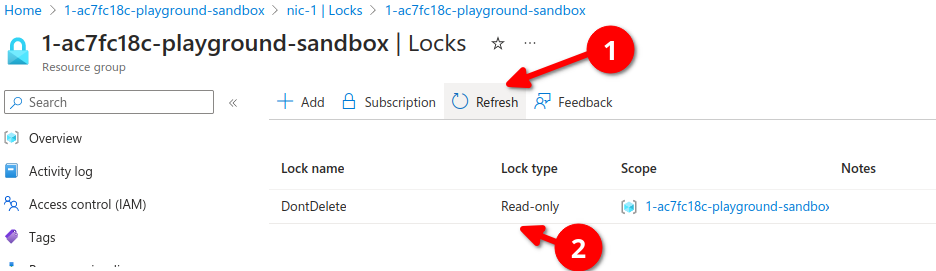
let's go back to our resources overview, open the VM again and let's Start our VM, we get a warning message, cannot perform write operation, please remove read-only lock

Now if we go back to our resources group we can select all our resources, from here we can click on Move, here you can move resources too another resource group, to another subscription or to another region.

AZ-104 - Governance and Compliance - Managing Azure Costs
Introduction to analyzing costs and creating budgets with Microsoft Cost Management
Describe cost management in Azure
Different components on Azure cost model
- Subscription type: Free, Pay as you go, Enterprise agreement, and Cloud Solution Provider (CSP).
- Resource type: For example, storage account blob storage vs Table Storage.
- Usage Meters: Utilities like overall CPU time, ingress/egress network traffic and disk size.
- Resource Usage: The cost of actually using a resource.
- Location: The cost for various services vary across geographical regions.
| Best Practices |
|
Select the appropriate resource for the use case. |
|
Understand needs (sizing). |
|
De-allocate resources when not needed. |
|
Use cloud capabilities where possible(e.g., scalability, elasticity). |
|
Plan your cost prior to purchase. |
| Cost Tools |
| Pricing Calculator. |
| Total cost of Ownership (TCO) calculator. |
| Microsoft Cost Management (Analyze costs and create Budgets) |
Inside Azure Portal search for cost management then go to cost analysis

We can identify different costs per service, resource groups, locations, etc

Using the pricing calculator

Using the TCO Calculator

AZ-104 - Governance and Compliance - Building a cloud governance strategy wth Azure tooling
Define Governance
- Rules
- Policies
- Compliance standards
- Control over resources
- Enforce rules, policies, and standard
Planing a Cloud Strategy
- Define: Define cloud governance needs of he organization.
- Plan: Plan which tools will be used to implement governance.
- Ready: understand how those tools will be used to implement governance.
- Adopt: Implement governance for the organization using a cloud strategy.
Governance Services
- Management groups and subscriptions: Organize subscriptions into hierarchical structures.
- Azure RBAC: Provide resources at varying scopes.
- Policies: Implement policies to enforce standards.
- Locks and Tagging: Lock resources to prevent deletion and tag resources to categorize.
Recommended to investigate more about Azure Blueprints to better understand rules and policies.
