1.- AZ-104 Azure Administration
- AZ-104 - Administration - Azure Resource Manager
- AZ-104 - Administration - Azure Portal and Cloud Shell Basics
- AZ-104 - Administration - Azure CLI and Powershell
- AZ-104 - Administration - Azure ARM Templates
AZ-104 - Administration - Azure Resource Manager
What is Azure Resource Manager?
Azure Clouds made of?
Resources:
- Entity managed by azure
- Virtual Machines
- Storage accounts and virtual networks

Resources groups:
- Logical container for grouping resources
- Group resources based on lifecycle and security
- Associated with an azure subscription

Azure Subscription:
- Logical construct that groups together resource groups and associated resources
- Billing unit for the azure cloud cost

Azure Resource Manager - ARM
- is the orchestration layer for managing the azure cloud
- Uses REST API endpoints
- ARM connects to resource provider (Powershell, CLI, Azure Portal)
- Resource provider completes the request
- It uses Azure Identity Manager


Resources are Azure Managed Entities like virtual Machines, Storage accounts and Virtual Networks
Resources are contained in resource groups
Resource groups are contained in subscriptions
You can use REST API endpoint to manage Azure through Azure Resource Manager
Azure Resource Manager is a Management Service
Each Resource has a resource provider
AZ-104 - Administration - Azure Portal and Cloud Shell Basics
Microsoft Azure portal
What is Azure Cloud Shell?
Describing Azure Portal, Components of Azure portal, Using the azure portal
Azure portal:
- Web-based portal for the azure cloud
- Crate and manage azure resources
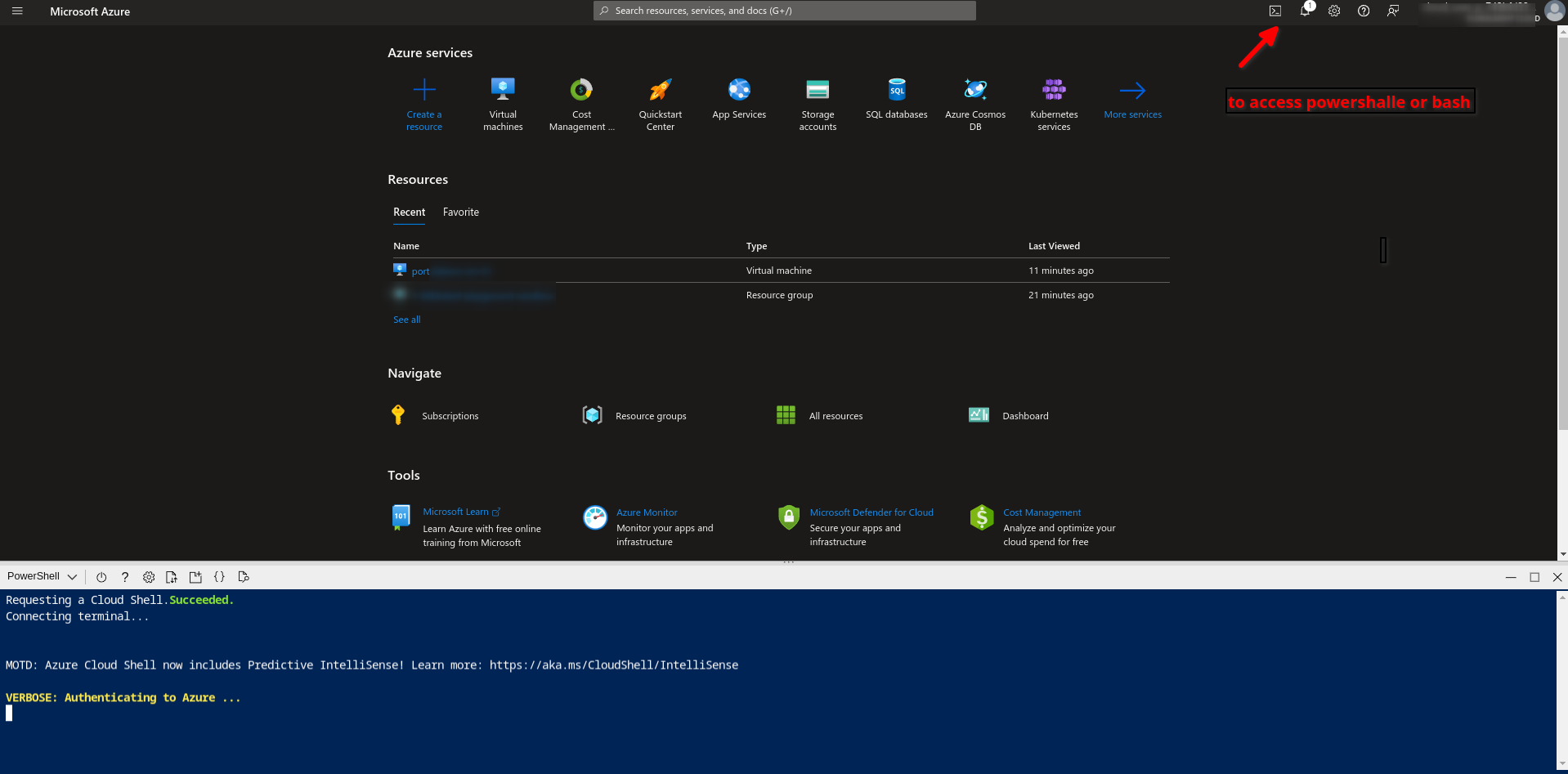
- Uses cloud shell
- Manage Billing
Access https://portal.azure.com


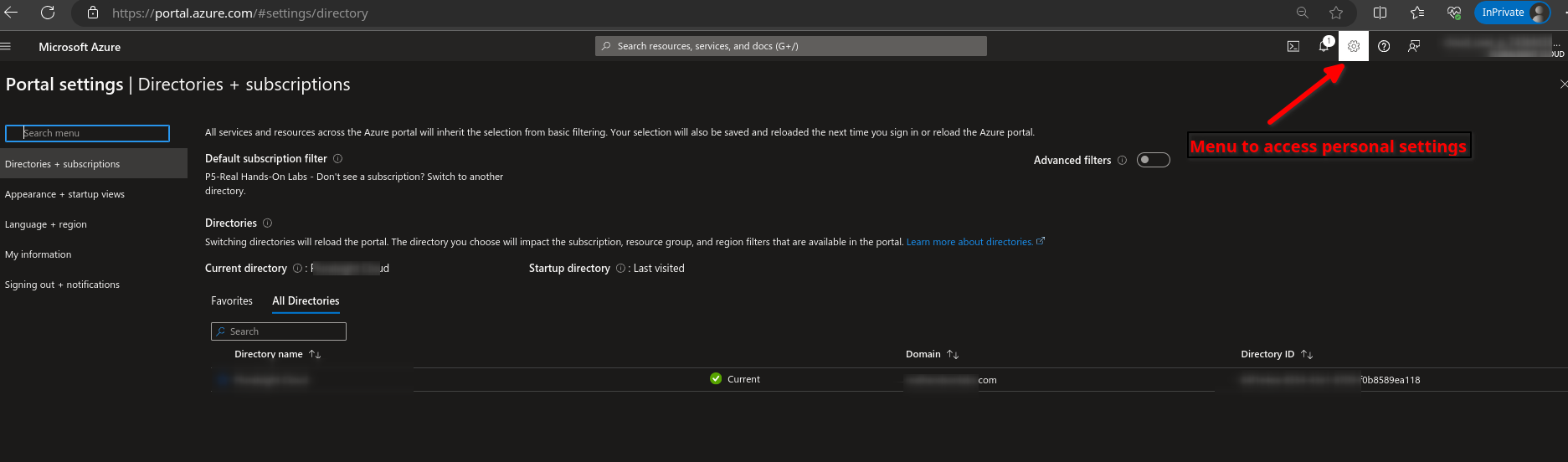
To access your preferences such as themes, etc go to the settings page
AZ-104 - Administration - Azure CLI and Powershell
Install PowerShell on Windows, Linux, and macOS
How to install the Azure CLI
What is the Azure CLI
- Its a command-line utility for managing azure resources
- Crate and manage resources without logging to the azure portal
- Create scripts to automate tasks

What is Azure PowerShell
- Its a set of cmdlets for managing Azure resources
- Create and manage resource s without logging into the azure portal
- Create scripts to automate tasks.

Cloud Shell
First we need to create a Cloud Shell

Select Bash or Powershell

Go to Advanced settings

Select a random storage account name and a file share name then click on create storage

if you get this error its more likely your storage account name its already in use, use alphanumeric

Done, you can switch between Powershell and Bash using the drop down menu on the left

Here we can run AZ CLI commands

And here is using the powershell

We can save objects to variables

To create a virtual machine from Azure CLI

PS /home/cesar> get-cloudDrive

FileShareName      : random1fileshare
FileSharePath      : //random1storage4.file.core.windows.net/random1fileshare
MountPoint         : /home/cesar/clouddrive
Name               : random1storage4
ResourceGroupName  : DefaultResourceGroup-CUS
StorageAccountName : random1storage4
SubscriptionId     : 33d9a849-c6f5-455d-b9e4-ef89b317fcec

PS /home/cesar> get-azresource | format-Table

Name                                                      ResourceGroupName        ResourceType                             Location
----                                                      -----------------        ------------                             --------
DefaultWorkspace-33d9a849-c6f5-455d-b9e4-ef89b317fcec-CUS DefaultResourceGroup-CUS Microsoft.OperationalInsights/workspaces centralus
random1storage4                                           DefaultResourceGroup-CUS Microsoft.Storage/storageAccounts        eastus
NetworkWatcher_eastus                                     NetworkWatcherRG         Microsoft.Network/networkWatchers        eastus

PS /home/cesar>
AZ-104 - Administration - Azure ARM Templates
Deploy Azure infrastructure by using JSON ARM templates
ARM templates are azure resource manager templates we create JSON files and provides
- IaC (Infrastructure as code)
- Deploy environments quickly
- Repeatable deployments
ARM Template
Skeleton arm template
{
   "$schema" : "https://schema.management.azure.com"
     ,
      "contentVersion":
      "`1.0.0.0",
      "parameters": {},
      "variables": {},
      "resourceS": {},
      "outputs": {}
}
Parameters and variables: components are used to pass information to the template.
Resources: Define resources to use in the template
Outputs: Component is used to return output from the execution of the template
Example of a template:
azuredeploy.json template
{
  "$schema": "https://schema.management.azure.com/schemas/2019-04-01/deploymentTemplate.json#",
  "contentVersion": "1.0.0.0",
  "parameters": {
    "adminUsername": {
      "type": "string",
      "metadata": {
        "description": "Username for the Virtual Machine."
      }
    },
    "adminPassword": {
      "type": "secureString",
      "minLength": 12,
      "metadata": {
        "description": "Password for the Virtual Machine."
      }
    },
    "dnsLabelPrefix": {
      "type": "string",
      "defaultValue": "[toLower(format('{0}-{1}', parameters('vmName'), uniqueString(resourceGroup().id, parameters('vmName'))))]",
      "metadata": {
        "description": "Unique DNS Name for the Public IP used to access the Virtual Machine."
      }
    },
    "publicIpName": {
      "type": "string",
      "defaultValue": "myPublicIP",
      "metadata": {
        "description": "Name for the Public IP used to access the Virtual Machine."
      }
    },
    "publicIPAllocationMethod": {
      "type": "string",
      "defaultValue": "Dynamic",
      "allowedValues": [
        "Dynamic",
        "Static"
      ],
      "metadata": {
        "description": "Allocation method for the Public IP used to access the Virtual Machine."
      }
    },
    "publicIpSku": {
      "type": "string",
      "defaultValue": "Basic",
      "allowedValues": [
        "Basic",
        "Standard"
      ],
      "metadata": {
        "description": "SKU for the Public IP used to access the Virtual Machine."
      }
    },
    "OSVersion": {
      "type": "string",
      "defaultValue": "2022-datacenter-azure-edition-core",
      "allowedValues": [
        "2008-R2-SP1",
        "2008-R2-SP1-smalldisk",
        "2012-Datacenter",
        "2012-datacenter-gensecond",
        "2012-Datacenter-smalldisk",
        "2012-datacenter-smalldisk-g2",
        "2012-Datacenter-zhcn",
        "2012-datacenter-zhcn-g2",
        "2012-R2-Datacenter",
        "2012-r2-datacenter-gensecond",
        "2012-R2-Datacenter-smalldisk",
        "2012-r2-datacenter-smalldisk-g2",
        "2012-R2-Datacenter-zhcn",
        "2012-r2-datacenter-zhcn-g2",
        "2016-Datacenter",
        "2016-datacenter-gensecond",
        "2016-datacenter-gs",
        "2016-Datacenter-Server-Core",
        "2016-datacenter-server-core-g2",
        "2016-Datacenter-Server-Core-smalldisk",
        "2016-datacenter-server-core-smalldisk-g2",
        "2016-Datacenter-smalldisk",
        "2016-datacenter-smalldisk-g2",
        "2016-Datacenter-with-Containers",
        "2016-datacenter-with-containers-g2",
        "2016-datacenter-with-containers-gs",
        "2016-Datacenter-zhcn",
        "2016-datacenter-zhcn-g2",
        "2019-Datacenter",
        "2019-Datacenter-Core",
        "2019-datacenter-core-g2",
        "2019-Datacenter-Core-smalldisk",
        "2019-datacenter-core-smalldisk-g2",
        "2019-Datacenter-Core-with-Containers",
        "2019-datacenter-core-with-containers-g2",
        "2019-Datacenter-Core-with-Containers-smalldisk",
        "2019-datacenter-core-with-containers-smalldisk-g2",
        "2019-datacenter-gensecond",
        "2019-datacenter-gs",
        "2019-Datacenter-smalldisk",
        "2019-datacenter-smalldisk-g2",
        "2019-Datacenter-with-Containers",
        "2019-datacenter-with-containers-g2",
        "2019-datacenter-with-containers-gs",
        "2019-Datacenter-with-Containers-smalldisk",
        "2019-datacenter-with-containers-smalldisk-g2",
        "2019-Datacenter-zhcn",
        "2019-datacenter-zhcn-g2",
        "2022-datacenter",
        "2022-datacenter-azure-edition",
        "2022-datacenter-azure-edition-core",
        "2022-datacenter-azure-edition-core-smalldisk",
        "2022-datacenter-azure-edition-smalldisk",
        "2022-datacenter-core",
        "2022-datacenter-core-g2",
        "2022-datacenter-core-smalldisk",
        "2022-datacenter-core-smalldisk-g2",
        "2022-datacenter-g2",
        "2022-datacenter-smalldisk",
        "2022-datacenter-smalldisk-g2"
      ],
      "metadata": {
        "description": "The Windows version for the VM. This will pick a fully patched image of this given Windows version."
      }
    },
    "vmSize": {
      "type": "string",
      "defaultValue": "Standard_B2s",
      "metadata": {
        "description": "Size of the virtual machine."
      }
    },
    "location": {
      "type": "string",
      "defaultValue": "[resourceGroup().location]",
      "metadata": {
        "description": "Location for all resources."
      }
    },
    "vmName": {
      "type": "string",
      "defaultValue": "vm-demo-002",
      "metadata": {
        "description": "Name of the virtual machine."
      }
    }
  },
  "variables": {
    "storageAccountName": "[format('bootdiags{0}', uniqueString(resourceGroup().id))]",
    "nicName": "myVMNic",
    "addressPrefix": "10.0.0.0/16",
    "subnetName": "Subnet",
    "subnetPrefix": "10.0.0.0/24",
    "virtualNetworkName": "MyVNET",
    "networkSecurityGroupName": "default-NSG"
  },
  "resources": [
    {
      "type": "Microsoft.Storage/storageAccounts",
      "apiVersion": "2021-04-01",
      "name": "[variables('storageAccountName')]",
      "location": "[parameters('location')]",
      "sku": {
        "name": "Standard_LRS"
      },
      "kind": "Storage"
    },
    {
      "type": "Microsoft.Network/publicIPAddresses",
      "apiVersion": "2021-02-01",
      "name": "[parameters('publicIpName')]",
      "location": "[parameters('location')]",
      "sku": {
        "name": "[parameters('publicIpSku')]"
      },
      "properties": {
        "publicIPAllocationMethod": "[parameters('publicIPAllocationMethod')]",
        "dnsSettings": {
          "domainNameLabel": "[parameters('dnsLabelPrefix')]"
        }
      }
    },
    {
      "type": "Microsoft.Network/networkSecurityGroups",
      "apiVersion": "2021-02-01",
      "name": "[variables('networkSecurityGroupName')]",
      "location": "[parameters('location')]",
      "properties": {
        "securityRules": [
          {
            "name": "default-allow-3389",
            "properties": {
              "priority": 1000,
              "access": "Allow",
              "direction": "Inbound",
              "destinationPortRange": "3389",
              "protocol": "Tcp",
              "sourcePortRange": "*",
              "sourceAddressPrefix": "*",
              "destinationAddressPrefix": "*"
            }
          }
        ]
      }
    },
    {
      "type": "Microsoft.Network/virtualNetworks",
      "apiVersion": "2021-02-01",
      "name": "[variables('virtualNetworkName')]",
      "location": "[parameters('location')]",
      "properties": {
        "addressSpace": {
          "addressPrefixes": [
            "[variables('addressPrefix')]"
          ]
        },
        "subnets": [
          {
            "name": "[variables('subnetName')]",
            "properties": {
              "addressPrefix": "[variables('subnetPrefix')]",
              "networkSecurityGroup": {
                "id": "[resourceId('Microsoft.Network/networkSecurityGroups', variables('networkSecurityGroupName'))]"
              }
            }
          }
        ]
      },
      "dependsOn": [
        "[resourceId('Microsoft.Network/networkSecurityGroups', variables('networkSecurityGroupName'))]"
      ]
    },
    {
      "type": "Microsoft.Network/networkInterfaces",
      "apiVersion": "2021-02-01",
      "name": "[variables('nicName')]",
      "location": "[parameters('location')]",
      "properties": {
        "ipConfigurations": [
          {
            "name": "ipconfig1",
            "properties": {
              "privateIPAllocationMethod": "Dynamic",
              "publicIPAddress": {
                "id": "[resourceId('Microsoft.Network/publicIPAddresses', parameters('publicIpName'))]"
              },
              "subnet": {
                "id": "[resourceId('Microsoft.Network/virtualNetworks/subnets', variables('virtualNetworkName'), variables('subnetName'))]"
              }
            }
          }
        ]
      },
      "dependsOn": [
        "[resourceId('Microsoft.Network/publicIPAddresses', parameters('publicIpName'))]",
        "[resourceId('Microsoft.Network/virtualNetworks', variables('virtualNetworkName'))]"
      ]
    },
    {
      "type": "Microsoft.Compute/virtualMachines",
      "apiVersion": "2021-03-01",
      "name": "[parameters('vmName')]",
      "location": "[parameters('location')]",
      "properties": {
        "hardwareProfile": {
          "vmSize": "[parameters('vmSize')]"
        },
        "osProfile": {
          "computerName": "[parameters('vmName')]",
          "adminUsername": "[parameters('adminUsername')]",
          "adminPassword": "[parameters('adminPassword')]"
        },
        "storageProfile": {
          "imageReference": {
            "publisher": "MicrosoftWindowsServer",
            "offer": "WindowsServer",
            "sku": "[parameters('OSVersion')]",
            "version": "latest"
          },
          "osDisk": {
            "createOption": "FromImage",
            "managedDisk": {
              "storageAccountType": "StandardSSD_LRS"
            }
          },
          "dataDisks": [
            {
              "diskSizeGB": 1023,
              "lun": 0,
              "createOption": "Empty"
            }
          ]
        },
        "networkProfile": {
          "networkInterfaces": [
            {
              "id": "[resourceId('Microsoft.Network/networkInterfaces', variables('nicName'))]"
            }
          ]
        },
        "diagnosticsProfile": {
          "bootDiagnostics": {
            "enabled": true,
            "storageUri": "[reference(resourceId('Microsoft.Storage/storageAccounts', variables('storageAccountName'))).primaryEndpoints.blob]"
          }
        }
      },
      "dependsOn": [
        "[resourceId('Microsoft.Network/networkInterfaces', variables('nicName'))]",
        "[resourceId('Microsoft.Storage/storageAccounts', variables('storageAccountName'))]"
      ]
    }
  ],
  "outputs": {
    "hostname": {
      "type": "string",
      "value": "[reference(resourceId('Microsoft.Network/publicIPAddresses', parameters('publicIpName'))).dnsSettings.fqdn]"
    }
  }
}
Go to Deploy a custom template

Build your own template in the editor

Copy and paste the azuredeploy.json and save


Fill out all parameters then review and create

Deployment in progress
