# Avaya - System Manager

# Administration, upgrades and maintenances

# SMGR - Patch Upgrade 8.X

Avaya system manager patch upgrade 8.1

Download patch and upload to /swlibrary

chmod +x System\_Manager\* this will modify all files with the name of System\_Manager and set it as excecutables

./System\_Manager\_8.1.3.7\_r813715592.bin

```bash
root >./System_Manager_8.1.3.7_r813715592.bin
Checking if patchplugin.log exists!
StrictModes yes
AllowTcpForwarding no
Extracting files to /var/patchsfx.pXBSP8...
Tue Mar 28 02:24:52 IST 2023 The System Manager bin version which is being install is System_Manager_R8.1.3.7_813715592
Tue Mar 28 02:24:52 IST 2023: EULA should be displayed on VE environment

Read the following Avaya Software License Terms carefully. The Chinese, German, Portugese, Spanish, French, Japanese, and Russian versions of the Avaya Software License Terms are posted at https://support.avaya.com/LicenseInfo . If you do not have direct Internet access, please access a device that has Internet access to view, download and print the applicable license.

Press the [Enter] key to read the Avaya Software License Terms.


AVAYA GLOBAL SOFTWARE LICENSE TERMS
REVISED:  June 1st, 2020

THESE GLOBAL SOFTWARE LICENSE TERMS (“SOFTWARE LICENSE TERMS”) GOVERN THE USE OF PROPRIETARY SOFTWARE AND THIRD- PARTY PROPRIETARY SOFTWARE LICENSED THROUGH AVAYA. READ THESE SOFTWARE LICENSE TERMS CAREFULLY, IN THEIR ENTIRETY, BEFORE INSTALLING, DOWNLOADING OR USING THE SOFTWARE (AS DEFINED IN SECTION A BELOW). BY INSTALLING, DOWNLOADING OR USING THE SOFTWARE, OR AUTHORIZING OTHERS TO DO SO, THE END USER, ON BEHALF OF THEMSELF AND THE ENTITY FOR WHOM THEY ARE DOING SO (HEREINAFTER REFERRED TO AS  “END USER”), AGREE TO THESE SOFTWARE
LICENSE TERMS AND CONDITIONS AND CREATE A BINDING CONTRACT BETWEEN END USER AND AVAYA INC. OR THE APPLICABLE AVAYA AFFILIATE (“AVAYA”). IF THE END USER IS ACCEPTING THESE SOFTWARE
LICENSE TERMS ON BEHALF OF A COMPANY OR OTHER LEGAL ENTITY, THE END USER REPRESENTS THAT THEY HAVE THE AUTHORITY TO BIND SUCH ENTITY TO THESE SOFTWARE LICENSE TERMS. IF THE END USER DOES NOT HAVE SUCH AUTHORITY OR DOES NOT WISH TO BE BOUND BY THESE SOFTWARE LICENSE TERMS, SELECT THE "DECLINE" BUTTON AT THE END OF THESE SOFTWARE LICENSE TERMS OR THE EQUIVALENT OPTION.

A. Definitions
(i) “Affiliate” means any entity that is directly or indirectly controlling, controlled by, or under common control with Avaya Inc. or End User. For purposes of this definition, “control” means the power to direct the management and policies of such party, directly or indirectly, whether through ownership of voting securities, by contract or otherwise; and the terms “controlling” and “controlled” have meanings correlative to the foregoing.
(ii) “Documentation” means information published in varying mediums which may include product information, subscription or service descriptions, operating instructions and performance specifications that are generally made available to users of products. Documentation does not include marketing materials.
(iii) “Software” means computer programs in object code, provided by Avaya or an Avaya Channel Partner, whether as stand-alone products or pre- installed on hardware products, and
any upgrades, updates, patches, bug fixes, or modified versions thereto.

B. Scope. These Software License Terms are applicable to anyone who installs, downloads, and/or uses Software and/or Documentation, obtained from Avaya or an Avaya reseller, distributor, direct partner, system integrator, service provider or other partner authorized to provide Software to End Users in the applicable territory (collectively “Avaya Channel Partner”). Some or all of the Software may be remotely hosted or accessible to End User through the Internet. The End User is not authorized to use the Software if the Software was obtained from anyone other than Avaya or an Avaya Channel Partner.
These Software License Terms govern End User’s use of the Software and/ or Documentation except to the extent: (i) End User is obtaining the Software directly from Avaya and the End User has a separate, written agreement with Avaya governing the End User’s use of the Software, signed within three (3) years of the purchase of the applicable Software license,
(ii) End User is obtaining the Software from an Avaya Channel Partner and the End User has an agreement with that Avaya Channel Partner but the End User also has a separate, written agreement with Avaya governing the End User’s use of the Software, that was signed within three (3) years of the purchase of the applicable Software license, (iii) the Software is accompanied by a Shrinkwrap License, or (iv) the Software is governed by Third Party Terms. If the End User has a separate signed purchase agreement with Avaya, as set forth in (i) or (ii) above, such agreement shall take precedence over these Software License Terms to the extent of any conflict. With respect to third party elements subject to a Shrinkwrap License or other Third Party Terms, the Shrinkwrap License or other Third Party Terms shall take precedence over any signed agreement with Avaya and these Software License Terms to the extent of any conflict.

C. License Grant. Avaya grants the End User a non-sublicensable, non-exclusive, non-transferable license to use Software and associated Documentation obtained from Avaya or an Avaya Channel Partner, and for which applicable fees have been paid, for End User’s internal business purposes at the indicated capacity and features and within the scope of the applicable license types described below and at locations where the Software is initially installed. Licenses provided under these Software License Terms are for a perpetual duration, unless (i) otherwise specified in the order or (ii) the license is provided as part of a service or subscription, in which case the license grant will be limited to the duration specified on the order or in the service or subscription Documentation. Documentation shall be used only in support of the authorized use of the associated Software. Software installed on mobile-devices and clients, such as a laptop or mobile phone, may be used outside of the country where the Software was originally installed, provided that such use is on a temporary basis only. Software installed on mobile phones or electronic devices from an app store (for example, Google Play or Apple App Store)  is subject to the applicable terms presented when the Software is downloaded or installed, rather than these Software License Terms.
(i) Right to Move License Entitlements. Notwithstanding the foregoing limitation permitting use of the Software only at the location where it is initially installed, the End User may move eligible right to use license entitlements (“RTU”) for certain specified Software from one location to another in accordance with Avaya’s then-current software license portability policy (“License Portability Policy”), which License Portability Policy is available upon request, subject to the conditions set forth in this Section C (i):
(a) End User shall provide written notice within ten (10) days to Avaya of any RTU moves including but not limited to, the number and type of licenses moved, the location of the original Server and the location of the new Server, the date of such RTU moves and any other information that Avaya may reasonably request;
(b) End User may only move RTU’s to and from Designated Processors or Servers supporting the same Software application;
(c) End User must reduce the quantity of the licenses on the original Server by the number of RTU’s being moved to the new Server;
(d) End User acknowledges that: (1) the End User may be charged additional fees when moving RTU’s as per Avaya’s then-current License Portability Policy, (2) maintenance services do not cover system errors caused by moves not performed by Avaya, (3) the End User are responsible for any programming, administration, design assurance, translation or other activity to make sure the Software will scale and perform as specified as a result of any license moves, and if any such transfer results in a requirement for Avaya system engineering or requires the use of on-site Avaya personnel, the End User will be charged the Time and Materials fees for such activity;
(e) If the End User’s maintenance coverage differs on licenses on the same product instance at the location of the new Server, service updates, recasts and/or fees may apply and any fee adjustments for differences in coverage will only be made on a going forward basis as of the date Avaya receives notice of the RTU move; and
(f) End User may move RTU’s from one Affiliate to another Affiliate provided that the End User complies with all of the conditions of this Section, including, without limitation, providing the name and address of the new Affiliate in the End User’s written notice under subpart (a) above, and provided such new Affiliate agrees to be bound by these Software License Terms.
(ii) Non-Production License Grant. With respect to Software distributed by Avaya to the End User for non-production purposes, the scope of the license granted herein shall be to use the Software in a non-production environment solely for testing or other non-commercial purposes on a single computer or as otherwise designated by Avaya.

D. All Rights Reserved. Avaya or its licensors retain title to and ownership of the Software, Documentation, and any modifications or copies thereof. Except for the limited license rights expressly granted in these Software License Terms, Avaya or its licensors reserve all rights, including without limitation copyright, patent, trade secret, and all other intellectual property rights, in and to the Software and Documentation and any modifications or copies thereof. The Software contains trade secrets of Avaya, its suppliers, or licensors, including but not limited to the specific design, structure and logic of individual Software programs, their interactions with other portions of the Software, both internal and external, and the programming techniques employed.

E. Disclaimer. Any software security feature is not a guaranty against malicious code, deleterious routines, and other techniques and tools employed by computer “hackers” and other third parties to create security exposures. Compromised passwords represent a major security risk. Avaya encourages the End User to create strong passwords using three different character types, change End User’s password regularly and refrain from using the same password regularly. The End User must treat such information as confidential. The End User agrees to notify Avaya immediately upon becoming aware of any unauthorized use or breach of the End User’s user name, password, account, or subscription. The End User is responsible for ensuring that the End User’s networks and systems are adequately secured against unauthorized intrusion or attack and regularly back up of the End User’s data and files in accordance with good computing practices.

F.   General License Restrictions. To the extent permissible under applicable law, End User agrees not to: (i) decompile, disassemble, reverse engineer, reverse translate or in any other manner decode the Software; (ii) alter, modify or create any derivative works or enhancements, adaptations, or translations of the Software or Documentation; (iii) sell, sublicense, lease, rent, loan, assign, convey or otherwise transfer the Software or Documentation except as expressly authorized by Avaya in writing, and any attempt to do so is void; (iv) distribute, disclose or allow use of the Software or Documentation, in any format, through any timesharing service, service bureau, network or by any other similar means, such as hosting or cloud, except as expressly authorized by Avaya in writing; (v) allow any service provider or other third party, with the exception of Avaya’s authorized maintenance providers who are acting solely on behalf of and for the benefit of End User, to use or execute any software commands that facilitate the maintenance or repair of any product; (vi) gain access to or the use of any Software or part thereof without authorization from Avaya; (vii) enable or activate, or cause, permit or allow others to enable or activate any logins reserved for use by Avaya or Avaya’s authorized maintenance providers; (viii) publish the results of any tests run on the Software; (ix) disclose, provide, or otherwise make
available to any third party any trade secrets contained in the Software or Documentation; (x) use the Software in a virtualized environment except as expressly authorized by these Software License Terms, or (xi) permit or encourage any third party to do any of the foregoing.

End User agrees not to allow anyone other than its authorized employees, agents or representatives who have a need to use the Software or Documentation to have access to the Software or Documentation. End User agrees to inform any third party to whom the End User gives access to the Software or Documentation of these Software License Terms and shall obligate such third party to comply with such terms and provisions. End User shall be responsible for End User and any authorized third party’s failure to comply with these Software License Terms and shall indemnify Avaya for any damages, loss, expenses or costs, including attorneys’ fees and costs of suit, incurred by Avaya as a result of non-compliance with this Section.

Additional License Restrictions Applicable to the EU. Notwithstanding the limitations in Sections C and F, solely to the extent an End User’s resale rights cannot be precluded or restricted by mandatory applicable law, End Users located in a member state of the European Union may resell licenses subject to the following conditions:
(i) Prior to resale of a license, End User will promptly, but not less than 30 days prior to a resale, notify Avaya in writing of its intention to resell a license.
(ii) Unless expressly agreed otherwise in writing, End User will not be permitted to resell less than its entire license to a buyer.
(iii) End User will resell the Software subject to these Software License Terms and shall ensure that the buyer is bound by these Software License Terms.
(iv) Upon resale of a license, End User shall immediately and permanently cease all use of and destroy all copies of the Software and any related materials in End User’s possession or control and, upon Avaya’s request, certify such destruction in writing. Avaya may audit End User’s compliance with the foregoing in accordance with Section K-Compliance below.
(v) End User will keep appropriate records of all license resale including, but not limited to, the name and location of the buyer and the number and types of licenses resold.
(vi) End User acknowledges that: (a) resale of a license is subject to any relevant Third Party Terms; (b) maintenance services do not cover system errors caused by license resale
not performed by Avaya; (c) Avaya is not responsible for any programming, administration, design assurance, translation or other activity to make sure the Software will scale and perform as specified as a result of any license resale, and if any such resale results in a requirement for Avaya system engineering or requires the use of on-site Avaya personnel,
End User will be charged the then applicable Avaya time and materials rates for such activity; (d) any resale of a maintenance services agreement between Avaya and the original licensee is subject to Avaya’s prior written approval. Avaya reserves the right to withhold such approval and/or offer the new licensee a maintenance services agreement subject to different terms and conditions; and (e) if not expressly agreed by Avaya in writing otherwise, the resale of licenses does not entitle the End User to cancel or partially cancel a maintenance services agreement during the agreed term.

If the Software is rightfully located in a member state of the European Union and End User needs information about the Software in order to achieve interoperability of an independently created software program with the Software, End User will first request such information from Avaya. Avaya may charge End User a reasonable fee for the provision of such information. End User agrees to protect such information in accordance with Section Q-Protection of Software and Documentation below, and shall use such information only in accordance with the terms and conditions under which Avaya provides such information. To the extent that the End User is expressly permitted by applicable mandatory law to undertake any activities related to achieving interoperability of an independently created software program with the Software, End User will not exercise those rights until End User has given Avaya twenty (20) days written notice of its intent to exercise any such rights.

G. Proprietary Rights Notices. End User agrees to retain, in the same form and location, all proprietary legends and/or logos of Avaya and/or Avaya’s suppliers on any permitted copies of the Software or Documentation.

H. Backup Copies. End User may create a reasonable number of archival and backup copies of the Software and the Documentation.

I. Upgrades. End User’s right to use any upgrades to the Software shall be conditioned upon End User having a valid license to use the original Software and paying the applicable license fee to Avaya or an Avaya Channel Partner for such upgrade.
J.   Warranty. Avaya’s Global Product Warranty Policy for End Users, which details a limited warranty for Software and Software media and the applicable procedures, exclusions, and disclaimers, is available through the following website: http://support.avaya.com (or such successor site as designated by Avaya). NEITHER AVAYA NOR ITS SUPPLIERS MAKE ANY WARRANTY, EXPRESS OR IMPLIED, THAT SECURITY THREATS AND VULNERABILITIES WILL BE DETECTED OR SOFTWARE WILL RENDER AN END USER’S NETWORK OR PARTICULAR NETWORK ELEMENTS SAFE FROM INTRUSIONS
AND OTHER SECURITY BREACHES. Please note that if End User is acquiring the Software from an Avaya Channel Partner outside the United States of America or Canada, any warranty is provided to End User by said Avaya Channel Partner and not by Avaya.

K. Compliance. Avaya and the Avaya Channel Partner who provided the Software have the right to inspect and/or audit (i) by remote polling or other reasonable electronic means at any time and (ii) in person during normal business hours and with reasonable notice End User’s books, records, and accounts, to determine End User’s compliance with these Software License Terms, including but not limited to usage levels. In the event such inspection or audit uncovers non-compliance with these Software License Terms, then without prejudice to Avaya’s termination rights hereunder, End User shall promptly pay Avaya any applicable license fees. End User agrees to keep a current record of the location of the Software.

L. Termination of License; Effect of Termination/ Expiration. If the End User breaches these Software License Terms and if within ten (10) business days of Avaya’s written request
to cure, the End User has not cured all breaches of license limitations or restrictions, Avaya may, with immediate effect, terminate the licenses granted in these Software License
Terms without prejudice to any available rights and remedies Avaya may have at law or in equity. Upon termination or expiration of the license for any reason, the End User must immediately destroy all copies of the Software and any related materials in End User’s possession or control and, upon Avaya’s request, certify such destruction in writing. The provisions concerning confidentiality, the protection of trade secrets and proprietary rights, license restrictions, export control, and all limitations of liability and disclaimers and
restrictions of warranty (as well as any other terms which, by their nature, are intended to survive termination) will survive any termination or expiration of the Software License Terms.

M. License Types. Avaya grants the End User a license within the scope of the license types described below, with the exception of Heritage Nortel Software, for which the scope of
the license is detailed in Section N-Heritage Nortel Software below. Where the order documentation does not expressly identify a license type, the applicable license will be a Designated System License as set forth below. The applicable number of licenses and units of capacity for which the license is granted will be one (1), unless a different number of licenses or units of capacity is specified in the documentation or other materials available to End User. “Designated Processor” means a single stand-alone computing device, such as,
a CPU core or digital signal processing (DSP) core dedicated to the execution of the Software. “Server” means a set of Designated Processors that hosts (physically or virtually) a
software application to be accessed by multiple users. “Instance” means a single copy of the Software executing at a particular time: (i) on one physical machine; or (ii) on one deployed software virtual machine or similar deployment. “Cluster” means a group of Servers and other resources that act as a single system.

a. Designated System(s) License (DS). End User may install and use each copy or an Instance of the Software only: 1) on a number of Designated Processors up to the number indicated in the order; or 2) up to the number of Instances of the Software as indicated in the order, Documentation, or as authorized by Avaya in writing. Avaya may require the Designated
Processor(s) to be identified in the order by type, serial number, feature key, Instance, location or other specific designation, or to be provided by End User to Avaya through electronic means established by Avaya specifically for this purpose.
b. Concurrent User License (CU). End User may install and use the Software on multiple Designated Processors or one or more Servers, so long as only the licensed number of Units are accessing and using the Software at any given time as indicated in the order, Documentation, or as authorized by Avaya in writing. A “Unit” means the unit on which Avaya, at its
sole discretion, bases the pricing of its licenses and can be, without limitation, an agent, port or user, an e-mail or voice mail account in the name of a person or corporate function (e.g., webmaster or helpdesk), or a directory entry in the administrative database utilized by the Software that permits one user to interface with the Software. Units may be
linked to a specific, identified Server or an Instance of the Software.
c. Cluster License (CL). End User may install and use each copy or an Instance of the Software only up to the number of Clusters as indicated on the order, Documentation, or as authorized by Avaya in writing with a default of one (1) Cluster if not stated.
d. Enterprise License (EN). End User may install and use each copy or an Instance of the Software only for enterprise-wide use of an unlimited number of Instances of the Software as indicated on the order, Documentation or as authorized by Avaya in writing.
e. Named User License (NU). End User may: (i) install and use each copy or Instance of the Software on a single Designated Processor or Server per authorized Named User (defined below); or (ii) install and use each copy or Instance of the Software on a Server so long as only authorized Named Users access and use the Software as indicated in the order, Documentation, or as authorized by Avaya in writing. “Named User,” means a user or device that has been expressly authorized by Avaya to access and use the Software. At Avaya’s sole discretion, a “Named User” may be, without limitation, designated by name, corporate function (e.g., webmaster or helpdesk), an e-mail or voice mail account in the name of a person or
corporate function, or a directory entry in the administrative database utilized by the Software that permits one user to interface with the Software.
f.  Shrinkwrap License (SR). End User may install and use the Software in accordance with the terms and conditions of the applicable license agreements, such as “shrinkwrap” or “clickthrough” license accompanying or applicable to the Software (“Shrinkwrap License”) as indicated in the order, Documentation, or as authorized by Avaya in writing.
g.  Transaction License (TR). End User may use the Software up to the number of Transactions as specified during a specified time period and as indicated in the order, Documentation, or as authorized by Avaya in writing. A “Transaction” means the unit by which Avaya, at its sole discretion, bases the pricing of its licensing and can be, without limitation, measured by the usage, access, interaction (between client/server or customer/organization), or operation of the Software within a specified time period (e.g. per hour, per day, per month). Some examples of Transactions include but are not limited to each greeting played/message waiting enabled, each personalized promotion (in any channel), each callback operation, each live agent or web chat session, each call routed or redirected (in any channel). End User may not exceed the number of Transactions without Avaya’s prior consent and payment of an additional fee.

N. Heritage Nortel Software. “Heritage Nortel Software” means the Software that was acquired by Avaya as part of its purchase of the Nortel Enterprise Solutions Business in December 2009. The Heritage Nortel Software is the Software contained within the list of Heritage Nortel Products located at http://support.avaya.com/LicenseInfo under the link “Heritage
Nortel Products” (or such successor site as designated by Avaya). For Heritage Nortel Software, Avaya grants End User a license to use Heritage Nortel Software provided hereunder solely to the extent of the authorized activation or authorized usage level, solely for the purpose specified in the Documentation, and solely as embedded in, for execution on, or for communication with Avaya equipment. Charges for Heritage Nortel Software may be based on extent of activation or use authorized as specified in an order or invoice.

O. Third Party Components. End User acknowledges certain software programs or portions thereof included in the Software may contain software (including open source software) distributed under third party agreements (“Third Party Components”), which contain terms regarding the rights to use certain portions of the Software (“Third Party Terms”). As required,
information regarding distributed Linux OS source code (for those Products that have distributed Linux OS source code) and identifying the copyright holders of the Third Party Components and the Third Party Terms that apply is available in the Products, Documentation or on Avaya’s website at: http://support.avaya.com/Copyright (or such successor site as designated by Avaya). The open source software license terms provided as Third Party Terms are consistent with the license rights granted in these Software License Terms, and may contain additional rights benefiting End User, such as modification and distribution of the open source software. The Third Party Terms shall take precedence over these Software License Terms, solely with respect to the applicable Third Party Components, to the extent that these Software License Terms impose greater restrictions on the End User than the applicable Third Party Terms.

P. Limitation of Liability. EXCEPT FOR PERSONAL INJURY CLAIMS OR WILLFUL MISCONDUCT, AND TO THE EXTENT PERMITTED UNDER APPLICABLE LAW, NEITHER AVAYA, AVAYA AFFILIATES, THEIR LICENSORS OR SUPPLIERS, NOR ANY OF THEIR DIRECTORS, OFFICERS, EMPLOYEES, OR AGENTS SHALL BE LIABLE FOR (i) ANY INCIDENTAL, SPECIAL, PUNITIVE, EXEMPLARY, STATUTORY, INDIRECT OR CONSEQUENTIAL DAMAGES, (ii) ANY LOSS OF PROFITS OR REVENUE, LOSS OR CORRUPTION OF DATA, TOLL FRAUD, OR COST OF COVER, SUBSTITUTE GOODS OR PERFORMANCE, OR (iii) ANY DIRECT DAMAGES ARISING UNDER THESE SOFTWARE LICENSE TERMS IN EXCESS OF THE FEES PAID FOR THE SOFTWARE GIVING RISE TO THE CLAIM IN THE TWELVE MONTH PERIOD IMMEDIATELY PRECEDING THE DATE THE CLAIM AROSE. REGARDLESS OF WHETHER THE END USER WAS ADVISED, HAD OTHER REASON TO KNOW, OR IN FACT KNEW OF THE POSSIBILITY THEREOF AND REGARDLESS OF WHETHER THE LIMITED REMEDIES FAIL THEIR ESSENTIAL PURPOSE, THESE LIMITATIONS OF LIABILITY IN THIS SECTION WILL APPLY TO ANY DAMAGES, HOWEVER CAUSED, AND ON ANY THEORY OF LIABILITY, WHETHER FOR BREACH OF CONTRACT, TORT (INCLUDING, BUT NOT LIMITED TO, NEGLIGENCE), OR OTHERWISE.

Q. Protection of Software and Documentation. End User acknowledges that the Software and Documentation are confidential information of Avaya and its suppliers and contain trade secrets of Avaya and its suppliers. End User agrees at all times to protect and preserve in strict confidence the Software and Documentation using no less than the level of care End User uses to protect its own information of a confidential nature and to implement reasonable security measures to protect the trade secrets of Avaya and its suppliers.

R. Privacy. When downloading or using the Software, Avaya might process certain data about the End User, the End User’s network and the End User’s device (e.g., email address, phone - extension number, device IDs, IP addresses, location, etc.). Avaya will keep End User’s data confidential and will only use End User’s data to the extent necessary to execute these Software License Terms and to ensure compliance with these Software License Terms. In case such data identifies or may be used to identify an individual (“Personal Data”), this Personal Data will generally not leave the Avaya group Affiliates and will only be transmitted to third parties if necessary for the above. Avaya will ensure in such case that all applicable data protection requirements are met, especially regarding international data transfers. For Avaya Affiliates this is achieved through the Avaya Binding Corporate Rules, which are published on the Avaya website mentioned below, for international transfers to other third parties this will be ensured through standard data protection clauses adopted by the EU-Commission or other appropriate safeguards. End User’s data will only be stored for the time necessary to achieve the above purpose or if statutory retention periods require longer storage times, for such longer time. Respective data subjects have the right to request access to and rectification or erasure of their Personal Data and can request restriction of processing of their Personal Data. They have the right to data portability, subject to the respective statutory requirements as well as the right to lodge a complaint with a competent supervisory authority. For more information on data subject rights or in case of any questions related to Avaya processing Personal Data, please refer to the Documentation and its Global Privacy Website available at https://www.avaya.com/en/privacy/website/

S. High Risk Activities. The Software is not fault-tolerant and is not designed, manufactured or intended for any use in any environment that requires fail- safe performance in which the failure of the Software could lead to death, personal injury or significant property damage (“High Risk Activities”). Such environments include, among others, control systems in a nuclear, chemical, biological or other hazardous facility, aircraft navigation and communications, air traffic control, and life support systems in a healthcare facility. End User assumes the risks for its use of the Software in any such High Risk Activities.

T. Import/Export Control. End User is advised that the Software is of U.S. origin and subject to the U.S. Export Administration Regulations (“"EAR”). The Software also may be subject to applicable local country import/export laws and regulations. Diversion contrary to U.S. and/ or applicable local country law and/ or regulation is prohibited. End User agrees not to directly or indirectly export, re-export, import, download, or transmit the Software to any country, end user or for any use that is contrary to applicable U.S. and/ or local country regulation or statute (including but not limited to those countries embargoed by the U.S. government). End User represents that any governmental agency has not issued sanctions against the End User or otherwise suspended, revoked or denied End User's import/export privileges. End User agrees not to use or transfer the Software for any use relating to nuclear, chemical or biological weapons, or missile technology, unless authorized by the U.S. and or any applicable local government by regulation or specific written license.
Additionally, End User is advised that the Software may contain encryption algorithm or source code that may not be exported to government or military end users without a license issued by the U.S. BIS and any other country's governmental agencies, where applicable.

U. U.S. Government End Users. The Software is classified as "commercial computer software" and the Documentation is classified as "commercial computer software documentation" or "commercial items," pursuant to 48 CFR FAR 12.212 or DFAR 227.7202, as applicable. Any use, modification, reproduction, release, performance, display or disclosure of the Software or Documentation by the Government of the United States shall be governed solely by the terms of these Software License Terms and shall be prohibited except to the extent expressly permitted by these Software License Terms, and any use of the Software and/ or Documentation by the Government constitutes agreement to such classifications and to these Software License Terms.

V. Acknowledgement. End User acknowledges that certain Software may contain programming that: (i) restricts, limits and/or disables access to certain features, functionality or capacity of such Software subject to the End User making payment for licenses to such features, functionality or capacity; or (ii) periodically deletes or archives data generated by use of the Software and stored on the applicable storage device if not backed up on an alternative storage medium after a certain period of time; or (iii) may rely on a third party
analytics service to collect and generate aggregated user data which Avaya may use to improve product performance and its functionality. For Google Analytics, please refer to the following website for more information: http://www.google.com/policies/privacy/partners/ (or such successor site as designated by Google). By accepting these Software License Terms
and continued use of the Software, service, or subscription, End User consents to the use of such an analytics service to analyze such data.

W. Miscellaneous. These Software License Terms and any dispute, claim or controversy arising out of or relating to these Software License Terms (“Dispute”), including without limitation those relating to the formation, interpretation, breach or termination of these Software License Terms, or any issue regarding whether a Dispute is subject to arbitration under these Software License Terms, will be governed by New York State laws, excluding conflict of law principles, and the United Nations Convention on Contracts for the International Sale of Goods.
Any Dispute shall be resolved in accordance with the following provisions. The disputing party shall give the other party written notice of the Dispute. The parties will attempt in good faith to resolve each Dispute within thirty (30) days, or such other longer period as the parties may mutually agree, following the delivery of such notice, by negotiations between designated representatives of the parties who have dispute resolution authority. If a Dispute that arose anywhere other than in the United States or is based upon an alleged breach committed anywhere other than in the United States cannot be settled under these procedures and within these timeframes, it will be conclusively determined upon request of
either party by a final and binding arbitration proceeding to be held in accordance with the Rules of Arbitration of the International Chamber of Commerce by a single arbitrator appointed by the parties or (failing agreement) by an arbitrator appointed by the President of the International Chamber of Commerce (from time to time), except that if the aggregate claims, cross claims and counterclaims by any one party against any or all other parties exceed One Million US Dollars at the time all claims, including cross claims and counterclaims are filed, the proceeding will be held in accordance with the Rules of Arbitration of the International Chamber of Commerce by a panel of three arbitrator(s) appointed in accordance with the Rules of Arbitration of the International Chamber of Commerce. The arbitration will be conducted in the English language, at a location agreed by the parties or (failing agreement) ordered by the arbitrator(s). The arbitrator(s) will have authority only to award compensatory damages within the scope of the limitations of these Software License Terms and will not award punitive or exemplary damages. The arbitrator(s) will not have the authority to limit, expand or otherwise modify the terms of these Software License Terms. The ruling by the arbitrator(s) will be final and binding on the parties and may be entered in any court having jurisdiction over the parties or any of their assets. The parties will evenly split the cost of the arbitrator(s)’ fees, but each party will bear its own attorneys' fees and other costs associated with the arbitration. The parties, their representatives, other participants and the arbitrator(s) will hold the existence, content and results of the arbitration in strict confidence to the fullest extent permitted by law. Any disclosure of the existence, content and results of the arbitration shall be as limited and narrowed as required to comply with the applicable law. By way of illustration, if the
applicable law mandates the disclosure of the monetary amount of an arbitration award only, the underlying opinion or rationale for that award may not be disclosed.
If a Dispute by one party against the other that arose in the United States or is based upon an alleged breach committed in the United States cannot be settled under the procedures and within the timeframe set forth above, then either party may bring an action or proceeding solely in either the Supreme Court of the State of New York, New York County, or the
United States District Court for the Southern District of New York. Except as otherwise stated above with regard to arbitration of Disputes that arise anywhere other than in the United States or are based upon an alleged breach committed anywhere other than in the United States, each party to these Software License Terms consents to the exclusive jurisdiction of those courts, including their appellate courts, for the purpose of all actions and proceedings.
The parties agree that the arbitration provision in this Section may be enforced by injunction or other equitable order, and no bond or security of any kind will be required with respect to any such injunction or order. Nothing in this Section will be construed to preclude either party from seeking provisional remedies, including but not limited to temporary restraining orders and preliminary injunctions from any court of competent jurisdiction in order to protect its rights, including its rights pending arbitration, at any time. In addition and notwithstanding the foregoing, Avaya shall be entitled to take any necessary legal action at any time, including without limitation seeking immediate injunctive relief
from a court of competent jurisdiction, in order to protect Avaya’s intellectual property and its confidential or proprietary information (including but not limited to trade secrets).
If any provision of these Software License Terms is determined to be unenforceable or invalid, these Software License Terms will not be rendered unenforceable or invalid as a whole, and the provision will be changed and interpreted so as to best accomplish the objectives of the original provision within the limits of applicable law. The failure to assert any rights under the Software License Terms, including, but not limited to, the right to terminate in the event of breach or default, will not be deemed to constitute a waiver of the
right to enforce each and every provision of the Software License Terms in accordance with their terms. If End User moves any Software, and as a result of such move, a jurisdiction imposes a duty, tax, levy or fee (including withholding taxes, fees, customs or other duties for the import and export of any such Software), then End User is  solely liable for,
and agree to pay, any such duty, taxes, levy or other fees.

X. Agreement in English. The parties confirm that it is their wish that these Software License Terms, as well as all other documents relating hereto, including all notices, have been and shall be drawn up in the English language only. Les parties aux présentes confirment leur volonté que cette convention, de même que tous les documents, y compris tout avis,
qui s'y rattachent, soient rédigés en langue anglaise.

© 2016-2020 Avaya Inc. All rights reserved. Avaya and the Avaya Logo are trademarks of Avaya Inc. and may be registered in certain jurisdictions. All trademarks identified by the ® or TM are registered trademarks, service marks or trademarks, respectively, of Avaya Inc. All other trademarks are the property of their respective owners.

If you agree with Terms and Conditions of the applicable Avaya Software License Terms, please enter "Y" for yes. If you do not agree with the Terms and Conditions, please enter "N" for No.

If you enter "Y", you have read, understand, and agreed to the Terms and Conditions of the Avaya Software License Terms (Avaya Products).  You further understand that by entering "Y" you will initiate the process to upgrade, and/or install the Avaya Product; and continued installations is acceptance of the Terms and Conditions of the applicable Avaya Software License Terms (Avaya Products).

If you do not agree to these terms and enter "N" it will abort the installation/upgrade of this Software.

Do you accept the Avaya Software License Terms? (Y)es/(N)o:   Y


```

software bill begin installation

```
Executing checkForPatchRequisite
Tue Mar 28 02:26:53 IST 2023 Checking RPM DB corruption.
Checking if postgresql is running..
Executed checkForPatchRequisite successfully, proceed to install the patch.
Running SMGR Pre-Patch Installer
SUCCESS: Extract /var/patchsfx.pXBSP8/SMGRPrePatch.zip in /swlibrary/tmp.pSmoOAciiK
SUCCESS: Execute SMGR Pre-Patch Installer script

==================================

Tue Mar 28 02:27:01 IST 2023 : Moving the patch execution to the background.

Please see the log /var/log/Avaya/SMGR_Patch.log for more details about patch installation.

You may close this window or wait for the patch installation to be completed.

==================================

Tue Mar 28 02:27:01 IST 2023 : Waiting for the patch installation to be completed

.
```

reboot after patch is completed

run swversion

```bash
cust >swversion
************************************************
System Manager - Software Information
************************************************

System Manager 8.1 Build 8.1.0.0.733078
Feature Pack 3 Service Pack 7
Latest Build 8.1.3.7.1015592

RTS Version: SMGR 8.1.3.7.1015592

Quantum 8.1.0.0.7(33073) 8.1.0.0 Build Number 8.1.0.0.733078
Communication Server 1000 4.7.0 Build Number 4.7-12502
Patch 4.7.0.81360002 Build Number 8.1.3.7.1015592

Communication System Management 8.1.7.0 Build Number 8.1.7.0.9013
Patch 8.1.7.81370073 Build Number 8.1.3.7.1015592

Messaging 8.1.7.0 Build Number 8.1.7.0.2967
Patch 8.1.7.81350081 Build Number 8.1.3.7.1015592

Device Inventory 8.1.7.0 Build Number 8.1.7.0.2551
Patch 8.1.7.81370073 Build Number 8.1.3.7.1015592

Upgrade Manager 8.1.7.0 Build Number 8.1.7.0.4804
Patch 8.1.7.81370073 Build Number 8.1.3.7.1015592

Session Manager Element Manager 8.1.3.7.0 Build Number 8.1.0.0.190005
Patch 8.1.3.7.813701 Build Number 8.1.3.7.1015592

Conferencing 8.0.2.0 Build Number 8.0.0.0.2
Patch 8.0.2.81360001 Build Number 8.1.3.7.1015592

Presence Extensions 8.1.0.0 Build Number 8.1.0-6163
Patch 8.1.0.81408010 Build Number 8.1.3.7.1015592

Avaya Breeze® 3.8.0.0 Build Number 3.8.0.0.381005 - Build 21 - SVN 42161
Patch 3.8.0.381017 Build Number 8.1.3.7.1015592

SMGR on VMware - PROFILE-2 8.1.7.0 Build Number 8.1.0.0.7-32871
Media Server 8.0.6.0 Build Number 8.0.6.0
Patch 8.0.6.81300003 Build Number 8.1.3.7.1015592

Officelinx 8.1.7.0 Build Number 8.1.7.0.32885
Patch 8.1.7.81370073 Build Number 8.1.3.7.1015592

Equinox 8.0.0 Build Number 8.0.0
Patch 8.0.0.81320001 Build Number 8.1.3.7.1015592

MMCS 8.1.4.0 Build Number 8.1.4.0
Patch 8.1.4.8100401 Build Number 8.1.3.0.1011784

Equinox 8.0.0 Build Number 8.0.0
SMGR SSP 8.1.7.0 Build Number 8.1.0.0.0
Patch 8.1.7.812900001 Build Number 8.1.3.7.1015592

UCAppsServer 7.1.3.0 Build Number 0.0.0.0.0
Patch 7.1.3.181 Build Number 8.1.3.7.1015592

Avaya Aura Web Gateway 8.1.0.0 Build Number 8.1.0.0
Patch 8.1.0.81300006 Build Number 8.1.3.7.1015592

Avaya Device Adopter 8.1.0.0 Build Number 8.1.0.0
Patch 8.1.0.81404005 Build Number 8.1.3.7.1015592

B5800 Branch Gateway 8.1.7.0 Build Number 8.1.0.0
Patch 8.1.7.81300910 Build Number 8.1.3.7.1015592

SMGR CVE-2021-44228 hotfix 8.1.7.0 Build Number 8.1.0.0.0
Patch 8.1.7.813000001 Build Number 8.1.0.0.0114027


************************************************
Operating System Information
************************************************
Red Hat Enterprise Linux Server release 7.6 (Maipo)
Linux denusvm-asysmgr.continuumgbl.com 3.10.0-1160.83.1.el7.x86_64 #1 SMP Mon Dec 19 10:44:06 UTC 2022 x86_64 x86_64 x86_64 GNU/Linux

************************************************
JAVA Version
************************************************
openjdk version "1.8.0_362"
OpenJDK Runtime Environment (build 1.8.0_362-b08)
OpenJDK 64-Bit Server VM (build 25.362-b08, mixed mode)

```

# SMGR - NTP and Timezone Configuration

configureNTP

```bash
root >configureNTP
Please provide NTP Server IP/FQDN [Multiple IP/FQDN separated by ,] : time.domainserver.com

 Validating NTP Server IP/FQDN:
  >> Validating time.continuumgbl.com ...
      DNS-Resolvable : Pass
      Pingable       : Pass

   NTP Server Details:
        Old Value: Null
        New Value: time.continuumgbl.com
        [ NTP entries will be overridden ]

  Do you want to continue with NTP configuration? [y/n] :y

  Configuring NTPD Client ..
    Disabling ESXi Time Sync: Pass
    Updating NTP Server Details: Pass
    Re-Starting NTPD service:
Redirecting to /bin/systemctl stop ntpd.service
         Date: Tue Mar 28 03:18:02 IST 2023
         Updating SMGR VM time
         Date: Mon Mar 27 22:52:48 IST 2023
Redirecting to /bin/systemctl start ntpd.service
         NTP Configuration : Success
Note: Forwarding request to 'systemctl enable ntpd.service'.
Created symlink from /etc/systemd/system/multi-user.target.wants/ntpd.service to /usr/lib/systemd/system/ntpd.service.
Created symlink from /etc/systemd/system/multi-user.target.wants/ntpdate.service to /usr/lib/systemd/system/ntpdate.service.
```

configureTimeZone

```
root >configureTimeZone

 Reboot is required, for changes to take effect
 Do you want to continue?

yes/No
yes


for UTC select ETC then UTC

```

after select Yes you will be provided with options for timezone, select timezone server will reboot

```
root >timedatectl
      Local time: Mon 2023-03-27 21:55:44 UTC
  Universal time: Mon 2023-03-27 21:55:44 UTC
        RTC time: Tue 2023-03-28 03:21:20
       Time zone: Etc/UTC (UTC, +0000)
     NTP enabled: no
NTP synchronized: no
 RTC in local TZ: yes
      DST active: n/a

Warning: The system is configured to read the RTC time in the local time zone.
         This mode can not be fully supported. It will create various problems
         with time zone changes and daylight saving time adjustments. The RTC
         time is never updated, it relies on external facilities to maintain it.
         If at all possible, use RTC in UTC by calling
         'timedatectl set-local-rtc 0'.
```

# SMGR - Geographic Redundancy

To configure geographic redundancy for Avaya System Manager 8.0, you will need to perform the following steps:

<div class="flex flex-grow flex-col gap-3" id="bkmrk-determine-the-roles-"><div class="flex flex-grow flex-col gap-3"><div class="min-h-[20px] flex flex-col items-start gap-4 whitespace-pre-wrap"><div class="markdown prose w-full break-words dark:prose-invert light">1. Determine the roles of the System Manager instances: The primary instance will be the active instance, and the secondary instance will be the standby instance.
2. Ensure that both instances are running the same software version and have the same licenses and certificates installed.
3. Configure network connectivity between the two instances, including IP addressing, routing, and firewalls.
4. Configure the primary instance to replicate data to the secondary instance. This can be done using the System Manager web interface:
    
    a. Log in to the System Manager web interface for the primary instance.
    
    b. Navigate to the System Manager Settings page.
    
    c. Select Geographic Redundancy from the left-hand menu.
    
    d. Enter the IP address of the secondary instance in the Remote System Manager IP field.
    
    e. Select the types of data to replicate to the secondary instance, such as configuration data, system logs, and alarms.
    
    f. Click the Save button to save the configuration.
5. Configure the secondary instance to receive replicated data from the primary instance. This can also be done using the System Manager web interface:
    
    a. Log in to the System Manager web interface for the secondary instance.
    
    b. Navigate to the System Manager Settings page.
    
    c. Select Geographic Redundancy from the left-hand menu.
    
    d. Enter the IP address of the primary instance in the Primary System Manager IP field.
    
    e. Click the Save button to save the configuration.
6. Verify that the replication is working correctly by checking the replication status on both instances. This can be done using the System Manager web interface:
    
    a. Log in to the System Manager web interface for either instance.
    
    b. Navigate to the System Manager Dashboard page.
    
    c. Check the Replication Status section to ensure that replication is occurring successfully.
7. Test the failover process by simulating a failure of the primary instance. This can be done by shutting down the primary instance or disconnecting it from the network.
    
    a. After the primary instance has failed, the secondary instance should automatically assume the active role.
    
    b. Verify that users are able to access the System Manager web interface and that all data is available.
    
    c. Once the primary instance is back online, it will automatically assume the standby role and begin replicating data from the secondary instance.

</div></div></div></div>Note that geographic redundancy requires careful planning and testing to ensure that it is configured correctly and working properly. It is also important to regularly test the failover process to ensure that it will work correctly in the event of a failure.

---

<p class="callout info">If host is not set on secondary SMGR it wont work we need to run **<span lang="EN-IN" style="font-size: 11.0pt; font-family: 'Calibri',sans-serif; mso-fareast-font-family: Calibri; mso-fareast-theme-font: minor-latin; mso-ansi-language: EN-IN; mso-fareast-language: EN-US; mso-bidi-language: AR-SA;">changeVFQDN</span>**<span lang="EN-IN" style="font-size: 11.0pt; font-family: 'Calibri',sans-serif; mso-fareast-font-family: Calibri; mso-fareast-theme-font: minor-latin; mso-ansi-language: EN-IN; mso-fareast-language: EN-US; mso-bidi-language: AR-SA;"> and match the virtual FQDN from Primary server</span></p>

<span lang="EN-IN" style="font-size: 11.0pt; font-family: 'Calibri',sans-serif; mso-fareast-font-family: Calibri; mso-fareast-theme-font: minor-latin; mso-ansi-language: EN-IN; mso-fareast-language: EN-US; mso-bidi-language: AR-SA;">Deploy Secondary System Manager</span>

<span lang="EN-IN" style="font-size: 11.0pt; font-family: 'Calibri',sans-serif; mso-fareast-font-family: Calibri; mso-fareast-theme-font: minor-latin; mso-ansi-language: EN-IN; mso-fareast-language: EN-US; mso-bidi-language: AR-SA;">Update with latest patches to match primary System Manager</span>

<span lang="EN-IN" style="font-size: 11.0pt; font-family: 'Calibri',sans-serif; mso-fareast-font-family: Calibri; mso-fareast-theme-font: minor-latin; mso-ansi-language: EN-IN; mso-fareast-language: EN-US; mso-bidi-language: AR-SA;">Run changeVFQDN as root to modify virtual system manager fqdn</span>

<span lang="EN-IN" style="font-size: 11.0pt; font-family: 'Calibri',sans-serif; mso-fareast-font-family: Calibri; mso-fareast-theme-font: minor-latin; mso-ansi-language: EN-IN; mso-fareast-language: EN-US; mso-bidi-language: AR-SA;">run configureNTP as root to match timezone on primary and secondary system manager</span>

<span lang="EN-IN" style="font-size: 11.0pt; font-family: 'Calibri',sans-serif; mso-fareast-font-family: Calibri; mso-fareast-theme-font: minor-latin; mso-ansi-language: EN-IN; mso-fareast-language: EN-US; mso-bidi-language: AR-SA;">run configureTimezone to setup the same timezone as primary system manager</span>

<span lang="EN-IN" style="font-size: 11.0pt; font-family: 'Calibri',sans-serif; mso-fareast-font-family: Calibri; mso-fareast-theme-font: minor-latin; mso-ansi-language: EN-IN; mso-fareast-language: EN-US; mso-bidi-language: AR-SA;">Disable TLS 1.0 and select 1.2</span>

<span lang="EN-IN" style="font-size: 11.0pt; font-family: 'Calibri',sans-serif; mso-fareast-font-family: Calibri; mso-fareast-theme-font: minor-latin; mso-ansi-language: EN-IN; mso-fareast-language: EN-US; mso-bidi-language: AR-SA;">Begin geo redundant enrollment process  
</span>

# SMGR - Adding Trusted CA Root certificate to system manager

<section id="bkmrk-on-the-home-page-of-">##   


1. <span class="ph cmd" id="bkmrk-on-the-home-page-of--2">On the home page of the <span class="ph product">System Manager</span> Web Console, in <span class="ph uicontrol" id="bkmrk-services">Services</span>, click <span class="ph menucascade"><span class="ph uicontrol">Inventory</span><abbr title="and then"> &gt; </abbr><span class="ph uicontrol"> Manage Elements</span></span>.</span>
2. <span class="ph cmd" id="bkmrk-on-the-manage-elemen">On the <span class="keyword wintitle" id="bkmrk-manage-elements">Manage Elements</span> page, select <span class="ph uicontrol">System Manager</span>.</span>
3. <span class="ph cmd" id="bkmrk-click-more-actions-%3E">Click <span class="ph menucascade"><span class="ph uicontrol">More Actions</span><abbr title="and then"> &gt; Manage</abbr><span class="ph uicontrol"> Trusted Certificates</span></span>.</span>
4. <span class="ph cmd" id="bkmrk-click-add.">Click <span class="ph uicontrol">Add</span>.</span>
5. <span class="ph cmd" id="bkmrk-on-the-add-trusted-c">On the<span class="keyword wintitle" id="bkmrk-add-trusted-certific"> Add Trusted Certificate</span> page, select <span class="ph uicontrol">Select Store Type to add trust certificate as All</span>.</span>  
    
    1. <span class="ph cmd" id="bkmrk-select-import-from-f-1">Select <span class="ph uicontrol">Import from file</span>.</span>
    2. <span class="ph cmd" id="bkmrk-browse-for-the-root-">Browse for the Root CA certificate using <span class="ph uicontrol">Please select a file</span>.</span>
    3. <span class="ph cmd">click on retrieve certificate</span>
    4. <span class="ph cmd">commit</span>

</section>[![image.png](https://wiki.tinod.net/uploads/images/gallery/2023-03/scaled-1680-/LIvimage.png)](https://wiki.tinod.net/uploads/images/gallery/2023-03/LIvimage.png)

[![image.png](https://wiki.tinod.net/uploads/images/gallery/2023-03/scaled-1680-/RvTimage.png)](https://wiki.tinod.net/uploads/images/gallery/2023-03/RvTimage.png)

# SMGR - Backup system manager

## Before you begin

To store the backup on the default remote server, you must configure the following information on the <span class="keyword wintitle">SMGR Element Manager</span> page:

<div class="section prereq p" id="bkmrk-ip-address%2C-port-num"><div class="section prereq p">- IP address, port number, user name, and password of the remote server
- Filename of the backup file with complete path

</div></div>You can access the <span class="keyword wintitle">SMGR Element Manager</span> page by clicking <span class="ph menucascade"><span class="ph uicontrol">Services</span><abbr title="and then"> &gt; </abbr><span class="ph uicontrol">Configurations</span><abbr title="and then"> &gt; </abbr><span class="ph uicontrol">Settings</span><abbr title="and then"> &gt; </abbr><span class="ph uicontrol">SMGR</span><abbr title="and then"> &gt; </abbr><span class="ph uicontrol">SMGR Element Manager</span></span>.

## Procedure

1. <span class="ph cmd">On the <span class="ph product" id="bkmrk-system-manager">System Manager</span> web console, click <span class="ph menucascade"><span class="ph uicontrol">Services</span><abbr title="and then"> &gt; </abbr><span class="ph uicontrol">Backup and Restore</span></span>.</span>
2. <span class="ph cmd">On the <span class="keyword wintitle">Backup and Restore</span> page, click <span class="ph uicontrol">Backup</span>.</span><span class="ph product" id="bkmrk-system-manager-1">System Manager</span> displays the <span class="keyword wintitle">Backup</span> page.
3. <span class="ph cmd">Select the <span class="ph uicontrol">Remote</span> option to store the backup on a remote server.</span>For <span class="ph product" id="bkmrk-system-manager-2">System Manager</span> upgrade or migration from 7.x to 8.x, the <span class="ph product" id="bkmrk-system-manager-3">System Manager</span> server is replaced and powered off. Therefore, you must take the backup on a remote server.
4. <span class="ph cmd">Do one of the following:</span>
    - To store the backup on the default remote server, select the <span class="ph uicontrol">Use Default</span> check box.
    - To store the backup on a particular remote server, clear the <span class="ph uicontrol">Use Default</span> check box.
5. **Optional:** <span class="ph cmd">If you clear the <span class="ph uicontrol">Use Default</span> check box, do the following:</span>
    1. <span class="ph cmd">In the <span class="ph uicontrol">File transfer protocol</span> field, click <kbd class="ph userinput">SCP</kbd> or <kbd class="ph userinput">SFTP</kbd>.</span>
    2. <span class="ph cmd">In the <span class="ph uicontrol">Remote Server IP</span> field, enter the IP address of the remote server.</span>
    3. <span class="ph cmd">In the <span class="ph uicontrol">Remote Server Port</span> field, enter the port number of the remote server.</span>
    4. <span class="ph cmd">In the <span class="ph uicontrol">User Name</span> field, enter the user name of the remote server.</span>
    5. <span class="ph cmd">In the <span class="ph uicontrol">Password</span> field, enter the password of the remote server.</span>
    6. <span class="ph cmd">In the <span class="ph uicontrol">File Name</span> field, enter the filename of the backup file with complete path.</span>
6. <span class="ph cmd">Click <span class="ph uicontrol">Now</span>.</span>After the backup is successful, the <span class="keyword wintitle">Backup and Restore</span> page displays the following message:
    
    <samp class="ph systemoutput sysout">Backup job submitted successfully. Please check the status detail below!!</samp>
    
    <div class="itemgroup stepresult"><div class="itemgroup stepresult"><div class="note note-avaya note note_note"><span class="note__title">Note:</span></div></div></div>Take a record of /etc/hosts entries from <span class="ph product">System Manager</span>, such as FQDN, vFQDN, IP, Subnet Mask, Gateway IP, Domain, Time server, and DNS. Also, take a record of the type of licenses in use. You require these details when installing <span class="ph product">System Manager</span> 8.0.
7. <span class="ph cmd">Shut down <span class="ph product">System Manager</span>.</span>

# SMGR - Signing certificate request with SMGR CA

Avaya System Manager comes with a Certificate Authority that can be used to integrate Avaya solutions and manage certificates.

In this entry we will work to sign the Certificate Request created in the Oracle SBC in the previous entry.

Lets start accessing the certificate authority menu ***Services -&gt; Security -&gt; Certificates -&gt; Authority***:

<figure class="wp-block-image size-full is-resized" id="bkmrk-">![](https://whereismyvoicepacket.com/wp-content/uploads/2022/10/image-256.png)</figure>A new web page will be displayed, on the left menu select ***Add End Entity*** in RA Functions section, then complete the form with the values used in the Oracle SBC configuration (use any Username/Password you want), then click on the Add button:

<figure class="wp-block-image size-full is-resized" id="bkmrk--1">![](https://whereismyvoicepacket.com/wp-content/uploads/2022/10/image-257.png)</figure>Once completed new information will appear in the bottom indicating that the entity was added successfully:

<figure class="wp-block-image size-full is-resized" id="bkmrk--2">![](https://whereismyvoicepacket.com/wp-content/uploads/2022/10/image-258.png)</figure>With an Entity now added, we can now sign the certificate request generated in the Oracle SBC, select the option Public Web in the left menu:

<figure class="wp-block-image size-full is-resized" id="bkmrk--3">![](https://whereismyvoicepacket.com/wp-content/uploads/2022/10/image-259.png)</figure>Once page is loaded select Create Certificate from CSR on the left menu, and complete the information with the Username/Password used in the previous step, you can upload the text file with the Browse button or copy and paste the Certificate Request generated in the Oracle SBC, and click on OK:

<figure class="wp-block-image size-full is-resized" id="bkmrk--4">![](https://whereismyvoicepacket.com/wp-content/uploads/2022/10/image-260.png)</figure>Certificate is now signed and it can be uploaded into the Oracle SBC (click Download certificate link and save the file):

<figure class="wp-block-image size-full is-resized" id="bkmrk--5">![](https://whereismyvoicepacket.com/wp-content/uploads/2022/10/image-261.png)</figure>

# SMGR - GeoRedundancy activating primary server for restoring services

**Status shown when Secondary server is active**

<span style="mso-no-proof: yes;"></span>

[![image.png](https://wiki.tinod.net/uploads/images/gallery/2023-04/scaled-1680-/4nAYWCvP25PIKNX9-image.png)](https://wiki.tinod.net/uploads/images/gallery/2023-04/4nAYWCvP25PIKNX9-image.png)

[![image.png](https://wiki.tinod.net/uploads/images/gallery/2023-04/scaled-1680-/ZgOmGdowSfLTck6q-image.png)](https://wiki.tinod.net/uploads/images/gallery/2023-04/ZgOmGdowSfLTck6q-image.png)

<span style="mso-no-proof: yes;">  
</span>

<span style="mso-no-proof: yes;">  
</span>

To active primary server, click in deactivate Secondary Server

<span style="mso-no-proof: yes;"></span>

[![image.png](https://wiki.tinod.net/uploads/images/gallery/2023-04/scaled-1680-/ySSXmTUnakoZ32lB-image.png)](https://wiki.tinod.net/uploads/images/gallery/2023-04/ySSXmTUnakoZ32lB-image.png)

<span style="mso-no-proof: yes;">  
</span>

A prompt will ask for confirmation.

<span style="mso-no-proof: yes;"></span>

[![image.png](https://wiki.tinod.net/uploads/images/gallery/2023-04/scaled-1680-/l2pNoyFaSj0mwYy7-image.png)](https://wiki.tinod.net/uploads/images/gallery/2023-04/l2pNoyFaSj0mwYy7-image.png)

<span style="mso-no-proof: yes;">  
</span>

Then click on Restore Data

<span style="mso-no-proof: yes;"></span>

[![image.png](https://wiki.tinod.net/uploads/images/gallery/2023-04/scaled-1680-/DrWIMc81MDjcAguS-image.png)](https://wiki.tinod.net/uploads/images/gallery/2023-04/DrWIMc81MDjcAguS-image.png)

<span style="mso-no-proof: yes;">  
</span>

And then confirm which server config you want to keep.

<span style="mso-no-proof: yes;"></span>

[![image.png](https://wiki.tinod.net/uploads/images/gallery/2023-04/scaled-1680-/MYG8Xu6M81EOHDeo-image.png)](https://wiki.tinod.net/uploads/images/gallery/2023-04/MYG8Xu6M81EOHDeo-image.png)

<span style="mso-no-proof: yes;">  
</span>

Then just wait for replication to show all green

<span style="mso-no-proof: yes;"></span>

[![image.png](https://wiki.tinod.net/uploads/images/gallery/2023-04/scaled-1680-/OvOa8P1QbgRkK4Xz-image.png)](https://wiki.tinod.net/uploads/images/gallery/2023-04/OvOa8P1QbgRkK4Xz-image.png)

<span style="mso-no-proof: yes;">  
</span>

# System Manager Enrollment process.

<span class="TextRun SCXW47575988 BCX0" data-contrast="auto" lang="EN-US" style="margin: 0px; padding: 0px; user-select: text; -webkit-user-drag: none; -webkit-tap-highlight-color: transparent; font-variant-ligatures: none !important; font-size: 11pt; line-height: 19.425px; font-family: Calibri, Calibri_EmbeddedFont, Calibri_MSFontService, sans-serif;" xml:lang="EN-US"><span class="NormalTextRun SCXW47575988 BCX0" style="margin: 0px; padding: 0px; user-select: text; -webkit-user-drag: none; -webkit-tap-highlight-color: transparent;">System Manager Enrollment process.</span></span><span class="EOP SCXW47575988 BCX0" data-ccp-props="{"201341983":0,"335559739":160,"335559740":259}" style="margin: 0px; padding: 0px; user-select: text; -webkit-user-drag: none; -webkit-tap-highlight-color: transparent; font-size: 11pt; line-height: 19.425px; font-family: Calibri, Calibri_EmbeddedFont, Calibri_MSFontService, sans-serif;"> </span>

<span class="EOP SCXW47575988 BCX0" data-ccp-props="{"201341983":0,"335559739":160,"335559740":259}" style="margin: 0px; padding: 0px; user-select: text; -webkit-user-drag: none; -webkit-tap-highlight-color: transparent; font-size: 11pt; line-height: 19.425px; font-family: Calibri, Calibri_EmbeddedFont, Calibri_MSFontService, sans-serif;"> </span>

<span class="TextRun SCXW47575988 BCX0" data-contrast="auto" lang="EN-US" style="margin: 0px; padding: 0px; user-select: text; -webkit-user-drag: none; -webkit-tap-highlight-color: transparent; font-variant-ligatures: none !important; font-size: 11pt; line-height: 19.425px; font-family: Calibri, Calibri_EmbeddedFont, Calibri_MSFontService, sans-serif;" xml:lang="EN-US"><span class="NormalTextRun SCXW47575988 BCX0" style="margin: 0px; padding: 0px; user-select: text; -webkit-user-drag: none; -webkit-tap-highlight-color: transparent;">Navigate to Home/Security/System Manager/Enrollment, click Begin </span><span class="NormalTextRun SCXW47575988 BCX0" style="margin: 0px; padding: 0px; user-select: text; -webkit-user-drag: none; -webkit-tap-highlight-color: transparent;">Enrollment</span></span><span class="EOP SCXW47575988 BCX0" data-ccp-props="{"201341983":0,"335559739":160,"335559740":259}" style="margin: 0px; padding: 0px; user-select: text; -webkit-user-drag: none; -webkit-tap-highlight-color: transparent; font-size: 11pt; line-height: 19.425px; font-family: Calibri, Calibri_EmbeddedFont, Calibri_MSFontService, sans-serif;"> </span>

<span class="TextRun SCXW47575988 BCX0" data-contrast="auto" lang="EN-US" style="margin: 0px; padding: 0px; user-select: text; -webkit-user-drag: none; -webkit-tap-highlight-color: transparent; font-variant-ligatures: none !important; font-size: 11pt; line-height: 19.425px; font-family: Calibri, Calibri_EmbeddedFont, Calibri_MSFontService, sans-serif;" xml:lang="EN-US"><span class="NormalTextRun SCXW47575988 BCX0" style="margin: 0px; padding: 0px; user-select: text; -webkit-user-drag: none; -webkit-tap-highlight-color: transparent;">Fill out administrative name, </span><span class="NormalTextRun SCXW47575988 BCX0" style="margin: 0px; padding: 0px; user-select: text; -webkit-user-drag: none; -webkit-tap-highlight-color: transparent;">description</span><span class="NormalTextRun SCXW47575988 BCX0" style="margin: 0px; padding: 0px; user-select: text; -webkit-user-drag: none; -webkit-tap-highlight-color: transparent;"> and everything with the </span><span class="NormalTextRun ContextualSpellingAndGrammarErrorV2Themed SCXW47575988 BCX0" style="margin: 0px; padding: 0px; user-select: text; -webkit-user-drag: none; -webkit-tap-highlight-color: transparent; background-repeat: repeat-x; background-position: left bottom; background-image: var(--urlContextualSpellingAndGrammarErrorV2, ); border-bottom: 1px solid transparent;">server</span><span class="NormalTextRun SCXW47575988 BCX0" style="margin: 0px; padding: 0px; user-select: text; -webkit-user-drag: none; -webkit-tap-highlight-color: transparent;"> name, in this case denusvm-ams2 (Element Administrative description </span><span class="NormalTextRun ContextualSpellingAndGrammarErrorV2Themed SCXW47575988 BCX0" style="margin: 0px; padding: 0px; user-select: text; -webkit-user-drag: none; -webkit-tap-highlight-color: transparent; background-repeat: repeat-x; background-position: left bottom; background-image: var(--urlContextualSpellingAndGrammarErrorV2, ); border-bottom: 1px solid transparent;">its</span><span class="NormalTextRun SCXW47575988 BCX0" style="margin: 0px; padding: 0px; user-select: text; -webkit-user-drag: none; -webkit-tap-highlight-color: transparent;"> blank below but also put the </span><span class="NormalTextRun ContextualSpellingAndGrammarErrorV2Themed SCXW47575988 BCX0" style="margin: 0px; padding: 0px; user-select: text; -webkit-user-drag: none; -webkit-tap-highlight-color: transparent; background-repeat: repeat-x; background-position: left bottom; background-image: var(--urlContextualSpellingAndGrammarErrorV2, ); border-bottom: 1px solid transparent;">server</span><span class="NormalTextRun SCXW47575988 BCX0" style="margin: 0px; padding: 0px; user-select: text; -webkit-user-drag: none; -webkit-tap-highlight-color: transparent;"> name).</span></span><span class="EOP SCXW47575988 BCX0" data-ccp-props="{"201341983":0,"335559739":160,"335559740":259}" style="margin: 0px; padding: 0px; user-select: text; -webkit-user-drag: none; -webkit-tap-highlight-color: transparent; font-size: 11pt; line-height: 19.425px; font-family: Calibri, Calibri_EmbeddedFont, Calibri_MSFontService, sans-serif;"> </span>

<span class="WACImageContainer NoPadding DragDrop BlobObject SCXW47575988 BCX0" role="presentation" style="margin: 0px; padding: 0px; user-select: text; -webkit-user-drag: none; -webkit-tap-highlight-color: transparent; position: relative; cursor: move; left: 0px; top: 2px; display: inline-block; text-indent: 0px; width: 624px; height: 270px; transform: rotate(0deg);">![](https://wiki.tinod.net/uploads/images/gallery/2023-10/AIg000wGO5U9oOgE-embedded-image-am0iggmz.png)</span><span class="EOP SCXW47575988 BCX0" data-ccp-props="{"201341983":0,"335559739":160,"335559740":259}" style="margin: 0px; padding: 0px; user-select: text; -webkit-user-drag: none; -webkit-tap-highlight-color: transparent; font-size: 11pt; line-height: 19.425px; font-family: Calibri, Calibri_EmbeddedFont, Calibri_MSFontService, sans-serif;"> </span>

<span class="EOP SCXW47575988 BCX0" data-ccp-props="{"201341983":0,"335559739":160,"335559740":259}" style="margin: 0px; padding: 0px; user-select: text; -webkit-user-drag: none; -webkit-tap-highlight-color: transparent; font-size: 11pt; line-height: 19.425px; font-family: Calibri, Calibri_EmbeddedFont, Calibri_MSFontService, sans-serif;"> </span>

<span class="EOP SCXW47575988 BCX0" data-ccp-props="{"201341983":0,"335559739":160,"335559740":259}" style="margin: 0px; padding: 0px; user-select: text; -webkit-user-drag: none; -webkit-tap-highlight-color: transparent; font-size: 11pt; line-height: 19.425px; font-family: Calibri, Calibri_EmbeddedFont, Calibri_MSFontService, sans-serif;"> </span>

<span class="EOP SCXW47575988 BCX0" data-ccp-props="{"201341983":0,"335559739":160,"335559740":259}" style="margin: 0px; padding: 0px; user-select: text; -webkit-user-drag: none; -webkit-tap-highlight-color: transparent; font-size: 11pt; line-height: 19.425px; font-family: Calibri, Calibri_EmbeddedFont, Calibri_MSFontService, sans-serif;"> </span>

<span class="EOP SCXW47575988 BCX0" data-ccp-props="{"201341983":0,"335559739":160,"335559740":259}" style="margin: 0px; padding: 0px; user-select: text; -webkit-user-drag: none; -webkit-tap-highlight-color: transparent; font-size: 11pt; line-height: 19.425px; font-family: Calibri, Calibri_EmbeddedFont, Calibri_MSFontService, sans-serif;"> </span>

<span class="EOP SCXW47575988 BCX0" data-ccp-props="{"201341983":0,"335559739":160,"335559740":259}" style="margin: 0px; padding: 0px; user-select: text; -webkit-user-drag: none; -webkit-tap-highlight-color: transparent; font-size: 11pt; line-height: 19.425px; font-family: Calibri, Calibri_EmbeddedFont, Calibri_MSFontService, sans-serif;"> </span>

<span class="EOP SCXW47575988 BCX0" data-ccp-props="{"201341983":0,"335559739":160,"335559740":259}" style="margin: 0px; padding: 0px; user-select: text; -webkit-user-drag: none; -webkit-tap-highlight-color: transparent; font-size: 11pt; line-height: 19.425px; font-family: Calibri, Calibri_EmbeddedFont, Calibri_MSFontService, sans-serif;"> </span>

<span class="EOP SCXW47575988 BCX0" data-ccp-props="{"201341983":0,"335559739":160,"335559740":259}" style="margin: 0px; padding: 0px; user-select: text; -webkit-user-drag: none; -webkit-tap-highlight-color: transparent; font-size: 11pt; line-height: 19.425px; font-family: Calibri, Calibri_EmbeddedFont, Calibri_MSFontService, sans-serif;"> </span>

<span class="EOP SCXW47575988 BCX0" data-ccp-props="{"201341983":0,"335559739":160,"335559740":259}" style="margin: 0px; padding: 0px; user-select: text; -webkit-user-drag: none; -webkit-tap-highlight-color: transparent; font-size: 11pt; line-height: 19.425px; font-family: Calibri, Calibri_EmbeddedFont, Calibri_MSFontService, sans-serif;"> </span>

<span class="EOP SCXW47575988 BCX0" data-ccp-props="{"201341983":0,"335559739":160,"335559740":259}" style="margin: 0px; padding: 0px; user-select: text; -webkit-user-drag: none; -webkit-tap-highlight-color: transparent; font-size: 11pt; line-height: 19.425px; font-family: Calibri, Calibri_EmbeddedFont, Calibri_MSFontService, sans-serif;"> </span>

<span class="EOP SCXW47575988 BCX0" data-ccp-props="{"201341983":0,"335559739":160,"335559740":259}" style="margin: 0px; padding: 0px; user-select: text; -webkit-user-drag: none; -webkit-tap-highlight-color: transparent; font-size: 11pt; line-height: 19.425px; font-family: Calibri, Calibri_EmbeddedFont, Calibri_MSFontService, sans-serif;"> </span>

<span class="EOP SCXW47575988 BCX0" data-ccp-props="{"201341983":0,"335559739":160,"335559740":259}" style="margin: 0px; padding: 0px; user-select: text; -webkit-user-drag: none; -webkit-tap-highlight-color: transparent; font-size: 11pt; line-height: 19.425px; font-family: Calibri, Calibri_EmbeddedFont, Calibri_MSFontService, sans-serif;"> </span>

<span class="EOP SCXW47575988 BCX0" data-ccp-props="{"201341983":0,"335559739":160,"335559740":259}" style="margin: 0px; padding: 0px; user-select: text; -webkit-user-drag: none; -webkit-tap-highlight-color: transparent; font-size: 11pt; line-height: 19.425px; font-family: Calibri, Calibri_EmbeddedFont, Calibri_MSFontService, sans-serif;"> </span>

<span class="EOP SCXW47575988 BCX0" data-ccp-props="{"201341983":0,"335559739":160,"335559740":259}" style="margin: 0px; padding: 0px; user-select: text; -webkit-user-drag: none; -webkit-tap-highlight-color: transparent; font-size: 11pt; line-height: 19.425px; font-family: Calibri, Calibri_EmbeddedFont, Calibri_MSFontService, sans-serif;"> </span>

<span class="EOP SCXW47575988 BCX0" data-ccp-props="{"201341983":0,"335559739":160,"335559740":259}" style="margin: 0px; padding: 0px; user-select: text; -webkit-user-drag: none; -webkit-tap-highlight-color: transparent; font-size: 11pt; line-height: 19.425px; font-family: Calibri, Calibri_EmbeddedFont, Calibri_MSFontService, sans-serif;"> </span>

<span class="EOP SCXW47575988 BCX0" data-ccp-props="{"201341983":0,"335559739":160,"335559740":259}" style="margin: 0px; padding: 0px; user-select: text; -webkit-user-drag: none; -webkit-tap-highlight-color: transparent; font-size: 11pt; line-height: 19.425px; font-family: Calibri, Calibri_EmbeddedFont, Calibri_MSFontService, sans-serif;"> </span>

<span class="EOP SCXW47575988 BCX0" data-ccp-props="{"201341983":0,"335559739":160,"335559740":259}" style="margin: 0px; padding: 0px; user-select: text; -webkit-user-drag: none; -webkit-tap-highlight-color: transparent; font-size: 11pt; line-height: 19.425px; font-family: Calibri, Calibri_EmbeddedFont, Calibri_MSFontService, sans-serif;"> </span>

<span class="EOP SCXW47575988 BCX0" data-ccp-props="{"201341983":0,"335559739":160,"335559740":259}" style="margin: 0px; padding: 0px; user-select: text; -webkit-user-drag: none; -webkit-tap-highlight-color: transparent; font-size: 11pt; line-height: 19.425px; font-family: Calibri, Calibri_EmbeddedFont, Calibri_MSFontService, sans-serif;"> </span>

<span class="TextRun SCXW47575988 BCX0" data-contrast="auto" lang="EN-US" style="margin: 0px; padding: 0px; user-select: text; -webkit-user-drag: none; -webkit-tap-highlight-color: transparent; font-variant-ligatures: none !important; font-size: 11pt; line-height: 19.425px; font-family: Calibri, Calibri_EmbeddedFont, Calibri_MSFontService, sans-serif;" xml:lang="EN-US"><span class="NormalTextRun SCXW47575988 BCX0" style="margin: 0px; padding: 0px; user-select: text; -webkit-user-drag: none; -webkit-tap-highlight-color: transparent;">FQDN System manager: </span><span class="NormalTextRun SCXW47575988 BCX0" style="margin: 0px; padding: 0px; user-select: text; -webkit-user-drag: none; -webkit-tap-highlight-color: transparent;">denusvm-asysmgr.continuumgbl.com</span></span><span class="EOP SCXW47575988 BCX0" data-ccp-props="{"201341983":0,"335559739":160,"335559740":259}" style="margin: 0px; padding: 0px; user-select: text; -webkit-user-drag: none; -webkit-tap-highlight-color: transparent; font-size: 11pt; line-height: 19.425px; font-family: Calibri, Calibri_EmbeddedFont, Calibri_MSFontService, sans-serif;"> </span>

<span class="TextRun SCXW47575988 BCX0" data-contrast="auto" lang="EN-US" style="margin: 0px; padding: 0px; user-select: text; -webkit-user-drag: none; -webkit-tap-highlight-color: transparent; font-variant-ligatures: none !important; font-size: 11pt; line-height: 19.425px; font-family: Calibri, Calibri_EmbeddedFont, Calibri_MSFontService, sans-serif;" xml:lang="EN-US"><span class="NormalTextRun SCXW47575988 BCX0" style="margin: 0px; padding: 0px; user-select: text; -webkit-user-drag: none; -webkit-tap-highlight-color: transparent;">FQDN secondary System Manager </span><span class="NormalTextRun SCXW47575988 BCX0" style="margin: 0px; padding: 0px; user-select: text; -webkit-user-drag: none; -webkit-tap-highlight-color: transparent;">louusvm-asysmgr1.contin</span><span class="NormalTextRun SCXW47575988 BCX0" style="margin: 0px; padding: 0px; user-select: text; -webkit-user-drag: none; -webkit-tap-highlight-color: transparent;">uumgbl.com</span></span><span class="EOP SCXW47575988 BCX0" data-ccp-props="{"201341983":0,"335559739":160,"335559740":259}" style="margin: 0px; padding: 0px; user-select: text; -webkit-user-drag: none; -webkit-tap-highlight-color: transparent; font-size: 11pt; line-height: 19.425px; font-family: Calibri, Calibri_EmbeddedFont, Calibri_MSFontService, sans-serif;"> </span>

<span class="TextRun SCXW47575988 BCX0" data-contrast="auto" lang="EN-US" style="margin: 0px; padding: 0px; user-select: text; -webkit-user-drag: none; -webkit-tap-highlight-color: transparent; font-variant-ligatures: none !important; font-size: 11pt; line-height: 19.425px; font-family: Calibri, Calibri_EmbeddedFont, Calibri_MSFontService, sans-serif;" xml:lang="EN-US"><span class="NormalTextRun SCXW47575988 BCX0" style="margin: 0px; padding: 0px; user-select: text; -webkit-user-drag: none; -webkit-tap-highlight-color: transparent;">registration username: </span><span class="NormalTextRun SpellingErrorV2Themed SCXW47575988 BCX0" style="margin: 0px; padding: 0px; user-select: text; -webkit-user-drag: none; -webkit-tap-highlight-color: transparent; background-repeat: repeat-x; background-position: left bottom; background-image: var(--urlSpellingErrorV2, ); border-bottom: 1px solid transparent;">denams</span></span><span class="EOP SCXW47575988 BCX0" data-ccp-props="{"201341983":0,"335559739":160,"335559740":259}" style="margin: 0px; padding: 0px; user-select: text; -webkit-user-drag: none; -webkit-tap-highlight-color: transparent; font-size: 11pt; line-height: 19.425px; font-family: Calibri, Calibri_EmbeddedFont, Calibri_MSFontService, sans-serif;"> </span>

<span class="TextRun SCXW47575988 BCX0" data-contrast="auto" lang="EN-US" style="margin: 0px; padding: 0px; user-select: text; -webkit-user-drag: none; -webkit-tap-highlight-color: transparent; font-variant-ligatures: none !important; font-size: 11pt; line-height: 19.425px; font-family: Calibri, Calibri_EmbeddedFont, Calibri_MSFontService, sans-serif;" xml:lang="EN-US"><span class="NormalTextRun SCXW47575988 BCX0" style="margin: 0px; padding: 0px; user-select: text; -webkit-user-drag: none; -webkit-tap-highlight-color: transparent;">password: </span><span class="NormalTextRun SCXW47575988 BCX0" style="margin: 0px; padding: 0px; user-select: text; -webkit-user-drag: none; -webkit-tap-highlight-color: transparent;">Kw4PvHDkmmc8846!</span></span><span class="EOP SCXW47575988 BCX0" data-ccp-props="{"201341983":0,"335559739":160,"335559740":259}" style="margin: 0px; padding: 0px; user-select: text; -webkit-user-drag: none; -webkit-tap-highlight-color: transparent; font-size: 11pt; line-height: 19.425px; font-family: Calibri, Calibri_EmbeddedFont, Calibri_MSFontService, sans-serif;"> </span>

<span class="TextRun SCXW47575988 BCX0" data-contrast="auto" lang="EN-US" style="margin: 0px; padding: 0px; user-select: text; -webkit-user-drag: none; -webkit-tap-highlight-color: transparent; font-variant-ligatures: none !important; font-size: 11pt; line-height: 19.425px; font-family: Calibri, Calibri_EmbeddedFont, Calibri_MSFontService, sans-serif;" xml:lang="EN-US"><span class="NormalTextRun SCXW47575988 BCX0" style="margin: 0px; padding: 0px; user-select: text; -webkit-user-drag: none; -webkit-tap-highlight-color: transparent;">(use same account for both Den and </span><span class="NormalTextRun SCXW47575988 BCX0" style="margin: 0px; padding: 0px; user-select: text; -webkit-user-drag: none; -webkit-tap-highlight-color: transparent;">Lou</span><span class="NormalTextRun SCXW47575988 BCX0" style="margin: 0px; padding: 0px; user-select: text; -webkit-user-drag: none; -webkit-tap-highlight-color: transparent;"> servers).</span></span><span class="EOP SCXW47575988 BCX0" data-ccp-props="{"201341983":0,"335559739":160,"335559740":259}" style="margin: 0px; padding: 0px; user-select: text; -webkit-user-drag: none; -webkit-tap-highlight-color: transparent; font-size: 11pt; line-height: 19.425px; font-family: Calibri, Calibri_EmbeddedFont, Calibri_MSFontService, sans-serif;"> </span>

<span class="TextRun SCXW47575988 BCX0" data-contrast="auto" lang="EN-US" style="margin: 0px; padding: 0px; user-select: text; -webkit-user-drag: none; -webkit-tap-highlight-color: transparent; font-variant-ligatures: none !important; font-size: 11pt; line-height: 19.425px; font-family: Calibri, Calibri_EmbeddedFont, Calibri_MSFontService, sans-serif;" xml:lang="EN-US"><span class="NormalTextRun SCXW47575988 BCX0" style="margin: 0px; padding: 0px; user-select: text; -webkit-user-drag: none; -webkit-tap-highlight-color: transparent;">Click next.</span></span><span class="EOP SCXW47575988 BCX0" data-ccp-props="{"201341983":0,"335559739":160,"335559740":259}" style="margin: 0px; padding: 0px; user-select: text; -webkit-user-drag: none; -webkit-tap-highlight-color: transparent; font-size: 11pt; line-height: 19.425px; font-family: Calibri, Calibri_EmbeddedFont, Calibri_MSFontService, sans-serif;"> </span>

<span class="WACImageContainer NoPadding DragDrop BlobObject SCXW47575988 BCX0" role="presentation" style="margin: 0px; padding: 0px; user-select: text; -webkit-user-drag: none; -webkit-tap-highlight-color: transparent; position: relative; cursor: move; left: 0px; top: 2px; display: inline-block; text-indent: 0px; width: 624px; height: 332px; transform: rotate(0deg);">![](https://wiki.tinod.net/uploads/images/gallery/2023-10/y65DGUmlYUSbyDpl-embedded-image-d63wvwq1.png)</span><span class="EOP SCXW47575988 BCX0" data-ccp-props="{"201341983":0,"335559739":160,"335559740":259}" style="margin: 0px; padding: 0px; user-select: text; -webkit-user-drag: none; -webkit-tap-highlight-color: transparent; font-size: 11pt; line-height: 19.425px; font-family: Calibri, Calibri_EmbeddedFont, Calibri_MSFontService, sans-serif;"> </span>

<span class="EOP SCXW47575988 BCX0" data-ccp-props="{"201341983":0,"335559739":160,"335559740":259}" style="margin: 0px; padding: 0px; user-select: text; -webkit-user-drag: none; -webkit-tap-highlight-color: transparent; font-size: 11pt; line-height: 19.425px; font-family: Calibri, Calibri_EmbeddedFont, Calibri_MSFontService, sans-serif;"> </span>

<span class="TextRun SCXW47575988 BCX0" data-contrast="auto" lang="EN-US" style="margin: 0px; padding: 0px; user-select: text; -webkit-user-drag: none; -webkit-tap-highlight-color: transparent; font-variant-ligatures: none !important; font-size: 11pt; line-height: 19.425px; font-family: Calibri, Calibri_EmbeddedFont, Calibri_MSFontService, sans-serif;" xml:lang="EN-US"><span class="NormalTextRun SCXW47575988 BCX0" style="margin: 0px; padding: 0px; user-select: text; -webkit-user-drag: none; -webkit-tap-highlight-color: transparent;">Use existing system manager signed certificate and click next.</span></span><span class="EOP SCXW47575988 BCX0" data-ccp-props="{"201341983":0,"335559739":160,"335559740":259}" style="margin: 0px; padding: 0px; user-select: text; -webkit-user-drag: none; -webkit-tap-highlight-color: transparent; font-size: 11pt; line-height: 19.425px; font-family: Calibri, Calibri_EmbeddedFont, Calibri_MSFontService, sans-serif;"> </span>

<span class="EOP SCXW47575988 BCX0" data-ccp-props="{"201341983":0,"335559739":160,"335559740":259}" style="margin: 0px; padding: 0px; user-select: text; -webkit-user-drag: none; -webkit-tap-highlight-color: transparent; font-size: 11pt; line-height: 19.425px; font-family: Calibri, Calibri_EmbeddedFont, Calibri_MSFontService, sans-serif;"> </span>

<span class="WACImageContainer NoPadding DragDrop BlobObject SCXW47575988 BCX0" role="presentation" style="margin: 0px; padding: 0px; user-select: text; -webkit-user-drag: none; -webkit-tap-highlight-color: transparent; position: relative; cursor: move; left: 0px; top: 2px; display: inline-block; text-indent: 0px; width: 624px; height: 182px; transform: rotate(0deg);">![](https://wiki.tinod.net/uploads/images/gallery/2023-10/Pv2CHwfwaylJkTiT-embedded-image-dtxcswso.png)</span><span class="EOP SCXW47575988 BCX0" data-ccp-props="{"201341983":0,"335559739":160,"335559740":259}" style="margin: 0px; padding: 0px; user-select: text; -webkit-user-drag: none; -webkit-tap-highlight-color: transparent; font-size: 11pt; line-height: 19.425px; font-family: Calibri, Calibri_EmbeddedFont, Calibri_MSFontService, sans-serif;"> </span>

<span class="EOP SCXW47575988 BCX0" data-ccp-props="{"201341983":0,"335559739":160,"335559740":259}" style="margin: 0px; padding: 0px; user-select: text; -webkit-user-drag: none; -webkit-tap-highlight-color: transparent; font-size: 11pt; line-height: 19.425px; font-family: Calibri, Calibri_EmbeddedFont, Calibri_MSFontService, sans-serif;"> </span>

<span class="TextRun SCXW47575988 BCX0" data-contrast="auto" lang="EN-US" style="margin: 0px; padding: 0px; user-select: text; -webkit-user-drag: none; -webkit-tap-highlight-color: transparent; font-variant-ligatures: none !important; font-size: 11pt; line-height: 19.425px; font-family: Calibri, Calibri_EmbeddedFont, Calibri_MSFontService, sans-serif;" xml:lang="EN-US"><span class="NormalTextRun SCXW47575988 BCX0" style="margin: 0px; padding: 0px; user-select: text; -webkit-user-drag: none; -webkit-tap-highlight-color: transparent;">Click </span><span class="NormalTextRun SCXW47575988 BCX0" style="margin: 0px; padding: 0px; user-select: text; -webkit-user-drag: none; -webkit-tap-highlight-color: transparent;">next</span></span><span class="EOP SCXW47575988 BCX0" data-ccp-props="{"201341983":0,"335559739":160,"335559740":259}" style="margin: 0px; padding: 0px; user-select: text; -webkit-user-drag: none; -webkit-tap-highlight-color: transparent; font-size: 11pt; line-height: 19.425px; font-family: Calibri, Calibri_EmbeddedFont, Calibri_MSFontService, sans-serif;"> </span>

<span class="WACImageContainer NoPadding DragDrop BlobObject SCXW47575988 BCX0" role="presentation" style="margin: 0px; padding: 0px; user-select: text; -webkit-user-drag: none; -webkit-tap-highlight-color: transparent; position: relative; cursor: move; left: 0px; top: 2px; display: inline-block; text-indent: 0px; width: 624px; height: 358px; transform: rotate(0deg);">![](https://wiki.tinod.net/uploads/images/gallery/2023-10/bgSiY19tBRlCflDM-embedded-image-9lyb7slp.png)</span><span class="EOP SCXW47575988 BCX0" data-ccp-props="{"201341983":0,"335559739":160,"335559740":259}" style="margin: 0px; padding: 0px; user-select: text; -webkit-user-drag: none; -webkit-tap-highlight-color: transparent; font-size: 11pt; line-height: 19.425px; font-family: Calibri, Calibri_EmbeddedFont, Calibri_MSFontService, sans-serif;"> </span>

<span class="EOP SCXW47575988 BCX0" data-ccp-props="{"201341983":0,"335559739":160,"335559740":259}" style="margin: 0px; padding: 0px; user-select: text; -webkit-user-drag: none; -webkit-tap-highlight-color: transparent; font-size: 11pt; line-height: 19.425px; font-family: Calibri, Calibri_EmbeddedFont, Calibri_MSFontService, sans-serif;"> </span>

<span class="TextRun SCXW47575988 BCX0" data-contrast="auto" lang="EN-US" style="margin: 0px; padding: 0px; user-select: text; -webkit-user-drag: none; -webkit-tap-highlight-color: transparent; font-variant-ligatures: none !important; font-size: 11pt; line-height: 19.425px; font-family: Calibri, Calibri_EmbeddedFont, Calibri_MSFontService, sans-serif;" xml:lang="EN-US"><span class="NormalTextRun SCXW47575988 BCX0" style="margin: 0px; padding: 0px; user-select: text; -webkit-user-drag: none; -webkit-tap-highlight-color: transparent;">Enroll…</span></span><span class="EOP SCXW47575988 BCX0" data-ccp-props="{"201341983":0,"335559739":160,"335559740":259}" style="margin: 0px; padding: 0px; user-select: text; -webkit-user-drag: none; -webkit-tap-highlight-color: transparent; font-size: 11pt; line-height: 19.425px; font-family: Calibri, Calibri_EmbeddedFont, Calibri_MSFontService, sans-serif;"> </span>

<span class="WACImageContainer NoPadding DragDrop BlobObject SCXW47575988 BCX0" role="presentation" style="margin: 0px; padding: 0px; user-select: text; -webkit-user-drag: none; -webkit-tap-highlight-color: transparent; position: relative; cursor: move; left: 0px; top: 2px; display: inline-block; text-indent: 0px; width: 624px; height: 346px; transform: rotate(0deg);">![](https://wiki.tinod.net/uploads/images/gallery/2023-10/Vs8Aiyaa7wXT8Xh9-embedded-image-1fbpx3af.png)</span><span class="EOP SCXW47575988 BCX0" data-ccp-props="{"201341983":0,"335559739":160,"335559740":259}" style="margin: 0px; padding: 0px; user-select: text; -webkit-user-drag: none; -webkit-tap-highlight-color: transparent; font-size: 11pt; line-height: 19.425px; font-family: Calibri, Calibri_EmbeddedFont, Calibri_MSFontService, sans-serif;"> </span>

<span class="EOP SCXW47575988 BCX0" data-ccp-props="{"201341983":0,"335559739":160,"335559740":259}" style="margin: 0px; padding: 0px; user-select: text; -webkit-user-drag: none; -webkit-tap-highlight-color: transparent; font-size: 11pt; line-height: 19.425px; font-family: Calibri, Calibri_EmbeddedFont, Calibri_MSFontService, sans-serif;"> </span>

<span class="TextRun SCXW47575988 BCX0" data-contrast="auto" lang="EN-US" style="margin: 0px; padding: 0px; user-select: text; -webkit-user-drag: none; -webkit-tap-highlight-color: transparent; font-variant-ligatures: none !important; font-size: 11pt; line-height: 19.425px; font-family: Calibri, Calibri_EmbeddedFont, Calibri_MSFontService, sans-serif;" xml:lang="EN-US"><span class="NormalTextRun SCXW47575988 BCX0" style="margin: 0px; padding: 0px; user-select: text; -webkit-user-drag: none; -webkit-tap-highlight-color: transparent;">Logout and log back in to </span><span class="NormalTextRun SCXW47575988 BCX0" style="margin: 0px; padding: 0px; user-select: text; -webkit-user-drag: none; -webkit-tap-highlight-color: transparent;">validate</span><span class="NormalTextRun SCXW47575988 BCX0" style="margin: 0px; padding: 0px; user-select: text; -webkit-user-drag: none; -webkit-tap-highlight-color: transparent;">.</span></span><span class="EOP SCXW47575988 BCX0" data-ccp-props="{"201341983":0,"335559739":160,"335559740":259}" style="margin: 0px; padding: 0px; user-select: text; -webkit-user-drag: none; -webkit-tap-highlight-color: transparent; font-size: 11pt; line-height: 19.425px; font-family: Calibri, Calibri_EmbeddedFont, Calibri_MSFontService, sans-serif;"> </span>

<span class="TextRun SCXW47575988 BCX0" data-contrast="auto" lang="EN-US" style="margin: 0px; padding: 0px; user-select: text; -webkit-user-drag: none; -webkit-tap-highlight-color: transparent; font-variant-ligatures: none !important; font-size: 11pt; line-height: 19.425px; font-family: Calibri, Calibri_EmbeddedFont, Calibri_MSFontService, sans-serif;" xml:lang="EN-US"><span class="NormalTextRun SCXW47575988 BCX0" style="margin: 0px; padding: 0px; user-select: text; -webkit-user-drag: none; -webkit-tap-highlight-color: transparent;">Navigate to Home/Security/System Manager/ Enrollment.</span></span><span class="EOP SCXW47575988 BCX0" data-ccp-props="{"201341983":0,"335559739":160,"335559740":259}" style="margin: 0px; padding: 0px; user-select: text; -webkit-user-drag: none; -webkit-tap-highlight-color: transparent; font-size: 11pt; line-height: 19.425px; font-family: Calibri, Calibri_EmbeddedFont, Calibri_MSFontService, sans-serif;"> </span>

<span class="WACImageContainer NoPadding DragDrop BlobObject SCXW47575988 BCX0" role="presentation" style="margin: 0px; padding: 0px; user-select: text; -webkit-user-drag: none; -webkit-tap-highlight-color: transparent; position: relative; cursor: move; left: 0px; top: 2px; display: inline-block; text-indent: 0px; width: 624px; height: 356px; transform: rotate(0deg);">![](https://wiki.tinod.net/uploads/images/gallery/2023-10/TK6at5HME7MhRxDt-embedded-image-fdaxrvsz.png)</span><span class="EOP SCXW47575988 BCX0" data-ccp-props="{"201341983":0,"335559739":160,"335559740":259}" style="margin: 0px; padding: 0px; user-select: text; -webkit-user-drag: none; -webkit-tap-highlight-color: transparent; font-size: 11pt; line-height: 19.425px; font-family: Calibri, Calibri_EmbeddedFont, Calibri_MSFontService, sans-serif;"> </span>

<span class="EOP SCXW47575988 BCX0" data-ccp-props="{"201341983":0,"335559739":160,"335559740":259}" style="margin: 0px; padding: 0px; user-select: text; -webkit-user-drag: none; -webkit-tap-highlight-color: transparent; font-size: 11pt; line-height: 19.425px; font-family: Calibri, Calibri_EmbeddedFont, Calibri_MSFontService, sans-serif;"> </span>

<span class="EOP SCXW47575988 BCX0" data-ccp-props="{"201341983":0,"335559739":160,"335559740":259}" style="margin: 0px; padding: 0px; user-select: text; -webkit-user-drag: none; -webkit-tap-highlight-color: transparent; font-size: 11pt; line-height: 19.425px; font-family: Calibri, Calibri_EmbeddedFont, Calibri_MSFontService, sans-serif;"> </span>

<span class="EOP SCXW47575988 BCX0" data-ccp-props="{"201341983":0,"335559739":160,"335559740":259}" style="margin: 0px; padding: 0px; user-select: text; -webkit-user-drag: none; -webkit-tap-highlight-color: transparent; font-size: 11pt; line-height: 19.425px; font-family: Calibri, Calibri_EmbeddedFont, Calibri_MSFontService, sans-serif;"> </span>

<span class="EOP SCXW47575988 BCX0" data-ccp-props="{"201341983":0,"335559739":160,"335559740":259}" style="margin: 0px; padding: 0px; user-select: text; -webkit-user-drag: none; -webkit-tap-highlight-color: transparent; font-size: 11pt; line-height: 19.425px; font-family: Calibri, Calibri_EmbeddedFont, Calibri_MSFontService, sans-serif;"> </span>

<span class="EOP SCXW47575988 BCX0" data-ccp-props="{"201341983":0,"335559739":160,"335559740":259}" style="margin: 0px; padding: 0px; user-select: text; -webkit-user-drag: none; -webkit-tap-highlight-color: transparent; font-size: 11pt; line-height: 19.425px; font-family: Calibri, Calibri_EmbeddedFont, Calibri_MSFontService, sans-serif;"> </span>

<span class="EOP SCXW47575988 BCX0" data-ccp-props="{"201341983":0,"335559739":160,"335559740":259}" style="margin: 0px; padding: 0px; user-select: text; -webkit-user-drag: none; -webkit-tap-highlight-color: transparent; font-size: 11pt; line-height: 19.425px; font-family: Calibri, Calibri_EmbeddedFont, Calibri_MSFontService, sans-serif;"> </span>

<span class="EOP SCXW47575988 BCX0" data-ccp-props="{"201341983":0,"335559739":160,"335559740":259}" style="margin: 0px; padding: 0px; user-select: text; -webkit-user-drag: none; -webkit-tap-highlight-color: transparent; font-size: 11pt; line-height: 19.425px; font-family: Calibri, Calibri_EmbeddedFont, Calibri_MSFontService, sans-serif;"> </span>

<span class="EOP SCXW47575988 BCX0" data-ccp-props="{"201341983":0,"335559739":160,"335559740":259}" style="margin: 0px; padding: 0px; user-select: text; -webkit-user-drag: none; -webkit-tap-highlight-color: transparent; font-size: 11pt; line-height: 19.425px; font-family: Calibri, Calibri_EmbeddedFont, Calibri_MSFontService, sans-serif;"> </span>

<span class="EOP SCXW47575988 BCX0" data-ccp-props="{"201341983":0,"335559739":160,"335559740":259}" style="margin: 0px; padding: 0px; user-select: text; -webkit-user-drag: none; -webkit-tap-highlight-color: transparent; font-size: 11pt; line-height: 19.425px; font-family: Calibri, Calibri_EmbeddedFont, Calibri_MSFontService, sans-serif;"> </span>

<span class="EOP SCXW47575988 BCX0" data-ccp-props="{"201341983":0,"335559739":160,"335559740":259}" style="margin: 0px; padding: 0px; user-select: text; -webkit-user-drag: none; -webkit-tap-highlight-color: transparent; font-size: 11pt; line-height: 19.425px; font-family: Calibri, Calibri_EmbeddedFont, Calibri_MSFontService, sans-serif;"> </span>

<span class="EOP SCXW47575988 BCX0" data-ccp-props="{"201341983":0,"335559739":160,"335559740":259}" style="margin: 0px; padding: 0px; user-select: text; -webkit-user-drag: none; -webkit-tap-highlight-color: transparent; font-size: 11pt; line-height: 19.425px; font-family: Calibri, Calibri_EmbeddedFont, Calibri_MSFontService, sans-serif;"> </span>

<span class="EOP SCXW47575988 BCX0" data-ccp-props="{"201341983":0,"335559739":160,"335559740":259}" style="margin: 0px; padding: 0px; user-select: text; -webkit-user-drag: none; -webkit-tap-highlight-color: transparent; font-size: 11pt; line-height: 19.425px; font-family: Calibri, Calibri_EmbeddedFont, Calibri_MSFontService, sans-serif;"> </span>

<span class="EOP SCXW47575988 BCX0" data-ccp-props="{"201341983":0,"335559739":160,"335559740":259}" style="margin: 0px; padding: 0px; user-select: text; -webkit-user-drag: none; -webkit-tap-highlight-color: transparent; font-size: 11pt; line-height: 19.425px; font-family: Calibri, Calibri_EmbeddedFont, Calibri_MSFontService, sans-serif;"> </span>

<span class="TextRun SCXW47575988 BCX0" data-contrast="auto" lang="EN-US" style="margin: 0px; padding: 0px; user-select: text; -webkit-user-drag: none; -webkit-tap-highlight-color: transparent; font-variant-ligatures: none !important; font-size: 11pt; line-height: 19.425px; font-family: Calibri, Calibri_EmbeddedFont, Calibri_MSFontService, sans-serif;" xml:lang="EN-US"><span class="NormalTextRun SCXW47575988 BCX0" style="margin: 0px; padding: 0px; user-select: text; -webkit-user-drag: none; -webkit-tap-highlight-color: transparent;">Update host file on windows:</span></span><span class="EOP SCXW47575988 BCX0" data-ccp-props="{"201341983":0,"335559739":160,"335559740":259}" style="margin: 0px; padding: 0px; user-select: text; -webkit-user-drag: none; -webkit-tap-highlight-color: transparent; font-size: 11pt; line-height: 19.425px; font-family: Calibri, Calibri_EmbeddedFont, Calibri_MSFontService, sans-serif;"> </span>

<span class="TextRun SCXW47575988 BCX0" data-contrast="auto" lang="EN-US" style="margin: 0px; padding: 0px; user-select: text; -webkit-user-drag: none; -webkit-tap-highlight-color: transparent; font-variant-ligatures: none !important; font-size: 11pt; line-height: 19.425px; font-family: Calibri, Calibri_EmbeddedFont, Calibri_MSFontService, sans-serif;" xml:lang="EN-US"><span class="NormalTextRun SCXW47575988 BCX0" style="margin: 0px; padding: 0px; user-select: text; -webkit-user-drag: none; -webkit-tap-highlight-color: transparent;">In Windows navigate to C:\\Windows\\System32\\drivers\\etc edit </span><span class="NormalTextRun ContextualSpellingAndGrammarErrorV2Themed SCXW47575988 BCX0" style="margin: 0px; padding: 0px; user-select: text; -webkit-user-drag: none; -webkit-tap-highlight-color: transparent; background-repeat: repeat-x; background-position: left bottom; background-image: var(--urlContextualSpellingAndGrammarErrorV2, ); border-bottom: 1px solid transparent;">hosts</span><span class="NormalTextRun SCXW47575988 BCX0" style="margin: 0px; padding: 0px; user-select: text; -webkit-user-drag: none; -webkit-tap-highlight-color: transparent;"> file.</span></span><span class="WACImageContainer NoPadding DragDrop BlobObject SCXW47575988 BCX0" role="presentation" style="margin: 0px; padding: 0px; user-select: text; -webkit-user-drag: none; -webkit-tap-highlight-color: transparent; position: relative; cursor: move; left: 0px; top: 2px; display: inline-block; text-indent: 0px; width: 561px; height: 326px; transform: rotate(0deg);">![](https://wiki.tinod.net/uploads/images/gallery/2023-10/8wLbGmLi0mx3dUfB-embedded-image-4mibi4nw.png)</span><span class="EOP SCXW47575988 BCX0" data-ccp-props="{"201341983":0,"335559739":160,"335559740":259}" style="margin: 0px; padding: 0px; user-select: text; -webkit-user-drag: none; -webkit-tap-highlight-color: transparent; font-size: 11pt; line-height: 19.425px; font-family: Calibri, Calibri_EmbeddedFont, Calibri_MSFontService, sans-serif;"> </span>

<span class="EOP SCXW47575988 BCX0" data-ccp-props="{"201341983":0,"335559739":160,"335559740":259}" style="margin: 0px; padding: 0px; user-select: text; -webkit-user-drag: none; -webkit-tap-highlight-color: transparent; font-size: 11pt; line-height: 19.425px; font-family: Calibri, Calibri_EmbeddedFont, Calibri_MSFontService, sans-serif;"> </span>

<span class="TextRun SCXW47575988 BCX0" data-contrast="auto" lang="EN-US" style="margin: 0px; padding: 0px; user-select: text; -webkit-user-drag: none; -webkit-tap-highlight-color: transparent; font-variant-ligatures: none !important; font-size: 11pt; line-height: 19.425px; font-family: Calibri, Calibri_EmbeddedFont, Calibri_MSFontService, sans-serif;" xml:lang="EN-US"><span class="NormalTextRun SCXW47575988 BCX0" style="margin: 0px; padding: 0px; user-select: text; -webkit-user-drag: none; -webkit-tap-highlight-color: transparent;">Add hostname entry for new server in this case 10.190.209.32, save changes.</span></span><span class="EOP SCXW47575988 BCX0" data-ccp-props="{"201341983":0,"335559739":160,"335559740":259}" style="margin: 0px; padding: 0px; user-select: text; -webkit-user-drag: none; -webkit-tap-highlight-color: transparent; font-size: 11pt; line-height: 19.425px; font-family: Calibri, Calibri_EmbeddedFont, Calibri_MSFontService, sans-serif;"> </span>

<span class="WACImageContainer NoPadding DragDrop BlobObject SCXW47575988 BCX0" role="presentation" style="margin: 0px; padding: 0px; user-select: text; -webkit-user-drag: none; -webkit-tap-highlight-color: transparent; position: relative; cursor: move; left: 0px; top: 2px; display: inline-block; text-indent: 0px; width: 552px; height: 402px; transform: rotate(0deg);">![](https://wiki.tinod.net/uploads/images/gallery/2023-10/1Y3ICGQcwALNUKK5-embedded-image-qyqxkokz.png)</span><span class="EOP SCXW47575988 BCX0" data-ccp-props="{"201341983":0,"335559739":160,"335559740":259}" style="margin: 0px; padding: 0px; user-select: text; -webkit-user-drag: none; -webkit-tap-highlight-color: transparent; font-size: 11pt; line-height: 19.425px; font-family: Calibri, Calibri_EmbeddedFont, Calibri_MSFontService, sans-serif;"> </span>

<span class="TextRun SCXW47575988 BCX0" data-contrast="auto" lang="EN-US" style="margin: 0px; padding: 0px; user-select: text; -webkit-user-drag: none; -webkit-tap-highlight-color: transparent; font-variant-ligatures: none !important; font-size: 11pt; line-height: 19.425px; font-family: Calibri, Calibri_EmbeddedFont, Calibri_MSFontService, sans-serif;" xml:lang="EN-US"><span class="NormalTextRun SCXW47575988 BCX0" style="margin: 0px; padding: 0px; user-select: text; -webkit-user-drag: none; -webkit-tap-highlight-color: transparent;">Logon via system manager.</span></span><span class="EOP SCXW47575988 BCX0" data-ccp-props="{"201341983":0,"335559739":160,"335559740":259}" style="margin: 0px; padding: 0px; user-select: text; -webkit-user-drag: none; -webkit-tap-highlight-color: transparent; font-size: 11pt; line-height: 19.425px; font-family: Calibri, Calibri_EmbeddedFont, Calibri_MSFontService, sans-serif;"> </span>

<span class="TextRun SCXW47575988 BCX0" data-contrast="auto" lang="EN-US" style="margin: 0px; padding: 0px; user-select: text; -webkit-user-drag: none; -webkit-tap-highlight-color: transparent; font-variant-ligatures: none !important; font-size: 11pt; line-height: 19.425px; font-family: Calibri, Calibri_EmbeddedFont, Calibri_MSFontService, sans-serif;" xml:lang="EN-US"><span class="NormalTextRun SCXW47575988 BCX0" style="margin: 0px; padding: 0px; user-select: text; -webkit-user-drag: none; -webkit-tap-highlight-color: transparent;">Navigate to </span></span>[<span class="TextRun Underlined SCXW47575988 BCX0" data-contrast="none" lang="EN-US" style="margin: 0px; padding: 0px; user-select: text; -webkit-user-drag: none; -webkit-tap-highlight-color: transparent; font-variant-ligatures: none !important; color: rgb(5, 99, 193); font-size: 11pt; text-decoration: underline; line-height: 19.425px; font-family: Calibri, Calibri_EmbeddedFont, Calibri_MSFontService, sans-serif;" xml:lang="EN-US"><span class="NormalTextRun SCXW47575988 BCX0" data-ccp-charstyle="Hyperlink" style="margin: 0px; padding: 0px; user-select: text; -webkit-user-drag: none; -webkit-tap-highlight-color: transparent;">https://10.190.220.13/network-login/</span></span>](https://10.190.220.13/network-login/)<span class="EOP SCXW47575988 BCX0" data-ccp-props="{"201341983":0,"335559739":160,"335559740":259}" style="margin: 0px; padding: 0px; user-select: text; -webkit-user-drag: none; -webkit-tap-highlight-color: transparent; font-size: 11pt; line-height: 19.425px; font-family: Calibri, Calibri_EmbeddedFont, Calibri_MSFontService, sans-serif;"> </span>

<span class="TextRun SCXW47575988 BCX0" data-contrast="auto" lang="EN-US" style="margin: 0px; padding: 0px; user-select: text; -webkit-user-drag: none; -webkit-tap-highlight-color: transparent; font-variant-ligatures: none !important; font-size: 11pt; line-height: 19.425px; font-family: Calibri, Calibri_EmbeddedFont, Calibri_MSFontService, sans-serif;" xml:lang="EN-US"><span class="NormalTextRun SCXW47575988 BCX0" style="margin: 0px; padding: 0px; user-select: text; -webkit-user-drag: none; -webkit-tap-highlight-color: transparent;">Select Single Sign-on and logon with your credentials for system manager.</span></span><span class="EOP SCXW47575988 BCX0" data-ccp-props="{"201341983":0,"335559739":160,"335559740":259}" style="margin: 0px; padding: 0px; user-select: text; -webkit-user-drag: none; -webkit-tap-highlight-color: transparent; font-size: 11pt; line-height: 19.425px; font-family: Calibri, Calibri_EmbeddedFont, Calibri_MSFontService, sans-serif;"> </span>

<span class="WACImageContainer NoPadding DragDrop BlobObject SCXW47575988 BCX0" role="presentation" style="margin: 0px; padding: 0px; user-select: text; -webkit-user-drag: none; -webkit-tap-highlight-color: transparent; position: relative; cursor: move; left: 0px; top: 2px; display: inline-block; text-indent: 0px; width: 624px; height: 188px; transform: rotate(0deg);">![](https://wiki.tinod.net/uploads/images/gallery/2023-10/XuTkhBJm9Iqn4OGX-embedded-image-umzbsekt.png)</span><span class="EOP SCXW47575988 BCX0" data-ccp-props="{"201341983":0,"335559739":160,"335559740":259}" style="margin: 0px; padding: 0px; user-select: text; -webkit-user-drag: none; -webkit-tap-highlight-color: transparent; font-size: 11pt; line-height: 19.425px; font-family: Calibri, Calibri_EmbeddedFont, Calibri_MSFontService, sans-serif;"> </span>

<span class="EOP SCXW47575988 BCX0" data-ccp-props="{"201341983":0,"335559739":160,"335559740":259}" style="margin: 0px; padding: 0px; user-select: text; -webkit-user-drag: none; -webkit-tap-highlight-color: transparent; font-size: 11pt; line-height: 19.425px; font-family: Calibri, Calibri_EmbeddedFont, Calibri_MSFontService, sans-serif;"> </span>

<span class="TextRun SCXW47575988 BCX0" data-contrast="auto" lang="EN-US" style="margin: 0px; padding: 0px; user-select: text; -webkit-user-drag: none; -webkit-tap-highlight-color: transparent; font-variant-ligatures: none !important; font-size: 11pt; line-height: 19.425px; font-family: Calibri, Calibri_EmbeddedFont, Calibri_MSFontService, sans-serif;" xml:lang="EN-US"><span class="NormalTextRun SCXW47575988 BCX0" style="margin: 0px; padding: 0px; user-select: text; -webkit-user-drag: none; -webkit-tap-highlight-color: transparent;">Access media server via system manager</span></span><span class="EOP SCXW47575988 BCX0" data-ccp-props="{"201341983":0,"335559739":160,"335559740":259}" style="margin: 0px; padding: 0px; user-select: text; -webkit-user-drag: none; -webkit-tap-highlight-color: transparent; font-size: 11pt; line-height: 19.425px; font-family: Calibri, Calibri_EmbeddedFont, Calibri_MSFontService, sans-serif;"> </span>

<span class="TextRun SCXW47575988 BCX0" data-contrast="auto" lang="EN-US" style="margin: 0px; padding: 0px; user-select: text; -webkit-user-drag: none; -webkit-tap-highlight-color: transparent; font-variant-ligatures: none !important; font-size: 11pt; line-height: 19.425px; font-family: Calibri, Calibri_EmbeddedFont, Calibri_MSFontService, sans-serif;" xml:lang="EN-US"><span class="NormalTextRun SCXW47575988 BCX0" style="margin: 0px; padding: 0px; user-select: text; -webkit-user-drag: none; -webkit-tap-highlight-color: transparent;">Open browser and go to </span></span>[<span class="TextRun Underlined SCXW47575988 BCX0" data-contrast="none" lang="EN-US" style="margin: 0px; padding: 0px; user-select: text; -webkit-user-drag: none; -webkit-tap-highlight-color: transparent; font-variant-ligatures: none !important; color: rgb(5, 99, 193); font-size: 11pt; text-decoration: underline; line-height: 19.425px; font-family: Calibri, Calibri_EmbeddedFont, Calibri_MSFontService, sans-serif;" xml:lang="EN-US"><span class="NormalTextRun SCXW47575988 BCX0" data-ccp-charstyle="Hyperlink" style="margin: 0px; padding: 0px; user-select: text; -webkit-user-drag: none; -webkit-tap-highlight-color: transparent;">https://denusvm-ams2.continuumgbl.com:8443</span></span>](https://denusvm-ams2.continuumgbl.com:8443/)<span class="EOP SCXW47575988 BCX0" data-ccp-props="{"201341983":0,"335559739":160,"335559740":259}" style="margin: 0px; padding: 0px; user-select: text; -webkit-user-drag: none; -webkit-tap-highlight-color: transparent; font-size: 11pt; line-height: 19.425px; font-family: Calibri, Calibri_EmbeddedFont, Calibri_MSFontService, sans-serif;"> </span>

<span class="TextRun SCXW47575988 BCX0" data-contrast="auto" lang="EN-US" style="margin: 0px; padding: 0px; user-select: text; -webkit-user-drag: none; -webkit-tap-highlight-color: transparent; font-variant-ligatures: none !important; font-size: 11pt; line-height: 19.425px; font-family: Calibri, Calibri_EmbeddedFont, Calibri_MSFontService, sans-serif;" xml:lang="EN-US"><span class="NormalTextRun SCXW47575988 BCX0" style="margin: 0px; padding: 0px; user-select: text; -webkit-user-drag: none; -webkit-tap-highlight-color: transparent;">If you are still connected via system manager single sign on it will take you straight to media server and you can manage/admin this using your system manager credentials.</span></span><span class="EOP SCXW47575988 BCX0" data-ccp-props="{"201341983":0,"335559739":160,"335559740":259}" style="margin: 0px; padding: 0px; user-select: text; -webkit-user-drag: none; -webkit-tap-highlight-color: transparent; font-size: 11pt; line-height: 19.425px; font-family: Calibri, Calibri_EmbeddedFont, Calibri_MSFontService, sans-serif;"> </span>

<span class="EOP SCXW47575988 BCX0" data-ccp-props="{"201341983":0,"335559739":160,"335559740":259}" style="margin: 0px; padding: 0px; user-select: text; -webkit-user-drag: none; -webkit-tap-highlight-color: transparent; font-size: 11pt; line-height: 19.425px; font-family: Calibri, Calibri_EmbeddedFont, Calibri_MSFontService, sans-serif;"> </span>

<span class="EOP SCXW47575988 BCX0" data-ccp-props="{"201341983":0,"335559739":160,"335559740":259}" style="margin: 0px; padding: 0px; user-select: text; -webkit-user-drag: none; -webkit-tap-highlight-color: transparent; font-size: 11pt; line-height: 19.425px; font-family: Calibri, Calibri_EmbeddedFont, Calibri_MSFontService, sans-serif;"> </span>

<span class="EOP SCXW47575988 BCX0" data-ccp-props="{"201341983":0,"335559739":160,"335559740":259}" style="margin: 0px; padding: 0px; user-select: text; -webkit-user-drag: none; -webkit-tap-highlight-color: transparent; font-size: 11pt; line-height: 19.425px; font-family: Calibri, Calibri_EmbeddedFont, Calibri_MSFontService, sans-serif;"></span>

# SMGR 10 - Install manually over RHEL8

Install redhat

create partitions

enable enterprise and set repos

```
subscription-manager attach --auto
```

```
yum clean all
# rm  -rf /var/cache/yum/*
# subscription-manager refresh
```

package required for SMGR-Dependencies-0.1-1.noarch.rpm -y

Log on to the RHEL virtual machine using SSH.  
Use the SSH user name to log on.  
2\. Switch to root user by using the following command: sudo su  
3\. Check if the BaseOS and AppStream repos are enabled.  
Repo ID:rhel-8-for-x86\_64-baseos-rpms  
Repo Name:Red Hat Enterprise Linux 8 for x86\_64 - BaseOS (RPMs)  
Repo URL:https://cdn.redhat.com/content/dist/rhel8/$releasever/x86\_64/baseos/os  
Enabled: 1  
and  
Repo ID:rhel-8-for-x86\_64-appstream-rpms  
Repo Name:Red Hat Enterprise Linux 8 for x86\_64 - AppStream (RPMs)  
Repo URL:https://cdn.redhat.com/content/dist/rhel8/$releasever/x86\_64/appstream/os  
Enabled:1  
4\. Enable the CodeReady Builder repository:  
subscription-manager repos --enable codeready-builder-for-rhel-8-x86\_64-rpms  
5\. Install the EPEL repository:  
dnf install: https://dl.fedoraproject.org/pub/epel/epel-release-  
latest-8.noarch.rpm

```
subscription-manager repos --enable codeready-builder-for-rhel-8-$(arch)-rpms
dnf install https://dl.fedoraproject.org/pub/epel/epel-release-latest-8.noarch.rpm
```

Disable SELinux

- ```
    <strong>vi /etc/selinux/config</strong>
    ```
    
    ```
    # This file controls the state of SELinux on the system.
    # SELINUX= can take one of these three values:
    #       enforcing - SELinux security policy is enforced.
    #       permissive - SELinux prints warnings instead of enforcing.
    #       disabled - No SELinux policy is loaded.
    SELINUX=<strong>disabled</strong>
    # SELINUXTYPE= can take one of these two values:
    #       targeted - Targeted processes are protected,
    #       mls - Multi Level Security protection.
    SELINUXTYPE=targeted
    ```
    
    install log /var/log/Avaya/install\_check.log

# Tips and tricks

# System Manager - Web GUI password reset via web

1st time login into avaya system password default password is avaya123 for admin account

must change password first time

to reset admin password logon to [https://ip-smgr/local-login](https://ip-smgr/local-login) instead of /SMGR or /network-login

logon with cust CLI user and password and reset admin password.

# System Manager Web GUI Password Script

create a new file name file as resetpw and save

run script as bash resetpw and follow instructions

Only works on versions up to 10.1, this does not work on a secondary SMGR

```bash
#!/bin/bash

# Version: 3.7

# Currently this script only supports SMGR up to 10.1

SMGRMaxRelease=101

. /etc/profile

echo
echo -e "\e[91m+--------------------+"
echo -e "|  Resetpass Script  |"
echo -e "|    Version: 3.7    |"
echo -e "+--------------------+\e[0m"

echo
[ `echo "$0"|grep -c bash` -gt 0 ] && (echo "Don't cut and paste. Use scp or paste into vi. Hit ^c to return.";stty -echo;cat > /dev/null)
if [ ! `id -u` -eq 0 ]; then
 echo "You must be root.  Type \"su -\""
 exit 1
fi

if [ -e /vspdata ]; then
 echo "You are on CDOM. Run on Dom0"
 exit
fi

skel_checkencryption(){ #nontest
 # remove yourself if this is from the decryption.  Also, default to silent+obfuscate. override with --zzz.
 if [ `echo "$0"|grep -c unenc` -gt 0 ]; then
   \rm -f $0
 fi

 if [ x"$1" == x"-e" ]; then
  which zip >&/dev/null
  if [ $? -ne 0 ]; then
   echo "Can't find zip."
   exit 2
  fi
  if [ x"$2" != x ]; then
   zip -P "$2" /tmp/$$.zip $0
  else
   zip -e /tmp/$$.zip $0
  fi
 cat << EOF > $0.customer
#!/bin/bash
echo \$0 > /tmp/valcmd
a=\$(awk '/^__START_OF_ARCHIVE__/{print NR+1; exit 0;}' \$0)
tail -n+\$a \$0 > \$0.enc
chmod 755 \$0.enc
filename=\`head -\$((\$a -1)) \$0|grep trial|tail -1|sed s/".*\$2"/''/|sed s/' '/'\\\\\\\\\\\\\\\\x'/g\`
mkdir /tmp/\$\$; i=\$((7+\`head -\$a \$0|grep -c "^unz"\`))  ;cd /tmp/\$\$
x=\`file \\\`which unzip 2>/dev/null\\\`|awk '{print \$2}'|cut -c1|tr "[A-Z]" "[a-z]"\`
file=\`(echo -en "\\x\$((1+\\\`ps --no-headers -fwwwp \$\$|grep -cv "sh \\..*customer"\\\`))\$1";echo -en \\\`eval echo "\$filename"\\\`)|gunzip -c 2>&1|sh 2>/dev/null\`
unzip -o -P \$file \$OLDPWD/\$0.enc >&/dev/null
[ \$? -ne 0 ] && unzip -o \$OLDPWD/\$0.enc
[ x"\$2" == x"trial" ] && shift 2
newfile=\`echo *\`
cd - >/dev/null
\rm -f \$0.enc >& /dev/null
mv /tmp/\$\$/\$newfile \$newfile.unenc >& /dev/null
rmdir /tmp/\$\$
if [ -e \$newfile.unenc ]; then
 chmod 755 \$newfile.unenc
 exec ./\$newfile.unenc \$*
fi
exit 5
# trial 8b 0\$i 00 \$a 87 99 50 00 03 4b ad 28 c8 2f 2a 51 08 89 b2 f5 0d 0\$x 31 f7 75 09 b1 4e 49 2c 49 55 50 d7 76 2c 4b ac 4c 54 8d 54 cd 55 4d 51 e7 02 00 22 74 63 45 26 00 00 00
__START_OF_ARCHIVE__
EOF
 cat /tmp/$$.zip >> $0.customer
  chmod 755 $0.customer
  echo "You can give the customer or BP $0.customer"
  exit 0
 fi
}

skel_checkencryption $*

if [ -e /etc/xen/udom ] || [ -e /etc/xen/udom.xml ]; then
 echo "You are on Dom0."

 version=`swversion | grep ^Version | awk '{print $2}'`
 version=${version:0:3}
 if [ x$version == "x6.4" ]; then
  ldapservice="slapd"
  pamcmd="pam_tally2"
 else
  ldapservice="ldap"
  pamcmd="pam_tally"
 fi

 diskuse=`df -k /|tail -1|awk '{print $(NF-1)}'|tr -d '%'`
 echo "Disk use is $diskuse %"
 if [ $diskuse -eq 100 ]; then
  echo "You are out of disk space.  Clean it up first."
  df -h
  exit
 fi

 if [ `service $ldapservice status|grep -c "is running"` -eq 0 ]; then
  echo "LDAP service is not running.  Trying to start."
  service $ldapservice start
 fi

 if [ `service $ldapservice status|grep -c "is running"` -eq 0 ]; then
  echo "LDAP service is not running yet.  Something is wrong."

  if [ `slapcat 2>&1| grep -c startup\ failed` -gt 0 ]; then
   echo "slapcat errors detected.  possible LDAP corruption."
   echo -n "Try to fix?"
   read o
   if [ `echo "$o"|grep -ci "^y"` -gt 0 ]; then
    service $ldapservice stop
    slapd_db_recover -v -h /var/lib/ldap # recover db
    sleep 4
    chown -R ldap:ldap /var/lib/ldap
    if [ `slapcat 2>&1| grep -c startup\ failed` -gt 0 ]; then
     echo "slapd_db_recover failed to recover."
     exit
    fi
    service $ldapservice start
    if [ `service $ldapservice status|grep -c "is running"` -eq 0 ]; then
     chown -R ldap:ldap /var/lib/ldap
     service $ldapservice start
    fi
   else
    exit
   fi
  else
   echo "Ldap did not come up, but slapcat has no errors. Not sure what's wrong."
   exit
  fi
 fi

 echo -n "Reset root to root01?"
 read o
 if [ `echo "$o"|grep -ci "^y"` -gt 0 ]; then
  sed -i s/'^root:.*:\(.*\):\(.*\):\(.*\):\(.*\):\(.*\):\(.*\):\(.*\)'/"root:\$1\$3UEVsYK.\$bUg14pg\/vHYYUgR7hxzL.1:\1:\2:\3:\4:\5:\6:\7"/ /etc/shadow
 fi
 echo -n "Reset admin to admin01?"
 read o
 if [ `echo "$o"|grep -ci "^y"` -gt 0 ]; then
  echo -n "unlocking admin on Dom0, just in case."
  $pamcmd --user admin --reset
  echo -n "unlocking admin on CDOM, just in case."
  ssh cdom.vsp $pamcmd --user admin --reset
  if [ -e /etc/ldap.secret ]; then
   manpasswd=`sudo cat /etc/ldap.secret`
  else
   if [ -e /etc/openldap/ldap.secret ]; then
    manpasswd=`sudo cat /etc/openldap/ldap.secret`
   else
    manpasswd=`sudo cat /opt/avaya/vsp/bin/ldapmanagerpw` 2>/dev/null
   fi
  fi
  ldappasswd -D "cn=Manager,dc=vsp" -x -w $manpasswd -s admin01 "uid=admin,ou=People,dc=vsp"
 fi
 exit
fi

if [ ! -e /opt/nortel/cnd ]; then
 echo "You are not on a SMGR box that has a nortel component. This started in SMGR6.1 onward."
 echo "Would you like to reset the GUI admin password to admin123"
 echo -n "using the old fashioned SMGR5.2+6.0 methods? "
 read opt
 if [ `echo "$opt"|grep -ci y` -gt 0 ]; then
  psql -U postgres avmgmt -c "update csuser set userpassword = 'WyjBDNOFwYbKMeQETEjZOQ==', salt = '19b99ae4' where username = 'admin'"
  echo "If you see UPDATE 1, then the admin password was successfully set to admin123."
  exit 0ex
 else
  exit 2
 fi
fi

deleteldapcertfile() {
  if [ -f "~/.ldaprc" ]; then
    rm -f ~/.ldaprc
  fi
}

createldapcertfile() {
  deleteldapcertfile
  if [ "$smgrversion" -eq 71 ]; then
    echo "TLS_CACERT /opt/Avaya/JBoss/6.1.0/jboss-as/server/avmgmt/conf/tm/truststore/default_truststore.pem" > ~/.ldaprc
    echo "TLS_CERT /opt/Avaya/JBoss/6.1.0/jboss-as/server/avmgmt/conf/tm/keystore/data_store.pem" >> ~/.ldaprc
    echo "TLS_KEY /opt/Avaya/JBoss/6.1.0/jboss-as/server/avmgmt/conf/tm/keystore/data_store.pem" >> ~/.ldaprc
  else
    if [ "$smgrversion" -ge 101 ]; then
      echo "TLS_CACERT /opt/Avaya/JBoss/wildfly/avmgmt/configuration/tm/truststore/default_truststore.pem" > ~/.ldaprc
      echo "TLS_CERT /opt/Avaya/JBoss/wildfly/avmgmt/configuration/tm/keystore/data_store.pem" >> ~/.ldaprc
      echo "TLS_KEY /opt/Avaya/JBoss/wildfly/avmgmt/configuration/tm/keystore/data_store.pem" >> ~/.ldaprc
    else
      echo "TLS_CACERT /opt/Avaya/JBoss/wildfly-10.1.0.Final/avmgmt/configuration/tm/truststore/default_truststore.pem" > ~/.ldaprc
      echo "TLS_CERT /opt/Avaya/JBoss/wildfly-10.1.0.Final/avmgmt/configuration/tm/keystore/data_store.pem" >> ~/.ldaprc
      echo "TLS_KEY /opt/Avaya/JBoss/wildfly-10.1.0.Final/avmgmt/configuration/tm/keystore/data_store.pem" >> ~/.ldaprc
    fi
  fi
}

cleanup() {
 deleteldapcertfile
 exit
}

trap cleanup INT
trap cleanup EXIT

smgrversion=`cat /opt/Avaya/installdata/inventory.xml 2>>/dev/null |awk 'BEGIN{a=""}{if($1=="</pack>"){print a;a=""}else{a=a" "$0}}'|grep System\ Manager|head -1|sed s/"version build"/"version_build"/g |tr " " "\n" | grep "id=.*[0-9]" |cut -d'"' -f2|sort -t. -k4 -n -u | tail -1 | tr -d "."`
if [[ $smgrversion =~ ^101.* ]]; then
  smgrversion=`echo $smgrversion | cut -c1-3`
  echo -e "\e[32mDetected System Manager Version: " `echo $smgrversion | sed 's/./&./2'` "\e[0m"
else
  smgrversion=`echo $smgrversion | cut -c1-2`
  echo -e "\e[32mDetected System Manager Version: " `echo $smgrversion | sed 's/./&./1'` "\e[0m"
fi

if [ "$smgrversion" -gt $SMGRMaxRelease ]; then
  echo -e "\e[91mThis release of SMGR is currently unsupported.  Please ensure you are running the latest version of the script and reach out to Tony Roberts (tonyroberts@avaya.com) to include this new release\e[0m"
  exit
fi

if [ "$smgrversion" -gt 62 ]; then
 if [ `grep serverType $MGMT_HOME/infra/conf/smgr-properties.properties | cut -d\= -f2`x == 'secondary'x ]; then
  echo "You are running the script on the secondary server of a Geographically Redundant pair and this script MUST not be used on the secondary server as it may cause corruption."
  echo "The script will now exit..."
  exit 2
 elif [ `grep serverType $MGMT_HOME/infra/conf/smgr-properties.properties | cut -d\= -f2`x != 'primary'x -a `grep serverType $MGMT_HOME/infra/conf/smgr-properties.properties | cut -d\= -f2`x != 'standalone'x ]; then
  echo "This doesn't seem to be a SMGR in mode standalone, primary, or secondary"
  echo "Script will exit since it cannot tell what server type this is"
  echo "Please contact ETSS to get this script updated"
  exit 2
 fi
fi

quantumreconfigure(){

#if [ "$smgrversion" == "101" ]; then
#  echo "Quantum Reconfigure is not supported on release 10.1"
#  exit 3
#fi
cat << EOF
NOTE: A quantum reconfigure should only be used as a last resort after all other troubleshooting has been exhausted

There is a long 18.5 minute procedure to restore LDAP and reinitialize quantum (timed in a lab).

You MUST get the customer to confirm that:

If SMGR is used to manage any CS1000 equipment, the SMGR/Quantum and all of their CS1000 configurations
will need to be reconfigured. So the reconfiguration should only ever be done if you're certain they
have no CS1000 configuration to lose.

A Quantum reconfiguration will:
 o      default the SMGR "admin" password to "admin123" and force a password change upon first login
 o      remove any defined custom RBAC roles & policies
 o      remove any defined "administrator" users
 o      require that any external authentication to be reconfigured (if originally configured)
 o      default the security policies (password, session, login banner and sign-on cookie domain)
 o      restore menu items to the default. If any custom menu items have been setup, they will be lost. For Example: Device Adapter

This takes down the web interface for up to 1 hour.
EOF

echo -n "Proceed?  y/n -> "
      read opt
      if [ `echo "$opt"|grep -ci y` -gt 0 ]; then

         if [ "$smgrversion" -ge 80 ]; then
           autoConfigFile="$JBOSS_HOME/avmgmt/configuration/quantum/quantum-config/autoConfig.properties"
         else
           autoConfigFile="$JBOSS_HOME/server/avmgmt/conf/quantum-config/autoConfig.properties"
         fi

         echo "Performing the long procedure to recover...  This may take up to 1 hour..."
         /etc/init.d/jboss stop
         sleep 10
         cd /home/ucmdeploy/quantum
         sh quantumUnconfigure.sh
         sh quantumAutoConfigPrepare.sh
         sh queryDefaultCertInfo.sh
         sh quantumChown.sh

         echo success > /opt/vsp/tminitstatus.txt
         echo success > /tmp/tminitstatus.txt

         service jboss start
         sleep 5
         echo "The jboss restart takes 5 minutes.  Do not stop this.  Be patient."
         date

         /opt/vsp/twiddle/JBossStatus.sh 900 &
         MY_PID=$!
         while true; do
            #test to see if pid exists
            kill -0 $MY_PID &> /dev/null
            if [ $? -eq 0 ]; then
               echo -n "."
               sleep 1
            else
               echo Done!
               break
            fi
         done

         #################################################################
         # Confirm that JBoss is indeed "started"
         /opt/vsp/twiddle/JBossStatus.sh 2
         status=${PIPESTATUS[0]}
         if [ $status -ne 0 ]; then
                 echo "SMGR" "JBOSS startup FAILED"
                 exit 1
         fi

         ## Check for consumption of the Quatum Auto Configuration file
         echo  "Quantum Auto Configuration... Waiting for completion"
         count=20
         while [ $count -ge 0 ]; do
            if [ -e $autoConfigFile ]; then
               ##Check if Quantum failure exists
               ##Log message if Quantum config failed
               cat $autoConfigFile | grep operationStatus=failed
               status=`echo $?`
               if [ $status -eq 0 ]; then
                  echo "Quantum Auto Configuration failure"
                  cat $autoConfigFile | grep operationStatus=failed
                  cat $autoConfigFile | grep ErrorMessage=
                  exit 15
                  break
               else
                  echo "Quantum Auto Configuration $count : still running."
               fi
            else
               echo "Quantum Auto Configuration Completed."
               break
            fi

            if [ $count -eq 0 ]; then
               echo "Quantum Auto Configuration Timed out"
               break
            fi
            sleep 30
            count=$((count-1))
         done
         #################################################################

         sleep 20

         service jboss restart
         echo "The jboss restart will take 5 more minutes.  Do not stop this.  Be patient."
         date

         /opt/vsp/twiddle/JBossStatus.sh 900 &
         MY_PID=$!
         while true; do
            #test to see if pid exists
            kill -0 $MY_PID &> /dev/null
            if [ $? -eq 0 ]; then
               echo -n "."
               sleep 1
            else
               echo Done!
               break
            fi
         done
         # Confirm that JBoss is indeed started
         /opt/vsp/twiddle/JBossStatus.sh 2
         status=${PIPESTATUS[0]}
         if [ $status -ne 0 ]; then
                 echo "SMGR" "JBOSS startup FAILED"
                 exit 1
         fi

         #################################################################
         echo "Wait for policy publishing to complete... ~5 minutes"
         sleep 300      # Need to allow policy publishing to complete.
         #################################################################

         echo "Done at `date`"
         echo "The GUI admin password is now 'admin123'. Please change the password using the Change Password link on the GUI."
         echo "Once changed, you can use this script to change it again if needed."
         exit
      else
         exit 1
      fi

}

if [ x"$1" == x"-q" ]; then
 quantumreconfigure
 exit 0
fi

echo
echo "NOTE: Run this script with -q to force a quantum reconfiguration."
echo
echo -n "Checking if CND DB connection is up..."
 cd /opt/nortel/cnd
 ./cnd.sh debug >& /tmp/cnddebug
 fs=`stat -c%s /opt/nortel/cnd/slapp 2>/dev/null`
 [ x"$fs" == x ] && fs=0
 slappissue=1
 if [ $fs -eq 150 -o "$smgrversion" -ge 71 ]; then
   slappissue=0
 fi
 if [ `grep -ci "CND Admin.*Success" /tmp/cnddebug` -eq 0 -o $slappissue -eq 1 ]; then
  echo "  Not good."
  echo "Something is wrong with CND."
  if [ $fs -eq 2 ]; then
   cat << EOF
The filesize of slapp is only 2 bytes.
I've seen this happen when the date is wrong on the box, and the quantum was not
configured properly because the certificates did not fall in the proper range.
The date is `date`.
If the date is wrong, fix that first.  Then you should force a quantum re-configure with
$0 -q
But read the disclaimer too.

EOF
   exit
  fi
  if [ $fs -ne 150 ]; then
   echo "/opt/nortel/cnd/slapp tampered with."
   bakfile=/opt/nortel/cnd/slapp.bak
   fs=`stat -c%s $bakfile 2>/dev/null`
   [ x"$fs" == x ] && fs=0
   if [ $fs -ne 150 ]; then
    bakfile=/opt/nortel/cnd/slapp.back
    fs=`stat -c%s $bakfile 2>/dev/null`
    [ x"$fs" == x ] && fs=0
   fi
   if [ $fs -eq 150 ]; then
    echo "Found a backup $bakfile which is the correct size."
    echo -n "Try to restore it [y/n]?"
    read opt
    if [ `echo "$opt"|grep -ci y` -gt 0 ]; then
     cp $bakfile /opt/nortel/cnd/slapp
     mv $bakfile $bakfile.old
     /etc/init.d/cnd restart
     echo "Try rerunning this script now."
    fi
    exit 1
   else
    quantumreconfigure
   fi
  else
   echo "/opt/nortel/cnd/slapp is ok. Contact ETSS"
   exit 2
  fi
 else
  echo " Good"
 fi

 if [ x"$1" == "x-r" ]; then
  oldpass=`cat /tmp/.adminsave 2>/dev/null`
  if [ x"$oldpass" == x ]; then
   echo "Old Password not found."
  else
   echo "Old encrypted pass is $oldpass.  Reverting..."
   cd /opt/nortel/cnd
   #different steps for V7.1+ than other releases
   if [ "$smgrversion" -ge 71 ]; then
     createldapcertfile
     pwdquality=`./slapcat -f slapd.conf |less|grep -i pwdCheckQuality|head -1|awk '{print $2}'`
     pwdinhistory=`./slapcat -f slapd.conf |less|grep -i pwdInHistory|head -1|awk '{print $2}'`
     pwdminage=`./slapcat -f slapd.conf |less|grep -i pwdMinAge|head -1|awk '{print $2}'`
     policy="dn: name=default,ou=PwdPolicies,dc=Nortel,dc=com\nchangeType:modify\n"
     echo -e "${policy}replace:pwdCheckQuality\npwdCheckQuality:0\n\n" > modifypol.ldif
     echo -e "${policy}replace:pwdInHistory\npwdInHistory:0\n\n" >> modifypol.ldif
     echo -e "${policy}replace:pwdMinAge\npwdMinAge:0\n\n" >> modifypol.ldif
     policy="dn: uid=admin,ou=people,dc=nortel,dc=com\nchangeType:modify\n"
     echo -e "${policy}replace:userPassword\nuserPassword::$oldpass" >> modifypol.ldif
     if [ $pwdquality -gt 0 ] || [ $pwdinhistory -gt 0 ] || [ $pwdminage -gt 0 ]; then
       policy="\n\ndn: name=default,ou=PwdPolicies,dc=Nortel,dc=com\nchangeType:modify\n"
       echo -e "${policy}replace:pwdCheckQuality\npwdCheckQuality:${pwdquality}\n\n" >> modifypol.ldif
       echo -e "${policy}replace:pwdInHistory\npwdInHistory:${pwdinhistory}\n\n" >> modifypol.ldif
       echo -e "${policy}replace:pwdMinAge\npwdMinAge:${pwdminage}\n\n" >> modifypol.ldif
     fi
     ./ldapadd -H ldaps://localhost:636 -D "cn=Administrator,dc=Nortel,dc=com" -Y external -f modifypol.ldif &> /dev/null
   else
     policy="dn: uid=admin,ou=people,dc=nortel,dc=com\nchangeType:modify\n"
     echo -e "${policy}replace:userPassword\nuserPassword::$oldpass" > modifypol.ldif
     rootpw=`java -cp cndCli-executable.jar com.avaya.cnd.cli.PrintAdminPwdEntryPoint 2>/dev/null`
     ./ldapadd -D "cn=Administrator,dc=Nortel,dc=com" -x -w "$rootpw" -f modifypol.ldif >& /dev/null
   fi
   cd - >& /dev/null
  fi
  exit
 fi

 if [ x"$1" == "x-u" ]; then
   echo "+----------------------------------+"
   echo "| Checking for locked GUI accounts |"
   echo "+----------------------------------+"
   echo ""

   cd /opt/nortel/cnd
   locklistDNs=`./slapcat -f slapd.conf|egrep -i "^dn: uid=|^pwdAccountLockedTime"|awk '{if($1=="pwdAccountLockedTime:"){print o}else{o=$2}}'`
   if [ x"$locklistDNs" == x ]; then
     echo -e "\e[91mNo locked accounts found.....\e[0m"
     exit
   fi
   echo -e "Locked accounts found [ \e[91m`echo -e \"\e91m$locklistDNs\e[0m\" | wc -l`\e[0m ] :"
   echo ""
   IFS='
'
   arrLockedAccounts=( $locklistDNs )
   for LockedAccount in "${arrLockedAccounts[@]}"
     do
       echo -e "\e[91m`echo $LockedAccount | cut -d= -f2|cut -d, -f1`\e[0m"
   done
   echo ""
   echo -n "Do you want to unlock all accounts? [ y/n ] ->"
   read opt
   echo ""
   if [ `echo "$opt"|grep  -ci y` -gt 0 ]; then
     rm -f modifypol.ldif
     for LockedAccount in "${arrLockedAccounts[@]}"; do
         policy="dn: $LockedAccount\nchangeType:modify\n"
         echo -e "${policy}delete:pwdAccountLockedTime\n\n" >> modifypol.ldif
     done
     if [ "$smgrversion" -ge 71 ]; then
       createldapcertfile
       ./ldapadd -H ldaps://localhost:636 -D "cn=Administrator,dc=Nortel,dc=com" -Y external -f modifypol.ldif &> /dev/null
     else
       rootpw=`java -cp cndCli-executable.jar com.avaya.cnd.cli.PrintAdminPwdEntryPoint 2>/dev/null`
       ./ldapadd -D "cn=Administrator,dc=Nortel,dc=com" -x -w "$rootpw" -f modifypol.ldif &> /dev/null
     fi
     echo -e "\e[91mAll accounts have been unlocked\e[0m"
   else
     echo -e "\e[91mAborting.....\e[0m"
   fi
   cd - >& /dev/null
   exit
 fi

if [ "$smgrversion" -lt 71 ]; then
 echo
 echo "Would you like to reset the admin user's GUI or CLI password?"
 echo "1. GUI"
 echo "2. CLI"
 echo -n "Please enter your choice: "
 read opt
else
 opt=1 # Force GUI password reset only
fi
if [ "$opt" == "1" ]; then
 echo "+----------------------------+"
 echo "| Resetting password for GUI |"
 echo "+----------------------------+"
 echo -n > /tmp/expirelist
 echo -n > /tmp/expirelistall
 m=""
 cd /opt/nortel/cnd
 curtim=`date '+%s'`
 pwdage=`./slapcat -f slapd.conf |less|grep -i pwdMaxAge|head -1|awk '{print $2}'`
 pwdquality=`./slapcat -f slapd.conf |less|grep -i pwdCheckQuality|head -1|awk '{print $2}'`
 pwdminage=`./slapcat -f slapd.conf |less|grep -i pwdMinAge|head -1|awk '{print $2}'`
 pwdinhistory=`./slapcat -f slapd.conf |less|grep -i pwdInHistory|head -1|awk '{print $2}'`

 if [ "$smgrversion" -ge 71 ]; then
  oldpass=`./slapcat -f /opt/nortel/cnd/slapd.conf | grep -i "uid=admin,ou=People,dc=Nortel,dc=com" -A50 | grep -A1 userPassword | sed 's/userPassword:: //'`
 else
  oldpass=`./slapcat -f slapd.conf|egrep -i "^dn: uid=|^userPassword"|awk '{if($1=="userPassword::"){print o" "$2}else{o=$2}}'|grep "^uid=admin,"|awk '{print $2}'`
 fi
 if [ "x$oldpass" == "x" ]; then
  echo
  echo -e "\e[91mUnable to determine the original password!!\e[0m"
  echo
  echo -e "You will not be able to restore to the original password. Continue anyway? [ y/n ] -> "
  read opt
  if [ `echo "$opt"|grep -ci y` -eq 0 ]; then
    echo
    echo -n "Aborting..."
    echo
    exit
  fi
 fi
 echo "Checking Password Settings..."
 echo -n "Quality / Strength = "
 [ $pwdquality -eq 0 ] && echo "disabled" || echo "enabled"
 echo -n "Previous History   = $pwdinhistory ("
 [ $pwdinhistory -eq 0 ] && echo "disabled)" || echo "enabled)"
 echo -n "Minimum Age        =" `expr $(($pwdminage / 86400))` "days ("
 [ $pwdminage -eq 0 ] && echo "disabled)" || echo "enabled)"
 echo -n "Maximum Age        =" `expr $(($pwdage / 86400))` "days "
 if [ $pwdage -eq 0 ]; then
  echo "(Password never expires)"
  echo
 else
  echo
  echo
  echo -n "Checking for expired GUI accounts... "
  ./slapcat -f slapd.conf|egrep -i "^dn: uid=|^pwdChangedTime"|awk '{if($1=="pwdChangedTime:"){print o" "$2}else{o=$2}}'| while read line ; do
   d=`echo "$line"|awk '{printf("%s %s\n",substr($2,1,8),substr($2,9,4))}'`
   pwdset=`date --date="$d" '+%s' -u`
   expirestim=$((($pwdage*86400)+$pwdset))
   expiresinsec=$((expirestim-$curtim))
   usr=`echo $line|awk '{print $1}'|cut -d= -f2|cut -d, -f1`
   echo $expiresinsec for $usr >> /tmp/expirelistall
   if [ $expiresinsec -lt 0 ]; then
     echo $expiresinsec for $usr >> /tmp/expirelist
   fi
  done
  if [ `cat /tmp/expirelist|wc -l` -eq 0 ]; then
   echo "No expired accounts."
  else
   listexpire=`awk '{print $NF}' /tmp/expirelist|tr "\n" ","`
   m=" Expired:$listexpire"
   echo "$m"
   echo "Note: instead of resetting the password, you can try https://FQDN/SMGR instead of https://IP/SMGR to get the warning."
  fi
 fi
 cd - >& /dev/null

 echo -n "Checking for locked GUI accounts..."

 cd /opt/nortel/cnd
 locklist=`./slapcat -f slapd.conf|egrep -i "^dn: uid=|^pwdAccountLockedTime"|awk '{if($1=="pwdAccountLockedTime:"){print o}else{o=$2}}'|cut -d= -f2|cut -d, -f1|tr "\n" ","`
 cd - >& /dev/null
 echo -n " $locklist"
 [ x"$locklist" == x ] && echo "No locked accounts" || echo
 guilock=$locklist

 echo -n "Checking for accounts with force password on next login..."
 cd /opt/nortel/cnd
 locklist=`./slapcat -f slapd.conf|egrep -i "^dn: uid=|^pwdMustChange.*TRUE"|awk '{if($1=="pwdMustChange:"){print o}else{o=$2}}'|grep .|cut -d= -f2|cut -d, -f1|tr "\n" ","`
 cd - >& /dev/null
 echo -n " $locklist"
 [ x"$locklist" == x ] && echo "No accounts with this flag set" || echo

 echo
 unlock=0
 if [ `echo $guilock|grep -c admin` -gt 0 ]; then
  echo -n "Account is locked.  Unlock it instead of reset pass? [ y/n ] ->"
  read opt
  if [ `echo "$opt"|grep  -ci y` -gt 0 ]; then
   unlock=1
  fi
 fi

 if [ $unlock -eq 0 -a x"$1" != "x-r" ]; then
  echo "Choose a different password for admin for WEB versus SSH."
  echo "If you make them the same, you will be presented with a different screen at login."
  echo
  if [ "$smgrversion" -ge 71 ]; then
   echo -e "\e[33mNOTE: For 7.1+ password resets, you MUST use a complex password that meets the minimum requirements or override the quality settings\e[0m"
  fi
  echo ""
  echo -e "\e[91mNOTE: If this script fails to reset the admin GUI password, please do not take any action such as a quantum-reconfigure to resolve.  You should attempt to reset the password from the Administrators section of the dashboard (if you have eToken / EASG access) or reach out to a SME for assistance if you don't!\e[0m"
  echo ""
  echo -n "Enter the new password for admin [GUI]: "
  stty -echo
  read -r pw
  stty echo
  echo -ne "\nEnter the new password for admin [GUI] again: "
  stty -echo
  read -r pw2
  stty echo
  if [ x"$pw" != x"$pw2" ]; then
   echo -e "\nThe passwords do not match!"
   exit 3
  fi
  echo ""
  echo -n "Turn off password aging too? [ y/N ]: "
  read age
  quality="N"
  if [ $pwdquality -eq 2 ] || [ $pwdinhistory -gt 0 ] || [ $pwdminage -gt 0 ]; then
    echo -n "Ignore password quality / history / age settings? [ y/N ]: "
    read quality
  fi
 fi

 cd /opt/nortel/cnd
 if [ "$smgrversion" -ge 71 ]; then
  createldapcertfile

  if [ $unlock -eq 0 ]; then
    if [ x"$quality" == "xy" -o x"$quality" == "xY" -o x"$quality" == "xyes" ]; then
      echo "Ignoring password quality / history / age settings..."
      policy="dn:name=default,ou=PwdPolicies,dc=Nortel,dc=com\nchangeType:modify\nreplace:"
      echo -e "${policy}pwdCheckQuality\npwdCheckQuality:0\n" > modifypol.ldif
      echo -e "${policy}pwdInHistory\npwdInHistory:0\n" >> modifypol.ldif
      echo -e "${policy}pwdMinAge\npwdMinAge:0\n" >> modifypol.ldif
      ./ldapadd -H ldaps://localhost:636 -D "cn=Administrator,dc=Nortel,dc=com" -Y external -f modifypol.ldif &> /dev/null
    fi
    /opt/nortel/cnd/ldappasswd -H ldaps://localhost:636 -D "cn=Administrator,dc=Nortel,dc=com" -Y external -s "$pw" "uid=admin,ou=People,dc=nortel,dc=com" &> /tmp/resetpass_error.txt
    if [ $pwdquality -gt 0 ] || [ $pwdinhistory -gt 0 ] || [ $pwdminage -gt 0 ]; then
      policy="dn:name=default,ou=PwdPolicies,dc=Nortel,dc=com\nchangeType:modify\nreplace:"
      echo -e "${policy}pwdCheckQuality\npwdCheckQuality:${pwdquality}\n" > modifypol.ldif
      echo -e "${policy}pwdInHistory\npwdInHistory:${pwdinhistory}\n" >> modifypol.ldif
      echo -e "${policy}pwdMinAge\npwdMinAge:${pwdminage}\n" >> modifypol.ldif
      ./ldapadd -H ldaps://localhost:636 -D "cn=Administrator,dc=Nortel,dc=com" -Y external -f modifypol.ldif &> /dev/null
    fi
  else
   echo "Turning off lock"
   policy="dn:uid=admin,ou=people,dc=nortel,dc=com\nchangeType:modify\n"
   echo -e "${policy}delete:pwdAccountLockedTime\n" > modifypol.ldif
   ./ldapadd -H ldaps://localhost:636 -D "cn=Administrator,dc=Nortel,dc=com" -Y external -f modifypol.ldif &> /dev/null
  fi

  if [ x"$age" == "xy" -o x"$age" == "xY" -o x"$age" == "xyes" ]; then
   echo "Turning off password aging."
   policy="dn:name=default,ou=PwdPolicies,dc=Nortel,dc=com\nchangeType:modify\nreplace:"
   echo -e "${policy}pwdGraceAuthNLimit\npwdGraceAuthNLimit:0\n" > modifypol.ldif
   echo -e "${policy}pwdMaxAge\npwdMaxAge:0\n" >> modifypol.ldif
   echo -e "${policy}pwdMaxFailure\npwdMaxFailure:5\n" >> modifypol.ldif
   echo -e "${policy}pwdExpireWarning\npwdExpireWarning:0\n" >> modifypol.ldif
   echo -e "${policy}pwdMinAge\npwdMinAge:0\n" >> modifypol.ldif
   ./ldapadd -H ldaps://localhost:636 -D "cn=Administrator,dc=Nortel,dc=com" -Y external -f modifypol.ldif &> /dev/null
  fi
 else
  rootpw=`java -cp cndCli-executable.jar com.avaya.cnd.cli.PrintAdminPwdEntryPoint 2>/dev/null`

#  /opt/nortel/cnd/ldapsearch -x -b "dc=Nortel,dc=com" -D "cn=Administrator,dc=Nortel,dc=com" -w "$rootpw" > ldap.txt

  if [ $unlock -eq 0 ]; then
    /opt/nortel/cnd/ldappasswd -D "cn=Administrator,dc=Nortel,dc=com" -x -w "$rootpw" -s "$pw" "uid=admin,ou=People,dc=nortel,dc=com"
  else
   echo "Turning off lock"
   policy="dn:uid=admin,ou=people,dc=nortel,dc=com\nchangeType:modify\n"
   echo -e "${policy}delete:pwdAccountLockedTime\n" > modifypol.ldif
   ./ldapadd -D "cn=Administrator,dc=Nortel,dc=com" -x -w "$rootpw" -f modifypol.ldif
  fi

  if [ x"$age" == "xy" -o x"$age" == "xY" -o x"$age" == "xyes" ]; then
   echo "Turning off password aging."
   policy="dn:name=default,ou=PwdPolicies,dc=Nortel,dc=com\nchangeType:modify\nreplace:"
   echo -e "${policy}pwdGraceAuthNLimit\npwdGraceAuthNLimit:0\n" > modifypol.ldif
   echo -e "${policy}pwdMaxAge\npwdMaxAge:0\n" >> modifypol.ldif
   echo -e "${policy}pwdMaxFailure\npwdMaxFailure:5\n" >> modifypol.ldif
   echo -e "${policy}pwdExpireWarning\npwdExpireWarning:0\n" >> modifypol.ldif
   echo -e "${policy}pwdMinAge\npwdMinAge:0\n" >> modifypol.ldif
   ./ldapadd -D "cn=Administrator,dc=Nortel,dc=com" -x -w "$rootpw" -f modifypol.ldif
  fi
 fi

 echo ""
 if [ x"$1" == "x" ]; then
  echo "Old Password saved - $oldpass"
  echo "Run $0 -r to revert back to old password.  Useful if you need to temporarily login."
  echo "$oldpass" > /tmp/.adminsave
 fi
 if [ "$smgrversion" -ge 71 ]; then
  newpass=`./slapcat -f /opt/nortel/cnd/slapd.conf | grep -i "uid=admin,ou=People,dc=Nortel,dc=com" -A50 | grep -A1 userPassword | sed 's/userPassword:: //'`
 else
  newpass=`./slapcat -f slapd.conf|egrep -i "^dn: uid=|^userPassword"|awk '{if($1=="userPassword::"){print o" "$2}else{o=$2}}'|grep "^uid=admin,"|awk '{print $2}'`
 fi
 echo "Current pass: $newpass."
 if [ "$oldpass" == "$newpass" ]; then
  echo
  echo -e "\e[91mUnable to change the password. Possible error description:\e[0m"
  echo ""
  egrep "Result:|Additional info:" /tmp/resetpass_error.txt
  if [ `egrep "Result:|Additional info:" /tmp/resetpass_error.txt -c` -eq 0 ]; then
    echo -e "\e[91mResult: \e[0mNo error was returned"
    echo -e "\e[91mAdditional Info: \e[0mMake sure the password that you are using is different than the one already in use!"
  fi
 fi
elif [ "$opt" == "2" ]; then
 echo "+----------------------------+"
 echo "| Resetting password for CLI |"
 echo "+----------------------------+"
 expires=`echo "$accdetails" | grep "Password expires" | cut -d: -f 2 | xargs`
 accdetails=`chage -l admin`
 if [ "$expires" == "never" ]; then
  echo "Password expiry is already disabled for the admin user."
 else
  echo -n "Turn off password expiry for the admin user? [ y/n ]:"
  read opt
  if [ `echo "$opt" | grep -ci "^y"` -gt 0 ]; then
   echo "Disabling password expiry for the admin user..."
   `chage -m0 -M-1 -E-1 -I-1 admin`
  else
   echo "NOT disabling password expiry for the admin user..."
   expires=`date -d "$expires" +%s`
   today=`date +%s`
   diff_days=$(((($expires - $today) / 86400)))
   if [ $diff_days -lt 0 ]; then
     echo "Password has already expired."
   elif [ $diff_days == 0 ]; then
     echo "Password Will expire today."
   elif [ $diff_days == 1 ]; then
     echo "Password will expire tomorrow."
   else
     echo "Password will expire in $diff_days days."
   fi
  fi
 fi
 passwd admin
else
 echo "Invalid choice, please run the script again."
fi
```

# Modify TLS on Secondary System Manager

Logon to primary system manager and disable replication

# Troubleshooting

# SMGR - JBoss reestart

There are multiple situations where Avaya System Manager JBoss needs to be restarted, in my case multiple alerts from different Avaya systems about loosing connectivity to the Web License Manager (CM, SBCE and AES) were received.

After troubleshooting the problem, it was narrowed down to the JBoss process in the System Manager which had to be restarted to clear all the issues.

Here is the command to verify the status and restart the process (root access is required)

***\#service jboss status***

<div class="entry-content wp-block-post-content is-layout-flow" id="bkmrk-"><div class="entry-content wp-block-post-content is-layout-flow"><figure class="wp-block-image size-full is-resized">![](https://whereismyvoicepacket.com/wp-content/uploads/2022/10/image-286.png)</figure></div></div>***\#service jboss restart***

Restarting JBoss process is NOT service affecting, but System Manager web administration wont be accessible for about 10 minutes.

# JBoss - Unable to start disk full maillog

to clear out maillog from system manager follow the procedure below

```bash

root >df -k
Filesystem                            1K-blocks    Used Available Use% Mounted on
/dev/mapper/smgrvg01-lv_root            4343808 2042116   2301692  48% /
devtmpfs                                6056520       0   6056520   0% /dev
tmpfs                                   6068832       8   6068824   1% /dev/shm
tmpfs                                   6068832  586280   5482552  10% /run
tmpfs                                   6068832       0   6068832   0% /sys/fs/cgroup
/dev/mapper/smgrvg01-lv_var             5724160 1704032   4020128  30% /var
/dev/mapper/smgrvg01-lv_home            1935360  366932   1568428  19% /home
/dev/mapper/smgrvg01-lv_var_log         1935360 1935340        20 100% /var/log
/dev/mapper/smgrvg01-lv_var_log_audit   1935360   33520   1901840   2% /var/log/audit
/dev/mapper/smgrvg01-lv_data           13854720  926576  12928144   7% /var/lib/pgsql/data
/dev/mapper/smgrvg01-lv_opt            10078208 8282612   1795596  83% /opt
/dev/mapper/smgrvg01-lv_tmp             1525760   33192   1492568   3% /tmp
/dev/sda1                                520868  254280    266588  49% /boot
/dev/sdc                               15718400   87540  15630860   1% /emdata
/dev/sdd                               22009344 1435376  20573968   7% /swlibrary
/dev/mapper/smgrvg02-lv_cnd             1038336   70188    968148   7% /var/opt/nortel/cnd
/dev/mapper/smgrvg02-lv_perfdata       25149444  116200  25033244   1% /perfdata
tmpfs                                   1213768       0   1213768   0% /run/user/779

du -h --max-depth=1 | sort -hr

ls -l --block-size=M


to zero out maillog run command:

/dev/null > /var/log/maillog
```

# System Manager Logs

Navigate to /var/log/Avaya/mgmt/

LS directory

![image.png](https://wiki.tinod.net/uploads/images/gallery/2023-10/scaled-1680-/B43Jv48TpQeTBA1X-image.png)

for example cd to geo directory to check georedundant logs

# System Manager 8.1 - Geo Replicaition not tworking due o CSYNC2 service down

### Problem Clarification

<div class="attr PROBLEM_CLARIFICATION" id="bkmrk-geo-replication-is-e" style="overflow-x: auto; overflow-y: hidden;"><div class="content">Geo replication is enabled, but File Replication Health status on Primary SMGR is showing failed.  
  
![](https://support.avaya.com/public/showImage.jsp?file=/library/AVAYA/AVAYA_SUPPORT/%20%20%20%20%20%20%20HIPAA/0smgr01.png)  
  
![](https://support.avaya.com/public/showImage.jsp?file=/library/AVAYA/AVAYA_SUPPORT/%20%20%20%20%20%20%20HIPAA/0smgr02.png)  
  
Primary SMGR file replication Heartbeat failed since 22nd Aug  
  
![](https://support.avaya.com/public/showImage.jsp?file=/library/AVAYA/AVAYA_SUPPORT/%20%20%20%20%20%20%20HIPAA/0smgr03.png)  
  
  
 </div></div>### Cause

```
Primary SMGR csync2.log shows connection to Secondary SMGR failed.

TIMESTAMP: 2022-09-07 10:25:02 AEST (GMT+1000)
[10:25:02] ERROR: Connection to remote host `secondarySMGR' failed.
[10:25:02] ERROR: Connection to remote host `secondarySMGR' failed.

Sniffer trace shows primary SMGR csync2 sent TCP SYNC to secondary SMGR port 30865, but secondary SMGR reset TCP connection.

Secondary SMGR is not listening on port 30865 used by Csync2.

<img alt="" src="https://support.avaya.com/public/showImage.jsp?file=/library/AVAYA/AVAYA_SUPPORT/%20%20%20%20%20%20%20HIPAA/0smgr04.png" style="width: 349px; height: 43px;"></img>

Found Csync2.socket service is not running on Secondary SMGR which caused the issue

<img alt="" src="https://support.avaya.com/public/showImage.jsp?file=/library/AVAYA/AVAYA_SUPPORT/%20%20%20%20%20%20%20HIPAA/0smgr05.png" style="width: 700px; height: 87px;"></img>
```

### Solution

```
Peform below actions resolved issue.

1.    Disable GEO from primary server.
2.    Restart csync2 on secondary server.
# systemctl restart csync2.socket
3.    Check csync2 on secondary server to make sure it’s up and running.
# systemctl status csync2.socket
4.    Then enable GEO from primary server.

File replication health status is showing good now
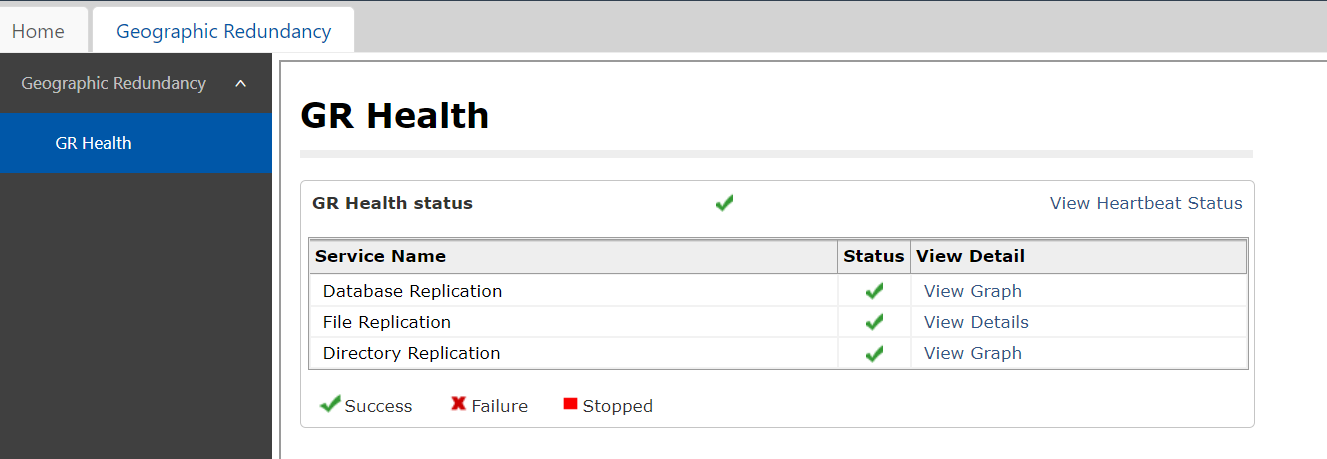
<img alt="" src="https://support.avaya.com/public/showImage.jsp?file=/library/AVAYA/AVAYA_SUPPORT/%20%20%20%20%20%20%20HIPAA/0smgr06.png" style="width: 800px; height: 277px;"></img>
```

# System Manager 8.1 virtual fqdn change - geo redundant not sync

if Virtual fqdn does not match with primary server, secondary server will fail to sync/register, in order to update the virtual fqdn run the following command to update vfqdm

```shell
root >changeVFQDN

Enter new virtual hostname : louusvm-asysmgr
Enter virtual domain name: continuumgbl.com
  >> Validating domain name : continuumgbl.com ...
  >> Basic pattern ok. Checking if TLD is all-numeric
New virtual FQDN : louusvm-asysmgr.continuumgbl.com
System configured FQDN : louusvm-asysmgr.continuumgbl.com
FQDN and VFQDN cannot be same
root >changeVFQDN

Enter new virtual hostname : grsmgr
Enter virtual domain name: continuumgbl.com
  >> Validating domain name : continuumgbl.com ...
  >> Basic pattern ok. Checking if TLD is all-numeric
New virtual FQDN : grsmgr.continuumgbl.com
System configured FQDN : louusvm-asysmgr.continuumgbl.com
SMGR old VFQDN : '  LOUUSVM-ASYSMGR.continuumgbl.com  '
SMGR old VFQDN hostname : ' LOUUSVM-ASYSMGR '
New Virtual FQDN will be - ' grsmgr.continuumgbl.com '
Do You want to proceed y/n =>:y


Thu Oct 26 23:54:49 IST 2023: Starting ........

Thu Oct 26 23:54:49 IST 2023 : Waiting for script execution to be completed
script will run in background more datails check /var/log/Avaya/SMGRVirtualFqdnUtility.log
```

# System Manager - Change root password on VM Instances

Reactivate Account and Modify Kernel option in GRUB:

 Reboot the vCenter Server appliance using the vSphere Client.  
 When the GRUB bootloader appears, press the spacebar to disable autoboot.

 Note: After powering on, the virtual machines takes only a short time to exits the BIOS/EFI and to launch the guest operating system. You can adjust the boot delay or force the virtual machine to enter BIOS or EFI setup screen after power on. For more information, see the Delay the Boot Sequence in the vSphere Client section in the VMware vSphere 5.5 Single Host Management Guide.  
   
 Type p to access the appliance boot options.  
 Enter the GRUB password.

 Note:  
 If the vCenter Server appliance is deployed without editing the root password in the Virtual Appliance Management Interface (VAMI), the default GRUB password is vmware.  
 If the vCenter Server appliance root password is reset using the VAMI, the GRUB password is the password last set in the VAMI for the root account.  
 Use the arrow keys to highlight VMware vCenter Server Appliance and type e to edit the boot commands.

 Modifying the GRUB boot loader to start root password reset process  
 Scroll to the second line displaying the kernel boot parameters.

 Scroll to the second line displaying the kernel boot parameters  
 Type e to edit the boot command.  
 Append init=/bin/bash to the kernel boot options.

 Append init=/bin/bash to the kernel boot options  
 Press Enter. The GRUB menu reappears.  
 Type b to start the boot process. The system boots to a shell.  
 Reset the root password by running the passwd root command.  
 Restart the appliance by running reboot command.

If error received " Authentication manipulation error" mount / with rw permissions

mount -o remount,rw /

run passwd again and change password

[![image.png](https://wiki.tinod.net/uploads/images/gallery/2024-05/scaled-1680-/puvV7LNYrG9wi0F6-image.png)](https://wiki.tinod.net/uploads/images/gallery/2024-05/puvV7LNYrG9wi0F6-image.png)
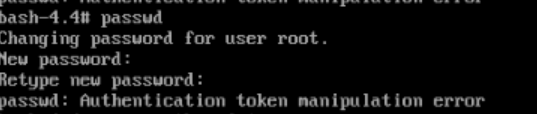
[![image.png](https://wiki.tinod.net/uploads/images/gallery/2024-05/scaled-1680-/11EjgOm2cu4A5lSa-image.png)](https://wiki.tinod.net/uploads/images/gallery/2024-05/11EjgOm2cu4A5lSa-image.png)
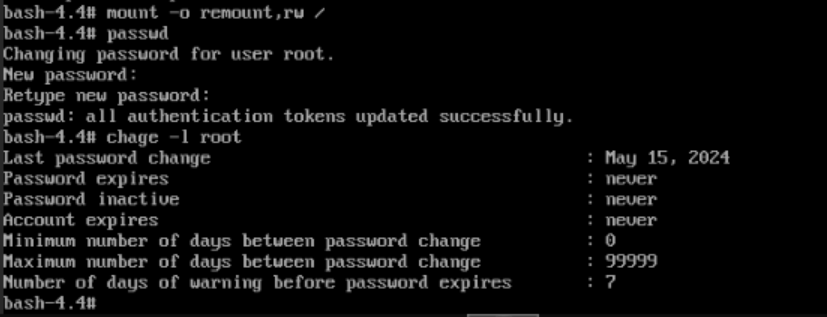
 Note: If you cannot restart the appliance by running reboot command, then run these commands:

 mkfifo /dev/initctl  
 reboot -f

 In order to prevent this issue from happening again in the future, you could set the root password to never expire at the VAMI page or by running this command: chage -I -1 -m 0 -M 99999 -E -1 root  
 Verify the root account password expiry settings have been changed using the following command: chage -l root

