Troubleshooting
- Avaya CMS - NFS Not Mounted local disk full
- Avaya CMS - CMS Supervisor status link icon
- Avaya CMS - Healthcheck commands
- Avaya CMS - Find zombie process
- Avaya CMS - Autosync
- ECH Data
Avaya CMS - NFS Not Mounted local disk full
CMS Disk getting full reason was daily backups where being stored loally as NFS mount did not automatically mount after a reboot.
[root@lab-cms /]# df -kh
Filesystem      Size  Used Avail Use% Mounted on
/dev/sda2       9.8G  9.8G     0 100% /
tmpfs            32G     0   32G   0% /dev/shm
/dev/sda1       546M   38M  480M   8% /boot
/dev/sda3       9.8G  1.8G  7.5G  19% /cms
/dev/sda7        32G  6.1G   24G  21% /export/home
/dev/sda10       12G  759M   11G   7% /opt
/dev/sda6        87G   13G   70G  15% /storage
/dev/sda9        16G   45M   15G   1% /tmp
/dev/sda8        26G  297M   24G   2% /var
See output here, there is no nfs drive mounted.

I have helped to remount the drive like this:

[root@lab-cms /]# mount -a
[root@lab-cms /]# df -kh
Filesystem            Size  Used Avail Use% Mounted on
/dev/sda2       9.8G  9.8G     0 100% /
tmpfs                  32G     0   32G   0% /dev/shm
/dev/sda1             546M   38M  480M   8% /boot
/dev/sda3             9.8G  1.8G  7.5G  19% /cms
/dev/sda7              32G  6.1G   24G  21% /export/home
/dev/sda10             12G  759M   11G   7% /opt
/dev/sda6              87G   13G   70G  15% /storage
/dev/sda9              16G   45M   15G   1% /tmp
/dev/sda8              26G  8.6G   16G  36% /var
10.10.10.122:/CMS-Share
                       50G   35G   16G  70% /nfsbu

As the issue is marked as SBI,  I have helped to move the backup files which is around 8GB from local partition to nfs location. And the whole procedure is not service impacting.

Now the partition issue is solved

[root@lab-cms var]# df -kh
Filesystem            Size  Used Avail Use% Mounted on
/dev/sda2             9.8G  1.5G  7.8G  16% /
tmpfs                  32G     0   32G   0% /dev/shm
/dev/sda1             546M   38M  480M   8% /boot
/dev/sda3             9.8G  1.8G  7.5G  19% /cms
/dev/sda7              32G  6.1G   24G  21% /export/home
/dev/sda10             12G  759M   11G   7% /opt
/dev/sda6              87G   13G   70G  15% /storage
/dev/sda9              16G   45M   15G   1% /tmp
/dev/sda8              26G  297M   24G   2% /var
10.10.10.122:/CMS-Share
                       50G   43G  7.2G  86% /nfsbu
Avaya CMS - CMS Supervisor status link icon
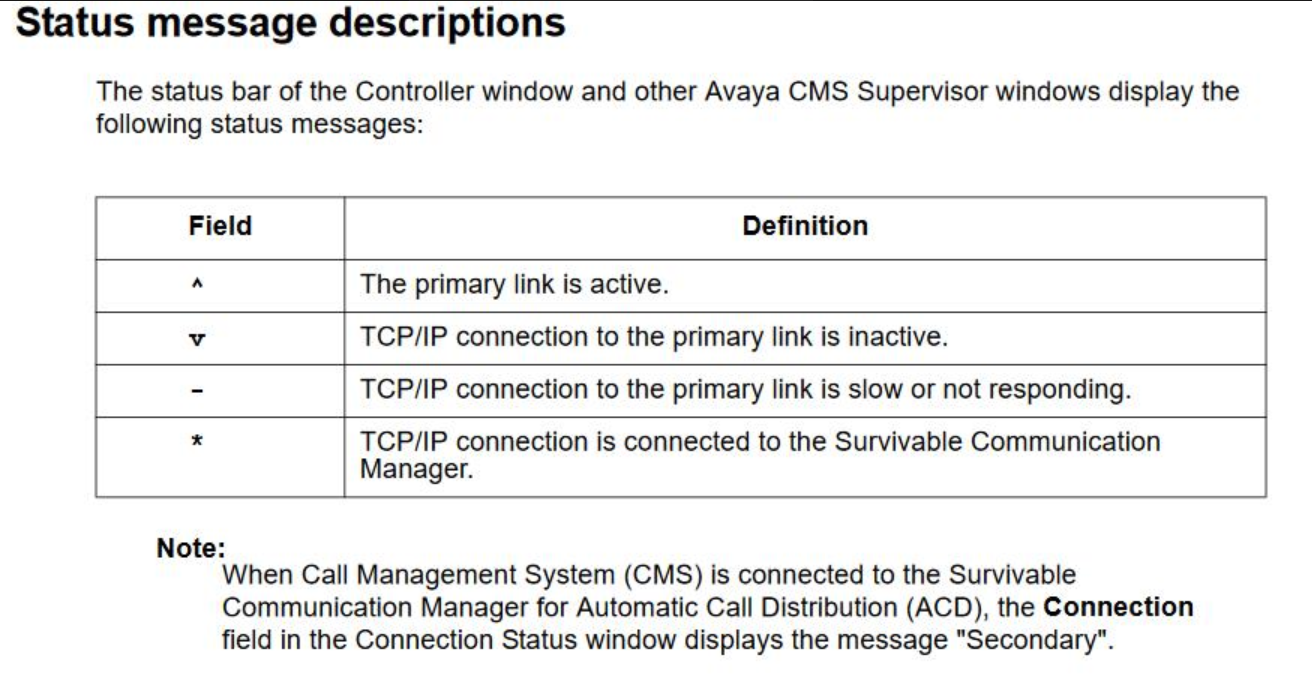
Avaya CMS - Healthcheck commands
who -q -- check who's logged on
rpm -qa cms -- View CMS Version
df -h -- check drive space (GB)
df -i -- check drive space (b)
iostat -- monitor input/output device average transfer rates (for more info https://linux.die.net/man/1/iostat)
cronetab -l -- list cronejobs
/cms/aom/bin/active_alarms
cat /cms/aom/data/db/alarm.lst
cat /cms/aom/data/log/alarm.log
tail /cms/pbx/acd1/spi.err
tail /cms/pbx/acd1/xln.log
tail /cms/dc/archive/arch.log
tail /cms/dc/harchive/harch.log
tail /cms/install/logdir/backup.log
tail /cms/maint/backup/back.log
/cms/aom/bin/active_alarms
cat /cms/aom/data/db/alarm.1st
cat /cms/aom/data/log/alarm.log
cat /var/elog/elog - view elog (Prognosis if installed)
cat /var/log/messages
ls /usr/lib/HA/ -- shows if CMS is primary or seconday
cat /export/home/pserv/HAcms/Log -- Heartbeats and sync log
/export/home/pserv/HAcms/HAheartbeat.log -- check Hearbeats between servers
/export/home/c1as/xcpr/xcpr_status
Avaya CMS - Find zombie process
pps auxww
Z = Zombie Process
D = uninterruptible sleep.
$ ps auxww | grep "Z"
USER       PID %CPU %MEM    VSZ   RSS TTY      STAT START   TIME COMMAND
root       935  0.0  0.0      0     0 ?        Z    17:40   0:00 [ech_copy.sh] <defunct>
cms       6569  0.0  0.0 103324   868 pts/4    S+   17:50   0:00 grep Z
$ find ech_copy.sh
find: `ech_copy.sh': No such file or directory
$ locate ech_copy.sh
/export/home/pserv/ech/ech_copy.sh
$ cat /export/home/pserv/ech/ech_copy.sh
#!/bin/ksh
 ############################################################################
 #                                                                          #
 #       Copyright (c) 1997 - 2017 by Avaya Inc. All rights reserved.       #
 #                                                                          #
 ############################################################################
#
# ech_copy.sh
#

# Load common functions and environment settings
BASEDIR=$(dirname $0)
. ${BASEDIR}/functions

# Set local variables
#HOME=/export/home/pserv/ech
. ${PKGHOME}/ech.conf         # ECH configuration variables file.
# . ${PKGHOME}/cvx_ftp.funcs    # declare functions

logit "============================================="
logit "Calling ech_copy"

# See if a timestamp file name is requested
if [[ "$TS_NAME" == "yes" ]]
then
  ts=`date +$TS_FORMAT`
  chr_name=`echo $2 | cut -f1 -d.`
  new_name="${chr_name}.${ts}"
  ${PKGHOME}/ech_copy $1 $new_name
else
  ${PKGHOME}/ech_copy $1 $2
fi
$ ps auxww | grep "D"
USER       PID %CPU %MEM    VSZ   RSS TTY      STAT START   TIME COMMAND
root      4999  0.0  0.0   6872   796 ?        Ss   Mar11   2:48 /export/home/pserv/rt_socket/rt_socket1 -w29 -w 10 -a 5000 -E ==EOD== new_rtsocket 7000 1
root      5191  0.0  0.0   7528   956 ?        Ss   Mar11   2:25 /export/home/pserv/rt_socket/rt_socket2 -w29 -w 10 -a 10000 -E ==EOD== new_rtsocket 7002 1
root      5324  0.0  0.0   6872   984 ?        Ss   Mar11  14:07 /export/home/pserv/rt_socket/rt_socket3 -w29 -w 10 -a 5000 -E ==EOD== new_rtsocket 7001 1
root      5455  0.0  0.0   7528   880 ?        Ss   Mar11   1:29 /export/home/pserv/rt_socket/rt_socket4 -w29 -w 10 -a 10000 -E ==EOD== new_rtsocket 7003 1
root      5543  0.0  0.0   7528   936 ?        Ss   Mar11   2:11 /export/home/pserv/rt_socket/rt_socket5 -w29 -w 10 -a 10000 -E ==EOD== new_rtsocket 7004 1
root      5677  0.0  0.0   6872   756 ?        Ss   Mar11   0:19 /export/home/pserv/rt_socket/rt_socket6 -w29 -a 5000 -E ==EOD== -M180 -w90 COSVMDEV01 6996 1
cms       7005  0.0  0.0 103324   876 pts/4    S+   17:51   0:00 grep D
Avaya CMS - Autosync
Click on Link below to display PDF.
ECH Data
cd /cms/ech_data/archive
ls -lt | more to identify dates to re upload
2024144.bz2
cp 2024143.bz2 ../recovery
cd ../recovery
bunzip2 2024144.bz2
cpio -ivm < 2024144
/export/home/pserv/ech/ascii_resend
created a script on /cms/data/ to automatically upload files
check echlog
cat /export/home/pserv/ech/echlog