Avaya CM
Troubleshooting
Avaya CM Error Log
15.2. Examine the logs
Change directories to /var/log/ecs. Run the ls –ltr command from the Linux shell or
the CLI to see a list of all the log files in that directory. The files are named with the time
stamp of when the logs began. Use this information to determine which log contains
information on the reset
# from logfiles get EIP address
[root@s8700 ecs]# cd /var/log/ecs
[root@s8700 ecs]# grep EIP 2006-07* to search by date
***FIND Log with word interchange***
grep "Interchange" 2011-08* | less
grep -i "FILESYNC" 2011-1114*.log|more
more 2019-0107-081018.log | grep interchange -B20
LOGC Logs to show lines before and after grep
logc -r | grep 20191231 | grep interchange -B 30 -A 30
dhelp logc to display logc help
LOGC to view IP events
> logc -r --view ipevt -t 20191231:2000-20191231:2030
logc --view ipevt -t 20170501:0830-20170505:1000
restartcauses <-- to view restart causes on linux CM.
logc -r --view ipevt | grep 4104176
grep -i "Interchange" 2020-1230-21*.log|more
2020-1230-215601.log:20201230:215638241:-1395161647:Arbiter(2677):MED:[HANDOFF->STANDBY:inter
change to healthier side]
more 2020-1230-215601.log | grep interchange -B30 -A30
======================================= messages log ===========================
/var/log/
grep 1228078 messages
grep -wc IPT_UNREG messages
2542
tac messages | IPEVT (to display message log in reverse order
/var/log
grep 1228078 *
Avaya CM MST
Avaya MST-MDA extract & download log files & Sip trunk example tracing.
The reason for this document is to show you how to extract MST traces from the shell of CM as a dadmin or admin (Prof18) user , what happens if you try and extract the MST trace from the CM SMI web interface is that it will fail and tell you your file is to large , this is actually false your file may only be a couple of KB , but because CM has to try and create temporary files of your MST , it will fail because of the rest of the logs in the location it tries to copy your MST to.
So the following first shows you how to filter and turn on MST , then extract your MST from CM shell with win SCP.
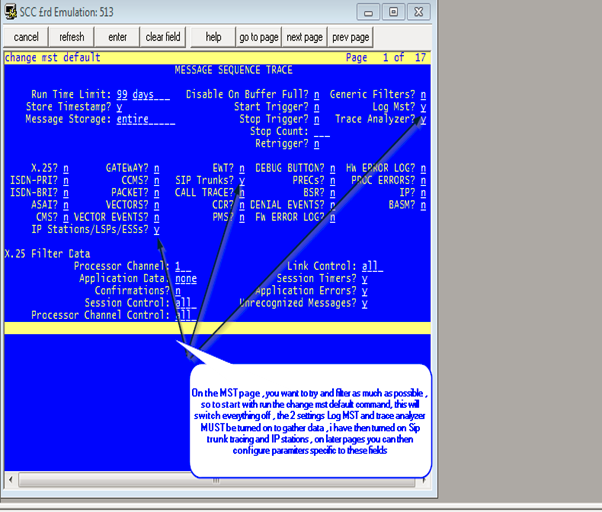
Step 1 , is to issue the command “clear mst” then “change mst default” this will reset all filter options, as in the screen shot from below, the log and trace options need to be selected for this to work.
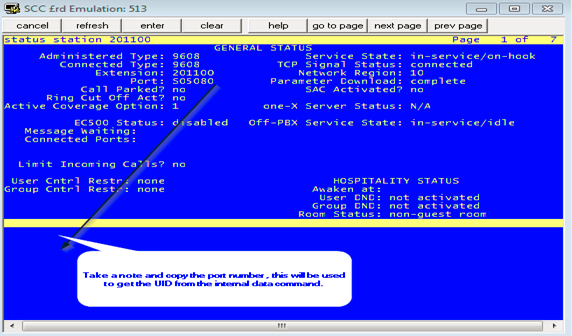
As I wanted to trace on both sip trunks and a specific sta I needed the port number for the station as below my port was S05080.
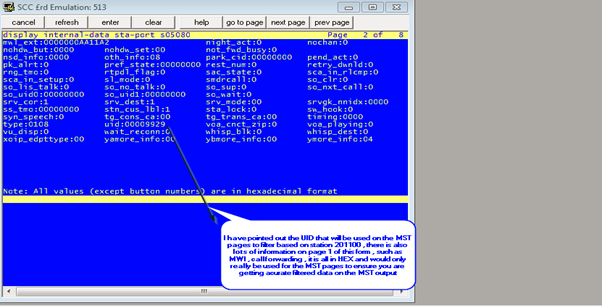
I then ran the command “disp internal data sta port s05080” , this was to obtain the UID of the station, take note of the below speech box , as it gives more information on this command and other useful data on that form.
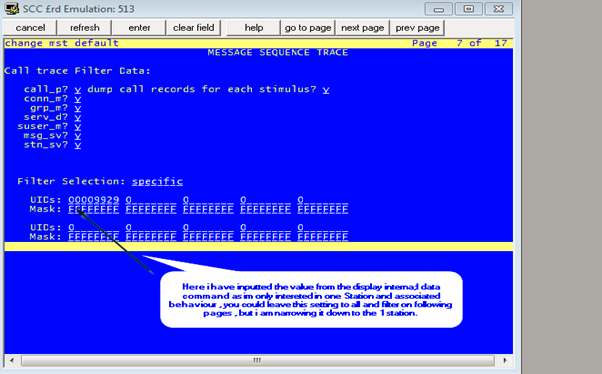
From there I returned back to the mst pages by issuing the “change mst” command rather than the “change mst default” just to ensure the log and analyser settings do not get switched off. And as below inputted the UID of my station obtained previously to ensure I was filtering as much as possible , as the below two screen shots show.
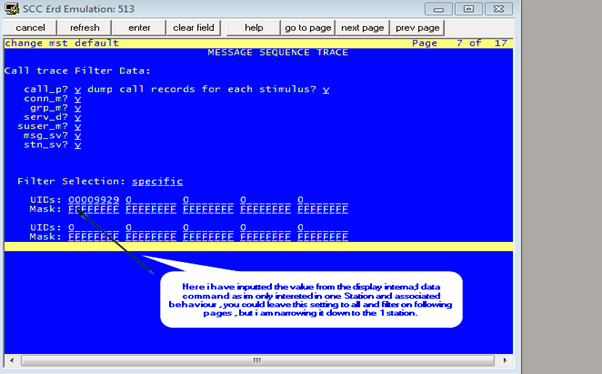
I then continued to filter based on my signalling group associated with the messaging trunk group that I am having issues with.
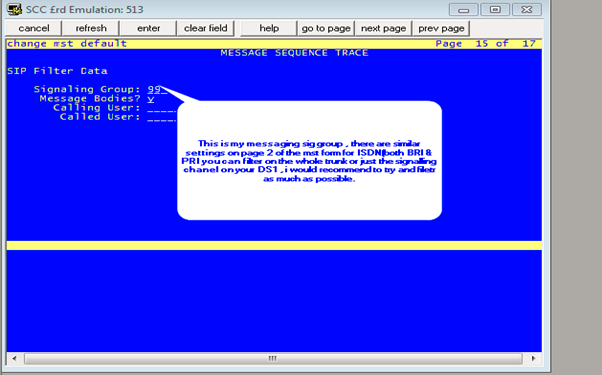
At this stage I was set, I saved the mst settings I had altered, and at that point enabled MST with the “enable MST” command ,a quick check with the “status mst” command will ensure it is enabled , at this point make your test calls and as soon as you have finished issue “disable mst” to allow collection of the trace.
The below instructions contains the details of how to collect the new MST logs , you need to putty(or similar) into CM to run the commands , you can then use WIN SCP to extract the trace files , in my case it was copied to the /tmp folder on CM
This command can be ran by `dadmin` user or prof18 superusers when accessing the MTA data by SSH into shell. The below string can be copy and pasted , you will just need to alter the time and date in the CLI string to match your MST trace time.
dadmin@labpbx> /usr/bin/sudo /opt/ecs/bin/logc -c 'view%mta' -t 0127:1300-0127:1400 > /tmp/mstdecoded.m
Where after the `t = time` switch user can define the start / end date of the interval for which they want to decode the MST data from ecs log files.
In the above example an hour interval is selected on the day 27th January between 1PM and 2PM and decoded data will be written into file /tmp/mstdecoded.m
.
Avaya CM - History file
cd /var/log/ecs
ls
cat commandhistory
History file to FTP
you could write a script to copy or tar and zip and copy to another server
on an as needed basis.
script could be as simple as follows which will create a tar.gz file with the
server_name and date in the file name. Then use scp or ftp to copy the archive
file off of the server to another server.
tar cvf /var/home/ftp/pub/`uname -n`_`date +%m%d%y`_hist_logs.tar /var/log/mess*
tar rvf /var/home/ftp/pub/`uname -n`_`date +%m%d%y`_hist_logs.tar /var/log/ecs/commandhist*
gzip /var/home/ftp/pub/`uname -n`_`date +%m%d%y`_hist_logs.tar
Avaya CM - Reason codes for IP Events
Reason codes for IP Events
Enable IP Events you need to enable IP logging levels
To record events to log files:
In CM you must set LOG IP Registrations and events: y

change logging-levels                                           Page   2 of   2

                                 LOGGING LEVELS

      Log All Submission Failures: y
          Log PMS/AD Transactions: y
  Log IP Registrations and events: n
     Log CTA/PSA/TTI Transactions: y
Below is an example (we need to use sudo to access ipevt)
cgzz@labacm> sudo logc -r --view ipevt | more
20230404:162659000:295944:lxsys:MED:labacm logmanager: IPEVT IPT_TCP_UP board=PROCR ip=10.123.123.10 net_reg= 1 ext= 1336035 the 1st ip=10.10.169.180;13926 the 2nd ip=0.0.0.0; 0 net_reg= 1 reason=switch_request
20230404:162658000:295943:lxsys:MED:labacm logmanager: IPEVT IPT_TCP_DOWN board=PROCR ip=10.123.123.10 net_reg= 1 ext= 1336035 the 1st ip=10.10.169.180;13926 the 2nd ip=0.0.0.0; 0 net_reg= 1 reason=00000
20230404:162658000:295942:lxsys:MED:labacm logmanager: IPEVT IPT_TCP_UP board=PROCR ip=10.123.123.10 net_reg= 1 ext= 1339100 the 1st ip=10.10.175.169;13926 the 2nd ip=0.0.0.0; 0 net_reg= 1 reason=switch_request
20230404:162657000:295941:lxsys:MED:labacm logmanager: IPEVT IPT_REG board=PROCR ip=10.123.123.10 net_reg= 1 ext= 1339100 ip= 10.10.175.169; 1024 net_reg= 1 reason=normal
20230404:162645000:295940:lxsys:MED:labacm logmanager: IPEVT IPT_UNREG board=PROCR ip=10.123.123.10 net_reg= 1 ext= 4095312 ip= 10.10.175.92; 1024 net_reg= 1 reason=2012
20230404:162643000:295938:lxsys:MED:labacm logmanager: IPEVT IPT_TCP_UP board=PROCR ip=10.123.123.10 net_reg= 1 ext= 1336021 the 1st ip=10.10.170.14;13926 the 2nd ip=0.0.0.0; 0 net_reg= 1 reason=switch_request
20230404:162642000:295937:lxsys:MED:labacm logmanager: IPEVT IPT_REG board=PROCR ip=10.123.123.10 net_reg= 1 ext= 1336021 ip= 10.10.170.14; 1024 net_reg= 1 reason=normal
20230404:162635000:295935:lxsys:MED:labacm logmanager: IPEVT IPT_TCP_UP board=PROCR ip=10.123.123.10 net_reg= 1 ext= 1338647 the 1st ip=10.10.169.137;13926 the 2nd ip=0.0.0.0; 0 net_reg= 1 reason=switch_request
20230404:162635000:295933:lxsys:MED:labacm logmanager: IPEVT IPT_REG board=PROCR ip=10.123.123.10 net_reg= 1 ext= 1338647 ip= 10.10.169.137; 1024 net_reg= 1 reason=move-user
20230404:162635000:295932:lxsys:MED:labacm logmanager: IPEVT IPT_UNREG board=PROCR ip=10.123.123.10 net_reg= 1 ext= 1338647 ip= 10.10.171.41; 1024 net_reg= 1 reason=2009
In the previous example we can find an IP_UNREG event 2009, code 2009 = Force Unregistration Request. Extension is already registered, but received a forced login registration request (RRQ). Send a URQ to the existing extension.
User is trying to register with an extension that is already register
| 2000 |
Unregistration Request rejected because no station user record exists for unregistering user (internal software error). |
| 2002 |
Unregistration Request rejected because of failure to build an unregistration request confirm (UCF) message (internal software error). |
| 2004 |
Unregistration Request rejected because the no station user record exists for the unregistering user (internal software error). |
| 2007 |
Force Unregistration Request. Unregister user because there is no signaling connection. RAS is alive, but the signaling connection has gone down (user cannot make calls). Re-register the endpoint. |
| 2008 |
Force Unregistration Request. Unregister associated H.323 user because there is no signaling connection. Re-register the endpoint. |
| 2009 |
Force Unregistration Request. Extension is already registered, but received a forced login registration request (RRQ). Send a URQ to the existing extension. |
| 2010 |
Forced Unregistration Request. The Gatekeeper is unregistering the endpoint because its call signaling connection has closed. |
| 2011 |
Force Unregistration Request. After an endpoint registers it should initiate the TCP connection and send a SETUP message. The SETUP message has not been received from the endpoint, and no Q931 Call object exists. The endpoint cannot make calls, so unregister it. |
| 2012 |
Force Unregistration Request. Unregister endpoint that has aged out. Endpoint's time to live (TTL) expired without receiving a keep-alive request (RRQ). |
| 2015 |
Forced Unregistration Request. Unregister user because the extension has been removed. |
| 2017 |
Forced Unregistration Request. Unregister the endpoint if there are no station user-records remaining. |
| 2018 |
Forced Unregistration Request. The release command was run on the extension or port. |
| 2019 |
Forced Unregistration Request. The release command was run on the Remote Office extension or port. |
| 2021 |
Custom Selection of VIP Direct Inward Dialing numbers feature is not active. |
| 2022 |
Announcement present but not administered. |
| 2023 |
Announcement present but no announcements administered for the board. |
| 2024 |
Registration rejected because unable to create an entry in the MTM complex table. 2025 Registration rejected because the option chosen by the endpoint in the RRQ for the emergency call does not match the option administered on the station form. |
| 2026 |
Xmobile offhook request rejected because Xmobile station has been taken out of service. |
| 2027 |
User attempted to play announcement and file was not found on board. |
| 2028 |
User attempted to play announcement and file had bad format. |
| 2029 |
Gatekeeper Request rejected because the Non Standard Data (NSD) from the registered application has an invalid object ID. |
| 2030 |
Gatekeeper Request rejected because of failure to decode Non Standard Data (NSD) element. |
| 2031 |
Gatekeeper Request rejected because of unexpected Non Standard Data (NSD) message from the registered application endpoint. |
| 2032 |
Force Unregistration Request. Instruct the RAS manager to cleanup a User ID which had just been registered prior to a system restart. This event is not logged, but only passed in the URQ. |
| 2033 |
Force Unregistration Request. Reset ip-stations was executed from the SAT to force unregister endpoints. |
| 2038 |
Getting the calling party number from the incoming side of the call failed. |
| 2039 |
Keep Alive Registration Request. Registration rejected because no endpoint identifier was provided. |
| 2040 |
Gatekeeper Request rejected because no resources available for signaling connection. |
| 2041 |
Registration Request rejected because no Digital Signal Processor (DSP) resources are available. |
| 2042 |
Registration Request rejected because no Digital Signal Processor (DSP) resources are available. |
| 2043 |
ARQ rejected because srcInfo and destinationInfo contents indicate the multipoint ept (VSX) is calling itself. |
| 2047 |
Registration rejected because it was received from unauthorized media platform. |
| 2048 |
Registration rejected because it is not ready for a media gateway re-registration. |
| 2049 |
VOIP Resources unavailable. |
| 2050 |
No gateway resource available |
| 2051 |
Remote Office invalid request (GRQ) No Sig Group available. |
| 2052 |
Remote Office invalid registration request (RRQ) No Sig group available. |
| 2053 |
MGKeepAlive: Wakeup() media platform heartbeat missed, indicates lackof traffic from specified platform. |
| 2054 |
UMSocket: SockWrite() Congestion on the Signaling Link due to PCD buffer exhaustion. |
| 2055 |
Reset the media platform Signaling Link due to error in Sending packets. |
| 2058 |
IncomingMsg. Null caps received on terminating end of H323 trunk. |
| 2059 |
Change of security code through Feature Access Code not supported for IP. |
| 2061 |
Post message digit timeout. |
| 2062 |
Post message too many digits. |
| 2063 |
Post message not station user. |
| 2064 |
Registration rejected because of failure to encode Non-standard Data (NSD) message. |
| 2070 |
Media gateway attempted registration with “warm start” condition, but the controller needs “cold start” data. |
| 2071 |
Media gateway attempted to register with a different serial number. |
| 2072 |
Conference or transfer 2 Meet-me conference call. |
| 2073 |
User attempted to download firmware to a station. User does not have console permission. |
| 2074 |
Attempt to record an announcement while that announcement is playing. |
| 2075 |
User does not have console permissions |
| 2076 |
IP Registration Rejection (RRJ) because of no call present on the switch side. But there is a call present on the ept. |
| 2077 |
Force Unregistration Request. Unregister endpoint whose call preservation timer (H323 link loss delay timer) expires. |
| 2078 |
OPTIM Extend Call via extend call button press was denied. |
| 2079 |
Registration rejected because set in wrong state (for example on call, Out of Service (OOS)). |
| 2081 |
IP Softphone in shared control configuration with DCP is forced unregistered because softphone switched to invalid state. |
| 2082 |
A TLS socket was rejected because of the constraint on the maximum number of TLS peers. |
| 2073 |
A peer cert was rejected by common name checking. |
| 2084 |
Handshake failed, for example due to no common cipher suite. |
| 2085 |
An expired certificate was returned and rejected. |
| 2088 |
Bad Record Max. For example, an attacker does not have the correct private key, which can go undetected until the MAC of the exchange is checked. |
| 2089 |
Bad Record Max. For example, an attacker does not have the correct private key, which can go undetected until the MAC of the exchange is checked. |
| 2090 |
TLS shutdown received. Listen socket could not be created. |
| 2092 |
Post message invalid Station Security Code (SSC). |
| 2093 |
Cannot start announcement. |
| 2094 |
Establish a socket on an IP trunk. The far end might be mis-administered |
Avaya CM - Logs
Examine the logs
Change directories to /var/log/ecs. Run the ls –ltr command from the Linux shell or
the CLI to see a list of all the log files in that directory. The files are named with the time
stamp of when the logs began. Use this information to determine which log contains
information on the reset
***FIND Log with word interchange***
grep "Interchange" 2022-08* | less
grep -i "FILESYNC" 2011-1114*.log|more
more 2021-0107-081018.log | grep interchange -B20
dhelp logc to display logc help
LOGC to view IP events
> logc -r --view ipevt -t 20191231:2000-20191231:2030
logc --view ipevt -t 20170501:0830-20170505:1000
restartcause <-- to view restart causes on linux CM.
grep -i "Interchange" 2020-1230-21*.log|more
2020-1230-215601.log:20201230:215638241:-1395161647:Arbiter(2677):MED:[HANDOFF->STANDBY:inter
change to healthier side]
more 2020-1230-215601.log | grep interchange -B30 -A30
Messages Log
/var/log/
grep 1228078 messages
grep -wc IPT_UNREG messages
2542
tac messages | IPEVT (to display message log in reverse order
/var/log
grep 1228078 *
MST SIP
Change mst default
Log mst: y (to send mst date to var/log/ecs*.log files
Trace analyzer? Y
SIP trunks? Y
IP stations/LSP/Ess Y
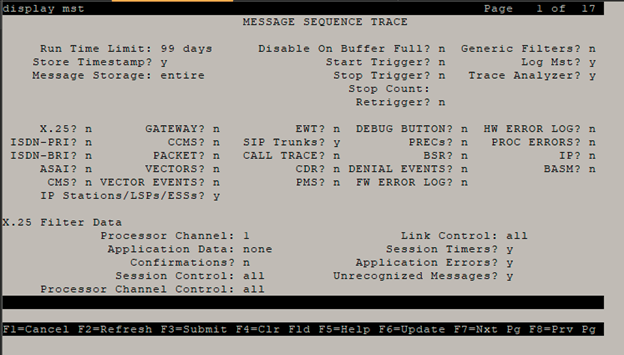
To display all mta messages
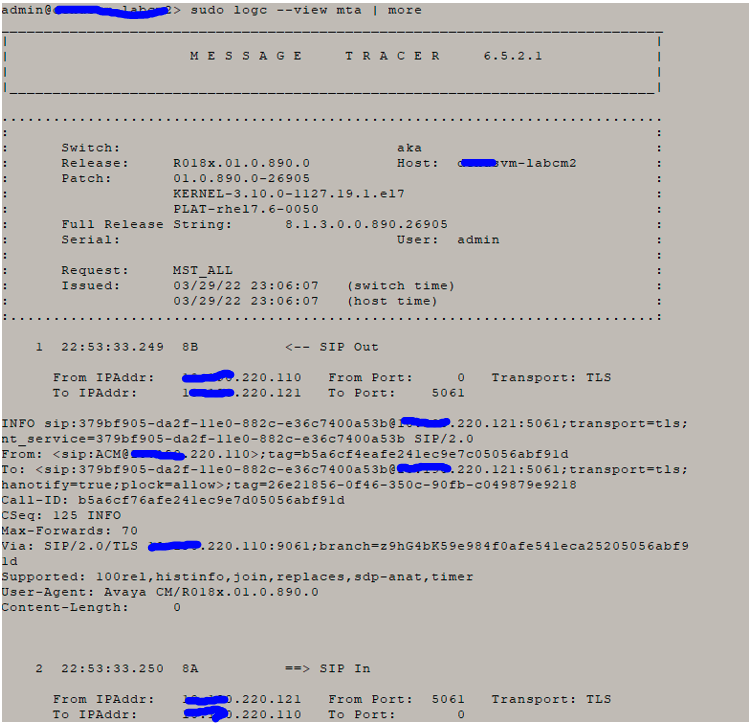
sudo logc --view mta | more
To display mta message on specific time period and write output log
sudo logc -t 20210915:0835-20210915:0850 --view mta > /tmp
sudo logc -t 20220429:2140-20220429:2320 --view mta > /tmp/test3.m
sudo logc -t 20220429:2140-20220429:2320 | logmst –c | mta > /tmp/test2.m
sudo logc -t 20220411:1641-20220411:1645 --view mta > /tmp/loumst2.m
Avaya CM - Reset System
Reset 1 Effects:
- Stable calls are preserved
- System links and stable feature and service state data are preserved.
- Error and alarm logs are preserved. And almost all alarms are resolved.
- Transient calls are dropped.
- Remote access and system port logins are dropped.
- Apllications links (CDR, AUDIX etc.) are dropped and reestablished.
- MSS activity is aborted.
Reset 2 Effects:
- All system and application links are dropped.
- All calls are dropped.
- Non-translation feature data is lost.
- All hardware components except PNC components are resetted.
- All busied out maintenance objects are released.
- Circuit packs are reinitialized.
Reset 3 effects:
- Same effects as reset 2 plus;
- Emergency transfer is invoked.
- Translations are reloaded from disk or tape.
Reset 4 effects:
- System software is reloaded. (default medium = disk).
- Before the reboot alarm & error logs are saved to disk.
- After reboot alarm & errors logs are reloaded from disk. (Some error information might be incorrect at this moment).
If this reboot fails your SPE will go down.
Reset 5 Effects:
- More extensive diagnositcs are performed compared to all previous resets.
Avaya CM - tethereal
[root@Acsito8800a ~]# tethereal -i eth0:0 -w /tmp/snifferCM.pcap
Running as user "root" and group "root". This could be dangerous.
Capturing on eth0:0
37212
[root@Acsito8800a ~]# ll /tmp
lrwxrwxrwx 1 root root 8 Mar 19 2013 /tmp -> /var/tmp
[root@Acsito8800a ~]# ll /var/tmp
Avaya CM - One X TTS
One-X Agent uses (TTS) which is enabled by default, IP Agent does not use such protocol.
Time-to-Service (TTS)
The IP Endpoint Time-to-Service (TTS) feature was introduced in Software Release 1.2, along with Avaya Communication Manager (CM) Release 4.0. TTS changes the way IP endpoints register with their gatekeeper, reducing the time to come into service. Currently, IP endpoints are brought into service in two steps, which are coupled (1) H.323 registration and (2) TCP socket establishment for call signaling. The TTS feature de-couples these steps. In CM 4.0, IP endpoints can be enabled for service with just the registration step. TCP sockets are established later, as needed.
The TTS feature also changes the direction of socket establishment. With TTS, Communication Manager, rather than the endpoint, initiates socket establishment, which further improves performance. In CM 4.0, TTS is enabled by default, but can be disabled for all IP endpoints in a given IP network region by changing the IP Network form. TTS applies only to IP endpoints whose firmware has been updated to support this feature. It does not apply to the following endpoints: third party H.323, DCP, BRI, and analog. For more information, see the Administrator Guide for Avaya Communications Manager (Document Number 03-300509).