# AES - Upgrade 8.0.1 to 8.1.3

In this entry we will focus in upgrading an AES version 8.1.2 to 8.1.3, to accomplish this we will fist deploy a new VM with OVA 8.1.3 file version and we will connect it into the network using a temporary IP address, allowing us to perform preparation task and have the VM ready just for the cut over maintenance window.

In order to simplify the information presented and the simplicity of the OVA deploy, it will be omitted, the most important part in this step is setting up the network connection using a temporary IP address, this can be completed within the wizard or using the command (using the proper permissions):

/opt/mvap/bin/netconfig

<div class="is-layout-flow entry-content wp-block-post-content" id="bkmrk-"><div class="is-layout-flow entry-content wp-block-post-content"><figure class="wp-block-image aligncenter size-full">![](https://whereismyvoicepacket.com/wp-content/uploads/2022/10/image-414.png)</figure><figure class="wp-block-image aligncenter size-full">![](https://whereismyvoicepacket.com/wp-content/uploads/2022/10/image-415.png)</figure></div></div>We will use the previous command later in this entry.

Here is the process to follow:

<div class="is-layout-flow entry-content wp-block-post-content" id="bkmrk-apply-the-service-pa"><div class="is-layout-flow entry-content wp-block-post-content">1. Apply the service pack/feature pack/Linux Security Update (refer to the entry ***Avaya AES – Admin task – Update process*** in case of any doubt)


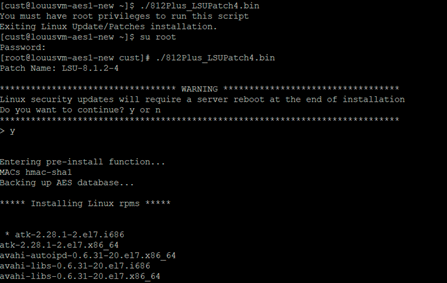
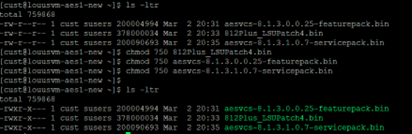
<figure class="wp-block-image aligncenter size-full is-resized">![](https://whereismyvoicepacket.com/wp-content/uploads/2022/10/image-416.png)</figure><figure class="wp-block-image aligncenter size-full is-resized">![](https://whereismyvoicepacket.com/wp-content/uploads/2022/10/image-417.png)</figure><figure class="wp-block-image size-full is-resized">![](https://whereismyvoicepacket.com/wp-content/uploads/2022/10/image-418.png)</figure><figure class="wp-block-image size-full is-resized">![](https://whereismyvoicepacket.com/wp-content/uploads/2022/10/image-419.png)</figure></div></div>2\. Keep track of the current configuration Backup configuration (Screenshoots)

**AE Services**

<div class="is-layout-flow entry-content wp-block-post-content" id="bkmrk--1"><div class="is-layout-flow entry-content wp-block-post-content"><figure class="wp-block-image size-full is-resized">![](https://whereismyvoicepacket.com/wp-content/uploads/2022/10/image-420.png)</figure></div></div>**AES Services -&gt; CVLAN -&gt; CVLAN Links**

<div class="is-layout-flow entry-content wp-block-post-content" id="bkmrk--2"><div class="is-layout-flow entry-content wp-block-post-content"><figure class="wp-block-image size-full is-resized">![](https://whereismyvoicepacket.com/wp-content/uploads/2022/10/image-421.png)</figure></div></div>**AES Services -&gt; TSAPI -&gt; TSAPI Links**

<div class="is-layout-flow entry-content wp-block-post-content" id="bkmrk--3"><div class="is-layout-flow entry-content wp-block-post-content"><figure class="wp-block-image size-full is-resized">![](https://whereismyvoicepacket.com/wp-content/uploads/2022/10/image-422.png)</figure></div></div>**Communication Manager Interface -&gt; Switch Connections**

<div class="is-layout-flow entry-content wp-block-post-content" id="bkmrk--4"><div class="is-layout-flow entry-content wp-block-post-content"><figure class="wp-block-image size-full is-resized">![](https://whereismyvoicepacket.com/wp-content/uploads/2022/10/image-423.png)</figure></div></div>**Communication Manager Interface -&gt; Switch Connections -&gt; Edit Connection**

<div class="is-layout-flow entry-content wp-block-post-content" id="bkmrk--5"><div class="is-layout-flow entry-content wp-block-post-content"><figure class="wp-block-image size-full is-resized">![](https://whereismyvoicepacket.com/wp-content/uploads/2022/10/image-424.png)</figure></div></div>**Communication Manager Interface -&gt; Switch Connections -&gt; Edit PE/CLAN IPs**

<div class="is-layout-flow entry-content wp-block-post-content" id="bkmrk--6"><div class="is-layout-flow entry-content wp-block-post-content"><figure class="wp-block-image size-full is-resized">![](https://whereismyvoicepacket.com/wp-content/uploads/2022/10/image-425.png)</figure></div></div>**Communication Manager Interface -&gt; Switch Connections -&gt; Survivability Hierarchy**

<div class="is-layout-flow entry-content wp-block-post-content" id="bkmrk--7"><div class="is-layout-flow entry-content wp-block-post-content"><figure class="wp-block-image size-full is-resized">![](https://whereismyvoicepacket.com/wp-content/uploads/2022/10/image-426.png)</figure></div></div>**Maintenance -&gt; Date Time/NTP Server**

<div class="is-layout-flow entry-content wp-block-post-content" id="bkmrk--8"><div class="is-layout-flow entry-content wp-block-post-content"><figure class="wp-block-image size-full is-resized">![](https://whereismyvoicepacket.com/wp-content/uploads/2022/10/image-427.png)</figure></div></div>**Networking -&gt; Network Configure**

<div class="is-layout-flow entry-content wp-block-post-content" id="bkmrk--9"><div class="is-layout-flow entry-content wp-block-post-content"><figure class="wp-block-image size-full is-resized">![](https://whereismyvoicepacket.com/wp-content/uploads/2022/10/image-428.png)</figure><figure class="wp-block-image size-full is-resized">![](https://whereismyvoicepacket.com/wp-content/uploads/2022/10/image-429.png)</figure></div></div>***Security -&gt; Security Database -&gt; Tlinks***

<div class="is-layout-flow entry-content wp-block-post-content" id="bkmrk--10"><div class="is-layout-flow entry-content wp-block-post-content"><figure class="wp-block-image size-full is-resized">![](https://whereismyvoicepacket.com/wp-content/uploads/2022/10/image-430.png)</figure></div></div>**Status -&gt; Switch Conn Summary**

<div class="is-layout-flow entry-content wp-block-post-content" id="bkmrk--11"><div class="is-layout-flow entry-content wp-block-post-content"><figure class="wp-block-image size-full is-resized">![](https://whereismyvoicepacket.com/wp-content/uploads/2022/10/image-431.png)</figure></div></div>**Status -&gt; TSAPI Service Summary**

<div class="is-layout-flow entry-content wp-block-post-content" id="bkmrk--12"><div class="is-layout-flow entry-content wp-block-post-content"><figure class="wp-block-image size-full is-resized">![](https://whereismyvoicepacket.com/wp-content/uploads/2022/10/image-432.png)</figure></div></div>**Utilities -&gt; SNMP -&gt; SNMP Agent**

<div class="is-layout-flow entry-content wp-block-post-content" id="bkmrk--13"><div class="is-layout-flow entry-content wp-block-post-content"><figure class="wp-block-image size-full is-resized">![](https://whereismyvoicepacket.com/wp-content/uploads/2022/10/image-433.png)</figure></div></div>**Utilities -&gt; SNMP -&gt; SNMP Trap Receivers**

<div class="is-layout-flow entry-content wp-block-post-content" id="bkmrk--14"><div class="is-layout-flow entry-content wp-block-post-content"><figure class="wp-block-image size-full">![](https://whereismyvoicepacket.com/wp-content/uploads/2022/10/image-434.png)</figure></div></div>3\. Maintenance window

Create a backup file **Maintenance -&gt; Server Data -&gt; Backup** and download

<div class="is-layout-flow entry-content wp-block-post-content" id="bkmrk--15"><div class="is-layout-flow entry-content wp-block-post-content"><figure class="wp-block-image size-full">![](https://whereismyvoicepacket.com/wp-content/uploads/2022/10/image-435.png)</figure><figure class="wp-block-image size-full">![](https://whereismyvoicepacket.com/wp-content/uploads/2022/10/image-436.png)</figure></div></div>**Shutdown production server**

**Restore backups**

<div class="is-layout-flow entry-content wp-block-post-content" id="bkmrk--16"><div class="is-layout-flow entry-content wp-block-post-content"><figure class="wp-block-image size-full is-resized">![](https://whereismyvoicepacket.com/wp-content/uploads/2022/10/image-437.png)</figure><figure class="wp-block-image size-full is-resized">![](https://whereismyvoicepacket.com/wp-content/uploads/2022/10/image-438.png)</figure></div></div>Last step is verifying all services and validate everything is up and running correctly to start testing applications. This concludes this entry.

[Source: https://whereismyvoicepacket.com/aes-upgrade/](https://whereismyvoicepacket.com/aes-upgrade/)